1
USR-WM1 User Manual
www.usr.so
LonHand Series Product Specification
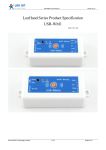
USR-WM1
Ver: V1.3.1
Jinan USR IOT Technology Limited
1 / 32
[email protected]
USR-WM1 User Manual
www.usr.so
Contents
1 Quick start.................................................................................................................................................3
1.1 Direct Connect Control..................................................................................................................5
1.2 Local Lan Control..........................................................................................................................7
1.3 Remote control.............................................................................................................................. 9
2 Product Introduction............................................................................................................................... 12
2.1 Product Description..................................................................................................................... 12
2.2 Product features........................................................................................................................... 12
2.3 Hardware specifications.............................................................................................................. 12
2.4 Indicator and Key Function Introduction.................................................................................... 13
2.5Usrlink Instructions...................................................................................................................... 14
2.6 Timing Function Instruction........................................................................................................ 14
2.7 Restore Factory Defaults............................................................................................................. 16
2.8 Wiring Schematic Drawing......................................................................................................... 16
3 Directions for Use.................................................................................................................................. 17
3.1 Hardware Instructions................................................................................................................. 17
3.2 Connect the wireless router......................................................................................................... 17
3.21 UsrLinke configuration process........................................................................................ 17
3.22 Webpage configuration process........................................................................................ 23
4 LonHand of Windows Introduction....................................................................................................... 28
Contact Information.................................................................................................................................. 32
Disclaimer................................................................................................................................................. 32
Update History.......................................................................................................................................... 32
Jinan USR IOT Technology Limited
2 / 32
[email protected]
USR-WM1 User Manual
www.usr.so
1 Quick start
Preparation :
1. Supply power to USR-WM1:
Working voltage
WM1s : DC 6~24V or DC 5V
WM1h: AC 110V/220V 60Hz/50Hz or
DC12V
Note:
When use the WM1h’s external key interface, do not touch the external leads, to avoid the risk of
electric shock!
2. Download and install LonHand software into your mobile phone
As for IOS system, search for "LonHand" in app store to download and install. Also you can scan
the below two-dimensional code.
IOS
Jinan USR IOT Technology Limited
Android
3 / 32
[email protected]
USR-WM1 User Manual
www.usr.so
3. Wiring Schematic Drawing
Note:
COM port input voltage are not associated with the internal circuit. User could choose depend on
the fact.
Input voltage range:
10A 277VAC/28VDC
12A 125VAC
Jinan USR IOT Technology Limited
4 / 32
[email protected]
USR-WM1 User Manual
www.usr.so
1.1 Direct Connect Control
1. Connect Smartphone to USR-WM1’s wireless network
Find’’USR-WM1’’in WLAN, connect to the network, as shown below:
2. Open LonHand software
Click the icon to run the software, and click ‘Start’.
Jinan USR IOT Technology Limited
5 / 32
[email protected]
USR-WM1 User Manual
www.usr.so
3. Control menu
Enter the device list and find USR-WM1, and click it to enter the control menu.
4. Control Test
You can click the switch button to control the USR-WM1 now.
Jinan USR IOT Technology Limited
6 / 32
[email protected]
USR-WM1 User Manual
www.usr.so
1.2 Local Lan Control
1. Connect Smartphone to USR-WM1’s wireless network .
Open LonHand software,then refresh the device list.
2. Click ’More’ form the bottom toolbars.
Then click “Link to Local Router”.
Jinan USR IOT Technology Limited
7 / 32
[email protected]
USR-WM1 User Manual
www.usr.so
3. Waiting for searching. Then select the router which want to join.
4. Input router passwords, and click “OK”.
Jinan USR IOT Technology Limited
8 / 32
[email protected]
USR-WM1 User Manual
www.usr.so
5. WM1 will connect to the router automatically after restart, and the blue indicator will light up.
Then You can control the USR-WM1 like direct connect.
1.3 Remote control
1. Connect WM1 to your router (refer to the above: Chapter 1.2 )then connect your smartphone to
it as well.
Click “User” form the bottom toolbars, then click “REGISTER”, set the account and password,
and login in.
Jinan USR IOT Technology Limited
9 / 32
[email protected]
USR-WM1 User Manual
www.usr.so
2. Return to the device list, and refresh,you can see the USR-WM1 .
Press the icon for long time, and click “Active”.
Jinan USR IOT Technology Limited
10 / 32
[email protected]
USR-WM1 User Manual
www.usr.so
3. A Click “Get activated devices” in the User section.
Then disconnect the wireless network, change to 2G/3G/Internet, refresh the device list.
You will see the wifi icon become a remote icon, now you can control it.
Jinan USR IOT Technology Limited
11 / 32
[email protected]
USR-WM1 User Manual
www.usr.so
2 Product Introduction
2.1 Product Description
The USR-WM1 whose relays can be switched on or switched off by remote control, is WIFI branch
of LonHand series product, and is designed for smart-home application.
LonHand series control terminals are developed for the application in the field of smart home,
Internet of Things, industrial controlling and so on. They are suitable for rapid deployment, especially
for mobile application because the USR-WM1 can be controlled by your cell phone. They can operate
with WIFI connection compared to traditional wired connection. These devices are an ideal choice to
realize remote control.
These series product are suitable for household application to build smart home for more
comfortable life. Also it can be used in industry and agriculture for low cost, high efficiency in
intelligent control of the devices. Users are capable to carry out more effective cost control and gain
higher profits, because there’s no big change and upgrading of your owned equipment under wireless
remote control, users can make full use of your original product without more costs for you.
2.2 Product features
�
�
�
�
�
�
�
WIFI interface, remote control switch
Support AP/STA
Support Usrtlink quick network configuration function
Support password authentication for safety control
1 high current output jack
5 timer switch function
Control software supports five platform: Windows, MAC, IOS, Android, Webpage, you can choose
freyy
2.3Hardware specifications
USR-WM1 supports 110V/220V two kinds of power input; 1 way power output.
Table.2-1 USR-WM1 Parameter table
Mechanical
85*45*23mm(L*W*H)
Dimensions
Working voltage
WM1s : DC 6~24V or DC 5V
WM1h: AC 110V/220V 60Hz/50Hz or
DC12V
Power consumption
Typical:2W Max: 3W
Working temperature -30-85°C
Preservation
temperature : -40-85°C
environment
Humidity: 5%-95%RH
Maximum output
10A 277VAC/28VDC
voltage / current
12A 125VAC
Jinan USR IOT Technology Limited
12 / 32
[email protected]
USR-WM1 User Manual
Packing List
www.usr.so
USR-WM1*1
Table.2-2
Default settings
Network Mode
AP
AP SSID
USR-WM1
AP Password
null
Device Name
USR-WM1
Device Password
admin
Webpage address in AP mode
10.10.100.254
Account / Password of Webpage Account : admin
Password: admin
Picture.4-1 Product graph
2.4 Indicator and Key Function Introduction
A. Indicator light
�Red indicator light: The relay switch indicator in Normal work;
Indicates the action to execute when Key is long press;
�Blue indicator light: Network connection status indicator.
It turns bright when the there is network access.
Jinan USR IOT Technology Limited
13 / 32
[email protected]
USR-WM1 User Manual
B. Key:
You can confirm the version # with below excels.
Table.2-1
V1.3
key-press time(S)
Function
0~3
Relay on-off state transition
5~10
Reset to defaults
10~∞
Invalid operation
www.usr.so
Red indicator light
Kill bright state transitions
keeps flashing
Restore Factory Defaults
key-press time(S)
0~3
5~10
10~20
Table.2-2
V1.2
Function
Relay on-off state transition
Function of Smartlink
Reset to defaults
20~∞
Invalid operation
Red indicator light
Kill bright state transitions
keeps rapid flashing
Rapid flashing into slow
flashing
Restore Factory Defaults
key-press time(S)
0~3
5~10
10~15
Table.2-3 V1.1
Function
Relay on-off state transition
Function of Smartlink
Function of Smartlink
Red indicator light
Kill bright state transitions
single flashing
Double flashing
15~20
20~∞
Reset to defaults
Invalid operation
three times flashing
Restore Factory Defaults
2.5Usrlink Instructions
Usrtlink is a fast and simple method to quickly connect the device to router by smartphone, user can
complete the device network configuration conveniently.
User must Keep WM1 in the AP mode.
The Usrlink configuration process is as follows:
Pls refer to Chapter 1.2 or Chapter 3.21 to setup.
2.6 Timing Function Instruction
It support time on and off control.
1. Connect PC or smartphone directly to the device’s wifi network or join them into same router.
Open Lonhand software, search the device. Then enter the control interface and click the timing
button.
Jinan USR IOT Technology Limited
14 / 32
[email protected]
USR-WM1 User Manual
www.usr.so
Picture.4-2 In to the Timing interface
2.Click the “+” to add your own timing task. The Max is 5 tasks.
Picture.4-3 Add the Timing
Jinan USR IOT Technology Limited
15 / 32
[email protected]
USR-WM1 User Manual
www.usr.so
2.7 Restore Factory Defaults
Pls Refer to Chapter 2.4 Indicator light and Key Function Introduction to restore factory defaults.
2.8 Wiring Schematic Drawing
As shown below:
1. WM1 has multiple power supply specifications:
USR-WM1s: DC 5V or DC 6~24V power supply
USR-WM1h: DC 12V or AC 110V/220V 60Hz/50Hz power supply
2. Relay has normally open and normally closed contacts, users can choose according to their own
needs.
Have a external key interface, the functions is same to WM1 built-in button. When use the
WM1h’s external key interface, do not touch the external leads, to avoid the risk of electric shock!
D C 6~2 4 V
M CU
Password
authentication
D C 5V
External
Key
Interface
Timing Control
N O
Pow er
Local C o ntrol
W IFI
R e la y
Output
Remote Control
COM
N e utral
Wi r e
L iv e
Wi r e
NC
N e utral
Wi r e
N O
N e utral
Wi r e
U S R -W M 1s
AC
1 1 0 ~2 2 0 V
M CU
Password
authentication
External
Key
Interface
DC 1 2 V
Timing Control
Pow er
Local C o ntrol
W IFI
R e la y
Output
Remote Control
COM
NC
L iv e
Wi r e
N e utral
Wi r e
U S R -W M 1h
Picture.4-4
Jinan USR IOT Technology Limited
Wiring Schematic Drawing
16 / 32
[email protected]
USR-WM1 User Manual
www.usr.so
3 Directions for Use
3.1 Hardware Instructions
USR-WM1 begins to work after power supply for 3~6 seconds. Now you can open or close the
socket switch (see product diagram) by the key. Press the key, it’s on, press again, it’s off.
If the socket is working improperly or you set the wrong parameters, restore factory defaults to start
over. As for Restore factory defaults, pls refer to chapter 2.4
3.2 Connect the wireless router
There are 2 ways for network configuration: UsrLink and Webpage Configuration.
Via
UsrLink
Webpage Configuration
Supportive Mode
AP
AP or STA
3.21 UsrLinke configuration process
●Connect WM1 to the router via smartphone (Take example with Android version)
1. Open smartphone’s settings interface, click to connect USR-WM1.
Picture.3-1 Connect to WM1
2. Open Lonhand software, click” More” form the bottom toolbars then click “Link to Local
Router”.
Jinan USR IOT Technology Limited
17 / 32
[email protected]
USR-WM1 User Manual
www.usr.so
Picture.3-2 Search the Local Router
3. Waiting for searching. select the router which want to connect.
Picture.3-3 Select the Router
4. Input router passwords, save it, and then click OK.
Jinan USR IOT Technology Limited
18 / 32
[email protected]
USR-WM1 User Manual
www.usr.so
Picture.3-4 Successfully joins the router
5. WM1 will connect to the router automatically after restart, the blue indicator will light up.
Then connect Smartphone to the same router. You can control the USR-WM1 like direct
connect.
●Windows System Configuration(Take example with XP)
1.
Double Click wireless network button
Click “USR-WM1” to connect.
from right bottom corner of the desktop.
Picture.3-5 Connect to WM1
2. Open LonHand software,then click
Jinan USR IOT Technology Limited
to refresh the device list.
19 / 32
[email protected]
USR-WM1 User Manual
www.usr.so
Picture.3-6 Control Interface
3. Click WM1 toolbars.After click Settings button.
CLICK HERE
Picture.3-7 In to the search interface 1
Jinan USR IOT Technology Limited
20 / 32
[email protected]
USR-WM1 User Manual
www.usr.so
Picture.3-8 In to the search interface 2
4. Pull the scroll bar and click ‘’Search’’
Picture.3-9 In to the search interface 3
Jinan USR IOT Technology Limited
21 / 32
[email protected]
USR-WM1 User Manual
www.usr.so
5. Waiting for searching. select the router which want to jion.
Then input router password, save it, and click Add.
Picture.3-10In to the search interface 4
Picture.3-11Successfully joins the router
6. WM1 will connect to the router automatically after restart, the blue indicator will light up.
Then connect Smartphone to the same router. You can control the USR-WM1 like direct connect.
Jinan USR IOT Technology Limited
22 / 32
[email protected]
USR-WM1 User Manual
www.usr.so
3.22 Webpage configuration process
●Connect WM1 to the router via smartphone (Take example with Android version)
1. Open smartphone’s settings interface, click to connect USR-WM1.
Picture.3-12 Connect to WM1
2. Open LonHand software, refresh the device list.
3. Long press USR-WM1 icon, and clic “web congig”.
Jinan USR IOT Technology Limited
23 / 32
[email protected]
USR-WM1 User Manual
www.usr.so
Picture.3-13 In to the search webpage 1
4. In the pop-up window, enter you name (admin) and password (admin) to login, then click the
fast setting section. The web Webpage is Chinese by default, click English to translate.
Picture.3-14In to the search webpage 2
Jinan USR IOT Technology Limited
24 / 32
[email protected]
USR-WM1 User Manual
www.usr.so
5. Click “Scan Router” to get the routers list, then select the router you want to connect, and click
“OK”.
Picture.3-15 Webpage configuration process 1
6. Input router passwords, save it, and then click OK, after click’restart’.
Picture.3-16Webpage configuration process 2
Jinan USR IOT Technology Limited
25 / 32
[email protected]
USR-WM1 User Manual
www.usr.so
7. WM1 will connect to the router automatically after restart, the blue indicator will light up. Now
you can control WM1 via internet. Regarding to detailed operation,pls refer to the manual of
LonHand software..
●Windows System Configuration(Take example with XP)
A wireless network card is required for the computer.
1. The WM1’s working mode is AP by default. Double click wireless network button
to get the
list after the WM1 work.
Picture.3-17 get wireless list
2. Find “USR-WM1” and connect it.
Picture.3-18 Connect to WM1
3. Open the Website of WM1,IP address: 10.10.100.254.
Jinan USR IOT Technology Limited
26 / 32
[email protected]
USR-WM1 User Manual
www.usr.so
Picture.3-19 Login the web
4. Input the account and password, default: admin,admin.
Picture.3-20 Enter the web
Picture.3-21The follow steps is similar to computer,you can refer to smartphone steps.
Picture.3-22For more detailed operation, pls refer to the manual of LonHand.
Jinan USR IOT Technology Limited
27 / 32
[email protected]
USR-WM1 User Manual
www.usr.so
4 LonHand of Windows Introduction
The computer and USR-WM1 socket need to connect to the same router.
The detailed operation please refer to the manual of LonHand.
1. Open the LonHand software
Picture.4-1 LonHand interface
2. The software will search WM1 automatically. If you don’t see WM1 in software, please click .
Then you can see the information as following.
If the WIFI symbol is gray, it means WM1 is not connected to computer. If the WIFI logo is blue, it
means connected.
Picture.4-2 Device list
3. Click WM1,enter into control menu.
Jinan USR IOT Technology Limited
28 / 32
[email protected]
USR-WM1 User Manual
www.usr.so
Picture.4-3 control menu
The control menu displays the control button, which is close by default. You can click the button to
control socket as shown in the diagram. Also the button will indicate according to the socket state.
Open
Close
4. you can also set WM1 all open or closed by the upper right button , the interface is as follows:
Picture.4-4 all on/off
5. Remote control
First,you need to register a user account (account number and the password 4-8 characters, can be
numbers, letters, combination of numbers and letters, case sensitive),and then login.
Jinan USR IOT Technology Limited
29 / 32
[email protected]
USR-WM1 User Manual
www.usr.so
Picture.4-5 User menu interface
Picture.4-6 remote account management interface
6. Active WM1
Refresh the device list, and find USR-WM1. Click , then click “active”.
Click “Synchronized to local”, refresh the device list, you will see the device icon into a remote
icon,then you can control the devices via internet.
Picture.4-7 Active interface
Picture.4-8 Active device
Jinan USR IOT Technology Limited
30 / 32
[email protected]
USR-WM1 User Manual
www.usr.so
Picture.4-9 Remote control
Mobile phone remote control refer to the first chapter or the manual of LonHand.
Jinan USR IOT Technology Limited
31 / 32
[email protected]
USR-WM1 User Manual
www.usr.so
Contact Information
----------------------------------------------------------------------------------Company: Jinan USR IOT Technology Limited
Address:
1-728, Huizhan Guoji Cheng, Gaoxin Qu, Jinan, Shandong, China
Tel:
86-531-55507297 86-531-88826739-803
Web:
http://en.usr.cn
Email:
[email protected], [email protected]
-----------------------------------------------------------------------------------
Disclaimer
This document provides information about USR-WM1, this document does not grant any license to
intellectual property rights. Except the responsibility declared in the product sale clause, USR does
not assume any other responsibilities. In addition, USR does not make any warranties for the sale
and use of this product, including the suitability of the product for a particular purpose,
merchantability or fitness for any patent, copyright or other intellectual property infringement, etc.
USR may make changes to specifications and product descriptions without notice.
Update History
V 1.0
V 1.1
V 1.2
V 1.3.1
06-30-2014 First Version
07-08-2014 Update the product characteristics
07-25-2014 Update product power supply information, add safety tips of external key
10-17-2014 updated UsrLink and Indicator light and Key function.
<END>
Jinan USR IOT Technology Limited
32 / 32
[email protected]