1
WireXpert - User Manual
Do not set reference or operate WireXpert while the battery is hot immediately after
charging.
Make sure that the WireXpert is always operated within the allowed temperature reange
from 0-40oC. If a significant increase or devrease of the temperature is discovered,
repeat the set reference procedure to remain the instrument’s accuracy.
Use only the supplied power supplies with the WireXpert kit. Using other powers may
damage the tester and void its warranty.
Battery Safety
1. To avoid the risk of fire, burns or damage to your battery pack, do not allow metal
objects to touch the battery contacts.
2. The battery pack is suitable for use only with compatible WireXpert devices.
3. Do not disassemble the battery pack. There are no user serviceable parts inside. Do
not dispose the battery pack in fire or water.
4. Handle a damaged or leaking battery with extreme care. If you come into contact
with the electrolyte, wash the exposed area with soap and water. If the electrolyte
contacts the eye, flush the eye with water for 15 minutes and seek medical attention.
5. Do not expose the battery pack to high storage temperatures (above 55°C).
6. When discarding a battery pack, contact your local waste disposal provider regarding
local restrictions on the disposal or recycling of Lithium Ion batteries.
7. To obtain a replacement battery (part number WX_AC_BAT1), contact your local
dealer.
8. Do not charge the battery pack if the ambient temperature is above 40°C.
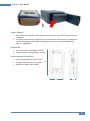
Replacing Battery
The batteries are located and secured at the bottom of the WireXpert units for safety
reasons. To replace the batteries;
1.
2.
3.
4.
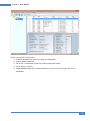
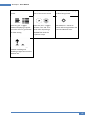
Switch off WireXpert and disconnect external power supplies.
Unscrew the battery compartment and remove the cover.
Remove and replace a new battery into the compartment.
Close, fasten and secure the screw onto the compartment cover.
14