1
Before getting started, check the following:
• The antenna must be plugged into the socket of the interface board
• The RS232 connector on the interface board must be connected to either COM1 or COM2 of
the PC
• A supply line from the power source to the jack connector must be available
When all 3 conditions are met, set the power switch to ON.
2.3
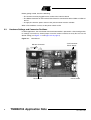
Hardware Settings and Connector Positions
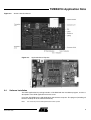
In RFID applications, the main board with the microcontroller is operated in a fixed configuration;
no settings are necessary. Check jumper J3 on the antenna interface to verify that it is has the
default setting (see Figure 2-1 and Figure 2-2 on page 3).
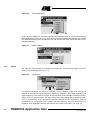
Figure 2-1.
Main Board
RS 232 Connector
Reset Button
2
Jack Connector
Power Supply
Power Switch
TMEB8704 Application Note
4781A–RFID–10/05