1
Follow this step to associate each new Tags with the Tag Manager. For water/moisture sensors, please activate by
shorting the tip using a metal object (scraping the tip using a coin, for example) or dipping the tip into water. A
red light should start flashing on the sensor every few seconds for about 2 minutes, before the sensor goes into
sleep again. Search & associate like other tags while the light is flashing.
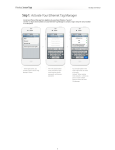
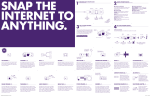
First time when the app is
launched, it may ask for the name
to use to identify current device to
enable/disable push notification
later. Click "OK" and click the "+
Associate" button at the upper left
corner.
An unassociated tag periodically
broadcasts information about
itself when powered on. Click the
"Search" button to receive this
information.
When a new tag is found, its
information is displayed. Assign a
name and comment (optional) to
the tag, then click "Associate".