1
Chapter 4
Taking VSM Measurements
Section 4.4
Taking Immediate-Mode VSM Measurements
4.4.2.3 ADVANCED TAB
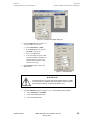
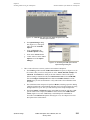
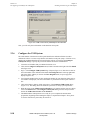
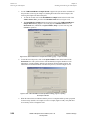
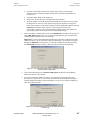
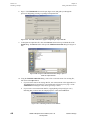
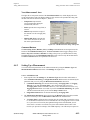
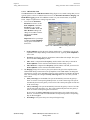
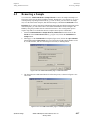
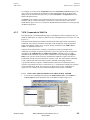
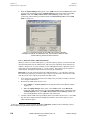
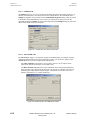
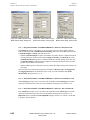
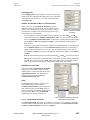
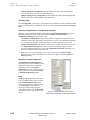
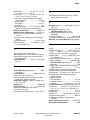
The Advanced tab of the VSM Measurement dialog (Figure 4-18) contains settings that you can
typically ignore, as there are default values. However, the Excitation Parameters, Ranging, and
PPMS Data Logging options offer additional control over your measurements, as explained
below. Chapter 6 explains these settings in greater detail.
1.
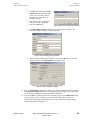
You can use the Excitation
Parameters section to set the
Peak Amplitude. Oscillation
Frequency is set to 40 Hz.
Note that the Max. Accel. and
Max. Moment readings will
change in accordance with the
settings used for Peak
Amplitude.
Important: Before you attempt
to change the Peak Amplitude
setting, please read about it in
Section 6.5 .
Figure 4-18. VSM Measurement dialog: Advanced
tab
2.
Quantum Design
•
Peak Amplitude specifies the peak vibration amplitude (i.e., one-half the peak-to-peak
amplitude) of the sample during a measurement (in mm). Typically, Peak Amplitude is
set to 2 mm.
•
Frequency specifies the frequency at which the VSM oscillates the sample. The system
uses an oscillation Frequency of 40 Hz.
•
Max. Accel. is computed from Frequency (40 Hz) and the value that you entered for
Peak Amplitude. It is the maximum calculated acceleration during a cycle.
•
Max. Moment is computed from Frequency (40 Hz) and the value that you entered for
Peak Amplitude. It is the maximum measurable moment.
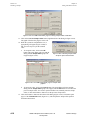
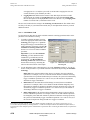
The Ranging setting refers to the way the system chooses the gain of the amplifiers in the
VSM module during a measurement. The preamplifiers in the VSM module can change the
gain ranges by factors of ten, depending on the size of the signal that is induced in the pickup
coils. You can change this setting from Sticky Autorange in the rare case when you need
more control.
•
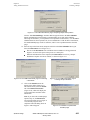
Sticky Autorange (recommended): The system automatically increases the gain by a
factor of 10 if the current peak signal drops below 2% of the current range. The system
automatically decreases the gain by a factor of 10 if the current peak signal exceeds 50%
of the current range.
•
Always Autorange: The system automatically increases the gain by a factor of 10 if the
current peak signal drops below 9%. The system automatically decreases the gain by a
factor of 10 if the current peak signal exceeds 100%.
In some cases, the Always Autorange setting might improve the signal-to-noise ratio.
However, it could also lead an increased number of range changes and a corresponding
drop in data throughput.
•
Fixed Range: The system always uses the specified gain range.
PPMS VSM Option User’s Manual, Rev. A3
January 2008
4-15