1
2.08 Invoice / Affidavit Format
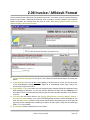
This Document Format controls how your printed invoice looks. You need to set up one Invoice Document
format for each station. (Multi-Station Document does not apply to Invoices.) Natural Log's individual
Station Documents are accessed from the main NL menu, click [Setup] [Administrator Controls]
[Station Settings / Document Formats].
q
[Restore Default Settings] You can return to the 'default' Document format anytime by clicking this
button.
q
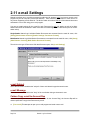
[e-mail Settings] If you use the NL e-mail capability to send Invoices by e-mail, you can set the text
of the accompanying message as well as signal NL to automatically carbon copy e-mail to the
Account Rep a copy of the Invoice.
q
[Page Margin / Font] If you desire you can change the page margins left/right and top/bottom used
when printing this Document. You can also select a different font and/or font size. Warning: Font
sizes above 12 are not recommended because larger fonts allow too little information to be printed in
a column.
q
[e-Invoice] On the invoice format in the [Setup] [Administrator Controls] [Station Settings /
Document Formats] section, if you use the Encoda-SpotData electronic invoice clearinghouse, you
must click the [e-Invoice] button to enter certain station-specific information such as the 4-letter call
sign used for the clearinghouse to identify your station, the band [AM or FM], and the media type
[Radio, TV, or Local Cable].
q
[Print Sample] Sends a sample Invoice to the printer.
Natural Log User Manual
Page 2-15