1
2.07 Log Page Format (cont)
Paper Type
You may print this document on the following paper types.
§
Blank Paper This draws the entire document including form boxes and lines, return address, and if
used, logo
§
Letterhead This draws the entire document including form boxes and lines, but not the return
address, and if used, logo.
§
PrePrinted Form Prints only the document data and assumes all form boxes, lines, addresses, and
logos are preprinted. Contact the NL8 developer for a sample form. These preprinted forms are not
user-configurable and must match the NL8 format.
Log Columns to be Printed
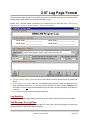
Use the [Select Columns] button to select which columns you'd like printed on the log page. You can
drag the column dividers left and right to set how wide each display column should be when the log page
is printed.
Compress Empty Lines to Save Space on Page
This removes 'most' empty lines before the log page is printed.
Hide Automation Commands on Printed Log
This removes all automation commands (text lines beginning with &) and puts empty spaces in their place
before the log is printed. This helps the aesthetics of the log for human users.
Print Log Pages for These Hours
You can select the hours for which a printed log is needed if less than all hours. See inserting pagebreaks to force NL8 to print 1 hour per page.
Bottom Message for Log Page
This is the small typeface message printed at the bottom of each page. This can be anything you want
such as operator sign-on / sign-off text. May be left blank.
Page 2-14
Natural Log User Manual