1
Setting up Church Manager
It is very important to correctly set up Church Manager before using it for the first
time. Please make sure you make the following settings before entering data into
Church Manager to avoid unexpected results.
DATES
Two very important settings must be made so your computer correctly handles dates for the year 2000 and beyond!
Setting One
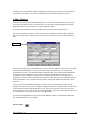
First you should set your Windows operating system. Click Start, Control Panel, and then double click
either International Settings or Regional Settings (depending on your operating system). Then click
the Date tab, and for the Short Date style select either m/d/yyyy or mm/dd/yyyy.
Setting Two
Next you will set the database engine. Go into your IDAPI folder (Church Manager by default places
this in C:\IDAPI) and double click the file BDECFG.EXE. Click the Date tab, and set
FOURDIGITYEAR to TRUE. Then set YEARBIASED to FALSE. Now to save your settings, click
File/Save.
FUNDS
Before using Church Manager for Financial details, it is important to set it up for your Church. First, you
need to establish what funds you wish to set up (ie General, Benevolence, Missionary). You can add and
delete your entries (except you can't delete the General Fund) before you start entering Financial Data.
You can always add a new fund at any time. But you can't delete a Fund which has received
Contributions or Pledges.
SERVICES
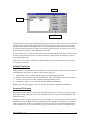
You also should enter the Services where Contributions will be received. This allows you to track
Contributions for each Service. To do this, Choose Tools/Services from the main screen. You can
add/edit new Services anytime, but you can't delete services for which there have been Contributions
received.
See Services.
CHURCH INFORMATION
Choose Tools/Church Info and enter the name and address of your Church. This information will be used
on reports. Also, tab to Preferences and select the current year. If you desire, you can paste a BITMAP
graphic here that will be printed on some of the reports. See Graphics.
NETWORK SETTINGS FOR PEER-TO-PEER NETWORKS
If you plan to have multiple users running on a Windows Peer-To-Peer network, you must first make
some settings to the database engine configuration file. These settings are only necessary if you are going
to have multiple users running Church Manager on a peer-to-peer network. For further information, read
Getting Started – Network Installation.
Church Manager 2.0
2