1
Agresso User Manual – Web Requisitioning
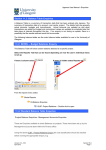
11. Delivery Address for Goods Either enter the delivery address code for the address to
which the goods to be sent (402-01, Chemistry Stores) or click on
click on
to open search screen:
N.B. The full address will be printed on the purchase order.
In the Search Criteria field enter the required department code e.g. 402 for Chemistry Stores.
Click on
The results will appear below. Click once on the required Address, which will then populate the
Delivery Address for Goods field and close the search screen.
For a more advanced Supplier search use the
12. Customer Ref
option
If your requisition is all against one Customer Ref, it can be entered
here. If not the Facref can be entered at a later stage against each line
of the required goods.
NB: This field is only used by specific School. If your School does not
use them you do not need to fill out this field. Click on
search screen to find relevant
13. Additional Note
to open
This field is optional and can be used to print extra information on the
Purchase Order. Click on
to open search screen, Click on
to see available options
See an example of how screen could look:
Version 4.0 – 553
November 2010
Section 2C
Page 3