1
•
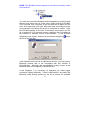
Check if you can ‘see’ the SPCMini using the Bluetooth
Utility on your PC. This is usually opened via a Bluetooth
icon
in the System Tray at bottom right of your PC screen,
but may also be accessed via a desktop icon or an icon in
Control Panel. If the SPCMini is found via your Bluetooth
Utility, but not via PowerPackPro, refer to page 13 for
detailed instructions on how to proceed.
•
Check that Bluetooth is enabled on your PC. Click ‘Start’ /
‘Control Panel’ and note whether the Bluetooth icon
appears in your control panel window. If it is present this
means Bluetooth has been loaded onto your PC, but may not
be correctly enabled.
•
If it is present but not working, click the system icon
and
select ‘Hardware’/‘Device Manager’.
Check that the
Bluetooth icon appears on your device list.
•
If it does not, or if it appears with a red X or yellow
! Bluetooth is not enabled.
exclamation mark
•
If your Bluetooth uses an external USB ‘Dongle’ make sure it
is plugged in. Most dongles have an on-board activity l.e.d.
29