1
Quality assurance
1 About this Manual
1.1 Contents
This manual has been conceived as a mean of reference to provide information and instructions on the use
of the NNT software.
The user shall fully read and understand this manual before using the equipment. It is highly recommended
to keep this manual along with further documentation and to use it as an handbook in order to instruct new
staff in using the equipment.
1.2 Definitions
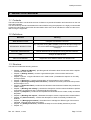
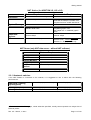
Definition
Meaning
MAIN WORKSTATION
Computer connected the CT scan.
SECONDARY WORKSTATION
Any computer running NNT software for the sole data processing/view.
Thus, all the MAIN WORKSTATIONS are excluded from this
cathegory.
MACHINE USER MANUAL
Manual dedicated to the equipment running the NNT software.
FOV
Acronym of Field Of View.
MULTI FOV DEVICE
Equipment which allows to switch to a different FOV.
1.3 Structure
This manual includes the following sections:
•
•
•
•
•
•
•
•
•
•
•
•
•
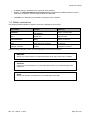
Chapter 1 (“About this Manual”): provides general information about the structure and the stylistic
conventions of the manual.
Chapter 2 (“Getting started”): contains a general description of the machine and its main
components.
Chapter 3 (“Errore. L'origine riferimento non è stata trovata.”): illustrates the steps to run the daily
check procedure.
Chapter 4 (“Scanning”): contains the description of the procedure to scan a patient.
Chapter 5 (“Running a Primary Reconstruction”): describes the Primary Reconstruction process
and the steps to run it.
Chapter 6 (“Volumetric Data”): introduces the volumetric data views and includes the procedure to
create a study.
Chapter 7 (“Working with a Study”): contains the description of all the tools and utilities to perform
a secondary reconstruction and a complete analysis of the study.
Chapter 8 (“Templates”): introduces the templates and illustrates how to create, modify and delete
templates.
Chapter 0 (“Working with reports”): illustrates the steps to create a report and the related utilities.
Chapter 10 (“Other functions”): contains the description of other functionality included in the
software.
Chapter 11 (“Managing documents”): describes how to manage the different type of documents
(raw data, volumetric data, study and report).
Chapter 12 (“Quality assurance”): illustrates the steps to run the Quality Assurance process.
Chapter 13 (“
st
Rev. 2.5 – March, 1 2011
Page 7 of 210