1
Perigee Power Solutions
Solar Power Kit User Manual
Congratulations on your purchase of an alternative power charger kit! This document is designed
to be as easy to follow as it is easy to use our kit for your electrical needs. There may be subtle
variations between the product and the documentation. For example, we may change the
placement of a switch on the dashboard or rename a given label. The functionality will always be
the same and the steps provided will persist across any version changes we may make to the
interface. Refer back to this manual for advice on caring for your kit (battery maintenance) and
general usage.
Using your Kit
Step 1
Activating Main & 12 Volt Power
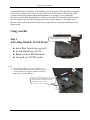
Main Power Switch On activates the 12V
status LED and powers the 12VDC port.
Insert Buss fuse & turn cap to fit.
Switch Main Power to ON.
Battery status LED illuminates.
Uncap & use 12VDC socket.
Notes:
1. If the status bar indicates “low” see the Steps 3 & 4.
2. The 201 modular battery pack may be connected to the
007 via the multi-port using our “Medium AUX battery
MPI cable” (each sold separately).
Image shows the 007 with panel connected &
charging kit while simultaneously powering
an MP3 player via the 12V port.
-2-