1
Perigee Power Solutions
Solar Power Kit User Manual
Multiport Interfacing
The multiport is capable of supporting many additional functions for all Perigee Products. You may link multiple kits
together in parallel (very useful for our wall mount units), connect an auxiliary battery, use the port with a voltmeter to
observe precise voltage levels, or connect to a compatible wind turbine. This text will cover connecting an AUX
battery.
AUX Battery & MPI Gator Cable
Clamp the BLACK clip to NEG terminal.
Clamp the RED clip to POS terminal.
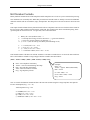
Insert the keyed power pole connector into
the multiport as shown (right image).
Switch kit main power ON & connect
solar panel to charge chained batteries.
When charged to desired level, disconnect
MPI from multiport. Unclamp cable from
AUX battery.
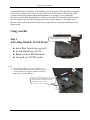
Image shows 44Ah AUX battery & MPI
cable connected to a 201 kit multiport with a
45W panel also connected to the Solar In
(panel not in frame).
Notes:
1. Important! Do not reverse\cross connect the gator cable. Doing so will pop the inline fuse. If
this occurs disconnect the cable & open the blister on the positive line. Replace with a STD
ATC 7.5A fuse (available at any automotive store)
2. Do not connect a dead AUX battery to the multiport. Anytime another battery is put in line
with the kit both batteries will normalize. I.E. – the kit batteries are at 12.8V and the AUX
battery is at 11.9V, putting them in line will draw down the kit battery to 11.9V. If the AUX
battery is dead (<10V) you may damage your kits battery. We recommend checking your
batteries voltage with a voltmeter before putting in line.
3. The status bar on the kit reports voltage of all batteries (Kit battery + AUX) as one battery.
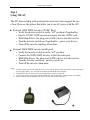
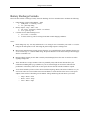
Image shows AUX battery MPI cable and
the blister that houses the 7.5A STD ATC
fuse.
-5-