1
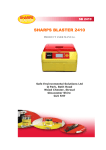
Product Specification SB2410 System Manual SB 2410 SHARPS BLASTER 2410 PRODUCT SPECIFICATION AND SYSTEM MANUAL Safe Environmental Solutions Ltd Q Park, Bath Road Wood Chester, Stroud Gloucester Shire GL5 5HT 2 Product Specification SB2410 System Manual PURPOSE OF THIS MANUAL IS TO FAMILIARIZE TECHNICIAN TO BASIC SYTEMS IN THE UNIT. ALL INFORMATION GIVEN HEREIN ARE PROTECTED BY EXCLUSIVE IP OF SES, UK TECHNICIAN IS ADVISED TO READ USER MANUAL BEFORE READING THIS DOCUMENT TO UNDERSTAND THE NORMAL OPERATION AS A USER. 3 Product Specification SB2410 System Manual CONTENTS Page No. 1. Technical Specification Sheet 6 2. Icon Display and Meaning of Icons 7 3. Basic processes: 8 3.1. Process of Soaking, Sterilizing & Cooling 8 3.2. Heating Chamber 8 3.3. System of Vapor & Odour Entrapment 8 3.4. Automatic Changeover from 110v to 230V 9 3.5. Overheat protection 9 3.6. Lid locking system 9 3.7. Cooling system 9 3.8. Power distribution in the unit 9 4. Electronics & Control 10 4.1. Main Processor Card 10 4.2. Display Card 10 4.3. Power Card 10 4.4. Overlay Card 10 4.5. Buffer Card 10 4.6. Printer 10 5. Feedback System 11 5.1. Two limit switches 11 5.2. Fans Feedback 11 5.3. Temperature Control 11 6. Printing the Label 11 7. New Cycle/ Next Cycle 12 8. Resets 12 9. Starting an incomplete cycle on power loss 12 10. Background Tasks 13 11. Parameters used by Software Program 13 12. Normal Startup Screen 14 4 Product Specification SB2410 System Manual 13. Process Sequence & Logic by Microprocessor 15 13.1. Power ON 15 13.2. Pre-start Stage 15 13.3. Confirmation Stage 16 13.4. Heating Stage 17 13.5. 35 Minutes Soaking Time stage 17 13.6. Sterilization cycle stage 18 13.7. Cut off stage 20 13.8. Faults and Display 22 13.8.1. Fan Fault 22 13.8.2. Lid Open 22 13.8.3. Can not present 23 13.8.4. Heater Failure 23 13.9. Lid locked up 24 13.10. Printer Operation 24 13.11. Filter Change alert 25 14. Windows Program 25 14.1. Installation 26 14.2. Operation 26 14.3. Features of Windows Program 27 5 Product Specification SB2410 System Manual 1.0 Technical Specifications: Device Name: SHARPS BLASTER TM Model No.: SB 2410 Type of Device: Electric Heating Oven Net Weight (Kg): 26.8 Kg approx. Dimensions (W x D x H): 550mm X 490mm X 360mm Standard Operating Voltage: 110V AC / 230V AC (Dual Voltage operation) Frequency: 60 / 50 Hz. Current Rating for Input Power: 15 amps min. Fuses: For 230V Operation: 6 amps 2nos For 110V Operation: 10 amps 2nos (See instructions on how to change fuse). Plug Top of Power Cord: European Power Plug, 15amps. Note: Power cords of different configuration supplied on specific request only. Wattage: 850 watts Max. Earthing: Required using the earth terminal Casing: FR grade ABS on metal chassis Certifications: CE certified as per EMC 89/336/EEC, Directive 2006/95/EC, Machinery Directive 98/37/EC Temperature Achieved: 180 Deg.C Process time: 2 1/2 – 3 1/2 Hrs. depending on ambient temperature 6 Product Specification SB2410 System Manual 2.0 Icon Display and Meaning of Icons LCD DISPLAY Fan operating icon indicates all fan is working properly. Fault Indicates which fan has failed this only illuminates when a fault occurs. Can Icon. If a can in not present the icon is displayed with a cross. If the can is present the can is displayed without the cross. Lid Icon. The icon displays the status of the lid; i.e. open or closed. The lid must be closed for the process to start Lock Icon. The icon indicates that the unit is locked. The lid must be locked for the process to start. Print Icon. The icon indicates that the printer is working. Maintenance Icon. This indicates that there is a problem with the unit. The unit is then locked and access denied to the operator. Temperature and time indication Process position indication Push button indicators Upper push button assigned functions- To start a quick cycle for testing control, To confirm can replaced, To start Sterilization along with lower switch, To confirm print OK Lower Push button assigned functions- To reset memory on power ON, To start sterilization along with upper switch, To repeat print, To reset filter cycle. Start Instruction Print confirmation Instruction Failure Indication heaters do not get supply 7 Product Specification SB2410 System Manual Sharps Blaster is an electric oven, which has a microprocessor to control the process functions and monitor the various passive devices for continued safety. 3.0 BASIC PROCESS: 3.1 Process of Soaking, Sterilizing and Cooling: The Can with sharps is put in the Aluminum Heat Chamber in the unit, which heats the can to 180 Deg. C (temperature set point is programmable), initially for 35minutes, which is referred to as SOAK time for homogenous temperature of all the Can contents. The can is heated for another 50 minutes (this duration is programmable), this part of cycle referred to as Sterilizing. After set duration, the heating is switched off and Can is cooled by the ambient air being circulated around the Aluminum Chamber using a cooling fan. This part of cycle is referred to as cooling cycle. The cooling cycle will continue till it reaches 35 Deg C (This temperature set point is programmable). On reaching the set temperature, the printer prints two labels and on confirmation by user, the cycle ends and the can containing decontaminated sharps can be taken out. 3.2 Heating Chamber: The Aluminum Chamber has a pair of Band heaters (Two halves) strapped on the middle of the Chamber to heat it. The Aluminum chamber is enclosed in a Steel sheet cover with Insulation to avoid heat losses inside the unit and retain heat for heating the can. 3.3 System of Vapor and Odour entrapment: The Aluminum Chamber has an opening hole at the upper part to which a Copper Coil is connected. The vapors of any moisture/liquid pass thru the copper coil, get condensed and are collected in the Condensate Bottle attached at the end of the coil, accessible from the front of the unit. The fumes, odour also travel down thru’ the coil to the Active Carbon filter where they are adsorbed. The lid has rubber seals to stop leakage of any vapor/odour into the atmosphere or within the unit and will require regular inspection and change. 8 Product Specification SB2410 System Manual 3.4 Automatic Changeover from 110V to 230V: The Power Card has a relay system which works based on the input voltage level so that unit can work on 110V / 230V without need for a changeover switch/selection. The heater bands are a set of two halves and they are connected in parallel when unit is connected to 110V and connected in series when applied voltage is 230V. The current supply to heater is thru’ a Triac on the power card. Triggering of Triac is by main processor card. 3.5 Overheat Prevention system: Current supply from Power card for the heaters pass thru’ two Thermo-switches, in series, one rated at 220 Deg C mounted on the bottom of Aluminum Chamber and the other rated at 70 Deg C mounted on the chassis. Incase an extreme case of Electronics Control failure, Relay or Triac failure, if heater starts to overheat, the thermo-switch will cut off the power supply to the heater thus ensuring safety. 3.6 Lid Locking system to prevent opening of Lid: The lid is prevented from opening during process by a solenoid plunger, which restricts the lock lever from pressing down to open the lid. Solenoid is mounted on the Lid. 3.7 Cooling system: There are three fans, which run continuously. One fan cools the Power supply while second fan cools the unit by creating airflow for removing any accumulated heat within the unit. The third fan is mounted on an air duct to pull air from the surrounding space around the Aluminum Chamber to create a draft and cool the Can during cooling cycle. 3.8 Power Distribution in the unit: The Power to the unit comes thru’ a switch unit with an inbuilt Fuse holder (to fix two fuses of 6Amps or 10Amps each depending on Input Voltage). If supply voltage is 230V, use 6Amps fuses and when supply Voltage is 110V, use 10 Amps fuses. The switch has an inbuilt RC Line filter to block any harmonics/spikes either way. 9 Product Specification SB2410 System Manual The voltage is applied to a Power supply which is an SMPS with input Voltage range from 90V to 240V continuous rating. The output from the PSU is 12V at 2 amps and 5Amps at 5Amps. The voltage is also applied to an Electronic Power card for supply to heaters thru the relay and Triac. All wires used are Teflon coated for heat resistance. 12V is utilized by Main Processor Control card, Solenoid, Fans while 5V is utilized by Printer, which draws heavy current for its print head during brief printing operation only. 4.0 Electronics and control: The entire electronics is divided into following Blocks: 4.1 Main processor card which has a microprocessor with resident memory to hold a program for intelligent process control and feedback based decision making, Buffer ICs to operate the field devices like Solenoid and fans, LEDs and LCDs. 4.2 The display Card is a PCB with LCD mounted on an independent card, which gets information to display from the main card as per process, feedbacks and alarms. 4.3 The Power card handles the supply of current and its control to heaters. The Power card gets the signals from the main processor card. 4.4 Overlay PCB provides Human Interface with two tactile buttons to input User information on operating the unit and LEDs to show status of Power and Heaters On/Off 4.5 Two buffer cards supply to the Solenoid and the fans. The buffer cards act as electronic switches activated by the signal from the main control card. These cards ensure that in case of any field failure of solenoid coil, fan coil etc, the main control card is not affected. 4.6 Printer gets supply from the SMPS and a data signal from the main processor card. 10 Product Specification SB2410 System Manual 5.0 Feedback system for intelligent decision making: 5.1 Two Limit switches, which provide signal for can present and Lid closed status. Can sensing limit switch is mounted in the lid which gets activated when pressed by a shaft which will move when pressed by the lid of can on the instance of Lid Closing over the can in the Aluminum chamber. Lid closed sensing limit switch is mounted in the Lock bracket assembly where the lock extended lever presses the limit switch when the lock is closed properly. 5.2 Fans used in the unit have a feedback wire, which gives pulses on rotation of fan blades. When turning the Power ON, the unit runs all the fans and checks the feedback pulse from each fan to verify its physical rotation. This feedback is taken from the fans all the time and any stoppage will result in unit stopping the process immediately and going into Maintenance mode. 5.3 Temperature Control: A Pt100 probe mounted on the Aluminum chamber provides feedback to Main processor card regarding the Temperature of Aluminum chamber. The heater is supplied power from a Power Card which gets signal to turn ON / OFF the heaters from the microprocessor on the Main Control Card based on a feedback of temperature from the Temperature probe. This feedback loop ensures that temperature is well maintained in the Aluminum Chamber. 6.0 Printing the Label and Finishing Off At the end of the sterilizing cycle itself, the printer automatically prints two labels. The label will have Unit S No. and cycle no printed. There will be place for date, time and place for the operator to sign it. Once the label is printed the operator has the option to reprint in case of a paper jam or the paper running out. Once the operator has accepted the label as good, the label cannot be reprinted. The lid can be opened only when the temperature reaches a set lower temperature. The unit returns to the beginning of the cycle ready for the next run. 7.0 New Cycle/ next cycle 11 Product Specification SB2410 System Manual To ensure that user has ensured that previous can is removed / replaced, the unit can be restarted into the cycle only by opening the lid and again closing it. 8.0 Resets: 1. To reset the equipment from malfunction, switch it OFF the unit; Press both the buttons and Turn ON the power. Keep the buttons pressed till it has reached to start mode. This reset will also remove information of incomplete cycle if any. 2. To reset Filter Change Alarm, switch OFF the unit, Press the lower button and Turn ON the power. Keep Lower button pressed till it reaches the start mode. This reset will not change the master cycle count and will also not affect the unit operation settings. 9.0 Starting after an Incomplete Cycle due to Power loss: 1. If Unit was in start/ Pre-start stage, on resumption of power, the unit will go back to start mode after self check for all system. Unit will need to be started again as fresh cycle by pressing both buttons. 2. If unit is in soaking stage or sterilization, then on resumption of power, it will restart the soaking cycle and will always preheat for 35 minutes upto the set temperature. 3. If Unit was in Cooling cycle, after power resumption, it will check temperature (and display the same), if it is still high, the cooling fan will run and reach to lower set temperature and finish cycle with Print out and release of Latch. 10.0 Background Tasks 12 Product Specification SB2410 System Manual There are following background tasks are running all the time: 1. Fan rotation is sensed, if any of the fans stop running or the cooling fan stops then the heaters are turned off, an error message is displayed and the buzzer is activated (see attached overlay). Any heating is immediately suspended and machine goes into maintenance mode. 2. During heating, rate of heating is also monitored and incase heater does not heat fast enough; the Heater Failure alarm is generated. 3. Status of Limit switches to confirm Can present and Lid locked. 4. Temperature sensing of the aluminum Chamber. 11.0 Parameters used by the Software Program. Parameters which are used by the software program in the unit and which can be reprogrammed using Windows program: 1. Heat up Temperature (Upper value) from 150 Deg C to 200 Deg C. 2. Sterilizing/ Decontamination Cycle Time (Timer 2) from 30 minutes to 180 minutes. 3. Lower cutoff Temperature for latch release for safe handling of can- any value upto zero. 4. Carbon Filter Change alarm count 5. Cycle count resetting. The parameters below are adjustable ONLY by change in the basic program put in the microprocessor chip and can be changed only by reprogramming the Chip 6. Soak time / Heat up time of 35 minutes (Timer 1) 7. Trigger Temperature for Heater Failure error set at 30 Deg C lower to Sterilizing / heat cycle temperature. 8. The Tolerance of Temperature Control High/Low Set at +1 Deg. C and – 3 Deg. C After reaching set temp. Value, heater will turn On /Off by change in temp by above tolerance. 12.0 Normal start up screen 13 Product Specification SB2410 System Manual In normal operation, when Power is turned ON, the LCD is turned on with all icons and then followed by the sequence of the hardware is interrogated to ensure Fans are operational by briefly running them and checking for rotation. EEPROM is read to see if the last cycles completed successfully, if it did not then certain decisions have to be made (see starting after an incomplete cycle). If all is OK the first check is to establish if a can is in the Chamber, if this is not the case then a message is displayed warning of, no container. Once a container has been put in, the system looks to see if the lid is shut, if it is not then a message warning of an open lid is displayed. With the container in place and the lid shut the operator has 2 options, one to open the lid to put more items in or to start the cycle. 14 Product Specification SB2410 System Manual 13.0 Process sequence and Logic by Microprocessor. 13.1 Power on – All Icons are displayed for 4 seconds. The previous cycle state is verified in memory. Power On stage 1. Power on Power On LED Green 13.2 Button LED s Pre- start stage after 4 seconds of turning power ON. Solenoid gets supply and is ON in this stage allowing latch to open. Lock icon will vanish. This means the solenoid has unlocked the latch and one can open the lid and replace the CAN. In this stage the Lid is opened so the icon of “Lid Open” blinks, Can is not sensed so the Can icon blinks prompting to place the can and close the lid. Toggling of both micro-switches is used as inputs for going to next stage. Blinking to accept Maintenance mode will not be initiated for Lid opening and Can not present to allow user to put can and close the lid. 15 Product Specification SB2410 System Manual 13.3 Confirmation stage: Since there is a chance to open and close the lid after sterilization of one can, same CAN may get sterilized again. To avoid this, confirmation to start the cycle is introduced BLINKS Press button with right mark to confirm that the can is changed. LEDs Green When confirmed it has locked the lid, it goes to next stage. In this stage if you open the lid both micro switches are toggled so the stage goes back to “pre start “ Place the Can and close the lid, both –Can & Lid icons will vanish and display prompts for “Press two buttons” will appear & Blink Blinks Press both buttons for 4 seconds. Then only it starts LEDs Green Now the stage is set for starting the cycle. The can is in place & lid is closed. Now press the two switches together for 4 seconds to avoid accidental start. The control will go in to heating cycle. 16 Product Specification SB2410 System Manual 13.4 Heating stage: Starts by Buttons (LEDs turn Red) Mark! Last 3 digits used for Temp indication Lock ON Blinks First Triangle on Display Temp Mode Switches LEDs turns Red In this stage Fan rotation is continuously monitored, Lid switch and CAN switch continuously monitored. Solenoid is OFF and locks the latch. Numeric Display shows increasing temperature with Deg C icon ON till the heat reaches to maximum set temp. 13.5 35 Minutes Soaking Time Stage: Display and function remains same But Numeric display changes to time (Hourglass icon). It starts down count from 35 Minutes and is displayed in Minutes & seconds. First 3 digits are used for down count of time in minutes and fourth place is dash blinks once every sec. Blinks every second BLINKS All other icons and their state remain same as previous. 13.6 Sterilization Cycle Stage: Starts after 35 minutes are over 17 Product Specification SB2410 System Manual Display shows Temp for few seconds. It then changes to sterilization time in minutes “Down counting”. This time is “Set Time” as per windows program giving the value. The total time is divided into 5 parts to make the icon ON at end of each divided part of total time. Blinks Also at the end of each duration, the monitored temp is displayed for few seconds After each 1/5th Duration one rectangular icon showing Sterilization progress turns ON in sterilizing cycle. Time Division distribution is as follows: (For time set between 30 Minutes to 180 Minutes using windows program). The sterilizing time, set by using windows program is divided by 5 for displaying each rectangle. The first 4 are in nearest integer and 5th is “Carry forward”. This carry forward must be kept bit longer at least more than first 4 intervals. This means if the time is 62Minutes then first 4 will come after every 12 Minutes and last will be 14 Minutes. If the time is 53 Minutes first 4 will be 10Minutes each and last will be 13 Minutes and so on for 180 Minutes each will be 35 Minutes for first 4 and 40 for last. 18 Product Specification SB2410 System Manual After completion of 4th duration the Display will be as below Blinks After 5th duration the display will be as below Blinks Last rectangle and the triangle will appear. Display will change to temperature. Icon “Cool” blinks and temperature starts falling (heaters turned off by microprocessor) 13.7 CUT-OFF Stage: 19 Product Specification SB2410 System Manual The cycle will be completed at the cut off temp set by window program. The Print icon will appear. Printing will be done for two labels. Confirmation will be asked. Temperature displayed. Blinks CONFIRM LABEL OK Press 4 seconds for confirmation. Press for reprint Immediately If printing is good, confirmation is given by pressing upper (right mark) switch. If not good then pressing lower (Cross mark) switch and second print can be taken. If printer is out of paper, you can load the paper and the press lower switch to get print. When print is satisfactory press upper switch to confirm printing. Stage changes to Pre Start Stage Pre Start stage to remove the sterilized can and load another can for sterilization 20 Product Specification SB2410 System Manual Fan ON Icon blink To accept Next can Solenoid energized to allow opening the lid. At this stage though old can is present and the lid is closed. Only when user opens the door and replaces can, then it goes to start stage of Press two buttons. Both limit switches must make one OFF and then ON after each cycle. 21 Product Specification SB2410 System Manual 13.8 FAULTS AND DISPLAYS 13.8.1 Fan Faults: Any fan stops rotating for any reason the fault icon comes on with the designated serial number for fan. Fan with Duct – Fan 1 Fan for exhaust near duct fan- Fan 2 Fan for PSU – Fan 3 All fans continuously monitored. All other icons will be displayed as per the state in which it stopped. 13.8.2 Lid Open: This is a micro-switch function. It is continuously monitored. In case Latch is opened by force or micro switch is not functioning, this icon will come and blink and the machine will go in Maintenance mode. This can happen only when the cycle is started and the Heating is started after “Confirmation of can change”. Blinks All other icons displayed as per state in which it stopped. Blinks Only one time blinks 22 Product Specification SB2410 System Manual 13.8.3 ‘CAN’ Not Present: This is a micro-switch function. It is continuously monitored. If Micro switch is not functioning this icon will come and the machine will go in Maintenance mode. This can happen only when the cycle is started and the Heating is started after “Confirmation of can change”. Blinks Only one time blinks All other icons displayed as per state in which it stopped. Blinks 13.8.4 Heater Failure: If the temperature is not reached within time (Background timer set) in HEAT stage. Or any Thermo-switch cuts off heaters and temperature falls below 165 Deg C (or 30 deg below the temp required in that stage) or Heaters get open and do not heat. All these will result in reduction or fall in temperature. Blinks All other icons displayed as per state in which it stopped. Blinks 13.9 Lid Lock: Incase of disoperation/maintenance mode, lid gets locked 23 Product Specification SB2410 System Manual If solenoid does not get supply/solenoid fails, the lid remains locked unless opened by external means. All other icons displayed as per state in which it stopped. Blinks Blinks Incase of problem in control circuit or powers supply, which will then not allow lid to open User can attempt to restart by System reset but if the system still shows maintenance mode, In such extreme conditions, Power to the unit should be removed completely and Latch can be override by use of key as provided for the opening the lid. User must be cautioned for risk of hot surfaces and Non Sterilized can. 13.10 Printer Operation. Paper Setting: The paper roll needs to put in a fashion described in detail in the User manual of the printer Serial No.: The printing of “Cycles completed” can be given in printing by allotting first 5 Digits for Serial Number of machine and a dash and then 5 digits for no of cycles completed. 00000-00000 Unit Serial No. No. of Cycles completed. The Sr. Nos. can be given as AP999 (AP001 to AP999) Or then up to BV999 then CV999 and so on. This way large qty of equipment manufactured can be allotted unique serial no with 4 digits. We have 10 spacing in window program Dash is taken as one space. 13.11 Filter Change Alert: 24 Product Specification SB2410 System Manual The microprocessor will run an internal counter and after a defined no. of cycles will start printing “CHANGE FILTER” on the Label to inform that the Carbon filter change is due. Machine operations will however not halt. The count of cycle since the last Filter change would be printed below Total Cycle S No. This warning will continue till the alarm is reset. User is advised to change the Carbon filter when such filter warning is printed 14.0 Windows Program: There are two programs 1. For Production engineer, this changes the parameters including Equipment Serial number and master count. 2. Other for Service technicians. This program cannot change the equipment Serial number and master count but only other parameters can be changed. 3. Soak time is fixed and cannot be changed in any program. 4. Main program cannot be changed by windows program. 5. If Control is changed then all parameters will be reset. Old record may be manually put in if available. The program can be loaded on a pc with windows XP/ VISTA The screen would look as below: 14.1 Installation: 25 Product Specification SB2410 System Manual • Installation CD provided with documentation. • Connect blaster by com port cable to 9 pin connector on blaster and to computer. • Run the exe file from CD. This will make a short cut on desktop for window program. • If some other component occupies the COM1 port then use USB to RS-232 converting cable. When drivers for cable are installed it will be on say com5. Then window program when started will search first for COM1 since not available it will prompt define com port give Com5 at prompt. The window program will appear on the screen as above picture. 14.2 Operation • Run the program by double clicking the blaster setter short cut. The program listens to com port for message from Blaster. It indicated by message ‘WAITING FOR BLASTER STX CHAR’ in status pad at the bottom of window. • Switch on blaster. Blaster reports its all parameters to PC. Those will be displayed in the program window. The message stream from blaster also appears in the status pad. • Now click stop, so that program stops continuous listening. • Change the parameter values on the text pads to the required values. • Click set buttons. Set command and the new values of parameters are sending to blaster. • Click quit button to close the program. • If the stop button is clicked and then read button is clicked then state will be displayed in parameter dialog box. • It may be noted that if blaster is in heat cycle then it will not communicate with the setting program on PC. 14.3 FEATURES OF WINDOWS PROGRAM FOR SETTINGS OF BLASTER. 26 Product Specification SB2410 System Manual Parameters that can be set by this windows program: 1. Sterilization Time: Range: 0 30-180 Minutes. Format: 3 digit long (number) 2. Sterilization Temperature: 160 -- 200 °C. Format: 3 digit long (number) 3. Format: 2 digit long (number) Release Temperature: 35 -- 60 °C. 4. Serial. No. Format: 5 characters long. 5. Cycles Completed (Usage count) Format: 5 digit long (number) (Maximum value 65535) 6. Filter Usage. Format: 5 digit long (number) (Maximum value 65535) 7. Filter Usage Limit Format: 5 digit long (number) (Maximum value 65535) 27