1
Page 4
TCG User Manual
5. Status Pages (LCD Display)
TCG User Manual
Page 5
5.1. STATUS PAGES & OPERATING MODES
Some of the status pages are only available in certain modes, as shown in the following table. When switching to another mode, the current status display is preserved, but
changes to the default (*) if the current display is not available in the new mode.
Status Display
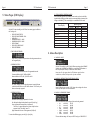
With the TCG option installed, your SR-112 has 3 new status pages, in addition to
the 5 existing ones:
•
•
•
•
•
•
•
•
TIME CODE INPUT STATUS
TIME CODE INPUT READER - NEW USER BITS IN
GENERATOR STATUS 1 - NEW GENERATOR STATUS 2 - NEW VIDEO FORMAT
TIME CODE/ VIDEO PHASE
TIME CODE ERRORS
• TIME CODE INPUT READER
Gives visibility to the timecode input at times when the generator takes over
the 7-segment display.
• GENERATOR STATUS 1
Indicates the format and the frame rate of the generated time code.
Formats available are 24, 25, 30DF and 30ND.
Rates available are 23.976, 24, 25, 29.970 and 30.
The “XFrm” indicator comes on when the generator is creating 24 frame
code locked at 23.976Hz to an NTSC video reference. This is the only cross
frame mode currently supported.
• GENERATOR STATUS 2
Operating Modes
Reshape
Repair
Generate
TIME CODE INPUT STATUS
Y*
Y*
-
TIME CODE INPUT READER
-
Y
-
USER BITS IN
Y
Y
-
GENERATOR STATUS 1
-
Y
Y*
GENERATOR STATUS 2
-
Y
Y
VIDEO FORMAT
Y
Y
Y
TIME CODE / VIDEO PHASE
Y
Y
-
TIME CODE ERRORS
Y
Y
Y
6. Menus Description
6.1. MENU 01: MODE
With the TCG enabled, the SR-112 has 3 different operating modes: RESHAPE
(default value), GENERATE and REPAIR. A corresponding LED illuminates on
the front panel (Status Section) to indicate the current selection.
Note: Menu 01 only appears when the TCG software option has been
installed since, without it, Reshape is the only mode available.
6.2. MENU 09: ALTERNATE PHASE WITH 50&60Hz VIDEO
Menu 09 allows the user to switch “A”/”B” phases when working with a 2x rate
video input. See chapter 12 for more information.
6.3. MENU 10: GENERATOR FORMAT
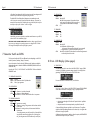
The bottom line of this page is separated in 3 sections:
Left: Indicates the Repair Mode selected in menu 20 (Jam/Copy)
Center: Indicates the Generator Delay in milliseconds.
The “DLY=xx” segment illuminates only when a delay has been
requested via the “Gen Delay” menu 12.
Right: Indicates the lock status of the regenerator (Unlk/Lock)
To access these different pages, press the [up] or [down] key.
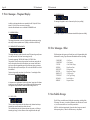
Select from the following options the type of time code to be generated:
• 24
at a rate of
23.976
• 24
at a rate of
24.000
• 25
at a rate of
25.000
• 30DF
at a rate of
29.970
• 30ND
at a rate of
29.970
• 30DF
at a rate of
30.000
• 30ND
at a rate of
30.000
This menu indicates settings. For Status, exit SET UP and go to ‘GEN STATUS 1’.