1
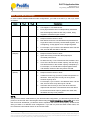
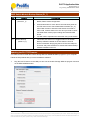
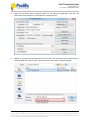
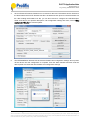
PL2775 Application Note Document Rev 1.0 an_PL2775_User Manual 20110307 Working under RAID1 Mode (Mirror) Under RAID1 Mode, it is required that you attach two physical SATA Hard Drives to the PL2775 demo board. Otherwise, P1_0 LED will turn ON to indicate an error and your computer will not detect the PL2775 device. To work under RAID1 Mode configuration, follow the steps below: 1. First set the mode switch (P3_4=0 and P3_5=0) to RAID1 mode. Mode P3_4 P3_5 RAID 1 0 0 (Mirror) Descriptions RAID 1 Mode: Mirrored Volume Requires 2 SATA Drives to work. Creates an exact copy (or mirror) of data and partition on two disks. Total array size can only be as big as the smallest capacity drive. For example, if you connect a 120 GB disk and a 100 GB disk, the size of the array will only be 100 GB. Automatic data recovery if one of the drives fails and replaced with new drive. The new disk where the data to be recovered must be equal or greater than other disk; otherwise recovery is not possible. 2. Connect the PL2775 demo board into the PC USB 3.0 port. Turn ON the power of the PL2775 demo board while holding down the P1_7 button for more than 3 seconds. Observe the P1_0 LED will flash 3 times to indicate switch mode was successful. Also observe P3_0 and P3_1 LED should turn ON to indicate the SATA hard drives were detected. 3. Go to Device Manager (View By Connection under USB 3.0 Host Controller) and your computer will detect one USB Mass Storage Device (PL2775) with only one SATA hard drive. This is normal for RAID1 mode and will only show the SATA hard drive model name attached to the SATA1 connector. Prolific Technology Inc. - 13 of 15 - March 7, 2011 All the information in this document is deemed to be correct but is subject to change without prior notice. Prolific Technology Inc. does not make any warranties (implied or otherwise) regarding the accuracy and completeness of this document and shall in no event be liable for any loss of profit or any other commercial damage.