1
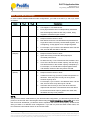
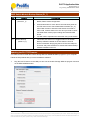
PL2775 Application Note Document Rev 1.0 an_PL2775_User Manual 20110307 RAID Switch Mode Settings In order to switch between different mode configurations, you need to set the P3_4 and P3_5 switch as follows: Mode P3_4 P3_5 JBOD 1 1 Descriptions JBOD Mode: Just a Bunch of Drives Can support 1 or 2 SATA Drives. Each physical SATA Drive is independently addressed with all the logical partitions each may contain, being mapped to a different logical volume. BIG 0 1 BIG Mode: Concatenation or spanning of disks Requires 2 SATA Drives to work. Both SATA Drives are concatenated and presented as a single disk. Disks are merely concatenated together, end to beginning, so they appear to be a single large disk. For example, if you connect a 500 GB disk and a 250 GB disk, the total disk size will be 750 GB. RAID 0 1 0 (Striped) RAID 0 Mode: Striped Volume Requires 2 SATA Drives to work. Splits data evenly across two disks (striped) for increased performance. No data recovery. If one of the drives fails, all data is lost. If one of the drives has a smaller capacity, the total array size will be based on the smaller capacity multiplied by 2. For example, if a 120 GB disk is striped together with a 100 GB disk, the size of the array will be 200 GB. RAID 1 0 (Mirror) 0 RAID 1 Mode: Mirrored Volume Requires 2 SATA Drives to work. Creates an exact copy (or mirror) of data and partition on two disks. Total array size can only be as big as the smallest capacity drive. For example, if you connect a 120 GB disk and a 100 GB disk, the size of the array will only be 100 GB. Automatic data recovery if one of the drives fails and replaced with new drive. The new disk where the data to be recovered must be equal or greater than other disk; otherwise recovery is not possible. NOTE: After you have set the mode switch to your desired mode configuration, you will need to power off and power on the PL2775 demo board again while holding the RAID Switch Mode Button (P1_7) for more than 3 seconds. Afterwards, you will also need to repartition the drives to work properly. All data is lost after you switch to a different mode configuration. If you did not press the switch mode button, the PL2775 demo board will still remain in its last state mode. Prolific Technology Inc. - 3 of 15 - March 7, 2011 All the information in this document is deemed to be correct but is subject to change without prior notice. Prolific Technology Inc. does not make any warranties (implied or otherwise) regarding the accuracy and completeness of this document and shall in no event be liable for any loss of profit or any other commercial damage.