1
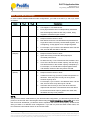
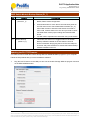
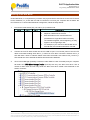
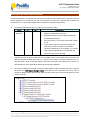
PL2775 Application Note Document Rev 1.0 an_PL2775_User Manual 20110307 PL2775 Demo Board Note the following PL2775 Demo Board connectors, button, jumpers, and LED locations. Please contact Prolific Sales or FAE for this demo board. PL2775 Demo Board LED Indicators and LED Behavior No. Features Descriptions 1 Power LED LED will turn ON when power supply and switch is ON. 2 SATA1 HDD LED LED will turn ON when PC detects SATA1 HDD. (GPIO P3_0) LED flashes when PC is accessing SATA1 HDD. SATA2 HDD LED LED will turn ON when PC detects SATA2 HDD. (GPIO P3_1) LED flashes when PC is accessing SATA2 HDD. For BIG mode, this LED will only flash when SATA1 HDD is 3 full or data is read/write from SATA2 HDD. 4 RAID Status Indicator (GPIO P1_0) This LED will flash 3 times @2Hz when switching between JBOD, BIG, RAID0, and RAID1 mode is successful. This LED is flashing along with P3_0 and P3_1 when RAID1 recovery is running. This LED will turn ON if there is an error in switch mode configuration or RAID1 recovery fails. See RAID1 section. 5 USB 3.0 LED Indicator (GPIO P1_5) Prolific Technology Inc. This LED will turn ON if PL2775 device is detected in USB 3.0 mode. Otherwise, this LED is OFF. - 2 of 15 - March 7, 2011 All the information in this document is deemed to be correct but is subject to change without prior notice. Prolific Technology Inc. does not make any warranties (implied or otherwise) regarding the accuracy and completeness of this document and shall in no event be liable for any loss of profit or any other commercial damage.