1
HDMi AUTO DETECTION
FUNCTION
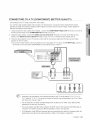
The player's video output will automatically change to HDMI output resolution when connecting an HDMI cable
while power is on (see page 39).
_ DependingonyourTV,certainHDMIoutputresolutionsmaynot work.
Pleasereferto the user'smanualof yourTV.
_ Ifan HDMIcableis connectedfromthe playerto aTV,the Blu-rayDiscPlayer'soutputis setto HDMIoutput
resolutionautomatically
within10 seconds.
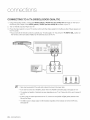
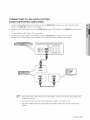
_ IfComponentandHDMIarebothconnected,HDMImodeis automaticallyselected.(Seepage39)
_ Whenyouconnectthe playerto the TVusingthe HDMIcableforthe first time or to a newTV,the HDMIoutput
resolutionwill beautomaticallysetto the highestprovidedbythe TV.
_ IfyouconnectaSamsungTVto the Blu-rayDiscPlayerusingan HDMIcable,the playercanbe easilyoperated
usingthe TVremotecontrol.(Thisis onlyavailablewithSamsungTVsthatsupportthe Anynet+feature.)(See
pages40-41)
HDMI (High Definition Multimedia Interface)
HDMI is an interface that enables the digital transmission of video and audio data with just a single
connector.
Using HDMI, the Blu-ray Disc Player transmits a digital video and audio signal and displays a vivid
picture on a TV having an HDMI input jack.
,, HDMI connection description
HDMI connector - Supports video and digital audio data (LPCM or Bitstream).
- HDMI outputs only a pure digital signal to the TV.
- If your TV does not support HDCP (High-bandwidth Digital Content Protection), random noise
appears on the screen.
,, Why does Samsung use HDMI?
Analog TVs require an analog video/audio signal. However, when playing a Blu-ray Disc/DVD, the data
transmitted to a TV is digital. Therefore either a digital-to-analog converter (in the Blu-ray Disc Player)
or an analog-to-digital converter (in the TV) is required. During this conversion, the picture quality is
degraded due to noise and signal loss. HDMI technology is superior because it requires no D/A
conversion and is a pure digital signal from the player to your TV.
,, What is the HDCP?
HDCP (High-band width Digital Content Protection)is a system for protecting Blu-ray Disc/DVD
content outputted via HDMI from being copied. It provides a secure digital link between a video
source (PC, DVD. etc) and a display device (TV, projector, etc). Content is encrypted at the source
device to prevent unauthorized copies from being made.
,, What is Anynet+?
Anynet+ is a convenient function that offers linked operation of this unit through Samsung TVs with the
Anynet+ feature.
- If your Samsung TV has an _ynet_ logo, then it supports the Anynet+ function.
- If you turn on the player and insert a disc, the player will start playing the disc, and the TV will turn on
automatically and switch to HDMI mode.
- If you turn on the player and press the Play button with a disc already inserted,the TV will
immediately turn on and switch to HDMI mode.
English 21