1
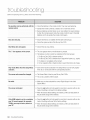
Before requesting service, please check the following.
Nooperationcanbe performedwith the
remotecontrol.
® Checkthebatteries
in theremotecontrol.Theymayneedreplacing.
* Operate
theremotecontrolata distanceofno morethan20 feet.
* Remove
batteriesandholddownoneor morebuttonsforseveralminutes
to drainthemicroprocessor
insidetheremotecontrolto resetit. Reinstall
batteries
andtryto operate
theremotecontrolagain.
Discdoesnotplay.
® Ensure
thatthediscisinstalledwiththelabelsidefacingup.
* Checktheregionnumberof theBlu-rayDisc/DVD.
DiscMenudoesnotappear.
* Checkif thedischasa Menu.
TheQ iconappearson thescreen.
o
Thisiconappears
whenan invalidbuttonis pressed.
o
Thefeatures
or actioncannotbecompleted
atthistimebecause:
1.TheBlu-rayDisc/DVD's
software
restricts
it.
2.TheBlu-rayDisc/DVD's
software
doesn'tsupportthefeature(e.g.,angles)
3.Thefeatureisnotavailable
atthemoment.
4.You've
requested
a titleorchapter
number
orsearch
timethatisoutofrange.
Playmodediffersfrom theSetupMenu
selection.
* Someof thefunctionsselectedintheSetupMenumaynotworkproperly
ifthediscisnotencoded
withthecorresponding
function.
Thescreenratiocannotbe changed,
* TheScreenRatioisfixedonyourBlu-rayDisc/DVDs.
• Thisisnota problemwiththeplayer.
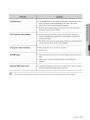
Noaudio.
* MakesureyouhaveselectedthecorrectDigitalOutputintheAudio
OptionsMenu.
Thescreenis blocked
* Pressthe_,_1button(infrontpanel)for morethan5 seconds
withnodisc
inside.Allsettingswillreverttothefactorysettings.
Whenthefactorydefaultsettingsarerestored,
alltheuserdatastoredin
thepersistent
storagewillbe deleted.
If the NDMIoutputisset to a resolution
yourTVcannotsupport(forexample,
1080p),youmaynot seea pictureon
yourTV.
62 troub eshooting
* Pressthe_,_1button(infrontpanel)for morethan5 seconds
withnodisc
inside.Allsettingswillreverttothefactorysettings.
* Whenthefactorydefaultsettingsarerestored,
alltheuserdatastoredin
thepersistent
storagewillbe deleted.