1
TE-UHH2_Layout 1 6/8/15 12:50 PM Page 4
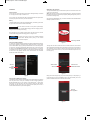
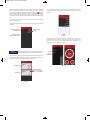
In the Preference Menu, users can select which parameter will be displayed larger
on the screen by checking the box next to Priority. Also, the user can select the
function of the parameter, engineering units, and logging method. The name of the
probe can be changed and calibration data (if available) will be displayed. Pressing
the arrow in the top left will return to the active probe list.
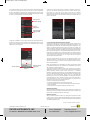
In order to end a log file, press the Save Log button on the bottom of the screen.
The log can then be either viewed, shared, or closed. In order to view the log file,
touch Open Log. To share the log file, select to share the file via wireless
communication to another device, email the file directly from the phone, or share it
via Wi-Fi to another device on the same network. Otherwise, touching OK will close
the file for later access.
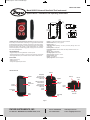
Touch to make
parameter priority
Touch to
change units
Touch to change
logging method
Figure 10
Figure 12
Logging can be initiated in any of the above views by either pressing the button on
the probe or by pulling up on the red square on the bottom and pressing Log. If the
logging is set to duration, which can be set in the Preferences menu, it will log
continuously for the set duration.
FCC RF EXPOSURE INFORMATION AND STATEMENT
The SAR limit of USA (FCC) is 1.6 W/kg averaged over one gram of tissue. Device
types: S09 (FCC ID: ZHN-W63) has also been tested against this SAR limit. The
highest SAR value reported under this standard during product certification for use
at the ear is 0.430 W/kg and when properly worn on the body is 0.772 W/kg. This
device was tested for typical body-worn operations with the back of the handset kept
1.5 cm from the body. To maintain compliance with FCC RF exposure requirements,
use accessories that maintain a 1.5 cm separation distance between the user’s body
and the back of the handset. The use of belt clips, holsters, and similar accessories
should not contain metallic components in its assembly. The use of accessories that
do not satisfy these requirements may not comply with FCC RF exposure
requirements and should be avoided.
This device complies with part 15 of the FCC rules. Operation is subject to the
following two conditions: (1) This device may not cause harmful interference, and (2)
This device must accept any interface received, including interference that may
cause undesired operation.
Touch to end and
save log file
Touch to start log
Figure 11
NOTE: The manufacturer is not responsible for any radio or TV interference caused
by unauthorized modification to this equipment. Such modifications could void the
user’s authority to operate the equipment.
This equipment has been tested and found to comply with the limits for a Class B
digital device, pursuant to part 15 of the FCC Rules. These limits are designed to
provide reasonable protection against harmful interference in a residential
installation. This equipment generates, uses, and can radiate radio frequency energy
and, if not installed and used in accordance with instructions, may cause harmful
interference to radio communications. However, there is no guarantee that
interference will not occur in a particular installation. If this equipment does cause
harmful interference to radio or television reception, which can be determined by
turning the equipment off and on, the user is encouraged to try and correct the
interference by one of more of the following measures:
• Reorient or relocate the receiving antenna
• Increase the separation between the equipment and receiver
• Connect the equipment into an outlet on a circuit different from that to which the
receiver is connected
• Consult the dealer or an experienced radio/TV technician for help
MAINTENANCE/REPAIR
Upon final installation of the Model UHH2, no routine maintenance is required. The
Model UHH2 is not field serviceable and should be returned if repair is needed. Field
repair should not be attempted and may void warranty.
WARRANTY/RETURN
Refer to “Terms and Conditions of Sale” in our catalog and on our website. Contact
customer service to receive a Return Goods Authorization Number before shipping
the product back for repair. Be sure to include a brief description of the problem plus
any additional application notes.
Android® is a registered trademark of Google Inc.
©Copyright 2015 Dwyer Instruments, Inc.
Printed in U.S.A. 6/15
FR# 444317-00 Rev. 1
DWYER INSTRUMENTS, INC.
Phone: 219/879-8000
www.dwyer-inst.com
P.O. BOX 373 • MICHIGAN CITY, INDIANA 46360, U.S.A.
Fax: 219/872-9057
e-mail: [email protected]