1
510140.qxd
9/4/02
9:45 PM
Page i
090402-510140-(08)
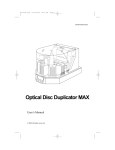
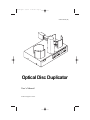
Optical Disc Duplicator
User’s Manual
© 2000 All rights reserved.
510140.qxd
9/4/02
9:45 PM
Page ii
Notices: The information in this document is subject to change without notice. NO WARRANTY OF
ANY KIND IS MADE WITH REGARD TO THIS MATERIAL, INCLUDING, BUT NOT LIMITED TO,
THE IMPLIED WARRANTIES OF MERCHANTABILITY AND FITNESS FOR A PARTICULAR
PURPOSE. No liability is assumed for errors contained herein or for incidental or consequential damages
in connection with the furnishing, performance, or use of this material. This document contains
proprietary information which is protected by copyright. All rights are reserved. No part of this document
may be photocopied, reproduced, or translated into another language without prior written consent.
Trademark Acknowledgments: Windows is a registered trademark of Microsoft
Corporation. All other trademarks are the property of their respective owners.
Printing History
Edition 2.2, #090402
FCC Compliance Statement: This device complies with part 15 of the FCC rules. Operation
is subject to the following two conditions: (1) this device may not cause harmful interference, and (2) this
device must accept any interference received, including interference that may cause undesired operation.
For Users in the United States: This product is intended to be supplied by a UL Listed
Direct Plug-In Power Supply marked “Class 2” or a UL Listed ITE Power Supply marked “LPS” with
output rated 24 V dc, 2.5 A. This equipment has been tested and found to comply with the limits for a
Class B digital device, pursuant to Part 15 of the FCC Rules. These limits are designed to provide
reasonable protection against harmful interference in a residential installation. This equipment
generates, uses, and can radiate radio frequency energy and, if not installed and used in accordance
with the instructions, may cause harmful interference to radio communications. However, there is no
guarantee that interference will not occur in a particular installation. If this equipment does cause
harmful interference to radio or television reception, which can be determined by turning the
equipment off and on, the user is encouraged to try to correct the interference by one or more of the
following measures:
• Re-orient or relocate the receiving antenna.
• Increase the separation between the equipment and receiver.
• Connect the equipment into an outlet on a circuit different from that to which the receiver is
connected.
• Consult the dealer or an experienced radio/TV technician for help.
Use of a shielded cable is required to comply with the Class B limits of Part 15 of the FCC Rules. You
are cautioned that any changes or modifications not expressly approved in this manual could void
your authority to operate and/or obtain warranty service for this equipment. This product is intended
to be supplied with a UL Listed Direct Plug-In Power Supply marked "Class 2" or a UL Listed ITE
Power Supply marked "LPS" with output rated of 24 V dc, 2.5 A.
For Users in Canada: This digital apparatus does not exceed the Class B limits for radio noise
for digital apparatus set out on the Radio Interference Regulations of the Canadian Department of
Communications. Le present appareil numerique n'emet pas de bruits radioelectriques depassant les
limites applicables aux appareils numeriques de la class B prescrites dans le Reglement sur le
brouillage radioelectrique edicte par le ministere des Communications du Canada.
CAUTION!
TO PREVENT FIRE OR SHOCK HAZARD, DO NOT EXPOSE THE UNIT TO RAIN OR MOISTURE. TO
REDUCE THE RISK OF ELECTRIC SHOCK, DO NOT REMOVE EXTERIOR PANELS. NO USER-SERVICEABLE
PARTS INSIDE. REFER SERVICING TO QUALIFIED SERVICE PERSONNEL. OPERATE THE UNIT WITH
ONLY THE PROPER ELECTRICAL SPECIFICATIONS AS LABELED ON THE PRINTER AND AC ADAPTER.
CAUTION!
THIS PRODUCT CONTAINS A LASER DIODE OF A HIGHER CLASS THAN 1. TO ENSURE CONTINUED
SAFETY, DO NOT REMOVE ANY COVERS OR ATTEMPT TO GAIN ACCESS TO THE INSIDE OF THIS
PRODUCT. REFER ALL SERVICING TO QUALIFIED PERSONNEL. THE FOLLOWING LABEL APPEARS
INSIDE YOUR UNIT:
CLASS 1 LASER PRODUCT
LASER KLASSE 1
CAUTION!
USE OF CONTROLS OR ADJUSTMENTS OR PERFORMANCE OF PROCEDURES OTHER THAN THOSE
SPECIFIED HEREIN MAY RESULT IN HAZARDOUS RADIATION.
NOTE:
ii
The optional DVD-R drive inside this product has laser diode(s) emitting below the
limits of Class 3B.
510140.qxd
9/9/02
1:43 PM
Page iii
INDEX
Table of Contents
Section 1: Getting Started ...............................................................................1
A. Overview of Operation .....................................................................2
B. Choosing a Good Location ................................................................6
C. Unpacking and Inspection.................................................................6
D. Identifying the Parts ...........................................................................7
E System Requirements .......................................................................10
Section 2: Hardware and Software Set-Up and Testing .........................11
A. Connecting Interface Cables............................................................11
B. Hardware Test and Printer Alignment ..........................................16
C. Fine Tuning the Printer Stand Alignment .....................................19
D. Software Installation.........................................................................20
E. Selecting Your Recorder Drive........................................................21
F. Software Test......................................................................................22
Section 3: Running Your First Job ...............................................................27
A. Operating Screens .............................................................................27
B. Overview of Recording....................................................................28
C. Copying an Audio CD......................................................................30
D. Creating Print Files ...........................................................................32
Section 4: Interpreting the Duplicator’s LED Status Lights..................33
A. Power LED .........................................................................................33
B. Pause LED ..........................................................................................33
Section 5: Maintenance and Troubleshooting ..........................................34
A. Cleaning the Case .............................................................................34
B. Resetting the Duplicator ..................................................................34
C. SCSI Power-Down Procedure .........................................................34
D. Recording Errors ...............................................................................35
E. Technical Support..............................................................................37
Section 6: Technical Specifications ............................................................38
Index ................................................................................................................40
iii
510119pdf.qxd
5/29/2002
11:14 AM
Page iv
Interactive Feature in this
PDF Document
There are interactive features that will allow you to
jump to different locations within the document. Each
listing in the Table of Contents is interactive. Place the
cursor on either the words or the page number. A
small hand with a pointing finger icon appears. Click
on the line with the icon and the document will jump to
that page. If you want to return to the Table of
Contents, move the icon to the top of the page and
click on the arrow marked TOC. Navigating through
the Index is similar. Place the icon on one of the
listings or page numbers, click on it, and it will move to
that page. The text relating to the Index listing will
appear in red. Returning to the Index can be done by
clicking on the arrow marked Index.
iv
510140.qxd
9/4/02
9:45 PM
Page 1
TOC
Section 1:
INDEX
Getting Started
THANK YOU…
...for purchasing the Optical Disc Duplicator or Optical Disc
Duplicator Plus. It is the perfect way for you to copy CDs.
The Optical Disc Duplicator handles 50 discs at a time, while
the Optical Disc Duplicator Plus has 100 disc capacity. You can
also print directly onto disc surfaces with an optional ink-jet or
thermal printer. A wide variety of disc formats are supported,
including Audio CDs, Video CDs, data discs and more.
Operation is simple and totally automatic once a job has been
started.
To begin using your Duplicator, please read this manual
carefully. This Operator's Manual is a complete step-by-step
guide to quickly and easily setting up and beginning to copy
discs with your new Duplicator.
A separate User's Guide is provided with your Duplicator that
explains the operation of the Prassi PrimoPro CD or PrimoDVD
Software.
NOTE ON TERMS AND CONVENTIONS:
From this point forward, the following terms and conventions
will apply:
1.
Both the Optical Disc Duplicator and Optical Disc
Duplicator Plus will be abbreviated as the Duplicator.
2.
Optical discs, which can include many different types of
discs including CD-Rs, CD-RWs, DVD-Rs and more are all
referred to as CDs or discs. Please note that in order to
copy and record DVDs, you need to have purchased the
DVD-R version of the Duplicator.
3.
This manual assumes that you will be attaching a printer to
the Duplicator. It further assumes that you will be using
the Ink-Jet CD Printer (CD Printer IV). If you are attaching
a Thermal CD Printer or any other ink-jet CD printer,
virtually all of the same set-up instructions are valid. In
either case, you will need to consult the printers' own
Operator's Manuals for details on printer operation.
Getting Started 1
510140.qxd
9/4/02
9:45 PM
Page 2
TOC
INDEX
A. OVERVIEW OF OPERATION
Your new CD Duplicator is an automated, precision device
intended for continuous-duty copying and printing of CDs.
The following is a description of the complete process of
copying and printing a CD job on your Duplicator:
1.
Up to 50 blank CD-Rs may be loaded at one time into the
Input Bin of the Duplicator. The Duplicator Plus will hold
up to 100 discs.
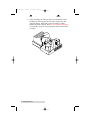
Input Bin
2.
The Duplicator has an integrated robotic arm that "picks"
discs one at a time from the Input Bin.
3.
The CD Tray on the built-in, high-speed CD Recorder
opens automatically and the Robotic Arm places the disc
into the recorder.
2 Getting Started
510140.qxd
9/4/02
9:45 PM
TOC
4.
Page 3
INDEX
The CD Tray on the CD Recorder automatically shuts.
Through software control, you can perform a verification
test on each CD-R disc before recording. If a disc does not
pass (meaning that all or part of that disc is not
recordable), the Robotic Arm picks it out of the CD Tray
and sends it to the Reject Area, located at the front left side
of the Duplicator. Rejected discs simply drop onto your
table-top in this area.
Since most CD-Rs available today are of extremely high
quality, you will rarely reject a disc. Nevertheless, it is
good practice to verify each disc - just in case. You
certainly don't want to send out a great looking disc that
does not read properly in your customer's CD drive! Keep
in mind that verifying each disc will add extra time to the
recording process.
5.
The CD-R is now recorded. If you were to fill up each CD
with data, audio, video or music (650 MB), recording time
is about 6 minutes each. Most jobs don't fill the entire
CD-R, so recording time is usually less than this.
Getting Started 3
510140.qxd
9/4/02
9:45 PM
TOC
6.
Page 4
INDEX
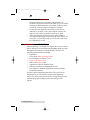
After recording, the CD Tray opens automatically so that
the Robotic Arm can pick the CD and transport it to the
optional printer. Print time varies according to which
printer has been selected. Both ink-jet and thermal printers
are available. In most cases, print time takes no more than
1 minute.
4 Getting Started
510140.qxd
9/4/02
9:45 PM
Page 5
TOC
7.
INDEX
After printing, the printer's CD Tray opens automatically
and the Robotic Arm picks the CD and transports it to the
Output Bin. The process starts over and repeats until all
blank discs are gone or the number you have specified via
software are copied and printed.
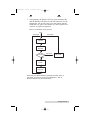
Here is a schematic of the process:
Start
Start Again
Start Again
Input Bin
CD-R
Recorder
Record
Not Good
Reject Area
Good
Printer
Output Bin
Now that you understand the principle and the order of
operation, it is time to set up your Duplicator. This is
discussed in the next several sections.
Getting Started 5
510140.qxd
9/4/02
9:45 PM
Page 6
TOC
INDEX
B. CHOOSING A GOOD LOCATION
•
•
•
Place the Duplicator in a location with adequate air
circulation to prevent internal heat build up. If you will be
attaching an optional printer, you'll need a table-top with
at least 30" (76cm) of depth for adequate clearance.
Do not place the duplicator near heat sources such as
radiators or air ducts, or in a place subject to direct sunlight, excessive dust, mechanical vibration or shock.
Allow for adequate clearance in front of the printer to
accommodate the length of the unit with its recorder's CD
Tray open. You will also need an area in front of the unit
for rejected discs to fall.
C. UNPACKING AND INSPECTION
While unpacking your Duplicator, inspect the carton to ensure
that no damage has occurred during shipping. Make sure that
all supplied accessories are included with your unit. The
following items should be included:
•
•
•
•
•
•
•
•
Duplicator
Gray Plastic Input and Output Bins
Power Adapter and Power Cord
Serial Control Port Cable
IEEE 1394 FireWire Cable
Application Software Installer CD-R
Warranty Statement and Registration Card
This Operator's Manual, Quick Start Guide and Other
Printed Information
Save the carton and packing materials. They will come in
handy later if you ever need to transport the Duplicator
and/or any of its parts and accessories. Transporting the unit
without the proper packaging can cause damage to the
robotics.
6 Getting Started
510140.qxd
9/4/02
9:45 PM
Page 7
TOC
INDEX
D. IDENTIFYING THE PARTS
Front Panel and Top
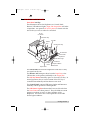
This illustration shows the Duplicator, its Control Panel,
Buttons, LED indicator lights, Input and Output Bins and other
components. An optional ink-jet CD printer is shown with the
unit so that you can see where it is attached:
Ink Jet
CD Printer
CD Printer Tray
Input Bin
Robotic
Arm
CD Recorder Tray
CD Recorder
CD Recorder
Tray Button
LED Status Light
Pick Button
Output Bin
Control
Panel
Reject Area
Sequence Button
Pause Button
The CD Recorder is where the Duplicator loads discs as they
are copied one-by-one.
The Robotic Arm transports discs from the Input Bin, to the
CD Recorder, to the printer, and finally to the Output Bin
The CD Tray Button manually opens or closes the CD Tray. In
normal operation, the in/out movement of the CD Tray is
controlled automatically and this button is not used.
The Control Panel contains LED Status Lights and Buttons to
manually control operation of the duplicator.
The LED Status Lights indicates that Power is ON and when
the Pause Button has been pressed. They also blink in certain
patterns to indicate an error or other condition of the
Duplicator. See Section 4 for a full explanation of the LED
Status Light conditions.
Getting Started 7
510140.qxd
9/4/02
9:45 PM
TOC
Page 8
INDEX
The Pause Button immediately pauses the motion of the
Robotic Arm. It is also used in combination with other buttons
to perform certain reset and error-clearing operations.
The Sequence Button moves the Robotic Arm from one
position to the next. Is is used mainly during the set-up and
testing procedures. It is also used in combination with other
buttons to perform certain reset and error-clearing operations.
The Pick Button is used to manually pick up a disc and to
drop it in a Bin, the CD Recorder or the Reject area. It is also
used in combination with other buttons.
The Input Bin is on the right side of the Duplicator. This is
where you stack blank discs which are to be recorded and
printed.
The Output Bin is where discs are stacked, up to 50 at a time,
after they have been recorded and printed by the Duplicator.
The Reject Area is where discs are dropped if they do not pass
a software verification test. Discs simply drop on the table-top
in front of the left front side of your Duplicator. In most cases,
rejected discs should be discarded. This is usually indicative of
a disc manufacturing problem. If one brand of discs seems to
be rejected frequently, you'll probably want to try using a
different brand.
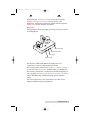
For reference, the illustration below shows the optional
Thermal CD Printer attached to the Duplicator.
Note that the Thermal CD Printer attaches to the left side of the
printer and that the Output Bin is located in a different spot
due to the location of the Thermal CD Printer. When you first
power-up the Duplicator, it will automatically do a search for
where the Input and Output Bins are located and from then on
will know where to pick and place discs.
8 Getting Started
510140.qxd
9/4/02
9:45 PM
Page 9
TOC
INDEX
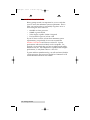
When using the Thermal CD Printer, you will also need to
attach a Tray Support Bracket to the top cabinet of the
Duplicator. Follow the instructions packed with the optional
Printer Stand for the Thermal CD Printer.
Rear Panel
This illustration shows the input ports found on the rear panel
of the Duplicator:
Power Input Port
Printer Control Port
Control Port
FireWire Port
The FireWire (IEEE 1394) Port of the duplicator is for
connection to your PCs internal FireWire board.
The Control Port is connected to COM1 (or COM2 or COM3)
of your PC with a serial cable, included with your Duplicator.
The Printer Control Port is connected to the mini-DIN plug on
the rear panel of a Thermal CD Printer or an Ink-Jet CD Printer
with a mini-DIN cable included with the optional printer
stand.
The Power Input Port is for connection to the +24V Power
Adapter included with your Duplicator.
Getting Started 9
510140.qxd
9/4/02
9:45 PM
Page 10
TOC
INDEX
E. SYSTEM REQUIREMENTS
Before getting started, it is important for you to verify that
your PC meets the minimum system requirements. Here's
what you need in order to successfully copy discs at 8x or
above using the Prassi software:
•
•
•
•
450 MHz or faster processor
128MB or greater RAM
Video display capable of 1024 x 768 pixels
Free hard drive space of at least 2 GB
If your PC does not have at least these minimum system
requirements, you probably do not want to install the
FireWire/SCSI board and software on that PC. System
performance will more than likely not be acceptable. For
example, you may find that your top recording speed will be
limited to only 4x. Your Duplicator is capable of much higher
performance, so why limit it due to a slow PC?
To print and burn simultaneously, you will need more RAM or
a faster processor. The processor should be a Pentium II or III
and the RAM should be at least 128mb.
10 Getting Started
510140.qxd
9/4/02
9:45 PM
Page 11
TOC
Section 2:
INDEX
Hardware and Software
Set-Up and Testing
A. CONNECTING INTERFACE CABLES
1.
Make sure that your PC is turned off and that it is
disconnected from its power source. Leave the PC turned
off until you are requested to turn it on later in this set-up
procedure.
2.
Install a compatible FireWire board inside your PC. Please
refer to the board manufacturer’s instructions for the
proper installation procedure.
3.
Connect the FireWire cable. One end is connected to the
FireWire port on the rear panel of the Duplicator. The
other end is connected to the FireWire board's output port
on your PC.
Hardware and Software Set-Up and Testing 11
510140.qxd
9/4/02
9:45 PM
Page 12
TOC
INDEX
4.
Connect the Serial Interface cable. One end is connected to
the DB9 connector on the rear panel of the Duplicator. The
other end is connected to your PC's DB9 COM1 port. If
COM1 is already used for another device, you can use
COM2 or COM3 and follow on-screen instructions later in
the set-up procedure for changing the default serial port
for the Duplicator.
5.
Apply power to the Duplicator. One end of the power
adapter's cord is attached to the power input port on the
rear panel of the Duplicator. The other end is connected to
a suitable wall outlet. Use of a high quality, commercially
available surge suppressor is highly recommended.
6.
If you will be printing as well as duplicating discs, setup
the printer according to its instructions and continue on to
step 7.
If you won't be attaching a printer, you have now completed
the Hardware and Cabling Set-Up procedure. Proceed to
Section B.
12 Hardware and Software Set-Up and Testing
510140.qxd
9/4/02
9:45 PM
Page 13
TOC
INDEX
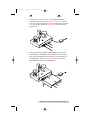
7.
Connect the 6-pin mini-DIN cable (included with the
optional Printer Stand) to the Printer Control Port on the
rear panel of the Duplicator. Do not connect the other end
yet. You need to attach the Printer Stand and mount the
printer first.
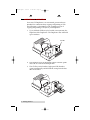
8.
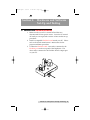
Attach the optional printer stand (required for a printer
installation) to the Duplicator by locating the connecting
tabs and inserting them into the slots on the rear panel of
the Duplicator. For the Ink-Jet CD Printer, the stand is
attached in the center of the Duplicator.
2
1
Hardware and Software Set-Up and Testing 13
510140.qxd
9/4/02
9:45 PM
Page 14
TOC
INDEX
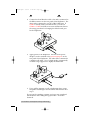
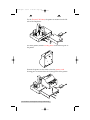
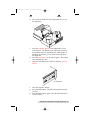
For the Thermal CD Printer, the printer is mounted on the left
side of the Duplicator.
2
1
For either printer, find the locating holes on the bottom plate of
the printer.
Position the printer on the stand so that the printer stand
locating pins are inserted into the locating holes of the printer.
14 Hardware and Software Set-Up and Testing
510140.qxd
9/4/02
9:45 PM
TOC
9.
Page 15
INDEX
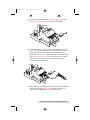
Connect the other end of the 6-pin mini-DIN cable to the
Printer Control Port on the rear panel of the printer.
10. Connect the printer with an IEEE 1284 compliant parallel
cable. One end is connected to the parallel port on the rear
panel of the printer. The other end is connected to the
parallel port of your PC. Make sure that your PC's parallel
port is set to ECP mode. If you don't know how to check
this or how to change it, refer to set-up section of the
printer's Operator's Manual.
11. Make sure that all cables are routed neatly underneath and
out the back of the printer stand and that no cables are
underneath the Duplicator or printer stand feet.
Hardware and Software Set-Up and Testing 15
510140.qxd
9/4/02
9:45 PM
Page 16
TOC
INDEX
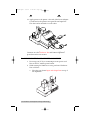
12. Apply power to the printer. One end of the Power Adapter
is connected to the printer's rear-panel Power Input Port.
The other end is attached to a wall outlet.
You have now completed the hardware and cabling set-up.
Continue on to the Hardware Test and Printer Alignment
procedures in the next section.
B. HARDWARE TEST AND PRINTER ALIGNMENT
1.
Power-up your PC by re-connecting its main power cord.
Turn on the PC with its power button.
2.
While waiting for Windows to start, perform a Hardware
Test as follows:
a.
Place the gray plastic Input and Output Bins on top of
the duplicator.
16 Hardware and Software Set-Up and Testing
510140.qxd
9/4/02
9:45 PM
TOC
Page 17
INDEX
b. Put a stack of blank CDs in the Input Bin (the one on
the right side).
c.
Press the Sequence button on the Duplicator's front
control panel. The Robotic Arm will swing around to
do an initial check to optically detect which printer is
installed. It will then go to a position directly above
the Input Bin.
d. Press the Pick button on the control panel. The robotic
arm will pick up a disc.
e. Open the CD-R Recorder's CD Tray with the CD Tray
button.
CD Tray Button
f. Press the Sequence button.
g. Press the Pick button. The CD will be placed into the
CD Tray.
h. Press the Pick button again. The CD will be lifted out
of the CD Tray.
Hardware and Software Set-Up and Testing 17
510140.qxd
9/4/02
9:45 PM
Page 18
TOC
i.
INDEX
Open the printer tray with the disc in/out button. On
the Ink-Jet CD Printer, this is the button with the two
arrows pointing different directions. On the Thermal
CD Printer, this is the button on the lower right side of
the front panel.
j. Press the Sequence button.
k. Press the Pick button. The CD will drop into the
printer's tray.
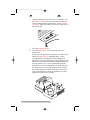
If it does not drop perfectly into place, you will need to
adjust the printer stand's Mounting Plate. This is
accomplished by loosening the three Phillips-head
adjusting screws and moving the printer slightly in one
direction or another until the disc is dropped perfectly
into the printer's tray. You can repeatedly press the
Pick button to test your alignment. Or, press and hold
the Pick button for 5 seconds, then release it, and the
disc will be positioned about 5 mm above the tray for
easy visual alignment. When the alignment is correct,
tighten down the screws securely.
18 Hardware and Software Set-Up and Testing
510140.qxd
9/4/02
9:45 PM
TOC
Page 19
INDEX
Check one more time for printer alignment after the screws
have been tightened down, just in case something changed
while you were making the adjustment. Re-align if necessary.
l. Press the Sequence button.
m. Press the Pick button. The CD will drop into the
Output Bin.
n. Press the Pick button again. The CD will be picked up
out of the Output Bin.
o. Press the Sequence button several times until the CD is
transported back above the Input Bin.
p. Press the Pick button. The CD will drop into the Input
Bin.
C. FINE TUNING THE PRINTER STAND ALIGNMENT
If you find that some discs are not being held tightly in the
printer tray and start to move inside the printer while printing,
the printer stand may need further alignment. If the discs are
not placed in the exact center of the Printer Tray, it is possible
you will encounter failed picks or poor print quality. There is a
special Fine Tune Alignment built in to the program of the
Duplicator to ensure proper picks. To perform this alignment,
follow these steps:
1.
Open the Printer Tray by pressing the Printer Tray Button
on the top of the Printer Control Panel.
2.
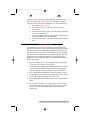
Loosen the three Printer Stand Adjustement Screws shown.
Press the Sequence Button on the front of the Duplicator
until the Robotic Arm is positioned over the Input Bin.
3.
Press and hold the Pick Button on the Duplicator’s Front
Control Panel for 5 seconds. Your will see the LEDs on the
front of the Duplicator toggle back and forth.
4.
Immediately press the Pause Button to enter the Fine Tune
Mode.
5.
Next, press the Duplicator’s Pick Button to perform the
Printer Tray Fine Tune Alignment. The Robotic Arm will
move to the printer position and hover just above the
Printer Tray.
Hardware and Software Set-Up and Testing 19
510140.qxd
9/4/02
9:45 PM
Page 20
TOC
INDEX
6.
With the Robotic Arm holding a disc just over the tray,
move the printer around until aligned as close as possible.
For a more accurate alignment, press the Sequence Button
to step the arm slightly to the right (clockwise), or press
the Pause Button to step the arm slightly to the left
(counter-clockwise).
7.
With the printer aligned, tighten the three Printer Stand
Adjustment Screws.
8.
Press the Pick Button to exit the Fine Tune Mode.
9.
Test your alignment by pressing the Pick Button repeatedly
to pick and place a disc into the tray.
You have now completed the Hardware Test and Printer
Alignment. Continue on to the Software Installation.
D. SOFTWARE INSTALLATION
Once you have properly set up your Duplicator and optional
CD printer, the next step is to install the appropriate software
on your PC that you'll need for duplicating and printing.
There are two software programs to install: (1) the printer
driver software, and (2) the CD duplicating application
software called Prassi PrimoDVD Pro 2.0. Install the two
software programs as follows:
1.
Install the printer driver software according to the
instructions in that unit's Operator's Manual.
2.
Install PrimoDVD Pro 2.0 software as follows:
3.
a. Close down all other software applications.
b. Insert the included CD into your computer's CD-ROM
drive. In most computers the software will auto-boot.
If it does, proceed to Step 3 below. If it does not,
follow these steps:
• Double click on My Computer
• Double click on your CD-ROM drive containing the
installation disc
• Click Install Prassi PrimoCD Pro (or Prassi DVD
Pro)
The Prassi Welcome Screen is now displayed. Press Next.
4.
The license agreement screen is displayed. After reading
it, press Yes to continue or No to leave the program.
20 Hardware and Software Set-Up and Testing
510140.qxd
9/4/02
9:45 PM
Page 21
TOC
INDEX
5.
Assuming that you pressed Yes, the next screen shows the
Destination Location. If you wish to install the program in
a different location, press Browse. If not, press Next.
6.
The Show Program Folder screen is displayed. If you wish
to change the name of the folder in which the software will
be installed, do so now. If not, press Next.
7.
The installation progress will be displayed. When the
program is completely installed, you will see Set Up
Complete. Press Finish.
8.
Re-boot your computer before you proceed.
E. SELECTING YOUR RECORDER DRIVE
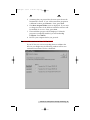
If your PC has one or more recording drives in addition the
drive in your Duplicator, the following window will be seen
each time Prassi Primo CD Pro is launched:
Hardware and Software Set-Up and Testing 21
510140.qxd
9/4/02
9:45 PM
Page 22
TOC
INDEX
This dialogue box will allow Prassi to identify the drive in your
Duplicator. Each recording drive installed on your system will
be listed in this dialogue box. Click each Open/Close button to
ope the recorder drive, then click the appropriate SELECT
radio button for the drive installed in your Duplicator.
F. SOFTWARE TEST
The final set-up step before starting your first job is to test the
entire hardware/software configuration. This will confirm
that the hardware, software and your PC are all
communicating properly with each other properly. Follow this
procedure:
1.
Launch the Prassi software from your Windows Desktop
or program menu. The main Application Window will
appear. Single click on the Duplicator drive in the list of
available drives on the lefthand side of the screen to high
light it.
2.
From the main Application Window, click on Robotics.
22 Hardware and Software Set-Up and Testing
510140.qxd
9/4/02
9:45 PM
Page 23
TOC
INDEX
3.
In the drop-down menu, go to Services.
4.
Click on Check Communications. You will get a dialog box
saying "Communication OK. System Idle." If you don't,
check that all cables are connected securely. Or, change the
serial cable from COM1 on your PC to COM2 or COM3
and change the setting in the Control Port drop down
menu. Try again until you get the "Communication OK"
message.
5.
Click OK to get back to the main screen.
Hardware and Software Set-Up and Testing 23
510140.qxd
9/4/02
9:45 PM
Page 24
TOC
6.
Click on Robotics again.
7.
Select Manual Movements.
24 Hardware and Software Set-Up and Testing
INDEX
510140.qxd
9/4/02
9:45 PM
Page 25
TOC
INDEX
8.
Deselect any components you don't have installed in the
check boxes in Multiple System Test.
9.
Load at least 4-5 discs into the Input Bin.
10. Click on Start Test. The robotic arm will move through its
entire sequence automatically. If you specified more than
one disc, it will continue until the number you specified is
completed or it runs out of discs.
Congratulations! You have now completed the installation
process and your Duplicator is ready for operation.
Hardware and Software Set-Up and Testing 25
510140.qxd
9/4/02
9:45 PM
Page 26
TOC
INDEX
NOTE: Prassi Primo PrimoDVD Pro 2.0 software is for use only with
Windows 98SE, Windows 2000, or Windows XP. A Macintosh
version is not available.
The next section of this Operator's Manual will guide you through a
simple audio disc copy procedure. For information on performing
more advanced copying jobs or to learn how to copy Video CDs, data
discs and other formats, consult the separate Prassi PrimoDVD Pro
2.0 Operator's Guide included with your Duplicator. An excellent
on-line Help file is also available from within the Prassi software as
well as from the printer driver software.
26 Hardware and Software Set-Up and Testing
510140.qxd
9/4/02
9:45 PM
Page 27
TOC
Section 3:
INDEX
Running Your First Job
Now that you've completed the hardware set-up, connected all
cables, loaded the Prassi PrimoDVD Pro 2.0 Software and the
printer driver and performed all tests, you're ready to copy discs.
The example given in this chapter is for a simple audio CD
copying job using Prassi PrimoDVD Pro 2.0 software. Please
refer to the excellent Prassi Software User's Guide for instructions
on performing other types of copying jobs. There is also on-line
help available from the Prassi software's Help screens.
A. OPERATING SCREENS
To keep things simple, there is really only one main operating
screen you'll need to know about in order to run the Prassi
Software. It is called the Application Window and it looks like
this:
Drive Status
Window
Job Set-Up
Window
Job Status
Window
Under this window there are several adjustable-size windows
that indicate what you've setup and what's happening: the Drive
Status Window, the Job Status Window, and the Job Setup
Window. A sub-Window called the Activity Log is also available,
but it is hidden upon initial boot-up of the software. Here's a
short explanation of each Window:
•
Drive Status Window. Lists all of the drives installed in the
system. Your configuration has just two drives: the internal
drive in your PC and the CD Recorder installed in your
Duplicator.
Running Your First Job 27
510140.qxd
9/4/02
9:45 PM
Page 28
TOC
INDEX
Job Set-Up Window. This is the space where the Job Setup
Panel for each job is displayed. When you select a job by
clicking on File: New from the File pull-down menu, a
different type of Job Panel will appear in the Job Set-Up
Window depending upon the type of job selected. Each
Job Panel contains all of the necessary information to run
that job, including source file name, number of copies to
make, etc. In addition, the Job Panels reports status
information during the running of the job.
• Job Status Window. As each Job Panel is formed, an entry
is made in the Job Status Window at the lower left side of
the main Application Window. When jobs are started, this
list displays the status of each job, including the number of
discs copied and the number remaining. This window
may be hidden by clicking on the Show Job List Panel
under the View menu.
One other sub-window available is called the Activity Log
Panel. It records all user actions and system responses during
the recording process by time of occurrence. If a problem
occurs while you're not present in front of the computer, you
can browse the log to find out details that may no longer be
present on the main screen. Control of the Activity Log is
under View: Activity Log. The log may be saved (this happens
automatically every time you exit the software). Emptying the
log will delete the entire log.
•
B. OVERVIEW OF RECORDING
Three basic recording operations are available: (1) actual
recording, (2) test recording, and (3) verifying.
Actual recording is self-explanatory. Discs will be recorded
without any testing or verifying beforehand. If you have used
the Duplicator successfully before with a particular brand of
media that is highly reliable, you may choose to record without
testing or verifying. This will deliver the highest throughput
rate of finished discs.
Test recording performs all of the operations of recording with
the drive's laser turned on to reading power. A test recording
run will determine if the data source will keep up with the
recorder's demand. Normally, a single test run is sufficient to
determine if a condition knows as "buffer underrun" will occur.
If a buffer underrun occurs during recording, all the discs that
are run through your CD Recorder will be wasted! So, a quick
28 Running Your First Job
510140.qxd
9/4/02
9:45 PM
Page 29
TOC
INDEX
test recording is highly recommended before starting a job and
walking away.
Verifying will compare the data of the recorded CD-R with the
original information. This takes extra time but ensures that the
recorded CD-R is an exact match.
After your job(s) have been set up, each one may be started by
clicking on the red Record Button at the top of the Job Setup
Panel. Here's what the Job Setup Panel looks like:
Record Button
Pause Button
Stop Button
While jobs are running, they may be paused or stopped by
clicking on the appropriate buttons on the Job Setup Panel.
The Pause Button will allow the current recording to finish,
then suspends operations on that job. Recording is resumed by
clicking the Pause Button again.
The Stop Button will abort any recording in progress and
cause the Duplicator to transport the disc to the Reject Area. It
will also terminate that job.
Record, Stop and Pause actions for the currently-selected
(highlighted) job may also be selected from the Toolbar at the
top of the main Application Screen.
Running Your First Job 29
510140.qxd
9/4/02
9:45 PM
Page 30
TOC
INDEX
C. COPYING AN AUDIO CD
Now, you're ready to start an actual recording job. In this
example, we'll perform a simple audio disc copy. More
detailed information regarding other types of jobs (data discs,
Video CD, etc.) can be found in the Prassi User's Guide and in
the Help files included on the main Application Screen Toolbar.
Follow these steps to set-up and perform an audio CD copy
job:
1.
Launch the PrimoDVD Pro 2.0 Software from your
Windows Desktop or program files.
2.
Insert the master disc into your PC's CD drive. In the
drive list, right-click on the Host Drive and select "Disc
Explorer and Drive Properties."
3.
The Disc Explorer Window will be displayed. Check in the
Disc Explorer that the source disc is correctly read. (Click
on the Force Refresh Button if the Auto Refresh checkbox
is not checked).
4.
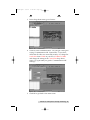
Press the big Global-Image button. In the panel that
appears at the bottom of the Disc Explorer enter the file
name that will contain the disc image (uses a .GI
extension). Then press Build.
Please note that this method of building a disc image
creates a saved file on your computer's hard drive. These
files can get huge - up to 650MB each. You may want to
create only a temporary image that is automatically deleted
after your copy job is done.
To do this instead, build your job image file using the Discto-Disc option from the main File: New Job drop-down
menu. Be sure to click the checkbox that reads Make a
Temporary Image on the Hard Disc and Copy From There.
The job will build automatically, make the number of
copies you've specified, and delete the disc image
afterwards.
5.
Wait until the image is completely built and then close the
Disc Explorer dialog.
6.
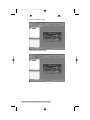
From the Menu bar, select File: New Job or New GlobalImage or Other Image Job. A Job Window will now open
in the right side of the application.
30 Running Your First Job
510140.qxd
9/4/02
9:45 PM
TOC
Page 31
INDEX
7.
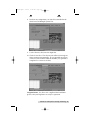
In the Image Job dialog box, enter the name of the .GI file
you just created into the Image field name. A drop-down
box will contain all the recent images you created and you
can easily select from this list if you choose.
8.
Also in the Image Job dialog box, check the box labeled
Print if you have a printer installed and wish to print a
print image onto each disc after it has been recorded.
There are two types of files supported: (1) .prn files you've
previously created using almost any Windows graphics
application, or (2) .pxf files that have been created with the
built-in Disc Face Editor software. Both graphics file types
and how to create them are explained in Section D.
NOTE: It is highly recommended that you use PRN files for
printing as opposed to PXF files. PXF files may not print
properly. PRN files are the recommended way for printing on
any operating system.
In the drop down box to the right of the Print checkbox,
you can select any recently used .pxf or .prn files. Or, click
the … box next to the print dialog box to browse for saved
.pxf or .prn files. Find the file you wish to print, highlight
it, and click Open. Or, double-click on it. The file appears
in the Image Job Window print dialog box with its path.
9.
In the Drive List, highlight the recorder icon. This is
where the software will send the job for recording. Right
click on the icon and select Select/Deselect as Recorder.
10. In the Image Job dialog box, set the number of copies, the
speed (if you select a speed that the recorder does not
support, it will default to the immediate lower one), and
the action you desire: Test, Test and Record, Record, Verify
and Record, etc.
11. Press the red Record button to start recording your copies.
12. If everything worked right, the Duplicator should now be
recording and printing your discs.
Running Your First Job 31
510140.qxd
9/4/02
9:45 PM
Page 32
TOC
INDEX
D. CREATING PRINT FILES
Two types of print files are supported in PrimoDVD Pro 2.0: (1)
.prn files and (2) .pxf files. Each are explained below.
1.
.PRN files. First and foremost a *.prn file is created by
printing, it is not saved in the conventional manner. The
*.prn has all of the driver properties built into the file at the
time of creation. Once this file is created it can not be
changed. Example: If a print file was created with the
cartridge type set to color, you can only print using color. If
you change to a monochrome cartridge the *.prn will not
work.
Print files can be created from any Window’s based graphics
application. Most applications have a check box in the print
window for printing to file. If this is the case run your print
to the printer to make sure that all settings are correct. Once
you are to the point of making the print file just select print
then in the print window select the Print to File checkbox. A
window will pop up prompting you for a file name and
location for the file to be saved in.
If your application does not have a print to file option then
you must change the printing mode under the printer
properties. Right click the printer icon from the printers
folder and select properties. Next if using Windows
95/98/ME select the details tab. Under the setting Print to
the Follwing Port change it from LPT1 to File (this is an
option just select the drop down arrow). If using Windows
NT/2000 select the ports tab and select the File option.
Which ever system you have any time you try to print using
that driver you will be prompted for a file name and
location. This will create a *.prn file.
Note: When creating print files make sure that the 32 Bit Spooler
and Direct to Port options under printer properties are not checked.
You will encounter problems if they are checked.
2.
.PXF files. These are created using the Prassi Disc Face
Editor software that is built-into the Prassi PrimoDVD
Pro 2.0.
To use Disc Face Editor, go to Tools, Disc Face Editor. The
program launches. Full instructions for its use are in the
Prassi User's Guide. Once you have created your image,
store it in a directory where you can later find it when you
need to call it from your Image Job window.
32 Running Your First Job
510140.qxd
9/4/02
9:45 PM
Page 33
TOC
INDEX
Section 4: Interpreting the Duplicator's
LED Status Lights
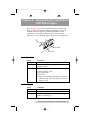
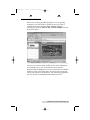
The LED Status Lights are located on the front Control Panel.
They can tell you a lot about what is happening at any given
moment with the Duplicator, including a number of error
conditions. To accurately interpret what is meant when the
lights are on, off, or flashing, please refer to the following chart:
Power LED
Pause LED
A. POWER LED
Status
Off
On Solid
Flashing
Condition
No Power. Plug in Power Adapter.
Power is ON. This is the Duplicator's normal
"waiting" mode.
Power is ON, but an error condition exists:
a. Didn't pick up a disc
b. Dropped a disc
c. Discs out
d. Robotic arm stalled; probably hit something
while moving. Press any button on Control
Panel to re-try.
B. PAUSE LED
Status
Off
On Solid
Flashing
Condition
Normal "waiting" mode
Duplicator is paused.
Duplicator is busy; i.e. motors are running,
printer is printing, etc.
Interpreting the Duplicator’s LED Status Lights 33
510140.qxd
9/4/02
9:45 PM
Page 34
TOC
Section 5:
INDEX
Maintenance and
Troubleshooting
The Duplicator is designed to operate for extended periods of
time with very little attention. In fact, no regular maintenance
is recommended other than cleaning the outside case.
NOTE: Do NOT attempt to oil or grease the Duplicator's Robotic Arm shaft
or other components. You will likely cause more harm than good!
Any moving parts are designed to be run for the life of the machine
with no additional lubrication required.
A. CLEANING THE CASE
Use a clean, white rag with a small amount of water or
isopropyl alcohol to clean the Duplicator and printer's outside
cases and CD trays. Stronger cleaning solutions are NOT
recommended because they may damage the paint and plastic
materials from which the parts are manufactured.
Always disconnect your Duplicator and printer's power cords
before cleaning. Resume operation only after the surfaces are
completely dry.
B. RESETTING THE DUPLICATOR
If you find yourself in a situation where the Duplicator is not
responding properly, you may need to do a system reset. A
typical cause may be when you stop a job out of sequence. To
do so, press the Pause and Pick buttons at the same time.
Do NOT be tempted to simply unplug the Duplicator's power
cord. This will shut down the Duplicator's internal SCSI CD-R
drive and force you to completely restart the PC to re-initialize
the drive.
C. SCSI POWER-DOWN PROCEDURE
As you may know, SCSI is a very finicky interface. You can not
simply unplug cables or power-down out of sequence since
drive locations will be lost, PCs can freeze-up, and other nasty
things can happen. To power down, always shut down your
PC first, then unplug the Duplicator.
Use the opposite procedure for power-up. Always start the
Duplicator first, then turn on your PC.
34 Maintenance and Troubleshooting
510140.qxd
9/4/02
9:45 PM
Page 35
TOC
INDEX
D. RECORDING ERRORS
If discs are not being recorded properly or are not passing
verification, you will want to consult the error log. This is
available in Prassi by clicking View, Activity Log then
selecting the option to Show at Top or Show at Right from the
drop-down menu.
This will show a history of tasks performed by Prassi. If there
are errors, you will see them in this list. For more information
on recording errors, you can consult the Prassi manual
included with the Duplicator. The most common error is Buffer
Underrun. This occurs when data can not be sent fast enough
to keep up with the recording drive. The following suggestions
are very useful in eliminating buffer underrun errors:
Maintenance and Troubleshooting 35
510140.qxd
9/4/02
9:45 PM
Page 36
TOC
a.
INDEX
Click Tools, Options and check the box labeled Enable
Burn Proof. This option enables the drive to slow down its
recording speed to match the data.
b. Click Robotics, Options and deselect Record and Print
Simultaneously. This will cause your jobs to take longer,
but will free more computer resources for recording.
c.
Examine the type of recording job you are attempting. If
you are attempting to record directly from a CD Reader to
the Duplicator, the reader or the bus inside your computer
may not be able to keep up with recording at 16x speed.
Try creating a global image (GI) of the disc as described
earlier in this manual and you will most likely have greater
success.
36 Maintenance and Troubleshooting
510140.qxd
9/4/02
9:45 PM
Page 37
TOC
INDEX
E. TECHNICAL SUPPORT
If you have difficulties in operating your Duplicator, the
procedures in this manual and the Prassi software User's Guide
should, in most cases, solve the problem. If you still have
difficulty, contact the technical support number listed on the
insert included in the supply pack that came with your
Duplicator.
Maintenance and Troubleshooting 37
510140.qxd
9/4/02
9:45 PM
Page 38
TOC
Section 6:
INDEX
Technical Specifications
Model
Optical Disc Duplicator
Configurations
CD-R System: One CD-R recorder, Prassi
PrimoCD Pro Software, Robotic Transport
Station
DVD-R System: One DVD-R recorder, Prassi
PrimoDVD and PrimoCD Software, Robotic
Transport Station
Print-Only System: (Printer Autoloader):
Robotic Transport Station only; controlled by
Ink-Jet CD Printer or Thermal CD Printer
Optional Printers
Ink-Jet CD Printer or Thermal CD Printer
Minimum System
Pentium® II/III Processor (or equivalent) at
450 Mhz or higher, 128MB RAM, available PCI
slot, SCSI controller card (Advansys
ASB3940UA or compatible), one free serial port,
one free parallel printer port
Disc Capacity
Optical Disc Duplicator
50 disc input, 50 disc output
Optical Disc Duplicator Plus
100 disc input, 100 disc output
Recordable Formats
CD-R: CD-Audio (CD-DA), CD-ROM,
CD-I, Video-CD, MP3 to CD-Audio
(on the fly, no hard drive overhead
required)
Pioneer AO3 General Purpose DVD-R:
DVD-R
Writes: DVD-R (4.7 General Only)
DVD-RW, CD-R, CD-RW
Reads: DVD-ROM DVD-R (all types),
DVD-RW, CD ROM, CD TEXT, Photo
CD, CD-DA, CD Extra
38 Technical Specifications
510140.qxd
9/4/02
9:45 PM
Page 39
TOC
INDEX
Operating Systems
Interface
Windows 98SE/XP/2000
Control: PC serial port
Printing: PC parallel port
Image data: IEEE1394 FireWire
(16x CD-R) SCSI
Power Requirement
100-240 VAC, 50/60 Hz, 60 watts
Weight
12.5 lbs. (5.67 kg)
Dimensions
16.625"W x 10"H x 10.125"D
(422mmW x 254mmH x 257mmD)
Certifications
Emissions: FCC Class B, CE
Safety: TUV-GS, cTUVus, CE
Warranty
One year return-to-depot
Index
Technical Specifications 39
510140.qxd
9/4/02
9:45 PM
Page 40
TOC
Index
Application Window.........................................................22, 27, 28
Audio Job, Running.......................................................................27
Bins
Input ..............................................................................6, 7, 8, 16
Output...........................................................................6, 7, 8, 16
Buttons
CD Tray .................................................................................7, 17
Pause..................................................................................7, 8, 29
Pick ......................................................................8, 17, 19, 20, 34
Sequence ...................................................................8, 17, 19, 20
Cables
6-Pin mini DIN...................................................................13, 15
Serial..................................................................................6, 9, 23
Connections, Rear Panel .................................................................9
Controls, Front Panel.......................................................................7
Disc Face Editor........................................................................31, 32
FireWire .......................................................................6, 9, 10, 11, 39
Hardware Test...........................................................................16, 20
Identifying the Parts........................................................................7
LED Status Lights ......................................................................7, 33
Locating Holes, Printer .................................................................14
Location..............................................................................................6
Maintenance....................................................................................34
Overview of Operation...................................................................2
Overview of Recording.................................................................28
Parallel Interface
Cable....................................................................................11, 15
ECP Mode.................................................................................15
Ports
COM1, COM2, COM3 ..................................................9, 12, 23
Control ..................................................................................9, 23
Printer Control...............................................................9, 13, 15
Power Input..........................................................................9, 12
40 Index
510140.qxd
9/4/02
9:45 PM
Page 41
TOC
PrimoCD Pro Software
Activity Log ........................................................................27, 28
Application Window.........................................................22, 28
Drive Status Window ..............................................................27
Job Status Window ............................................................27, 28
Job Set-Up Window...........................................................27, 28
Print Files
Creating .....................................................................................32
Types ..........................................................................................32
Printer Driver Software .........................................................20, 26
Printers
Ink-Jet..................................................................1, 4, 7, 9, 13, 38
Thermal...............................................................1, 4, 8, 9, 14, 38
PRN Files ..................................................................................31, 32
PXF Files ...................................................................................31, 32
Reject Area .............................................................................3, 8, 29
Resetting the Duplicator .............................................................34
Selecting Drive ...............................................................................21
Software
Installation ................................................................................20
Operating Screens....................................................................27
Testing........................................................................................22
Specifications .................................................................................38
Stands, Printer .........................................................9, 13, 14, 15, 19
System Requirements ..................................................................10
Technical Support .........................................................................37
Tray Support Bracket ......................................................................9
Troubleshooting ............................................................................34
Unpacking ........................................................................................6
Index 41
510140.qxd
9/4/02
9:45 PM
Page 42
510140.qxd
9/4/02
9:45 PM
Page 43
510140.qxd
9/4/02
9:45 PM
Page 44
Printed in the United States of America
P/N 510140