1
Appendix E
Removable Box Application Examples
3. Creating Screens for Each Station
Create screens for stations so that the station numbers and the screen numbers match.
Screen number
0
1
2
--8
Application
Initial screen (Displayed when NSH5 is started.)
Screen for Station 1
Screen for Station 2
--Screen for Station 8
4. Macro Settings
Use the following steps to change screens depending on value changes of the Station Status Monitor Address and notify the PLC of the station number.
(1) Select Project Properties from CX-Designer's PT Menu.
(2) Click the Macro Tab in the Project Property Dialog Box.
(3) Click the Set Button for the When a bit changed Option.
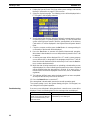
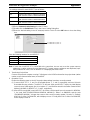
(4) Perform the following in the When a Bit Changed Dialog Box.
• Select the When a bit changed option.
• Enter $SB1 in the Address Field
• Select the Execute when ON Option in the Action Timing Area.
Select the option.
Enter $SB1.
Select the Execute when ON Option.
(5) Click the Edit Macro Button next to the When a bit changed Option.
(6) Enter the following macro and the click the OK Button.
Writes the station number to DM00200.
(Entered before SHOWPAGE.)
WRITECMEM([SERIALA:DM00200],$W1000,1 );
SHOWPAGE($W1000);
Opens the screen with the same number as
the station number.
(7) After all settings have been entered, click the OK Button in the Edit Macro Dialog Box, in the When a
Bit Changed Dialog Box, and in the Project Property Dialog Box to close them.
Note For detailed information on the macro function, refer to the NS Series Macro Reference.
(8) Select System Setting from the PT Menu.
(9) Click the Initial Tab in the System Setting Dialog Box.
90