1
8.1 Planning Search Patterns
Before missions are launched, the briefing officer provides pilots and
crewmembers with information designating the routes to and from the search
area, and the types of search patterns to be used upon entering the search area.
Mission observers, in their role as mission commander, should be able to plan
and perform each type of search pattern: besides becoming proficient as a
mission commander, this allows the observer to better assist the mission pilot and
help ensure the success of the mission.
The following descriptions are directed primarily toward a single aircraft
search, and will cover track line, parallel, creeping line, expanding square, sector
and contour search patterns.
The majority of CAP aircraft are Cessna 172s that only carry three
crewmembers, so we assume that the crew consists of a pilot, an observer in the
right front seat, and a single scanner in the rear seat. We assume that the
observer will be looking out the right side of the aircraft while the scanner covers
the left side; therefore the observer's primary duty during the search is to be a
scanner. If a larger aircraft is used there may be two scanners in the rear seat.
The observer (as mission commander) must be aware of how many scanners
will be on board in order to assign which side of the aircraft they should scan.
Planning and executing a search pattern with only one scanner on board is quite
different from one where you have two scanners. Likewise, having an observer
and two scanners on board will allow the observer to spend more time assisting
the pilot without seriously decreasing search effectiveness.
When you are planning and flying search patterns, always perform a stupid
check -- as in "Hey! Wait a minute. This is stupid." Use this to see if your
headings, waypoint positions, lat/long coordinates and distances look sensible. At
a minimum, perform this check after you finish planning, when you start your
pattern, and periodically thereafter. For example, you've just entered a set of
lat/long coordinates into the GPS and turned to the heading shown on the GPS.
You know the coordinates represent a lake southwest of your position, so check
the heading indicator to see you're actually traveling in a southwesterly direction.
Or, you know the lake is approximately 25 nm away; check the distance indicated
on the GPS! You'd be surprised how many mistakes this method will catch.
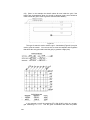
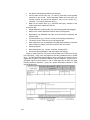
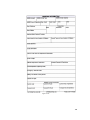
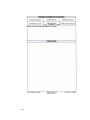
In the following discussions of the parallel line, creeping line and expanding
square search patterns, examples (worksheets) are given to aid in pre-planning
each pattern. The examples are designed for aircraft using the older (non-moving
map) GPS units, but the information you will need to set up the search pattern in
the GX50/55 is included on the worksheets. Note: The Garmin G1000 requires
specialized training and is not cover here; refer to the NESA MAS Cessna NavIII
G1000 Search Pattern Procedures manual (provided separately).
In both cases (old versus new GPS), pre-planning (plotting) your search
pattern results in the most effective search. Pre-planning sets the details of the
sortie in your mind and makes entering your data (correctly) into the GPS much
easier. This allows the pilot and observer to concentrate on their primary task by
minimizing navaid setup time and reducing confusion. The worksheets used in
our examples (and included in the Flight Guide, Attachment 2) are just one
method you can use to pre-plan your search patterns.
138