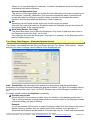
1
Using your Payroll and Payroll Tutorial Revision date: May 2014 Copyright © 2014 SmoothPay Limited, PO Box 20019, Palmerston North 4448, New Zealand Phone: +64 6 3536462 Fax: +64 6 3536717 Email: [email protected] web: http://www.smoothpay.co.nz Page 1 of 48 Warranty, Limitation of Liability and Copyright Performance Warranty SmoothPay ("Program") is warranted to be free of material errors and will perform as documented provided the Program is up to date at the latest release level and the computer equipment is correctly configured. Any confirmed programming error will be corrected at no charge to the user provided they have a registered copy of the Software and have complied with the conditions of their registration (refer SUPPORT-page 6). The documentation is intended as a guide only. The Software it accompanies is produced on the understanding that data will be checked by the user and proper manual audit checks will be undertaken on a regular basis. SmoothPay Ltd makes no other warranties, either expressed or implied, as to the quality, performance or merchantability of the Program, nor to the fitness for any particular purpose or particular results obtained through using this Program. Limitation of Liability SmoothPay Ltd will not be liable for any direct, incidental, or consequential damages resulting from the use of the Program, even if a defect or error exists in the Program. Copyright Notice SmoothPay Ltd owns the enclosed Program. The Program and any documentation are copyright, and may not be copied except for back-up security purposes. SmoothPay Ltd grants you a non-exclusive licence to use the enclosed program subject to these terms and conditions: You may use one copy of the Program at any one instant. You may not sell or transfer the licence granted with your copy to any other person. You may freely give a copy of this Program to any other person for evaluation purposes. © Copyright 1995 - 2014 SMOOTHPAY LIMITED All rights reserved Copyright © 2014 SmoothPay Limited, PO Box 20019, Palmerston North 4448, New Zealand Phone: +64 6 3536462 Fax: +64 6 3536717 Email: [email protected] web: http://www.smoothpay.co.nz Page 2 of 48 Contents and.....................................................................................................................................................................1 WARRANTY, LIMITATION OF LIABILITY AND COPYRIGHT......................................................2 Performance Warranty........................................................................................................................................... 2 Limitation of Liability............................................................................................................................................. 2 Copyright Notice.................................................................................................................................................... 2 SMOOTHPAY - PAYROLL FOR WINDOWS..................................................................................6 Training................................................................................................................................................................... 6 Support.................................................................................................................................................................... 6 Upgrades................................................................................................................................................................. 7 Requests for Change............................................................................................................................................. 7 Custom Software Development............................................................................................................................ 7 Registration............................................................................................................................................................ 7 To Register.............................................................................................................................................................. 8 About SmoothPay Ltd............................................................................................................................................ 8 YOUR INITIAL QUESTIONS ANSWERED.....................................................................................9 How much............................................................................................................................................................... 9 Is the Source Code available................................................................................................................................. 9 How does SmoothPay integrate with my existing Systems...............................................................................9 Is SmoothPay Multi-User....................................................................................................................................... 9 Security?................................................................................................................................................................. 9 Will SmoothPay be kept up to date....................................................................................................................... 9 INSTALLATION..............................................................................................................................10 Hardware Requirements...................................................................................................................................... 10 Installation Procedure.......................................................................................................................................... 10 USING SMOOTHPAY....................................................................................................................11 The Tab Key and Esc Keys.................................................................................................................................. 11 Function Keys....................................................................................................................................................... 11 Popup Arrows ...................................................................................................................................................... 11 Icons...................................................................................................................................................................... 11 The Control Centre............................................................................................................................................... 11 Maintenance Screens........................................................................................................................................... 11 CONTROL CENTRE......................................................................................................................12 Overview............................................................................................................................................................... 12 Employee List....................................................................................................................................................... 12 Functions.............................................................................................................................................................. 13 Report List............................................................................................................................................................ 13 GETTING STARTED......................................................................................................................14 Use the following procedure to Download SmoothPay....................................................................................14 THE PAYROLL PROCESS............................................................................................................15 Use the following procedure every time you start processing a new pay period..........................................15 WALK THROUGH PAYROLL SETUP TUTORIAL.......................................................................16 COMPANY SETUP.........................................................................................................................16 Overview............................................................................................................................................................... 16 Procedure.............................................................................................................................................................. 16 Points to Note....................................................................................................................................................... 16 ACC Classification............................................................................................................................................... 16 Direct Credit Facility............................................................................................................................................ 16 Time Clock Facility............................................................................................................................................... 17 Ledger Setup........................................................................................................................................................ 17 Payslip Type......................................................................................................................................................... 17 Pay Period and Pay Day Dates............................................................................................................................ 17 Registration.......................................................................................................................................................... 17 Copyright © 2014 SmoothPay Limited, PO Box 20019, Palmerston North 4448, New Zealand Phone: +64 6 3536462 Fax: +64 6 3536717 Email: [email protected] web: http://www.smoothpay.co.nz Page 3 of 48 Security................................................................................................................................................................. 17 EMPLOYEE SETUP.......................................................................................................................18 Overview............................................................................................................................................................... 18 Procedure.............................................................................................................................................................. 18 Points to Note....................................................................................................................................................... 18 Terminating Employees....................................................................................................................................... 18 Un-terminating Employees.................................................................................................................................. 18 Employment Type................................................................................................................................................ 19 Method of Payment.............................................................................................................................................. 19 Notes Field............................................................................................................................................................ 19 Holiday Setup....................................................................................................................................................... 19 Sick Leave Setup.................................................................................................................................................. 20 Apprenticeship Setup.......................................................................................................................................... 20 KiwiSaver Setup................................................................................................................................................... 21 PAYROLL CODES.........................................................................................................................22 Overview............................................................................................................................................................... 22 Procedure.............................................................................................................................................................. 22 Points to Note....................................................................................................................................................... 22 Allowance Maintenance....................................................................................................................................... 22 Deduction Maintenance....................................................................................................................................... 22 Employee Bank Account Maintenance............................................................................................................... 23 Account Code Maintenance................................................................................................................................ 23 Job/Activity Code Maintenance.......................................................................................................................... 23 Special Leave Codes............................................................................................................................................ 23 Reminders............................................................................................................................................................. 23 Group Schemes.................................................................................................................................................... 24 GST Rates............................................................................................................................................................. 24 PAY INPUT.....................................................................................................................................25 Overview............................................................................................................................................................... 25 Procedure.............................................................................................................................................................. 25 Points to Note....................................................................................................................................................... 26 Pay Input Screen Functions................................................................................................................................ 26 Tax, Salary, Child Support... (Extended Options Screen).................................................................................28 Mixed Pay Cycles................................................................................................................................................. 30 WIZARDS QUICK PAYS................................................................................................................31 Overview............................................................................................................................................................... 31 Procedure.............................................................................................................................................................. 31 WIZARDS MAKE TIMESHEET FILE/TIMESHEET IMPORT........................................................32 Overview............................................................................................................................................................... 32 Procedure.............................................................................................................................................................. 32 Make Timesheet File............................................................................................................................................ 32 Timesheet Import................................................................................................................................................. 32 WIZARDS TIMECLOCK IMPORT.................................................................................................32 Overview............................................................................................................................................................... 32 Procedure.............................................................................................................................................................. 32 Points to Note....................................................................................................................................................... 33 WIZARDS FEEDBACK..................................................................................................................33 Overview............................................................................................................................................................... 33 Procedure.............................................................................................................................................................. 33 WIZARDS TOOLBOX....................................................................................................................33 Reverse or Reprocess a Pay............................................................................................................................... 34 To reverse a payroll batch................................................................................................................................... 34 Other Toolbox Options........................................................................................................................................ 34 STANDARD REPORTS.................................................................................................................35 Overview............................................................................................................................................................... 35 Copyright © 2014 SmoothPay Limited, PO Box 20019, Palmerston North 4448, New Zealand Phone: +64 6 3536462 Fax: +64 6 3536717 Email: [email protected] web: http://www.smoothpay.co.nz Page 4 of 48 Procedure.............................................................................................................................................................. 35 Points to Note....................................................................................................................................................... 35 BACKUP ........................................................................................................................................36 Overview............................................................................................................................................................... 36 Procedure.............................................................................................................................................................. 36 Points to Note....................................................................................................................................................... 36 RESTORE DATA FILES SCREEN................................................................................................37 Overview............................................................................................................................................................... 37 Procedure.............................................................................................................................................................. 37 REBUILD FILES.............................................................................................................................38 Overview............................................................................................................................................................... 38 FINISH THIS PAY...........................................................................................................................39 Overview............................................................................................................................................................... 39 Procedure.............................................................................................................................................................. 39 Points to Note....................................................................................................................................................... 40 Next Pay Period Ending....................................................................................................................................... 40 Next Pay Day......................................................................................................................................................... 40 Automatic Production of IR345 and IR348/349.................................................................................................. 40 CREATE PDF DOCUMENTS FROM ANY REPORT (& OPTIONALLY EMAIL).........................41 Overview............................................................................................................................................................... 41 How do I create a PDF Report and email it?...................................................................................................... 41 Aggregate Standard Reports to PDF (& optionally Email)................................................................................43 How do I aggregate my Standard Reports and send them to someone else for printing and/or checking? ............................................................................................................................................................................... 43 EMAIL SETUP................................................................................................................................45 Procedure.............................................................................................................................................................. 45 Troubleshooting Email from SmoothPay........................................................................................................... 45 UPDATING YOUR COPY OF SMOOTHPAY................................................................................46 Via Internet Connection....................................................................................................................................... 46 No Internet Connection........................................................................................................................................ 46 NOTES AND COMMENTS.............................................................................................................47 Copyright © 2014 SmoothPay Limited, PO Box 20019, Palmerston North 4448, New Zealand Phone: +64 6 3536462 Fax: +64 6 3536717 Email: [email protected] web: http://www.smoothpay.co.nz Page 5 of 48 SmoothPay - Payroll for Windows Welcome to SmoothPay! SmoothPay Payroll has been developed to integrate with modern business systems, including electronic banking and a selection of popular cash management systems. It provides a comprehensive array of features and unsurpassed ease of use. A few of the many features are: Unlimited account and job enterprise analysis (including prorated Allowances) Link to General Ledger (supports MYOB, Profax, Pastel, NZHO, Concept, CBA and others) Multiple Employee Bank Accounts Multiple Time Type entries Multiple Allowances and Deductions, (all of which can be added on the fly) Production of electronic banking system files (direct credit schedules) Holidays Act compliant IR345, IRD approved IR348 Employer Schedules, IR68 reports, IRD ir-file Additional Companies may be added (refer Company Setup...Registration), bureau licence available Reports and payslips can be produced as PDF and emailed direct from SmoothPay The Software is ready to use, with full Online Help and Tool Tips prompts, selected Allowance and Deduction Codes, and support for all current Tax Codes. Every input field has a help prompt line at the bottom of the Screen so you know what to enter without constant reference to the manual or Online Help. The Online Help can be accessed by pressing the F1 function key anywhere in the Program, and provides extensive reference material and detailed assistance for every aspect of SmoothPay. You can use the built in sample system to try things out or to train new staff. Training The SmoothPay website gives you access to multimedia training, as well as complete documentation. For those who prefer a "live" training experience, call us. Support We will provide you with free telephone and online support (your call, our time) during the first twelve months of registration of SmoothPay. Your annual subscription covers ongoing helpdesk assistance and updates. Support is only provided to Registered Users for Software at the latest release level. Copyright © 2014 SmoothPay Limited, PO Box 20019, Palmerston North 4448, New Zealand Phone: +64 6 3536462 Fax: +64 6 3536717 Email: [email protected] web: http://www.smoothpay.co.nz Page 6 of 48 Upgrades Registered users receive free upgrades, including tax table changes, within the first 12 months of registration. Major Upgrades (new feature sets and legislative changes) are normally issued once or twice each year to cover enhancements and tax changes, and minor Updates requiring the release of new Software builds may be released monthly. All Updates are available directly from our website (you can click the "Planet" in the SmoothPay Control Centre toolbar to go straight there). On the anniversary of your purchase, an annual subscription is payable. This covers the ongoing costs of developing and maintaining the Software, providing updates, HelpDesk support services and all the facilities available from our website. Requests for Change These can be discussed directly with SmoothPay and should be followed up with a written specification of the change/s requested on the provided Feedback form (refer to the Wizards...Feedback topic). If the change is considered to be useful to the majority of Users, the change will be scheduled for release as part of the next Software release. Otherwise, the request, if accepted, will be produced on a contract basis. Requests for change are only accepted from Registered Users. Registration After 5 FREE pay periods you will need to register your copy of the Software to be able to continue processing. Note: On registering, all data previously entered is retained. Registration of SmoothPay entitles you to receive the following personel benefits: Telephone support, (your call, our time), during the first 12 months. Upgrades and tax table changes for the first 12 months of registration Automatic issue of Software enhancements and tax/legislative updates The Software can only be registered by SmoothPay so that an up to date central registry of Users is maintained. To Register Activation details will be emailed to you once payment for SmoothPay is made and company information is sent. Copyright © 2014 SmoothPay Limited, PO Box 20019, Palmerston North 4448, New Zealand Phone: +64 6 3536462 Fax: +64 6 3536717 Email: [email protected] web: http://www.smoothpay.co.nz Page 7 of 48 About SmoothPay Ltd SmoothPay Ltd is a private software development company that specialises in payroll software development and support. The principal and systems analyst/programmer is Matthew Gardner, who has been engaged in commercial Software development of financial and payroll systems, local authority systems, medical database conversions as well as systems implementation and for over 20 years. SmoothPay can be contacted as follows: Telephone 06-353 6462 Fax 06-353 6717 Email [email protected] Website http://www.smoothpay.co.nz Postal Address PO Box 20019, Palmerston North 4448, NEW ZEALAND Please refer to support terms and conditions. Copyright © 2014 SmoothPay Limited, PO Box 20019, Palmerston North 4448, New Zealand Phone: +64 6 3536462 Fax: +64 6 3536717 Email: [email protected] web: http://www.smoothpay.co.nz Page 8 of 48 Your Initial Questions Answered How much? Please refer to a current pricelist or contact our HelpDesk for the latest prices. The prices are also contained within the program and are shown on the Registration Request Form and website. An annual maintenance charge is charged on each anniversary of registration/purchase. This covers all upgrades, phone support and media charges, and includes all user driven improvements and modifications. Note: The above prices are subject to change without notice. We guarantee that SmoothPay is 100% error free (as long as the errors are within our control and not caused by the host of configuration settings and setup of your machine). Any program errors reported will be fixed at no cost to you. How does SmoothPay integrate with my existing Systems? SmoothPay is completely self contained as far as the processing of payroll information is concerned, but it can produce costing and banking files, named by you in the Company Setup Screen. These files are created for the purpose of transferring information to your direct banking system and to your financial systems. These standard file formats can be modified to suit specific system requirements, and can even be directly integrated with some systems. SmoothPay will happily negotiate the writing of programs required to integrate SmoothPay to your system. Is SmoothPay a Multi-User? Yes! SmoothPay is network compatible and Employee Setup and Time Input may be accessed by multi users, though not for the same Employee at the same time. Backup, Restore and Finish this Pay routines can only be accessed if no other Users are currently accessing the files. You can run it from a remote location (Network Drive) and utilise local or network printers. A free Multi User Network Client is available from our website. Security? The Software should be installed on the local hard disk of your PC to prevent unauthorised access by other Users attached to your Network, or it should be placed in a secure directory on your Network Drive. Note: Registered copies of the Software allow for each Company to be password protected. Will SmoothPay be kept up to date? Yes! Should regulatory or User specific changes be required to the Software or its operation, these changes will be made and released to Users at reasonable cost or included as part of your annual subscription. Copyright © 2014 SmoothPay Limited, PO Box 20019, Palmerston North 4448, New Zealand Phone: +64 6 3536462 Fax: +64 6 3536717 Email: [email protected] web: http://www.smoothpay.co.nz Page 9 of 48 Installation Hardware Requirements SmoothPay will run on virtually any PC purchased in the last few years. Make sure it meets the following minimum specifications: Microsoft Windows XP or later 100MB free disk space A minimum of 512MB of RAM A mouse. A printer, laser or inkjet recommended. Installation Procedure 1. Download the latest version from our website at www.smoothpay.co.nz. • The installation should start automatically. 2. After a few moments the SmoothPay Installation dialogue appears. Install In: • By default, the installation program installs the SmoothPay files into a folder available to each User of the computer. • If you wish to install SmoothPay in a different Drive or Directory, change the information displayed to suit. 3. Click the Install button or press Enter. • Over the next few minutes the program files are installed. 4. Start SmoothPay by clicking (or double-clicking) the SmoothPay Icon created on your Desktop by the installation process. Copyright © 2014 SmoothPay Limited, PO Box 20019, Palmerston North 4448, New Zealand Phone: +64 6 3536462 Fax: +64 6 3536717 Email: [email protected] web: http://www.smoothpay.co.nz Page 10 of 48 Using SmoothPay The Tab Key and Esc Keys Use the Tab key to move to the next between fields and to access the various lists that are built into the program. Use Shift + Tab to move to the previous field. The Tab key is the most used key in SmoothPay, though you may also use the mouse to move around, select data etc. The Escape (Esc) key quickly closes a window. Function Keys The function key F1 can be used throughout the Program to access the Online Help. Other function keys are also used throughout the system for various functions. e.g. Function keys F5, F6, F7 and F8 may be used in the Pay Input Screen to access the various Input Detail Screens. Popup Arrows Clicking on the small arrow displays a list of permitted entries in a field. You can also use the up and down cursor keys to change the field contents to the next/previous value, or you can use the first letter of an option in the list to set the field value. Try it out! Icons Click on an Icon to perform the associated task or function, such as view a Report, or Exit a window. The Control Centre When SmoothPay starts, the program Control Centre is displayed which lists Employees, payroll function buttons, Reports and provides Company selection. If the security feature has been enabled, you will need to enter the password before being granted access to SmoothPay. See the "Control Centre" topic for details about the contents and facilities offered by the Control Centre. Maintenance Screens SmoothPay provides a series of maintenance Screens so that Records can be modified, added, deleted (where permitted). Unless the maintenance Screen specifically provides a Save/Cancel button pair, all input changes the current record immediately. If you wish to add a new record, choose the Insert or New button BEFORE you begin changing the record contents (otherwise you will be changing the record currently displayed). Note: We have assumed that you are familiar with your computer and its operation. We have not included Windows operating instructions as these are documented in your Windows User Manual. Copyright © 2014 SmoothPay Limited, PO Box 20019, Palmerston North 4448, New Zealand Phone: +64 6 3536462 Fax: +64 6 3536717 Email: [email protected] web: http://www.smoothpay.co.nz Page 11 of 48 Control Centre Overview The Control Centre provides access to Employees, Reports and each of the various functions provided by SmoothPay to complete payroll processing. As well, this Screen lets you select which Company (or Employer) you wish to process, and accesses the Company Setup for the currently selected Company. Note: An unregistered copy does not permit you to change security settings or PAYE tax tables and you will not receive automatic upgrades and new release information. You will also be nagged occasionally by SmoothPay to Register. • Whenever you start SmoothPay the Control Centre will be displayed. The Screen is laid out in three general areas: Employee List This list lets you pick an individual Employee for maintenance editing, or Pay Input. Highlight the required Employee and then choose Edit Employee or Pay Input. Alternatively you can double click the Employee’s name to enter Pay Input for that Employee, or right click on the name to bring up a context Menu containing many commonly used functions including Pay Input and some Employee options. Copyright © 2014 SmoothPay Limited, PO Box 20019, Palmerston North 4448, New Zealand Phone: +64 6 3536462 Fax: +64 6 3536717 Email: [email protected] web: http://www.smoothpay.co.nz Page 12 of 48 Note: You can specify that all, or only active Employees appear in the Employee List by checking the option at the top of the Employee list (Show Terminated). Function List This section of the Control Centre Screen accesses the various Screens that provide SmoothPay with its functionality. More information on these individual Screens can be found in the subsequent topics in this Manual or the Online Help (F1). The buttons are arranged in the general order they would be used in the payroll process, and are reflected by the general order of the toolbar buttons appearing at the top of the Control Centre Screen. Report List This list contains all defined Reports. The most used Reports are listed at the top. A full description of what each Report is about can be displayed/printed by selecting the Reports Guide under Miscellaneous. Select the Report Group (click the "+" symbol to display a list of Reports under the Group) Select the Report you wish to produce. Depending on the Report selected, you may need to enter additional information or select various options before the Report is produced. You may then choose how you want the Report produced: Preview Displays the selected Report in preview and/or full Screen modes. Print Prints the selected Report. You will be presented with a print dialogue before printing starts so that you can select different printer settings, or page ranges, as required. Print + Exit If enabled through Company Setup...Options, this button replaces the Print button on the Print Menu. The Print + Exit button prints your Report and automatically exits from the Print Menu. Browse Displays the Report data in a tabular (spreadsheet) format where you can literally browse through the data, search for items of interest etc. You cannot change items in the Report using this option. Export Lets you to export the Report Data to various other file formats, including PDF, Word DOC, Excel XLS, HTML, XML, TXT and other formats. You can also email the exported Report to any recipient. More detailed and up to date reference information is provided in the Online Help provided with SmoothPay. Just press the F1 function key anywhere in the program to access Online Help. Copyright © 2014 SmoothPay Limited, PO Box 20019, Palmerston North 4448, New Zealand Phone: +64 6 3536462 Fax: +64 6 3536717 Email: [email protected] web: http://www.smoothpay.co.nz Page 13 of 48 Getting Started To get the most out of your introduction to SmoothPay, please read the following notes and follow these brief instructions. They are the basic steps required to set up your Payroll. Specific information on the Screens and the different options can be found in the subsequent topics. Note: More detailed and up to date reference material is also available by using the Online Help, available at any time while using the program by pressing the F1 function key. Use the following procedure to Download SmoothPay 1 Download the appropriate Software from our website, follow the instructions on the Download Page. 2 Start the Program. An Icon will have been created on your Desktop and in the Programs group in your Windows Start Menu. 3 Experiment with the System in the Sample Company (Test and Training Data). Check out the Company Setup, Employee Setup etc to get a feel for the way things work. Run a few Reports if you want to, or even run the full payroll process. 4 You are now ready to set up your Company payroll. Select Your Company. 5 Select Company Setup. You need to enter your Company details, and any other options you require, such as whether you need the Electronic Bank file and General Ledger link. Make sure you set the correct period ending and pay day. Now is a good time to print the Registration Form. You can also set up your email settings so SmoothPay can email Reports, Backup data and Error Messages if required (refer Email Setup chapter). When you have completed setting up your Company details, choose Save to keep your changes. 6 Select Edit Employee. If no Employees exist, one will be created automatically, otherwise select New Employee to create a new Employee record. The New Employee Setup Wizard will display prompting you to enter the basic Employee information required to begin pay processing. If you wish to, you can then fill in the rest of the new Employee's details and Holiday entitlement etc (a Leave Application Form is available from our website to assist you to setup leave correctly). Note: Wage/Salary amounts, Allowances and Deductions are entered during Pay Input (page 18). 7 When all Employees have been added to the system (and set up correctly), you can process your first live pay. Tip: If you are starting part way through the year, you can easily capture your Employee’s opening financial totals using the Employee...Opening Totals ($) Screen. Any leave remaining should be entered in the Employee’s Leave Setup Screens first. 8 Once any catch up processing is complete, you should enter details of a Standard Pay for each Employee, including any standard Allowances, Deductions, Bank Accounts or extended options (refer Pay Input topic) and save this as the Standard Pay. In this way you will have a base Payslip for each Employee to work from for each new pay period. Copyright © 2014 SmoothPay Limited, PO Box 20019, Palmerston North 4448, New Zealand Phone: +64 6 3536462 Fax: +64 6 3536717 Email: [email protected] web: http://www.smoothpay.co.nz Page 14 of 48 The Payroll Process Use the following 5 Step procedure every time you start processing a new pay period. The following process outlines the basic steps required to correctly process your payroll. This process is more fully explained in the following tutorial topics or by pressing the F1 function key within the program for Online Help. 1 Add/change any Employee (Edit Employee) or Company Setup information. 2 Select the Employee you wish to pay from the Employee List and select Pay Input. If this is the first time you have selected Pay Input for this Employee for this pay period, SmoothPay will automatically extract any previously saved default pay (or last pay if no default saved). Otherwise, the entries you have already made will be displayed. The Pay Input Screen resembles a Payslip and is divided into 5 distinct areas, one each for Time & Earnings, Allowances, Deductions, Net Pay and "Tax, Salary, Child support…" (extended settings and options). Each can be accessed by the indicated function key, or by clicking on the required section with the mouse. Entry is straightforward and selfexplanatory, though if you need more information you can press F1 at any time for Online Help. New Allowance, Deduction and Net Pay Bank Account Codes can be selected from existing entries, or added on the fly, just by typing in an abbreviated reference. The system is supplied with a basic set of Allowance and Deduction Codes. 3 When you have completed entries for all Employees to be paid, select Standard Reports to produce the various Audit Trails and Summary Reports for this pay period. Check them, and make any amendments if necessary to the Employees’ Pay Input. Run the Reports again. Repeat until everything is correct. 4 BACKUP YOUR DATA NOW! Choose Backup. Your data files will be zipped up into an internal backup, a USB Data Stick and/or you can access our free internet backup service (FTP) to SmoothPay's offsite storage, if your system allows. This way if any problems occur with the Finish this Pay process, or you spot an error after the payroll has been completed, you will be able to Restore your files to this point so that any corrections can be made and the process repeated. Note: Backup and Restore process data is for the currently selected Company only. 5 Select Finish this Pay. You will be reminded about doing a Backup, and printing and checking the Standard Reports. If you firmly believe that everything is okay, check (and correct if need) the next pay period ending and pay day dates then select Run, otherwise Exit and repair any errors. That's it! SmoothPay is now ready for the next pay period. Copyright © 2014 SmoothPay Limited, PO Box 20019, Palmerston North 4448, New Zealand Phone: +64 6 3536462 Fax: +64 6 3536717 Email: [email protected] web: http://www.smoothpay.co.nz Page 15 of 48 Walk through Payroll Setup Tutorial The following topics will cover the procedure necessary to setup your payroll and process a pay. More detailed information regarding specific functions or fields can be found by pressing F1 at anytime within SmoothPay to access Online Help. Company Setup Overview The Company Setup Screen is accessed from the Control Centre by selecting the required Company and clicking Company Setup. The Setup Screen provides SmoothPay with detailed information about your Company and sets options that affect payroll processing. You need to complete the Company Setup Screen to register your copy of SmoothPay. Note: An unregistered copy means you will not receive automatic upgrades and new release information. You will also be nagged occasionally by the program to register. However, during your evaluation period you are more than welcome to contact the HelpDesk for assistance. Procedure Fill in all the Screen details and select the options you want. Once completed click on Save to save the current settings. To move between fields use the TAB key. To select an check-box option, click on it so that a tick appears in the box (or press the space-bar). Note: To assist you when you are in a Field, a help prompt appears if you hover the mouse pointer over the field giving a brief description of what is required. For more details about the operation you might be performing, press F1 for Online Help. Points to Note Direct Credit Facility SmoothPay provides the facility to generate direct credit files, which can be used by most major electronic banking systems. If you use a direct credit (MTS) facility, tick the box provided in Company Setup...Bank. Enter: • the Company Bank Account number from which payments will be made; • the type of electronic banking package you have; • the particulars to appear on Company’s bank statement; • and the name of the file to be created when each pay is finished. This file will contain the direct credit entries for all Employees paid by Direct Credit. Guides for each Banking package are available from our website. Time Clock Facility If the Time Clock facility is to be used, set the Time clock type and default import name. Use the Wizard/Time clock utility to process the time import file. Your Time clock system will need to have the correct Employee Identification Numbers setup so that the imported data can be matched against Employees in the payroll. Run the Employee Summary Listing to get this information. Guides for each Time Clock option are available from our website. Copyright © 2014 SmoothPay Limited, PO Box 20019, Palmerston North 4448, New Zealand Phone: +64 6 3536462 Fax: +64 6 3536717 Email: [email protected] web: http://www.smoothpay.co.nz Page 16 of 48 Ledger Setup To use the General Ledger interface functions, including account codes and job codes entry, you need to have the Analyse Earnings by Account and/or Link to General Ledger box ticked in the Ledger Setup Screen. Refer to Online Help for specific information on how to complete the Ledger Setup Screen. Guides relating to specific accounting systems integration are available from our website. Payslip Type There are various Payslip styles that may be selected: • Standard A4 Portrait is the basic Payslip and is the format used by the Print this Payslip button in the Pay Input Screen. • More Detail A4 Portrait prints Allowance and Deduction entries in more detail. It includes the standard Payslip summary at the top. • 2 per page A4 Landscape (A5 size) is like the More Detail format, except it prints two Payslips side by side in Landscape mode, without the standard Payslip summary. This requires an inkjet/laser printer to work properly as the font sizes are quite small. • Rediform R900/COM Security Payslip is a laser or inkjet secure Payslip. • Lineflow PSL1 is a dot matrix secure Payslip (available from Payroll Systems Ltd phone: 03 3811635). Pay Period and Pay Day Dates • • • Pay Period indicates the date that the current Pay Period ends. Pay Day indicates the date the current pay is to be paid into accounts and is the date used for tax period purposes. Current tax year indicates which tax year the current Pay Day applies to. Note: The 1 April to 31 March tax years are STRICTLY adhered to - you cannot apply a Payday (say the 2nd of April) to the previous tax year. Security Once (and if) set, the Password will be required every time you start SmoothPay, or whenever you attempt to access the Password Setup Screen. Copyright © 2014 SmoothPay Limited, PO Box 20019, Palmerston North 4448, New Zealand Phone: +64 6 3536462 Fax: +64 6 3536717 Email: [email protected] web: http://www.smoothpay.co.nz Page 17 of 48 Employee Setup Overview The Employee Setup Screen is accessed from the Control Centre by clicking on the Edit Employee function button. The setup Screen allows you to set up each Employee’s work details, including IRD number, Tax Code, ACC classification (if different from Company classification), Holiday and Sick leave entitlements, for correct processing of tax and pay. Procedure To initially set up your Employees, from the Control Centre select Edit Employee. If you have already set up your Employees and wish to modify them, highlight the Employee you wish to modify from the list before selecting Edit Employee. Fill in all the Screen details and select the options you want. To move between fields use the TAB key. To select a check-box option, click on it so that a tick appears in the box . Click on Holiday setup, complete Screen details, click on OK. Click on Sick Leave, complete Screen details, click on OK. If the Employee started prior to implementing SmoothPay, capture their opening financial totals in the Opening Totals ($) Screen. Note: The entries required are determined by the current Company Pay Period ending date, the Employee’s pay cycle, their annual leave anniversary date and their pay cycle - if these are not right, then you’ll not be asked the correct questions. If you have another Employee to setup, save the current Employee, then click on New before you change any details (otherwise you’ll be changing the details of the current Employee). When selecting New you will get the option to base the new Employee on the currently displayed Employee. If you have selected a similar Employee before selecting New this can save you setup time. Once completed click on Save on the Employee Detail Screen to save the current settings. Note: SmoothPay provides import facilities from numerous other payroll systems, saving considerable time in transferring data. A charge may apply for this service, though many importers are already built-in. Points to Note Terminating Employees Employees should be terminated by using the "Final Pay Assistant" option during Pay Input. This is the preferred method, as it properly calculates their final leave entitlements. Casual staff will merely be flagged for termination using this process. Note: You can also terminate staff by ticking their "Terminated" checkbox after you have completed the Final Pay for the Employee. Depending on the option you chose in the Company Setup Screen or Control Centre, Employee's name will/won’t show in the Employee List once terminated. Un-terminating Employees Employees can be "Un-Terminated" by un-ticking their "Terminated" checkbox. If they have not yet been reported to the IRD as having terminated (on the IR348) their original Employee record will be utilised, though the leave balances may need to be reinstated. Copyright © 2014 SmoothPay Limited, PO Box 20019, Palmerston North 4448, New Zealand Phone: +64 6 3536462 Fax: +64 6 3536717 Email: [email protected] web: http://www.smoothpay.co.nz Page 18 of 48 Employment Type Full Time - Usual employment type. Annual Leave normally accumulates on an annual weeks basis. Part Time - An Employee who works for you regularly, although hours may vary ie. employed on a permanent basis. Annual Leave should be accumulated on an annual weeks basis. Casual - An Employee who works irregular hours at irregular intervals. Entitled to receive Annual Leave as an automatic (and separate) entitlement with each Pay - SmoothPay does this for you, and also provides for payment of an "inclusive pay rate" where the Annual Leave component is still identified separately according to current legislative rules. This type of Employee typically does not receive Sick Leave, Alternative Leave or Public Holiday pay, however they are entitled to be paid at Overtime/Penal rates for working on a Public Holiday. Method of Payment Cash will produce a payment schedule with net pay amounts to be paid. Net pay is automatically rounded to 10 cents if necessary (rounding adjustment is carried forward to their next pay and recalculated). The same applies if you select rounding net pay to whole dollar (tax amount will also be adjusted). Cheque will produce a cheque schedule with net pay amounts to be paid. Bank will produce an MTS schedule for direct credit payments. For this to work successfully you will have to have completed the direct credit (MTS) section of Company Setup...Bank, and setup Bank Account Codes for each Employee to be paid by Direct Credit. Refer Pay Input topic. Notes Field This section of the Employee Setup Screen provides room for Notes about the currently selected Employee. These may include employment history, qualifications, endorsements, certificates, emergency contact details etc. Holiday Setup This section of the Edit Employee Setup Screen contains the Annual Leave allocation rules and current leave entitlement owing for the currently selected Employee. Annual leave may be shown in weeks, days or hours (weeks is recommended, except for Casual staff). A comprehensive Guide to Holidays and Leave Guide is available from our website. What follows is a very brief précis of the information contained in that Guide. Full Time Employees normally accrue Annual Leave once each year, in weeks, on their starting date anniversary. Part Time Employees will normally accrue Annual Leave once each year, in weeks, on their starting date anniversary. Casual Employees will automatically be paid Annual Leave, (shown separately on their Payslip) and their Annual Leave Setup should reflect this percentage rate of entitlement. (usually 8% - entered as 0.08) Standard Days Worked Per Week should be completed in the Edit Employee... More...Contract Screen. Copyright © 2014 SmoothPay Limited, PO Box 20019, Palmerston North 4448, New Zealand Phone: +64 6 3536462 Fax: +64 6 3536717 Email: [email protected] web: http://www.smoothpay.co.nz Page 19 of 48 Sick Leave Setup This section of the Edit Employee Setup Screen contains the Sick Leave allocation rules and the current Sick Leave entitlement owing for the currently selected Employee. As with Holiday Leave, Sick Leave can be shown in days, hours or as a percentage per pay. Full Time Employees normally accrue Sick Leave as annual days with the first entitlement available after 6 months service, then every 12 months thereafter, usually to a maximum accrual of 20 days. Part Time Employees normally accrue Sick Leave as annual days with the first entitlement available after 6 months service, then every 12 months thereafter, usually to a maximum accrual of 20 days. Casual Employees do not usually accrue Sick Leave, although this can be over ridden if desired. Standard Days Worked Per Week should be completed in the Edit Employee... More...Contract Screen. Apprenticeship Setup This section of the Edit Employee Setup Screen can be accessed via Edit Employee...More...Apprenticeship, and provides for options to include the start date, accrued hours (these usually accrue automatically, and can be recalculated if required), and an option to show the Apprenticeship Hours on the Employee’s Payslip. Copyright © 2014 SmoothPay Limited, PO Box 20019, Palmerston North 4448, New Zealand Phone: +64 6 3536462 Fax: +64 6 3536717 Email: [email protected] web: http://www.smoothpay.co.nz Page 20 of 48 KiwiSaver Setup New Employees are enrolled automatically in KiwiSaver, unless you untick the Enrolment option or the Employee is exempt from automatic enrolment due to their employment status or tax code. Exempt Employee's may still be enrolled if they request. Non-exempt Employees must be enrolled for a minimum of 2 weeks, but may opt out before 8 weeks. Existing Employees may also enrol in KiwiSaver, by ticking the KiwiSaver option on their Employee record. SmoothPay will automatically produce a KS1 Enrolment Report as each tax period ends, as well as a file that can be electronically transferred to the IRD via ir-File. Please refer to the KiwiSaver Guide dedicated to this topic from our website for more detailed information. Copyright © 2014 SmoothPay Limited, PO Box 20019, Palmerston North 4448, New Zealand Phone: +64 6 3536462 Fax: +64 6 3536717 Email: [email protected] web: http://www.smoothpay.co.nz Page 21 of 48 Payroll Codes Overview The Payroll Codes Screen is accessed from the Control Centre Screen and provides access to a Menu of Payroll Code types that can be setup, edited and/or deleted. These types include Allowance and Deduction Codes, Account, Job and Activity Codes and Employee Bank Account Codes. Note: These Codes can all be entered as part of your initial Setup of the system or added on the fly during Pay Input just by typing in a new code and responding Yes when SmoothPay asks if you want to add the new code. Procedure From the Control Centre select the Payroll Codes function button. Select from the Menu the Type of Code (Allowance, Deduction etc) you want to setup or modify. Select New (Green Plus icon) to add a new Code (Item), or click on and highlight the Code you wish to modify, and press the Enter key. All input changes the current record immediately, so ensure you have the correct Code displayed before modifying any contents. Complete all the Screen details for the Code you have selected and click on the Green Tick to Save. Click on Close when completed. Points to Note Employee Bank Account Maintenance Bank Account Codes are specific to individual Employees, so the Employee must be selected (using the Locate button) before maintenance begins. Pre-selecting an Employee in the Control Centre will automatically place you on that Employee’s Bank Account entries (if any). An Employee may have multiple bank accounts to be used when allocating Net Pay, by creating as many "Amount per pay period" method Bank Accounts, and a single "Net Pay" Bank Account (if required, as the balance may be paid out as cheque or cash). These accounts then need to appear on the Employee’s Pay Input...Net Pay (F8) Screen, preferably also as part of their Standard Pay Input. If multiple Net Pay accounts occur, only the first will have net pay allocated to it. Payments to Credit Card Suspense Accounts are also provided for, so that Employee’s can allocate some of their earnings to their Credit Card Accounts - details of the account numbers and required field values are included in the Online Help (F1) or by contacting your Bank. Ledger Code Maintenance Ledger Codes may be used with Time and Allowance Input to analyse earnings over one or more Cost Centres in your accounting system. The use of these Codes is optional. Copyright © 2014 SmoothPay Limited, PO Box 20019, Palmerston North 4448, New Zealand Phone: +64 6 3536462 Fax: +64 6 3536717 Email: [email protected] web: http://www.smoothpay.co.nz Page 22 of 48 Job/Activity Code Maintenance Job Codes may be used with Time and Allowance Input to analyse earnings over one or more Cost Centres for your job costing system, or other information needs. Activity Codes can also be used to further analyse type of work being undertaken for costing purposes. Activity Codes are especially useful when using Remote Timesheets. The use of these Codes is optional. Special Leave Codes Special Leave Codes allow you to enter descriptive names for different types of leave, which have their own identification. The classification is used when applying Special Leave in the Pay Input Screen. Reminders Reminders allow you to enter a message to appear automatically on the Employee maintenance (Edit Employee) and Pay Input Screens (warnings), or to appear as a Bringup or Reminder at some future date (and to repeat according to a specified cycle). Useful in reminding you of reviews (ie. pay review, sick leave setup reminder, birthdays etc..). Reminders can also be accessed on an individual basis from the Edit Employee Screen. Group Schemes The Group Schemes Screen provides the following features: • Allows you to group Deductions together for payment (eg. Tax Arrears, WINZ Deductions, Union Fees, Social Club, Superannuation – not KiwiSaver). This then allows SmoothPay to produce a consolidated (or itemised, by Employee) direct credit schedule to a nominated bank account. • Allows you to create "reducing balance" Allowances and Deductions, so that large Bonus Payments, Back Pays, Repayments of Advance Pays, Debtor Balances, Time Payments etc, can be spread over a number of pay periods. Note: This could possibly reduce an Employee's tax liability on a large lump sum payment. Payments will stop automatically when the balance owed reaches zero. • If GST applies to Allowances or Deductions, the balance will be reduced by the GST exclusive value. When an Employee is given an Allowance or Deduction that is associated with a Group Scheme, membership fields on the Allowance and Deductions Pay Input Screens are activated to enable entry of a reference (eg. Superannuation Scheme Employee ID, Debtor Account Number etc), and to indicate if the payment is a reducing balance, and if so what the balance remaining is. Allowances and Deductions can be associated with a Group Scheme in Payroll Codes... Allowances and Deductions. A listing of the Group Schemes and members (Allowance/Deduction Codes and Employees that have used those Codes) can be accessed through Employee Reports....Allowance and Dedution History Please refer to the Group Schemes Guide dedicated to this topic from our website with more detailed information and examples. GST Rates SmoothPay can automatically calculate and process GST for specified Employees on specified Allowances and Deductions. This is applicable where an Employee, Contractor or Commission Copyright © 2014 SmoothPay Limited, PO Box 20019, Palmerston North 4448, New Zealand Phone: +64 6 3536462 Fax: +64 6 3536717 Email: [email protected] web: http://www.smoothpay.co.nz Page 23 of 48 Earner is GST registered and they want you to deduct PAYE tax from their earnings. The rate at which GST is calculated on each Code is determined by a range of GST values that can be established in Payroll Codes...GST Rates. The appropriate GST rate applied to selected Allowance and Deduction Codes as required. Note: This setting only applies to Employees set up for GST processing. An Employee may be set for one of the options below through Control Centre...Edit Employee. None means that GST processing will not occur for the Employee (default). GST on Payslip causes GST to be calculated on the applicable Allowance and Deduction Codes, and the results show on the Employee's Payslip (they provide you with a Tax Invoice). GST Tax Invoice will produce a Buyer Created Tax Invoice and show the GST calculated on applicable Allowance and Deduction Codes. The Employee must not produce a tax invoice themselves. SmoothPay's Buyer Created Tax Invoice is IRD approved. Copyright © 2014 SmoothPay Limited, PO Box 20019, Palmerston North 4448, New Zealand Phone: +64 6 3536462 Fax: +64 6 3536717 Email: [email protected] web: http://www.smoothpay.co.nz Page 24 of 48 Pay Input Overview The Pay Input Screen is accessed from the Control Centre and provides the means to enter or edit pay details for the currently selected Employee. It is important that you understand the basic concepts used in the design of SmoothPay, especially the Pay Input Screen. The Pay Input Screen provides what amounts to a live Payslip. Each section of the Screen opens up a specific Input Screen simply by clicking the required Section with the mouse, or by pressing the Function key which each Section is labelled with (eg Allowance Input is accessed by pressing the F6 Function key, or by clicking on the Allowance section of the Pay Input Screen). In this way you can quickly build a complete pay for an Employee and immediately see the results of your changes. Pay Input is therefore easier to check and any modifications or corrections can be done straight away. Procedure To pay an individual Employee, highlight the Employee from the Employee List on the Control Centre Screen, and select Pay Input, (or double click the Employee name or right click the mouse to bring up the Context Menu which gives quick access to the pay input screen). If you have not previously paid the Employee, (new Employee) an empty Payslip will be displayed. Select the appropriate sections of the Payslip and make the required entries for their Standard Pay including any standard Allowances, Deductions (Tax, Student Loan etc is calculated automatically) and Bank Accounts. If they are Salaried workers, click on Copyright © 2014 SmoothPay Limited, PO Box 20019, Palmerston North 4448, New Zealand Phone: +64 6 3536462 Fax: +64 6 3536717 Email: [email protected] web: http://www.smoothpay.co.nz Page 25 of 48 theTax, Salary, Child Support… button and tick the Paid a Salary box and complete the details. Once the Standard Pay is complete, click on Save Input as Standard Pay. If the Current Pay varies from the Standard Pay then modify the details. In this way you will have a default (standard) pay to work from each time. If the Employee has not already been selected this pay period, SmoothPay automatically checks to see if there is a Standard Pay already set up, and uses it as the basis for this pay. Click on Company Setup........Options.....Use previous pay as template if no standard pay, to have the previous pay brought up as a template if there is no Standard Pay saved, If you have already entered or altered Pay Input for the selected Employee, the details you have already entered appear on the Screen and can be further modified, cancelled, saved as Standard etc. Repeat for each Employee to be paid. Note: You can also examine and modify the Employee’s Standard Pay independently, by choosing Standard Pay from the View option at the top of the Pay Input Screen. You can also view the Employee’s Last Pay entries for reference from the View option as well (although it’s PAYE is recalculated according to today’s tax rules). Points to Note Pay Input Screen Functions The Pay Input Screen provides the following functionality: Time Input (F5) Displays the Time Entry Screen, which accepts time entries for different time types (Ordinary, Overtime, Holiday, Sick, ACC etc) hours, and optional Account Code and Job Code analysis, with the option to analyse time to these Cost Centres by percentage (you can choose to use these options in Company Setup). New Account and Job Codes can be added on the fly just by typing in a new Code and responding Yes when SmoothPay asks if you want to add the new Code, or by using the appropriate Payroll Codes routine then inserting the new Code into the Employee’s Pay Input. Selecting any TimeType will normally display a Leave Assistant Screen which provides you with up-to-the-minute values and a pre-selected pay rate for that Leave Type. A Guide to Holidays and Leave is available on our website and deals specifically with all aspects of Leave. Allowances Input (F6) Displays the Allowance Input Screen, which accepts Allowance entries, Units and Rates, and optional Account Code and Job Code analysis. If you chose to use these options in Company Setup you may also enter Account Code and Job Code analysis for each entry. New Allowance Codes can be added 'on the fly' just by typing in a new Code and responding Yes when SmoothPay asks if you want to add the new Code, or by using the appropriate Payroll Codes routine then inserting the new Code into the Employee’s Pay Input. Copyright © 2014 SmoothPay Limited, PO Box 20019, Palmerston North 4448, New Zealand Phone: +64 6 3536462 Fax: +64 6 3536717 Email: [email protected] web: http://www.smoothpay.co.nz Page 26 of 48 The "Net Wizard" button lets you add a Bonus, or any other type of Allowance, that will affect the Employee’s Net Pay by a specified amount. Note: All other Pay Input must be completed first, as other earnings entries may affect the Employee’s tax scale. Deductions Input (F7) Displays the Deduction Input Screen, which accepts deduction entries, units and rates. New Deduction Codes can be added 'on the fly' or by using the appropriate Payroll Codes routine then inserting the new Code into the Employee’s Pay Input. Note: PAYE, Earner Premium, Student Loans are NOT dealt with in this area - refer to the Tax, Salary, Child support topic below if you need to override the automatically calculated values. Net Pay Bank Deductions (F8) Displays the Net Pay Input Screen, which accepts Bank Account Deduction entries to one or more Bank Accounts for disbursement of the Employee's Net Pay. New Bank Codes can be added 'on the fly' just by typing in a new Code and responding Yes when SmoothPay asks if you want to add the new Code, or by using the appropriate Payroll Codes routine then inserting the new Code into the Employee’s Pay Input. Tax, Salary, Child Support… Displays the Extended Options Screen, which allows you to alter the number of Pay Periods this pay is for, override tax, set up Child Support or override it, or setup an Employee’s Salary, refer to Extended Options topic for more detail. Print this Payslip Prints the current Payslip (useful when processing a final pay in advance of other Employees pay but for the same period ending). Email this Payslip Employees payslips can be emailed directly from any employee's Pay Input screen. Refer to Email Setup and Emailing Reports and Data documentation. Save Input as Standard Pay Saves the current Pay Input as the Standard Pay for the selected Employee. Don’t pay Employee this Time Cancels the pay entries for the Employee for the current pay period so they will not be paid this pay period. Final Pay Assistant Copyright © 2014 SmoothPay Limited, PO Box 20019, Palmerston North 4448, New Zealand Phone: +64 6 3536462 Fax: +64 6 3536717 Email: [email protected] web: http://www.smoothpay.co.nz Page 27 of 48 Allows you to view and adjust, if necessary, to achieve the desired result, the Employee's outstanding final leave calculation. Amend Lieu/Alternative Days This section of Pay Input allows you to alter the total Alternative (Lieu) leave remaining for an Employee. Generally, Alternative Time accrues automatically when Overtime/Penal entries are made for working on a public holiday, provided you complete the entries correctly, and are used when the Alternative Leave is paid out. OK Saves the current Payslip entries as the pay for the current pay period. If the Net Pay result is a credit pay (Employee owes the Employer money) the entries will be carried forward to the next pay period. Hold (Keep Entries, Don’t Pay) This check-box allows you to place the Employee’s Pay Input on hold and their colour in the Employee list will turn Gold - for on hold. You might use this when the Employee’s Pay Input is in question, or the Employee will be paid in a different pay cycle. Tax, Salary, Child Support... (Extended Options Screen) This Screen is accessed from the Pay Input Screen through Tax, Salary, Child support… button, and lets you enter or change various aspects of the Employee's pay. Note: SmoothPay’s tax calculations are produced in accordance with the specifications provided by the Inland Revenue Department (and the Australian Tax Office for Australian Users), so there should be little need, if ever, for PAYE, Student Loan or Child Support overrides to be set,. If in doubt, please contact the HelpDesk immediately. Override pay periods Check the box if it is necessary to allow entry of a number of pay periods greater than 1. This is useful where pay is being prepared prior to annual closure or the Employee wishes to be paid holiday pay prior to leaving. Example: If you have entered 120 hours for a weekly Employee, which is for the current week, plus 2 weeks closure or holiday, then you should override the number of pay periods to 3. Otherwise the Employee will be taxed as if his earnings were for 1 week and consequently Copyright © 2014 SmoothPay Limited, PO Box 20019, Palmerston North 4448, New Zealand Phone: +64 6 3536462 Fax: +64 6 3536717 Email: [email protected] web: http://www.smoothpay.co.nz Page 28 of 48 pay too much tax. Also, any Allowances and Deductions, as well as Net Pay Bank Account disbursements that are calculated on a per pay period basis will be incorrect, as they will be calculated for just 1 week, rather than 3. SmoothPay will normally prompt you to set the number of periods to a sensible value, though you can override the number of periods manually if you wish. Override PAYE tax Check the box if it is necessary to override the internally calculated PAYE tax (which includes earner premium - same as the tax tables). This may become necessary where you are not using the current version of SmoothPay (you should upgrade), have modified the tax tables incorrectly, or you are capturing pays from another system.. Note: Before you override the tax calculation, ensure that the number of hours being paid to the current Employee do not exceed their normal work period - it may be necessary to override the number of pay periods to have SmoothPay calculate the correct amount of tax. You should not use PAYE override to make a payslip net pay amount balance with an amount paid by Automatic Payment, as you run the risk of under or overtaxing your employee. All employees should be paid from the results provided by SmoothPay. The HelpDesk may not be able to provide support for problems with staff paid by Automatic Payment. Override Student Loan Check the box if it is necessary to override the internally calculated Student Loan amount. Refer to the Override PAYE tax notes above for possible causes for incorrect calculation and cautionary notes. It may be that the Employee’s Tax Code is not set correctly. If you think you need to use this option you should discuss it with the HelpDesk. Override Child Support Check the box if it is necessary to override the usual or calculated amount of Child Support Deduction. The usual amount of Child Support to be deducted each pay period is stored in the Per Pay Period field of this Screen. Refer to the Override PAYE tax notes above for possible causes for incorrect calculation and cautionary notes. If you think you need to use this option you should discuss it with the HelpDesk. KiwiSaver Contribution percentages and an optional bonus payment to the Employee's KiwiSaver scheme may be changed here if required. Please refer to the IRD for full details. Paid a Salary Check this box if the Employee is paid a Salary. Enter the equivalent hours per pay period that the Employee is paid for, and the gross amount of salary paid each pay period. SmoothPay will automatically fill in the ‘hours’ field for you when you set up a new salaried Employee based on the pay period cycle (e.g. 40 hours for weekly, 80 hours for fortnightly etc). You can override this to contain any number of hours per pay period as long as it is greater than zero. Note: The number of equivalent hours is a REQUIREMENT, so that Holidays Act requirements can be complied with. A reduction in annual salary, payment of allowances or productivity bonuses, or entry of overtime (even though you may not do it for salaried Employees) or any type of leave requiring Relevant Daily Pay calculations to be performed, may cause the Average Daily Pay Value to be greater than the current contract provides. The Employer has a legal requirement to pay Annual Holiday Leave at the greater of the average weekly rate or the current weekly contract rate. Copyright © 2014 SmoothPay Limited, PO Box 20019, Palmerston North 4448, New Zealand Phone: +64 6 3536462 Fax: +64 6 3536717 Email: [email protected] web: http://www.smoothpay.co.nz Page 29 of 48 During Time Input the hourly rate will automatically adjust according to the total number of hours entered (that’s the difference between a Salaried and a Waged Employee), although in most cases the hours entered would remain constant from pay to pay. Mixed Pay Cycles This subject applies only to Employers paying groups of Employees at different pay period ending intervals (some weekly, some fortnightly etc). SmoothPay will pay any Employee who has Pay Input that results in a Net Pay that is not negative. That means that a fortnightly or monthly Employee can be paid at the same time as a weekly Employee. However it also means that you should not normally enter pay details for an Employee who is not due to be paid this pay period ending (otherwise they will get paid). You can of course place the Employee’s pay on hold (see the Hold (Keep Entries, Don’t Pay), section) avoiding re-entry. Copyright © 2014 SmoothPay Limited, PO Box 20019, Palmerston North 4448, New Zealand Phone: +64 6 3536462 Fax: +64 6 3536717 Email: [email protected] web: http://www.smoothpay.co.nz Page 30 of 48 Wizards Quick Pays Overview Quick Pay is accessed from the Wizard Menu and lets you mark the Employees you want to pay by moving them to the appropriate list, saving having to select each Employee and then performing Pay Input. Quick Pays will use the Employees Standard Pay or Pay Input entry if already entered. Procedure This is also a quick way of checking who is to be paid (entries so far), or cancelling the current pay for one or all Employees. Perform Pay Input as normal for only those Employees whose pay will be different from their Standard Pay. Select Wizards, then Quick Pays. Employees who have been edited via Pay Input will already appear in the ‘Employees to be Paid’ list and their current entries will be preserved. Double click, (or highlight and press ENTER) on an Employee's name in the ‘Employees Unpaid’ list to move them to the ‘Employees to be paid’ list. You may also use the arrow buttons on Screen to move Employees individually, or all Employees collectively between the lists. Employees added to the ‘Employees to be paid’ list will automatically generate Pay Input from their Standard Pay entries when you choose OK. Employees in the 'Employees Unpaid' list will have any Current Pay Period entries (if any) deleted when you choose OK. When complete, click OK. Copyright © 2014 SmoothPay Limited, PO Box 20019, Palmerston North 4448, New Zealand Phone: +64 6 3536462 Fax: +64 6 3536717 Email: [email protected] web: http://www.smoothpay.co.nz Page 31 of 48 Wizards Make Timesheet File/Timesheet Import Overview Timesheet options are accessed from the Wizards Menu. Please refer to the guides available from our website...Documents and Manuals...etc for the Timesheet options available. Procedure Make Timesheet File Click Wizards...Make Timesheet File, enter the type of File you would like to create from the drop down box and click on the Make file button. This will create a Timesheet Starter File of the specified type in the location you have specified. Timesheet Import Click Wizards...Timesheet Import, select the Time File type from the drop down box, select the File name and click on the Import button. This will import a Timesheet Data File of the specified type and name into SmoothPay. The Import doesn't replace any previous data, just adds to it. An audit trail of import entries and their success or failure will be produced. Wizards Timeclock Import Overview Time Clock Import is accessed from the Wizards Menu and provides for Time Clock data file/s of specified name and type to be imported instead of having to enter time manually for each Employee. Please refer to the Guides available from our website...Learn..Documentation for the Timeclock options available. You will need to ensure that the Timeclock Type and File names have been specified in Company setup. Procedure Select Wizards, then Time Clock Import Select the correct Time Clock Data Format from the list. Click on the Locate Time Data File button to display file list for selection of Time Clock Data File (if it is different from the one displayed). Click Import to import the specified data file. After importing, you should produce the usual Standard Reports for checking and to serve as an Audit Trail of entries. Complete Pay as per normal. Copyright © 2014 SmoothPay Limited, PO Box 20019, Palmerston North 4448, New Zealand Phone: +64 6 3536462 Fax: +64 6 3536717 Email: [email protected] web: http://www.smoothpay.co.nz Page 32 of 48 Points to Note Note: This facility is an additive process, in that it will add imported lines to the current pay file. If pay entries have already been made, the import will preserve these existing entries. If there are no previous pay entries, the default pay will first be loaded, followed by entries from the imported file, so make sure that the stored default pay does not contain any time entries. If an Employee has never been paid before they won't yet have a pay rate established. The import will detect this and ask you to enter an appropriate pay rate if required. Any of the imported entries can be edited as usual using the Pay Input Screen for the selected Employee. Warning: There is nothing to prevent you from importing the same file more than once, so the onus is on you to ensure that the correct file is imported. If you accidentally import more than once, or import the wrong file (eg an old version) you can easily scrap all pays by using Wizard...Quick Pays to delete entries, or recover from your previous Backup. Wizards Feedback Overview The Feedback Form is accessed from Wizards and provides a formal means of submitting change requests, bug reports and other feedback from Users back to SmoothPay. Please use this Form for all requests and feedback so that you can help us make this a better package for all users. Procedure Select Wizards then Feedback. This is also available from Reports...Miscellaneous...Report a Problem or Request a Change. Complete the Screen details as fully as possible. Click on Print and send the Form to SmoothPay. SmoothPay will discuss your problem/suggestion and decide on a course of action with you if necessary. Wizards Toolbox Toolbox is accessed from the Wizards Menu and enables you to: reverse a payroll batch, re-add payroll totals and Holiday Act Accrual totals, merge payroll Companies (Branches reuniting etc), erase all payroll data import data from another payroll system regenerate a direct credit batch from any completed pay period And a range of other useful Tools that may be required from time to time Note: It is a system requirement that you Backup your Files before using these Toolbox options to aid restoration if you use a Toolbox option incorrectly. Reverse or Reprocess a Pay Where a pay has been processed incorrectly, SmoothPay permits the reversal of a completed Copyright © 2014 SmoothPay Limited, PO Box 20019, Palmerston North 4448, New Zealand Phone: +64 6 3536462 Fax: +64 6 3536717 Email: [email protected] web: http://www.smoothpay.co.nz Page 33 of 48 Payroll Batch for destruction or reprocessing (correction). To reverse a payroll batch Enter the Payroll Batch Number to be reversed. Wizards...Toolbox This is obtained from the Payroll Update Report produced as part of the Finish This Pay processing, or from a fresh IR345 Reconciliation Report. You are required to answer the following questions: 1. Have you backed up your data? You must answer Yes. 2. Have you printed a "before" IR345 Reconciliation Report? You must answer Yes. 3. Do you want to put the reversed batch into current pay input? If you answer Yes, you can correct and reprocess the reversed pay. If you answer No, the entire Batch will be destroyed. 4. Are you sure you want to do this? You must answer Yes. If you need to use one of the other Toolbox options, please contact the SmoothPay HelpDesk for advice. Standard Reports Copyright © 2014 SmoothPay Limited, PO Box 20019, Palmerston North 4448, New Zealand Phone: +64 6 3536462 Fax: +64 6 3536717 Email: [email protected] web: http://www.smoothpay.co.nz Page 34 of 48 Overview Standard Reports is accessed from the Control Centre and is used as part of the regular payroll process to produce a variety of standard payroll reports after Pay Input has been completed, and before Finish This Pay has been run. Procedure After completing Pay Input or Wizards...Quick Pays for all Employees, select Standard Reports Check the box beside each Report you require to be printed. If you want the printer to pause and give you a prompt message before each Report then check the Printer Prompt box. Click Run Check all Standard Reports carefully. If any corrections are required make your corrections in Pay Input, discard the old Standard Reports output and print a new set for rechecking. When all Input and Reports have been examined and authorised as correct, you can continue on to Backup and Finishing This Pay. Points to Note Each time Standard Reports is selected, the previously saved check box settings are used automatically, and can be changed as required. This way, you can easily produce a single Report for quick checking before committing yourself to producing all the other Reports and finishing off the pay period. Save Selections will save the current Standard Report selections to be used as the default next time Standard Reports is selected. Copyright © 2014 SmoothPay Limited, PO Box 20019, Palmerston North 4448, New Zealand Phone: +64 6 3536462 Fax: +64 6 3536717 Email: [email protected] web: http://www.smoothpay.co.nz Page 35 of 48 Backup Overview The Backup Utility Screen is accessed from the Control Centre and is used as part of the regular payroll process to protect a copy of your data files. It is always done after Pay Input has been completed/checked and before the data is updated during the Finish this Pay process. SmoothPay will enforce this rule so you can easily Restore if you spot a mistake after the pay has been processed. Procedure Select Backup. Select the Drive you wish to Backup to, or any of the other options that suit (in this case we’ve selected to Backup to Other Folder (or a Network Drive), presumably one that is in turn backed up each day). Select any of the other Backup options you would like to use, such as backing up to a USB data stick (Other Drive Letter) or using the Free Internet Backup (FTP) option to SmoothPay's offsite storage, if your system allows. Click on Begin Backup and follow any Screen prompts to insert the USB data stick etc. Points to Note SmoothPay automatically stores up to 20 backup copies internally, and will prompt to Restore from an internal copy unless you select otherwise. The internal backup is only as good as the disk on which it is written, and a hard drive crash may make all data unusable, so it is REALLY IMPORTANT that you have Backups to a USB data stick, other external media or a Network Drive in case of system failure. Copyright © 2014 SmoothPay Limited, PO Box 20019, Palmerston North 4448, New Zealand Phone: +64 6 3536462 Fax: +64 6 3536717 Email: [email protected] web: http://www.smoothpay.co.nz Page 36 of 48 Restore Data Files Screen Overview Restore function is accessed from the Control Centre and is used when it is necessary to Restore files to a previous state (as at the time the Backup was made). This may be required when you finish a pay before realising an error has been made. Restoring files from the Backup (done before Finish This Pay) lets you correct your Pay Input before repeating the process to complete the pay period. You can also use this function to test a Backup from external media or other archive, without actually restoring the data it contains, to ensure it is not corrupted. Procedure Select Restore. Click on Restore from internal archive and highlight the internal backup image (or from external media or other archive). Select Run. Insert the correct USB data stick (if required) when requested. The archive will be automatically verified before any attempt is made to overwrite your current data files with the archived data. Once complete, correct or re-enter payroll processing and complete the pay period processing as you would normally, ie run Standard Reports, Backup and Finish this Pay. Copyright © 2014 SmoothPay Limited, PO Box 20019, Palmerston North 4448, New Zealand Phone: +64 6 3536462 Fax: +64 6 3536717 Email: [email protected] web: http://www.smoothpay.co.nz Page 37 of 48 Rebuild Files Overview This function is provided to rebuild the file indexes and to remove any deleted records. Rebuilding the file indexes is prescribed where (typically) the system has crashed or shut down due to a failure. This procedure is performed automatically in these circumstances, and also when a Software update is supplied. The Rebuild also ensures that data is accessed correctly and as quickly as possible. This procedure should be run if you experience other file error problems. In serious cases you will need to Restore your files from a recent Backup. If you require further assistance, please contact SmoothPay HelpDesk. Copyright © 2014 SmoothPay Limited, PO Box 20019, Palmerston North 4448, New Zealand Phone: +64 6 3536462 Fax: +64 6 3536717 Email: [email protected] web: http://www.smoothpay.co.nz Page 38 of 48 Finish this Pay Overview This Screen is accessed from the Control Centre and is the final step in the regular payroll process. The procedure updates files, produces a direct credit file for electronic transfer (if required), and sets the next pay Period End and Pay Day dates. Prior to running this procedure, you should have done the following: Entered all Pay Input. Printed and checked Standard Reports. Backed up your Data Files (enforced by SmoothPay). Procedure Once you are sure that Standard Reports have been completed and are correct, and a Backup has been completed, Click on Finish this Pay. Check that the new pay period ending and pay day dates are correct - make any amendments if necessary. Select Run. If you are sure everything is OK, answer ‘Yes’ to the prompt to confirm the updating of Employee records and close the pay period. Check the Reports and direct credit schedule (if there is one). Note: If any errors have been found after Finish this Pay has been completed you will need to Restore to your Backup (made prior to Finish this Pay), amend the errors and reprocess the pay. Copyright © 2014 SmoothPay Limited, PO Box 20019, Palmerston North 4448, New Zealand Phone: +64 6 3536462 Fax: +64 6 3536717 Email: [email protected] web: http://www.smoothpay.co.nz Page 39 of 48 Points to Note Next Pay Period Ending The next pay period ending date is automatically set according to the pay cycle of the next period cycle that is due for payment. If the next pay period ending date displayed is not correct, you may set it before choosing Run. Note: The pay period ending date may also be set by clicking the yellow bar displayed at the bottom of the Control Centre Screen which displays the current period dates or in the Company Setup Screen. Next Pay Day Pay Day is the actual day that the pay is paid into Employees’ bank accounts. This is the date used for tax purposes. Example: If the Pay Period finishes 30 March but Pay Day is 2 April, this pay will be included in the new tax year. Automatic Production of IR345 and IR348/349 SmoothPay checks to see if the next pay day is in the next tax period and, if so, prompts you to produce the IR345 and IR348/349 schedules. If it’s the end of the tax year, you’ll also be prompted to produce the end of year reports. You can also produce these any time after the end of tax year from Reports...IRD Schedules. For direct submission of IR345 and IR348 reports to IRD website refer to irFile on Documentation in the SmoothPay website. Copyright © 2014 SmoothPay Limited, PO Box 20019, Palmerston North 4448, New Zealand Phone: +64 6 3536462 Fax: +64 6 3536717 Email: [email protected] web: http://www.smoothpay.co.nz Page 40 of 48 Create PDF documents from any report (& optionally email) Overview SmoothPay provides the means to Export any report as a PDF (Acrobat reader format), and many other formats (such as Excel, Word etc) and to optionally send the file produced as an email attachment, to Employees, Managers, the HelpDesk etc. This is accomplished using the "Export" option on the Report Destination Options dialogue displayed when any Report is produced. The Export facility also provides an option to email the resulting file, and intelligently applies rules to determine who the Report should go to (a Report for a single Employee will typically use the Employee’s email address if there is one, otherwise it’ll use the Company email address). You have the option to change the email address before it is sent, and have control over how Reports are sent (via your email client or direct using SMTP) in the email configuration Screen (see below). Note: Word DOC and Excel XLS files will only work properly if these applications are installed on your computer. If they are not installed, you can still generate compatible files (using the RTF option for Word Processing documents and Raw XLS option for spreadsheet documents). In general though, the default PDF option should be used for the best presentation and portability. The Acrobat Reader Software is freely available and can be installed free from the Adobe website. It’s also really handy if an Employee needs an Earnings Certificate urgently - just email it. How do I create a PDF Report and email it? Run the Report you want in the usual way In this example we’ve selected a Leave Liability Report from Reports...Leave Reports. The Report Destination Options dialogue is displayed: Choose Export and the following Screen will be displayed: Copyright © 2014 SmoothPay Limited, PO Box 20019, Palmerston North 4448, New Zealand Phone: +64 6 3536462 Fax: +64 6 3536717 Email: [email protected] web: http://www.smoothpay.co.nz Page 41 of 48 Note: Take note of the Filename (destination) of the file that will be created, particularly if you are not wanting to email it, but wish to refer to it later. If you wish to email the file, click the "Send file as an email attachment" box, then click on the Export button. The Report will be converted to PDF (in this example), then the following will be displayed: You can choose OK to accept the email address displayed (or change it first), or Cancel to prevent the file being emailed anywhere. Assuming you wish to email the file, choose OK. You can type any message to go with the default text (Report Title information), then choose Send or Cancel. Refer to the Email Setup notes below for configuration options. Copyright © 2014 SmoothPay Limited, PO Box 20019, Palmerston North 4448, New Zealand Phone: +64 6 3536462 Fax: +64 6 3536717 Email: [email protected] web: http://www.smoothpay.co.nz Page 42 of 48 Aggregate Standard Reports to PDF (& optionally Email) The Standard Reports Screen provides for the aggregation of all selected Reports (including Payslips) into a single PDF document, and optional emailing of the document to any Recipient. This is particularly useful for sites who are processing payroll on behalf of another Company or Branch and wish to print Payslips and print or check Reports at the destination instead of inhouse, or simply to provide an archive copy. You need to move it somewhere safe so it doesn’t get overwritten by the next payroll process. See below for a worked example. How do I aggregate my Standard Reports and send them to someone else for printing and/or checking? In the Standard Reports Screen, after entering or importing all Pay Input for the Pay Period: Tick the "Collate Reports to PDF" option, then Run Reports. After all selected Reports have been "collated" into a single PDF document, the option to Email them is offered: You can choose OK to accept the Email address displayed (or change it first), or Cancel to prevent the File being emailed anywhere. Assuming you wish to email the File, choose OK: Copyright © 2014 SmoothPay Limited, PO Box 20019, Palmerston North 4448, New Zealand Phone: +64 6 3536462 Fax: +64 6 3536717 Email: [email protected] web: http://www.smoothpay.co.nz Page 43 of 48 If the file exceeds a certain threshold, and your preferred method of delivery is via SMTP rather than your workstation email client, the following message would be displayed: In this case, answer No, but you could pass the file to your workstation email client if you wish, especially if the file is very large (more than 1MB). Copyright © 2014 SmoothPay Limited, PO Box 20019, Palmerston North 4448, New Zealand Phone: +64 6 3536462 Fax: +64 6 3536717 Email: [email protected] web: http://www.smoothpay.co.nz Page 44 of 48 Email Setup Procedure In order for SmoothPay to send reports, data and feedback etc by email, you need to make sure that your computer has a working internet connection and optionally a working email client installed such as Outlook, Outlook Express, Thunderbird, IncrediMail etc. SmoothPay uses your email client by default, but if you don’t have email installed, or it’s not configured properly, it won’t work. If you don’t have a working email client but still have an internet connection, don’t worry. As long as your computer is connected to the internet, either directly or via a network, then you can configure SmoothPay’s email options to send emails without having to worry about an email client by setting the SmoothPay Email Options in Company Setup...Email Setup...Configure, or the Configure option on the Email Screen accessed via Export Report to use the SMTP option. The associated settings such as SMTP server depends on who provides your internet services (Xtra, TelstraClear, InspireNet, Wave etc). If you need help setting these up you should contact your IT person. From here you can also Test that the selected options actually work - an email will be sent to the HelpDesk, if your test email is received, they’ll respond with a reply email “the test email sent to SmoothPay was received OK ”. Troubleshooting Email from SmoothPay The most likely and common causes of failure are: • no internet connection available • an incorrectly configured email client on your workstation (Outlook etc) • incorrectly configured SMTP server name (if using SMTP which bypasses your email client) • internet security Software (firewall) is preventing communication via SMTP port 25 from your workstation These problems should be easily rectified by your IT person. Please refer to the Internet Access Required by SmoothPay Guide from our website for more information. Copyright © 2014 SmoothPay Limited, PO Box 20019, Palmerston North 4448, New Zealand Phone: +64 6 3536462 Fax: +64 6 3536717 Email: [email protected] web: http://www.smoothpay.co.nz Page 45 of 48 Updating your copy of SmoothPay Via Internet Connection PLEASE check our website regularly for updates (we generally release new versions each month, mostly minor updates, but some very important updates). If you have an internet connection, SmoothPay can be installed or updated, and you can obtain the latest documentation directly from our website. Please refer to the Installing the Latest Update from our website for more information. Updates can be checked for simply by clicking the "Planet" Icon in the Control Centre Tool Bar: This will advise you of the current version you are using, then click through to our website home page where you can check the latest version available: Then, simply click the "Latest SmoothPay Update" link, choose Run or Open (or Save then Open or Run if using Firefox or another browser) to start the Download and (eventually) the update install wizard will start and apply the update to your copy of SmoothPay. Copyright © 2014 SmoothPay Limited, PO Box 20019, Palmerston North 4448, New Zealand Phone: +64 6 3536462 Fax: +64 6 3536717 Email: [email protected] web: http://www.smoothpay.co.nz Page 46 of 48 Notes and comments The following extracts from Online Help (F1) cover a wide range of topics, and you should become familiar with these notes so that you are aware of some of the requirements, operation and limitations of SmoothPay. Refer to Online Help for latest information on SmoothPay. Wage/Salary amounts, Allowances and Deductions are entered (normally only once) during Pay Input. Account, Job, Allowance, Deduction and Bank Account (codes) can be added on 'the fly' during Pay Input. Backup and Restore process data for the currently selected Company only - each Company is backed up independently during their respective pay processes. Terminated Employees do not appear on the Employee List in the Control Centre unless this option has been ticked in Company Setup or the option ticked on top of the Employee List. SmoothPay will pay any active Employee with entries in Pay Input, regardless of their payment cycle, unless the Employee’s Pay Input is placed "on hold" by ticking the option provided in the Pay Input Screen. This means that you can mix monthly, weekly and fortnightly pays together at the same period end date without extra processing. If you select Bank as the Net Pay method (Edit Employee Screen), and no Net Pay entries (F8) have been made in Pay Input (F5), the Employee’s Net Pay will be allocated to Cheque. This will be reported in the Issues and Setup Problems Checkup Report. Cash Net Pays are automatically rounded to 10 cents, unless whole dollar rounding is in effect. Overtime entries should have the ACTUAL TIME WORKED and ordinary rate of pay, entered. SmoothPay will automatically calculate the correct amount of pay. Holiday, Sick, Special and Alternative (Lieu) Pay Input entries will automatically update Leave Entitlement records when the payroll is completed. Before you override the tax calculation, ensure that the number of hours being paid to the current Employee does not exceed their normal work period. It may be necessary to override the number of pay periods to have SmoothPay calculate the correct amount of tax. Days worked per week is to be loaded in Edit Employee...More...Contract or Edit Employee...Holiday Setup. SmoothPay will replicate either entry. Salaried Employees are required to have equivalent hours entered so that Annual Holiday Pay Act requirements can be complied with - this is not strictly required in the case of Employees accruing leave in accordance with the Holidays Act (4 weeks). A reduction in annual salary, or entry of overtime (even though you may not do it for salaried Employees), may cause the average annual pay rate to be greater than the current hourly rate. The Employer has a legal requirement to pay Annual Holiday Leave at the greater of the average weekly rate or the current weekly rate. Copyright © 2014 SmoothPay Limited, PO Box 20019, Palmerston North 4448, New Zealand Phone: +64 6 3536462 Fax: +64 6 3536717 Email: [email protected] web: http://www.smoothpay.co.nz Page 47 of 48 SMOOTHPAY LTD POBox 20019 Palmerston North 4448 New Zealand Telephone +64 6 3536462 Fax +64 6 3536717 © Copyright 1995-2014 SMOOTHPAY LTD All rights reserved SmoothPay is a trademark of SmoothPay Limited. Produced in New Zealand for New Zealand business. Published by SmoothPay Limited Copyright © 2014 SmoothPay Limited, PO Box 20019, Palmerston North 4448, New Zealand Phone: +64 6 3536462 Fax: +64 6 3536717 Email: [email protected] web: http://www.smoothpay.co.nz Page 48 of 48