1
PX HS User Manual – Issue A
Operator Controls and Displays
System Keypads
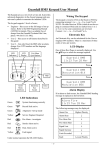
2 x 16 character
LCD backlit display
Mains indicator
Optional electronic
key socket
The operator keypad unit incorporates a backlit liquid crystal display (LCD) comprising 2 lines of 16
characters, and a backlit keypad to gain access to the system and to perform all authorised user
functions. The backlighting will be turned on during the entry time, during code entry and while a user
is logged on. It may also be turned on using any button except and and turned off using the or
buttons. Keypads may be fitted with an electronic key socket or an internal proximity reader. The
keypad incorporates a mains power indicator. This indicator will flash if the system is operating on
standby battery power.
Electronic Keys
A user PIN code can be replaced by an electronic key. To use the facility at least one keypad in the
system must have the optional electronic key interface fitted. All Guardall electronic keys are
manufactured with a unique code and duplicate keys cannot be obtained. Spare or replacement keys
can be obtained from the installation company.
Keyswitch
As an alternative method of setting and unsetting, a simple On/Off keyswitch may be fitted to the
system.
Proximity Cards/Fobs
A user PIN code can be replaced by a proximity card or fob if the keypad is fitted with the optional
proximity reader. All Guardall proximity cards and fobs are manufactured with a unique code and
duplicate cards or fobs cannot be obtained. Spare or replacement cards or fobs can be obtained from
the installation company.
-5-