1
Login
1. Click the Blackboard link
(http://blackboard.uiwtx.edu/) on the UIW
Homepage.
2. The Blackboard Login page opens.
3. Type your Username. Your username is the
name that precedes “@uiwtx.edu” in your
email address. The username is case
sensitive
4. Type your Password in the space provided.
The first time you login to Blackboard, your
password is your PIDM number.
5. Click Login.
6. If you make a mistake, repeat steps 3 and 4.
If you cannot log in, contact the System
Administrator, Kenneth Rogers at 832-2197.
3
4
5
The Blackboard Homepage
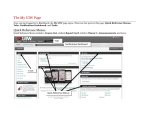
Once you have logged in to Blackboard, the Blackboard Homepage opens. There are four parts
to the homepage: Quick Reference Menus. Tabs, Notifications Dashboard, and Tools.
Quick Reference Menus
Quick Reference Menus include a Course List, student Report Card, a link to iTunes U,
Announcements, and more.
Tabs
Notifications Dashboard
Tools
Quick Reference Menus
3
UIW Department of Instructional Technology