1
Infinitely Expandable
OPM-4260 | OPM-4260R
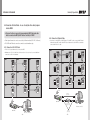
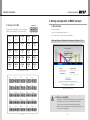
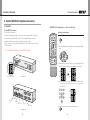
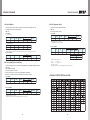
4.3. Connection of Control Cable - In case of using MSCS
••Control signal transmission can be connected by 2 different methods.
(RS-232C or Ethernet)
•• RS-232C and Ethernet connection cannot be used simultaneously.
4.3.2. Connection of Ethernet Cable
4.3.1. Connection of RS-232C Cable
••In case of Ethernet connection, the control PC should be connected to one of MPDP sets with
Ethernet cable. For the connection between the MPDP sets, they should be connected with
RS-232C cables.
••Maximum use of RS-232C with Daisy Chain connection is 30 sets or less, if you need
additional connection, use RS-232C distributor.
ID 1
ID 2
RS-232C
RS-232C
ID 3
RS-232C
ID 1
RS-232C
ID 2
LAN
IN
ID 4
OUT
IN
ID 5
RS-232C
OUT
RS-232C
IN
ID 6
OUT
RS-232C
OUT
RS-232C
ID 5
OUT
IN
ID 7
OUT
ID 8
IN
OUT
RS-232C
OUT
IN
OUT
IN
LAN Cable
(Direct Cable)
RS-232C
IN
RS-232C
LAN
IN
OUT
RS-232C
IN
OUT
IN
RS-232C
RS-232C control PC
- 24 -
OUT
LAN
LAN Cable
(Cross Cable)
HUB or Router
(Wireless & Cable)
OUT
ID 9
RS-232C
OUT
ID 6
OUT
ID 8
RS-232C
IN
LAN
IN
LAN
IN
RS-232C
OUT
ID 7
ID 9
RS-232C
OUT
LAN
IN
RS-232C
LAN
IN
LAN
IN
ID 3
LAN
IN
ID 4
RS-232C
LAN Cable
(Direct Cable)
- 25 -
Ethernet control PC
OUT