1
Infinitely Expandable
OPM-4260 | OPM-4260R
6. Control Method of optional accessory
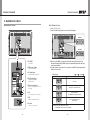
6.1. New MFC
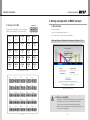
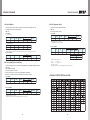
(2) MPDP Set Configuration (e.g. X:5 sets x Y:6 sets)
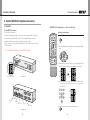
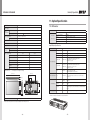
(1) New MFC Connection
Horizontal configuration
1) Connect power of New MFC
2) Connect female D-sub of New MFC to the Com port in the computer with RS-232C cable.
ON
3) Connect male D-sub of New MFC to the RS-232C port in MPDP with RS-232C cable.
5) Set the number of the connected MPDP units in advance. The number can be set only by the
Remote controller.
ID SETTING
4) Install the New MFC at the location of good Remote controller reception.
1
2
3
4
5
6
7
8
※※ For the additional information refer to the "New MFC manual"
9
BROADCAST
ON
OFF
DVI 1
DVI 2
0
SET
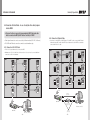
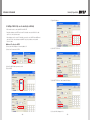
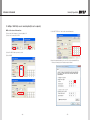
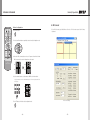
1. Press SET button .
OFF
A
B
SET
2. Press Left and Right buttons sequentially to enter the horizontal configuration
mode.
INFO
DVI
VIDEO
PC
DTV
S-VIDEO
HDSDI
DVIC1
DVIC2
OUTPUT
HDMI
INFO
AUTO
FUNCTION
MPDP
HOR
PDP
REMOTE CONTROL
VER
MPDP "N x M" Configuration
New MFC Front
INFO
DVI CONVERTER INPUT
3. When the 2 LEDs at lower right corner of each 7-segment of lower line in the
New MFC are turned on, the horizontal configuration mode is started.
HOR
HOR
VER
VER
4. Use the number buttons to set the numbers of MPDP sets in horizontal line.
-e.g. If you want to set 5 for horizontal number, press "0" for ten's place and
"5" for one's place.
1
2
3
4
5
6
7
8
9
AS Connect
Adaoter Jack
(5V 1A)
HOR
VER
0
USB Connect
Ethernet Connect
PC Connect
MPDP Connect
New MFC Rear
- 54 -
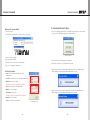
5. Pres SET button to finish the horizontal configuration mode.
SET
- 55 -