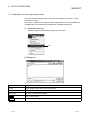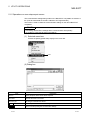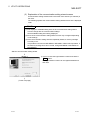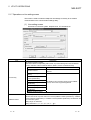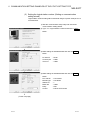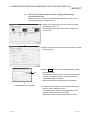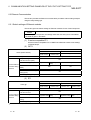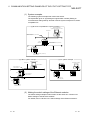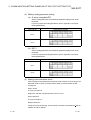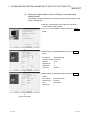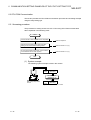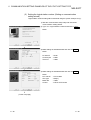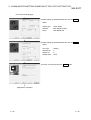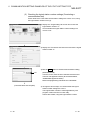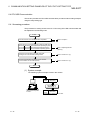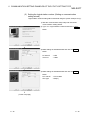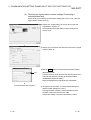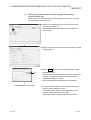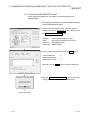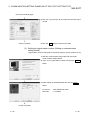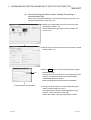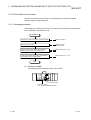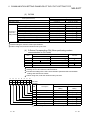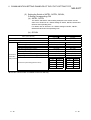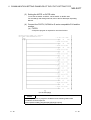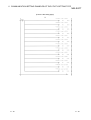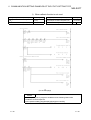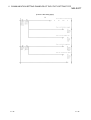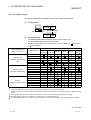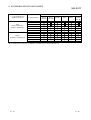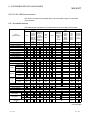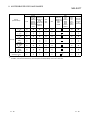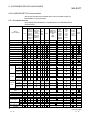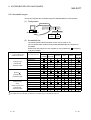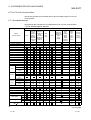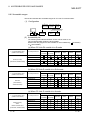
1
O Operating Manual Operating Manual MX Component Version 3 Operating Manual MODEL MELS3-ACTE-O-E MODEL CODE 13JU32 SH(NA)-080271-A(0204)MEE HEAD OFFICE : 1-8-12, OFFICE TOWER Z 14F HARUMI CHUO-KU 104-6212,JAPAN NAGOYA WORKS : 1-14 , YADA-MINAMI 5 , HIGASHI-KU, NAGOYA , JAPAN When exported from Japan, this manual does not require application to the Ministry of Economy, Trade and Industry for service transaction permission. Specifications subject to change without notice. SW3D5C-ACT-E MONO • SAFETY PRECAUTIONS • (Always read these instructions before using this equipment.) Before using this product, please read this manual and the relevant manuals introduced in this manual carefully and pay full attention to safety to handle the product correctly. The instructions given in this manual are concerned with this product. For the safety instructions of the programmable controller system, please read the CPU module user's manual. In this manual, the safety instructions are ranked as "DANGER" and "CAUTION". DANGER Indicates that incorrect handling may cause hazardous conditions, resulting in death or severe injury. ! CAUTION Indicates that incorrect handling may cause hazardous conditions, resulting in medium or slight personal injury or physical damage. ! Note that the ! CAUTION level may lead to a serious consequence according to the circumstances. Always follow the instructions of both levels because they are important to personal safety. Please save this manual to make it accessible when required and always forward it to the end user. [Design Instructions] ! DANGER • When performing data changes or status control from the personal computer to the running PLC, configure up an interlock circuit outside the PLC system to ensure that the whole system will operate safely. In addition, predetermine corrective actions for the system so that you can take measures against any communication error caused by a cable connection fault or the like in online operations performed from the peripheral device to the PLC. ! CAUTION • Read the manual carefully before performing the online operations (especially forced output and operating status change) which will be executed with the personal computer connected to the running CPU module. Not doing so can damage the machine or cause an accident due to misoperation. A-1 A-1 REVISIONS * The manual number is given on the bottom left of the back cover. Print Date Apr., 2002 Jun., 2002 * Manual Number Revision SH (NA)-080271-A First edition SH (NA) -080271-B Correction Operating Instructions, Subsection 6.12.1 Addition Subsection 6.12.2 Sep., 2002 SH (NA) -080271-C Correction Subsection 6.12.1, Subsection 6.12.2, Appendix 2.3 Japanese Manual Version SH-080274-C This manual confers no industrial property rights or any rights of any other kind, nor does it confer any patent licenses. Mitsubishi Electric Corporation cannot be held responsible for any problems involving industrial property rights which may occur as a result of using the contents noted in this manual. 2002 MITSUBISHI ELECTRIC CORPORATION A-2 A-2 Operating Instructions This section gives explanation of instructions in the following order. 1) Instructions for used OS and personal computer 2) Instructions for installation and uninstallation 3) PLC CPU-related instructions 4) Instructions for use of other MELSOFT products 5) Instructions for use of Ethernet modules 6) Instructions for use of CC-Link modules 7) Instructions for use of MELSECNET(II), MELSECNET/10 and MELSECNET/H 8) Instructions for use of computer link and serial communication modules 9) Instructions for modem communication 10) Instructions for programming 11) Instructions for use of Microsoft Excel 12) Instructions for use of Microsoft Access 13) Instructions for use of VBScript and ASP function R R Instructions for used OS and personal computer (1) When using Microsoft Windows NT Workstation Operating System Version 4.0, Microsoft Windows 2000 Professional Operating System, Microsoft Windows XP Professional and Microsoft Windows XP Home Edition When using Windows NT Workstation 4.0, Microsoft Windows 2000 Professional, Microsoft Windows XP Professional and Microsoft Windows XP Home Edition, MX Component may be installed and used only on the administrator's authority. R R R R R R R R R R R R R R R (2) About Ethernet communication, computer link communication and CPU COM communication on Microsoft Windows 95 Operating System (a) Making Ethernet communication using TCP/IP and UDP/IP on Windows 95 of the version older than OSR2 will cause a memory leak. When performing continuous operation on Windows 95, use Window 95 OSR2 or later. (b) On Windows 95, communication using the COM port, e.g. computer link communication or CPU COM communication, will cause a memory leak. Therefore, do not perform continuous operation. R R R R R R (3) Precautions for use of Microsoft Windows Millennium Edition Operating System It is not recommended to use MX Component with the "system restoring function" made invalid by the operating system. If the free space of the system drive becomes less than 200MB, the "system restoring function" is made invalid by the operating system. When using Windows Me, reserve a 200MB or more free space for the system drive. R R R (4) About the resume and other functions of personal computer A communications error may occur if communications are made with the PLC CPU after setting the resume function, suspend setting, power-saving function and/or standby mode of the personal computer. Therefore, do not set the above functions when making communications with the PLC CPU. A-3 A-3 Instructions for installation and uninstallation (1) About installation (a) When performing overwrite installation, install the software in the folder where it had already been installed. (b) If you install the MELSEC board driver or GX Developer into the personal computer where MX Component has already been installed, communication using a specific path (e.g. ASCII packet of the AJ71E71) may result in a receive, device number or other error. If any of these phenomena has occurred, perform overwrite installation of MX Component again. (2) Precautions for performing installation and uninstallation on a dual boot machine where two different operating systems are installed in a single IBM-PC/AT compatible personal computer On a dual boot machine having Windows NT Workstation 4.0 (hereafter referred to as OS1) and Windows 95 or Windows 98 (hereafter referred to as OS2), note the following points when MX Component was installed on OS1 first and MX Component was then installed over the same folder on OS2. R R R (a) If MX Component is uninstalled first on the OS2 side, uninstallation does not delete the control DLLs and ACT folders, and they remain within the IBMPC/AT compatible. To delete the control DLLs and ACT folders, perform uninstallation also on the OS1 side. (b) If MX Component is uninstalled first on the OS1 side, the control DLLs and ACT folders are deleted. In this case, MX Component may not operate properly or cannot be uninstalled on the OS2 side. Install MX Component again on the OS2 side to operate MX Component properly or uninstall it on the OS2 side. (3) About start menu When you have uninstalled MX Component, the item may remain in the start menu. In that case, restart the IBM-PC/AT compatible personal computer. PLC CPU-related instructions (1) About transmission speed As the transmission speed of the QCPU(Q mode) and QCPU(A mode), you can set 9600bps, 19200bps, 38400bps, 57600bps or 11520bps. For the QnACPU of version 9707B or later, you can set the transmission speed of 9600bps, 19200bps or 38400bps. For the QnACPU of other versions, you can set 9600bps or 19200bps. The transmission speeds of the ACPU (except A2USHCPU-S1), FXCPU and motion controller CPU are fixed to 9600bps. (The A2USHCPU-S1 may be set to 19200bps.) A-4 (2) Precautions for USB communication Frequently disconnecting/reconnecting the USB cable or resetting or powering ON/OFF the PLC CPU during communications with the PLC CPU may cause a communications error which cannot be recovered. If it is not recovered, completely disconnect the USB cable once and then reconnect it after 5 or more seconds have elapsed. (If this error occurs at the initial communication after the above operation, the function will be performed properly in and after the second communications.) A-4 (3) About clock data of the PLC CPU (a) For the ACPU (including the motion controller CPU), clock data setting may be made only when the PLC CPU is in the STOP status. For the QCPU (Q mode), QCPU (A mode), QnACPU and FXCPU, clock data setting may be made if the PLC CPU is in the RUN status. (b) For the A0J2HCPU, A2CCPU and A2CJCPU, setting cannot be made as they do not have the clock function. (c) For the ACPU, setting can be made independently of whether the clock setting special relay "M9028" is ON or OFF. (Note that the special relay "M9028" turns OFF after execution.) For the QCPU (Q mode), QCPU (A mode) and QnACPU, setting can be made independently of whether the clock setting device "SM1028" is ON or OFF. (d) Among the FXCPUs, setting may be made for only the FX1N (clock built-in), FX1NC (clock built-in), FX1S (clock built-in), FX2N (clock built-in), FX2NC (when RTC cassette is fitted), FX2 (when RTC cassette is fitted) and FX2C (when RTC cassette is fitted). (e) Note that an error for transfer time will be produced in clock setting. (4) Precautions for use of Q4ARCPU The duplexing function cannot be used. (5) Restrictions on use of the FXCPU (a) When the FXCPU is used, access to the TN devices (timer present values) or CN devices (counter present values) is not permitted if the device numbers specified are split across 199 or earlier and 200 or later. (b) As the FXCPU does not have a PAUSE switch as the PLC CPU, an error is returned if remote pause is specified in SetCpuStatus. (c) Note that specifying the first I/O number of a nonexisting module and executing the WriteBuffer( ) method will not return an error. (d) For the index registers (Z, V) of the FXCPU, data cannot be written to 2 or more consecutive points using WriteDeviceBlock(). (Data may be written to only one point.) (6) Serial communication function of Q00J/Q00/Q01CPU When the following conditions are all satisfied, communication between the personal computer and the Q00J/Q00/Q01CPU is made at 9600bps speed. 1) The connected CPU is the Q00CPU or Q01CPU 2) The serial communication function of the connected CPU is valid. 3) The personal computer side baud rate setting differs from the Q00J/Q00/Q01CPU side baud rate setting. To increase the communication speed, match the personal computer side baud rate with the Q00J/Q00/Q01CPU side baud rate. A-5 A-5 Instructions for use of other MELSOFT products (1) About simultaneous use of MX Component and GX Developer When using GX Developer and MX Component together for the same E71 module to make Ethernet communication, make the following settings. (a) Set the protocol of the communication setting wizard screen to "UDP/IP". (b) Set "SW2" of the communications setting switches of the E71 module to OFF (binary). (2) Precautions for GX Simulator communication Before executing the monitor utility, communication setting utility or user program, make sure that GX Simulator and GX Developer are operating. In addition, do not terminate the GX Simulator and GX Developer while the user program is running. If you do so, you will not be able to terminate the user program normally. Instructions for use of Ethernet modules (1) Resetting PLC CPU during TCP/IP connection setting If you reset the PLC CPU during TCP/IP connection setting (during opening) using MX Component, a communication or receive error will occur at the time of communication after that. In that case, close the application that uses MX Component and then perform open processing again. (2) About target existence check starting interval 1 of Ethernet module If close processing (Close) is executed from the IBM-PC/AT compatible, the Ethernet module may not perform close processing (Close). One of its causes is the open cable. If open processing (Open) is executed from the IBM-PC/AT compatible with the Ethernet module not performing close processing (Close), open processing (Open) from the IBM-PC/AT compatible is not terminated normally until the Ethernet module makes a target existence check and executes close processing (Close). If you want to terminate open processing (Open) early from the IBM-PC/AT compatible, shorten the target existence check starting interval setting of the Ethernet module. (The target existence check starting interval setting of the Ethernet module defaults to 10 minutes.) 1: It can be set for the E71 of AJ71E71-S3 or later. (3) Replacement of Ethernet module If you changed the Ethernet module during Ethernet communication due to debugging, failure or like, the other node (IBM-PC/AT compatible) must be restarted. (Since the Ethernet addresses (MAC addresses) differ between devices) (4) Simultaneous access when using Q series-compatible Ethernet module The following conditions should be satisfied when communication is to be made simultaneously from multiple IBM-PC/AT compatibles to the same module using the TCP/IP protocol. • Q series-compatible E71 module (except QJ71E71-100) whose first five digits of the serial number is "02122" or later and whose function version is B or later. • Using GX Developer Version 6.05F or later, set "MELSOFT connection" in the Ethernet parameter "open system". A-6 A-6 (5) Unlocking password when using QJ71E71 The range where the password can be unlocked by remote operation is up to the connection target station. If the password is set also on the lower layer, communication cannot be made with the PLC CPU on the lower layer. Starting source Enter password to unlock. AAAA Ethernet QCPU 1) 2) (Q QJ71 QJ71 mode) E71 E71 Ethernet QCPU 3) (Q QJ71 mode) E71 QCPU 4) (Q QJ71 mode) E71 QCPU 5) (Q QJ71 mode) E71 No. 1) 2) 3) 4) 5) Remote Password With setting (AAAA) Without setting With setting (AAAA) With setting (BBBB) Without setting : Accessible : Inaccessible 1) Unlocking QJ71E71 password enables access to PLC CPUs in this range. (6) About use of the Q4ARCPU When using the UDP/IP protocol of Ethernet communication, use the Q4ARCPU whose year and month of manufacture is "0012" or later and whose function version is B or later. (7) About Ethernet communication (a) When access is made to the QnACPU, AnUCPU, QCPU (A mode) or motion controller CPU via the E71, the device range is equivalent to that of the AnACPU. (b) When making access to the PLC CPU through Ethernet communication, the functions may not be executed depending on the PLC CPU status. 1) When the protocol is TCP/IP (target module: E71, QE71) The functions can be executed only when the communication target PLC CPU is in the RUN mode. An error is returned if the PLC CPU is in other than the RUN mode. 2) When the protocol is UDP/IP (target module: E71, QE71) The functions cannot be executed until the communication target PLC CPU is RUN once. An error is returned if the PLC CPU has not been RUN once. (c) The communication line is broken if the CPU becomes faulty or the Ethernet module is reset during Ethernet communication (when the protocol is TCP/IP). In that case, perform line close processing (Close) and then execute reopen processing (Open). A-7 A-7 (d) When two different communication systems (protocols) are used to make access from one IBM-PC/AT compatible to one Q series-compatible E71, two station numbers, i.e. for TCP/IP and for UDP/IP, must be set. (Example) When MX Component uses TCP/IP and GX Developer uses UDP/IP IBM-PC/AT compatible (TCP/IP) station number for MX Component: 2 (UDP/IP) station number for GX Developer : 3 Q series-compatible E71 (Station number: 1) GX Developer(UDP/IP) MX Component(TCP/IP) Set different station numbers as the (TCP/IP) station number for MX Component and (UDP/IP) station number for GX Developer. If they are set to the same station number, an error will occur on the Ethernet module side. (8) About switch settings of E71 and QE71 If the four lower digits of the error code that occurred during Ethernet communication using the E71 or QE71 is not indicated in the E71 or QE71 manual, check the DIP switch (SW2) setting of the E71 or QE71. If the DIP switch is not set correctly, a difference has occurred in the packet format (ASCII/binary) and therefore the error code returned from the module cannot be recognized correctly. Instructions for use of CC-Link modules (1) Software version of CC-Link master/local module As the CC-Link master/local module used in CC-Link communication or CC-Link G4 communication(only when the AJ65BT-G4 is used), use the module of software version "N" or later. The module of software version "M" or earlier will not operate properly. (2) Software version of CC-Link G4 module As the CC-Link G4 module used in CC-Link G4 communication(only when the AJ65BT-G4 is used), use the module of software version "D" or later. The module of software version "C" or earlier will not operate properly. Instructions for use of MELSECNET(II), MELSECNET/10 and MELSECNET/H (1) About relaying from the MELSECNET/10 loaded station When the module is loaded to the AnNCPU or AnACPU, it is recognized as a MELSECNET(II) module. When the connected station is the AnNCPU or AnACPU, set the relayed network as MELSECNET(II). In addition, set the station number to "0" when making access to the control station. A-8 A-8 (2) Instructions for relaying the MELSECNET(II) When access is made to the QnACPU, AnUCPU, QCPU (A mode) or motion controller CPU via the MELSECNET(II), the device range is equivalent to that of the AnACPU. Instructions for use of computer link and serial communication modules (1) About computer link communication (a) If the connected station CPU is the AnUCPU and the computer link module is the UC24 for computer link connection, remote operation will result in an error when access is made to the AnNCPU, AnACPU or QnACPU via the MELSECNET/10. (b) On any computer link modules other than the UC24 and C24, remote "PAUSE" operation will result in an error for all connections. (c) For the QC24, note that the illegal case of specifying the first I/O number of a nonexisting module and reading/writing U \G will not return an error if the software version of the module is "k" or earlier. (d) In any connection form (direct coupling, relaying) where the target station of the UC24 or C24 is the QnACPU, an error is returned if clock data read/write is executed. (2) Precautions for connecting personal computer and serial communication module (a) When QJ71C24-R2 of function version A is used An MX Component application can use only either of CH1 and CH2. When the MELSOFT product, such as GX Developer or GOT, is using one channel, the application cannot use the other channel. When the QJ71C24-R2 of function version B is used, the application can use both channels. (b) When AJ71QC24-R2 or A1SJ71QC4-R2 is used The MX Component application can use only CH1. It cannot use CH2. Instructions for modem communication (1) Simultaneous modem communications It is not allowed to simultaneously perform modem communications using MX Component and other application such as GX Developer. Do not perform a modem communication using other applications during a modem communication using MX Component. If modem communications are simultaneously performed using MX Component and other application, this will result in a communication error, disconnection of telephone line or similar problem. (2) Instructions for use of telephone line (a) Do not use the call-waiting phone line. On the call-waiting phone line, data corruption, telephone line disconnection or similar may occur due to interrupt reading sounds. (b) Do not connect the line to master/slave phones. If the handset of the slave phone is lifted while the telephone line is connecting to the master/slave phones, the telephone line may be disconnected. A-9 A-9 (c) Use an analog 2 wire type telephone line. When using a digital line, use a terminal adaptor. When the telephone line is of 4 wire type, the line may not be connected depending on the wiring type of the modular jack. For the 4 wire type, conduct connection tests in advance to check for connection. (3) Instructions for use of cellular phone (a) Modem for radio communication using a cellular phone Although the modem name is different depending on the maker, the modem is generically referred to as the cellular phone communication unit in this manual. Select the model of the cellular phone communication unit according to the cellular phone used. For details, contact the company of your cellular phone. (b) Cellular phone without auto answer function For the cellular phone without auto answer function, use a cellular phone communication unit that has the ANS/ORG/TEL select switch. If the cellular phone communication unit does not have the ANS/ORG/TEL select switch, it is impossible to connect the line. The line connection procedure is different depending on the cellular phone company and cellular phone model. For details, contact the maker of your cellular phone. Instructions for programming (1) About sample programs, test programs and sample sequence programs (a) Sample programs, test programs The sample programs are attached for your reference to create user programs. The test programs are attached to conduct communication tests. Use these programs on your own responsibility. (b) Sample sequence programs The sample sequence programs attached to MX Component must be modified depending on the system configuration and parameter settings. Modify them to be best for the system. Please note that it is user’s responsibility to use the same sequence programs. (2) About forced termination of processes during communication If communication is being made with the same type of control open for multiple processes, forcing one process to be terminated by Task Manager or the like may stop the other processes at the communication function execution area. (3) About error at communication start A communication error may occur within the preset time-out period at a communication start, e.g. when the communication diagnostic button is pressed, at a monitor start, or at the execution of any function. These errors are assumed to be detected before a time-out error. (Example: Connection cable not connected, at PLC power-off) A - 10 A - 10 (4) CheckDeviceString Do not use the CheckDeviceString method of each ACT control. (5) About ActUMsg control, ActUWzd control, ActMnet2BD control and ActAFBD control Installing MX Component registers the ActUMsg control, ActUWzd control, ActMnet2BD control and ActAFBD control, but do not use them. (6) Precautions for use of Act(ML)QJ71E71TCP, Act(ML)AJ71QE71TCP and Act(ML)AJ71E71TCP controls (a) Provide an interval longer than the sequence scan time of the Ethernet module loaded station from when the Open method is executed until the Close method is executed. (b) Provide an interval of at least 500ms from when the Close method is executed until the Open method is executed again. (7) Instructions for use of Disconnect If execution of Disconnect cannot disconnect the telephone line for some reason, power off the modem used to make a call to forcibly disconnect the telephone line. Instructions for use of Microsoft Excel R (1) Precautions for starting multiple Excel files on Windows Me Note that Windows Me has been confirmed to stop if you run multiple Excel files which use many control objects. This phenomenon is not attributable to this product. (a) Conditions on which this phenomenon has been confirmed to occur Graphic driver : Matrox make MGA Mystique display driver OS : Windows Me (English version) Number of controls pasted to Excel files : A total of 150 or more controls used in the whole BOOK <Other devices checked by Mitsubishi (reference)> CPU : Pentium 166MHz Memory : 64MB Hard disk : 8GB (free space 6GB) R R R R (b) Cause The phenomenon has been confirmed to occur when the Matrox make MGA Mystique graphic card display driver is used. This is because Version 4.12 of the MGA Mystique graphic card display driver is not compatible with Windows Me. R (c) How to judge whether the phenomenon is the same or not After changing the used graphic driver for the standard VGA driver, delete the temporary data (*.emf) left in the temporary folder. After that, try starting multiple Excel files. The phenomenon seems to be the same if it does not occur by changing the driver for the standard VGA driver. A - 11 A - 11 (d) Corrective action If this phenomenon occurs, the temporary data (*.emf) will be left in the temporary folder of the system. You have to delete the remaining temporary data (*.emf) manually. The temporary folder of the system is normally in C:\Temp. After that, take either of the following actions. 1) Use the graphic card and display driver which support Windows Me. 2) Reduce the number of control objects pasted to the Excel files. R (2) Precautions for use of EXCEL VBA Do not set the page feed preview function in the application that uses EXCEL VBA. Doing so can cause a memory leak or OS basic operation (file operation, printing or other) fault. (3) Precautions for use of Microsoft Excel 2000 or Microsoft Excel 2002 (a) If you paste the control to Excel 2000 or Excel 2002, it may sometimes not be pasted. This phenomenon occurs if the cache file (temporary file) of Excel 2000 or Excel 2002 remains. In such a case, perform operation in the following procedure. 1) Close Excel 2000 or Excel 2002. 2) Delete *.exd in the Excel 8.0 folder of the temp folders. 3) Restart Excel 2000 or Excel 2002. (b) Excel 2000 allows ACT control resizing, which does not affect the operation of MX Component. To restore the size, set the Height and Width properties of ACT control to "24" again. R R Instructions for use of Microsoft Access R (1) Precautions for use of Microsoft Access 2000 or Microsoft Access 2002 (a) When you paste the ACT control to an Access 2000 form or an Access 2002 form and double-click the ACT control or choose the custom control in the property, the following error message will appear but this does not affect the operation of ACT control. (Other error message may appear.) R R (b) When you paste the ACT control and display the properties, the property names displayed may be broken. As this phenomenon occurs for only the property indication, there will be no problem in the property functions. A - 12 A - 12 Instructions for use of VBScript and ASP function (1) Security of the Internet/intranet when using VBScript MX Component does not have the Internet/intranet security function. When you need the security function, make setting on the user side. (2) Precautions for making CPU COM communication, computer link communication, CC-Link G4 communication or Ethernet (TCP/IP) communication on ASP page and application 1 when Windows 2000 Professional is used. If the ASP page opens CPU COM, computer link, CC-Link G4 or Ethernet (TCP/IP) communication earlier than the application, communication in the same path cannot be made on the application until the ASP page is closed. Therefore, note the following points. (a) CPU COM, computer link, CC-Link G4 or Ethernet (TCP/IP) communication should be opened on the application earlier. After it has been opened on the application, communication can be made on both the application and ASP page until it is closed. R (b) When CPU COM, computer link, CC-Link G4 or Ethernet (TCP/IP) communication has been opened on the ASP page, always close the communication. 1 The application indicates any of the user applications created using the MX series and MELSOFT products. A - 13 A - 13 INTRODUCTION Thank you for choosing the Mitsubishi MELSOFT series comprehensive Factory Automation software. Read this manual and make sure you understand the functions and performance of MELSOFT series thoroughly in advance to ensure correct use. CONTENTS SAFETY PRECAUTIONS................................................................................................................................A- 1 REVISIONS ......................................................................................................................................................A- 2 Operating Instructions ......................................................................................................................................A- 3 CONTENTS......................................................................................................................................................A-14 Manuals ......................................................................................................................................................A-18 How to Use This Manual..................................................................................................................................A-19 Generic Terms and Abbreviations ...................................................................................................................A-20 Meanings and Definitions of Terms .................................................................................................................A-22 1 OVERVIEW 1- 1 to 1- 6 1.1 Features ..................................................................................................................................................... 1- 1 2 SYSTEM CONFIGURATIONS 2- 1 to 2-20 2.1 System Configuration List.......................................................................................................................... 2- 1 2.1.1 When using Microsoft Windows NT Workstation Operating System Version 4.0......................... 2- 1 2.1.2 When using Microsoft Windows 95 Operating System .................................................................. 2- 2 2.1.3 When using Microsoft Windows 98 Operating System .................................................................. 2- 3 2.1.4 When using Microsoft Windows 2000 Professional Operating System ........................................ 2- 4 2.1.5 When using Microsoft Windows Millennium Edition Operating System ........................................ 2- 5 2.1.6 When using Microsoft Windows XP Professional Operating System........................................... 2- 6 2.1.7 When using Microsoft Windows XP Home Edition Operating System......................................... 2- 7 2.2 System Configuration for Use of Each Connection Form......................................................................... 2- 8 2.2.1 System configurations......................................................................................................................... 2- 8 2.2.2 Details of the communication forms ................................................................................................... 2- 9 2.3 Operating Environment.............................................................................................................................. 2-20 2.4 Usable PLC CPUs ..................................................................................................................................... 2-20 R R R R R R R R R R R R R R 3 OPERATION PROCEDURES 3- 1 to 3- 6 3.1 Selecting the Development Type............................................................................................................... 33.2 User Application Creating Procedures ...................................................................................................... 33.2.1 When using Microsoft Visual Basic ................................................................................................ 33.2.2 When using Microsoft Visual C++ .................................................................................................. 33.2.3 When using VBA ................................................................................................................................. 33.2.4 When using VBScript .......................................................................................................................... 33.3 PLC Monitor Utility Operating Procedure .................................................................................................. 3R R A - 14 R R A - 14 1 2 2 3 4 5 6 4 OPERATIONS COMMON TO UTILITIES 4- 1 to 4- 2 4.1 Starting the Utility ....................................................................................................................................... 4- 1 4.2 Exiting the Utility......................................................................................................................................... 4- 1 4.3 Confirming the Version .............................................................................................................................. 4- 2 5 UTILITY OPERATIONS 5- 1 to 5-30 5.1 Communication Setup Utility...................................................................................................................... 5- 1 5.1.1 Operations on target setting screen ................................................................................................... 5- 2 5.1.2 Operations on list view screen............................................................................................................ 5- 3 5.1.3 Operations on connection test screen................................................................................................ 5- 4 5.1.4 Operations on com setup import screen ............................................................................................ 5- 5 5.1.5 Operations on com setup export screen ............................................................................................ 5- 6 5.1.6 Operations on communication setting wizard screens ...................................................................... 5- 7 5.1.7 Operations on line setting screen ....................................................................................................... 5-11 5.2 PLC Monitor Utility ..................................................................................................................................... 5-19 5.2.1 Operations on transfer setting screen ................................................................................................ 5-19 5.2.2 Operations on device batch screen .................................................................................................... 5-22 5.2.3 Operations on buffer memory screen................................................................................................. 5-24 5.2.4 Operation on entry device screen....................................................................................................... 5-26 5.2.5 Operations on device write screen ..................................................................................................... 5-28 5.2.6 Operations on clock setting screen .................................................................................................... 5-29 5.2.7 Operations on telephone line connection, disconnection screens .................................................... 5-30 6 COMMUNICATION SETTING EXAMPLES OF THE UTILITY SETTING TYPE 6- 1 to 6-98 6.1 Computer Link Communication ................................................................................................................. 6- 1 6.1.1 Switch settings of computer link modules .......................................................................................... 6- 1 6.1.2 Accessing procedure........................................................................................................................... 6- 6 6.2 Ethernet Communication ........................................................................................................................... 6-12 6.2.1 Switch settings of Ethernet modules .................................................................................................. 6-12 6.2.2 Accessing procedure........................................................................................................................... 6-13 6.3 CPU COM Communication........................................................................................................................ 6-27 6.3.1 Accessing procedure........................................................................................................................... 6-27 6.4 CPU USB Communication......................................................................................................................... 6-31 6.4.1 Accessing procedure........................................................................................................................... 6-31 6.5 MELSECNET/10 Communication ............................................................................................................. 6-35 6.5.1 Accessing procedure........................................................................................................................... 6-35 6.6 CC-Link Communication............................................................................................................................ 6-40 6.6.1 Accessing procedure........................................................................................................................... 6-40 6.7 CC-Link G4 Communication...................................................................................................................... 6-45 6.7.1 Switch settings of CC-Link G4 module............................................................................................... 6-45 6.7.2 Accessing procedure........................................................................................................................... 6-47 6.8 CPU Board Communication ...................................................................................................................... 6-54 6.8.1 Accessing procedure........................................................................................................................... 6-54 6.9 GX Simulator Communication ................................................................................................................... 6-60 6.9.1 Accessing procedure........................................................................................................................... 6-60 A - 15 A - 15 6.10 MELSECNET/H Communication............................................................................................................. 6-63 6.10.1 Accessing procedure......................................................................................................................... 6-63 6.11 Q Series Bus Communication ................................................................................................................. 6-68 6.11.1 Accessing procedure......................................................................................................................... 6-68 6.12 Modem Communication........................................................................................................................... 6-72 6.12.1 Switch settings of A6TEL, Q6TEL, QC24N, Q Series Corresponding C24 .................................... 6-72 6.12.2 Access procedure ............................................................................................................................. 6-74 6.13 Gateway Function Communication ......................................................................................................... 6-94 6.13.1 Access procedure ............................................................................................................................. 6-94 7 COMMUNICATION SETTING EXAMPLES OF THE PROGRAM SETTING TYPE 8 ACCESSIBLE DEVICES AND RANGES 7- 1 to 7- 2 8- 1 to 8-39 8.1 Precautions for Device Access.................................................................................................................. 8- 1 8.2 For Computer Link Communication........................................................................................................... 8- 2 8.2.1 Accessible devices .............................................................................................................................. 8- 2 8.2.2 Accessible ranges ............................................................................................................................... 8- 4 8.3 For Ethernet Communication..................................................................................................................... 8- 6 8.3.1 Accessible devices .............................................................................................................................. 8- 6 8.3.2 Accessible ranges ............................................................................................................................... 8- 8 8.4 For CPU COM Communication ................................................................................................................. 8-10 8.4.1 Accessible devices .............................................................................................................................. 8-10 8.4.2 Accessible ranges ............................................................................................................................... 8-12 8.5 For CPU USB Communication .................................................................................................................. 8-14 8.5.1 Accessible devices .............................................................................................................................. 8-14 8.5.2 Accessible ranges ............................................................................................................................... 8-16 8.6 For MELSECNET/10 Communication....................................................................................................... 8-17 8.6.1 Accessible devices .............................................................................................................................. 8-17 8.6.2 Accessible ranges ............................................................................................................................... 8-19 8.7 For CC-Link Communication ..................................................................................................................... 8-20 8.7.1 Accessible devices .............................................................................................................................. 8-20 8.7.2 Accessible ranges ............................................................................................................................... 8-22 8.8 For CC-Link G4 Communication ............................................................................................................... 8-23 8.8.1 Accessible devices .............................................................................................................................. 8-23 8.8.2 Accessible ranges ............................................................................................................................... 8-25 8.9 For CPU Board Communication................................................................................................................ 8-26 8.9.1 Accessible devices .............................................................................................................................. 8-26 8.9.2 Accessible ranges ............................................................................................................................... 8-28 8.10 For MELSECNET/H Communication ...................................................................................................... 8-29 8.10.1 Accessible devices............................................................................................................................ 8-29 8.10.2 Accessible ranges ............................................................................................................................. 8-31 8.11 For Q Series Bus Communication........................................................................................................... 8-32 8.11.1 Accessible devices............................................................................................................................ 8-32 8.11.2 Accessible ranges ............................................................................................................................. 8-33 8.12 For Modem Communication .................................................................................................................... 8-34 8.12.1 Accessible devices............................................................................................................................ 8-34 8.12.2 Accessible ranges ............................................................................................................................. 8-36 A - 16 A - 16 8.13 For Gateway Function Communication................................................................................................... 8-39 8.13.1 Accessible devices............................................................................................................................ 8-39 8.13.2 Accessible ranges ............................................................................................................................. 8-39 APPENDICES APP- 1 to APP-22 Appendix 1 Concept of the Routing Parameters........................................................................................APP- 1 Appendix 2 How to Start the Internet/Intranet Environment ......................................................................APP- 3 Appendix 2.1 Operating procedure.........................................................................................................APP- 3 Appendix 2.2 Conditions of usable personal computers........................................................................APP- 4 Appendix 2.3 How to install Web server.................................................................................................APP- 5 Appendix 2.4 Setting the Internet access account .................................................................................APP- 6 Appendix 2.5 Making Web pages public ................................................................................................APP-12 Appendix 2.6 Checking whether access can be made to Web server properly or not .........................APP-13 Appendix 3 Examples of Wiring RS-232C Cable for Connection of C24 and Personal Computer .........APP-14 Appendix 3.1 A Series.............................................................................................................................APP-14 Appendix 3.2 QnA Series........................................................................................................................APP-16 Appendix 3.3 Q Series ............................................................................................................................APP-18 Appendix 4 Multi-CPU System ...................................................................................................................APP-19 Appendix 5 Number of Loadable Network Modules When Q00JCPU, Q00CPU or Q01CPU Is Used..............................................................................APP-20 Appendix 6 Flowchart for the case where access cannot be performed during modem communication ........................................................................................................................APP-21 A - 17 A - 17 Manuals The following lists the manuals for this software package. Refer to the following table when ordering manuals. Related Manuals Manual Number (Model Code) Manual Name MX Component Version 3 Operating Manual (Startup) Provides procedures for installing and uninstalling MX Component and for browsing the operating manual. SH-080270 (13JU31) (Sold separetely) MX Component Version 3 Programming Manual Provides the programming procedures, detailed explanations and error codes of the ACT controls. SH-080272 (13JF66) (Sold separetely) Type A70BDE-J71QLP23/A70BDE-J71QLP23GE/A70BDE-J71QBR13/A70BDE-J71QLR23 MELSECNET/10 Interface Board User's Manual(For SW3DNF-MNET10) Describes the features, specifications, part names and setting of the MELSECNET/10 board, and the installation, uninstallation and others of the driver. (Sold separetely) Type A80BDE-J61BT11 Control & Communication Link System Master/Local Interface Board User's Manual (For SW4DNF-CCLINK-B) Describes the features, specifications, part names and setting of the CC-Link master board, and the installation, uninstallation and others of the driver. IB-0800175 (13JR28) (Sold separetely) Type A80BDE-J61BT13 Control & Communication Link System Local Interface Board User's Manual (For SW4DNF-CCLINK-B) Describes the features, specifications, part names and setting of the CC-Link local board, and the installation, uninstallation and others of the driver. IB-0800035 (13JL93) IB-0800176 (13JR29) (Sold separetely) Type A80BDE-A2USH-S1 PLC CPU Board User's Manual (For SW1DNF-ANU-B) Describes the features, specifications, part names and setting of the CPU board, and the installation, uninstallation and others of the driver. IB-0800174 (13JR27) (Sold separetely) MELSECNET/H Interface Board User's Manual(For SW0DNC-MNETH-B) Describes the features, specifications, part names and setting of the MELSECNET/H board, and the installation, uninstallation and others of the driver. SH-080128 (13JR24) (Sold separetely) Note: The MX Component Version 3 Operating Manual (Startup) and MX Component Version 3 Programming Manual are contained in the CD-ROM together with the software package as a set. When you want to purchase the manual alone, it is optionally available as the printed matter of the manual number (Model code) in the above table. A - 18 A - 18 How to Use This Manual "HOW TO USE THIS MANUAL" is given purpose-by-purpose for use of MX Component. Refer to the following outlines and use this manual. (1) To know the features (Section 1.1) Section 1.1 gives the features. (2) To know the system configurations (Sections 2.1, 2.2) The system configurations using MX Component are provided. (3) To know the MX Component operating environment and usable PLC CPUs (Sections 2.3, 2.4) Section 2.3 gives the operating environment of MX Component and Section 2.4 indicates usable PLC CPUs. (4) To know the MX Component operating procedures (Chapter 3) Chapter 3 provides the operation procedures of MX Component. (5) To know how to operate the utilities (Chapters 4, 5) Chapter 4 describes operations common to the utilities, and Chapter 5 explains how to operate the utilities. Read these chapters when using the utilities. (6) To know the communication setting examples of the utility setting type (Chapter 6) Chapter 6 gives the setting example of each communication path using the utility setting type. (7) To know the communication setting examples of the program setting type (Chapter 7) Chapter 7 provides the setting example of each communication path using the program setting type. (8) To know the accessible devices and ranges (Chapter 8) Chapter 8 contains the accessible devices and accessible ranges. A - 19 A - 19 Generic Terms and Abbreviations Unless otherwise started, this manual uses the following abbreviations and terms for the explanation of MX Component. Generic Term/Abbreviation MX Component IBM-PC/AT compatible PC CPU module GX Developer GX Simulator MELSECNET/10 board MELSECNET/H board CC-Link board CPU board AnNCPU AnACPU AnUCPU QnACPU ACPU QCPU (A mode) QCPU (Q mode) FXCPU Motion controller CPU PLC CPU C24 UC24 QC24 QC24N QC24(N) Q series-compatible C24 A - 20 Description Generic product name of the product types SWnD5C-ACT-E and SWnD5C-ACT-EA. (n denotes any versions 0 or later.) -EA means a volume-license product. Abbreviation of the IBM PC/AT or its compatible personal computer Abbreviation of the MELSEC-Q series compatible PC CPU module (CONTEC CO., LTD. make). Generic product name of the product types SWnD5C-GPPW-E, SWnD5C-GPPW-EA, SWnD5C-GPPW-EV and SWnD5C-GPPW-EVA. (n denotes any of versions 0 or later.) -EA means a volume-license product, and -EV an updated product. Generic product name of the product types SWnD5C-LLT-E, SWnD5C-LLT-EA, SWnD5C-LLT-EV and SWnD5C-LLT-EVA. (n denotes any of versions 0 or later.) -EA means a volume-license product, and -EV an updated product. Abbreviation of Type A70BDE-J71QLP23/A70BDE-J71QLP23GE/A70BDEJ71QBR13/A70BDE-J71QLR23 MELSECNET/10 interface board Abbreviation of Type Q80BD-J71LP21-25/Q80BD-J71LP21G/Q80BD-J71BR11 MELSECNET/H board Abbreviation of Type A80BDE-J61BT11 CC-Link system master/local interface board and Type A80BDE-J61BT13 CC-Link interface board Abbreviation of Type A80BDE-A2USH-S1 PLC CPU board Generic term of the A0J2HCPU, A1SCPU, A1SCPU-S1, A1SCPUC24-R2, A1SHCPU, A1SJCPU, A1SJHCPU, A1NCPU, A2CCPU, A2CCPUC24, A2CCPUC24PRF, A2CJCPU, A2NCPU, A2NCPU-S1, A2SCPU, A2SCPU-S1, A2SHCPU, A2SHCPU-S1, A3NCPU and A1FXCPU Generic term of the A2ACPU, A2ACPU-S1, A2ACPUP21/R21, A2ACPUP21-S1, A3ACPU and A3ACPUP21/R21 Generic term of the A2UCPU, A2UCPU-S1, A2USCPU, A2USCPU-S1, A2ASCPU, A2ASCPU-S1, A2ASCPU-S30, A2USHCPU-S1, A3UCPU and A4UCPU Generic term of the Q2ACPU, Q2ACPU-S1, Q2ASCPU, Q2ASCPU-S1, Q2ASHCPU, Q2ASHCPU-S1, Q3ACPU, Q4ACPU and Q4ARCPU Generic term of the AnNCPU, AnACPU and AnUCPU Generic term of the Q02CPU-A, Q02HCPU-A and Q06HCPU-A Generic term for Q00JCPU, Q00CPU, Q01CPU, Q02CPU, Q02HCPU, Q06HCPU, Q12HCPU, Q25HCPU, Q12PHCPU, and Q25PHCPU. Note that especially when the CPU is indicated as a different model, Q00JCPU, Q00CPU and Q01CPU are described as the Q00J/Q00/Q01CPU, and Q02CPU, Q02HCPU, Q06HCPU, Q12HCPU and Q25HCPU as Q02/Q02H/Q06H/Q12H/ Q25HCPU. In addition, Q12PHCPU and Q25PHCPU are described as the Process CPU. Generic term of the FX0, FX0S, FX0N, FX1, FX1N, FX1NC, FX1S, FX2, FX2C, FX2N and FX2NC series Generic term of the A171SHCPU, A172SHCPU, A173UHCPU, A173UHCPU-S1, A273UHCPU and A273UHCPU-S3 Generic term of the QCPU(Q mode), QCPU(A mode), QnACPU, ACPU, FXCPU and motion controller CPU Generic term of the A1SCPUC24-R2, A1SJ71C24-PRF, A1SJ71C24-R2, A1SJ71C24-R4, A2CCPUC24, A2CCPUC24-PRF, AJ71C24-S6 and AJ71C24-S8 Generic term of the AJ71UC24, A1SJ71UC24-R2, A1SJ71UC24-R4 and A1SJ71UC24-PRF Generic term of the AJ71QC24, AJ71QC24-R2, AJ71QC24-R4, A1SJ71QC24-R2 and A1SJ71QC24-R2 Generic term of the AJ71QC24N, AJ71QC24N-R2, AJ71QC24N-R4, A1SJ71QC24N and A1SJ71QC24N-R2 Generic term of the QC24 and QC24N Generic term of the QJ71C24 and QJ71C24-R2 A - 20 Generic Term/Abbreviation Description Generic term of the C24, UC24, QC24(N) and Q series-compatible C24 Computer link module Described as the serial communication module especially to indicate the QC24(N) or (Serial communication module) Q series-compatible C24. Generic term of the AJ71E71, AJ71E71-S3, A1SJ71E71-B2, A1SJ71E71-B5, E71 A1SJ71E71-B2-S3, A1SJ71E71-B5-S3, AJ71E71N-B2, AJ71E71N-B5T, A1SJ71E71N-B2 and A1SJ71E71N-B5T Generic term of the AJ71QE71, AJ71QE71-B5, A1SJ71QE71-B2, A1SJ71QE71-B5, QE71 AJ71QE71N-B2, AJ71QE71N-B5T, A1SJ71QE71N-B2 and A1SJ71QE71N-B5T Generic term of the QJ71E71, QJ71E71-B2 and QJ71E71-100 Q series-compatible E71 Generic term of the E71, QE71 and Q series-compatible E71 Ethernet module Generic term of the AJ65BT-G4 GPP function peripheral connection module and the CC-Link G4 module AJ65BT-G4-S3 GPP function peripheral connection module Abbreviation of A6TEL modem interface module. A6TEL Abbreviation of Q6TEL modem interface module. Q6TEL Abbreviation of Graphic Operation Terminal. GOT Abbreviation of communication made with the PLC CPU using the computer link Computer link communication module (Serial communication) Described as serial communication especially in communication that uses the QC24(N) or Q series-compatible C24. Abbreviation of communication made with the PLC CPU using the Ethernet module Ethernet communication Abbreviation of communication made by connecting the IBM-PC/AT compatible to the CPU COM communication RS-232 or RS-422 connector of the PLC CPU Abbreviation of communication made by connecting the IBM-PC/AT compatible to the CPU USB communication USB connector of the QCPU (Q mode) MELSECNET/10 Abbreviation of communication made with the PLC CPU using the MELSECNET/10 communication board MELSECNET/H Abbreviation of communication made with the PLC CPU using the MELSECNET/H communication board Abbreviation of communication made with the PLC CPU using the CC-Link board CC-Link communication Abbreviation of communication made with the PLC CPU using the CC-Link G4 CC-Link G4 communication module Abbreviation of communication made with the PLC CPU using the CPU board CPU board communication Abbreviation of communication made with the PLC CPU on the same base using the Q series bus communication PC CPU module Abbreviation of communication made with the GX Simulator GX Simulator communication Abbreviation of communication made with the PLC CPU via modems using the Modem communication QC24N (except the AJ71QC24N-R4), Q series-compatible C24, A6TEL, Q6TEL or FXCPU Gateway function Abbreviation of communication made with the PLC CPU and third-party PLCs using the gateway functions of the GOT communication Abbreviation of user program creation using the communication settings utility Utility setting type Abbreviation of user program creation without using the communication settings utility Program setting type Generic term of the ActiveX controls offered by MX Component ACT controls A - 21 A - 21 Meanings and Definitions of Terms The terms used in this manual have the following meanings and definitions. (1) Logical station number The connection target information necessary to open the communication line is combined into one data using the communication setup utility, and that data is provided with a logical number. This number may be used with the utility setting type only. (Example) For CPU COM communication Q25HCPU (CPU to communicate with) IBM-PC/AT compatible Q25HCPU MELSECNET/H (Network No. 1) CPU COM communication (COM 1) Time-out period QJ71LP21 (Station number: 3) QJ71LP21 Baudrate transmission (Station number: 1) control Target information up to CPU to communicate with is combined into one data, to which logical station number is assigned. (2) Utility setting type The communication setup utility (logical station number) is used to create a user program. In the user program, the communication line can be connected easily by simply specifying the logical station number set on the communication setting wizard. Use ActEasyIF and ActMLEasyIF. (3) Program setting type A user program is created without using the communication setup utility. Make ACT control settings for the corresponding communication in the user program or on the property page or like of Visual Basic or Visual C++ . The properties necessary to be set depend on the ACT control. Use the control other than ActEasyIF and ActMLEasyIF. R A - 22 R A - 22 1 OVERVIEW MELSOFT 1 OVERVIEW MX Component is a tool designed to implement communication from an IBM-PC/AT compatible personal computer to the PLC without any knowledge of communication protocols and modules. Use of common functions has made it extremely easy to develop serial communication and Ethernet communication programs which had been troublesome and complex. 1.1 Features MX Component has the following features. (1) Support of a wide range of communication paths for PLC A wide range of communication paths to the PLC are supported to enable the user to configure up a system as desired. IBM-PC/AT compatible You can make communication with the specified PLC easily without being aware of the communication protocol. MX Component RS-232C Computer link communication (Serial communication) Ethernet Ethernet board Ethernet communication CPU COM communication Computer link module (Serial communication module) RS-232C/RS-422 conversion, RS-232C USB CPU USB communication Ethernet module ACPU, QnACPU, QCPU(Q mode), QCPU(A mode), FXCPU, motion controller CPU QCPU (Q mode) MELSECNET/10 communication MELSECNET/10 board MELSECNET/10 MELSECNET/10 module MELSECNET/H communication MELSECNET/H board MELSECNET/H MELSECNET/H module CC-Link board CC-Link CC-Link communication CC-Link G4 communication CC-Link module RS-232C/RS-422 conversion CC-Link G4 module (Software version "N" or later) CC-Link module CC-Link (Software version "N" or later) (Software version "D" or later) CPU board equivalent to A2USHCPU-S1 CPU board communication GX Developer + GX Simulator (offline debugging) GX Simulator communication GX Developer Version5 (SW5D5C-GPPW-E) or later GX Simulator (SW5D5C-LLT-E 10B) or later Must be purchased separately. Modem communication Modem Telephone line Ethernet board Gateway function communication Q series bus communication 1-1 PC CPU module Modem Ethernet On the same base A6TEL,Q6TEL,FXCPU,QC24N, Q series-compatible C24 GOT (Q mode) 1-1 1 1 OVERVIEW MELSOFT (2) Substantial improvement in user's development efficiency MX Component comes with the wizard type communication setup utility. By simply making interactive settings on the screen, the user can achieve communication settings to access the PLC CPU to communicate with. Once the communication settings have been made, access can be made by merely specifying the logical station number of the PLC stored on the communication setup utility. 1 (3) Save and read of communication settings MX Component has the functions to save and read the communication settings made on the communication setup utility. You can move the set data easily from the IBM-PC/AT compatible used for development to the actually used IBM-PC/AT compatible. Note: MX Component must have been installed in both the IBM-PC/AT compatible used for development and the actually used IBM-PC/AT compatible. IBM-PC/AT compatible used for development Communication setup data are moved. Actually used IBM-PC/AT compatible MX Component MX Component Read communication setup data and establish communication path. Enter and save communication setup data. Reduction of on-site working time (4) Device monitor function Utilizing the PLC monitor utility enables you to monitor the status of the specified device and change its data. X39 is ON. X39 is ON! MX Component Device status is checked. Set and connect communication path on MX Component. (5) Access to buffer memory of special function module Access can be made to not only the devices of the PLC CPU but also the buffer memory of an intelligent function or special function module. Buffer memory data of connected intelligent or special function module can be read/written! MX Component Access to buffer memory 1-2 1-2 1 OVERVIEW MELSOFT (6) Read/write of PLC CPU clock data You can read and write the clock data of the PLC CPU connected to the IBMPC/AT compatible. Clock data of connected PLC CPU can be read/written! MX Component Access to clock data (7) Multithread communication Access to the same communication path can be made from multiple threads at the same time. Access to the same communication path can be made simultaneously. User program 1 User program 2 (8) GX Simulator for offline debugging By using GX Developer and GX Simulator, you can perform debugging on a single IBM-PC/AT compatible without connecting the PLC. You can debug by accessing GX Simulator on the same IBM-PC/AT compatible! MX Component IBM-PC/AT compatible PLC PLC CPU need not be connected. POINT GX Developer and GX Simulator are separately required to use the GX Simulator. 1-3 1-3 1 OVERVIEW MELSOFT (9) A wide variety of programming languages supported MX Component supports VBScript and VBA as well as Visual Basic and Visual C++ . R R (a) Creation of monitoring page using VBScript 1) Monitoring page can be created in HTML format Using the text editor, you can create a graphical monitoring home page (HTML format). You need not purchase Visual Basic , Visual C++ or like. R R Monitoring using Internet Explorer MX Component Web browser Internet Explorer 5.0 or later HTML for PLC monitoring MELSECNET/H or like 2) Using ASP function for monitoring via Internet/intranet Using the ASP function of VBScript to make public the Web pages on the factory side (side which monitors data using MX Component) enables the PLC device status or fault occurrence-time remote operation to be performed from a remote location or business destination via the Internet/intranet by merely specifying the factory side URL on Internet Explorer. <Factory side> MX Component PLC accessing ASP MELSECNET/H or like 1-4 Internet Intranet Web server *1 *1: Web server supported by OS (Internet Information Server, Personal Web Server, etc.) <Office side> Web browser Internet Explorer 5.0 or later 1-4 1 OVERVIEW MELSOFT (b) VBA-driven data collection and monitoring function Programming using VBA allows Excel or Access functions to be utilized to create an application for providing a real-time graph display. You can log the device data of the PLC and collect/save the device data in real time. <Access> <Excel> (10) Compatibility with multi-CPU system of QCPU (Q mode) Setting the communication setting utility or ACT control properties enables access to the multi-CPU system. (11) Operability on PC CPU module Q series bus communication from the PC CPU module enables access to the QCPU (Q mode) on the same base. Using the MELSECNET/H communication control and CC-Link communication control enables access to other stations via the MELSECNET/H module and CCLink module controlled by the PC CPU module. QCPU (Q mode) QCPU (Q mode) or like PC CPU module MELSECNET/H CC-Link QCPU (Q mode) or like 1-5 1-5 1 OVERVIEW MELSOFT (12) Accessibility to gateway devices of GOT Using the gateway function communication of MX Component can read/write the gateway device data of the GOT. Reading/writing the gateway device data of the GOT can read/write the device data of the PLC CPU that is being monitored by the GOT. MX Component Ethernet GOT Gateway device data of GOT can be read/written using MX Component (gateway functions). GOT GOT PLC CPU data are read/written with GOT. Mitsubishi PLC Company A PLC Company B PLC (13) Reduction of error definition search time The ActSupport control for troubleshooting function is supported. The error definition and corrective action appear within the user application by only specifying the error code. This eliminates the need to find the error definition or corrective action by referring to the programming manual, if an error occurs in ACT control. <Example of displaying error definition in message box> Error definition and corrective action are displayed. 1-6 1-6 2 SYSTEM CONFIGURATIONS MELSOFT 2 SYSTEM CONFIGURATIONS This chapter describes the system configurations, operating environment and usable CPUs of MX Component. 2.1 System Configuration List 2 This section lists the systems that may be configured for each operating system. 2.1.1 When using Microsoft Windows NT Workstation Operating System Version 4.0 R R The following table lists the systems that may be configured for use of Windows NT Workstation 4.0. Item R Description Computer link communication Ethernet communication CPU COM communication CPU USB communication MELSECNET/10 communication MELSECNET/H communication CC-Link communication 1 Usable board MELSECNET/10 board Usable driver SW2DNF-MNET10 or later Usable board MELSECNET/H board Usable driver SW0DNC-MNETH-B or later Usable board CC-Link board Usable driver SW2DNF-CCLINK or later CC-Link G4 communication CPU board communication Usable board CPU board Usable driver SW0DNF-ANU-B or later Q series bus communication (only when PC CPU module is used) GX Simulator communication Modem communication Gateway function communication : Configurable : Not configurable 1: Does not support the used OS. POINT Use GX Developer and GX Simulator of the following version or later when making GX Simulator communication. • GX Developer Version 5 (SW5D5C-GPPW-E) • GX Simulator (SW5D5C-LLT-E 10B) 2-1 2-1 2 SYSTEM CONFIGURATIONS MELSOFT 2.1.2 When using Microsoft Windows 95 Operating System R R The following table lists the systems that may be configured for use of Windows 95. R Item Description Computer link communication 2 Ethernet communication CPU COM communication CPU USB communication MELSECNET/10 communication MELSECNET/H communication CC-Link communication 1 Usable board MELSECNET/10 board Usable driver SW2DNF-MNET10 or later Usable board MELSECNET/H board Usable driver SW0DNC-MNETH-B or later Usable board CC-Link board Usable driver SW2DNF-CCLINK or later CC-Link G4 communication CPU board communication 2 Q series bus communication (only when PC CPU module is used) GX Simulator communication Modem communication Gateway function communication : Configurable : Not configurable 1: Does not support the used OS. 2: The driver is incompatible. POINT (1) On Windows 95, a memory leak will occur if any of the following communications is made using the COM port. Therefore, do not perform continuous operation. • Computer link communication • CPU COM communication • CC-Link G4 communication • Modem communication (2) Use GX Developer and GX Simulator of the following version or later when making GX Simulator communication. • GX Developer Version 5 (SW5D5C-GPPW-E) • GX Simulator (SW5D5C-LLT-E 10B) R 2-2 2-2 2 SYSTEM CONFIGURATIONS MELSOFT 2.1.3 When using Microsoft Windows 98 Operating System R R The following table lists the systems that may be configured for use of Windows 98. R Item Description Computer link communication Ethernet communication CPU COM communication CPU USB communication MELSECNET/10 communication MELSECNET/H communication CC-Link communication 1 Usable board MELSECNET/10 board Usable driver SW2DNF-MNET10 or later Usable board MELSECNET/H board Usable driver SW0DNC-MNETH-B or later Usable board CC-Link board Usable driver SW2DNF-CCLINK or later CC-Link G4 communication CPU board communication 2 Q series bus communication (only when PC CPU module is used) GX Simulator communication Modem communication Gateway function communication : Configurable : Not configurable 1: Usable only when Q02HCPU, Q06HCPU, Q12HCPU, Q25HCPU, Q12PHCPU or Q25PHCPU is used 2: The driver is incompatible. POINT Use GX Developer and GX Simulator of the following version or later when making GX Simulator communication. • GX Developer Version 5 (SW5D5C-GPPW-E) • GX Simulator (SW5D5C-LLT-E 10B) 2-3 2-3 2 SYSTEM CONFIGURATIONS MELSOFT 2.1.4 When using Microsoft Windows 2000 Professional Operating System R R The following table lists the systems that may be configured for use of Windows 2000 Professional. R Item Description Computer link communication Ethernet communication CPU COM communication CPU USB communication 1 MELSECNET/10 communication MELSECNET/H communication CC-Link communication Usable board MELSECNET/H board Usable driver SW0DNC-MNETH-B or later Usable board CC-Link board Usable driver SW4DNF-CCLINK or later CC-Link G4 communication CPU board communication Usable board CPU board Usable driver SW1DNF-ANU-B or later Q series bus communication (only when PC CPU module is used) GX Simulator communication Modem communication Gateway function communication : Configurable : Not configurable 1: Usable only when Q02HCPU, Q06HCPU, Q12HCPU, Q25HCPU, Q12PHCPU or Q25PHCPU is used POINT Use GX Developer and GX Simulator of the following version or later when making GX Simulator communication. • GX Developer Version 7 • GX Simulator Version 6 2-4 2-4 2 SYSTEM CONFIGURATIONS MELSOFT 2.1.5 When using Microsoft Windows Millennium Edition Operating System R R The following table lists the systems that may be configured for use of Windows Me. R Item Description Computer link communication Ethernet communication CPU COM communication CPU USB communication 1 MELSECNET/10 communication MELSECNET/H communication CC-Link communication CC-Link G4 communication CPU board communication Q series bus communication (only when PC CPU module is used) GX Simulator communication Modem communication Gateway function communication : Configurable : Not configurable 1: Usable only when Q02HCPU, Q06HCPU, Q12HCPU, Q25HCPU, Q12PHCPU or Q25PHCPU is used POINT (1) Use GX Developer and GX Simulator of the following version or later when making GX Simulator communication. • GX Developer Version 7 • GX Simulator Version 6 (2) The ASP function of VBScript cannot be used. 2-5 2-5 2 SYSTEM CONFIGURATIONS MELSOFT 2.1.6 When using Microsoft Windows XP Professional Operating System R R The following table lists the systems that may be configured for use of Windows XP Professional. R Item Description Computer link communication Ethernet communication CPU COM communication CPU USB communication 1 MELSECNET/10 communication MELSECNET/H communication CC-Link communication CC-Link G4 communication CPU board communication Q series bus communication (only when PC CPU module is used) GX Simulator communication Modem communication Gateway function communication : Configurable : Not configurable 1: Usable only when Q02HCPU, Q06HCPU, Q12HCPU, Q25HCPU, Q12PHCPU or Q25PHCPU is used 2-6 2-6 2 SYSTEM CONFIGURATIONS MELSOFT 2.1.7 When using Microsoft Windows XP Home Edition Operating System R R The following table lists the systems that may be configured for use of Windows XP Home Edition. R Item Description Computer link communication Ethernet communication CPU COM communication CPU USB communication 1 MELSECNET/10 communication MELSECNET/H communication CC-Link communication CC-Link G4 communication CPU board communication Q series bus communication (only when PC CPU module is used) GX Simulator communication Modem communication Gateway function communication : Configurable : Not configurable 1: Usable only when Q02HCPU, Q06HCPU, Q12HCPU, Q25HCPU, Q12PHCPU or Q25PHCPU is used POINT The ASP function of VBScript cannot be used. 2-7 2-7 2 SYSTEM CONFIGURATIONS MELSOFT 2.2 System Configuration for Use of Each Connection Form This section provides the system configurations for use of MX Component on a communication form basis. 2.2.1 System configurations IBM-PC/AT compatible RS-232C Computer link communication (Serial communication) Ethernet Ethernet board Ethernet communication CPU COM communication Computer link module (Serial communication module) RS-232C/RS-422 conversion, RS-232C USB CPU USB communication Ethernet module ACPU, QnACPU, QCPU(Q mode), QCPU(A mode), FXCPU, motion controller CPU QCPU (Q mode) MELSECNET/10 communication MELSECNET/10 board MELSECNET/10 MELSECNET/10 module MELSECNET/H communication MELSECNET/H board MELSECNET/H MELSECNET/H module CC-Link board CC-Link CC-Link communication CC-Link G4 communication CC-Link module RS-232C/RS-422 conversion CC-Link G4 module (Software version "N" or later) CC-Link module CC-Link (Software version "N" or later) (Software version "D" or later) CPU board equivalent to A2USHCPU-S1 CPU board communication GX Developer + GX Simulator (offline debugging) GX Simulator communication GX Developer Version5 (SW5D5C-GPPW-E) or later GX Simulator (SW5D5C-LLT-E 10B) or later Must be purchased separately. Modem communication Modem Telephone line Gateway function communication Q series bus communication PC CPU module 2-8 Ethernet board Modem Ethernet On the same base A6TEL,Q6TEL,FXCPU,QC24N, Q series-compatible C24 GOT (Q mode) 2-8 2 SYSTEM CONFIGURATIONS MELSOFT 2.2.2 Details of the communication forms The table at top right of each communication format explanation indicates whether the communication format can be made up when the OSs are used. (Example) Windows NT Workstation 4.0 and Windows 95 are not supported. Windows 98, Windows 2000 Professional, Windows Me, Windows Professional and Windows XP Home Edition are supported. R R R R R R XP R NT 95 98 2000 Me XP NT: Windows NT Workstation 4.0, 95: Windows 95, 98: Windows 98, 2000: Windows 2000 Professional, Me: Windows Me, XP: Windows XP Professional, Windows XP Home Edition R R R R R R R : Configurable : Not configurable (1) Computer link communication NT 95 98 2000 Me XP For the way to make connection to the computer link module, read the manual of your computer link module. (a) Precaution Computer link communication made on Windows 95 will cause a memory leak. Therefore do not perform continuous operation. R (b) Usable modules 1) Any of the following computer link modules may be used to access the PLC CPU. Usable Modules A1SCPUC24-R2 1, A1SJ71C24-PRF 2, A1SJ71C24-R2 2, C24 A1SJ71C24-R4 2, A2CCPUC24 3, A2CCPUC24-PRF 3, AJ71C24-S6, AJ71C24-S8 UC24 AJ71UC24, A1SJ71UC24-R2, A1SJ71UC24-R4, A1SJ71UC24-PRF AJ71QC24, AJ71QC24-R2, AJ71QC24-R4, A1SJ71QC24, QC24(N) A1SJ71QC24-R2, AJ71QC24N, AJ71QC24N-R2, AJ71QC24N-R4, A1SJ71QC24N, A1SJ71QC24N-R2 Q seriescompatible C24 QJ71C24, QJ71C24-R2 1: Handled as equivalent to the UC24. 2: Modules of software version "M" or later are handled as equivalent to the UC24. 3: Modules of software version "K" or later are handled as equivalent to the UC24. 2-9 2-9 2 SYSTEM CONFIGURATIONS MELSOFT 2) About connection of usable modules When a computer link module is used to make access from the IBMPC/AT compatible to the PLC CPU, note that three are restrictions on the modules connectable directly to the IBM-PC/AT compatible. If the module cannot be connected directly to the IBM-PC/AT compatible, it may be used as the "n"th module of multidropping. Type Interface 1:1 Connection Multidropping First module "n"th module RS-232C A2CCPUC24 RS-422 RS-422/485 RS-232C A2CCPUC24-PRF RS-422 RS-422/485 AJ71C24-S6 AJ71C24-S8 A1SCPUC24-R2 RS-232C RS-422 RS-232C A1SJ71C24-PRF RS-232C A1SJ71C24-R2 RS-232C A1SJ71C24-R4 RS-422/485 AJ71UC24 A1SJ71UC24-R2 RS-232C RS-422/485 RS-232C A1SJ71UC24-R4 RS-422/485 A1SJ71UC24-PRF RS-232C AJ71QC24 AJ71QC24-R2 AJ71QC24-R4 A1SJ71QC24 A1SJ71QC24-R2 AJ71QC24N AJ71QC24N-R2 AJ71QC24N-R4 A1SJ71QC24N A1SJ71QC24N-R2 QJ71C24 QJ71C24-R2 2 - 10 RS-232C RS-422 RS-232C RS-422/485 RS-232C RS-232C RS-422 RS-422/485 RS-232C RS-422/485 RS-232C RS-232C RS-232C RS-422/485 RS-232C RS-232C RS-422 RS-422/485 RS-232C RS-422/485 RS-232C RS-232C RS-232 RS-422/485 RS-232 RS-232 2 - 10 2 SYSTEM CONFIGURATIONS MELSOFT (c) Switch settings of the computer link module For the switch settings for use of MX Component, refer to "Section 6.1.1 Switch settings of computer link modules". (d) Cable for connection For the connection cable, refer to the manual of your computer link module. Refer to Appendix 3 for cable pin assignment. POINT Only the RS-232C connector may be used for connection of the IBM-PC/AT compatible and computer link (serial communication) module. The RS-422 connector or RS-422/485 terminal block cannot be used. (2) Ethernet communication NT 95 98 2000 Me XP For the way to make connection to the Ethernet module, read the manual of your Ethernet module. (a) Precaution The accessible range for Ethernet communication is the same segment only. Access cannot be made beyond the router and gateway. (b) Usable modules Any of the following Ethernet modules may be used to access the PLC CPU. Usable Modules AJ71E71, AJ71E71-S3, A1SJ71E71-B2, A1SJ71E71-B5, E71 1 A1SJ71E71B2-S3, A1SJ71E71B5-S3, AJ71E71N-B2, AJ71E71N-B5T, A1SJ71E71N-B2, A1SJ71E71N-B5T AJ71QE71, AJ71QE71-B5, A1SJ71QE71-B2, A1SJ71QE71-B5, QE71 2 AJ71QE71N-B2, AJ71QE71N-B5T, A1SJ71QE71N-B2, A1SJ71QE71N-B5T Q seriescompatible E71 QJ71E71, QJ71E71-B2, QJ71E71-100 1: Accessible as equivalent to the AnACPU when fitted to the AnUCPU. 2: An error will occur if monitoring via QnA Ethernet and monitoring via other communication path are executed for the same CPU simultaneously. (c) Switch settings of the Ethernet module For the switch settings for use of MX Component, refer to "Section 6.2.1 Switch settings of Ethernet modules". 2 - 11 2 - 11 2 SYSTEM CONFIGURATIONS MELSOFT (3) CPU COM communication NT 95 98 2000 Me XP (a) Precaution CPU COM communication made on Windows 95 will cause a memory leak. Therefore do not perform continuous operation. R (b) Cables for connection 1) Cable for connection of QCPU(Q mode) and QCPU(A mode) The following cable is needed to make communications between the IBM-PC/AT compatible and of QCPU(Q mode) and QCPU(A mode). When communication is to be made at 115200bps or 57600bps, fast communication cannot be performed if the used IBM-PC/AT compatible does not support 115200bps or 57600bps communication speed. If a communication error occurs, reduce the baudrate setting and restart communication. Cable QC30R2 (Connector of IBM-PC/AT compatible is D-sub 9-pin) 2 - 12 2 - 12 2 SYSTEM CONFIGURATIONS MELSOFT 2) Cables for connection of ACPU, QnACPU or FXCPU The following cables are needed to make communications between the IBM-PC/AT compatible and ACPU, QnACPU or FXCPU. IBM-PC/AT Compatible Side (RS-232C Cable) RS-232C/RS422 PLC Side (RS-422 Cable) Converter For ACPU, QnACPU or FX1/FX2/FX2CCPU FX-422CAB (0.3m/0.98feet) FX-422CAB-150 (1.5m/4.92feet) F2-232CAB-1 1 (When connector of IBM-PC/AT compatible is FX-232AW(C) For FX0/FX0S/FX0N/FX1N//FX1NC/FX1S/FX2N/FX2NCCPU D-sub 9-pin) FX-422CAB0 (1.5m/4.92feet) 1: How to identify compatible product of F2-232CAB-1 cable Check the indication on the type label attached to the cable. Incompatible product F2-232CAB-1 Y990C Indicates as a compatible product (with indication of F/FX/A) F2-232CAB-1(F/FX/A) Y990C POINT For connection with the FX series, always use the device indicated in the above table. 3) Cables for connection of motion controller CPU For communications between the IBM-PC/AT compatible and motion controller CPU, use the cables as indicated in 2). (4) CPU USB communication NT 95 98 2000 Me XP CPU USB communication may be made only when the Q02HCPU, Q06HCPU, Q12HCPU, Q25HCPU, Q12PHCPU or Q25PHCPU is used. (a) About the USB cable (QCPU (Q mode) compatible) 1) Windows 98, Windows 2000 Professional, Windows Me, Windows XP Professional or Windows XP Home Edition may be used when the USB driver has been installed. 2) When using Windows 2000 Professional, Windows XP Professional or Windows XP Home Edition, the user must install the USB driver. 3) When the USB cable is used, only one PLC CPU may be connected. 4) Use the USB cable which conforms to the USB Standard Rev. 1.1. 5) Refer to "Operating Instructions" for the precautions for and restrictions on use of the USB cable to make communications. R R R R R R R R 2 - 13 2 - 13 2 SYSTEM CONFIGURATIONS MELSOFT (5) MELSECNET/10 communication NT 95 98 2000 Me XP (a) Precautions 1) Always use any of the following communication drivers. Other communication drivers cannot be used. Used OS SW2DNF-MNET10 SW3DNF-MNET10 Windows NT Workstation 4.0 R Windows 95 R Windows 98 R Windows 2000 Professional R Windows Me R Windows R Windows R XP Professional XP Home Edition : Usable, : Unusable 2) The following are the CPUs that can be accessed by the communication drivers. CPU Type SW2DNF-MNET10 SW3DNF-MNET10 ACPU (Including motion controller CPU) QCPU(A mode) QnACPU QCPU(Q mode) : Accessible, : Inaccessible (6) MELSECNET/H communication NT 95 98 2000 Me XP (a) Precautions As the communication driver, always use SW0DNC-MNETH-B or later. Any other communication driver is unusable. 2 - 14 2 - 14 2 SYSTEM CONFIGURATIONS MELSOFT (7) CC-Link communication NT 95 98 2000 Me XP (a) Precautions 1) Always use any of the following communication drivers. Other communication drivers cannot be used. Used OS Windows NT SW2DNF-CCLINK SW3DNF-CCLINK SW4DNF-CCLINK-B R Workstation 4.0 Windows 95 R Windows 98 R Windows 2000 R Professional Windows Me R XP Professional Windows XP Home Edition Windows R R : Usable, : Unusable 2) The following are the CPUs that can be accessed by the communication drivers. CPU Type SW2DNF-CCLINK A to V 1 W to SW3DNF- CCLINK 2 A to V 1 W to SW4DNF-CCLINK-B 2 A to V 1 W to 2 ACPU (including motion controller CPU) QCPU(A mode) QnACPU QCPU(Q mode) : Accessible, : Inaccessible 1 For ROM versions "A" to "V" of CC-Link board 2 For ROM versions "W" and later of CC-Link board 3) The CC-Link master station module used should be of software version "N" or later. 2 - 15 2 - 15 2 SYSTEM CONFIGURATIONS MELSOFT (8) CC-Link G4 communication NT 95 98 2000 Me XP (a) Precautions 1) Computer link communication made on Windows 95 will cause a memory leak. Therefore do not perform continuous operation. 2) The CC-Link G4 module used should be of software version "D" or later. 3) The CC-Link master station module used should be of software version "N" or later. R (b) Switch settings of the CC-Link G4 module For the switch settings for use of MX Component, refer to "Section 6.7.1 Switch settings of CC-Link G4 module". (c) About cables Communications between the IBM-PC/AT compatible and CC-Link G4 module require the RS-232C/RS-422 conversion cables as used in CPU COM communication. For more information, refer to "(3) 2) Cables for connection of ACPU, QnACPU or FXCPU". (9) CPU board communication NT 95 98 2000 Me XP (a) Precautions 1) Always use any of the following communication drivers. Other communication drivers cannot be used. Used OS SW0DNF-ANU-B SW1DNF-ANU-B Windows NT Workstation 4.0 R Windows 95 R Windows 98 R Windows 2000 Professional R Windows Me R Windows R Windows R XP Professional XP Home Edition : Usable, : Unusable 2) Access to the QCPU (Q mode) and FXCPU cannot be made. 2 - 16 2 - 16 2 SYSTEM CONFIGURATIONS MELSOFT (10) Q series bus communication (only when PC CPU module is used) NT 95 98 2000 Me XP (a) Precautions 1) Use the MELSECNET/H communication and CC-Link communication controls to make access to other stations via the MELSECNET/H module and CC-Link module controlled by the PC CPU module. (11) GX Simulator communication NT 95 98 2000 Me XP When making GX Simulator communication, use GX Developer and GX Simulator of the following versions or later. Used OS Windows NT Workstation 4.0 R Windows 95 R Windows 98 R Windows 2000 Professional R Windows Me R Windows R Windows R GX Developer GX Simulator Version 5 (SW5D5C-GPPW-E) or later SW5D5C-LLT-E (10B or later) Version 7 (SW7D5C-GPPW-E) or later SW6D5C-LLT-E or later XP Professional XP Home Edition POINT GX Developer and GX Simulator must be purchased separately. 2 - 17 2 - 17 2 SYSTEM CONFIGURATIONS MELSOFT (12) Modem communication NT 95 98 2000 Me XP (a) Precautions 1) When performing modem communication, make the setting in the parameters and sequence program for the connected module. Use any of the following GX Developers to set the corresponding module. Module A6TEL, Q6TEL, FXCPU, QC24N Q series-compatible C24 GX Developer Version 3 (SW3D5C-GPPW-E/ SW3D5F-GPPW-E) or later Version 4 (SW4D5C-GPPW-E) or later 2) For modem communication using the FXCPU, only the FX1S, FX1N, FX1NC, FX2N and FX2NC are applicable. 3) Use the RS-232C cable supplied with the modem for connection between the personal computer and modem. (b) Modem specifications When performing modem communication, select the modem that satisfies the following specifications. 1) AT command compatibility (initialization command) 2) Only the DR terminal can be turned ON (High) independently. (Example: The modem where the CD terminal turns ON when only the DR terminal is turned ON is not applicable.) 3) Communication Standards: ITU-T V.90/V.34/V.32bis/V.32/V.22BIS/ V.22/V.21/V.FC Bell 212A/103 POINT (1) MX Component is not compatible with manual line connection (connection via an operator). Use a subscriber telephone line or private telephone line to perform modem communication. (2) It is required to set the COM port when performing modem communication by using modem built in the personal computer or the PC card (PCMCIA). For the COM port of the modem built in the personal computer or the PC card (PCMCIA), refer to the manual of the corresponding product. (3) For modem communication, the AT command, that is standard for some modems, is not executable. If the line cannot be connected by selecting "Modem standard" for "AT command" within the communication settings utility, specify the AT command on the user side. Refer to Section 5.1.7 for the setting of "AT command" within the communication settings utility. (4) When using the callback function, use the Q Series Corresponding C24. 2 - 18 2 - 18 2 SYSTEM CONFIGURATIONS MELSOFT (13) Gateway function communication NT 95 98 2000 Me XP (a) Gateway function-compatible GOT For the gateway function-compatible GOT, refer to the Operating Manual (Gateway Functions) of the GOT. (b) About GOT setting and setting between GOT and PLC For the GOT setting and the setting between the GOT and PLC, refer to the Operating Manual (Gateway Functions) of the GOT. 2 - 19 2 - 19 2 SYSTEM CONFIGURATIONS MELSOFT 2.3 Operating Environment The following table summarizes the operating environment for MX Component. Item Description IBM PC/AT 133MHz or more Pentium *1 IBM PC/AT compatible personal computer where the OS Personal compatible operates. *2 computer personal computer PC CPU module MELSEC-Q series compatible PC CPU module (CONTEC CO., LTD. make) Any of Microsoft Windows 2000 Professional Operating System (English version), Microsoft Windows Millennium Edition Operating System (English version), Microsoft Windows 95 Operating System (English version), O S Microsoft Windows 98 Operating System (English version), Microsoft Windows NT Workstation Operating System Version 4.0 (English version) *3, Microsoft Windows XP Professional Operating System (English version) *4 and Microsoft Windows XP Home Edition (English version) *4 Required memory 32MB or more *5 Hard disk free space 100MB or more Disk drive CD-ROM disk drive Display 800 × 600 dot or more resolution R R R R R R R R R R R R R R R Programming language Development software Visual Basic Microsoft Visual Basic 6.0 (English version) Visual C++ Microsoft Visual C++ 6.0 (English version) VBScript *7, *8 Text editor and commercially available HTML tool Microsoft Excel 2000 (English version), Microsoft Excel VBA 2002 (English version), Microsoft Access 2000 (English version) or Microsoft Access 2002 (English version) R R R Programming language *6 R R R R R R R *1: Pentium 150MHz or more is recommended for use of Windows Me, or Pentium 300MHz or more for use of Windows XP Professional or Windows XP Home Edition. *2: A multiprocessor IBM-PC/AT compatible personal computer cannot be used because of driver incompatibility. *3: Service Pack 3 or more is needed for use of Windows NT Workstation 4.0. *4: MX Component cannot be used in the XP compatibility mode. *5: 64MB or more is recommended for use of Windows 2000 Professional, or 128MB or more for use of Windows XP Professional or Windows XP Home Edition. *6: User programs created in the English environment may be used in the English environment only. They cannot be used in the Japanese environment. *7: To operate VBScript, use Internet Explorer (version 5.00.2919.6307 or later). *8: When Windows Me or Windows XP Home Edition is used, the ASP function is unusable. R R R R R R R R R R R 2.4 Usable PLC CPUs The usable PLC CPUs are given below. ACPU QnACPU QCPU (A mode) QCPU (Q mode) FXCPU Motion controller CPU 2 - 20 PLC CPU Types A0J2HCPU, A1SCPU, A1SCPU-S1, A1SCPUC24-R2, A1SHCPU, A1SJCPU, A1SJHCPU, A1NCPU, A2CCPU, A2CCPUC24, A2CCPUC24-PRF, A2CJCPU, A2NCPU, A2NCPU-S1, A2SCPU, A2SCPU-S1, A2SHCPU, A2SHCPU-S1, A3NCPU, A1FXCPU, A2ACPU, A2ACPU-S1, A2ACPUP21/R21, A2ACPUP21/R21-S1, A3ACPU, A3ACPUP21/R21, A2UCPU, A2UCPU-S1, A2USCPU, A2USCPU-S1,A2ASCPU, A2ASCPU-S1, A2ASCPU-S30, A2USHCPU-S1, A3UCPU, A4UCPU Q2ACPU, Q2ACPU-S1, Q2ASCPU, Q2ASCPU-S1, Q2ASHCPU, Q2ASHCPU-S1, Q3ACPU, Q4ACPU, Q4ARCPU Q02CPU-A, Q02HCPU-A, Q06HCPU-A Q00JCPU, Q00CPU, Q01CPU, Q02CPU, Q02HCPU, Q06HCPU, Q12HCPU, Q25HCPU, Q12PHCPU, Q25PHCPU FX0, FX0S, FX0N, FX1, FX1N, FX1NC, FX1S, FX2, FX2C, FX2N, FX2NC series A171SHCPU, A172SHCPU, A173UHCPU, A173UHCPU-S1, A273UHCPU, A273UHCPU-S3 2 - 20 3 OPERATION PROCEDURES MELSOFT 3 OPERATION PROCEDURES This chapter explains the selection of the MX Component development type and the procedures for creating user applications. 3.1 Selecting the Development Type When using MX Component to create user applications, choose the utility setting type or program setting type before creating a user application. The utility setting type and program setting type will be described. 3 (1) Utility setting type Make communication settings using the communication setting wizard. Using the communication setup utility enables you to create a user program without being aware of the complicated parameters of any communication. In the user program, the communication line can be connected by simply setting the logical station number set on the communication setting wizard to the ACT control property or into a user program. (2) Program setting type A user program is created without using the communication setup utility. Make ACT control settings for the corresponding communication in the property window directly or within the user program. The properties necessary to be set depend on the ACT control. (3) Comparison The following table compares the utility setting type and program setting type. Setting Type Utility Setting Type Item Program Setting Type Communication settings can be made easily using the communication setting wizard. In program creation, communication can be made Feature by merely making the setting (logical station number) on the communication setting wizard. (The number of development processes can be All communication settings can be made in the user program. Communication settings can be changed flexibly in the user program. reduced.) Used ACT control ActEasyIF, ActMLEasyIF ACT control for corresponding communication Used. Not used. Whether communication setup utility is used or not How to connect PLC monitor utility 3-1 Choose the logical station number. Change the settings every time you make connection. (Use the wizard) 3-1 3 OPERATION PROCEDURES MELSOFT 3.2 User Application Creating Procedures 3.2.1 When using Microsoft Visual Basic R R The following creation procedures assumes use of Visual Basic . R Power on the IBM-PC/AT compatible and start Windows. Refer to the operating manual (startup). Install MX Component. 3 Make settings using the utility setting type? No Yes <Program setting type> <Utility setting type> Start the communication setup utility and make communication settings in accordance with the wizard. Refer to Section 5.1, Chapter 6. Start Visual Basic . Add the ACT controls to Visual Basic . Start Visual Basic . Register the ACT control to Visual Basic . Refer to the programming manual. Create a form and paste the control. (ActEasyIF control) No Refer to the programming manual and Chapter 7. Refer to Chapter 6. Perform programming using the functions offered by the corresponding ACT control. Perform debugging using the PLC monitor utility? Create a form and paste the ACT controls for corresponding communication. Set the properties of the pasted ACT controls. Set the property of the pasted control. (Set only the logical station number) Refer to the programming manual. Refer to the programming manual. Yes Refer to "Section 3.3 PLC Monitor Utility Operating Procedure". Completion of user application 3-2 3-2 3 OPERATION PROCEDURES MELSOFT 3.2.2 When using Microsoft Visual C++ R R The following creation procedures assumes use of Visual C++ . R Power on the IBM-PC/AT compatible and start Windows . Install MX Component. Make settings using the utility setting type? Refer to the operating manual (startup). No Yes <Program setting type> <Utility setting type> Start the communication setup utility and make communication settings in accordance with the wizard. Refer to Section 5.1, Chapter 6. Start Visual C++ . Add the ACT control to Visual C++ . Start Visual C++ . Create a form and paste the ACT control for corresponding communication. Register the ACT control to Visual C++ . Create a form and paste the control. (ActEasyIF control) Refer to the programming manual. Using ClassWizard, define the pasted ACT control as a dialog member. Set the property of the pasted control. (Set only the logical station number) No Using Class Wizard, define the pasted ACT control as a dialog member. Set the properties of the pasted ACT control. Refer to Chapter 6. Perform programming using the functions offered by the corresponding ACT control. Perform debugging using the PLC monitor utility? Refer to the programming manual. Refer to the programming manual. Yes Refer to "Section 3.3 PLC Monitor Utility Operating Procedure". Completion of user application 3-3 3-3 3 OPERATION PROCEDURES MELSOFT 3.2.3 When using VBA The following creation procedures assumes use of VBA. Power on the IBM-PC/AT compatible and start Windows . Install MX Component. Make settings using the utility setting type? Refer to the operating manual (startup). No Yes <Program setting type> <Utility setting type> Start the communication setup utility and make communication settings in accordance with the wizard. Refer to Section 5.1, Chapter 6. Start Visual Basic Editor and create applications. Start Microsoft Excel orMicrosoft Access. Generate the corresponding communication control so that MX Component may be utilized on VBA. Start Visual Basic Editor and create applications. Generate the ActEasyIF control so that MX Component may be utilized on VBA. Set the property of the pasted control. (Set only the logical station number) Refer to the programming manual. No Set the property of the pasted control. Refer to the programming manual. Refer to Chapter 6. Refer to Chapter 6. Perform programming using the functions offered by the corresponding ACT control. Perform debugging using the PLC monitor utility? Start Microsoft Excel orMicrosoft Access. Refer to the programming manual. Yes Refer to "Section 3.3 PLC Monitor Utility Operating Procedure". Completion of user application 3-4 3-4 3 OPERATION PROCEDURES MELSOFT 3.2.4 When using VBScript The following creation procedures assumes use of VBScript. Power on the IBM-PC/AT compatible and start Windows . Install MX Component. Make settings using the utility setting type? Refer to the operating manual (startup). No Yes <Utility setting type> <Program setting type> Start the communication setup utility and make communication settings in accordance with the wizard. Create a home page using the text editor and HTML editor. Refer to Section 5.1, Chapter 6. Create a home page using the text editor and HTML editor. On the home page, generate the ActMLEasyIF control so that MX Component may be utilized using VBScript. Refer to the programming manual. Set the property of the pasted control. (Set only the logical station number) Refer to Chapter 6. Perform programming using the functions offered by the corresponding ACT control. Perform debugging using the PLC monitor utility? On the home page, generate the ActMLEasyIF control so that MX Component may be utilized using VBScript. Refer to the programming manual. Set the property of the pasted control. Refer to Chapter 6. Refer to the programming manual. Yes Refer to "Section 3.3 PLC Monitor Utility Operating Procedure". No Completion of user application POINT Refer to Appendix 2 for the way to start the Internet/intranet environment. 3-5 3-5 3 OPERATION PROCEDURES MELSOFT 3.3 PLC Monitor Utility Operating Procedure The following is the PLC monitor utility operating procedure. Start Use utility setting type? No Yes <Program setting type> <Utility setting type> Start the communication setup utility and make communication settings in accordance with the wizard. Refer to Section 5.1, Chapter 6. Start the PLC monitor utility. After the transfer setting screen has appeared, choose the program setting type. Refer to Section 4.1, Section 5.2. Start PLC monitor utility. After the transfer setting screen has appeared, choose the utility setting type. Refer to Section 4.1, Section 5.2. Press the wizard button on the transfer setting screen and make target setting. Is connection destination correct?(Look at the connection image diagram to check) Choose the logical station number set on the communication setup utility. No Click the image diagram of the location you want to correct, and make setting again. Refer to Section 5.2, Chapter 7. Yes Select the monitor you want to execute from among three tabs according to your application. Refer to Section 5.2 Press the monitor start button. Monitor execution 3-6 3-6 4 OPERATIONS COMMON TO UTILITIES MELSOFT 4 OPERATIONS COMMON TO UTILITIES This chapter explains the operations common to the utilities. 4.1 Starting the Utility Each utility can be started by clicking the corresponding icon in the [Start]-[Programs 1]-[MELSOFT Application]-[MX Component] menu. For the registered icons, refer to the operating manual (startup). 1: [All programs] appears when using Microsoft Windows XP Professional Operating System or Microsoft Windows XP Home Edition Operating System. R R R R Starts Communication Setup Utility. Starts PLC Monitor Utility. 4 4.2 Exiting the Utility To exit each utility, click the Exit button at bottom right of the screen. As the dialog box appears, click the Yes button to exit the utility. Click! 4-1 4-1 4 OPERATIONS COMMON TO UTILITIES MELSOFT 4.3 Confirming the Version To confirm the version of each utility, click the [Help]-[About] menu. Click! 4 4-2 4-2 5 UTILITY OPERATIONS MELSOFT 5 UTILITY OPERATIONS This chapter provides how to operate the communication setup utility and PLC monitor utility. POINT Refer to "CHAPTER 6 COMMUNICATION SETTING EXAMPLES OF THE UTILITY SETTING TYPE" for communication setting examples using the communication setup utility. 5.1 Communication Setup Utility This section describes how to operate and set the communication setup utility used to make communication with the utility setting type. 5 5-1 5-1 5 UTILITY OPERATIONS MELSOFT 5.1.1 Operations on target setting screen This screen is used to display the setting details of the logical station number set on the communication setting wizard and to edit the logical station number. 1) 5 Item Logical station number Description Choosing the logical station number set on the communication setting wizard shows 1) (Connection image diagram). Wizard Used to start the communication setting wizard and set the logical station number. Delete Used to delete the preset logical station number. Shows the connection image diagram of the logical station number set on the communication 1) (Connection image diagram) setting wizard. Clicking any sketch (personal computer, PLC CPU) in the connection image diagram starts the communication setting wizard, enabling you to change the settings. REMARK For details of the communication setting wizard, refer to "Section 5.1.6 Operations on the communication setting wizard screen". 5-2 5-2 5 UTILITY OPERATIONS MELSOFT 5.1.2 Operations on list view screen This screen is used to list the logical station numbers registered, edit the logical station number, and list the properties necessary for the program setting type. 1) Item 1) (Property list) Description Shows the settings of the registered logical station numbers. Double-clicking the logical station number starts the communication setting wizard. Wizard Used to start the communication setting wizard and set the logical station number. Delete Used to delete the preset logical station number. Utility ..........Shows the settings made for the logical station numbers in 1) (Property list). Display Program.....Shows the property list necessary for setting with the program setting type in 1) (Property list). Save text 1) Used to save the settings of 1) (Property file) into a file in the txt format. REMARK For details of the communication setting wizard, refer to "Section 5.1.6 Operations on the communication setting wizard screen". 5-3 5-3 5 UTILITY OPERATIONS MELSOFT 5.1.3 Operations on connection test screen This screen is used to conduct a communication test on the logical station number registered. Item Logical station number Communication diagnosis count Description Choose the logical station number on which a communication test will be made. Set how many times the communication test will be repeated for the specified logical station number. (Default: 5) Setting range: 1 to 32767 Used to start (stop) the communication test. When the logical station number where the modem communication data have been set is selected, the following screen appears after Test is clicked. When you have set the password, enter the password and click OK . Test ( Cancel ) Shows the result of the communication test. Item Diagnosis count Result 5-4 Result Description Shows the number of connections made during the communication test. Shows the test result. An error code appears at error occurrence. 0 appears at normal termination, or any value other than 0 appears at abnormal termination. CPU name Shows the connected CPU type. Mean time of communication Shows the average time taken until one communication test is established. (Unit: ms) 5-4 5 UTILITY OPERATIONS MELSOFT 5.1.4 Operations on com setup import screen The communication settings saved in the file by the operations in Section 5.1.5 are reflected on the utility. This screen is used when the communication settings made on the other IBM-PC/AT compatible are to be reflected on the IBM-PC/AT compatible being used. (1) Selected menu item Choose the [Menu]-[COM setup import] on the menu bar. Click! (2) Dialog box Item Description Look in Specify the place where the file to be imported exists. File name Enter the file name to be imported. Files of type Set the type of the file to be imported. Open Used to execute import. Cancel Used to cancel importing the communication settings. 5-5 5-5 5 UTILITY OPERATIONS MELSOFT 5.1.5 Operations on com setup export screen The communication settings being made on the IBM-PC/AT compatible are saved in a file. (The file where data are saved is called the ACT registered file.) This screen is used to reflect the communication settings on the other IBM-PC/AT compatible. POINT Uninstalling deletes all the settings within "Communication Setup Utility". To avoid this, export the file storing the settings. (1) Selected menu item Choose the [Menu]-[COM setup export] on the menu bar. Click! (2) Dialog box Item Description Save in Specify the place where the file will be exported. File name Enter the file name to be saved. Save as type Set the type of the file to be saved. Save Used to export the communication settings. Cancel Used to cancel exporting the communication settings. 5-6 5-6 5 UTILITY OPERATIONS MELSOFT 5.1.6 Operations on communication setting wizard screens These screens are used to set the logical station number necessary to make communication with the utility setting type. (1) Outline of the communication setting wizard The logical station number necessary to make communication with the utility setting type is set in the wizard format. The places and descriptions of the settings made on the communication setting wizard screens will be given below. For the wizard screen settings, refer to "(3) Explanation of the communication setting wizard screens". Wizard 1), 6) IBM-PC/AT compatible Wizard 3) Wizard 5) Connected station Relayed station MX Component Connected network Wizard 2) Relayed network Wizard 4) Screen Name Wizard 1) Wizard 2) Wizard 3) Wizard 4) Description Used to set the logical station number. Used to set the connected network between the IBM-PC/AT compatible and connected station (PLC CPU and module). Used to set the connected station (PLC CPU and module). Used to set the relayed network between the connected station (PLC CPU and module) and relayed station (PLC CPU and module). Wizard 5) Used to set the relayed station PLC CPU. Wizard 6) Used to comment the logical station number. (2) Starting procedure Choose the [Menu]-[Wizard] on the menu bar. (You can also start by clicking the Wizard button displayed on the utility screen.) Click! 5-7 5-7 5 UTILITY OPERATIONS MELSOFT (3) Explanation of the communication setting wizard screens Communication setting wizard screens are shown from wizard 1) to wizard 6) in the order. The following explains the communication setting wizard screens in the displayed order. POINT (1) The displays or available setting items of the communication setting wizard screens change with the communication settings. Set all available setting items being displayed. (2) Some of the communication setting wizard screens may not appear depending on the settings. (3) If the communication setting wizard is repeatedly started, a memory shortage error may occur. This problem occurs due to MS-IME95 or MS-IME97 of Microsoft Corporation. If the memory shortage error has occurred, change MS-IME95 or MS-IME97 for MS-IME2000. Start the communication setting wizard. Wizard 1) 1) Type or choose the logical station number and click the Next> button. The logical station number can be registered between 0 and 1023. (To the next page) 5-8 5-8 5 UTILITY OPERATIONS MELSOFT (From the preceding page) Wizard 2) 2) Choose the "PC side I/F" to communicate with. The items shown in "Communication setting" change with the setting made in "PC side I/F". Set all available setting items and click the Next> button. The choices corresponding to the communications in "PC side I/F" are indicated below. Setting Item Serial USB Communication Name Computer link communication, CPU COM communication, CC-Link G4 communication USB communication MELSECNET/10 board MELSECNET/10 communication MELSECNET/H board Q Series Bus Q Series bus communication CC-Link board CC-Link communication Ethernet board Wizard 3) MELSECNET/H communication Ethernet communication, Gateway function communication CPU board CPU board communication GX Simulator GX Simulator communication Modem Modem communication 3) Wizard 3) differs in available setting items depending on the settings on Wizard 2). Set all available setting items and click the Next> button. Wizard 4) 4) Wizard 4) differs in available setting items depending on the settings on Wizard 2) and Wizard 3). Set all available setting items and click the Next> button. REMARK When the modem is selected on Wizard 2), the line setting screen appears on Wizard 3) and Wizard 4). For details of the line setting screen, refer to "Section 5.1.7 Operations on line setting screen". (To the next page) 5-9 5-9 5 UTILITY OPERATIONS MELSOFT (From the preceding page) Wizard 5) 5) Wizard 5) differs in available setting items depending on the settings on Wizard 2), Wizard 3) and Wizard 4). Set all available setting items and click the Next> button. Wizard 6) 6) Comment the logical station number that was set. A comment may be entered using up to 32 characters. Enter a comment and click the Finish button. When you do not need a comment, click the Finish button without entering it. (Registration complete) When the registration of the logical station number is completed on the communication setting wizard, the settings are displayed on the target setting screen. <Before registration> 5 - 10 <After registration> 5 - 10 5 UTILITY OPERATIONS MELSOFT 5.1.7 Operations on line setting screen This screen is used to make the telephone line settings necessary to set modem communication in the communication settings utility. (1) Line setting screen Set the line connection system, telephone line, AT command, etc. Item Description Set the line connection system. When the Q Series Corresponding C24 is used, any of the following items can be selected. (Fixed to "Auto line connect" when the A6TEL, Q6TEL, FXCPU or QC24N is used.) Item Connect way Callback number 5 - 11 Description Auto line connect Select this item when the callback function has not been set. Auto line connect (Callback fixation) Auto line connect (Callback number specification) Callback connect (Fixation) Callback connect (Number specification) Callback request (Fixation) Callback request (Number specification) Callback reception waiting For details on the connection format of each callback function, refer to the Programming Manual. Set the telephone number used with the callback function of the Q Series Corresponding C24. This item can be set only when "Auto line connect (Callback number specification)", "Callback connect (Number specification)" or "Callback connect (Number specification)" is selected in the line connection system. Setting range: 62 characters Setting characters: 0, 1, 2, 3, 4, 5, 6, 7, 8, 9, -, , # 5 - 11 5 UTILITY OPERATIONS MELSOFT Item Description Set the line type. (Default: Tone) Item Line type Line Description Pulse Choose this item when using rotary dialing line. Tone Choose this item when using push button dialing line. ISDN Choose this item when using ISDN line. Set the outside line access number. Outside line number Setting range: 10 characters Setting characters: 0, 1, 2, 3, 4, 5, 6, 7, 8, 9, -, Port ,# Set the COM port for modem communication. (Default: COM1) Enter the telephone number of the connection target. When the connection target has been selected on the phone book screen, the Call number telephone number of the connection target appears. Setting range: 50 characters Connection Setting characters: 0, 1, 2, 3, 4, 5, 6, 7, 8, 9, -, target Name Browse ,# The other end name of the connection target selected on the phone book screen appears. Used to display the phone book screen. For details of the phone book screen, refer to "(2) Phone book screen". Modem standard Select this item when using the modem-standard AT command to connect the line. Enter the AT command. If the modem standard cannot be selected to connect the line, choose this item and enter the AT command. AT command setting If the AT command has been selected on the AT command registration screen, the data of the AT command is displayed. AT Setting range: 70 characters command Setting characters: ASCII code Title The title of the AT command selected on the AT command registration screen appears. Used to display the AT command registration screen. Browse For details of the AT command registration screen, refer to "(4)" AT command registration screen". Help of AT command Details setting Used to display the AT command help. Used to display the detail setting screen. For details of the detail setting screen, refer to "(6) Detail setting screen". 5 - 12 5 - 12 5 UTILITY OPERATIONS MELSOFT (2) Phone book screen Set the telephone numbers used on the line setting screen. 1) Item Description 1) (Registered phone number Displays the group names and other end names. display list) Choice display Displays the settings of the other end selected in the registered phone number display list. Close Used to update the edited data and close the phone book screen. Cancel Used to discard the edited data and close the phone book screen. New call number Used to display the new phone number setting screen. For details of the new phone number setting screen, refer to "(3) New phone number setting, phone number editing screens". New group Used to create a new group. Setting range: 50 characters Edit Used to display the phone number editing screen. For details of the phone number editing screen, refer to "(3) New phone number setting, phone number editing screens". Copy Used to copy the other end selected in the registered phone number display list to another group. Move group Used to move the other end selected in the registered phone number display list to another group. Delete Used to delete the other end in the group selected in the registered phone number display list. You cannot batch-delete a group. Delete a group after deleting all other ends in the group. Find Used to search the registered other end names or telephone numbers for data. Select Used to display on the line setting screen the other end selected in the registered phone number display list. Read file Used to read the settings of the phone book screen saved by file write. Write file Used to save the settings made on the phone book screen into a file. POINT MX Component enables read of the phone book created using GX Developer. The phone book of GX Developer is stored in the following folders. [User-specified folder] - [Gppw] 5 - 13 5 - 13 5 UTILITY OPERATIONS MELSOFT (3) New phone number setting, phone number editing screens Set the telephone number to be registered to the phone book. Item Group name Destination name Description Displays the group name of the registration destination. Enter the other end of the telephone number to be registered. Setting range: 50 characters Set the telephone number. Call number Setting range: 50 characters Setting characters: 0, 1, 2, 3, 4, 5, 6, 7, 8, 9, -, ,# Set the outside line access number. Outside line number Setting range: 10 characters Setting characters: 0, 1, 2, 3, 4, 5, 6, 7, 8, 9, -, ,# When the password has been set to the A6TEL, Q6TEL, Q Series Corresponding C24, making this setting automatically starts password setting and connects the line. For only line connection If the password has not been set, this setting is ignored. Setting range: 4 characters Setting characters: ASCII code Memo 5 - 14 Enter the memo for the registered data. Setting range: 60 characters 5 - 14 5 UTILITY OPERATIONS MELSOFT (4) AT command registration screen Set the AT commands used on the line setting screen. 1) Item Description 1) (Registered AT command display list) Displays a list of titles of the registered AT commands. Choice display Used to display the registered data selected in the registered AT command display list. Close Used to update the edited data and close the AT command registration screen. Cancel Used to discard the edited data and close the AT command registration screen. New AT command Used to display the new AT command registration screen. For details of the new AT command registration screen, refer to "(5) New AT command registration, AT command editing screens". Edit Used to display the AT command editing screen for the AT command selected in the registered AT command display list. For details of the AT command editing screen, refer to "(5) New AT command registration, AT command editing screens". Used to copy the registered AT command. Selecting the registered data to be copied in the registered AT command display list and clicking Copy Copy displays the group designation dialog box. Choose the copy destination group and click OK . Used to move the registered AT command to any other end. Selecting the registered data to be moved in the registered AT command display list and clicking Move group Move group displays the group designation dialog box. Choose the move destination group and click OK . Delete Used to delete the AT command selected in the AT command display list. Select Used to display the AT command selected in the AT command display list on the line setting screen. Read file Used to read the settings of the AT command registration screen saved by file write. Write file Used to save the settings made on the AT command registration screen into a file. POINT MX Component can the AT commands created using GX Developer. The AT commands of GX Developer are stored in the following folders. [User-specified folder] - [Gppw] 5 - 15 5 - 15 5 UTILITY OPERATIONS MELSOFT (5) New AT command registration, AT command editing screens Register a new AT command and edit the AT command. Item Group name Title Description Displays the group name where the AT command to be registered. Enter the title of the AT command to be registered. Setting range: 60 characters Enter the AT command for modem initialization. AT command Setting range: 70 characters Setting characters: ASCII code Help of AT command 5 - 16 Used to display the AT command help. 5 - 16 5 UTILITY OPERATIONS MELSOFT (6) Detail setting screen Set details for telephone line connection. Make settings according to the modem used. Item Description Set the line connection CD signal confirmation time. (Default: 90) Line connection CD signal Increase the set time if the CD signal does not turn ON within the set time depending on the wait time line-connected region (example: overseas). Setting range: 1 to 999 Line connection modem report waiting time Set the line connection modem report wait time. (Default: 5) Increase the set time if the response speed of the modem is low. Setting range: 1 to 999 Set the line disconnection CD signal confirmation time. (Default: 5) Line disconnection CD Increase the set time if the CD signal does not turn OFF within the preset time depending on signal wait time the line-connected region (example: overseas). Setting range: 1 to 999 Line disconnection delay time Data transmission delay time AT command response wait time Password cancellation response wait time 5 - 17 Set the line disconnection delay time. (Default: 3) Increase the set time if the response speed of the modem is low. Setting range: 1 to 999 Set the data transmission delay time. (Default: 0) Increase the set time if the response speed of the modem is low. Setting range: 1 to 999 Set the AT command response wait time. (Default: 1) Increase the set time if the response speed of the modem is low. Setting range: 1 to 999 Set the password cancellation response wait time. (Default: 5) Increase the set time if the quality of the line with the other end is low. Setting range: 1 to 999 5 - 17 5 UTILITY OPERATIONS Item AT command/password cancellation retry count MELSOFT Description Set the AT command/password cancellation retry count. (Default: 3) Increase the set count if the AT command cannot be sent or the password cannot be canceled. Setting range: 1 to 999 Set the Line callback cancel wait time. (Default: 90) Line callback cancel wait Increase the set time if the line at the other end (Q series corresponding C24 side) is not time disconnected within the set time depending on the line-connected region (example: overseas). Setting range: 1 to 180 Set the callback delay time. (Default: 20) Call back delay time Increase the set time if the device for relaying connection to the line (example: modem, etc.) requires the set time for reconnection after line disconnection. Setting range: 1 to 999 Call back reception waiting time-out 5 - 18 Set the callback reception waiting time-out. (Default: 120) Increase the set time if a time-out occurs in a callback receive waiting status. Setting range: 1 to 3600 5 - 18 5 UTILITY OPERATIONS MELSOFT 5.2 PLC Monitor Utility This section explains how to operate and set the PLC monitor utility. 5.2.1 Operations on transfer setting screen This screen is used to set connection from the IBM-PC/AT compatible to the PLC CPU. (1) Selected menu item Choose [Online]-[Transfer setup] on the menu bar. (This screen also appears when the PLC monitor utility is started.) (2) Dialog box (a) When choosing the utility setting type Item Utility setting type Description Choose when using the logical station number set on the communication setup utility to make transfer setting. Choose the logical station number set on the communication setup utility. When the logical station number where the modem communication data have been set is selected, the following screen appears after OK is clicked. When you have set the password, enter the password and click OK . Logical station number Connect Retry Times Set the number of retries to be made when an error occurs during monitoring with the PLC monitor utility.(default : 0) Setting range : 0 to 9 POINT Before specifying the logical station number, confirm that the settings of the logical station number, such as the CPU type and station number, are correct on the communication setup utility. 5 - 19 5 - 19 5 UTILITY OPERATIONS MELSOFT (b) When choosing the program setting type Item Program setting type Description Choose when the program setting type is used to create programs. Used to start the communication setting wizard and make transfer setting. When the logical station number where the modem communication data have been set is selected, the following screen appears after OK is clicked. When you have set the password, enter the password and click OK . Wizard Set the number of retries to be made when an error occurs during monitoring with the PLC Connect Retry Times monitor utility.(default : 0) Setting range : 0 to 9 5 - 20 5 - 20 5 UTILITY OPERATIONS MELSOFT POINT When the program setting type is selected, clicking the PLC or personal computer sketch enables you to change the details of the transfer setting. Clicking the screen portion where you want to change setting enables a setting change. 5 - 21 5 - 21 5 UTILITY OPERATIONS MELSOFT 5.2.2 Operations on device batch screen This screen is used to monitor only the specified one type of devices. 1) 2) 3) 4) Item Device Description Enter the device name to be batch-monitored. Start monitor ( Stop monitor ) Used to start (stop) monitor. Set the monitor format. (Default: Bit & Word) Item Monitor format Description Bit & Word Sets the monitor screen to the bit and word display. Bit Sets the monitor screen to the bit display only. Word Sets the monitor screen to the word display only. Set the display format of the device values to be displayed when the monitor format is "Bit & Word" or "Word". (Default: 16 bit integer) Item Display Description 16 bit integer Sets to the 16-bit integer display. 32 bit integer Sets to the 32-bit integer display. Real number Sets to the real number display. ASCII character Sets to the ASCII character string display. Set the radix when the display is "16 bit integer" or "32 bit integer". (Default: DEC) Item Data format 5 - 22 Description DEC Sets to the decimal display. HEX Sets to the hexadecimal display. 5 - 22 5 UTILITY OPERATIONS MELSOFT Item Description Set the order in which the bit devices being monitored are arranged. Item Bit order Description F-0 Arranged in order of F, E, ... 1, 0 from left to right. 0-F Arranged in order of 0, 1, ... E, F from left to right. Shows the device statuses. 1) (Monitor screen) Clicking the device name shows the device write screen. For details of the device write screen, refer to "Section 5.2.5 Operations on device write screen". 2) (Target CPU name) 3) (Communication path information) 4) (Logical station number) Shows the communication target CPU name specified on the communication setting wizard screen. Shows such information as the network type, network number, first I/O address and station number. Shows the logical station number set for the utility setting type. This does not appear when the program setting type is used. POINT (1) For the bit device statuses, 1 indicates an ON status and 0 an OFF status. (2) Bit devices are monitored in units of 16 points. If any device outside the range supported by the PLC CPU is included in the 16 points, its value is displayed "0". (3) Specifying the device memory in the U \G format enables the buffer memory to be monitored. (4) When monitoring the set values of the timers and counters, indirectly specify the data registers. (5) For the X and Y devices of the FXCPU, type their device numbers in octal. (6) For the C devices of the FXCPU, C0 to C199 (16 bit) and C200 and later (32 bit) are displayed separately. (7) Devices cannot be monitored if the connection destination is not established. (8) During monitoring, you cannot make transfer setting. (9) During monitoring, " " flickers under the scroll button. 5 - 23 5 - 23 5 UTILITY OPERATIONS MELSOFT 5.2.3 Operations on buffer memory screen This screen is used to monitor only the specified one type of buffer memory. 1) 2) 3) 4) Item Description Module I/O Type the first address of the module to be monitored. Memory address Enter the address of the buffer memory to be monitored in hexadecimal or decimal. Start monitor ( Stop monitor ) Used to start (stop) monitor. Set the monitor format. (Default: Bit & Word) Item Monitor format Description Bit & Word Sets the monitor screen to the bit and word display. Bit Sets the monitor screen to the bit display only. Word Sets the monitor screen to the word display only. Set the display format of the device values to be displayed when the monitor format is "Bit & Word" or "Word". (Default: 16 bit integer) Item Display 16 bit integer Description Sets to the 16-bit integer display. 32 bit integer Sets to the 32-bit integer display. Real number Sets to the real number display. ASCII character Sets to the ASCII character string display. Set the radix when the display is "16 bit integer" or "32 bit integer". (Default: DEC) Item Data format 5 - 24 Description DEC Sets to the decimal display. HEX Sets to the hexadecimal display. 5 - 24 5 UTILITY OPERATIONS MELSOFT Item Description Set the order in which the bit devices being monitored are arranged. Item Bit order 1) (Monitor screen) 2) (Target CPU name) 3) (Communication path information) 4) (Logical station number) Description F-0 Arranged in order of F, E, ... 1, 0 from left to right. 0-F Arranged in order of 0, 1, ... E, F from left to right. Shows the buffer memory status. Shows the communication target CPU name specified on the communication setting wizard screen. Shows such information as the network type, network number, first I/O address and station number. Shows the logical station number set for the utility setting type. This does not appear when the program setting type is used. POINT (1) For the bit device statuses, 1 indicates an ON status and 0 an OFF status. (2) For access to the FXCPU, enter the block number of the special expansion equipment into Module I/O. (3) Devices cannot be monitored if the connection destination is not established. (4) During monitoring, you cannot make transfer setting. (5) During monitoring, " " flickers under the scroll button. (6) During gateway function communication, devices cannot be monitored. 5 - 25 5 - 25 5 UTILITY OPERATIONS MELSOFT 5.2.4 Operation on entry device screen This screen is used to monitor the specified devices on a single screen at the same time. 1) 2) 3) 4) Item Description Used to register the device to be monitored. Clicking the Register device button shows the following screen. Item Device Description Type the device to be registered. Set the value to be entered when a word device is specified. (Default: DEC) Item Value Register device Description DEC Sets to decimal. HEX Sets to hexadecimal. Set the display format when a word device is specified. (Default: 16 bit integer) Item Display Description 16 bit integer Sets to the 16-bit integer display. 32 bit integer Sets to the 32-bit integer display. Real number Sets to the real number display. ASCII character Sets to the ASCII character string display. Register Used to register the device. Close Used to close the dialog box. Delete device Used to delete the device to be monitored. Clear device Used to delete all devices registered in device entry monitor from the monitor screen. Start monitor ( Stop monitor ) 5 - 26 Used to start (stop) monitor. 5 - 26 5 UTILITY OPERATIONS Item 1) (Monitor screen) 2) (Target CPU name) 3) (Communication path information) 4) (Logical station number) MELSOFT Description Shows the device statuses. Clicking the device name shows the device write screen. For details of the device write screen, refer to "Section 5.2.5 Operations on device write screen". Shows the communication target CPU name specified on the communication setting wizard screen. Shows such information as the network type, network number, first I/O address and station number. Shows the logical station number set for the utility setting type. This does not appear when the program setting type is used. POINT (1) When monitoring the set values of the timers and counters, indirectly specify the data registers. (2) Devices cannot be monitored if the connection destination is not established. (3) During monitoring, you cannot make transfer setting. (4) During monitoring, " " flickers under the scroll button. 5 - 27 5 - 27 5 UTILITY OPERATIONS MELSOFT 5.2.5 Operations on device write screen This screen is used to change the ON/OFF of a bit device or the present value of a word device or buffer memory. This screen is displayed by double-clicking the monitor screen of the corresponding tab. Item Device Bit device Description Enter the device name. Force ON Used to forcibly change the specified device to the ON status. Force OFF Used to forcibly change the specified device to the OFF status. Toggle force Used to forcibly change the specified device from the ON to OFF status or from the OFF to ON status. Device Buffer memory Choosing "Device" enables you to enter the word device to which write will be performed. Choosing "Buffer memory" enables you to enter the module's first I/O and buffer memory address. Type the value to be written. The input range is as indicated below. Item Word device/Buffer memory Setting value Description 16 bit integer –32768 to 32767 32 bit integer –2147483648 to 2147483647 1.175494351e–38 to 3.402823466e+33 Real number Number of valid digits: 13 digits (max. 13 characters displayed) Set 5 - 28 Used to write the set data. 5 - 28 5 UTILITY OPERATIONS MELSOFT 5.2.6 Operations on clock setting screen This screen is used to read or change the clock data of the PLC. (1) Selected menu item Choose [Online]-[Set time] on the menu bar. (2) Dialog box The screen provided for explanation is the one displayed when the QCPU (Q mode) is connected. Item Description PC Time Shows the time of the personal computer. (Write disabled) PLC Time Shows the time of the PLC. Register Used to write the "PLC Time" information to the PLC CPU. Close Used to close the clock setting screen. POINT Clock setting is not available when either of the following communications is selected. • GX Simulator communication (only the time of the personal computer is displayed.) • Gateway function communication (an error occurs.) 5 - 29 5 - 29 5 UTILITY OPERATIONS MELSOFT 5.2.7 Operations on telephone line connection, disconnection screens Connect and disconnect the telephone line for modem communication. (1) Menu to be selected (a) Telephone line connection Choose [Online] - [Connect] on the menu bar. (b) Telephone line disconnection Choose [Online] - [Disconnect] on the menu bar. (2) Dialog box for telephone line connection For telephone line connection, the following dialog box appears. Enter the password and click OK . 5 - 30 5 - 30 6 COMMUNICATION SETTING EXAMPLES OF THE UTILITY SETTING TYPE MELSOFT 6 COMMUNICATION SETTING EXAMPLES OF THE UTILITY SETTING TYPE This chapter explains the setting procedure and setting example of each communication path when the utility setting type is used for programming. 6.1 Computer Link Communication This section provides the computer link communication procedure and its setting example using the utility setting type. 6.1.1 Switch settings of computer link modules This section gives the switch settings of computer link modules for use of MX Component. The following sketches are used to explain each module. <For 1:1 communication> <For 1:n communication> IBM-PC/AT compatible IBM-PC/AT compatible Module 1) 2 Module 2) 1 6 1: Limited for use of only CH1 2: Limited for use of both CH1 and CH2 POINT When using MX Component, the settings other than "As set by user" in the tables are fixed as given in the tables. 6-1 6-1 6 COMMUNICATION SETTING EXAMPLES OF THE UTILITY SETTING TYPE MELSOFT (1) C24, UC24 Settings Switch 1 For 1:n communication For 1:1 communication Module 1) Module 2) Mode setting switch 1 (format 1) A (format 1) 5 (format 1) Station number setting switches 0 Transmission specifications setting switches As set by user Main channel setting OFF(RS-232C) Data bit setting As set by user As set by user 2 Transmission speed setting As set by user As set by user 2 Parity bit yes/no setting As set by user As set by user 2 Stop bit setting As set by user As set by user 2 Sum check yes/no setting As set by user As set by user 2 Online change enable/disable setting OFF(RS-232C) OFF(RS-422) As set by user Computer link/multidrop setting ON (computer link) ON (computer link) 1: For switch numbers, refer to the computer link module manual. 2: Make the same settings to Module 1 and Module 2. ON (computer link) (2) QC24(N) Settings Switch (Switch Number) 6 Mode setting switch Station number setting switch Operation setting switch (SW01) communication Transmission specifications setting switches 0 OFF (independent operation) — (SW13 to SW15) Module 2) As set by user OFF (independent operation) ON or OFF 1 OFF (independent operation) ON(8 bit) As set by user As set by user 2 As set by user As set by user 2 Stop bit setting (SW05) Sum check yes/no setting (SW06) Online change enable/disable setting (SW07) Setting change enable/disable setting (SW08) Transmission speed setting (SW09 to SW12) Module 1) CH1 side CH2 side CH1 side CH2 side CH1 side CH2 side 0 or 5 5(format 5) 5(format 5) 5(format 5) (format 5) Data bit setting (SW02) Parity bit yes/no setting (SW03) Even parity/odd parity setting (SW04) For 1:n communication For 1:1 OFF(1 bit) ON(yes) As set by user As set by user As set by user 2 As set by user As set by user 2 All OFF 1: Set to ON if the CH1 side mode setting switch setting is 0 or to OFF if the setting is 5 (format 5). 2: Make the same settings to Module 1 and Module 2. 6-2 6-2 6 COMMUNICATION SETTING EXAMPLES OF THE UTILITY SETTING TYPE MELSOFT (3) Q series-compatible C24 (a) For 1:1 communication Settings Item Set Value b15 to b8 b7 to b0 CH1 communication speed CH1 transmission setting 1 Switch 2 — CH1 communications protocol 0000H Switch 3 CH2 communication speed CH2 transmission setting 1 0000H 2 Switch 4 — CH2 communications protocol 0000H 2 Switch 1 Switch 5 0000H Module station number 0000H 1: Settings of CH1 and CH2 are indicated below. 2: When using CH2, enter any value set by the user. b7 b6 b5 b4 b3 b2 b1 b0 CH1 side CH2 side Settings Bit Description b0 Operation setting 0 (independent) 0 (independent) b1 Data bit 0 (7) 0 (7) b2 Parity bit 0 (no) 0 (no) b3 Odd/even parity 0 (odd) 0 (odd) b4 Stop bit 0 (1) 0 (1) 0 (no) 0 (no) 0 (disable) 0 (disable) 0 (disable) 0 (disable) CH1 transmission CH2 transmission setting b5 Sum check code b6 Online change b7 Setting change 3 setting 3: When the communication protocol is set to GX Developer connection (0H), the online change bit (b6) setting is made invalid to enable online change regardless of the online change setting. Refer to the Q series-compatible C24 manual for details. 6-3 6-3 6 COMMUNICATION SETTING EXAMPLES OF THE UTILITY SETTING TYPE MELSOFT (b) For 1:n communication Module 1) Item Switch 1 Settings b15 to b8 CH1 communication speed — Switch 2 Switch 3 CH2 communication speed — Switch 4 Switch 5 b7 to b0 CH1 transmission setting 1 CH1 communications protocol CH2 transmission setting 1 CH2 communications protocol Module station number Set Value Synchronous operation 0726H 0008H 0727H 0000H As set by user 1: Settings of CH1 and CH2 are indicated below. b7 b6 b5 b4 b3 b2 b1 b0 CH1 side CH2 side Bit 6-4 Description Settings Synchronous operation CH1 transmission setting CH2 transmission setting b0 Operation setting Match to module 2) setting. b1 Data bit Match to module 2) setting. b2 Parity bit Match to module 2) setting. b3 Odd/even parity Match to module 2) setting. b4 Stop bit Match to module 2) setting. b5 Sum check code Match to module 2) setting. b6 Online change Match to module 2) setting. b7 Setting change Match to module 2) setting. 6-4 6 COMMUNICATION SETTING EXAMPLES OF THE UTILITY SETTING TYPE MELSOFT Module 2) Item Switch 1 Settings b15 to b8 CH1 communication speed — Switch 2 Switch 3 b7 to b0 CH1 transmission setting 1 CH1 communications protocol CH2 transmission setting 1 CH2 communications protocol CH2 communication speed — Switch 4 Switch 5 Set Value Synchronous operation Module station number 0726H 0008H 0727H 0000H As set by user 1: Settings of CH1 and CH2 are indicated below. b7 b6 b5 b4 b3 b2 b1 b0 CH1 side CH2 side Bit Settings Synchronous operation CH1 transmission setting CH2 transmission setting 0 (independent) 1 (synchronous) Description b0 Operation setting b1 Data bit b2 Parity bit 1 (yes) 1 (yes) b3 Odd/even parity 0 (odd) 0 (odd) b4 Stop bit 0 (1) 0 (1) b5 Sum check code 1 (yes) 1 (yes) 0 (disable) 0 (disable) 0 (disable) 0 (disable) b6 Online change b7 Setting change 1 (8) 2 1 (8) 2: When the communication protocol is set to GX Developer connection (0H), the online change bit (b6) setting is made invalid to enable online change regardless of the online change setting. Refer to the Q series-compatible C24 manual for details. 6-5 6-5 6 COMMUNICATION SETTING EXAMPLES OF THE UTILITY SETTING TYPE MELSOFT 6.1.2 Accessing procedure The procedure for making access to the PLC CPU using computer link communication will be explained in the following order. START When using the C24, UC24 or QC24(N), set the mode and transmission setting switches. When using the Q series-compatible C24, set the software switches. Refer to Section 6.1.2 (2). Connect the computer link module and IBM-PC/AT compatible. Refer to Chapter 2. Start the communication setup utility and make setting on the communication setting wizard. Refer to Section 6.1.2 (3). On the communication test screen, check whether communication can be made properly. Refer to Section 6.1.2 (4). END (1) System examples The following system examples are used in this section. The explanation given in "(3) Setting the logical station number (Setting on communication setting wizard)" and later uses the system example for 1:n communication. <For 1:1 communication> <For 1:n communication> Module 1) Q2A QC24 CPU (Sta. No.1) Q25H Q series-compatible CPU C24 (Sta. No.1) Computer link (Multidrop communication) IBM-PC/AT compatible (MX Component) COM1 is used. IBM-PC/AT compatible (MX Component) COM1 is used. Module 2) Q2A QC24 CPU (Sta. No.3) Logical station number of "1" is used. 6-6 6-6 6 COMMUNICATION SETTING EXAMPLES OF THE UTILITY SETTING TYPE MELSOFT (2) Making the switch settings of the computer link module (a) For 1:1 communication Settings Item Set Value b15 to b8 b7 to b0 CH1 communication speed CH1 transmission setting 1 0000H Switch 2 — CH1 communications protocol 0000H Switch 3 CH2 communication speed CH2 transmission setting 1 0000H Switch 4 — CH2 communications protocol 0000H Switch 1 Switch 5 Module station number 0000H 1: Settings of CH1 and CH2 are indicated below. b7 b6 b5 b4 b3 b2 b1 b0 CH1 side CH2 side Settings Bit Description CH1 transmission CH2 transmission setting setting b0 Operation setting 0 (independent) 0 (independent) b1 Data bit 0 (7) 0 (7) b2 Parity bit 0 (no) 0 (no) b3 Odd/even parity 0 (odd) 0 (odd) b4 Stop bit 0 (1) 0 (1) b5 Sum check code 0 (no) 0 (no) b6 Online change 0 (disable) 0 (disable) b7 Setting change 0 (disable) 0 (disable) 2 2: When the communication protocol is set to GX Developer connection (0H), the online change bit (b6) setting is made invalid to enable online change regardless of the online change setting. Refer to the Q series-compatible C24 manual for details. 6-7 6-7 6 COMMUNICATION SETTING EXAMPLES OF THE UTILITY SETTING TYPE MELSOFT (b) For 1:n communication Settings Switch (Switch Number) Mode setting switch Module 1) CH1 side CH2 side 0 5 (format 5) Station number setting switches OFF (independent operation) 3 ON (synchronous operation) OFF (independent operation) Data bit setting (SW02) ON (8 bit) ON (8 bit) Parity bit yes/no setting (SW03) ON (yes) ON (yes) OFF (odd) OFF (odd) OFF (1 bit) OFF (1 bit) ON (yes) ON (yes) ON (enable) ON (enable) OFF (disable) OFF (disable) 19200bps 19200bps Even parity/odd parity setting (SW04) Stop bit setting (SW05) Sum check yes/no setting (SW06) Online change enable/disable specifications setting setting (SW07) Setting change enable/disable switches setting (SW08) SW Setting SW Setting Transmission speed setting SW09 OFF SW09 OFF (SW09 to SW12) SW10 ON SW10 ON SW11 ON SW11 ON SW12 OFF SW12 OFF — 6-8 CH2 side 5 (format 5) 1 Operation setting switch (SW01) Transmission Module 2) CH1 side (SW13 to SW15) All OFF All OFF 6-8 6 COMMUNICATION SETTING EXAMPLES OF THE UTILITY SETTING TYPE MELSOFT (3) Setting the logical station number (Setting on communication setting wizard) Logical station number setting will be described using the system example for 1:n communication. 1) Start the communication setup utility and choose the communication setting wizard. 2) Type "1" in Logical station number and click the Next> button. 3) Make settings as indicated below and click the Next> button. PC side I/F Connect port Time out : Serial : COM1 : 10000 4) Make settings as indicated below and click the Next> button. PLC side I/F Module type Station No Baud rate Parity Control : C24 module : AJ71QC24 :1 : 19200 : Odd : DTR or RTS Control (To the next page) 6-9 6-9 6 COMMUNICATION SETTING EXAMPLES OF THE UTILITY SETTING TYPE MELSOFT (From the preceding page) 5) Make settings as indicated below and click the Next> button. Station type Network Network type : Other station : C24 : Multidrop(combine) 6) Make settings as indicated below and click the Next> button. CPU type Station No : Q2A :3 7) Enter a comment and click the Finish button. (Registration complete) 6 - 10 6 - 10 6 COMMUNICATION SETTING EXAMPLES OF THE UTILITY SETTING TYPE MELSOFT (4) Checking the logical station number settings (Conducting a communication test) Check whether the computer link communication settings are correct or not, using the logical station number set in (3). 1) Display the "Target setting" tab screen and choose the logical station number "1". Check whether the logical station number settings are correct or not. 2) Display the "Connection test" tab screen and set the logical station number "1". 3) Click the Test button to check that communication is being Click! (Communication test complete) 6 - 11 performed normally. If an error occurrs, check the error code and remove the error. The error code appears in Result. (At normal termination, "0x00000000" appears in Result.) Refer to the programming manual for error code details. 4) Through the above steps, it is confirmed that the logical station number settings are correct. This logical station number is made applicable by user program creation and PLC monitor utility. Collect device data, using this logical station number. 6 - 11 6 COMMUNICATION SETTING EXAMPLES OF THE UTILITY SETTING TYPE MELSOFT 6.2 Ethernet Communication This section provides the Ethernet communication procedure and its setting example using the utility setting type. 6.2.1 Switch settings of Ethernet modules This section gives the switch settings of Ethernet modules for use of MX Component. POINT When using MX Component, the settings other than "As set by user" in the tables are fixed as given in the tables. (1) Q series-compatible E71 Set the Q series-compatible E71 in "MNET/10H Ethernet module count setting" of GX Developer. (2) QE71 Setting Switch (Switch Number) Operation mode setting switch Line processing selection for TCP time-out error (SW1) Data code setting (SW2) TCP/IP When ASCII packet is used UDP/IP When binary packet is used When binary packet is used 0 (online) OFF ON (ASCII code) Communications Automatic start mode setting condition setting (SW3) switches — (SW4 to SW6) CPU communications timing setting (SW7) Initial timing setting (SW8) OFF(binary code) As set by user OFF ON All OFF ON OFF (3) E71 Setting Switch 1 Operation mode setting switch Line processing selection for TCP time-out error Communications Data code setting condition setting switches CPU communications timing setting) Initial timing setting TCP/IP When ASCII packet is used UDP/IP When binary packet is used When ASCII packet is used When binary packet is used 0 (online) OFF ON (ASCII code) OFF(binary code) ON (ASCII code) OFF(binary code) ON OFF 1: For switch numbers, refer to the E71 module manual. 6 - 12 6 - 12 6 COMMUNICATION SETTING EXAMPLES OF THE UTILITY SETTING TYPE MELSOFT 6.2.2 Accessing procedure The procedure for making access to the PLC CPU using Ethernet communication will be explained in the following order. START Set the Ethernet module switches. Refer to Section 6.2.1 Set the Ethernet module parameters. Refer to Section 6.2.2 (3), (4). Connect the Ethernet module and IBM-PC/AT compatible. Refer to Chapter 2. Edit the HOSTS file. 1 Start the communication setup utility and make setting on the communication setting wizard. Refer to Section 6.2.2 (6). On the communication test screen, check whether communication can be made properly. Refer to Section 6.2.2 (7). END 1: You need not edit the HOSTS file when entering the IP address in the host name of the communication setting utility and the ActHostAddress property of the Ethernet communication control. 6 - 13 6 - 13 6 COMMUNICATION SETTING EXAMPLES OF THE UTILITY SETTING TYPE MELSOFT (1) System examples The following system examples are used in this section. The explanation given in "(6) Setting the logical station number (Setting on communication setting wizard)" and later uses the system example for Q seriescompatible E71. (a) Q series-compatible E71 system example IBM-PC/AT compatible Logical station number of "2" is used. Network No. 1 Station number: 2 Q series-compatible E71 (192.168.0.2) Station number: 2 CPU1 Q02HCPU CPU2 Q02HCPU Q series-compatible E71 (192.168.0.1) Station number: 1 Network No. 2 Q series-compatible E71 (192.168.0.3) Station number: 3 (c) E71 system example (b) QE71 system example IBM-PC/AT compatible IBM-PC/AT compatible Network No. 1 Station number: 2 QE71(192.168.0.2) Station number: 2 CPU1 QE71(192.168.0.1) Station number: 1 Network No. 2 E71(192.168.0.2) Port No. 500 (HEX) CPU2 QE71(192.168.0.3) Station number: 3 (2) Making the switch settings of the Ethernet modules The switch setting examples in this section are the same as in "Section 6.2.1 Switch settings of the Ethernet modules". For details, refer to "Section 6.2.1 Switch settings of the Ethernet modules". 6 - 14 6 - 14 6 COMMUNICATION SETTING EXAMPLES OF THE UTILITY SETTING TYPE MELSOFT (3) Making parameter setting Parameter setting may either be made from the network parameter "MELSECNET/ETHERNET setting screen" of GX Developer or from a sequence program. The network parameters of GX Developer must be used to set the Q seriescompatible E71 (TCP/IP, UDP/IP) or QE71 (UDP/IP), or a sequence program used to set the QE71 (TCP/IP) or E71 (TCP/IP, UDP/IP). (a) Q series-compatible E71 In the network parameters, set the network type, first I/O No., network No., station number, mode and operational settings. CPU to Be Set Setting Screen Example Ethernet parameters CPU1 Operational settings Ethernet parameters CPU2 6 - 15 Operational settings 6 - 15 6 COMMUNICATION SETTING EXAMPLES OF THE UTILITY SETTING TYPE MELSOFT (b) QE71 1) For TCP/IP The QE71 requires an initial processing and communication line open processing sequence program for use of TCP/IP. The sequence program example is given below. Setting Item Set Value Setting Item TCP/IP open system 8000H (TCP, fixed buffer send) QE71's IP address 192.168.0.2 QE71's port number Set Value 500H (To the next page) POINT This sample sequence program is installed into the following folders after installation of MX Component. [User-specified folder]-[Act]-[Sample]-[Gppw]-[Qe71_tcp] 6 - 16 6 - 16 6 COMMUNICATION SETTING EXAMPLES OF THE UTILITY SETTING TYPE MELSOFT (From the preceding page) 6 - 17 6 - 17 6 COMMUNICATION SETTING EXAMPLES OF THE UTILITY SETTING TYPE MELSOFT 2) For UDP/IP For the QE71, set the network type, first I/O No., network No., group No., station number and IP address on the Ethernet parameter setting screen of GX Developer when using UDP/IP. CPU to Be Set Setting Screen Example Ethernet parameters CPU1 Operational settings Ethernet parameters CPU2 Operational settings 6 - 18 6 - 18 6 COMMUNICATION SETTING EXAMPLES OF THE UTILITY SETTING TYPE MELSOFT (c) E71 The E71 requires an initial processing and communication line open processing sequence program. The sequence program example is given below. 1) For TCP/IP Setting Item Set Value Setting Item TCP/IP open system 8000H (TCP, fixed buffer send) E71's IP address 192.168.0.2 E71's port number Set Value 500H (To the next page) POINT This sample sequence program is installed into the following folders after installation of MX Component. [User-specified folder]-[Act]-[Sample]-[Gppw]-[E71_tcp] 6 - 19 6 - 19 6 COMMUNICATION SETTING EXAMPLES OF THE UTILITY SETTING TYPE MELSOFT (From the preceding page) 6 - 20 6 - 20 6 COMMUNICATION SETTING EXAMPLES OF THE UTILITY SETTING TYPE MELSOFT 2) For UDP/IP Setting Item Set Value Setting Item Set Value UDP/IP open system 100H (UDP, fixed buffer send) Other node IP address FFFFFFFFH E71's IP address 192.168.0.2 Other node port number FFFFH E71's port number 500H (To the next page) POINT This sample sequence program is installed into the following folders after installation of MX Component. [User-specified folder]-[Act]-[Sample]-[Gppw]-[E71_udp] 6 - 21 6 - 21 6 COMMUNICATION SETTING EXAMPLES OF THE UTILITY SETTING TYPE MELSOFT (From the preceding page) In the communications enabled status, the E71's RUN LED is lit and the RDY LED flickers. 6 - 22 6 - 22 6 COMMUNICATION SETTING EXAMPLES OF THE UTILITY SETTING TYPE MELSOFT (4) Making routing parameter setting (a) Q series-compatible E71 Set the routing parameters on the Ethernet parameter setting screen of GX Developer. For the concept of the routing parameters, refer to "Appendix 1 Concept of Routing Parameters". CPU to Be Set Setting Screen Example CPU1 CPU2 (b) QE71 Set the routing parameters on the Ethernet parameter setting screen of GX Developer. For the concept of the routing parameters, refer to "Appendix 1 Concept of Routing Parameters". CPU to Be Set Setting Screen Example CPU1 CPU2 (5) Making communications check After completion of preparations for Ethernet communication, execute ping in the MS-DOS mode to check connection before starting communications on MX Component. When normal C:\>ping 192.168.0.2 Reply from 192.168.0.2:bytes=32 time<10ms TTL=32 When abnormal C:\>ping 192.168.0.2 Request timed out. If ping does not pass through, check module connections and Windows side IP address and other settings. R 6 - 23 6 - 23 6 COMMUNICATION SETTING EXAMPLES OF THE UTILITY SETTING TYPE MELSOFT (6) Setting the logical station number (Setting on communication setting wizard) Logical station number setting will be described using the system example for Q series-compatible E71. 1) Start the communication setup utility and choose the communication setting wizard. 2) Type "2" in Logical station number and click the Next> button. 3) Make settings as indicated below and click the Next> button. PC side I/F : Ethernet board Connect module : QJ71E71 Protocol : TCP Network No :1 Station No :2 Time out : 60000 4) Make settings as indicated below and click the Next> button. PLC side I/F Module type Host Station No : Ethernet module : QJ71E71 : 192.168.0.1 :1 (To the next page) 6 - 24 6 - 24 6 COMMUNICATION SETTING EXAMPLES OF THE UTILITY SETTING TYPE MELSOFT (From the preceding page) 5) Make settings as indicated below and click the Next> button. Station type Network : Other station : Ethernet 6) Make settings as indicated below and click the Next> button. CPU type Network No Station No Multiple CPU : Q02(H) :2 :3 : None 7) Enter a comment and click the Finish button. (Registration complete) 6 - 25 6 - 25 6 COMMUNICATION SETTING EXAMPLES OF THE UTILITY SETTING TYPE MELSOFT (7) Checking the logical station number settings (Conducting a communication test) Check whether the computer link communication settings are correct or not, using the logical station number set in (6). 1) Display the "Target setting" tab screen and choose the logical station number "2". Check whether the logical station number settings are correct or not. 2) Display the "Connection test" tab screen and set the logical station number "2". 3) Click the Test button to check that communication is being Click! (Communication test complete) 6 - 26 performed normally. If an error occurred, check the error code and remove the error. The error code appears in Result. (At normal termination, "0x00000000" appears in Result.) Refer to the programming manual for error code details. 4) Through the above steps, it is confirmed that the logical station number settings are correct. This logical station number is made applicable by user program creation and PLC monitor utility. Collect device data, using this logical station number. 6 - 26 6 COMMUNICATION SETTING EXAMPLES OF THE UTILITY SETTING TYPE MELSOFT 6.3 CPU COM Communication This section provides the CPU COM communication procedure and its setting example using the utility setting type. 6.3.1 Accessing procedure The procedure for making access to the PLC CPU using CPU COM communication will be explained in the following order. START Connect the PLC CPU and IBM-PC/AT compatible. Refer to Chapter 2. Start the communication setup utility and make setting on the communication setting wizard. Refer to Section 6.3.1 (2). On the communication test screen, check whether communication can be made properly. Refer to Section 6.3.1 (3). END (1) System example The following system example is used in this section. Q02H Ordinary station (Sta. No.2) CPU MELSECNET/H (Network No. 5) IBM-PC/AT compatible (MX Component) COM1 is used. Q02H Ordinary station (Sta. No.5) CPU Logical station number of "3" is used. 6 - 27 6 - 27 6 COMMUNICATION SETTING EXAMPLES OF THE UTILITY SETTING TYPE MELSOFT (2) Setting the logical station number (Setting on communication setting wizard) Logical station number setting will be described using the system example for (1). 1) Start the communication setup utility and choose the communication setting wizard. 2) Type "3" in Logical station number and click the Next> button. 3) Make settings as indicated below and click the Next> button. PC side I/F Connect port Time out : Serial : COM1 : 10000 4) Make settings as indicated below and click the Next> button. PLC side I/F CPU type Baud rate Control : CPU module : Q02(H) : 19200 : DTR or RTS Control (To the next page) 6 - 28 6 - 28 6 COMMUNICATION SETTING EXAMPLES OF THE UTILITY SETTING TYPE MELSOFT (From the preceding page) 5) Make settings as indicated below and click the Next> button. Station type Network Mode : Other station : MELSECNET/10(H) : MELSECNET/H 6) Make settings as indicated below and click the Next> button. CPU type Network No Station No Multiple CPU : Q02(H) :5 :5 : None 7) Enter a comment and click the Finish button. (Registration complete) 6 - 29 6 - 29 6 COMMUNICATION SETTING EXAMPLES OF THE UTILITY SETTING TYPE MELSOFT (3) Checking the logical station number settings (Conducting a communication test) Check whether the CPU COM communication settings are correct or not, using the logical station number set in (2). 1) Display the "Target setting" tab screen and choose the logical station number "3". Check whether the logical station number settings are correct or not. 2) Display the "Connection test" tab screen and set the logical station number "3". 3) Click the Test button to check that communication is being Click! (Communication test complete) 6 - 30 performed normally. If an error occurs, check the error code and remove the error. The error code appears in Result. (At normal termination, "0x00000000" appears in Result.) Refer to the programming manual for error code details. 4) Through the above steps, it is confirmed that the logical station number settings are correct. This logical station number is made applicable by user program creation and PLC monitor utility. Collect device data, using this logical station number. 6 - 30 6 COMMUNICATION SETTING EXAMPLES OF THE UTILITY SETTING TYPE MELSOFT 6.4 CPU USB Communication This section provides the CPU USB communication procedure and its setting example using the utility setting type. 6.4.1 Accessing procedure The procedure for making access to the PLC CPU using CPU USB communication will be explained in the following order. START Connect the PLC CPU and IBM-PC/AT compatible. Refer to Chapter 2. When using any of the following OSs, install the USB driver. Microsoft Windows 2000 Professional Operating System. Microsoft Windows XP Professional Operating System. Microsoft Windows XP Home Edition Operating System. Refer to Operating Manual (Startup). Start the communication setup utility and make setting on the communication setting wizard. Refer to Section 6.4.1 (2). On the communication test screen, check whether communication can be made properly. Refer to Section 6.4.1 (3). END (1) System example The following system example is used in this section. Q02H Ordinary station (Sta. No.2) CPU MELSECNET/H (Network No. 1) IBM-PC/AT compatible (MX Component) USB is used. Q02H Ordinary station (Sta. No.8) CPU Logical station number of "4" is used. 6 - 31 6 - 31 6 COMMUNICATION SETTING EXAMPLES OF THE UTILITY SETTING TYPE MELSOFT (2) Setting the logical station number (Setting on communication setting wizard) Logical station number setting will be described using the system example for (1). 1) Start the communication setup utility and choose the communication setting wizard. 2) Type "4" in Logical station number and click the Next> button. 3) Make settings as indicated below and click the Next> button. PC side I/F Time out : USB : 10000 4) Make settings as indicated below and click the Next> button. PLC side I/F CPU type : CPU module : Q02(H) (To the next page) 6 - 32 6 - 32 6 COMMUNICATION SETTING EXAMPLES OF THE UTILITY SETTING TYPE MELSOFT (From the preceding page) 5) Make settings as indicated below and click the Next> button. Station type Network Mode : Other station : MELSECNET/10(H) : MELSECNET/H 6) Make settings as indicated below and click the Next> button. CPU type Network No Station No Multiple CPU : Q02(H) :1 :8 : None 7) Enter a comment and click the Finish button. (Registration complete) 6 - 33 6 - 33 6 COMMUNICATION SETTING EXAMPLES OF THE UTILITY SETTING TYPE MELSOFT (3) Checking the logical station number settings (Conducting a communication test) Check whether the CPU USB communication settings are correct or not, using the logical station number set in (2). 1) Display the "Target setting" tab screen and choose the logical station number "4". Check whether the logical station number settings are correct or not. 2) Display the "Connection test" tab screen and set the logical station number "4". 3) Click the Test button to check that communication is being Click! (Communication test complete) 6 - 34 performed normally. If an error occurred, check the error code and remove the error. The error code appears in Result. (At normal termination, "0x00000000" appears in Result.) Refer to the programming manual for error code details. 4) Through the above steps, it is confirmed that the logical station number settings are correct. This logical station number is made applicable by user program creation and PLC monitor utility. Collect device data, using this logical station number. 6 - 34 6 COMMUNICATION SETTING EXAMPLES OF THE UTILITY SETTING TYPE MELSOFT 6.5 MELSECNET/10 Communication This section provides the MELSECNET/10 communication procedure and its setting example using the utility setting type. 6.5.1 Accessing procedure The procedure for making access to the PLC CPU using MELSECNET/10 communication will be explained in the following order. START Set the MELSECNET/10 board. Connect the IBM-PC/AT compatible to the MELSECNET/10. Refer to Chapter 2 and Section 6.5.1 (2). Start the communication setup utility and make setting on the communication setting wizard. Refer to Section 6.5.1 (3). On the communication test screen, check whether communication can be made properly. Refer to Section 6.5.1 (4). END (1) System example The following system example is used in this section. Ordinary station Station number 1 IBM-PC/AT compatible (MX Component) First MELSECNET/10 board is used. Numeral within indicates station number. 1 4 Network No. 1 3 6 - 35 2 3 Network No. 2 2 Access is made to A2USHCPU-S1 at ordinary station (station number: 2) on network No. 2. Logical station number of "5" is used. 6 - 35 6 COMMUNICATION SETTING EXAMPLES OF THE UTILITY SETTING TYPE MELSOFT (2) Checking the MELSECNET/10 board Check whether the IBM-PC/AT compatible is connected properly to the MELSECNET/10. 1) Click [Start]-[Program]-[Melsec]-[MELSECNET10 Utility] to start the MELSECNET/10 utility. 2) Click the "Card information" tab and set the channel to "51:MELSECNET10 (1 slot)". After that, set the mode to "On-line automatic return" and click the Routing Param. Setting button. 3) Set the routing parameters and click the Set button. Target network No. Relay target network Relay target Sta. No. :2 :1 :2 After that, click the OK button to close the dialog box. 4) Click the Routing Param. Transfer button to transfer the routing parameters to the MELSECNET/10 board. (To the next page) 6 - 36 6 - 36 6 COMMUNICATION SETTING EXAMPLES OF THE UTILITY SETTING TYPE MELSOFT (From the preceding page) 5) Click the "Loop monitor" tab and make sure that the loop is normal. (Check complete) 6) Click the Exit button to exit from the utility. (3) Setting the logical station number (Setting on communication setting wizard) Logical station number setting will be described using the system example for (1). 1) Start the communication setup utility and choose the communication setting wizard. 2) Type "5" in Logical station number and click the Next> button. 3) Make settings as indicated below and click the Next> button. PC side I/F Board No : MELSECNET/10 board : 1st module (To the next page) 6 - 37 6 - 37 6 COMMUNICATION SETTING EXAMPLES OF THE UTILITY SETTING TYPE MELSOFT (From the preceding page) 4) Make settings as indicated below and click the Next> button. Station type : Other station(Single) 5) Make settings as indicated below and click the Next> button. CPU type Network No Station No : A2USH-S1 :2 :2 6) Enter a comment and click the Finish button. (Registration complete) 6 - 38 6 - 38 6 COMMUNICATION SETTING EXAMPLES OF THE UTILITY SETTING TYPE MELSOFT (4) Checking the logical station number settings (Conducting a communication test) Check whether the MELSECNET/10 communication settings are correct or not, using the logical station number set in (3). 1) Display the "Target setting" tab screen and choose the logical station number "5". Check whether the logical station number settings are correct or not. 2) Display the "Connection test" tab screen and set the logical station number "5". 3) Click the Test button to check that communication is being Click! (Communication test complete) 6 - 39 performed normally. If an error occurred, check the error code and remove the error. The error code appears in Result. (At normal termination, "0x00000000" appears in Result.) Refer to the programming manual for error code details. 4) Through the above steps, it is confirmed that the logical station number settings are correct. This logical station number is made applicable by user program creation and PLC monitor utility. Collect device data, using this logical station number. 6 - 39 6 COMMUNICATION SETTING EXAMPLES OF THE UTILITY SETTING TYPE MELSOFT 6.6 CC-Link Communication This section provides the CC-Link communication procedure and its setting example using the utility setting type. 6.6.1 Accessing procedure The procedure for making access to the PLC CPU using CC-Link communication will be explained in the following order. START Set the CC-Link board. Connect the IBM-PC/AT compatible to CC-Link. Refer to Chapter 2 and Section 6.6.1 (2). Start the communication setup utility and make setting on the communication setting wizard. Refer to Section 6.6.1 (3). On the communication test screen, check whether communication can be made properly. Refer to Section 6.6.1 (4). END (1) System example The following system example is used in this section. Local station Station number 1 Number of occupied stations 4 Transmission speed: 10Mbps CC-Link Q02H Local station (Sta. No.5) CPU Logical station number of "6" is used. IBM-PC/AT compatible (MX Component) First CC-Link board is used. 6 - 40 6 - 40 6 COMMUNICATION SETTING EXAMPLES OF THE UTILITY SETTING TYPE MELSOFT (2) Checking the CC-Link board Check whether the IBM-PC/AT compatible is connected properly to CC-Link. 1) Click [Start]-[Program]-[Melsec]-[CC-Link Board Utility] to start the CC-Link utility. 2) Click the "Board Information" tab and set the channel to "81:CC-Link (1)", and set the own station. Station No. Station type Occupy St. Link Err X Data Baud Rate :1 : Local station : 4 St. : Clear : 10M Set the mode to "Hardware test", click the Apply button, and check whether the CC-Link card is normal or not. 3) Set the mode to "Online" and click the Apply button. 4) Click the "Network Monitor" tab and make sure that the loop of the own station is normal. (Check complete) 6 - 41 5) Click the Exit button to exit from the utility. 6 - 41 6 COMMUNICATION SETTING EXAMPLES OF THE UTILITY SETTING TYPE MELSOFT (3) Setting the logical station number (Setting on communication setting wizard) Logical station number setting will be described using the system example for (1). 1) Start the communication setup utility and choose the communication setting wizard. 2) Type "6" in Logical station number and click the Next> button. 3) Make settings as indicated below and click the Next> button. PC side I/F Board No : CC-Link board : 1st module 4) Make settings as indicated below and click the Next> button. Station type : Other station(Single) (To the next page) 6 - 42 6 - 42 6 COMMUNICATION SETTING EXAMPLES OF THE UTILITY SETTING TYPE MELSOFT (From the preceding page) 5) Make settings as indicated below and click the Next> button. CPU type Station No Multiple CPU : Q02(H) :5 : None 6) Enter a comment and click the Finish button. (Registration complete) 6 - 43 6 - 43 6 COMMUNICATION SETTING EXAMPLES OF THE UTILITY SETTING TYPE MELSOFT (4) Checking the logical station number settings (Conducting a communication test) Check whether the CC-Link communication settings are correct or not, using the logical station number set in (3). 1) Display the "Target setting" tab screen and choose the logical station number "6". Check whether the logical station number settings are correct or not. 2) Display the "Connection test" tab screen and set the logical station number "6". 3) Click the Test button to check that communication is being Click! (Communication test complete) 6 - 44 performed normally. If an error occurred, check the error code and remove the error. The error code appears in Result. (At normal termination, "0x00000000" appears in Result.) Refer to the programming manual for error code details. 4) Through the above steps, it is confirmed that the logical station number settings are correct. This logical station number is made applicable by user program creation and PLC monitor utility. Collect device data, using this logical station number. 6 - 44 6 COMMUNICATION SETTING EXAMPLES OF THE UTILITY SETTING TYPE MELSOFT 6.7 CC-Link G4 Communication This section provides the CC-Link G4 communication procedure and its setting example using the utility setting type. 6.7.1 Switch settings of CC-Link G4 module This section gives the switch settings of the CC-Link G4 module for use of MX Component in the following system configuration. CC-Link module IBM-PC/AT compatible CC-Link G4 module POINT When using MX Component, the settings other than "As set by user" in the tables are fixed as given in the tables. (1) AJ65BT-G4 Setting Switch (Switch Number) In QnA mode Station number setting switches In A mode As set by user As set by user Data link transmission speed setting switch (match to the transmission speed of the CC-Link module) Operation mode setting (SW1) ON (QnA mode) OFF (A mode) 9600bps Inter-peripheral transmission speed setting (SW2, SW3) As set by user (Match to the baudrate of MX Component) SW Setting SW2 OFF SW3 OFF Operation setting DIP switches Parity bit yes/no setting (SW4, SW5) Setting SW Setting SW4 OFF SW4 OFF SW5 OFF SW5 OFF — (SW6) OFF OFF — (SW7) OFF OFF OFF (online mode) OFF (online mode) Test mode setting (SW8) 6 - 45 SW 6 - 45 6 COMMUNICATION SETTING EXAMPLES OF THE UTILITY SETTING TYPE MELSOFT (2) AJ65BT-G4-S3 Switch (Switch Number) Setting In Q mode In QnA mode Station number setting switches As set by user Data link transmission speed setting As set by user switch (match to the transmission speed of the CC-Link module) Operation mode setting (SW1, SW6) Inter-peripheral Operation In A mode transmission speed setting DIP setting (SW2, SW3) SW Setting SW Setting SW Setting SW1 OFF SW1 ON SW1 OFF SW6 ON SW6 OFF SW6 OFF As set by user SW Setting (Match to the baudrate of SW2 OFF MX Component) SW3 OFF Setting need not be made (Automatic setting) switches Parity bit yes/no setting (SW4, SW5) — (SW7) Test mode setting (SW8) 6 - 46 SW Setting SW Setting SW Setting SW4 OFF SW4 OFF SW4 OFF SW5 OFF SW5 OFF SW5 OFF OFF OFF OFF OFF (online mode) OFF (online mode) OFF (online mode) 6 - 46 6 COMMUNICATION SETTING EXAMPLES OF THE UTILITY SETTING TYPE MELSOFT 6.7.2 Accessing procedure The procedure for making access to the PLC CPU using CC-Link G4 communication will be explained in the following order. START Set the operation setting DIP switches of the CC-Link G4 module. Refer to Section 6.7.2 (2). Connect the CC-Link G4 module to the CC-Link module. Refer to Section 6.7.2 (3). Connect the IBM-PC/AT compatible to the CC-Link G4 module. Refer to Chapter 2. Set the network parameters. Refer to Section 6.7.2(4). Start the communication setup utility and make setting on the communication setting wizard. Refer to Section 6.7.2(5). On the communication test screen, check whether communication can be made properly. Refer to Section 6.7.2 (6). END (1) System example The following system example is used in this section. Transmission speed: 19200bps Transmission speed: 10Mbps CC-Link IBM-PC/AT compatible (MX Component) COM1 is used. 6 - 47 CC-Link G4 module (QnA mode) Station number: 1 Q2A Master station CPU (Sta. No.0) Logical station number of "7" is used. 6 - 47 6 COMMUNICATION SETTING EXAMPLES OF THE UTILITY SETTING TYPE MELSOFT (2) Making switch settings of the CC-Link G4 module The switch settings of the CC-Link G4 module are indicated below. Switch (Switch Number) Setting Station number setting switches 01 (station number 1) Data link transmission speed setting switch 4 (10Mbps) Operation mode setting (SW1) ON (QnA mode) 19200bps Inter-peripheral transmission speed setting (SW2, SW3) SW Setting SW2 ON SW3 OFF SW Setting SW4 OFF SW5 OFF Operation setting DIP switches Parity bit yes/no setting (SW4, SW5) — (SW6) — (SW7) 1 Test mode setting (SW8) OFF OFF OFF (online mode) 1: This switch acts as the operation mode setting switch on the AJ65BT-G4-S3. (3) Wiring the CC-Link G4 module The diagram of wiring the CC-Link G4 module to the CC-Link module is shown below. CC-Link module Termination resistor AJ65BT-G4 DA DA DB DB DG DG SLD SLD FG +24V 24G Termination resistor 24VDC FG 6 - 48 6 - 48 6 COMMUNICATION SETTING EXAMPLES OF THE UTILITY SETTING TYPE MELSOFT (4) Setting the network parameters Parameter setting may either be made from the network parameter "CC-Link setting screen" of GX Developer or from a sequence program. POINT When using the CC-Link G4 module in the A mode, set the parameters in accordance with "(b) Making parameter setting in sequence program". (a) Making parameter setting on CC-Link setting screen Set the first I/O No., type, total number of modules connected, and station information. Set other setting items as required. <CC-Link parameter setting screen> <Station information setting screen> After setting the CC-Link parameters, write them to the PLC CPU. 6 - 49 6 - 49 6 COMMUNICATION SETTING EXAMPLES OF THE UTILITY SETTING TYPE MELSOFT (b) Making parameter setting in sequence program The parameter setting items for data link and the sequence program example are given below. <Parameter setting items> Address Item Number of 1H connected modules 20H Station information Description Set the number of modules on the remote/local stations connected. AJ65BT-G4(-S3) Set Value 1H 2101H <Sequence program> POINT This sample sequence program is installed into the following folders after installation of MX Component. [User-specified folder]-[Act]-[Sample]-[Gppw]-[Ccg4a] 6 - 50 6 - 50 6 COMMUNICATION SETTING EXAMPLES OF THE UTILITY SETTING TYPE MELSOFT (5) Setting the logical station number (Setting on communication setting wizard) Logical station number setting will be described using the system example for (1). 1) Start the communication setup utility and choose the communication setting wizard. 2) Type "7" in Logical station number and click the Next> button. 3) Make settings as indicated below and click the Next> button. PC side I/F Connect port Time out : Serial : COM1 : 10000 4) Make settings as indicated below and click the Next> button. PLC side I/F Mode Baud rate Control : G4 module : QnA : 19200 : DTR or RTS Control (To the next page) 6 - 51 6 - 51 6 COMMUNICATION SETTING EXAMPLES OF THE UTILITY SETTING TYPE MELSOFT (From the preceding page) 5) Make settings as indicated below and click the Next> button. Station type : Host station CPU type : Q2A CC-Link module No : 0 6) Enter a comment and click the Finish button. (Registration complete) 6 - 52 6 - 52 6 COMMUNICATION SETTING EXAMPLES OF THE UTILITY SETTING TYPE MELSOFT (6) Checking the logical station number settings (Conducting a communication test) Check whether CC-Link G4 communication settings are correct or not, using the logical station number set in (5). 1) Display the "Target setting" tab screen and choose the logical station number "7". Check whether the logical station number settings are correct or not. 2) Display the "Connection test" tab screen and set the logical station number "7". 3) Click the Test button to check that communication is being Click! (Communication test complete) 6 - 53 performed normally. If an error occurred, check the error code and remove the error. The error code appears in Result. (At normal termination, "0x00000000" appears in Result.) Refer to the programming manual for error code details. 4) Through the above steps, it is confirmed that the logical station number settings are correct. This logical station number is made applicable by user program creation and PLC monitor utility. Collect device data, using this logical station number. 6 - 53 6 COMMUNICATION SETTING EXAMPLES OF THE UTILITY SETTING TYPE MELSOFT 6.8 CPU Board Communication This section provides the CPU board communication procedure and its setting example using the utility setting type. 6.8.1 Accessing procedure The procedure for making access to the CPU board using CPU board communication will be explained in the following order. START Set the CPU board. Fit the CPU board to the IBM-PC/AT compatible and start the CPU board. Refer to Chapter 2 and Section 6.8.1 (2). Start the communication setup utility and make setting on the communication setting wizard. Refer to Section 6.8.1 (3). On the communication test screen, check whether communication can be made properly. Refer to Section 6.8.1 (4). END (1) System example The following system example is used in this section. IBM-PC/AT compatible During RUN! MX Component CPU board (Equivalent to A2USHCPU-S1) Logical station number of "8" is used. 6 - 54 6 - 54 6 COMMUNICATION SETTING EXAMPLES OF THE UTILITY SETTING TYPE MELSOFT (2) Checking and starting the CPU board Check whether the CPU board is connected to the IBM-PC/AT compatible properly and start the CPU board. 1) Click [Start]-[Programs]-[Melsec]-[AnU Utility] to start the AnU utility. 2) Check whether the CPU board is operating properly. Display the memory I/O test screen and click the Start button to perform the test any number of times. Then, click the Stop button to stop the test and make sure that the CPU board is normal. 3) Display the communication diagnosis screen and click the Start button to make sure that communication is made properly. If an error has occurred, check the error code and remove the error. (Refer to the CPU board manual.) (To the next page) 6 - 55 6 - 55 6 COMMUNICATION SETTING EXAMPLES OF THE UTILITY SETTING TYPE MELSOFT (From the preceding page) 4) In this section, you must perform setting to make the CPU board running on the board operation screen since access is made while the CPU board is running. The board operation screen appears. 5) Click the CPU operation key to choose the unlock status. After choosing the unlock status, click the RUN button to make the CPU board running. 6) Click the Close button to store the AnU utility into the (Check complete) 6 - 56 taskbar. 6 - 56 6 COMMUNICATION SETTING EXAMPLES OF THE UTILITY SETTING TYPE MELSOFT (3) Setting the logical station number (Setting on communication setting wizard) Logical station number setting will be described using the system example for (1). 1) Start the communication setup utility and choose the communication setting wizard. 2) Type "8" in Logical station number and click the Next> button. 3) Make settings as indicated below and click the Next> button. PC side I/F : CPU board 4) Make settings as indicated below and click the Next> button. Station type : Host station (To the next page) 6 - 57 6 - 57 6 COMMUNICATION SETTING EXAMPLES OF THE UTILITY SETTING TYPE MELSOFT (From the preceding page) 5) Enter a comment and click the Finish button. (Registration complete) 6 - 58 6 - 58 6 COMMUNICATION SETTING EXAMPLES OF THE UTILITY SETTING TYPE MELSOFT (4) Checking the logical station number settings (Conducting a communication test) Check whether CPU board communication settings are correct or not, using the logical station number set in (3). 1) Display the "Target setting" tab screen and choose the logical station number "8". Check whether the logical station number settings are correct or not. 2) Display the "Connection test" tab screen and set the logical station number "8". 3) Click the Test button to check that communication is being Click! (Communication test complete) 6 - 59 performed normally. If an error occurred, check the error code and remove the error. The error code appears in Result. (At normal termination, "0x00000000" appears in Result.) Refer to the programming manual for error code details. 4) Through the above steps, it is confirmed that the logical station number settings are correct. This logical station number is made applicable by user program creation and PLC monitor utility. Collect device data, using this logical station number. 6 - 59 6 COMMUNICATION SETTING EXAMPLES OF THE UTILITY SETTING TYPE MELSOFT 6.9 GX Simulator Communication This section provides the GX Simulator communication procedure and its setting example using the utility setting type. 6.9.1 Accessing procedure The procedure for making access to the GX Simulator using ladder logic communication will be explained in the following order. START Start GX Developer and GX Simulator. Refer to Chapter 2. Start the communication setup utility and make setting on the communication setting wizard. Refer to Section 6.9.1 (2). On the communication test screen, check whether communication can be made properly. Refer to Section 6.9.1 (3). END (1) System example The following system example is used in this section. IBM-PC/AT compatible Starting! GX Developer GX Simulator MX Component Q02HCPU Logical station number of "9" is used. 6 - 60 6 - 60 6 COMMUNICATION SETTING EXAMPLES OF THE UTILITY SETTING TYPE MELSOFT (2) Setting the logical station number (Setting on communication setting wizard) Logical station number setting will be described using the system example for (1). 1) Start the communication setup utility and choose the communication setting wizard. 2) Type "9" in Logical station number and click the Next> button. 3) Make settings as indicated below and click the Next> button. PC side I/F CPU type Time out : GX Simulator : Q02(H) : 10000 4) Enter a comment and click the Finish button. (Registration complete) 6 - 61 6 - 61 6 COMMUNICATION SETTING EXAMPLES OF THE UTILITY SETTING TYPE MELSOFT (3) Checking the logical station number settings (Conducting a communication test) Check whether GX Simulator communication settings are correct or not, using the logical station number set in (2). 1) Display the "Target setting" tab screen and choose the logical station number "9". Check whether the logical station number settings are correct or not. 2) Display the "Connection test" tab screen and set the logical station number "9". 3) Click the Test button to check that communication is being Click! (Communication test complete) 6 - 62 performed normally. If an error occurred, check the error code and remove the error. The error code appears in Result. (At normal termination, "0x00000000" appears in Result.) Refer to the programming manual for error code details. 4) Through the above steps, it is confirmed that the logical station number settings are correct. This logical station number is made applicable by user program creation and PLC monitor utility. Collect device data, using this logical station number. 6 - 62 6 COMMUNICATION SETTING EXAMPLES OF THE UTILITY SETTING TYPE MELSOFT 6.10 MELSECNET/H Communication This section provides the MELSECNET/H communication procedure and its setting example using the utility setting type. 6.10.1 Accessing procedure The procedure for making access to the PLC CPU using MELSECNET/H communication will be explained in the following order. START Set the MELSECNET/H board. Connect the IBM-PC/AT compatible to the MELSECNET/H. Refer to Chapter 2 and Section 6.10.1 (2). Start the communication setup utility and make setting on the communication setting wizard. Refer to Section 6.10.1 (3). On the communication test screen, check whether communication can be made properly. Refer to Section 6.10.1 (4). END (1) System example The following system example is used in this section. Ordinary station Station number 1 IBM-PC/AT compatible (MX Component) First MELSECNET/H board is used. Numeral within indicates station number. 1 4 Network No. 1 3 6 - 63 2 3 Network No. 2 2 Access is made to Q06HCPU (No. 2) at ordinary station (station number: 2) on network No. 2. Logical station number of "10" is used. 6 - 63 6 COMMUNICATION SETTING EXAMPLES OF THE UTILITY SETTING TYPE MELSOFT (2) Checking the MELSECNET/H board Check whether the IBM-PC/AT compatible is connected properly to the MELSECNET/H. 1) Click [Start]-[Program]-[Melsec]-[MELSECNETH Utility] to start the MELSECNET/H utility. 2) Call the board information screen, make the following settings, and click the Board Set button. After that, click the Routing Param. Setting button. Channel Mode Baud rate NET mode : Set "51:MELSECNET/H (1 slot)". : Set "Online (automatic reconnector)". : Any (10Mbps here) : MNET/H mode 3) Set the routing parameters and click the Set button. Target network No. Intermediate Network Intermediate Sta. No. :2 :1 :2 After that, click the OK button to close the dialog box. 4) Click the Routing Param. Transfer button to transfer the routing parameters to the MELSECNET/H board. (To the next page) 6 - 64 6 - 64 6 COMMUNICATION SETTING EXAMPLES OF THE UTILITY SETTING TYPE MELSOFT (From the preceding page) 5) Click the "Loop monitor" tab and make sure that the loop is normal. (Check complete) 6) Click the Exit button to exit from the utility. (3) Setting the logical station number (Setting on communication setting wizard) Logical station number setting will be described using the system example for (1). 1) Start the communication setup utility and choose the communication setting wizard. 2) Type "10" in Logical station number and click the Next> button. 3) Make settings as indicated below and click the Next> button. PC side I/F Board No : MELSECNET/H board : 1st module (To the next page) 6 - 65 6 - 65 6 COMMUNICATION SETTING EXAMPLES OF THE UTILITY SETTING TYPE MELSOFT (From the preceding page) 4) Make settings as indicated below and click the Next> button. Station type : Other station(Single) 5) Make settings as indicated below and click the Next> button. CPU type Network No Station No Multiple CPU : Q06H :2 :2 : No.2 6) Enter a comment and click the Finish button. (Registration complete) 6 - 66 6 - 66 6 COMMUNICATION SETTING EXAMPLES OF THE UTILITY SETTING TYPE MELSOFT (4) Checking the logical station number settings (Conducting a communication test) Check whether the MELSECNET/H communication settings are correct or not, using the logical station number set in (3). 1) Display the "Target setting" tab screen and choose the logical station number "10". Check whether the logical station number settings are correct or not. 2) Display the "Connection test" tab screen and set the logical station number "10". 3) Click the Test button to check that communication is being Click! (Communication test complete) 6 - 67 performed normally. If an error occurred, check the error code and remove the error. The error code appears in Result. (At normal termination, "0x00000000" appears in Result.) Refer to the programming manual for error code details. 4) Through the above steps, it is confirmed that the logical station number settings are correct. This logical station number is made applicable by user program creation and PLC monitor utility. Collect device data, using this logical station number. 6 - 67 6 COMMUNICATION SETTING EXAMPLES OF THE UTILITY SETTING TYPE MELSOFT 6.11 Q Series Bus Communication This section provides the Q series bus communication procedure and its setting example using the utility setting type. 6.11.1 Accessing procedure The procedure for making access to the PLC CPU using Q series bus communication will be explained in the following order. START Load the PLC CPU and PC CPU on the same base. Refer to Chapter 2. Set the PC CPU module. Refer to PC CPU module manual. Start the communication setup utility and make setting on the communication setting wizard. Refer to Section 6.11.1 (2). On the communication test screen, check whether communication can be made properly. Refer to Section 6.11.1 (3). END (1) System example The following system example is used in this section. PC CPU module Q12HCPU (No. 3) Use "11" as logical station number. 6 - 68 6 - 68 6 COMMUNICATION SETTING EXAMPLES OF THE UTILITY SETTING TYPE MELSOFT (2) Setting the logical station number (Setting on communication setting wizard) Logical station number setting will be described using the system example for (1). 1) Start the communication setup utility and choose the communication setting wizard. 2) Type "11" in Logical station number and click the Next> button. 3) Make settings as indicated below and click the Next> button. PC side I/F : Q Series Bus 4) Make settings as indicated below and click the Next> button. CPU type Multiple CPU : Q12H : No.3 (To the next page) 6 - 69 6 - 69 6 COMMUNICATION SETTING EXAMPLES OF THE UTILITY SETTING TYPE MELSOFT (From the preceding page) 5) Enter a comment and click the Finish button. (Registration complete) 6 - 70 6 - 70 6 COMMUNICATION SETTING EXAMPLES OF THE UTILITY SETTING TYPE MELSOFT (3) Checking the logical station number settings (Conducting a communication test) Check whether the Q series bus communication settings are correct or not, using the logical station number set in (2). 1) Display the "Target setting" tab screen and choose the logical station number "11". Check whether the logical station number settings are correct or not. 2) Display the "Connection test" tab screen and set the logical station number "11". 3) Click the Test button to check that communication is being Click! (Communication test complete) 6 - 71 performed normally. If an error occurred, check the error code and remove the error. The error code appears in Result. (At normal termination, "0x00000000" appears in Result.) Refer to the programming manual for error code details. 4) Through the above steps, it is confirmed that the logical station number settings are correct. This logical station number is made applicable by user program creation and PLC monitor utility. Collect device data, using this logical station number. 6 - 71 6 COMMUNICATION SETTING EXAMPLES OF THE UTILITY SETTING TYPE MELSOFT 6.12 Modem Communication This section explains the modem communication procedures and setting examples for the utility setting type. POINT When performing modem communication for the first time on MX Component, check whether normal modem communication can be performed using GX Developer, and then start modem communication using MX Component. 6.12.1 Switch settings of A6TEL, Q6TEL, QC24N, Q Series Corresponding C24 This section explains the switch settings of the modules for use of MX Component. POINT When MX Component is used, the settings of other than "As set by user" in the table are fixed to the settings in the table. (1) A6TEL Switch Setting Switch Number 1 DIP switches Setting OFF (Telephone line connection mode) 2 OFF (Notification processing execution mode) 3 OFF (Remote access enable mode) 4 OFF (2) Q6TEL Setting Switch A/QnA select switch MODEM/PLG select switch A mode QnA mode A (A mode) QnA (QnA mode) MODEM (remote access) status MODEM (remote access) status Switch Number DIP switches 6 - 72 Setting Switch Number Setting 1 OFF (Telephone line connection mode) 1 OFF (Telephone line connection mode) 2 OFF (Notification processing execution mode) 2 OFF 3 OFF (Remote access enable mode) 3 OFF 4 OFF 4 OFF 6 - 72 6 COMMUNICATION SETTING EXAMPLES OF THE UTILITY SETTING TYPE MELSOFT (3) QC24N Setting Switch (Switch Number) 1 CH2 side 5 format (5) As set by user CH1 side Mode setting switch Station number setting switch 3 0 Operation setting switch (SW01) OFF (Independent operation) OFF (Independent operation) Data bit setting (SW02) ON (8) As set by user 3 Parity bit presence/absence setting (SW03) OFF (No) As set by user 3 Even parity/odd parity setting (SW04) OFF (Odd) As set by user 3 OFF (1bit) As set by user 3 ON (Yes) As set by user 3 ON (Enable) As set by user 3 As set by user As set by user 3 As set by user 3 Transmission Stop bit setting (SW05) specification Sumcheck yes/no setting (SW06) setting switches Online change enable/disable setting (SW07) Setting change enable/disable setting (SW08) Transmission speed setting (SW09 to SW12) As set by user (SW13 to SW15) 2 All OFF All OFF 1: Modem communication is available on the CH1 side only. 2: Make settings to meet the modem specifications. 3: When using CH2, enter the values as set by the user. (4) Q Series Corresponding C24 (When performing modem communication on CH1 side) Settings Item b15 to b8 Switch 1 CH1 communication speed Switch 2 Switch 3 Set Value b7 to b0 1 CH1 transmission setting 2 3 CH1 communication protocol CH2 communication speed Switch 4 Switch 5 CH2 transmission setting 0005H 2 4 CH2 communication protocol 4 Module station number As set by user 1: Make settings to meet the modem specifications. 2: Settings of CH1 and CH2 are indicated below. 3: Confirm the settings of the CH1 communication speed and CH1 transmission setting, and enter the set values. 4: When using CH2, enter the values as set by the user. b7 b6 b5 b4 b3 b2 b1 b0 CH1 side CH2 side Bit b0 b1 b2 b3 b4 b5 b6 b7 Description Operation setting Data bit Parity bit Odd/even parity Stop bit Sumcheck code Online change Setting change Settings CH1 transmission CH2 transmission setting setting 0 (Independent) 1 (8) 0 (Independent) As set by user 4 0 (No) As set by user 4 0 (Odd) As set by user 4 0 (1) 1 (Yes) 1 (Enable) As set by user 4 As set by user 4 As set by user 4 As set by user As set by user 4 4: When using CH2, enter the values as set by the user. 6 - 73 6 - 73 6 COMMUNICATION SETTING EXAMPLES OF THE UTILITY SETTING TYPE MELSOFT 6.12.2 Access procedure This section explains the procedure for accessing the PLC CPU using modem communication in the following flowchart. <When A6TEL or Q6TEL is used> Start Set the A6TEL or Q6TEL and connect it to the modem. Refer to the GX Developer Operating Manual. Connect "LINE" of the modem and the telephone line. Refer to the manual of the used modem. When the modem has the ANS/ORG/TEL switch, set it to the "TEL" mode. Start the communication settings utility and make settings using the communication settings wizard. 1 Check whether normal communication can be made on the communication test screen. 2 End Refer to 6.12.2 (5). Refer to 6.12.2 (6). 1: When using Q6TEL in A mode, set the "Connect module" as "A6TEL" on the communication setting wizard. 2: If normal communication cannot be made, refer to "Appendix 6 Flowchart for the Case Where Access Cannot Be Made during Modem Communication" and take corrective action. <When FXCPU is used> Start Set the FXCPU and connect it to the modem. Start the communication settings utility and make settings using the communication settings wizard. Refer to 6.12.2 (5). Check whether normal communication can be made on the communication test screen. 1 Refer to 6.12.2 (6). End 6 - 74 Refer to the GX Developer Operating Manual. 1: If normal communication cannot be made, refer to "Appendix 6 Flowchart for the Case Where Access Cannot Be Made during Modem Communication" and take corrective action. 6 - 74 6 COMMUNICATION SETTING EXAMPLES OF THE UTILITY SETTING TYPE MELSOFT <QC24N, Q series-compatible C24> Start When using the QC24N, set the mode setting and transmission setting switches. When using the Q series-compatible C24, set the software switches. Refer to 6.12.2 (2). In the sequence program, set the items to be written. 1) Write the AT command (ATS0=1). 2) Set the initialization request. Refer to 6.12.2 (4). Start the communication settings utility and make settings using the communication settings wizard. Refer to 6.12.2 (5). Check whether normal communication can be made on the communication test screen. 1 Refer to 6.12.2 (6). 1: If normal communication cannot be made, refer to "Appendix 6 Flowchart for the Case Where Access Cannot Be Made during Modem Communication" and take corrective action. End (1) System example The following system example is used in this section. "(5) Setting the logical station number (setting of communication setting wizard)" and later are described using the Q series-compatible C24 system example. <When A6TEL or Q6TEL is used> <When Q6TEL (QnA mode) is used> A2USH CPU-S1 modem IBM-PC/AT compatible (MX Component) COM1 is used. modem Q6TEL (QnA mode) modem modem IBM-PC/AT compatible (MX Component) COM1 is used. modem IBM-PC/AT compatible (MX Component) COM1 is used. <When QC24N is used> QC24N Q2ACPU (Station No. 0) <Q series-compatible C24> Q25HCPU Q series-compatible C24 (Station No. 0) modem modem 2) modem IBM-PC/AT compatible (MX Component) COM1 is used. 6 - 75 FX 2NC Q2ACPU A6TEL, Q6TEL (A mode) modem <When FXCPU is used> "12" is used as logical station number. Pushbutton dialing line (tone) modem 1) IBM-PC/AT compatible (MX Component) COM1 is used. 6 - 75 6 COMMUNICATION SETTING EXAMPLES OF THE UTILITY SETTING TYPE MELSOFT (2) Setting the Switch of A6TEL, Q6TEL, QC24N, Q Series Corresponding C24 (a) A6TEL, Q6TEL The A6TEL and Q6TEL switch setting examples in this section are the same as in "Section 6.12.1 Switch settings of A6TEL, Q6TEL, QC24N and Q Series Corresponding C24". For details, refer to "Section 6.12.1 Switch settings of A6TEL, Q6TEL, QC24N and Q Series Corresponding C24". (b) QC24N Settings Switch (Switch Number) 1 CH1 side Mode setting switch CH2 side 5 (format 5) Station number setting switch Operation setting switch (SW01) 5 ( format 5) 0 OFF (Independent operation) Data bit setting (SW02) OFF (Independent operation) ON (8) ON (8) Parity bit presence/absence setting (SW03) OFF (No) OFF (No) Even parity/odd parity setting (SW04) OFF (Odd) OFF (Odd) Stop bit setting (SW05) OFF (1bit) OFF (1bit) Sumcheck yes/no setting (SW06) ON (Yes) ON (Yes) ON (Enable) ON (Enable) OFF (Disable) ON (Enable) 19200bps 19200bps Online change enable/disable setting (SW07) Transmission Setting change enable/disable setting (SW08) specification setting switches Transmission speed setting (SW09 to SW12) (SW13 to SW15) SW Settings SW Settings SW09 OFF SW09 OFF SW10 ON SW10 ON SW11 ON SW11 ON SW12 OFF SW12 OFF All OFF All OFF 1: Modem communication is available on the CH1 side only. 6 - 76 6 - 76 6 COMMUNICATION SETTING EXAMPLES OF THE UTILITY SETTING TYPE MELSOFT (c) Q series-compatible C24 (When modem communication is made on CH1 side) Settings Item b15 to b8 Switch 1 CH1 communication speed Switch 2 Switch 3 Set Value b7 to b0 CH2 communication speed Switch 4 CH1 transmission setting 1 0762H CH1 communication protocol 0005H CH2 transmission setting 0000H 1 CH2 communication protocol Switch 5 0000H Module station number 0000H 1: Settings of CH1 and CH2 are indicated below. b7 b6 b5 b4 b3 b2 b1 b0 CH1 side CH2 side Bit b0 b1 b2 b3 b4 b5 b6 b7 6 - 77 Description Operation setting Data bit Parity bit Odd/even parity Stop bit Sumcheck code Online change Setting change Settings CH1 transmission CH2 transmission setting setting 0 (Independent) 1 (8) 0 (Independent) 0 (7) 0 (No) 0 (No) 0 (Odd) 0 (Odd) 0 (1) 1 (Yes) 1 (Enable) 0 (Disable) 0 (1) 0 (No) 0 (Disable) 0 (Disable) 6 - 77 6 COMMUNICATION SETTING EXAMPLES OF THE UTILITY SETTING TYPE MELSOFT (3) Setting the A6TEL or Q6TEL data To use the the A6TEL or Q6TEL, set the A6TEL or Q6TEL data. For the settings and setting methods, refer to the GX Developer Operating Manual. (4) Connect the FXCPU, QC24N or Q series-compatible C24 and the modem. (a) FXCPU A sequence program is required for use of the FXCPU. (To the next page) POINT This sample sequence program is installed into the following folders after installation of MX Component. [User-specified folder]-[Act]-[Sample]-[Gppw]-[Fxcputel] 6 - 78 6 - 78 6 COMMUNICATION SETTING EXAMPLES OF THE UTILITY SETTING TYPE MELSOFT (From the Preceding page) 6 - 79 6 - 79 6 COMMUNICATION SETTING EXAMPLES OF THE UTILITY SETTING TYPE MELSOFT (b) QC24N Using the QC24N requires a sequence program to set the following buffer memory addresses. The following table indicates the buffer memory addresses that must be set and the sequence program. Setting Item (Buffer Memory Address) Settings Setting in Sample Sequence Program Modem connection channel designation (2EH) 0: Not connected (modem function is not used) 1: CH1 side interface 2: CH2 side interface 1 (CH1) Initialization data No. designation (34H) 0H: Send of initialization data specified in the sending user registration frame specifying area 7D0H to 7D4H: Initialization data No. 2000 (No. 2000) Q6TEL connection designation (36H) 0: Does not make communication as Q6TEL. 1: Makes communication as Q6TEL. 1 (Communicate as Q6TEL) No-communication interval time designation (37H) 0: Unlimited waiting 1 to 120: No-communication interval time (line disconnection waiting time) 10 (10 minutes) 1 1: The following initialization data are factor-registered to the QC24N. When the modem used corresponds to the initialization data (7D0H to 7D4H), specify the following registration number. When using the modem where the initialization data have not been registered, register the AT command to 2 the E PROM or buffer memory address (1B00H) of the QC24N. Registration No. Hexadecimal Decimal Corresponding Device Initialization Command Maker Type 7D0H 2000 ATQ0V1E1X1\J0\Q2\V2\N3S0=1 7D1H 2001 ATQ0V1E1X1\Q2\V2\N3S0=1 7D2H 2002 ATQ0V1E1X1&K3\N3S0=1 7D3H 2003 ATQ0V1E1X1&H1&R2&A3&D2S0=1 Omron ME3314B 7D4H 2004 ATQ0V1E1X1\J0\Q2\N3S0=1 Sun Electronic MS336AF 6 - 80 Aiwa PV-AF2881WW PV-BF288M2 Micro General Laboratory MC288XE MC288X1 Microcom DESKPORTE22.8S DESKPORTE33.6S 6 - 80 6 COMMUNICATION SETTING EXAMPLES OF THE UTILITY SETTING TYPE MELSOFT (To the next page) POINT This sample sequence program is installed into the following folders after installation of MX Component. [User-specified folder]-[Act]-[Sample]-[Gppw]-[AJ71QC24NTEL] 6 - 81 6 - 81 6 COMMUNICATION SETTING EXAMPLES OF THE UTILITY SETTING TYPE MELSOFT (From the Preceding page) 6 - 82 6 - 82 6 COMMUNICATION SETTING EXAMPLES OF THE UTILITY SETTING TYPE MELSOFT (b) Q series-compatible C24 Using the Q series-compatible C24 requires a sequence program to set the following buffer memory addresses. The following table indicates the buffer memory addresses that must be set and the sequence program. Setting Item (Buffer Memory Address) Settings Modem connection channel designation (2EH) 0: Not connected (modem function is not used) 1: CH1 side interface 2: CH2 side interface Initialization data No. designation (34H) 0H: Send of initialization data specified in the sending user registration frame specifying area 7D0H to 7D4H: Initialization data No. 1 GX Developer connection designation (36H) 0: Not connected 1: Connected. Callback function designation (2001H) 0H: Auto line connect 1H: Callback connect (Fixation) 3H: Callback connect (Number specification) 7H: Callback connect (Number specification (max. 10 units)) 9H: Auto line connect (Callback fixation) BH: Auto line connect (Callback number specification) FH: Auto line connect (Callback number specification (max. 10 units)) 1: The following initialization data are factor-registered to the Q series-compatible C24. When the modem used corresponds to the initialization data (7D0H to 7DAH), specify the following registration number. When using the modem where the initialization data have not been registered, register the AT command to the buffer memory address (1B00H) of the Q series-compatible C24. Registration No. Hexadecimal Decimal Corresponding Device Initialization Command Maker Type 7D0H 2000 ATQ0V1E1X1\J0\Q2\V2\N3S0=1 Aiwa PV-AF2881WW PV-BF288M2 7D1H 2001 ATQ0V1E1X1\Q2\V2\N3S0=1 Micro General Laboratory MC288XE MC288X1 7D2H 2002 ATQ0V1E1X1&K3\N3S0=1 Microcom DESKPORTE22.8S DESKPORTE33.6S 7D3H 2003 ATQ0V1E1X1&H1&R2&A3&D2S0=1 Omron ME3314B 7D4H 2004 ATQ0V1E1X1\J0\Q2\N3S0=1 Sun Electronic MS336AF 7D5H 2005 ATE1Q0V1&C1&D2&H1&I0&R2&S0S0=1 Omron 7D6H 2006 ATE1Q0V1&C1&D2&K3&S0S0=1 ME5614B Sun Electronic MS56KAF Micro General Laboratory MRV56XL Matsushita Electric VS-2621A 7D7H 2007 ATE1Q0V1&C1&D2&K3&S1S0=1 7D8H 2008 ATE1Q0V1&C1&D2&K3&S0S0=1 Omron VC-173 MT128B -D 7D9H 2009 ATE1Q0V1&C1&D1\Q2&S0S0=1 Sun Electronic TS128JX DN-TA1 7DAH 2010 ATE1Q0V1&C1&D2\Q3&S0S0=1 Sharp 7DCH 2012 AT&S0S0=1 7DDH 2013 ATX1&S0S0=1 General Use this device for operation check. If the device does not operate, create the initialization command, which matches the modem specifications, on the user side. 6 - 83 6 - 83 6 COMMUNICATION SETTING EXAMPLES OF THE UTILITY SETTING TYPE MELSOFT 1) When callback function is not used Setting Item (Buffer Memory Address) Settings Setting Item (Buffer Memory Address) Modem connection channel designation (2EH) 1 (CH1) GX Developer connection designation (36H) Initialization data No. designation (34H) 2006 (No.2006) Callback function designation (2001H) Settings 1 (Connected.) (To the next page) POINT This sample sequence program is installed into the following folders after installation of MX Component. [User-specified folder]-[Act]-[Sample]-[Gppw]-[QJ71C24TEL] 6 - 84 6 - 84 6 COMMUNICATION SETTING EXAMPLES OF THE UTILITY SETTING TYPE MELSOFT (From the Preceding page) 6 - 85 6 - 85 6 COMMUNICATION SETTING EXAMPLES OF THE UTILITY SETTING TYPE MELSOFT 2) When "Auto line connect (Callback fixation)" is used as callback function Setting Item (Buffer Memory Address) Settings Setting Item (Buffer Memory Address) Modem connection channel designation (2EH) 1 (CH1) GX Developer connection designation (36H) Initialization data No. designation (34H) 2012 (No.2012) Callback function designation (2001H) Settings 1 (Connected.) 9H (Auto line connect (Callback fixation)) (To the next page) POINT This sample sequence program is installed into the following folders after installation of MX Component. [User-specified folder]-[Act]-[Sample]-[Gppw]-[QJ71C24Callback] 6 - 86 6 - 86 6 COMMUNICATION SETTING EXAMPLES OF THE UTILITY SETTING TYPE MELSOFT (From the Preceding page) 6 - 87 6 - 87 6 COMMUNICATION SETTING EXAMPLES OF THE UTILITY SETTING TYPE MELSOFT 3) When "Auto line connect (Callback number specification (max. 10 units))" is used as callback function Setting Item (Buffer Memory Address) Modem connection channel designation (2EH) Settings 1 (CH1) Setting Item (Buffer Memory Address) GX Developer connection designation (36H) Settings 1 (Connected.) FH (Auto line Initialization data No. designation (34H) 2012 (No.2012) Callback function designation (2001H) connect (Callback number specification (max. 10 units))) (To the next page) POINT This sample sequence program is installed into the following folders after installation of MX Component. [User-specified folder]-[Act]-[Sample]-[Gppw]-[QJ71C24CallbackNumber] 6 - 88 6 - 88 6 COMMUNICATION SETTING EXAMPLES OF THE UTILITY SETTING TYPE MELSOFT (From the Preceding page) (To the next page) 6 - 89 6 - 89 6 COMMUNICATION SETTING EXAMPLES OF THE UTILITY SETTING TYPE MELSOFT (From the Preceding page) 6 - 90 6 - 90 6 COMMUNICATION SETTING EXAMPLES OF THE UTILITY SETTING TYPE MELSOFT (5) Setting the Logical station number (Setting on communication setting wizard) This section describes the setting of the logical station number using the Q series-compatible C24 system example. 1) Start the communication setup utility and choose the communication setting wizard. 2) Type "12" in Logical station number and click the Next> button. 3) Make settings as indicated below and click the Next> button. PC side I/F Connect module Time out : Modem : QJ71C24 : 10000 4) Make settings as indicated below and click the Next> button. Line type Outside line number Port Call number AT command : Tone : None : COM1 : ********** (Enter the PLC side phone number.) : Modem standard (To the next page) 6 - 91 6 - 91 6 COMMUNICATION SETTING EXAMPLES OF THE UTILITY SETTING TYPE MELSOFT (From the preceding page) 5) Make settings as indicated below and click the Next> button. PLC side I/F Module type Station No Baudrate : Modem : QJ71C24 :0 : 19200 6) Make settings as indicated below and click the Next> button. Station type CPU type Multiple CPU : Host station : Q25H : None 7) Enter a comment and click the Finish button. (Registration complete) 6 - 92 6 - 92 6 COMMUNICATION SETTING EXAMPLES OF THE UTILITY SETTING TYPE MELSOFT (6) Checking the logical station number settings (Conducting a communication test) Check whether modem communication settings are correct or not, using the logical station number set in (5). 1) Display the "Target setting" tab screen and choose the logical station number "12". Check whether the logical station number settings are correct or not. 2) Display the "Connection test" tab screen and set the logical station number "12". 3) Click the Test button to check that communication is being Click! (Communication test complete) 6 - 93 performed normally. If an error occurred, check the error code and remove the error. The error code occurs in Result. (At normal termination, "0x00000000" appears in Result.) Refer to the programming manual for error code details. 4) Through the above steps, it is confirmed that the logical station number settings were correct. This logical station number is made applicable by user program creation and PLC monitor utility. Collect device data, using this logical station number. 6 - 93 6 COMMUNICATION SETTING EXAMPLES OF THE UTILITY SETTING TYPE MELSOFT 6.13 Gateway Function Communication This section describes the gateway function communication procedure and setting example for the utility setting type. 6.13.1 Access procedure This section explains the procedure for accessing the GOT using gateway function communication in the following flowchart. Start Set the GOT. Connect the GOT to Ethernet. Refer to the GOT Operating Manual. Connect the IBM-PC/AT compatible to Ethernet. Edit the HOSTS file. *1 Start the communication settings utility and make settings using the communication settings wizard. Refer to 6.13.1 (3) Check whether normal communication can be made on the communication test screen. *1 Refer to 6.13.1 (4) End 1: The HOSTS file need not be edited when the IP address is entered into the host name of the communication settings utility and the ActHostAddress property of the gateway function communication control. 6 - 94 6 - 94 6 COMMUNICATION SETTING EXAMPLES OF THE UTILITY SETTING TYPE MELSOFT (1) System examples The following system examples are used in this section. IBM-PC/AT compatible (MX Component) Use "15" as logical station number. Ethernet GOT(192.168.0.1) (2) Checking communication After completion of preparations for making gateway function communication, execute ping in the MS-DOS mode before starting communication using MX Component. When normal C:\>ping 192.168.0.1 Reply from 192.168.0.1 : bytes=32 time<10ms TTL=32 When abnormal C:\>ping 192.168.0.1 Request timed out. If ping does not pass through, check the settings of the GOT and the settings of the Windows side IP address and others. R 6 - 95 6 - 95 6 COMMUNICATION SETTING EXAMPLES OF THE UTILITY SETTING TYPE MELSOFT (3) Setting the Logical station number (Setting on communication setting wizard) This section describes the setting of the logical station number using (1) system example. 1) Start the communication setup utility and choose the communication setting wizard. 2) Type "13" in Logical station number and click the Next> button. 3) Make settings as indicated below and click the Next> button. PC side I/F Connect module Port No Time out : Ethernet board : GOT : 5011 : 60000 4) Make settings as indicated below and click the Next> button. PLC side I/F Module type Host : Ethernet board : GOT : 192.168.0.1 (To the next page) 6 - 96 6 - 96 6 COMMUNICATION SETTING EXAMPLES OF THE UTILITY SETTING TYPE MELSOFT (From the preceding page) 5) Enter a comment and click the Finish button. (Registration complete) 6 - 97 6 - 97 6 COMMUNICATION SETTING EXAMPLES OF THE UTILITY SETTING TYPE MELSOFT (4) Checking the logical station number settings (Conducting a communication test) Check whether gateway function communication settings are correct or not, using the logical station number set in (3). 1) Display the "Target setting" tab screen and choose the logical station number "13". Check whether the logical station number settings are correct or not. 2) Display the "Connection test" tab screen and set the logical station number "13". 3) Click the Test button to check that communication is being Click! (Communication test complete) 6 - 98 performed normally. If an error occurred, check the error code and remove the error. The error code occurs in Result. (At normal termination, "0x00000000" appears in Result.) Refer to the programming manual for error code details. 4) Through the above steps, it is confirmed that the logical station number settings were correct. This logical station number is made applicable by user program creation and PLC monitor utility. Collect device data, using this logical station number. 6 - 98 7 COMMUNICATION SETTING EXAMPLES OF THE PROGRAM SETTING TYPE MELSOFT 7 COMMUNICATION SETTING EXAMPLES OF THE PROGRAM SETTING TYPE To make communication using the program setting type, you must set the properties of the corresponding ACT controls. For the properties of the corresponding ACT controls, directly enter them in the property window or change their settings in the user program. the user program. Refer to the MX Component programming manual for details of the properties which must be set for the corresponding ACT controls. Refer to the following sections for the settings of the modules for use of MX Component. • Computer link communication : Section 6.1.1 • Ethernet communication : Section 6.2.1 • CC-Link G4 communication : Section 6.8.1 • Modem communication : Section 6.12.1 REMARK On MX Component, the following property setting method is available for those who are not familiar with property setting. <Property setting changing procedure> 1) Specify the communication path where you want to make property setting using the "Communication Setting Wizard" on the communication setup utility. For details of the communication setting wizard, refer to "Section 5.1.6 Operations on the communication setting wizard screen". 7 2) Display the "List view" screen of the communication setup utility. For details of the "List view" screen, refer to "Section 5.1.2 Operations on list view screen". (To the next page) 7-1 7-1 7 COMMUNICATION SETTING EXAMPLES OF THE PROGRAM SETTING TYPE MELSOFT (From the preceding page) 3) Choose "Program" in "Display" on the "List view" screen. Click! 4) Control the scroll bar on the "List view" screen to confirm the properties. The "List view" screen shows the properties that are needed for setting using the program setting type. Clicking the Save text button on the "List view" screen enables you to save the data into a file in the txt format. Saved into file in txt format. 7 5) When creating a user program, directly enter the confirmed property values into Properties of the property window or change the property setting in the user program. Directly enter properties in property window or change The screen used for explanation uses Visual Basic . R property setting in user program. 7-2 7-2 8 ACCESSIBLE DEVICES AND RANGES MELSOFT 8 ACCESSIBLE DEVICES AND RANGES This chapter describes the accessible devices and accessible ranges in each communication form. 8.1 Precautions for Device Access (1) About accessible devices For accessible devices, the devices not given or devices marked (inaccessible) in the accessible device list indicated in Sections 8.2 and later are not supported by MX Component. Do not specify the inaccessible devices. (2) Precautions for making access to extended file registers It is possible (depending on the type of memory cassette mounted on the PLC CPU) that no errors will occur even when a device is read and written by specifying a block number which does not exist. In such a case, the data read is not correct. Further, writing to that device may destroy the user memory of the PLC CPU. Make sure to use the function described here, after fully confirming the kind of memory cassette, details of parameter setting, etc. For details, refer to the AnACPU and AnUCPU User’s Manual. 8 8-1 8-1 8 ACCESSIBLE DEVICES AND RANGES MELSOFT 8.2 For Computer Link Communication This section provides the accessible devices and accessible ranges for computer link communication. 8.2.1 Accessible devices The following table indicates the accessible devices for computer link communication. Access Target Device (Device Name) 8 A1N Function input (FX) Function output (FY) Function register (FD) Special relay (SM) Special register (SD) Input relay (X) Output relay (Y) Internal relay (M) Latch relay (L) Annunciator (F) Edge relay (V) Link relay (B) Data register (D) Link register (W) Contact (TS) Coil (TC) Timer Present value (TN) Contact (CS) Coil (CC) Counter Present value (CN) Contact (SS) Retentive Coil (SC) timer Present value (SN) Link special relay (SB) Link special register (SW) Step relay (S) Direct input (DX) Direct output (DY) Accumulator (A) (Z) Index register (V) (R) File register (ZR) Extended file register (ER \R) A0J2H A1S(-S1) A1SH A1SJ(H) A2C(J) A2N(-S1) A2S(-S1) A2SH(-S1) A1FX A2A(-S1) A2U(-S1) A2US(-S1) A2AS (-S1/-S30) A2USH-S1 Q02(H)-A Q06H-A A3N A3A A3U A4U Q2A(-S1) Q2AS(-S1) Q2ASH(-S1) Q3A Q4A Q4AR Q00J Q00 Q01 Q02(H) Q06H Q12H Q25H Q12PH Q25PH FX0(S) FX0N FX1 FX1S FX1N(C) FX2(C) FX2N(C) A171SH A172SH A173UH (-S1) A273UH(-S3) 1 1 1: Disabled for use of Q00JCPU (To next page) 8-2 8-2 8 ACCESSIBLE DEVICES AND RANGES MELSOFT Access Target Device (Device Name) A1N A0J2H A1S(-S1) A1SH A1SJ(H) A2C(J) A2N(-S1) A2S(-S1) A2SH(-S1) A1FX A2A(-S1) A2U(-S1) A2US(-S1) A2AS (-S1/-S30) A2USH-S1 Q02(H)-A Q06H-A A3N A3A A3U A4U Q00J Q00 Q01 Q02(H) Q06H Q12H Q25H Q12PH Q25PH Q2A(-S1) Q2AS(-S1) Q2ASH(-S1) Q3A Q4A Q4AR FX0(S) FX0N FX1 FX1S FX1N(C) FX2(C) FX2N(C) A171SH A172SH A173UH (-S1) A273UH(-S3) Link input (J \X) Link output (J \Y) Link relay (J \B) Direct link Link special relay (J \SB) Link register (J \W) Link special register (J \SW) Special direct buffer memory (U \G) 2 2: In a multi-CPU configuration, read from the shared memory of the host CPU cannot be performed. In addition, write to the shared memory cannot be performed independently of the host or other CPU. 8-3 8-3 8 ACCESSIBLE DEVICES AND RANGES MELSOFT 8.2.2 Accessible ranges This section indicates the accessible ranges for computer link communication. (1) Configuration 1 2 Connected Connected Relayed station CPU module module Relayed network 3 4 Relay target Relayed CPU module IBM-PC/AT compatible (2) Accessibility list The following table indicates whether access can be made or not. The connected station CPUs are all accessible. Whether the relay target CPU is accessible or not is indicated by (accessible) or (inaccessible). Connected Station 1. CPU 2. Connected module (Usable control name) 4. Relay Target CPU 3. Relayed Network QCPU (Q mode) QCPU (A mode) QnACPU ACPU FXCPU Motion controller CPU 4 MELSECNET/H MELSECNET/10 MELSECNET(II) QCPU (Q mode) Q series-compatible C24 1 (ActQJ71C24, ActMLQJ71C24) Ethernet 2 2 Computer link CC-Link Multidrop (Independent mode) Multidrop (Synchronous mode) 1 MELSECNET/H MELSECNET/10 MELSECNET(II) QnACPU QC24(N) (ActAJ71QC24, ActMLAJ71QC24) Ethernet 2 Computer link CC-Link Multidrop (Independent mode) Multidrop (Synchronous mode) 1: Always set the transmission specifications software switch setting "SW6 (sumcheck)" of the Q series-compatible C24 parameters to ON. 2: Set the parameter-set values of the target station side QE71 to the network number and station number. Also set the "MNET/10 routing information" of the QE71 parameter setting. At that time, specify any of the IP address calculation system, table conversion system and combined system as the "MNET/10 routing system". 4: Accessible to the A171SHCPU, A172SHCPU, A173UHCPU(-S1) or A273UHCPU(-S3) only (To next page) 8-4 8-4 8 ACCESSIBLE DEVICES AND RANGES MELSOFT Connected Station 1. CPU QCPU (A mode), QnACPU 3, ACPU, motion controller CPU QCPU (A mode), QnACPU 3, ACPU, motion controller CPU 2. Connected module (Usable control name) 4. Relay Target CPU 3. Relayed Network QCPU (Q mode) QCPU (A mode) QnACPU ACPU FXCPU Motion controller CPU 4 MELSECNET/H UC24 (ActAJ71UC24, (ActMLAJ71UC24) MELSECNET/10 3 MELSECNET(II) 3 Ethernet Computer link CC-Link Multidrop 3 MELSECNET/H C24 (ActAJ71C24, ActMLAJ71C24) MELSECNET/10 3 MELSECNET(II) 3 Ethernet Computer link CC-Link Multidrop 3 3: Operates as the one equivalent to AnACPU. 4: Accessible to the A171SHCPU, A172SHCPU, A173UHCPU(-S1) or A273UHCPU(-S3) only 8-5 8-5 8 ACCESSIBLE DEVICES AND RANGES MELSOFT 8.3 For Ethernet Communication This section provides the accessible devices and accessible ranges for Ethernet communication. 8.3.1 Accessible devices The following table indicates the accessible devices for Ethernet communication. Access Target Device (Device Name) A1N A0J2H A1S(-S1) A1SH A1SJ(H) A2C(J) A2N(-S1) A2S(-S1) A2SH(-S1) A1FX Function input (FX) Function output (FY) Function register (FD) Special relay (SM) Special register (SD) Input relay (X) Output relay (Y) Internal relay (M) Latch relay (L) Annunciator (F) Edge relay (V) Link relay (B) Data register (D) Link register (W) Contact (TS) Coil (TC) Timer Present value (TN) Contact (CS) Coil (CC) Counter Present value (CN) Contact (SS) Retentive Coil (SC) timer Present value (SN) Link special relay (SB) Link special register (SW) Step relay (S) Direct input (DX) Direct output (DY) Accumulator (A) 1 (Z) 1 Index register (V) 1 (R) File register (ZR) Extended file register (ER \R) 1: Disabled when E71 (TCP/IP) is used. 2: Disabled when QE71 (TCP/IP) is used. 3: Disabled for use of Q00JCPU A2A(-S1) A2U(-S1) A2US(-S1) A2AS (-S1/-S30) A2USH-S1 Q02(H)-A Q06H-A A3N A3A A3U A4U Q2A(-S1) Q2AS(-S1) Q2ASH(-S1) Q3A Q4A Q4AR Q00J Q00 Q01 Q02(H) Q06H Q12H Q25H Q12PH Q25PH FX0(S) FX0N FX1 FX1S FX1N(C) FX2(C) FX2N(C) A171SH A172SH A173UH (-S1) A273UH(-S3) 2 2 2 1 1 1 1 1 1 1 1 1 1 1 1 1 1 1 3 3 (To next page) 8-6 8-6 8 ACCESSIBLE DEVICES AND RANGES MELSOFT Access Target Device (Device Name) A1N A0J2H A1S(-S1) A1SH A1SJ(H) A2C(J) A2N(-S1) A2S(-S1) A2SH(-S1) A1FX A2A(-S1) A2U(-S1) A2US(-S1) A2AS (-S1/-S30) A2USH-S1 Q02(H)-A Q06H-A A3N A3A A3U A4U Q2A(-S1) Q2AS(-S1) Q2ASH(-S1) Q3A Q4A Q4AR Q00J Q00 Q01 Q02(H) Q06H Q12H Q25H Q12PH Q25PH FX0(S) FX0N FX1 FX1S FX1N(C) FX2(C) FX2N(C) A171SH A172SH A173UH (-S1) A273UH(-S3) Link input (J \X) Link output (J \Y) Link relay (J \B) Direct link Link special relay (J \SB) Link register (J \W) Link special register (J \SW) Special direct buffer memory (U \G) 4 4: In a multi-CPU configuration, read from the shared memory of the host CPU cannot be performed. In addition, write to the shared memory cannot be performed independently of the host or other CPU. 8-7 8-7 8 ACCESSIBLE DEVICES AND RANGES MELSOFT 8.3.2 Accessible ranges This section indicates the accessible ranges for Ethernet communication. (1) Configuration 1 2 Connected Connected Relayed station CPU module module Ethernet Relayed network 3 4 Relay target Relayed CPU module IBM-PC/AT compatible (2) Accessibility list The following table indicates whether access can be made or not. The connected station CPUs are all accessible. Whether the relay target CPU is accessible or not is indicated by (accessible) or (inaccessible). POINT When using the Q series-compatible E71 or QE71 (when UDP/IP is used), you must set the Ethernet parameters in GX Developer parameter setting. Connected Station 1. CPU 2. Connected module (Usable control name) 4. Relay Target CPU 3. Relayed Network MELSECNET/H Q seriescompatible E71 QCPU (Q mode) (ActQJ71E71TCP, ActMLQJ71E71TCP) MELSECNET/10 QCPU (Q mode) QCPU (A mode) QnACPU ACPU FXCPU Motion controller CPU 6 1 1 MELSECNET(II) Ethernet 2 2 2 2 Computer link CC-Link MELSECNET/H Q seriesCompatible E71 QCPU (Q mode) (ActQJ71E71UDP, ActMLQJ71E71UDP) MELSECNET/10 1 1 MELSECNET(II) Ethernet Computer link CC-Link 1: On the connected station side (Q series-compatible E71), always specify the station number set in the Ethernet parameter. 2: Set the parameter-set values of the target station side QE71 to the network number and station number. Also set the "MNET/10 routing information" of the QE71 parameter setting. At that time, specify any of the IP address calculation system, table conversion system and combined system as the "MNET/10 routing system". 6: Accessible to the A171SHCPU, A172SHCPU, A173UHCPU(-S1) or A273UHCPU(-S3) only (To next page) 8-8 8-8 8 ACCESSIBLE DEVICES AND RANGES MELSOFT Connected Station 1. CPU 2. Connected module (Usable control name) 4. Relay Target CPU 3. Relayed Network QCPU (Q mode) QCPU (A mode) QnACPU ACPU FXCPU Motion controller CPU 6 MELSECNET/H MELSECNET/10 QE71 MELSECNET(II) QnACPU (ActAJ71QE71TCP, 5 Ethernet ActMLAJ71QE71TCP) Computer link 5 CC-Link MELSECNET/H MELSECNET/10 QE71 MELSECNET(II) QnACPU (ActAJ71QE71UDP, Ethernet ActMLAJ71QE71UDP) Computer link 2 3 3 CC-Link QCPU MELSECNET/H (A mode), MELSECNET/10 QnACPU E71 MELSECNET(II) 4, (ActAJ71E71TCP, ACPU, Ethernet ActMLAJ71E71TCP) motion Computer link controller CC-Link CPU QCPU MELSECNET/H (A mode), MELSECNET/10 QnACPU E71 MELSECNET(II) 4, (ActAJ71E71UDP, ACPU, Ethernet ActMLAJ71E71UDP) motion Computer link controller CC-Link CPU 4 4 4 4 2: Set the parameter-set values of the target station side QE71 to the network number and station number. Also set the "MNET/10 routing information" of the QE71 parameter setting. At that time, specify any of the IP address calculation system, table conversion system and combined system as the "MNET/10 routing system". 3: Inaccessible when TCP/IP is selected. 4: Operates as the one equivalent to AnACPU. 5: CPU codes acquired are all 0x21. 6: Accessible to the A171SHCPU, A172SHCPU, A173UHCPU(-S1) or A273UHCPU(-S3) only 8-9 8-9 8 ACCESSIBLE DEVICES AND RANGES MELSOFT 8.4 For CPU COM Communication This section provides the accessible devices and accessible ranges for CPU COM communication. 8.4.1 Accessible devices The following table indicates the accessible devices for CPU COM communication. Access Target Device (Device Name) A1N A0J2H A1S(-S1) A1SH A1SJ(H) A2C(J) A2N(-S1) A2S(-S1) A2SH(-S1) A1FX A2A(-S1) A2U(-S1) A2US(-S1) A2AS (-S1/-S30) A2USH-S1 Q02(H)-A Q06H-A A3N A3A A3U A4U Q2A(-S1) Q2AS(-S1) Q2ASH(-S1) Q3A Q4A Q4AR Q00J Q00 Q01 Q02(H) Q06H Q12H Q25H Q12PH Q25PH FX0(S) FX0N FX1 FX1S FX1N(C) FX2(C) FX2N(C) A171SH A172SH A173UH (-S1) A273UH(-S3) Function input (FX) Function output (FY) Function register (FD) Special relay (SM) Special register (SD) Input relay (X) Output relay (Y) Internal relay (M) Latch relay (L) Annunciator (F) Edge relay (V) Link relay (B) Data register (D) Link register (W) Contact (TS) Coil (TC) Timer Present value (TN) Contact (CS) Coil (CC) Counter Present value (CN) Contact (SS) Retentive Coil (SC) timer Present value (SN) Link special relay (SB) Link special register (SW) Step relay (S) Direct input (DX) Direct output (DY) Accumulator (A) (Z) 1 Index register (V) 1 (R) 3 2 File register (ZR) 3 Extended file register (ER \R) 1: Data cannot be written to 2 or more consecutive points using WriteDeviceBlock or WriteDeviceBlock2. (Data may be written to only one point.) 2: When specifying the file register, specify the data register (D). 3: Disabled for use of Q00JCPU (To next page) 8 - 10 8 - 10 8 ACCESSIBLE DEVICES AND RANGES MELSOFT Access Target Device (Device Name) A1N A0J2H A1S(-S1) A1SH A1SJ(H) A2C(J) A2N(-S1) A2S(-S1) A2SH(-S1) A1FX A2A(-S1) A2U(-S1) A2US(-S1) A2AS (-S1/-S30) A2USH-S1 Q02(H)-A Q06H-A A3N A3A A3U A4U Q2A(-S1) Q2AS(-S1) Q2ASH(-S1) Q3A Q4A Q4AR Q00J Q00 Q01 Q02(H) Q06H Q12H Q25H Q12PH Q25PH FX0(S) FX0N FX1 FX1S FX1N(C) FX2(C) FX2N(C) A171SH A172SH A173UH (-S1) A273UH(-S3) Link input (J \X) Link output (J \Y) Link relay (J \B) Direct link Link special relay (J \SB) Link register (J \W) Link special register (J \SW) Special direct buffer memory (U \G) 4 4: In a multi-CPU configuration, read from the shared memory of the host CPU cannot be performed. In addition, write to the shared memory cannot be performed independently of the host or other CPU. 8 - 11 8 - 11 8 ACCESSIBLE DEVICES AND RANGES MELSOFT 8.4.2 Accessible ranges This section indicates the accessible ranges for CPU COM communication. (1) Configuration 1 Connected Relayed station CPU module Relayed network 2 3 Relay target Relayed CPU module IBM-PC/AT compatible (2) Accessibility list The following table indicates whether access can be made or not. The connected station CPUs are all accessible. Whether the relay target CPU is accessible or not is indicated by (accessible) or (inaccessible). 3. Relay Target CPU 1. Connected Station CPU (Usable control name) 2. Relayed Network QCPU (Q mode) QCPU (A mode) QnACPU ACPU FXCPU Motion controller CPU 3 MELSECNET/H QCPU(Q mode) (ActQCPUQ, ActMLQCPUQ) 4 MELSECNET/10 MELSECNET(II) Ethernet 1 1 Computer link CC-Link 2 2 2 2 MELSECNET/H MELSECNET/10 QCPU(A mode) (ActQCPUA, ActMLQCPUA) MELSECNET(II) Ethernet Computer link CC-Link MELSECNET/H MELSECNET/10 MELSECNET(II) QnACPU (ActQnACPU, ActMLQnACPU) Ethernet 1 Computer link CC-Link 1: Set the parameter-set values of the target station side Q series-compatible E71 or QE71 to the network number and station number. Also set the "MNET/10 routing information" of the Q series-compatible E71 or QE71 parameter setting. At that time, specify any of the IP address calculation system, table conversion system and combined system as the "MNET/10 routing system". 2: As the relayed station CPU side CC-Link system master/local module, use the module of software version "S" or later. 3: Accessible to the A171SHCPU, A172SHCPU, A173UHCPU(-S1) or A273UHCPU(-S3) only 4: For the Q00J/Q00/Q01CPU, some network cards have restrictions on the number of loadable cards. Refer to Appendix 5 for details. (To next page) 8 - 12 8 - 12 8 ACCESSIBLE DEVICES AND RANGES MELSOFT 3. Relay Target CPU 1. Connected Station CPU (Usable control name) 2. Relayed Network QCPU (Q mode) QCPU (A mode) QnACPU ACPU FXCPU Motion controller CPU 3 MELSECNET/H ACPU, Motion controller CPU (ActACPU, ActMLACPU) MELSECNET/10 MELSECNET(II) Ethernet Computer link CC-Link MELSECNET/H MELSECNET/10 FXCPU (ActFXCPU, ActMLFXCPU) MELSECNET(II) Ethernet Computer link CC-Link 3: Accessible to the A171SHCPU, A172SHCPU, A173UHCPU(-S1) or A273UHCPU(-S3) only 8 - 13 8 - 13 8 ACCESSIBLE DEVICES AND RANGES MELSOFT 8.5 For CPU USB Communication This section provides the accessible devices and accessible ranges for CPU USB communication. 8.5.1 Accessible devices The following table indicates the accessible devices for CPU USB communication. Access Target Device (Device Name) A1N Function input (FX) Function output (FY) Function register (FD) Special relay (SM) Special register (SD) Input relay (X) Output relay (Y) Internal relay (M) Latch relay (L) Annunciator (F) Edge relay (V) Link relay (B) Data register (D) Link register (W) Contact (TS) Coil (TC) Timer Present value (TN) Contact (CS) Coil (CC) Counter Present value (CN) Contact (SS) Retentive Coil (SC) timer Present value (SN) Link special relay (SB) Link special register (SW) Step relay (S) Direct input (DX) Direct output (DY) Accumulator (A) (Z) Index register (V) (R) File register (ZR) Extended file register (ER \R) A0J2H A1S(-S1) A1SH A1SJ(H) A2C(J) A2N(-S1) A2S(-S1) A2SH(-S1) A1FX A2A(-S1) A2U(-S1) A2US(-S1) A2AS (-S1/-S30) A2USH-S1 Q02(H)-A Q06H-A A3N A3A A3U A4U Q00J Q00 Q01 Q02(H) Q06H Q12H Q25H Q12PH Q25PH Q2A(-S1) Q2AS(-S1) Q2ASH(-S1) Q3A Q4A Q4AR FX0(S) FX0N FX1 FX1S FX1N(C) FX2(C) FX2N(C) A171SH A172SH A173UH (-S1) A273UH(-S3) 1 1 1: Disabled for use of Q00JCPU (To next page) 8 - 14 8 - 14 8 ACCESSIBLE DEVICES AND RANGES MELSOFT Access Target Device (Device Name) A1N A0J2H A1S(-S1) A1SH A1SJ(H) A2C(J) A2N(-S1) A2S(-S1) A2SH(-S1) A1FX A2A(-S1) A2U(-S1) A2US(-S1) A2AS (-S1/-S30) A2USH-S1 Q02(H)-A Q06H-A A3N A3A A3U A4U Q00J Q00 Q01 Q02(H) Q06H Q12H Q25H Q12PH Q25PH Q2A(-S1) Q2AS(-S1) Q2ASH(-S1) Q3A Q4A Q4AR FX0(S) FX0N FX1 FX1S FX1N(C) FX2(C) FX2N(C) A171SH A172SH A173UH (-S1) A273UH(-S3) Link input (J \X) Link output (J \Y) Link relay (J \B) Direct link Link special relay (J \SB) Link register (J \W) Link special register (J \SW) Special direct buffer memory (U \G) 2 2: In a multi-CPU configuration, read from the shared memory of the host CPU cannot be performed. In addition, write to the shared memory cannot be performed independently of the host or other CPU. 8 - 15 8 - 15 8 ACCESSIBLE DEVICES AND RANGES MELSOFT 8.5.2 Accessible ranges This section indicates the accessible ranges for CPU USB communication. (1) Configuration 1 Connected Relayed station CPU module Relayed network 2 3 Relay target Relayed CPU module IBM-PC/AT compatible (2) Accessibility list The following table indicates whether access can be made or not. The connected station CPUs are all accessible. Whether the relay target CPU is accessible or not is indicated by (accessible) or (inaccessible). 3. Relay Target CPU 1. Connected Station CPU (Usable control name) 2. Relayed Network QCPU (Q mode) QCPU (A mode) QnACPU ACPU FXCPU Motion controller CPU MELSECNET/H QCPU(Q mode) (ActQCPUQUSB, ActMLQCPUQUSB) MELSECNET/10 MELSECNET(II) Ethernet 1 1 Computer link CC-Link 2 2 2 2 1: Set the parameter-set values of the target station side Q series-compatible E71 or QE71 to the network number and station number. Also set the "MNET/10 routing information" of the Q series-compatible E71 or QE71 parameter setting. At that time, specify any of the IP address calculation system, table conversion system and combined system as the "MNET/10 routing system". 2: As the relayed station CPU side CC-Link system master/local module, use the module of software version "S" or later. 8 - 16 8 - 16 8 ACCESSIBLE DEVICES AND RANGES MELSOFT 8.6 For MELSECNET/10 Communication This section provides the accessible devices and accessible ranges for MELSECNET/10 communication. 8.6.1 Accessible devices The following table indicates the accessible devices for MELSECNET/10 communication. Access Target Device (Device Name) A1N A0J2H A1S(-S1) A1SH A1SJ(H) A2C(J) A2N(-S1) A2S(-S1) A2SH(-S1) A1FX A2A(-S1) A2U(-S1) A2US(-S1) A2AS (-S1/-S30) A2USH-S1 Q02(H)-A Q06H-A A3N A3A A3U A4U Q00J Q00 Q01 Q02(H) Q06H Q12H Q25H Q12PH Q25PH Q2A(-S1) Q2AS(-S1) Q2ASH(-S1) Q3A Q4A Q4AR FX0(S) FX0N FX1 FX1S FX1N(C) FX2(C) FX2N(C) A171SH A172SH A173UH (-S1) Own board A273UH(-S3) Function input (FX) Function output (FY) Function register (FD) Special relay (SM) Special register (SD) Input relay (X) Output relay (Y) Internal relay (M) Latch relay (L) Annunciator (F) Edge relay (V) Link relay (B) Data register (D) Link register (W) Contact (TS) Timer Coil (TC) Present value (TN) Contact (CS) Coil (CC) Counter Present value (CN) Contact (SS) Retentive Coil (SC) timer Present value (SN) Link special relay (SB) Link special register (SW) Step relay (S) Direct input (DX) Direct output (DY) Accumulator (A) (Z) Index register (V) (R) File register (ZR) Extended file register (ER \R) 1: Disabled for use of Q00JCPU 1 1 (To next page) 8 - 17 8 - 17 8 ACCESSIBLE DEVICES AND RANGES MELSOFT Access Target Device (Device Name) A1N A0J2H A1S(-S1) A1SH A1SJ(H) A2C(J) A2N(-S1) A2S(-S1) A2SH(-S1) A1FX A2A(-S1) A2U(-S1) A2US(-S1) A2AS (-S1/-S30) A2USH-S1 Q02(H)-A Q06H-A A3N A3A A3U A4U Q00J Q00 Q01 Q02(H) Q06H Q12H Q25H Q12PH Q25PH Q2A(-S1) Q2AS(-S1) Q2ASH(-S1) Q3A Q4A Q4AR FX0(S) FX0N FX1 FX1S FX1N(C) FX2(C) FX2N(C) A171SH A172SH A173UH (-S1) Own board A273UH(-S3) Link input (J \X) Link output (J \Y) Link relay (J \B) Direct link Link special relay (J \SB) Link register (J \W) Link special register (J \SW) Special direct buffer memory (U \G) 2 2: In a multi-CPU configuration, read from the shared memory of the host CPU cannot be performed. In addition, write to the shared memory cannot be performed independently of the host or other CPU. 8 - 18 8 - 18 8 ACCESSIBLE DEVICES AND RANGES MELSOFT 8.6.2 Accessible ranges This section indicates the accessible ranges for MELSECNET/10 communication. (1) Configuration MELSECNET/10 1 Connected Connected Relayed station CPU module module Relayed network 2 3 Relay target Relayed CPU module IBM-PC/AT compatible (2) Accessibility list The following table indicates whether access can be made or not. The connected station CPUs and own board (MELSECNET/10 board) are all accessible. Whether the relay target CPU is accessible or not is indicated by (accessible) or (inaccessible). 3. Relay Target CPU 1. Connected Station CPU (Usable control name) 2. Relayed Network QCPU (Q mode) QCPU (A mode) QnACPU ACPU FXCPU Motion controller CPU 2 MELSECNET/H QCPU(Q mode) (ActMnet10BD, ActMLMnet10BD) MELSECNET/10 MELSECNET(II) Ethernet Computer link CC-Link MELSECNET/H QnACPU 1, (ActMnet10BD, ActMLMnet10BD) MELSECNET/10 MELSECNET(II) Ethernet Computer link CC-Link MELSECNET/H QCPU(A mode), ACPU, Motion controller CPU (ActMnet10BD, ActMLMnet10BD) MELSECNET/10 MELSECNET(II) Ethernet Computer link CC-Link 1: Operates as the one equivalent to AnACPU. 2: Accessible to the A171SHCPU, A172SHCPU, A173UHCPU(-S1) or A273UHCPU(-S3) only 8 - 19 8 - 19 8 ACCESSIBLE DEVICES AND RANGES MELSOFT 8.7 For CC-Link Communication This section provides the accessible devices and accessible ranges for CC-Link communication. 8.7.1 Accessible devices The following table indicates the accessible devices for CC-Link communication. (1) For another station access Access Target Device (Device Name) A1N Function input (FX) Function output (FY) Function register (FD) Special relay (SM) Special register (SD) Input relay (X) Output relay (Y) Internal relay (M) Latch relay (L) Annunciator (F) Edge relay (V) Link relay (B) Data register (D) Link register (W) Contact (TS) Coil (TC) Timer Present value (TN) Contact (CS) Coil (CC) Counter Present value (CN) Contact (SS) Retentive Coil (SC) timer Present value (SN) Link special relay (SB) Link special register (SW) Step relay (S) Direct input (DX) Direct output (DY) Accumulator (A) (Z) Index register (V) (R) File register (ZR) Extended file register (ER \R) A0J2H A1S(-S1) A1SH A1SJ(H) A2C(J) A2N(-S1) A2S(-S1) A2SH(-S1) A1FX A2A(-S1) A2U(-S1) A2US(-S1) A2AS (-S1/-S30) A2USH-S1 Q02(H)-A Q06H-A A3N A3A A3U A4U Q00J Q00 Q01 Q02(H) Q06H Q12H Q25H Q12PH Q25PH Q2A(-S1) Q2AS(-S1) Q2ASH(-S1) Q3A Q4A Q4AR FX0(S) FX0N FX1 FX1S FX1N(C) FX2(C) FX2N(C) A171SH A172SH A173UH (-S1) A273UH(-S3) 1 1 1: Disabled for use of Q00JCPU (To next page) 8 - 20 8 - 20 8 ACCESSIBLE DEVICES AND RANGES MELSOFT Access Target Device (Device Name) A0J2H A1S(-S1) A1SH A1SJ(H) A2C(J) A2N(-S1) A2S(-S1) A2SH(-S1) A1FX A1N A2A(-S1) A2U(-S1) A2US(-S1) A2AS (-S1/-S30) A2USH-S1 Q02(H)-A Q06H-A A3N A3A A3U A4U Q00J Q00 Q01 Q02(H) Q06H Q12H Q25H Q12PH Q25PH Q2A(-S1) Q2AS(-S1) Q2ASH(-S1) Q3A Q4A Q4AR FX0(S) FX0N FX1 FX1S FX1N(C) FX2(C) FX2N(C) A171SH A172SH A173UH (-S1) A273UH(-S3) Link input (J \X) Link output (J \Y) Link relay (J \B) Direct link Link special relay (J \SB) Link register (J \W) Link special register (J \SW) Special direct buffer memory (U \G) 2 2: In a multi-CPU configuration, read from the shared memory of the host CPU cannot be performed. In addition, write to the shared memory cannot be performed independently of the host or other CPU. (2) For own board access The following devices are usable only for own board access. Device Name Remarks Special relay Device SM Special relay of own board Special register SD Special register of own board Link special relay (for CC-Link) SB Link special relay of own board Link special register (for CC-Link) SW Link special register of own board Remote input X RX Remote output Y RY Link register W —— Remote register (write area for CC-Link) WW RWw Remote register (read area for CC-Link) WR RWr Buffer memory ML Buffer memory of own station CC-Link module Random access buffer MC Random access buffer in buffer memory of own station CC-Link module Automatic refresh buffer MF Automatic refresh buffer of own station CC-Link module 8 - 21 8 - 21 8 ACCESSIBLE DEVICES AND RANGES MELSOFT 8.7.2 Accessible ranges This section indicates the accessible ranges for CC-Link communication. (1) Configuration 1 Connected Connected Relayed station CPU module module CC-Link IBM-PC/AT compatible Relayed network 2 3 Relay target Relayed CPU module (2) Accessibility list The following table indicates whether access can be made or not. The connected station CPUs and own board (CC-Link board) are all accessible. Whether the relay target CPU is accessible or not is indicated by (accessible) or (inaccessible). 3. Relay Target CPU 1. Connected Station CPU (Usable control name) 2. Relayed Network QCPU (Q mode) QCPU (A mode) QnACPU ACPU FXCPU Motion controller CPU MELSECNET/H MELSECNET/10 QCPU(Q mode), (ActCCBD, ActMLCCBD) MELSECNET(II) Ethernet Computer link CC-Link MELSECNET/H MELSECNET/10 QnACPU (ActCCBD, ActMLCCBD) MELSECNET(II) Ethernet Computer link CC-Link MELSECNET/H QCPU(A mode), ACPU, Motion controller CPU (ActCCBD, ActMLCCBD) MELSECNET/10 MELSECNET(II) Ethernet Computer link CC-Link 8 - 22 8 - 22 8 ACCESSIBLE DEVICES AND RANGES MELSOFT 8.8 For CC-Link G4 Communication This section provides the accessible devices and accessible ranges for CC-Link G4 communication. 8.8.1 Accessible devices The following table indicates the accessible devices for CC-Link G4 communication. Access Target Device (Device Name) A1N Function input (FX) Function output (FY) Function register (FD) Special relay (SM) Special register (SD) Input relay (X) Output relay (Y) Internal relay (M) Latch relay (L) Annunciator (F) Edge relay (V) Link relay (B) Data register (D) Link register (W) Contact (TS) Coil (TC) Timer Present value (TN) Contact (CS) Coil (CC) Counter Present value (CN) Contact (SS) Retentive Coil (SC) timer Present value (SN) Link special relay (SB) Link special register (SW) Step relay (S) Direct input (DX) Direct output (DY) Accumulator (A) (Z) Index register (V) (R) File register (ZR) Extended file register (ER \R) A0J2H A1S(-S1) A1SH A1SJ(H) A2C(J) A2N(-S1) A2S(-S1) A2SH(-S1) A1FX A2A(-S1) A2U(-S1) A2US(-S1) A2AS (-S1/-S30) A2USH-S1 Q02(H)-A Q06H-A A3N A3A A3U A4U Q00J Q00 Q01 Q02(H) Q06H Q12H Q25H Q12PH Q25PH Q2A(-S1) Q2AS(-S1) Q2ASH(-S1) Q3A Q4A Q4AR FX0(S) FX0N FX1 FX1S FX1N(C) FX2(C) FX2N(C) A171SH A172SH A173UH (-S1) A273UH(-S3) 1 1 1: Disabled for use of Q00JCPU (To next page) 8 - 23 8 - 23 8 ACCESSIBLE DEVICES AND RANGES MELSOFT Access Target Device (Device Name) A1N A0J2H A1S(-S1) A1SH A1SJ(H) A2C(J) A2N(-S1) A2S(-S1) A2SH(-S1) A1FX A2A(-S1) A2U(-S1) A2US(-S1) A2AS (-S1/-S30) A2USH-S1 Q02(H)-A Q06H-A A3N A3A A3U A4U Q2A(-S1) Q2AS(-S1) Q2ASH(-S1) Q3A Q4A Q4AR Q00J Q00 Q01 Q02(H) Q06H Q12H Q25H Q12PH Q25PH FX0(S) FX0N FX1 FX1S FX1N(C) FX2(C) FX2N(C) A171SH A172SH A173UH (-S1) A273UH(-S3) Link input (J \X) Link output (J \Y) Link relay (J \B) Direct link Link special relay (J \SB) Link register (J \W) Link special register (J \SW) Special direct buffer memory (U \G) 8 - 24 8 - 24 8 ACCESSIBLE DEVICES AND RANGES MELSOFT 8.8.2 Accessible ranges This section indicates the accessible ranges for CC-Link G4 communication. (1) Configuration 1 Connected station CPU CC-Link G4 module IBM-PC/AT compatible CC-Link Relayed module module Relayed network 2 3 Relay target Relayed CPU module (2) Accessibility list The following table indicates whether access can be made or not. The connected station CPUs are all accessible. Whether the relay target CPU is accessible or not is indicated by (accessible) or (inaccessible). (a) When CC-Link G4 module is in Q mode 3. Relay Target CPU 1. Connected Station CPU (Usable control name) 2. Relayed Network QCPU (Q mode) QCPU (A mode) QnACPU ACPU FXCPU Motion controller CPU FXCPU Motion controller CPU FXCPU Motion controller CPU MELSECNET/H MELSECNET/10 QCPU (Q mode) (ActCCG4Q, ActMLCCG4Q) MELSECNET(II) Ethernet Computer link CC-Link (b) When CC-Link G module is in QnA mode 3. Relay Target CPU 1. Connected Station CPU (Usable control name) 2. Relayed Network QCPU (Q mode) QCPU (A mode) QnACPU ACPU MELSECNET/H QnACPU (ActCCG4QnA, ActMLCCG4QnA) MELSECNET/10 MELSECNET(II) Ethernet Computer link CC-Link (c) When CC-Link G module is in A mode 3. Relay Target CPU 1. Connected Station CPU (Usable control name) 2. Relayed Network QCPU (Q mode) QCPU (A mode) QnACPU ACPU MELSECNET/H QCPU(A mode), ACPU, Motion controller CPU (ActCCG4A, ActMLCCG4A) MELSECNET/10 MELSECNET(II) Ethernet Computer link CC-Link 8 - 25 8 - 25 8 ACCESSIBLE DEVICES AND RANGES MELSOFT 8.9 For CPU Board Communication This section provides the accessible devices and accessible ranges for CPU board communication. 8.9.1 Accessible devices The following table indicates the accessible devices for CPU board communication. Access Target Device (Device Name) A1N A0J2H A1S(-S1) A1SH A1SJ(H) A2C(J) A2N(-S1) A2S(-S1) A2SH(-S1) A1FX A2A(-S1) A2U(-S1) A2US(-S1) A2AS (-S1/-S30) A2USH-S1 Q02(H)-A Q06H-A A3N A3A A3U A4U Function input (FX) Function output (FY) Function register (FD) Special relay (SM) Special register (SD) Input relay (X) Output relay (Y) Internal relay (M) Latch relay (L) Annunciator (F) Edge relay (V) Link relay (B) Data register (D) Link register (W) Contact (TS) Coil (TC) Timer Present value (TN) Contact (CS) Coil (CC) Counter Present value (CN) Contact (SS) Retentive Coil (SC) timer Present value (SN) Link special relay (SB) Link special register (SW) Step relay (S) Direct input (DX) Direct output (DY) Accumulator (A) (Z) Index register (V) (R) File register (ZR) Extended file register (ER \R) Q00J Q00 Q01 Q02(H) Q06H Q12H Q25H Q12PH Q25PH Q2A(-S1) Q2AS(-S1) Q2ASH(-S1) Q3A Q4A Q4AR FX0(S) FX0N FX1 FX1S FX1N(C) FX2(C) FX2N(C) A171SH A172SH A173UH (-S1) A273UH(-S3) 1 1 1 1 1 1 1 1 1 1 1 1 1 1 1 1 1 1 1 1 1 1 1 1 1 1 1 2 1 2 1: Access to QCPU (Q mode) cannot be made. When making access to QnACPU, the range is equivalent to that of AnACPU. 2: Disabled for use of Q00JCPU (To next page) 8 - 26 8 - 26 8 ACCESSIBLE DEVICES AND RANGES MELSOFT Access Target Device (Device Name) Direct link A1N A0J2H A1S(-S1) A1SH A1SJ(H) A2C(J) A2N(-S1) A2S(-S1) A2SH(-S1) A1FX A2A(-S1) A2U(-S1) A2US(-S1) A2AS (-S1/-S30) A2USH-S1 Q02(H)-A Q06H-A A3N A3A A3U A4U Q00J Q00 Q01 Q02(H) Q06H Q12H Q25H Q12PH Q25PH Q2A(-S1) Q2AS(-S1) Q2ASH(-S1) Q3A Q4A Q4AR Link input (J \X) 1 Link output (J \Y) 1 Link relay (J \B) 1 Link special relay (J \SB) 1 Link register (J \W) 1 Link special register (J \SW) 1 Special direct buffer memory (U \G) FX0(S) FX0N FX1 FX1S FX1N(C) FX2(C) FX2N(C) A171SH A172SH A173UH (-S1) A273UH(-S3) 1 1: Access to QCPU (Q mode) cannot be made. When making access to QnACPU, the range is equivalent to that of AnACPU. 8 - 27 8 - 27 8 ACCESSIBLE DEVICES AND RANGES MELSOFT 8.9.2 Accessible ranges This section indicates the accessible ranges for CPU board communication. (1) Configuration Extension base unit Relayed module IBM-PC/AT compatible Relayed network 1 2 Relay target Relayed CPU module (2) Accessibility list The following table indicates whether access can be made or not. The own board (CPU board) is accessible. Whether the relay target CPU is accessible or not is indicated by (accessible) or (inaccessible). 3. Relay Target CPU Network Board 1. Relayed Network QCPU (Q mode) QCPU (A mode) QnACPU ACPU FXCPU Motion controller CPU 2 MELSECNET/H CPU board (ActAnUBD, ActMLAnUBD) MELSECNET/10 1 Ethernet Computer link CC-Link 1: Operates as the one equivalent to AnACPU. 2: Accessible to the A171SHCPU, A172SHCPU, A173UHCPU(-S1) or A273UHCPU(-S3) only 8 - 28 8 - 28 8 ACCESSIBLE DEVICES AND RANGES MELSOFT 8.10 For MELSECNET/H Communication This section provides the accessible devices and accessible ranges for MELSECNET/H communication. 8.10.1 Accessible devices The following table indicates the accessible devices for MELSECNET/H communication. Access Target Device (Device Name) A1N A0J2H A1S(-S1) A1SH A1SJ(H) A2C(J) A2N(-S1) A2S(-S1) A2SH(-S1) A1FX A2A(-S1) A2U(-S1) A2US(-S1) A2AS (-S1/-S30) A2USH-S1 Q02(H)-A Q06H-A A3N A3A A3U A4U Q2A(-S1) Q2AS(-S1) Q2ASH(-S1) Q3A Q4A Q4AR Q00J Q00 Q01 Q02(H) Q06H Q12H Q25H Q12PH Q25PH FX0(S) FX0N FX1 FX1S FX1N(C) FX2(C) FX2N(C) A171SH A172SH A173UH (-S1) Own board A273UH(-S3) Function input (FX) Function output (FY) Function register (FD) Special relay (SM) Special register (SD) Input relay (X) Output relay (Y) Internal relay (M) Latch relay (L) Annunciator (F) Edge relay (V) Link relay (B) Data register (D) Link register (W) Contact (TS) Timer Coil (TC) Present value (TN) Contact (CS) Counter Coil (CC) Present value (CN) Contact (SS) Retentive Coil (SC) timer Present value (SN) Link special relay (SB) Link special register (SW) Step relay (S) Direct input (DX) Direct output (DY) Accumulator (A) (Z) Index register (V) (R) File register (ZR) Extended file register (ER \R) 1 1 1: Disabled for use of Q00JCPU (To next page) 8 - 29 8 - 29 8 ACCESSIBLE DEVICES AND RANGES MELSOFT Access Target Device (Device Name) A1N A0J2H A1S(-S1) A1SH A1SJ(H) A2C(J) A2N(-S1) A2S(-S1) A2SH(-S1) A1FX A2A(-S1) A2U(-S1) A2US(-S1) A2AS (-S1/-S30) A2USH-S1 Q02(H)-A Q06H-A A3N A3A A3U A4U Q00J Q00 Q01 Q02(H) Q06H Q12H Q25H Q12PH Q25PH Q2A(-S1) Q2AS(-S1) Q2ASH(-S1) Q3A Q4A Q4AR FX0(S) FX0N FX1 FX1S FX1N(C) FX2(C) FX2N(C) A171SH A172SH A173UH (-S1) Own board A273UH(-S3) Link input (J \X) Link output (J \Y) Link relay (J \B) Direct link Link special relay (J \SB) Link register (J \W) Link special register (J \SW) Special direct buffer memory (U \G) 2 2: In a multi-CPU configuration, read from the shared memory of the host CPU cannot be performed. In addition, write to the shared memory cannot be performed independently of the host or other CPU. 8 - 30 8 - 30 8 ACCESSIBLE DEVICES AND RANGES MELSOFT 8.10.2 Accessible ranges This section indicates the accessible ranges for MELSECNET/H communication. (1) Configuration MELSECNET/H 1 Connected Connected Relayed station CPU module module Relayed network 2 3 Relay target Relayed CPU module IBM-PC/AT compatible (2) Accessibility list The following table indicates whether access can be made or not. The connected station CPUs and own board (MELSECNET/H board) are all accessible. Whether the relay target CPU is accessible or not is indicated by (accessible) or (inaccessible). 3. Relay Target CPU 1. Connected Station CPU (Usable control name) 2. Relayed Network QCPU (Q mode) MELSECNET/H 1 MELSECNET/10 2 QCPU (A mode) QnACPU ACPU FXCPU Motion controller CPU 3 MELSECNET(II) QCPU(Q mode) (ActMnetHBD, ActMLMnetHBD) Ethernet Computer link CC-Link MELSECNET/H MELSECNET/10 MELSECNET(II) QnACPU 1, (ActMnetHBD, ActMLMnetHBD) Ethernet Computer link CC-Link MELSECNET/H QCPU(A mode), ACPU, Motion controller CPU (ActMnetHBD, ActMLMnetHBD) MELSECNET/10 MELSECNET(II) Ethernet Computer link CC-Link 1: Accessible when the MELSECNET/10(H) module of the connected station is in the MELSECNET/H mode 2: Accessible when the MELSECNET/10(H) module of the connected station is in the MELSECNET/10 mode 3: Accessible to the A171SHCPU, A172SHCPU, A173UHCPU(-S1) or A273UHCPU(-S3) only 8 - 31 8 - 31 8 ACCESSIBLE DEVICES AND RANGES MELSOFT 8.11 For Q Series Bus Communication This section provides the accessible devices and accessible ranges for Q series bus communication. 8.11.1 Accessible devices The following table indicates the accessible devices for Q series bus communication. Access Target Access Target Device Q02(H), Q06H, Device Q02(H), Q06H, (Device Name) Q12H, Q25H, (Device Name) Q12H, Q25H, Q12PH, Q25PH Function input (FX) Function output (FY) Q12PH, Q25PH Retentive timer Coil (SC) Present value (SN) Function register (FD) Link special relay (SB) Special relay (SM) Link special register (SW) Special register (SD) Step relay (S) Input relay (X) Direct input (DX) Output relay (Y) Direct output (DY) Internal relay (M) Accumulator (A) Latch relay (L) Annunciator (F) Index register Edge relay (V) File register Link relay (B) Data register (D) Link output(J \Y) Coil (TC) Direct Link relay(J \B) Present value (TN) link Link special relay(J \SB) Contact (CS) Link register(J \W) Coil (CC) Link special register (J \SW) Present value (CN) Retentive timer (ZR) Link input(J \X) Contact (TS) Counter (V) (R) Extended file register (ER \R) Link register (W) Timer (Z) Special direct buffer memory(U \G) 1 Contact (SS) 1: In a multi-CPU configuration, read from the shared memory of the host CPU cannot be performed. In addition, write to the shared memory cannot be performed independently of the host or other CPU. 8 - 32 8 - 32 8 ACCESSIBLE DEVICES AND RANGES MELSOFT 8.11.2 Accessible ranges There are the following three accessible ranges for Q series bus communication. (1) Access can be made to another CPU on the same base. However, access cannot be made to another CPU via the network of another CPU. (2) Access can be made to another CPU via the MELSECNET/H module controlled by the PC CPU module. In this case, the accessible ranges are as in MELSECNET/H communication. Refer to Section 8.10.2. The IBM-PC/AT compatible used for MELSECNET/H communication corresponds to the PC CPU module, and the MELSECNET/H board to the MELSECNET/H module. (3) Access can be made to another CPU via the CC-Link module controlled by the PC CPU module. In this case, the accessible ranges are as in CC-Link communication. Refer to Section 8.7.2. The IBM-PC/AT compatible used for CC-Link communication corresponds to the PC CPU module, and the CC-Link board to the CC-Link module. 8 - 33 8 - 33 8 ACCESSIBLE DEVICES AND RANGES MELSOFT 8.12 For Modem Communication This section explains the accessible devices and accessible ranges for modem communication. 8.12.1 Accessible devices The following table indicates the accessible devices for modem communication. Access Target Device (Device Name) A1N A0J2H A1S(-S1) A1SH A1SJ(H) A2C(J) A2N(-S1) A2S(-S1) A2SH(-S1) A1FX A2A(-S1) A2U(-S1) A2US(-S1) A2AS (-S1/-S30) A2USH-S1 Q02(H)-A Q06H-A A3N A3A A3U A4U Q2A(-S1) Q2AS(-S1) Q2ASH(-S1) Q3A Q4A Q4AR Q00J Q00 Q01 Q02(H) Q06H Q12H Q25H Q12PH Q25PH FX0(S) FX0N FX1 FX1S FX1N(C) FX2(C) FX2N(C) A171SH A172SH A173UH (-S1) A273UH(-S3) Function input (FX) Function output (FY) Function register (FD) Special relay (SM) Special register (SD) Input relay (X) 1 Output relay (Y) 1 Internal relay (M) 1 Latch relay (L) Annunciator (F) Edge relay (V) Link relay (B) Data register (D) 1 Link register (W) Contact (TS) 1 Coil (TC) 1 Timer Present value 1 (TN) Contact (CS) 1 Coil (CC) 1 Counter Present value 1 (CN) Contact (SS) Retentive Coil (SC) timer Present value (SN) Link special relay (SB) Link special register (SW) Step relay (S) 1 Direct input (DX) Direct output (DY) Accumulator (A) (Z) 1 2 Index register (V) 1 2 (R) 4 3 File register (ZR) 4 1: Only the FX1S, FX1N, FX1NC, FX2N or FX2NC can be used. 2: WriteDeviceBlock or WriteDeviceBlock2 cannot be used to write data to 2 or more points consecutively. (Data can be written to one point only.) 3: When specifying the file register, specify the data register (D). 4: Disabled for use of Q00JCPU 8 - 34 8 - 34 8 ACCESSIBLE DEVICES AND RANGES MELSOFT Access Target Device (Device Name) A1N A0J2H A1S(-S1) A1SH A1SJ(H) A2C(J) A2N(-S1) A2S(-S1) A2SH(-S1) A1FX A2A(-S1) A2U(-S1) A2US(-S1) A2AS (-S1/-S30) A2USH-S1 Q02(H)-A Q06H-A A3N A3A A3U A4U Q00J Q00 Q01 Q02(H) Q06H Q12H Q25H Q12PH Q25PH Q2A(-S1) Q2AS(-S1) Q2ASH(-S1) Q3A Q4A Q4AR FX0(S) FX0N FX1 FX1S FX1N(C) FX2(C) FX2N(C) A171SH A172SH A173UH (-S1) A273UH(-S3) Extended file registers (ER \R) Link input (J \X) Link output (J \Y) Link relay (J \B) Direct link Link special relay (J \SB) Link register (J \W) Link special register (J \SW) Special direct buffer memory (U \G) 5 5: In a multi-CPU configuration, read from the shared memory of the host CPU cannot be performed. In addition, write to the shared memory cannot be performed independently of the host or other CPU. 8 - 35 8 - 35 8 ACCESSIBLE DEVICES AND RANGES MELSOFT 8.12.2 Accessible ranges This section indicates the accessible ranges for Modem communication. (1) When using A6TEL and Q6TEL (a) Configuration 1 Connected Relayed station CPU module Modem Subscriber line Modem Relayed network 2 3 Relayed Relayed station CPU module IBM-PC/AT compatible (b) Accessibility list The following table indicates whether access can be made or not. The connected CPUs are all accessible. Whether the relay target CPU is accessible or not is indicated by (accessible) or (inaccessible). Connected Station 1. CPU Connected unit (Usable control name) 3. Relay Target CPU 2. Relayed Network QCPU (Q mode) QCPU (A mode) QnACPU ACPU FXCPU Motion controller CPU MELSECNET/H QnACPU Q6TEL(QnA mode) (ActQ6TEL) MELSECNET/10 MELSECNET(II) Ethernet Computer link CC-Link MELSECNET/H MELSECNET/10 A6TEL, ACPU, MELSECNET(II) Q6TEL(A mode) Motion Ethernet (ActA6TEL) controller CPU Computer link CC-Link 8 - 36 8 - 36 8 ACCESSIBLE DEVICES AND RANGES MELSOFT (2) When using FXCPU (a) Configuration 1 Connected Relayed station CPU module Relayed network 2 3 Subscriber line Relayed Relayed Modem station CPU module IBM-PC/AT compatible Modem (b) Accessibility list The following table indicates whether access can be made or not. The connected station CPUs are all accessible. Whether the relay target CPU is accessible or not is indicated by (accessible) or (inaccessible). 3. Relay Target CPU 1. Connected Station CPU (Usable control name) 2. Relayed Network QCPU (Q mode) QCPU (A mode) QnACPU ACPU FXCPU Motion controller CPU MELSECNET/H MELSECNET/10 FXCPU 1 (ActFXCPUTEL) MELSECNET(II) Ethernet Computer link CC-Link 1: Only the FX1S, FX1N, FX1NC, FX2N or FX2NC can be used. 8 - 37 8 - 37 8 ACCESSIBLE DEVICES AND RANGES MELSOFT (3) When using Q series compatible C24 and QC24N (a) Configuration 2 1 Connected Connected Relayed station CPU module module Modem Relayed network 3 4 Subscriber line Relayed Relayed Modem station CPU module IBM-PC/AT compatible (b) Accessibility list The following table indicates whether access can be made or not. The connected station CPUs are all accessible. Whether the relay target CPU is accessible or not is indicated by (accessible) or (inaccessible). Connected Station 1. CPU 2. Connected unit (Usable control name) 4. Relay Target CPU 3. Relayed Network QCPU (Q mode) QCPU (A mode) QnACPU ACPU FXCPU Motion controller CPU MELSECNET/H MELSECNET/10 QCPU (Q mode) MELSECNET(II) Q series Ethernet compatible C24 Computer link (ActQJ71C24TEL) CC-Link Multidrop (Independent mode) 1 MELSECNET/H MELSECNET/10 MELSECNET(II) QnACPU QC24N Ethernet (ActAJ71QC24TEL) Computer link CC-Link Multidrop (Independent mode) 1 1: Indicates the CH2 side setting. (The CH1 side is fixed to the independent mode.) 8 - 38 8 - 38 8 ACCESSIBLE DEVICES AND RANGES MELSOFT 8.13 For Gateway Function Communication This section describes the accessible devices and accessible ranges for gateway function communication. 8.13.1 Accessible devices This section indicates the accessible devices for gateway function communication. (1) Accessible devices Only the following device is accessible for gateway function communication. Device: Gateway device Device name: EG 8.13.2 Accessible ranges This section indicates the accessible ranges for gateway function communication. (1) Configuration GOT PLC CPU Ethernet IBM-PC/AT compatible (2) Accessible ranges Access can be made to only the connected GOT. 8 - 39 8 - 39 APPENDICES MELSOFT APPENDICES Appendix 1 Concept of the Routing Parameters The routing function is used by the station of the PLC in a multi-level system to make transient transmission to the station of another network No. To perform the routing function, the "Routing parameters" must be set to associate the network No.s and stations acting as bridges. For communication via the MELSECNET(II), the routing function cannot be used. (1) The routing parameters must be set to the request source and relay station of the PLC. (a) The request source must be set to make access to the request target. (b) The relay station must be set to make access from the request source to the request target and to make access from the request target to the request source. (c) The request target needs no setting. For example, to make transient transmission from 1Ns3 to 3Ns4 in the following diagram, the routing parameters must be set to the PLC 1Ns3 which makes transient transmission, to the PLCs 1Ns4 and 2Mp1 which serve as bridges, and to the PLCs 2Ns4 and 3Ns5. Routing parameter setting Transfer target Relay target Relay target network No. network No. station No. 3 1 4 Only transfer target network No. 3 must be set. Routing parameter setting Transfer target Relay target Relay target network No. network No. station No. 1 2 1 Transfer target network No. 2 and 3 need not be set as they are connected. Request source 1Mp1 1N2 1Ns3 3Mp1 Network No.1 1N6 1Ns5 Network No.3 1Ns4 2Mp1 2Ns4 3Ns5 Network No.2 2Ns2 APP 3Ns2 Routing parameter setting Transfer target Relay target Relay target network No. network No. station No. 3 2 4 Transfer target network No. 1 and 2 need not be set as they are connected. 3Ns4 3N3 Request target 2N3 Mp Ns N Control station Ordinary station (station that can be control station) Ordinary station Routing parameter setting areas (2) Up to 16 "transfer target network No.s" can be set to the PLC. 16 different network No.s allow the own station to be a request source or other stations to be accessed via the own station. APP - 1 APP - 1 APPENDICES MELSOFT (3) Routing parameter setting areas and data For transient transmission, the routing parameter setting areas depend on the system. (a) Two-level system The routing parameters need not be set because transient transmission is made to within the same network. Request source Network No.1 Request target (b) Multi-level 1 (two networks) Set the routing parameters only to the station of the request source. To the request source, set the data to access the request target (network No. 2). Request source Relay station Network No.1 Network No.2 Request target (c) Multi-level 2 (three networks) Set the routing parameters to the request source and relay stations. To the request source, set the data to access the request target (network No. 3). To the relay station 1), set the data to access the request target (network No. 3). To the relay station 2), set the data to access the request source (network No. 1). Request source Relay station 1) Network No.1 Relay station 2) Network No.2 Network No.3 Request target (d) Multi-level 3 (four or more networks) Set the routing parameters to the request source and relay stations. To the request source, set the data to access the request target (network No. 4). To the relay station 1) (the nearest relay station to the request source), set the data to access the request target (network No. 4). To the relay station 2) (the nearest relay station to the request target), set the data to access the request source (network No. 1). To the relay station 3) (relay station other than 1) and 2)), set the data to access the request target (network No. 4) and request source (network No. 1). Request source Network No.1 Relay station 1) Relay station 3) Network No.2 Relay station 2) Network No.3 Network No.4 Request target APP - 2 APP - 2 APP APPENDICES MELSOFT Appendix 2 How to Start the Internet/Intranet Environment This section describes an example of configuring a system that uses MX Component to create a home page (HTML, ASP) for communication with the PLC CPU and display it using the browser (Internet Explorer) via the Internet/intranet. Appendix 2.1 Operating procedure The following is the procedure to start the Internet/intranet environment. Start Prepare the personal computer. Refer to Appendix 2.2. Install the Web server. Refer to Appendix 2.3. Set the Internet access account. Refer to Appendix 2.4. Restart the personal computer. Make settings to make Web pages public. Abnormal Conduct a test using the sample page. Refer to Appendix 2.5. Refer to Appendix 2.6. Normal Make settings to make any Web page public. Refer to Appendix 2.5. POINT Web pages using MX Component will not operate in the environment where a test using the sample page is not conducted properly. Check the traffic, noise and others of the communication line to operate the sample page properly. APP - 3 APP - 3 APPENDICES MELSOFT Appendix 2.2 Conditions of usable personal computers The following are the conditions of the personal computers that may be used as a Web server and a Web client. (1) Personal computer usable as Web server (factory side) When using the personal computer as a Web server, use the personal computer that satisfies all of the following conditions 1 to 4. Description Any of the following Operating Systems is operating on the personal computer. R Condition 1 R • Microsoft Windows NT Workstation Operating System Version 4.0 R R R R R R • Microsoft Windows 2000 Professional Operating System Version 4.0 • Microsoft Windows 98 Operating System • Microsoft Windows XP Professional Operating System Condition 2 The personal computer can be connected to the Internet or intranet. Condition 3 Condition 4 When Web pages are to be made public on the Internet, external access must not be inhibited by a firewall or like. MX Component has been installed and settings have been made for communication with the PLC. (2) Personal computer usable as Web client (office side) When using the personal computer as a Web client, use the personal computer that satisfies both of the following conditions 1 and 2. Description Any of the following Operating Systems is operating on the personal computer. R R • Microsoft Windows NT Workstation Operating System Version 4.0 R R R R R R R R R R R R • Microsoft Windows 2000 Professional Operating System Version 4.0 Condition 1 • Microsoft Windows 98 Operating System • Microsoft Windows 95 Operating System • Microsoft Windows Millennium Edition Operating System • Microsoft Windows XP Professional Operating System • Microsoft Windows XP Home Edtion Operating System Condition 2 The personal computer can be connected to the Internet or intranet. APP - 4 APP - 4 APPENDICES MELSOFT Appendix 2.3 How to install Web server Install the Web server in the following method. (1) When using Windows NT Workstation 4.0 R Get "Windows NT Option Pack 4.0" and install Peer Web Services 4.0. It can be installed using the CD drive: \setup.exe. R (2) When using Windows 2000 Professional R Choose [Control Panel]-[Add/Remove Programs] and install the Windows component "Internet Information Service (IIS)". The Windows 2000 Professional setup CD is required for installation. R (3) When using Windows XP Professional R Choose [Control Panel]-[Add/Remove Programs] and install the Windows component "Internet Information Service (IIS)". The Windows XP Professional setup CD is required for installation. R (4) When using Windows 98 R Install Personal Web Server stored on the Windows 98 setup CD. It can be installed using the CD drive: \add-ons\pws\setup.exe. R POINT For detailed Web server installation method corresponding to the OS, refer to the installation procedure attached to the corresponding OS. APP - 5 APP - 5 APPENDICES MELSOFT Appendix 2.4 Setting the Internet access account When the OS of the personal computer where the Web server is operating is Windows NT Workstation 4.0, Windows 2000 Professional or Windows XP Professional, a special right must be set to the Internet access account. R R R POINT The settings in this section are not needed when the OS of the personal computer where the Web server is operating is Windows 98. R (1) When using Windows NT Workstation 4.0 R When the Active Server Pages (ASP) pages using MX Component are to be made public, the IUSR_Name (Internet Server Anonymous Access) must be given the "Debug programs" right. Make settings in the following procedure. 1) Choose the [Start]-[Programs]-[Administrative Tool(Common)]-[User Manager] menu. 2) As User Manager starts, choose the [Policies]-[User Rights] menu. 3) Check "Show Advanced User Rights" and choose "Debug programs" from the "Right" list box. 4) Click the Add button. (To next page) APP - 6 APP - 6 APPENDICES MELSOFT (From preceding page) 5) The "Add User and Groups" dialog box appears. At this time, if the computer name (name of the computer where Peer Web Server 4.0 has been set up) is not displayed in "List Names Form", select the computer name. 6) With the computer name selected, click the Show Users button. 7) Choose the "IUSR_ computer name (Internet Server Anonymous Access)" account from the "Names" list box, and click the Add button. 8) Click the OK button. 9) After making sure that the account has been added, reboot the personal computer. (Setting completion) APP - 7 APP - 7 APPENDICES MELSOFT (2) When using Windows 2000 Professional R When the Active Server Pages (ASP) pages using MX Component are to be made public, the IUSR_Name(Internet Server Anonymous Access) must be given the "Debug programs" right. Make settings in the following procedure. 1) Choose [Administrative Tools]-[Local Security Policy]. 2) Choose [Local Policies]-[User Rights Assignment] in the tree structure and double-click "Debug programs". 3) As the "Local Security Policy Setting" dialog box appears, click the Add button. (To next page) APP - 8 APP - 8 APPENDICES MELSOFT (From preceding page) 4) The "Select Users or Groups" dialog box appears. At this time, if the computer name (name of the computer where Internet Information Service has been set up) is not displayed in "Lock in", select the computer name. 5) Choose the "IUSR_Name (Internet Server Anonymous Access)" account from the "Name" list box, and click the Add button. 6) Click the OK button. 7) After making sure that the account has been added, reboot the personal computer. APP - 9 APP - 9 APPENDICES MELSOFT (3) When using Windows XP Professional R When the Active Server Pages (ASP) pages using MX Component are to be made public, the IUSR_Name(Internet Server Anonymous Access) must be given the "Debug programs" right. Make settings in the following procedure. 1) Choose [Administrative Tools]-[Local Security Policy]. 2) Choose [Local Policies]-[User Rights Assignment] in the tree structure and double-click "Debug programs". 3) As the "Local Security Policy Setting" dialog box appears, click the Add User or Group button. (To next page) APP - 10 APP - 10 APPENDICES MELSOFT (From preceding page) 4) The "Select Users or Groups" dialog box appears. At this time, if the computer name (name of the computer where Internet Information Service has been set up) is not displayed in "Locations", select the computer name. After confirming the above setting, click the Advanced button. 5) Click the Find Now button, and choose the "IUSR_Name (Internet Server Anonymous Access)" account from the "Name" list box, and click the OK button. 6) After making sure that the account has been added, reboot the personal computer. APP - 11 APP - 11 APPENDICES MELSOFT Appendix 2.5 Making Web pages public To make Web pages public on the Internet/intranet, the folder must be Web shared. The following is the procedure to make the folder Web shared. Though the screen slightly varies with the Web server OS, the setting procedure is the same. 1) Boot Explorer and right-click any folder that contains the Web file (*.html, *.asp) to be made public to display the folder properties. 2) As the properties screen appears, choose the "Web Sharing" tab and select "Share this folder". 3) As the "Edit Alias" dialog box appears, change the alias here if you change it. The alias is the underlined part of the URL to be specified on the Web browser. http://**.**.**.**/Mxcomponent/NetTest.asp (Setting completion) APP - 12 APP - 12 APPENDICES MELSOFT Appendix 2.6 Checking whether access can be made to Web server properly or not When a check is to be made via the Internet, the personal computer where the Web server has been installed must be connected to the Internet. After confirming that the Web server is connected to the Internet/intranet, boot the Web browser (Internet Explorer) on the Web client side personal computer, enter the URL as indicated below, and make sure that the Web page is displayed properly. (URL input example) http://10.97.85.10/Mxcomponent/NetTest.asp Alias set in Appendix 2.5 IP address of Web server NetTest.asp is the Web server operation checking test page offered by MX Component. Make sure that the system date and system time of the server are displayed on the Web browser. POINT (1) If access to NetTest.asp cannot be made properly, access cannot be made to the Web pages using MX Component, either. In such a case, reconfirm the Web server settings and Web client browser settings. If the settings are correct, the Web pages may not be displayed because communication cannot be made properly due to dense traffic or like of the communication line. In this case, check the status of the communication line. (2) NetTest.asp is stored in the following folder. [user-specified folder]-[Act]-[Sample]-[VBScript]-[SampleASP] APP - 13 APP - 13 APPENDICES MELSOFT Appendix 3 Examples of Wiring RS-232C Cable for Connection of C24 and Personal Computer Appendix 3.1 A Series (1) When a 25-pin connector is used in a C24(computer link module) (Example of connection 1) Computer Link Module Side Personal Computer Side Signal Name Pin No. Signal Name FG 1 FG SD(TXD) 2 SD(TXD) RD(RXD) 3 RD(RXD) RS 4 RS CS(CTS) 5 CS(CTS) DSR(DR) 6 DSR(DR) SG 7 SG CD 8 CD DTR(ER) 20 DTR(ER) The CD signal need not be connected when the following connection is used for communication. Choose no CD terminal check (write 1) as the RS-232C CD terminal check setting (setting made at buffer memory address 10BH). (Example of connection 2) Computer Link Module Side APP - 14 Personal Computer Side Signal Name Pin No. Signal Name FG SD(TXD) RD(RXD) RS CS(CTS) DSR(DR) SG CD DTR(ER) 1 2 3 4 5 6 7 8 20 FG SD(TXD) RD(RXD) RS CS(CTS) DSR(DR) SG CD DTR(ER) APP - 14 APPENDICES MELSOFT (2) When a 9-pin connector is used in a C24(computer link module) (Example of connection 1) Computer Link Module Side Personal Computer Side Signal Name Pin No. Signal Name CD 1 CD RD(RXD) 2 RD(RXD) SD(TXD) 3 SD(TXD) DTR(ER) 4 DTR(ER) SG 5 SG DSR(DR) 6 DSR(DR) RS(RTS) 7 RS(RTS) CS(CTS) 8 CS(CTS) (Example of connection 2) Computer Link Module Side Personal Computer Side Signal Name Pin No. Signal Name CD 1 CD RD(RXD) 2 RD(RXD) SD(TXD) 3 SD(TXD) DTR(ER) 4 DTR(ER) SG 5 SG DSR(DR) 6 DSR(DR) RS(RTS) 7 RS(RTS) CS(CTS) 8 CS(CTS) Connecting the DTR and DSR signals of the C24 (computer link module) to the external device as shown above enables DC code control or DTR/DSR control. APP - 15 APP - 15 APPENDICES MELSOFT Appendix 3.2 QnA Series (1) For large-scale QC24(N) (a) Example of connection to an external device that allows the CD signal(No.8 pin) to be turned ON/OFF Large-scale QC24(N) Side Cable Connection and Signal Direction Personal Computer Side (Full-/Half-Duplex Communication) Signal Name Signal Name Pin No. FG 1 FG SD(TXD) 2 SD(TXD) RD(RXD) 3 RD(RXD) RS 4 RS CS(CTS) 5 CS(CTS) DSR(DR) 6 DSR(DR) SG 7 SG CD 8 CD DTR(ER) 20 DTR(ER) DC code control or DTR/DSR control is enabled by connecting the QC24(N) to an external device as shown above. (b) Example of connection to an external device that dose not allow the CD signal(No.8 pin) to be turned ON/OFF Large-scale QC24(N) Side Signal Name Pin No. FG 1 Cable Connection and Signal Direction Personal Computer Side (Full-Duplex Communication) Signal Name FG SD(TXD) 2 SD(TXD) RD(RXD) 3 RD(RXD) RS 4 RS CS(CTS) 5 CS(CTS) DSR(DR) 6 DSR(DR) SG 7 SG CD 8 CD DTR(ER) 20 DTR(ER) DC code control or DTR/DSR control is enabled by connecting the QC24(N) to an external device as shown above. APP - 16 APP - 16 APPENDICES MELSOFT (2) For compact QC24(N) (a) Example of connection to an external device that allows the CD signal(No.1 pin) to be turned ON/OFF Compact QC24(N) Side Cable Connection and Signal Direction Personal Computer Side (Full-Duplex Communication) Signal Name Signal Name Pin No. CD 1 CD RD(RXD) 2 RD(RXD) SD(TXD) 3 SD(TXD) DTR(ER) 4 DTR(ER) SG 5 SG DSR(DR) 6 DSR(DR) RS(RTS) 7 RS(RTS) CS(CTS) 8 CS(CTS) DC code control or DTR/DSR control is enabled by connecting the QC24(N) to an external device as shown above. (b) Example of connection to an external device that dose not allows the CD signal(No.1 pin) to be turned ON/OFF Compact QC24(N) Side Cable Connection and Signal Direction Personal Computer Side (Full-Duplex Communication) Signal Name Signal Name Pin No. CD 1 CD RD(RXD) 2 RD(RXD) SD(TXD) 3 SD(TXD) DTR(ER) 4 DTR(ER) SG 5 SG DSR(DR) 6 DSR(DR) RS(RTS) 7 RS(RTS) CS(CTS) 8 CS(CTS) DC code control or DTR/DSR control is enabled by connecting the QC24(N) to an external device as shown above. APP - 17 APP - 17 APPENDICES MELSOFT Appendix 3.3 Q Series The connector specifications are indicated below. Pin No. Signal Code Signal Name 1 CD 2 RD(RXD) Receive data 3 SD(TXD) Send data 4 DTR(ER) Data terminal ready Signal Direction Q seriescompatible C24 external device Receive carrier detection 5 SG 6 DSR(DR) Send ground Data set ready 7 RS(RTS) Request to send 8 CS(CTS) Clear to send 9 RI(CI) Call indication (1) Connection example which can turn ON/OFF CD signal (No.1 pin) Q series -compatible C24 Signal Name Pin No. Cable Connection and Signal Direction Personal Computer (Connection example for full duplex/half Side duplex communication) Signal Name CD 1 CD RD(RXD) 2 RD(RXD) SD(TXD) 3 SD(TXD) DTR(ER) 4 DTR(ER) SG 5 SG DSR(DR) 6 DSR(DR) RS(RTS) 7 RS(RTS) CS(CTS) 8 CS(CTS) RI(CI) 9 (2) Connection example which cannot turn ON/OFF CD signal (No.1 pin) Connection example for exercising DC code control or DTR/DSR control Q series -compatible C24 Signal Name APP - 18 Pin No. Cable Connection and Signal Direction Personal Computer (Connection example for full duplex Side communication) Signal Name CD 1 CD RD(RXD) 2 RD(RXD) SD(TXD) 3 SD(TXD) DTR(ER) 4 DTR(ER) SG 5 SG DSR(DR) 6 DSR(DR) RS(RTS) 7 RS(RTS) CS(CTS) 8 CS(CTS) RI(CI) 9 APP - 18 APPENDICES MELSOFT Appendix 4 Multi-CPU System The valid CPU number specified for a multi-CPU system is that of the last accessed station only. When making access to the non-control CPU of the relay module on the accessed station, use the modules of function version B as the relay modules and QCPUs (Q mode) on the own station, all relay stations and accessed station. (Example 1) CPU COM communication When the PLC CPU No. 3 (0x3E2) is specified for access, access is made to the CPU . Personal computer Last access target :QCPU (Q mode) No. 1 :QCPU (Q mode) No. 2 :QCPU (Q mode) No. 3 :QCPU (Q mode) No. 4 (Example 2) CPU COM communication (via MELSECNET/H) When the PLC CPU No. 3 (0x3E2), network number 2 and station number 2 are specified for access, access is made to the CPU '. The CPU number cannot be specified for the relay station. Therefore, if access is made to the network No. 1 in the following case, an error will occur since the network number controlled by the CPU is only "2". Personal computer Relay station Last access target MELSECNET/H APP - 19 : QCPU (Q mode) No. 1 : QCPU (Q mode) No. 2 : QCPU (Q mode) No. 3 : QCPU (Q mode) No. 4 : MELSECNET/H module controlled by (Network number: 1, station number: 1) : MELSECNET/H module controlled by (Network number: 2, station number: 1) : MELSECNET/H module controlled by (Network number: 2, station number: 2) APP - 19 APPENDICES MELSOFT Appendix 5 Number of Loadable Network Modules When Q00JCPU, Q00CPU or Q01CPU Is Used The following indicates the number of loadable network modules that may be connected when the Q00JCPU, Q00CPU or Q01CPU is used. Network Module Number of Loadable Modules MELSECNET/H module 1 module Ethernet module 1 module CC-Link module(Function version B or later) 2 modules Therefore, the following systems cannot be configured. (Example 1) Since the number of loadable Ethernet modules is 1, the part of the system indicated by the dotted line cannot be configured. MX Component Ethernet QCPU QJ71 QJ71 (Q E71 E71 mode) Ethernet QCPU QJ71 (Q E71 mode) QCPU QJ71 (Q E71 mode) QCPU QJ71 (Q E71 mode) (Example 2) Since the number of loadable MELSECNET/H modules is one, the part of the system indicated by the dotted line cannot be configured. MX Component MELSECNET/H QCPU QJ71 QJ71 (Q LP21 LP21 mode) MELSECNET/H QCPU QJ71 (Q LP21 mode) QCPU QJ71 (Q LP21 mode) APP - 20 APP - 20 APPENDICES MELSOFT Appendix 6 Flowchart for the case where access cannot be performed during modem communication If the PLC CPU cannot be accessed using modem communication, refer to the following flowchart and take corrective action. Start Can normal modem communication be executed using GX Developer? No Reexamine the wiring, switch settings, parameter settings, etc. No 1) Reexamine the setting of the logical station number. 2) Take corrective action for the error that occurred. Yes Did the communication test of the communication settings utility end normally? Yes Did an error occur in the user program that was executed? Yes Reexamine the user program. No End APP - 21 APP - 21 APPENDICES MELSOFT MEMO APP - 22 APP - 22 Microsoft, Windows, Windows NT, Visual Basic and Visual C++ are either trademarks or registered trademarks of Microsoft Corporation in the United States and/or other countries. Adobe and Acrobat are the registered trademarks of Adobe Systems Incorporated. Pentium and Celeron are either trademarks or registered trademarks of Intel Corporation in the United States and/or other countries. Ethernet is the registered trademark of Xerox Co. Ltd. Other company and product names herein are either trademarks of registered trademarks of their respective owners. SPREAD Copyright(C) 1998 Far Point Technologies, Inc. O Operating Manual Operating Manual MX Component Version 3 Operating Manual MODEL MELS3-ACTE-O-E MODEL CODE 13JU32 SH(NA)-080271-C(0209)MEE HEAD OFFICE : 1-8-12, OFFICE TOWER Z 14F HARUMI CHUO-KU 104-6212,JAPAN NAGOYA WORKS : 1-14 , YADA-MINAMI 5 , HIGASHI-KU, NAGOYA , JAPAN When exported from Japan, this manual does not require application to the Ministry of Economy, Trade and Industry for service transaction permission. Specifications subject to change without notice. SW3D5C-ACT-E G