1
DNP/SK18
Embedded Linux Starter Kit
First Steps
SSV Embedded Systems
Heisterbergallee 72
D-30453 Hannover
Phone: +49 (0)511/40 000-0
Fax:
+49 (0)511/40 000-40
E-mail: [email protected]
For further information regarding our products please visit us at www.ssv-embedded.de
Manual Revision: 1.0
Date: 2006-01-13
DNP/SK18 First Steps – Content
CONTENT
1
INTRODUCTION............................................................................................................... 3
1.1
Features and Technical Data .....................................................................................................4
2
GETTING STARTED......................................................................................................... 5
2.1
Serial Link between DNP/EVA7 and PC .................................................................................5
2.2
Ethernet Link between DNP/EVA7 and PC .............................................................................6
2.3
Connecting Power Supply and Power-up the Starter Kit..........................................................7
2.4
Using Serial Link with Terminal Program................................................................................8
2.5
Power-up ADNP/1520 without RCM Jumper (RCM disabled) ...............................................9
2.6
Power-up ADNP/1520 with RCM Jumper (RCM enabled) ...................................................10
2.7
Checking IP Address of PC ....................................................................................................11
2.8
Checking Ethernet-based TCP/IP Communication.................................................................12
2.9
Using a Telnet Connection......................................................................................................13
2.10 Checking ADNP/1520 Embedded Web Server ......................................................................14
2.11 Checking ADNP/1520 FTP Server .........................................................................................16
2.12 Changing ADNP/1520 Ex Factory IP Address (ipaddree usage) ...........................................18
HELPFUL LITERATURE ....................................................................................................... 20
CONTACT ............................................................................................................................. 20
DOCUMENT HISTORY ......................................................................................................... 20
COPYRIGHT ......................................................................................................................... 20
SSV EMBEDDED SYSTEMS
2
DNP/SK18 First Steps – Introduction
1
INTRODUCTION
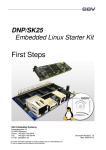
The DIL/NetPC ADNP/1520 Starter Kit contains everything you need to get started with
your x86-based (IA-32) embedded networking application. The Starter Kit includes a
ADNP/1520 module with a pre-installed ROM-DOS – which acts as boot loader – and an
embedded Linux, the Evaluation Board DNP/EVA7, power supply, serial interface (null
modem) cable, a CD-ROM with software and documentation and a printed user manual
for the first steps with the Starter Kit.
The Starter Kit CD-ROM comes with a full GNU tool chain for C/C++ software development. The binary files of this pre-build tool chain run on an x86 Linux-based host (SuSE,
Red Hat or other) and builds executable files for a x86-based (IA-32) 32-bit microcontroller.
For using the ADNP/1520 Embedded Linux Starter Kit you need a development system.
The minimal configuration for this system is a Windows-based PC with the
HyperTerminal terminal emulation program and a free COM port (COM1, COM2 or
USB-based COMx) for the RS232 serial link between the ADNP/1520 and HyperTerminal.
For using the Ethernet link, your PC needs an Ethernet adapter with 10 Mbps or
10/100 Mbps LAN interface. This environment allows web server programming (HTML
pages, Java Applets) and Linux shell script programming. For using the GNU C/C++ tool
chain, it is necessary to run Linux on the development system.
SSV EMBEDDED SYSTEMS
3
DNP/SK18 First Steps – Introduction
1.1
Features and Technical Data
The ADNP/1520 comes with a pre-installed ROM-DOS and an embedded Linux
operating system. The ADNP/1520 Linux consists of two main components: 1. the Linux
kernel and 2. the root file system.
The ADNP/1520 ROM-DOS allows downloading new Linux kernel versions and root file
systems to the ADNP/1520 RAM and Flash. This in-system programming feature can be
used by a simple serial and Ethernet link between the development system and the
ADNP/1520.
•
DIL/NetPC ADNP/1520 with AMD 133 MHz SC520, 16 Mbytes Flash and
64 Mbytes SDRAM, 3.3 VDC Vcc
•
ROM-DOS and embedded Linux pre-installed in Flash memory
•
Evaluation Board DNP/EVA7
•
CompactFlash (CF) card
•
Null modem cable
•
110 VAC or 230 VAC to 5 VDC international power supply
•
CD-ROM with user manual and hardware/programmers manuals
•
Embedded Linux with source
•
GNU tool chain for C/C++ software development for Linux-based PCs
•
GNU gdb and gdbserver for Ethernet-based remote debugging
•
Linux remote login with Telnet
•
Web server setup sample
•
FTP server setup sample
•
Many source code samples
SSV EMBEDDED SYSTEMS
4
DNP/SK18 First Steps – Getting Started
2
2.1
GETTING STARTED
Serial Link between DNP/EVA7 and PC
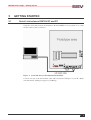
Setup the serial link between the Evaluation Board DNP/EVA7 and your PC. Use a null
modem cable for this connection.
Figure 1: Serial link between Evaluation Board and PC
Connect one end of the null modem cable with an unused COM port of your PC. Make
sure that this PC COM port supports 115.200 bps.
SSV EMBEDDED SYSTEMS
5
DNP/SK18 First Steps – Getting Started
2.2
Ethernet Link between DNP/EVA7 and PC
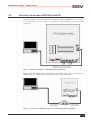
Setup the Ethernet LAN link between the Evaluation Board DNP/EVA7 and your PC.
Use an Ethernet cross-over cable or a switch-based infrastructure for the first LAN
connection.
Figure 2: Ethernet link between Evaluation Board and PC
Please note: The ADNP/1520 comes with the default IP address 192.168.0.126. Please
make sure that your PC can work with the IP address range 192.168.0.x.
Figure 3: Switch-based Ethernet link between Evaluation Board and PC
SSV EMBEDDED SYSTEMS
6
DNP/SK18 First Steps – Getting Started
2.3
Connecting Power Supply and Power-up the Starter Kit
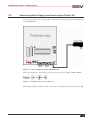
Connect a 5 VDC power supply with a 5.5 mm x 2.5 mm jack plug to the Evaluation
Board DNP/EVA7.
Figure 4: Power supply for the Evaluation Board
Please pay attention to the polarity of the power connector: the + pole is in the center!
Figure 5: Polarity of the power connector
Please note: Make sure that all cable connections are OK. Then power-up the Starter Kit.
SSV EMBEDDED SYSTEMS
7
DNP/SK18 First Steps – Getting Started
2.4
Using Serial Link with Terminal Program
Run HyperTerminal on your Windows-PC, minicom or a similar simple terminal
emulation program on your Linux-based PC.
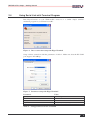
Figure 6: Direct connection setup with HyperTerminal
Setup a direct connection with the parameters of table 1. Make sure, that the PC COM
port supports 115.200 bps.
Figure 7: Parameter setup with HyperTerminal
Parameter
Speed
Data Bits
Parity
Stop Bits
Protocol
Value
115.200 bps
8
None
1
No (Xon/Xoff, RTS/CTS or similar)
Table 1: Setup parameters for the serial link
SSV EMBEDDED SYSTEMS
8
DNP/SK18 First Steps – Getting Started
2.5
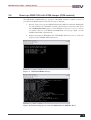
Power-up ADNP/1520 without RCM Jumper (RCM disabled)
After power-up the DIL/NetPC ADNP/1520 starts an automatic boot process from the
on-board flash memory chip. This process consists of two steps:
1. Directly after power-up, the ADNP/1520 runs the BIOS and then the ROM-DOS
for some milliseconds. The BIOS initializes the hardware components (hardware
init). With RCM disabled (please see the DNP/EVA7 hardware reference
manual for details), there is no BIOS and ROM-DOS text message output over
the ADNP/1520 COM1 serial interface. Direct after the hardware init, the ROMDOS runs AUTOEXEC.BAT and starts the Linux OS.
2. Linux takes control over the ADNP/1520 hardware from ROM-DOS and runs all
necessary processes for coming up to live. HyperTerminal shows the first output after some seconds.
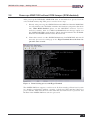
Figure 8: Linux booting process with HyperTerminal
The ADNP/1520 Linux supports a serial console. It allows running a Linux-based system
in a headless configuration without a monitor or keyboard. Wait until the Linux boot
process finishes. Then enter the user name root. This user name needs no password. Just
hit Enter if the ADNP/1520 Linux asks for a password.
SSV EMBEDDED SYSTEMS
9
DNP/SK18 First Steps – Getting Started
2.6
Power-up ADNP/1520 with RCM Jumper (RCM enabled)
The DIL/NetPC ADNP/1520 boot sequence with RCM enabled is similar to the boot
procedure with RCM disabled. Only the first step is different:
1. Directly after power-up, the ADNP/1520 runs the BIOS and then the ROM-DOS
for some milliseconds. The BIOS initializes the hardware components (hardware
init). With RCM enables (please see the DNP/EVA7 hardware reference manual
for details), there are some BIOS and ROM-DOS text message output over the
ADNP/1520 COM1 serial interface.
2. Without interruption ROM-DOS the AUTOEXEC.BAT file starts a Linux OS
image from the ADNP/1520 Flash memory.
Figure 9: ADNP/1520 BIOS message
Figure 10: Linux booting process after the ROM-DOS AUTOEXEC.BAT
SSV EMBEDDED SYSTEMS
10
DNP/SK18 First Steps – Getting Started
2.7
Checking IP Address of PC
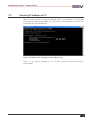
Make sure that your PC is using the right IP address for the Ethernet-based TCP/IP
communication with the DIL/NetPC. Use 192.168.0.1 or 192.168.0.254 for your PC and
192.168.0.126 for the ADNP/1520.
Figure 11: Windows-PC IP address check with ipconfig
Talk to your network administrator if you have problems with the IP address
understanding.
SSV EMBEDDED SYSTEMS
11
DNP/SK18 First Steps – Getting Started
2.8
Checking Ethernet-based TCP/IP Communication
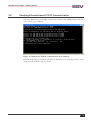
Check the Ethernet-based TCP/IP communication between the ADNP/1520 and the PC
with a simple ping command.
Figure 12: Windows-PC TCP/IP communication check with ping
First check the cable connections and then the IP addresses if your ping doesn’t work.
Then check the TCP/IP setup of your PC.
SSV EMBEDDED SYSTEMS
12
DNP/SK18 First Steps – Getting Started
2.9
Using a Telnet Connection
Run a Telnet client program on your PC with the IP address of the ADNP/1520. You can
use a Telnet session for remote entering Linux commands.
Figure 13: Run the Windows telnet client program
Wait until the ADNP/1520 Linux requests a user name. Please enter the user name root.
This user name needs no password. Just hit Enter if the ADNP/1520 Linux requests a
password.
Please note: The ADNP/1520 Linux comes with BusyBox. All Linux command line
commands are implemented in BusyBox. BusyBox combines tiny versions of many
common UNIX utilities into a single small executable. It provides replacements for most
of the utilities you usually find in GNU fileutils, shellutils, etc. The utilities in BusyBox
generally have fewer options than their full-featured GNU cousins; however, the options
that are included provide the expected functionality and behave very much like their
GNU counterparts. BusyBox provides a fairly complete environment for any small or
embedded system.
Figure 14: Using Linux commands within a Telnet client window
SSV EMBEDDED SYSTEMS
13
DNP/SK18 First Steps – Getting Started
2.10
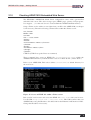
Checking ADNP/1520 Embedded Web Server
The DIL/NetPC ADNP/1520 default Linux configuration comes with a pre-installed
embedded web server. The object storage space (HTML pages, pictures, CGI programs,
Java Applets, …) for this web server is located within the ADNP/1520 Flash memory.
Setup a Telnet session with root user rights from your PC to the ADNP/1520 (see chapter
2.9 if necessary). Enter the following command lines within this Telnet session:
cd /flash
mkdir www
cd www
cat > test.html
<html>
<head>
<title>Hallo Welt!</title>
</head>
<body>
<h1>Hallo Welt!</h1>
</body>
</html>
CTRL-D (CTRL-D stops the Linux cat command)
These command lines create an HTML file /flash/www/test.html within the
ADNP/1520 Flash memory with the German version of “Hello World” (“Hallo Welt!”).
Reboot your ADNP/1520. This reboot defines /flash/www/ as default directory for
the web server.
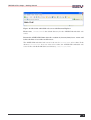
Figure 15: Create an HTML file within a Telnet session
Run your PC web browser and access the HTML file test.html with your browser.
Use the URL http://192.168.0.126/test.html. This URL assumes that your
ADNP/1520 is using the IP address 192.168.0.126 for the Ethernet LAN interface LAN1.
Change this IP address if necessary.
SSV EMBEDDED SYSTEMS
14
DNP/SK18 First Steps – Getting Started
Figure 16: Check the embedded web server with Internet Explorer
Please note: /flash/www is the default directory for the ADNP/1520 embedded web
server.
Restart the ADNP/1520 Linux after the creation of /flash/www/test.html and
before the first access with a web browser.
The ADNP/1520 embedded web server looks out for /flash/www at boot time. If the
directory /flash/www does not exist at boot time, the ADNP/1520 embedded web
server works with the RAM disk-based directory /usr/local/www.
SSV EMBEDDED SYSTEMS
15
DNP/SK18 First Steps – Getting Started
2.11
Checking ADNP/1520 FTP Server
The DIL/NetPC ADNP/1520 Linux comes with a pre-installed FTP server. This server
allows the file transfer between a PC and the ADNP/1520.
Run an FTP client program on your PC. Set the session parameters for your FTP client to
IP address 192.168.0.126, user name guest and password guest. The ADNP/1520 default
directory for the FTP user name guest is /home/guest. This directory is located within
the ADNP/1520 RAM disk.
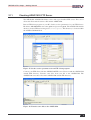
Figure 17: Set the session parameters for an FTP client program
Connect your FTP client with the ADNP/1520 FTP server. Please watch the ADNP/1520
default FTP directory. Transfer some files from your PC to the ADNP/1520. The
ADNP/1520 stores these files in the ADNP/1520 default FTP directory.
Figure 18: Transfer some files to the ADNP/1520
SSV EMBEDDED SYSTEMS
16
DNP/SK18 First Steps – Getting Started
Check the new files with a Telnet session. Change to the ADNP/1520 default FTP
directory /home/guest within your Telnet session.
Figure 19: The new files within /home/guest
SSV EMBEDDED SYSTEMS
17
DNP/SK18 First Steps – Getting Started
2.12
Changing ADNP/1520 Ex Factory IP Address (ipaddree usage)
Every device connected to an IP network must have a unique IP address. This address is
used to reference the specific unit.
The DIL/NetPC ADNP/1520 is automatically assigned an IP address on DHCP-enabled
networks as it is DHCP-enabled by default. If DHCP doesn’t work (i.e. no DHCP server
available), the ADNP/1520 takes a default IP address.
The ex factory value for this default IP address is 192.168.0.126. The network mask for
this address is 255.255.255.0. You can change this IP address over an RS232-based serial
link with help of the program called ipaddree.
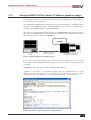
Figure 20: Environment for ipaddree usage
Use a serial console and enter the user name root. This user name needs no password.
Just hit Enter if the ADNP/1520 Linux requests a password. Then execute the following
command:
ipaddree –w 192.168.2.126 –m 255.255.255.0
“ipaddree” is the name of a command line IP setup tool. “192.168.2.126” is an IP
address. Use the IP address of your choice for your setup on this position.
“255.255.255.0” is a network mask. Use a valid network mask for your IP address.
Figure 21: Serial console with ipaddree command line
SSV EMBEDDED SYSTEMS
18
DNP/SK18 First Steps – Getting Started
Reboot the ADNP/1520. The new IP address and network mask are valid after the next
boot process if no DHCP server is available or if DHCP doesn’t work. Check the new IP
address with ping.
Figure 22: Check the new IP address with ping
Please note: Don’t forget to change the IP address of your PC to 192.168.2.1 or similar.
SSV EMBEDDED SYSTEMS
19
DNP/SK18 First Steps – Helpful Literature
HELPFUL LITERATURE
DIL/NetPC ADNP/1520 hardware reference manual (SSV Starter Kit item)
DNP/EVA7 hardware reference manual (SSV Starter Kit item)
CONTACT
SSV Embedded Systems
Heisterbergallee 72
D-30453 Hannover
Phone: +49 (0)511/40 000-0
Fax:
+49 (0)511/40 000-40
E-mail: [email protected]
Internet: www.ssv-embedded.de
www.dilnetpc.com
DOCUMENT HISTORY
Revision
1.0
Date
2006-01-13
Remarks
first version
Name
WBU
COPYRIGHT
The content of this document can change any time without announcement. There is taken
over no guarantee for the accuracy of the statements. The user assumes the entire risk as
to the accuracy and the use of this document. Information in this document is provided
‘as is’ without warranty of any kind.
Some names within this document can be trademarks of their respective holders.
© 2006 SSV EMBEDDED SYSTEMS. All rights reserved.
SSV EMBEDDED SYSTEMS
20