1
4.4.8. “Local ISDN Configuration” Menu (ISDN mode only)
This menu is for the addressing configuration of the equipment itself (number and sub-address of the
ISDN interfaces the codec is connected to).
Each B channel of each S0 interface is allocated an ISDN number (and possibly a sub-address), so each
S0 interface has two numbers. Consequently, 4 numbers are needed for a 256 kbit/s link, 6 numbers for a
384 kbit/s, etc. This principle ensures compatibility with PABXs that impose a unique number for each B
channel. If each S0 interface is allocated only one number (e.g. direct connection to the public network),
this same number will just have to be programmed for each of the two B channels of this interface.
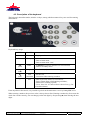
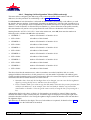
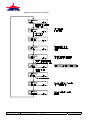
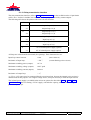
Starting from the “LOCAL ISDN CFG.” item in the main menu, enter OK, then enter the numbers in
following order (validate with OK after each number):
•
LOCAL DIAL NB 1 :
number of B channel 1 of interface S0 #1
•
LOCAL SUB ADD 1 :
sub-address of this channel
•
LOCAL DIAL NB 2 :
number of B channel 2 of interface S0 #1
•
LOCAL SUB ADD 2 :
sub-address of this channel
•
LOCAL DIAL NB 3 :
number of B channel 1 of interface S0 #2
•
LOCAL SUB ADD 3 :
sub-address of this channel
•
LOCAL DIAL NB 4 :
number of B channel 2 of interface S0 #2
•
LOCAL SUB ADD 4 :
sub-address of this channel
•
LOCAL DIAL NB 5 :
number of B channel 1 of interface S0 #3
•
LOCAL SUB ADD 5 :
sub-address of this channel
•
LOCAL DIAL NB 6 :
number of B channel 2 of interface S0 #3
•
LOCAL SUB ADD 6 :
sub-address of this channel
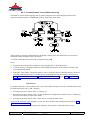
The above describes the maximum case, when six numbers are needed (384 kbit/s link, in a codec
equipped with three S0 interfaces). In the general case, only the number of [number+sub-address] pairs
actually needed (depending on the current configuration) has to be entered; the display comes back to the
main menu after the last useful numbers have been entered.
Although the display only shows 16 digits, 25 digit numbers can actually be entered. When a number
includes more than 16 digits, initially only the 15 leftmost digits are displayed. Pressing the right arrow
(remember that the left arrow is for erasing the rightmost digits) rotates the number to the left and shows
the rightmost digits.
Sub-addresses are limited to four digits.
42
HIFISCOOP 3 5ASystem - User Manual
This document is the property of AETA and can not be duplicated without authorisation
September 2002
55 000 039 – Ed. C
Hifiscoop 3 5AS Manual - Ed.C.doc