1
•
Online Documentation.
The online documentation is very helpful in
learning how to create and specify new features in the user interface.
Other useful Visual Basic 6.0 controls and tools that we found but did not use in the
final version of the program include:
•
Timer. To keep track of time within the program without implementing a
separate clock utility.
•
Icon level raising.
•
Debug output.
Toggles the icons of a program feature with
complementary states.
Write error messages or other debug statements to a
Visual Basic debug window without altering the appearance of the user
interface.
We designed features to implement in our project software and hardware through
further experimentation with the motor commands and Visual Basic software.
<
Features of the Friction Lab Software
We have implemented many features in the graphical user interface to make it
maximally accessible for future students, teachers, and programmers:
•
Serial communications control.
•
Debug output.
•
Coarse- and fine-grain control.
•
Online help.
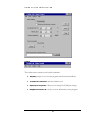
The program opens a serial connection
and enables the user to write various microcontroller commands to the
serial port, either manually or with automatic buttons. The port number
and other COM settings can be changed on-the-fly using the Port
Settings feature.
Acknowledgements from the microcontroller are read in
and written to the debug output of the Visual Basic IDE (integrated
development environment).
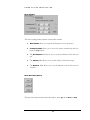
The graphical user interface includes 3
sliders (horizontal scrollbars) for increasing or decreasing the acceleration,
velocity, and travel distance of the motor. The user can switch between
continuous and non-continuous (default) movement.
We have added Tool Tips to all buttons and sliders. If the
student does not know how to use a particular feature of the software,
s/he can simply hold the mouse pointer over the feature, and a Tool Tip
box describing the feature functionality will appear.
13