1
G U I D E
T O
T H E
F R I C T I O N
L A B
«More information on the PASCO photogate and photogate timer can be found at
http://www.pasco.com/.
Magnetic protractor
The magnetic protractor is removable and can be used to measure the angle of the
friction plane.
<
Friction lab software
The friction lab software (executable and source code) is provided on the
accompanying floppy disk. It is also available on the ENME414 Fall 1999 Team 2
website at http://www.isr.umd.edu/~zhang/.
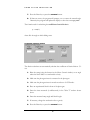
MTo install on a PC with Microsoft Windows:
1. Insert the floppy disk into drive A: (floppy disk drive).
2. Click on the Start Menu Button and select Run…
3. Type: a:\setup.exe
4. Follow installation instructions.
MTo run the software:
1. Make sure the motor is powered.
2. Click on the Start Menu Button and select the Programs|Friction Lab
directory.
3. Click on Friction Lab.
Now you are ready to learn how to use the friction lab software!
1
Using the Software
The software consists of two main windows: (1) Motor Control and (2) Friction
Calculator.
Motor Control
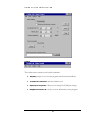
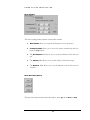
The motor control window is the main window of the program. You will see the
toolbar, controls for motor settings, motor movement buttons, step accumulator,
and controls for manual motor command.
3