1
Measuring a Powder X-ray Diagram
• Open the program Gadds (if it is not already open).
• Set the generator’s power to the user’s setting (45kV, 35mA). Before starting the
measurement, always check the generator’s power (Collect:Goniometer:Generator)
Create a new Project
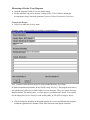
• Select New under the ProJect menu.
Example: create a project called uffa in Fabio’s personal directory.
Note: you must create the new project in your personal directory, by writing
D:\frames\username\projectname\ in the field Working Directory. The program will create a
new subdirectory called projectname in the username directory. The projectname directory
should contain a file named gadds._nc where project’s preferences are stored. You can also
use an old project (ProJect:Load), or read an old gadds._nc file (Edit:Configure:Read).
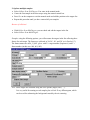
• Check whether the numbers on the gadds window are correct and whether the program
loaded the right detector's distance, flood field correction, and spatial correction.