1
Model: 4300-PG
User Manual
Rev: 1.2
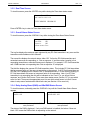
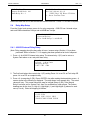
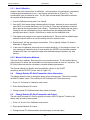
3.3.2 Real Time Screen
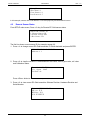
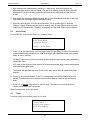
To view this screen, press the <ENTER> key while viewing the Zone alarm status screen.
Current Date / Time
2013/06/30 19:19:19
YYYY/MM/DD HH:MM:SS
Press <ENTER> key to return to Zone alarm status screen.
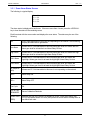
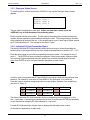
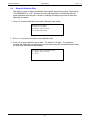
3.3.3 Overall Alarm Status Screen
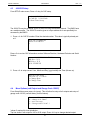
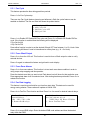
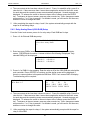
To view this screen, press the <DISPLAY> key while viewing the Zone Alarm Status Screen.
Max ppm=25 by #5
Network:
OK
Sensors:
OK
Alarm status: Low
The top line displays the maximum ppm registered by any EC-Gold transmitter in any zone and the
transmitter network address which caused it.
The second line displays the network status: either “OK” if all active EC-Gold transmitters and
networked resources are responding, or “Net no response: x” and the number (quantity) of not
responding transmitters or networked resources is displayed. For example if 1 EC-Gold transmitter
and 1 RAB board are not responding then "Net no response: 2" is displayed.
The third line displays the common EC-Gold transmitter status. This includes EC-Gold transmitters
that have sensor faults or if they are not responding on the network. If all EC-Gold transmitters are
OK, then “OK is displayed, else “Sensor Fault: x” is displayed where “x” is the number (quantity) of
EC-Gold transmitters with sensor or instrument faults or not responding. Note: if an EC-Gold
transmitter is not responding then this will be indicated on line 2 and 3 i.e. you will get “Net no
response” and “Sensor Fault” errors. Press zone alarm status screen (Section 3.3.1) to see which
zone is in fault. Then press the appropriate zone # to see which actual sensor is in fault. Sensor
status in setup menu can determine which fault code (see Section 4.2 for more info).
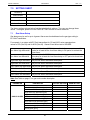
3.3.4 Relay Analog Board (RAB) and MiniRAB Status Screen
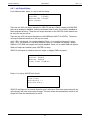
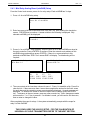
To view this screen, continually press the <DISPLAY> key until the Overall Alarm Status Screen
appears.
RAB1: OK
RAB2: OK
miniRAB1: OK
miniRAB2: OK
This screen will only show up if 4300-RAB
were purchased.
This screen will only show up if miniRAB
were purchased.
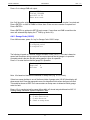
The status of the RAB is displayed. If only one RAB module is installed, the bottom 3 lines are
blank. “OK” means the RAB module is responding on the network.
10