1
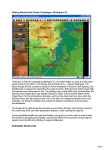
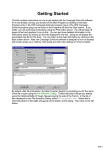
Along the bottom of the screen you can see the Status Bar, which contains several pieces of
information including Date, Game Turn and Game Length. In the lower right you can see visual
display of the time of day where the black at either end depicts night and the yellow in the center is
daylight. Each turn in the game represents 2 hours during the day and 4 hours at night. As time
passes in each day the red current turn indicator moves from left to right. A full day in Bulge ’44
lasts 9 turns, 6 in daylight and 3 at night.
The Status Bar is also used to display game messages, such as those you will see if you attempt
to perform a function that is not allowed. For example, in the game you are not permitted to move
a tank though a water hex. And if you try, nothing will be indicated on the map. But if you look on
the status bar, you will see a message “Unit is blocked by Terrain” .
Left click on the German unit in hex 20,15. On the left of the screen, in the Unit Window, you will
see the unit is the Pio. Btl. 1818. You can also tell at a glance that the unit has a strength of 540
men. Units in the game are measured in Men, Vehicles or Guns. This unit has taken no losses
and is at 100% strength. You can also see its Quality is C, where A is very good Quality and E is
quite poor. So, while this unit is in good shape strength-wise, it is not what you would call an elite
formation. In fact this is the quality of your entire formation at start. Combat, Fatigue and losses
will affect unit Morale and the quality will drop. In longer scenarios, when you rest your units (no
movement or fighting), the Fatigue will be reduced and the Morale will improve. You can also see
the unit is in a Forest Hex of 450m elevation. The current visibility is 2km (or 2 hexes)
If you place your cursor over the Unit Picture or Hex Area Info and right mouse click, even more
information about the unit is revealed. You will see the formation hierarchy from the highest parent
organization of the unit at the bottom, the Army Group B, up to the description of the unit itself, a
Pioneer Battalion. In the same display to the right is a number of game factors about the unit. You
can also see in the Hex Area Info box below the unit that there is a Primary Road passing through
the hex. The value in the center is the total strength stacked in this hex. Release the right mouse
button when you are finished examining the unit details.
We won’t discuss all the details of this information in this Getting Started help file because it is
Page 5