1
1. Aerial triangulation data ...................................................................................................... 3
2. Workflow ............................................................................................................................... 4
2.1 Control of stages performing............................................................................................ 5
3. Interior orientation ............................................................................................................... 6
3.1 Interior orientation menu ..................................................................................................6
3.2 Cameras management..................................................................................................... 7
3.2.1 Input and editing of film camera parameters............................................................. 9
3.2.2 Input of digital camera parameters.......................................................................... 11
3.2.3 Cameras parameters import and export ................................................................. 16
3.3 Interior orientation of film camera images ...................................................................... 17
3.3.1 Manual measuring of fiducial marks........................................................................ 18
3.3.2 Semiautomatic interior orientation........................................................................... 20
3.3.3 Automatic interior orientation .................................................................................. 23
3.4 Interior orientation of digital camera images .................................................................. 25
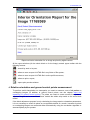
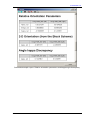
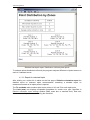
3.5 Report on interior orientation.......................................................................................... 25
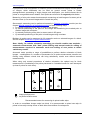
4. Relative orientation and ground control points measurement ..................................... 30
4.1 Orientation menu............................................................................................................ 32
4.2 Input and measuring of ground control points................................................................ 34
4.2.1 GCP input................................................................................................................34
4.2.1.1 Import of GCP list .............................................................................................................. 36
4.2.1.1 Export of GCP list .............................................................................................................. 39
4.2.2 GCP measurement.................................................................................................. 40
4.2.3 Measuring control point on map.............................................................................. 42
4.2.3.1 Preparation and loading of georeferenced data .................................................................. 42
4.2.3.2 Searching corresponding GCPs on images......................................................................... 43
4.2.3.3 Adding to list and measuring GCP on project images........................................................ 44
4.2.3.4 Map window....................................................................................................................... 47
4.2.3.5 Raster map georeference .................................................................................................... 49
4.3 Automatic tie points measurement................................................................................. 51
4.3.1 Working order and terms......................................................................................... 52
4.3.2 Performing of automatic tie points measurement ................................................... 52
4.3.2.1 Automatic tie point measurement window ......................................................................... 53
4.3.2.2 Additional measurement parameters .................................................................................. 56
4.4 Manual measuring of triangulation points ...................................................................... 62
4.4.1 Points measurement module ................................................................................ 62
4.4.1.1 Main window of Points measurement module................................................................. 65
4.4.1.1.1 Windows of opened images ......................................................................................... 70
4.4.1.2 Triangulation points window.............................................................................................. 72
4.4.1.3 Parameters of points measurement ..................................................................................... 76
4.4.1.4 Analysis of autocorrelation coefficient .............................................................................. 77
4.4.1.5 Measuring correspondent point search area ....................................................................... 77
4.4.2 Points measurement workflow ................................................................................ 78
4.4.2.1 Points measurement on a strip stereopair ........................................................................... 78
4.4.2.1.1 Measuring new points ................................................................................................. 78
4.4.2.1.2 Transferring existing points ........................................................................................ 78
4.4.2.2 Points measurement on a stereopair between strips ........................................................... 78
4.4.2.3 Points measurement in triplets............................................................................................ 78
4.4.2.4 Working in 4 windows ....................................................................................................... 78
4.4.2.5 Working in 6 windows ....................................................................................................... 79
4.4.3 Points measurement in stereomode ....................................................................... 79
4.4.4 Displaying points ..................................................................................................... 82
4.4.4.1 Point symbols ..................................................................................................................... 82
4.4.4.2 Point filter........................................................................................................................... 83
4.4.4.3 Displaying points in 2D window........................................................................................ 84
4.4.5 Point measurements deletion.................................................................................. 87