1
Key Reference
Front Panel Keys
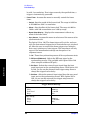
applied to the RF input to ≤+25 dBm.
When using the internal preamplifier, the electronic attenuator
selections using the Input Atten key are not available, and the key is
grayed out. Use the mechanical attenuator under More, Attenuator,
below.
• Attenuator - (For PSA Option 1DS or Option 110) When Int Preamp is
set to On, this key controls an internal mechanical input attenuator
setting. The choices are 0 dB, 10 dB, and 20 dB. The Attenuator key
shows the actual hardware value that is used for the current
measurement. The Attenuator setting is not coupled to the Max Total
Pwr setting.
The Attenuator is only available for measurements which can use the
Int Preamp: Modulation Accuracy (EVM and Peak Code Domain
Error) measurements, QPSK EVM, and Code Domain
measurements. If the Int Preamp is not available for a particular
measurement, the key is grayed out.
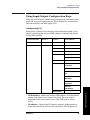
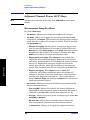
• IF Align Signal - Accesses the following menu to select one of the
signals to be used for IF alignment:
❏ Signal Rate - Sets a value to be used for dividing the fundamental
frequency of 468.75 kHz. The value ranges from 0 to 12 as the
power of 2.
❏ Signal Type - Accesses the following menu to select one of the
signal types:
❏ CW - Sets the IF alignment signal to CW.
❏ Comb - Sets the IF alignment signal to comb wave.
❏ Pulse - Sets the IF alignment signal to pulse wave.
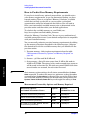
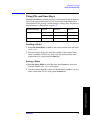
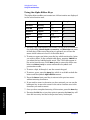
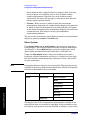
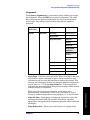
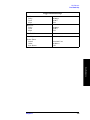
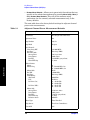
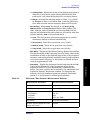
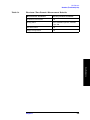
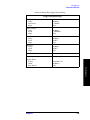
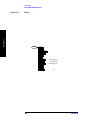
Input Default Settings
Input Port
RF
Input Atten
0.00 dB
Ext RF Atten:
MS
BTS
0.00 dB
0.00 dB
Int Preamp
OFF
Attenuator
0 dB
Chapter 5
163
Key Reference
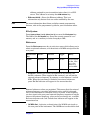
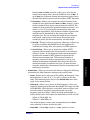
❏ Signal Amptd - Sets an amplitude value to be applied to the digital
analog converter, for the IF alignment signal. The value ranges
from 0 to 4095. This functionality is not available if the PSA
Option 122 or 140 wideband IF path is selected.