1
6
INSTALLATION - AUDIO LEVEL SETTING, continued
4) Set the MMTS20 'TEST TONE' switch to the
'OFF' position. Connect Left and Right audio
source signals to the MMTS20.
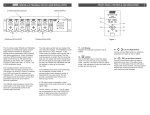
REAR PANEL CONNECTIONS / INTERNAL JUMPERS
3
The system audio levels are now properly set.
Disconnect the test equipment.
R1
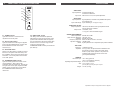
5) Set the 'Audio LEVEL' control on the
MMTS20 to a point where the
'OVERMODULATION' indicator just remains off
or flashes occasionally.
R2
R3
METHOD 2: (If a spectrum analyzer is not
available).
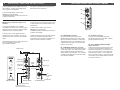
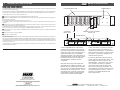
1) Connect the MMTS20, A/V modulator,
compatible DC power source, and video source
signal as shown on this page. Keep the 'TEST
TONE' switch 'OFF' for this procedure.
2) Connect a TV receiver (with MTS stereo
capability) to the A/V modulator. Tune the TV
receiver to the same channel as the modulator
output.
3) Connect the audio source signal (not a tone)
to either the LEFT or the RIGHT Audio Input of
the MMTS20.
4) Set the 'Audio LEVEL' control on the
MMTS20 to a point where the
'OVERMODULATION' indicator just remains off
or flashes occasionally.
5) While monitoring the opposite audio channel
from the TV receiver audio output, set the
'Audio' level control on the A/V modulator for a
maximum (stereo) separation condition.
NOTE: Make certain that the audio response of
the A/V modulator is set for 'FLAT'
(pre-emphasis defeated).
MMTS20
Video Input
Loop-Through
PILOT
LOCK
ON
OFF
TEST
TONE
Video Input
Audio
Cable
POWER
Composite
Audio Out
Audio Input
DC Input
DC Input
OVERMOD
AUDIO LEVEL
MMTS20 FRONT
Audio
In
MMTS20 REAR
Right audio source
Left audio source
(250 mV rms to 2.5 V rms)
Figure 2
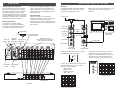
R1 - VIDEO INPUT Connector
This is the baseband video input to the
MMTS20 which provides the encoder circuitry
with the modulator horizontal sync information.
The baseband video to the modulator must be
'looped through' this input using an external 'F'
type Tee (T) connector.
R2 - COMPOSITE AUDIO OUT Connector
This is the unbalanced composite BTSC format
stereo signal output. The output from this RCA
phono receptacle must be connected to the
AUDIO INPUT of the modulator. The connected
modulator audio response must be set for 'Flat'
(pre-emphasis defeated).
Video Source
STEREO
ENCODER
R4
To
System Distribution
or
A/V MODULATOR TV Receiver
R3 - DC INPUT Connector
This 3-pin connector (Male) accepts the
appropriate mating DC power cable. Observe
proper orientation and wiring.
R4 - LEFT AUDIO INPUT/RIGHT AUDIO
INPUT Connectors
These are the left and right audio source input
connectors that accept either a balanced or
unbalanced configuration. Use the Tip (+) and
Ring (-) of a mating male 3.5 mm ‘stereo’ plug
for a balanced connection. If an unbalanced
input is required, the Ring (-) contact should be
connected to ground (shield) with the audio hot
connected to the Tip (+).