1
BL600 Development Kit
Version 2.0
3.5
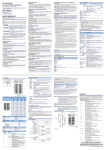
nAutoRUN Pin and Operating Modes
On the development board USB_DTR output (FTDI chip U9) from PC is wired to BL600 module pin SIO.28 (pin40)
which is the nAutoRUN pin.
Note:
smart BASIC runtime engine FW checks for the status of nAutoRUN during power-up or reset. The
nAutoRUN pin detects if the BL600 module should power up into “Interactive / Development Mode (3.3
V)” or “Self-contained Run Mode (0v)”. The module enters Self-contained Run Mode if the nAutoRUN pin
is at 0V and an application called “$autorun$” exists in the modules file system, then the smart BASIC
runtime engine FW will execute the smart BASIC application script automatically; hence the name
Self-contained Run mode.
The nAutoRUN pin inhibits the automatic launch $autorun$ application on power-up. Tying nAutoRUN to 3.3V
inhibits the $autorun$ application from running. The J6 3-pin header allows a jumper to be fitted to select between
the two operating modes.
Table 3-1: BL600 nAutoRUN pin
nAutoRUN
pin
BL600 Operating Mode
Interactive /
Development Mode
Self-contained Run
Mode
Circuit
J6 jumper
position
Micro DIP switch CON12 allows the 4 x UART signals from the FTDI chip (USB_DSR, USB_DTR, USB_DCD, USB_RI) to
be disconnected from reaching the BL600. By default the DIP switch is open.
Since BL600 nAutoRUN pin 40 (SIO.28) is connected to PC FTDI USB_DTR line, the DIP switch CON12 pin 2-6 must be
closed, to allow selection nAutoRUN functionality with jumper on J6.
Figure 4: DIP switch CON12
Note:
The additional lines of the DIP switch CON12 are not currently utilised and need to remain open, as shown
in Figure 4.
Americas: +1-800-492-2320 Option 2
Europe: +44-1628-858-940
Hong Kong: +852-2923-0610
www.lairdtech.com/bluetooth
10
CONN-GUIDE_BL600_DVK_v2_0