1
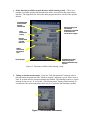
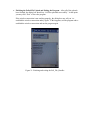
c. Finishing the Failed File Upload and Exiting the Program – After all of the uploads
have finished, the dialog box should say “All files uploaded successfully.” At this point
you may click “Exit” to leave the program.
If the wireless connection is not working properly, the dialog box may tell you “reestablish the wireless connection and try again.” If this happens, exit the program and reestablish the wireless connection and run the program again.
Figure 21. Finishing and exiting the Fail_File_Handler