1
e. Be sure that Bluetooth is turned on before starting the program. The light at the top right
of the PDA should flash blue if Bluetooth is activated. There are two ways to turn on the
Bluetooth option.
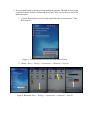
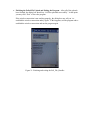
i. Click the Bluetooth Icon on the bottom right of the pda screen and select “Turn
Bluetooth On”.
Figure 3: Turning Bluetooth ON/OFF using the Bluetooth Icon
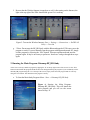
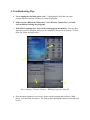
ii. Choose: Start -> Settings -> Connections -> Bluetooth ->Turn On
Figure 4: Bluetooth: Start -> Settings -> Connections -> Bluetooth ->Turn On