1
1. Setup Procedures
*Before beginning any study, please make sure that the following items have been taken care of.
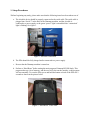
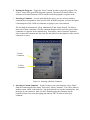
a. The Aircable device should be properly connected to the serial cable. The serial cable is
plugged into “Serial 2” in the back of the Dinamap machine, and the Aircable is
connected to a power supply so the green “power” light is on and the blue “connection”
light is flashing. See figure 1.
Figure 1. AirCable Connection
b. The PDA should be fully charged and/or connected to a power supply.
c. Be sure that the Dinamap machine is turned on.
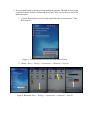
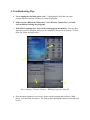
d. Perform a “Hard Reset” before stating the main program, Dinamap BP_HR Study. This
program takes up a lot of memory, and the reset will clear out the memory so the program
will run smoothly. To reset the PDA, press and hold the button on back of the PDA for 2
seconds as shown in the picture below.
Figure 2. “Hard Reset” of the PDA