1
NUCLEIC ACID AMPLIFICATION FROM
INDIVIDUAL CELLS
SECTION A
Laser Capture Microdissection
UNIT 25A.1
Mammalian tissues are histologically and biologically heterogeneous, and typically
contain multiple cellular components, such as epithelial, mesenchymal (i.e., stromal), and
inflammatory cells. Laser capture microdissection (LCM) offers a rapid and precise
method of isolating and removing specified cells from complex tissues for subsequent
analysis of their RNA, DNA, or protein content, thereby allowing assessment of the role
of the cell type in the normal physiologic or disease process being studied. LCM has been
utilized to study molecular changes during the neoplastic progression of specific cell types
(Sgroi et al., 1999; Paweletz et al., 2000), and to understand the role of particular cell
types in normal organ function (Glasow et al., 1998; Jin et al., 1999) and in various disease
processes (Fend et al., 1999a; Sawyer et al., 2000). LCM has the potential to contribute
to the understanding of many cellular processes, particularly processes involving multiple
cell types, such as embryonic development, tissue differentiation and function, aging, and
disease.
There are methods for tissue microdissection other than LCM, such as laser microbeam
microdissection and laser-pressure catapulting, in which a fine laser beam is used to cut
around individual or groups of cells and then laser energy is used to “catapult” the cells
out of the tissue section and allow their collection (P.A.L.M. Mikrolaser Technologie;
http://www.palm-mikrolaser.com); however, currently, Arcturus Engineering is the only
manufacturer of instrumentation for LCM. Arcturus Engineering (http://www.arctur.com)
can be contacted for details about the various LCM systems available and the current
prices of instrumentation and consumables.
In this unit, protocols for the preparation of mammalian frozen tissues (see Basic Protocol
1), fixed tissues (see Basic Protocol 2), and cytologic specimens (see Basic Protocols 3
and 4) for LCM, including hematoxylin and eosin staining (H&E; see Basic Protocol 5
and UNIT 14.5), are presented, as well as a protocol for the performance of LCM utilizing
the PixCell I or II Laser Capture Microdissection System manufactured by Arcturus
Engineering (see Basic Protocol 6). Also provided is a protocol for tissue processing and
paraffin embedding (see Support Protocol), and recipes for lysis buffers for the recovery
of nucleic acids and proteins (see Reagents and Solutions). The Commentary section
addresses the types of specimens that can be utilized for LCM and approaches to staining
of specimens for cell visualization (see Critical Parameters). Emphasis is placed on the
preparation of tissue or cytologic specimens as this is critical to effective LCM. Resources
available on-line are given at the end of the unit (see Internet Resources).
PREPARATION OF FROZEN SECTIONS FOR LCM
Embedding and freezing is a way to preserve specimens and stabilize them for long-term
storage and sectioning (also see UNIT 14.2). Tissue is embedded in a viscous compound,
such as optimal cutting temperature (OCT; Tissue-Tek) medium, and rapidly frozen on
dry ice. For long-term storage (i.e., months to years), liquid nitrogen offers the best
preservation of protein and RNA. Storage at −80°C is adequate for shorter time periods
(i.e., a few days to several weeks).
BASIC
PROTOCOL 1
Discovery of
Differentially
Expressed Genes
Contributed by Andra R. Frost, Isam-Eldin Eltoum, and Gene P. Siegal
Current Protocols in Molecular Biology (2001) 25A.1.1-25A.1.24
Copyright © 2001 by John Wiley & Sons, Inc.
25A.1.1
Supplement 55
Materials
Embedding medium (e.g., OCT; Tissue-Tek)
∼1-cm maximum-dimension tissue samples
Cryomolds (Tissue-Tek)
Dry-ice container with lid
Aluminum foil
Microm cryostat, refrigerated to −20°C with tissue platform (chuck) and
appropriate blades (Richard-Allan Scientific)
Glass slides (e.g., Gold Seal plain uncoated slides; Becton Dickinson)
No. 2 pencil or slide marker
Slide boxes (optional)
Embed tissue
1. Place a labeled empty cryomold on dry ice in a container for 1 min. Keep on dry ice
during the entire embedding procedure.
2. Cover the bottom of the cryomold with ∼2 to 3 mm embedding medium.
3. Place the tissue to be frozen against the bottom of the cryomold in the medium before
it hardens (this may take <1 min depending on the amount of OCT used).
To facilitate cutting, the tissue should be relatively small (i.e., 1 cm in maximum dimension)
and the desired cutting surface should be flush against the bottom.
4. Fill the cryomold containing the base of embedding medium and frozen tissue with
more embedding medium. Cover the dry ice container and allow the embedding
medium to harden (several minutes).
The medium will turn from translucent to white when frozen.
5. Wrap the resulting tissue block, still in the cryomold, in aluminum foil and keep in
a −80°C freezer or in liquid nitrogen until cutting.
Tissue for RNA extraction should be frozen as quickly as possible after resection. The
method described here is preferred for LCM because tissue processed in this manner is
more amenable to cryostat sectioning and offers acceptable histomorphology. More rapid
methods of freezing tissue, such as direct immersion into liquid nitrogen, isopentane chilled
to −160°C (Sheehan and Hrapchak, 1987a), or the vapor phase of liquid nitrogen, can also
be utilized; however, these methods are more technically difficult when incorporating
cryostat embedding media and are more likely to result in cracking of the tissue block.
Tissues that were rapidly frozen without embedding medium can be postembedded in
cryostat embedding medium, but will thaw somewhat in the process. This can compromise
RNA preservation and introduce undesirable histologic artifacts.
Section tissue
6. Remove the tissue block from the cryomold and attach it to the tissue platform (chuck)
in the cryostat, with additional embedding media serving as the “glue” at the interface.
Apply just enough embedding media to cover the surface of the chuck and quickly
attach the frozen tissue block before the “glue” hardens completely.
The cutting surface should be as parallel as possible to the chuck surface.
7. Allow the block to equilibrate to the cryostat temperature (i.e., −20°C) ≥15 min.
8. Cut 5- to 10-µm sections onto glass slides that have been sitting at room temperature
and previously labeled with identifying numbers and or letters using a no. 2 pencil
or a permanent marker designed for labeling slides.
Laser Capture
Microdissection
25A.1.2
Supplement 55
Current Protocols in Molecular Biology
Glass slides can be plain uncoated, charged, or silanized. The properties of glass slides
that allow tissue adherence are variable among different brands, even with plain uncoated
slides. It is important to use slides that allow tissue sections to adhere well enough that
they do not fall off during staining, but not so tightly that the tissue cannot be captured. It
is likely that different brands and types of slides will have to be tried, and that slides used
successfully for formalin-fixed paraffin-embedded sections may not be optimal for frozen
ones. The authors have found the Becton Dickinson Gold Seal plain uncoated slides work
well for LCM of frozen sections in their laboratory. It is best to begin with plain uncoated
slides, and if tissue sections do not adhere well enough to allow staining, to try charged or
silanized slides. Adhesives, such as Sta-On (Surgipath) can be applied directly to the slides
or gelatin, or can be added to the water bath during histologic sectioning; however, these
may limit the transfer efficiency of LCM.
It is important to mount the tissue as close to the center of the slide as possible. If the tissue
is too far off center, the slide cannot be positioned so that the vacuum slide holder can
function during microdissection.
If sections are particularly friable and thus difficult to cut, the tissue may be too cold;
therefore, the time allowed for the block to equilibrate to −20°C may need to be extended.
Sections should be without folds and lie as flat as possible on the slides.
Sections with >10-ìm thickness are difficult to visualize. The authors prefer sections of 5to 6-ìm thickness. Thicker sections will require a larger spot size and therefore a higher
laser-energy level.
9. Keep the slides in the cryostat or on dry ice if LCM is to be performed that day.
Alternatively, store in slide boxes at −80°C until needed.
The duration of preservation of RNA and protein in frozen sections at −80°C is not well
documented and likely depends on the tissue and the desired analyte. Although storage
over several weeks or even months at −80°C may preserve the analyte of interest well, if
this has not been assessed, we recommend limiting storage of frozen sections prior to
microdissection to one week.
10. Stain slides (see Basic Protocol 5) just prior to LCM.
IMPORTANT NOTE: Do not allow the slides to dry or thaw at room temperature prior to
staining and dehydration. This is critical for successful LCM. Drying and thawing causes
the tissue to adhere tightly to the slide and will decrease the transfer efficiency of LCM.
Additionally, it may contribute to the degradation of RNA.
PREPARATION OF FIXED PARAFFIN-EMBEDDED SECTIONS
Paraffin embedding is a process in which fixed tissue—utilizing neutral buffered formalin
(NBF) or another fixative—is infiltrated and then placed into liquefied paraffin to stabilize
it for long-term storage and easy sectioning (UNIT 14.1). While fixation is performed to
preserve the morphology of the tissue for histologic examination, it also effects the DNA,
RNA, and protein content. Formalin fixation is the standard for morphologic preservation
of tissue and has been used by most pathology laboratories for decades; however, it creates
cross-links between nucleic acids and proteins, and between different proteins. This
cross-linking interferes with recovery of DNA, RNA, and proteins from fixed tissue, as
well as the amplification of DNA and RNA by PCR (Arnold et al., 1996; Coombs et al.,
1999; Goldsworthy et al., 1999; Masuda et al., 1999); however, short lengths of DNA, up
to ∼200 bp, can be reliably amplified after extraction from formalin-fixed paraffin-embedded (FFPE) tissue. RNA is a more labile species, and formalin fixation and paraffin
embedding greatly interfere with its recovery. Attempts to break cross-links and thereby
improve recovery of nucleic acids and protein have been utilized with varying degrees of
success (Ikeda et al., 1998; Coombs et al., 1999; Masuda et al., 1999). Optimization and
standardization of methods to break the cross-links caused by formalin fixation is a goal
BASIC
PROTOCOL 2
Discovery of
Differentially
Expressed Genes
25A.1.3
Current Protocols in Molecular Biology
Supplement 55
of many researchers. Studies have shown that, among commonly used fixatives, formalin
has the worst effects on RNA, while ethanol (i.e., 70% or 95% ethanol) or ethanol-based
fixatives, available from suppliers of histology-related materials (e.g., Richard-Allan
Scientific), offer the best RNA preservation (Goldsworthy et al., 1999; Shibutani et al.,
2000).
In this protocol, it is assumed that most researchers will procure fixed and embedded
tissue from pathology laboratories or other sources and may have no control over fixation
and processing of tissues; however, a suggested protocol for fixation and tissue processing
(see Support Protocol) has been included in the event the researcher is prospectively
collecting human or animal tissues and has some degree of control over these processes.
Materials
Paraffin-embedded tissue block mounted on appropriate microtome chuck (see
Support Protocol)
Xylene
100%, 95%, and 70% ethanol
Microtome and microtome blades (disposable preferred; Richard-Allan Scientific),
clean
43° to 44°C water bath
Histologic slides, plain uncoated, charged, or silanized
37° to 42°C oven (optional)
Coplin jars or other solvent containers
Section tissue
1. Cut 5- to 10-µm sections of a paraffin-embedded tissue block mounted on an
appropriate chuck on a clean microtome with a clean blade.
IMPORTANT NOTE: Careful attention should be given during sectioning and mounting
of paraffin-embedded tissue to prevent carryover. Carryover contamination of one specimen from another or transfer of material from one region of a section to another can lead
to spurious results. The microtome used to cut sections should be kept clean and excess
paraffin and tissue fragments should be wiped from the area with a simple gauze pad. A
fresh microtome blade should be used for each block and disposable blades used if possible.
Sections of 5-ìm thickness are optimal for LCM, but the thickness should be dependent on
the size of the cells to be microdissected.
2. Float resulting paraffin ribbons on 43° to 44°C deionized water in a water bath to
smooth out and eliminate folds and wrinkles.
The water should be changed frequently to avoid contamination of sections by tissue
fragments from other tissues and to minimize growth of environmental microorganisms.
The authors currently do not recommend using formalin-fixed paraffin-embedded tissue
for RNA analysis; however, the authors and others have successfully performed RT-PCR
on alcohol-fixed paraffin-embedded tissues. If sections will be microdissected for RNA,
consideration should be given to using RNase-free water (UNIT 4.1).
Some histopathology laboratories use an adhesive in the water bath to better adhere the
tissue section to the slide. As this may result in reduced LCM transfer of tissue, it is not
recommended.
3. Mount sections on histologic glass slides.
Clean uncoated plain, charged, or silanized histological slides can be used. The authors
have successfully performed LCM utilizing many brands of uncoated glass slides, as well
as charged slides, with fixed and paraffin-embedded tissues.
Laser Capture
Microdissection
It is important to mount the tissue as close to the center of the slide as possible. If the tissue
is too far off center, the slide cannot be positioned so that the vacuum slide holder can
function during microdissection.
25A.1.4
Supplement 55
Current Protocols in Molecular Biology
4. Air dry the paraffinized sections overnight or bake up to 8 hr at 37° to 42°C.
As with frozen sections, the desired result is for the tissue to remain adherent to the slide
during staining, but not be so adherent as to prevent tissue transfer by LCM. Baking the
slides will cause the sections to be more adherent than air drying. Relevant variables that
affect LCM include the type of slide, whether the sample is air dried or baked, the duration
of baking, and the type of tissue being microdissected.
Remove paraffin
5. Allow the slide containing the tissue section to remain in the following solutions, in
Coplin jars or other solvent containers, for the specified times in the specified order:
Xylene
Xylene
100% ethanol
95% ethanol
70% ethanol
5 min
5 min
30 sec
30 sec
30 sec
In order to proceed with histologic staining and LCM following sectioning, paraffin must
be removed from the tissue sections.
If RNA is to be analyzed, consideration should be given to preparing the 95% and 70%
ethanol solutions with RNase-free water. The authors routinely utilize sterile or distilled
water and typically achieve good RNA recovery.
6. Proceed with hematoxylin and eosin staining (see Basic Protocol 5).
PREPARATION OF CYTOLOGIC SPECIMENS FOR LCM: DIRECT
SMEARS
BASIC
PROTOCOL 3
Cellular elements in body fluids or fine-needle aspirates and cultured cells do not readily
lend themselves to sectioning, but can easily be prepared for LCM by making direct
smears or cytospin preparations. The choice as to which to use will depend upon the
anticipated cellularity of the sample. Highly cellular samples can be easily and rapidly
prepared as direct smears and effectively utilized for LCM, whereas less cellular samples
are better concentrated and prepared as cytospin preparations. To determine if the sample
requires concentration, make a direct smear as described below and examine it under the
microscope. If the concentration of cells is such that the desired number of cells for LCM
can be located in 1 to 4 areas each with a diameter of 0.5 cm (the appropriate diameter of
the “cap” used to capture the cells of interest during LCM), the specimen does not require
concentration. If however, the concentration of cells is so low that the number of desired
cells is not present or the cells are so widely spaced that it will require five or more caps
to obtain them, specimen concentration is recommended. For specimens contaminated
with undesired blood elements (i.e., red blood cells or white cells that are not intended to
be microdissected), use the protocol for cytologic smears or cytospins containing excessive blood as the contaminant (see Alternate Protocol 1). The same basic caveats apply
to cytologic specimens as histologic sections—i.e., ethanol is the preferred fixative
(especially for RNA analysis), the cells should never be allowed to dry on the slide prior
to fixation, and the fixed and stained cells should be adequately dehydrated prior to LCM.
Materials
High-cellularity sample: cellular fluid (e.g., fine-needle aspiration, suspended
cultured cells) or fresh tissue
95% ethanol
Hemocytometer cover (optional)
Glass slides, clean
Scalpel blade (fresh tissue)
Discovery of
Differentially
Expressed Genes
25A.1.5
Current Protocols in Molecular Biology
Supplement 55
1a. For cellular fluid: Place a drop of cellular fluid (i.e., fine-needle aspiration samples
or cultured cells suspended in medium), no larger than 5 mm in diameter, towards
the label end of a clean glass slide. Quickly utilize the edge of another glass slide, or
preferably a hemacytometer cover, to thinly spread the drop (i.e., as if making a
blood-smear preparation) on the slide in a single motion, relying on capillary action
between the liquid and the two slides to spread the liquid in a uniform, thin-layer
across the length and width of the slide. Do not apply excessive force which might
result in crushing or shearing of cells.
Plain uncoated, charged, or silanized glass slides can be used.
We prefer to prepare cytologic smears with a hemocytometer cover because its width is
slightly less than that of the standard glass microscopic slide and the resulting smear (i.e.,
cells) is not spread to, or off, the edge of the slide.
1b. For fresh tissue: Quickly sample by scraping tissue with a scalpel blade and then
rapidly spread the scraped sample on a glass slide with the blade.
This is a quick and useful method of specimen preparation for tissues in which the desired
cells can be readily identified cytologically, such as highly malignant cells.
2. Immediately after spreading, immerse the smear in 95% ethanol without allowing it
to dry. Incubate 10 min.
3. Transfer to 70% ethanol for 30 sec.
4. Proceed to hematoxylin and eosin staining (see Basic Protocol 5).
BASIC
PROTOCOL 4
PREPARATION OF CYTOLOGIC SPECIMENS FOR LCM: CYTOSPIN
METHOD
Cytospin preparations can be used for any cytologic sample but are preferred for samples
of low cellularity. Cytospin instrumentation allows cellular fluids to be simultaneously
concentrated and placed on a glass slide. Using centrifugation, these instruments spin cell
suspensions onto a microscope slide as the suspension medium is simultaneously absorbed by a blotter. The result is a monolayer of well-preserved well-displayed cells within
a 6-mm2 area on the slide. Another alternative for samples of low cellularity is to centrifuge
the sample, decant the supernatant, and make a direct smear (see Basic Protocol 3) from
the sediment. Particularly bloody specimens may benefit from the protocol provided
below (see Alternate Protocol 1). To avoid RNA, DNA, or protein degradation, the
cytologic samples should be processed and fixed in 95% ethanol shortly after collection.
Microdissection after fixation is preferable, particularly for RNA analysis.
Materials
Low-cellularity sample: fine-needle aspiration or cultured cells suspended in
medium
95% and 70% ethanol
Cytospin instrument and appropriate single sample chamber cytospin device (e.g.,
Shandon/Lipshaw)
Glass slides, clean
Assemble and load cytospin devices
1. Assemble the sample chamber cytospin device with clean glass slides according to
the manufacturer’s instructions.
Laser Capture
Microdissection
Plain uncoated, charged, or silanized glass slides can be used.
25A.1.6
Supplement 55
Current Protocols in Molecular Biology
2. Load the assembled collection chamber devices into the support plate of the cytospin
instrument.
They must be secure, freely tiltable, and symmetrically distributed.
Add samples and spin
3. Pipet low-cellularity sample into sample chambers.
The optimal amount of specimen will vary with its cellularity. Samples of low cellularity
will require 300 to 400 ìl per chamber; highly cellular samples will require only 100 to
200 ìl per chamber.
4. Press closure cap on each sample chamber.
5. Lock the lid of sealed head and close the cytospin cover.
6. Program cytospin for 3 min at 1500 rpm on high acceleration and press start.
Rapidly fix cytospins
7. When the alarm signaling the end of the spin sounds, quickly remove the assembled
collection chambers. Open the chambers and remove the slides by lifting the blotter
away from the slide
This method avoids damage of cell membranes and thus smearing.
8. Quickly transfer slide into 95% ethanol without allowing the specimen to dry. Fix 10
min. Transfer slide to 70% ethanol for 30 sec.
9. Proceed to H&E staining (see Basic Protocol 5) or other stain of choice.
REMOVING BLOOD FROM SAMPLES FOR CYTOLOGIC SMEARS OR
CYTOSPINS
ALTERNATE
PROTOCOL 1
Particularly bloody specimens may benefit from separating red blood cells from other
cellular elements, thereby concentrating the desired cells (especially epithelial cells). This
can be accomplished by utilizing the Ficoll-Paque density gradient technique described
here. The specimen is layered onto an undiluted Ficoll-Paque solution and centrifuged.
Differential migration during centrifugation results in the formation of layers enriched in
different cell types. This allows extraction of other cells in the sample from red blood
cells. This method is not ideal for isolating white blood cells for microdissection as many
of them separate with the red blood cells. See the Arcturus Engineering web site
(http://www.arctur.com) for a protocol for isolating the buffy coat of blood.
Materials
Cytologic sample
Sterile saline (i.e., 0.9% w/v NaCl) or balanced salt solution
Ficoll-Paque (Pharmacia)
50-ml centrifuge tubes
Concentrate cellular components
1. Centrifuge the cytologic sample for 10 min at 350 × g, room temperature, in a 50-ml
centrifuge tube.
2. Aspirate the supernatant with a pipet.
3. Resuspend the cell “button” in 5 to 10 ml sterile saline or balanced salt solution.
Discovery of
Differentially
Expressed Genes
25A.1.7
Current Protocols in Molecular Biology
Supplement 55
Separate cellular components
4. Add 20 ml Ficoll-Paque to a clean-50 ml centrifuge tube. Carefully pipet the cell
suspension onto the Ficoll-Paque.
It is best not to mix the Ficoll-Paque with the specimen at this point.
5. Centrifuge 10 min at 350 × g, room temperature.
After centrifugation, the top and clearest layer contains any epithelial cells and some white
blood cells. The middle layer is the Ficoll-Paque and the lowest layer is predominantly red
blood cells and white blood cells.
6. Prepare the superficial cell layer as direct smears or cytospins (see Basic Protocols 3
and 4).
BASIC
PROTOCOL 5
HEMATOXYLIN AND EOSIN STAINING
Histologic section and cytologic preparations must be stained so that the component cells
can be adequately visualized for accurate identification; hematoxylin and eosin stain is
commonly used for this purpose. With this stain, nuclei are black-blue and cell cytoplasm
and most extracellular material are varying shades of pink. Although both hematoxylin
and eosin staining solutions can be prepared from their basic components, the authors
recommend purchasing prepared, ready-to-use stains.
Materials
Sample on a glass slide (see Basic Protocols 1 to 4)
70%, 95%, and 100% ethanol
Sterile, distilled, or RNase free water
Mayer’s hematoxylin (Richard-Allan Scientific)
Bluing reagent (Richard-Allan Scientific)
Eosin Y
Xylene
1. For frozen sections (optional): Rapidly remove the sample on a glass slide from
−80°C storage (see Basic Protocol 1) and immerse in or flood with 70% ethanol
without allowing the slide to thaw and dry prior to contact with the ethanol. Allow
the ethanol to remain in contact with the tissue for 30 sec.
Deparaffinized fixed sections (see Basic Protocol 2) as well as samples prepared by direct
smear or cytospin (see Basic Protocols 3 and 4) will already be in 70% alcohol and are
ready to proceed through the following steps.
2. Allow the slide containing the tissue section to remain in the following solutions for
the specified times in the specified sequence:
Sterile, distilled, or RNase-free water
Mayer’s hematoxylin
Sterile, distilled, or RNase-free water
Bluing reagent
70% ethanol
Eosin Y
95% ethanol
95% ethanol
100% ethanol
100% ethanol
Xylene
10 sec
10 sec
10 sec
15 to 30 sec
15 to 30 sec
15 to 30 sec
30 sec
30 sec
30 sec
30 sec to 1 min
1 to 5 min
Laser Capture
Microdissection
25A.1.8
Supplement 55
Current Protocols in Molecular Biology
3. Allow the section to air dry completely and proceed to LCM (see Basic Protocol 6
and Alternate Protocol 2).
Poor LCM transfers will result if the tissue section is not fully dehydrated. This may result
if the 100% ethanol becomes hydrated after repeated use. One way to check the 100%
ethanol for water is to put a small amount into xylene. If there is water present, the xylene
will become cloudy. The final xylene rinse also facilitates the efficiency of transfer with
LCM. If a tissue section does not transfer well, repeating the dehydration with fresh 100%
alcohol and/or a longer xylene rinse may help. While other staining protocols can be used,
the slides should be dehydrated with graded alcohols and the final xylene step.
LASER CAPTURE MICRODISSECTION
The described procedure is for the PixCell I or II Laser Capture Microdissection System
and assumes a general knowledge of the function of the components of the instrument
and the software that accompanies the instrument. The general theory underlying the use
of the instrument is discussed elsewhere (see Background Information). The procedure
can be divided into three basic steps: slide positioning, microdissecting with the laser,
and collecting the microdissected cells. Additional information about the Arcturus LCM
software, including capturing and storing images, and additional instruction for LCM,
can be found in the instrument users’ manual and at the Arcturus Engineering web site
(http://www.arctur.com), the National Institute of Environmental Health Sciences web
site (http://dir.niehs.nih.gov), or from Arcturus technical support (650-962-3020).
BASIC
PROTOCOL 6
Materials
Glass slide with stained specimen (see Basic Protocol 5)
Appropriate lysis buffer (e.g., DNA lysis buffer, protein lysis buffer; see recipes)
PixCell I or II Laser Capture Microdissection System (Arcturus Engineering)
Arcturus LCM software (Arcturus Engineering; optional)
CapSure transfer film (Arcturus Engineering)
0.5-ml microcentrifuge tubes (Eppendorf)
NOTE: Wear gloves when microdissecting to avoid contamination of the LCM specimens.
Clean the microscope stage and capping station before beginning the microdissection
(e.g., use 95% ethanol wipes), to reduce the possibility of contamination.
Position slide (section) to be microdissected
1. Turn on the PixCell I or II Laser Capture Microdissection System. Open the Arcturus
LCM software if it is to be used.
The Arcturus LCM software is not required for LCM as all adjustments of parameters can
be made on the laser electronics box; however, it eases the use of the instrument and
performs useful functions, such as counting the pulses of the laser (“shots”) and allowing
the procurement and archiving of images.
2. Place the glass slide with the stained section to be microdissected on the microscope
stage. Move the joystick so that it is perpendicular to the tabletop to allow proper
placement of the CapSure transfer film (“cap”). Focus the microscope to view the
tissue or cells. Locate the area to be microdissected, moving the slide by hand rather
than with the joystick, so that the joystick will be in proper alignment when the area
to be microdissected is located.
Samples are usually stained in order to be visualized for LCM; however, LCM can be
performed successfully without staining, but desired cells may not be identifiable.
The area selected should be located such that a portion of the slide covers the vacuum
chuck hole and the slide spans the central hole in the stage.
Discovery of
Differentially
Expressed Genes
25A.1.9
Current Protocols in Molecular Biology
Supplement 55
3. Turn on the vacuum slide holder.
IMPORTANT NOTE: The joystick should now be used to move the slide.
4. Use the visualizer to more precisely locate the cells to be microdissected.
The light from the microscope will need to be increased when using the visualizer.
The area to be microdissected should be in the field of view.
The sections are not coverslipped; therefore, the area of interest may be difficult to visualize.
All models of the PixCell System are equipped with a visualizer which acts to diffuse light
and improves resolution; however, the visualizer is engaged differently on different models
(see instrument user’s guide).
Microdissect with the laser
5. Pick up a cap from the loaded cassette module on the right side of the microscope
stage (see instrument users’ guide for instructions on loading the caps into the cassette
module) with the placement arm. Swing the placement arm toward the caps until the
arm overrides the first cap in the cassette module. Ensure that the cassette module is
engaged in the proper indent so that the first available cap is aligned with the arrow
on the microscope stage. Lift the transport arm until the cap detaches from the base
slide in the cassette module.
6. Without lowering the placement arm, swing the arm back toward the tissue section
as far as possible, so that the arm is over the tissue. Make sure that the area to be
microdissected is still in the microscopic field of view by looking through the
microscope eyepieces or at the monitor. Gently lower the arm so that the cap contacts
the tissue section.
If there are folds in the tissue, the cap may not make direct contact with the entire surface
in the area to be microdissected, and transfer efficiency will be compromised; therefore, it
is advisable to inspect the tissue before placing down the cap. If any tissue is mounded or
folded, it is best not to place the cap over that area. Alternatively, the area of the tissue with
folds can be scrapped off the slide using a sterile razor blade, leaving only flat portions of
the tissue section. The tissue section must be dry and cannot be coverslipped for LCM
transfer.
7. Enable the laser by turning the key on the laser electronics box and pushing the
laser-enable button.
The laser-tracking beam should now be visible on the monitor, as well as the area to be
microdissected. If it is not, try lowering the light from the microscope or raising the intensity
of the tracking beam. If it is still not visible, check that the laser is enabled and that the
joystick is perpendicular.
Avoid passing hands through the path of the laser when it is enabled.
8. Using the 20× objective, adjust the focus of the tissue by moving the slide via the
joystick to an area of the slide without tissue. Adjust the laser spot size to 7.5 µm.
Lower the light from the microscope until there is a black monitor screen, except for
the tracking beam. Turn the laser focusing wheel until the tracking beam is a bright
spot with a well-defined edge.
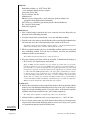
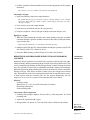
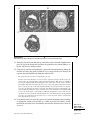
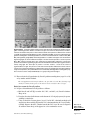
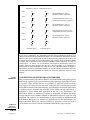
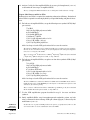
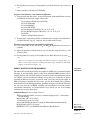
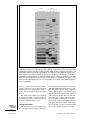
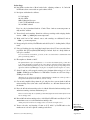
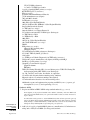
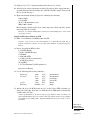
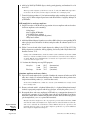
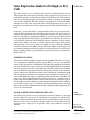
There should be no bright rings surrounding the central spot (Fig. 25A.1.1).
Always focus the laser with the 7.5-ìm spot. Each tissue section and slide will need to be
refocused. Once the 7.5-ìm spot is focused for a particular slide, there is no need to refocus
the 15-ìm or 30-ìm spots, as they are automatically calibrated.
Laser Capture
Microdissection
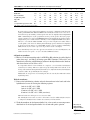
9. Adjust the laser power and pulse duration settings for the particular spot size to be
used as provided below:
25A.1.10
Supplement 55
Current Protocols in Molecular Biology
A
B
C
Figure 25A.1.1 Focusing the Laser Beam. (A) Unfocused beam, the spot of light has concentric halos of light.
(B) Focused beam, the spot of light has a sharp border without halos of light. (C) Unfocused beam, the spot of
light has a blurred border. A 20× objective and 7.5-µm spot size is used in all three pictures.
Spot size
7.5 µm
15 µm
30 µm
Power
40 mW
25 mW
20 mW
Duration
450 µsec
1.5 msec
5 msec
Laser power and duration determine the spot size. The power and duration settings given
above should provide a melted area that is similar in size to the tracking beam at each of
the three settings, but may require adjustment. See the user’s manual for more information.
10. While the tracking beam is still located in an area without tissue, fire the laser by
clicking the red button on the remote thumb switch to assess the effectiveness of the
laser focus and settings.
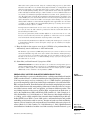
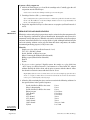
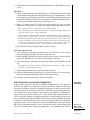
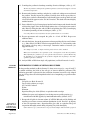
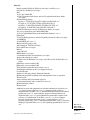
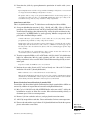
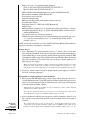
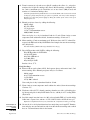
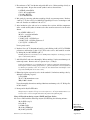
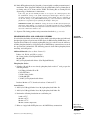
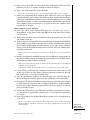
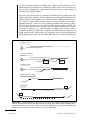
Effective melting (“wetting”) of the polymer on the lower surface of the cap is indicated
by a circle with a well defined black outline (see Fig. 25A.1.2).
If the edges of the circle are not well delineated, check to make sure that the tissue section
where the cap is placed is flat and refocus the beam. If this fails, increase the power and/or
duration gradually and as little as possible (see Troubleshooting).
11. Test the effectiveness of LCM in the tissue section by moving the tracking beam to
the cells to be microdissected. After targeting the cells, fire the laser. Move the slide
Discovery of
Differentially
Expressed Genes
25A.1.11
Current Protocols in Molecular Biology
Supplement 55
A
B
Figure 25A.1.2 Polymer Melting After Laser Firing. (A) An adequate and effective melt has a sharp, delineated
border. (B) The border of an inadequate melt is blurred and indistinct.
with the joystick to another group of cells and fire the laser again. Limit the number
of pulses for this test to two or three.
The delineation of the circle may be more difficult to visualize on the tissue section, but the
tissue in an area of proper “wetting” should become more sharply focused because the
melted polymer acts as a coverslip. Lift the placement arm and inspect the area in which
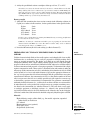
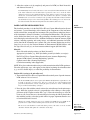
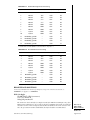
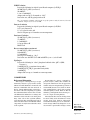
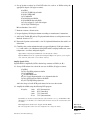
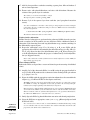
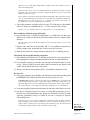
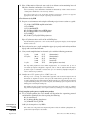
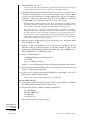
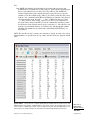
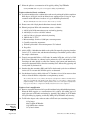
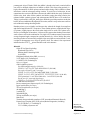
the laser was fired for removal of cells (see before and after photomicrographs in Fig.
25A.1.3).
If the LCM was successful, the area where the polymer was melted should no longer be
occupied by tissue and should be empty, although a small amount of cellular and stromal
material may remain. The great majority of the tissue that occupied those spots should now
be attached to the cap. This can be checked by releasing the vacuum slide holder, moving
the slide so that a clean area without tissue is in the microscopic field of view, lowering the
cap to the slide, and scanning the surface of the cap. The microdissected tissue should be
visible on the cap surface. If this is not the case, there are several explanations and potential
remedies (see Troubleshooting).
Avoid lifting and lowering the cap repeatedly after firing the laser and capturing some
tissue. It is difficult to replace the captured tissue in the exact spot from which it came.
Consequently the captured tissue, and tissue that may nonspecifically stick to the cap, will
be placed on the histologic section, resulting in a layering effect which can limit contact
of the cap with the tissue and compromise the effectiveness of LCM; therefore, limit the
number of shots used to test the adequacy of capture, and, if the test capture is successful,
avoid lifting the cap again until the microdissection is complete.
Dense, dark or thick samples may occlude the tracking beam. If this occurs, increase the
intensity of the tracking beam.
12. Once LCM is achieved successfully with the test pulses, proceed to microdissect the
remainder of the desired cells.
Laser Capture
Microdissection
Collect microdissected cells
13. After completing the intended microdissection, lift the placement arm. Assess the
completeness of the capture by inspecting the microdissected tissue and the cap as
described above.
25A.1.12
Supplement 55
Current Protocols in Molecular Biology
A
B
C
Figure 25A.1.3 LCM of ductal carcinoma in situ. (A) The area of ductal carcinoma in situ prior to LCM. (B)
The same focus after LCM. (C) The microdissected focus on the transfer film (cap).
14. Swing the placement arm with the cap towards the right to the unload platform and
place the cap in the designated slot. Move the placement arm, without lifting it, to
the left and place in a resting position.
15. Using the cap insertion tool, pick up the cap from the unload platform by sliding the
insertion tool along the guide rail until the cap is engaged in the tool. Remove the
cap from the unload platform by lifting the insertion tool.
The open end of the insertion tool should face the cap.
Because tissue and cells that were not selected for capture may nonspecifically stick to the
surface of the cap, it is important to remove this unwanted tissue. This can be accomplished
by using the CapSure Pads (Arcturus Engineering), which have a sticky surface. If using
the CapSure Pad, place the pad on the microscope stage in the path of the placement arm
prior to placing the cap on the unload platform. Move the placement arm over the pad,
lower the cap, and raise the pad to contact the cap. Raise the placement arm and the cap
while holding the pad in place with your hand. A less costly alternative to the CapSure Pad
is to use the sticky surface of Post-It Notes (3M). The Post-It Notes can be used after the
cap has been removed from the unload platform. Peel a fresh Post-It Note off the pad and
lower the cap, loaded into the insertion tool, to contact the sticky surface of the Post-It
Note. Repeat this 2 to 3 times.
16. Using the insertion tool, insert the cap into a 0.5-ml microcentrifuge tube containing
an appropriate amount of lysis buffer (e.g., DNA or protein lysis buffer), usually
between 50 and 100 µl. Press down firmly and rotate the insertion tool to ensure an
even seal.
Discovery of
Differentially
Expressed Genes
25A.1.13
Current Protocols in Molecular Biology
Supplement 55
The choice of lysis or digestion buffers is dependent on the analyte and the method of
analysis. The recipes supplied in this unit (see Reagents and Solutions) provide examples
of lysis buffers for DNA and protein that can be used for LCM samples. Other buffer recipes
can be found in many of the references provided and at the BioProtocol web site
(http://www.bioprotocol.com); however, it is best to customize the buffer to the methodology
of the specific laboratory. The authors prefer to use Trizol (Life Technologies) or Stat-60
(Tel-Test) for cell lysis and RNA stabilization prior to RNA extraction and have not provided
a recipe for an RNA lysis buffer; however, other buffers containing guanidine thiocyanate
and 2-mercaptoethanol can also be used.
The caps fit well in standard 0.5-ml microcentrifuge tubes. When properly seated, the cap
does not sit down fully in the tube, but should be seated evenly. Capped tubes will leak if
the cap is pushed all the way down into the tube so that the top portion of the cap touches
the lip of the microcentrifuge tube.
17. Invert the tube so that the lysis buffer contacts the cap surface. Flick the tube to move
the lysis buffer to the cap surface, if necessary.
Place on ice or refrigerate until the microdissection session is over, if this will help to
preserve the analyte in the chosen lysis buffer. This sample is now ready to be processed by
appropriate methods for the analyte of interest.
ALTERNATE
PROTOCOL 2
LASER CAPTURE MICRODISSECTION OF SINGLE OR A SMALL
NUMBER OF CELLS
Arcturus Engineering has developed a line of related consumables that are specially
designed for high-sensitivity capture and extraction of a single cell or a minimal number
of cells. There are three key components of the system: a preparation strip that flattens
the tissue section and removes loose debris, the high-sensitivity transfer cap (HS cap) that
keeps the tissue surface area adjacent to the cells being captured out of contact with the
sample, and a low-volume reaction chamber that fits onto the high-sensitivity transfer
caps and accepts a low volume of lysis or digestion buffer while sealing out any
nonselected material from the captured cells. The HS cap has a raised ridge on the contact
surface so that only the ridge actually touches the tissue section. The surface coated with
polymer only contacts the tissue in the area in which the laser is fired; thus, contamination
by unwanted tissue is greatly reduced.
The basic steps of LCM as described (see Basic Protocol 6) are applicable to the use of
the high-sensitivity consumables, with a few modifications. The modifications to the
standard LCM protocol are described briefly below. These products can be purchased as
a kit from Arcturus Engineering, which includes detailed instructions on their use.
Additional Materials (also see Basic Protocol 6)
Preparation strips (Prep Strips; Arcturus Engineering)
High-sensitivity transfer film (HS CapSure; Arcturus Engineering)
Tweezers, clean
Alignment tray designed for use with the high-sensitivity system
Low-volume reaction chamber (ExtracSure; Arcturus Engineering)
NOTE: All pipetting steps should be performed using filtered aerosol-resistant pipet tips.
Position slide
1. Prior to placing the stained sample on the glass slide on the microscope stage, apply
a preparation strip (Prep Strip) to the tissue section or sample to flatten the tissue and
remove loose debris.
Laser Capture
Microdissection
25A.1.14
Supplement 55
Current Protocols in Molecular Biology
2. Position the slide as described in the basic LCM protocol (see Basic Protocol 6, steps
1 to 4).
Microdissect
3. Pick up a high-sensitivity transfer film (HS cap; e.g., HS CapSure) from the loaded
cassette module on the right side of the microscope stage (see instrument user’s guide
for instructions on loading the caps into the cassette module) with the placement arm
and position the HS cap on the tissue to be microdissected. Enable and focus the laser
as previously described (see Basic Protocol 6, steps 5 to 8).
4. Begin at a starting power of 75 mW and a pulse duration of 1 msec and make
adjustments to the spot size by changing the duration setting rather than the power.
These settings are those recommended for high-sensitivity LCM.
For the smallest spot size, keep the duration and power settings low but pulse multiple times
at the same target to ensure capture and transfer.
The laser activates the transfer film, which then expands down into contact with the tissue.
It is preferable to capture cells as close to the center of the cap as possible. Unlike basic
LCM using the standard caps, the HS caps can be repositioned as often as needed to keep
the targets toward the center of the cap, because the cap surface does not contact the tissue
except at the area that the laser is fired. It is important to stay within the capture ring
because areas outside the ring will be excluded from the low volume reaction tube.
5. Test the effectiveness as described (Basic Protocol 6, step 11).
Collect microdissected cells
6. After completing the intended microdissection, place the HS cap on the unload
platform and pick up the HS cap with the cap insertion tool.
7. Remove the HS cap from the insertion tool using clean tweezers and place the HS
cap into the alignment tray so that the captured sample is facing up.
8. Using clean tweezers, position the specialized low-volume reaction chamber over the
cap.
The chamber has a port for insertion of the appropriate lysis buffer (e.g., DNA or protein
lysis buffer), which should be facing up.
9. Push the chamber down onto the cap until it snaps into place.
10. Pipet 10 µl desired buffer into the fill port. Cover the port with a 0.5-ml microcentrifuge tube or thin-walled PCR tube and press down to fit securely.
11. Proceed to extraction and analysis of the desired analyte.
TISSUE FIXATION AND PARAFFIN-EMBEDDING
If the researcher can choose a fixative, one which is alcohol based (e.g., 70% ethanol) is
preferable for nucleic acid and protein recovery, and provides adequate morphologic
detail for most LCM uses; however, alcohol-based fixatives have been reputed to confer
a shrinkage artifact in histologic sections that is undesirable to diagnostic pathologists,
as it results in tissue that is difficult to section and, at low dilutions, is inadequate for
long-term storage of tissues (Vardaxis et al., 1997). On the other hand, Bostwick et al.
(1994) successfully utilized an alcohol-based fixative in their pathology laboratory for
one year without reporting these difficulties. Fixed tissue is typically embedded in paraffin
to stiffen it so that thin histologic sections can be cut. Most paraffin used in pathology
laboratories melts at ∼60°C, which may accelerate formaldehyde reactions and damage
RNA, DNA, and proteins; therefore, waxes or paraffins that have a lower melting point
can be used, but they make softer tissue blocks that are more difficult to cut and may
SUPPORT
PROTOCOL
Discovery of
Differentially
Expressed Genes
25A.1.15
Current Protocols in Molecular Biology
Supplement 55
require refrigerated storage. Tissue processing, embedding, and sectioning are generally
performed in a histology laboratory by histotechnologists and generally require some
degree of training and skill. The processing steps provided are suggested for utilization
by histology laboratories processing tissue for LCM (http://www.arctur.com); however,
other processing sequences may also provide good LCM results.
Materials
Fresh tissue
Fixative of choice (e.g., 70% ethanol)
Neutral buffered formalin (NBF; Richard-Allan Scientific)
70%, 80%, 95% and 100% ethanol
Xylene
Embedding paraffin
Tissue cassettes
Automated tissue processor
Embedding mold (Tissue-Tek)
Embedding center (optional; Leica)
Fix tissue
1. Place fresh tissue in a volume of fixative that is ≥10× the tissue volume, so that the
fixative surrounds the tissue on all sides.
Unfixed tissue that floats should be covered by a layer of gauze or paper towel to ensure
the tissue is under the fixative. Fixation can be carried out at room temperature or 4°C.
Fixation at 4°C slows down the autolytic process and can be useful for larger specimens.
2. Fix the tissue for an appropriate amount of time.
The time required for fixation is dependent on the size of the tissue and the speed with which
the fixative penetrates the tissue. Formalin and 95% ethanol penetrate at a rate of ∼1 mm/hr.
Fixation time and tissue size should be adjusted as necessary.
For any fixative used, a fixing period of 16 to 24 hr is recommended to provide complete
tissue fixation; however, a fixation period of <6 hr provides better recovery of DNA than
longer fixation times (http://www.arctur.com).
3. Optional: Trim tissue sections from larger fresh or fixed tissue specimens so that they
are no more than 3 mm in thickness and no larger than the dimensions of the cassette
used for tissue processing. Place one section in each cassette.
Again, 1-cm maximum dimension is ideal.
Process and embed tissue
4. After the tissue sections in the cassettes are fixed, place the cassettes in the first station
of an automated tissue processor. Program and load the processor.
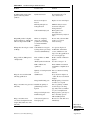
5a. For routine overnight processing: Perform the steps in Table 25A.1.1.
After processing, the tissue will be infiltrated with paraffin.
5b. For accelerated processing: Follow the steps in Table 25A.1.2.
No difference has been found in the LCM transfer efficiency of tissues processed either way.
6. Remove the tissue from the original cassette and embed the paraffin-infiltrated tissue
in additional melted paraffin in an embedding mold. Allow to cool and harden.
7. Adhere the paraffin block to a cutting platform (chuck) and remove the paraffin block
from the embedding mold. The paraffin block is now ready for sectioning (see Basic
Protocol 2).
Laser Capture
Microdissection
Also see Sheehan and Hrapchak (1987b).
25A.1.16
Supplement 55
Current Protocols in Molecular Biology
Table 25A.1.1
Routine Overnight Tissue Processing
Station
Solution
Concentration Time (min) Temperature (°C)
1
NBFa
10%
2:00
40
2
Ethanol
70%
0:30
40
3
Ethanol
80%
0:30
40
4
Ethanol
95%
0:45
40
5
Ethanol
95%
0:45
40
6
Ethanol
100%
0:45
40
7
Ethanol
100%
0:45
40
8
Ethanol
100%
0:45
40
9
Xylene
100%
0:45
40
10
Xylene
100%
0:45
40
11
Embedding paraffin
—
0:30
58
12
Embedding paraffin
—
0:30
58
13
Embedding paraffin
—
0:30
58
14
Embedding paraffin
—
0:30
58
aIf neutral buffered formalin (NBF) is not the initial fixative, skip station 1.
Table 25A.1.2
Accelerated Tissue Processing
Station
Solution
Concentration Time (min) Temperature (°C)
1
Ethanol
70%
0:10
40
2
Ethanol
80%
0:10
40
3
Ethanol
95%
0:15
40
4
Ethanol
100%
0:20
40
5
Ethanol
100%
0:30
40
6
Xylene
100%
0:30
40
7
Xylene
100%
0:30
40
8
Xylene
100%
0:30
40
11
Embedding paraffin
—
0:30
60
12
Embedding paraffin
—
0:20
60
13
Embedding paraffin
—
0:30
60
14
Embedding paraffin
—
0:20
60
REAGENTS AND SOLUTIONS
Use deionized, distilled water in all recipes and protocol steps. For common stock solutions, see
APPENDIX 2; for suppliers, see APPENDIX 4.
DNA lysis buffer
10 mM Tris⋅Cl, pH 8.0 (APPENDIX 2)
0.2% (v/v) Tween 20
100 µg/ml proteinase K
The authors use this lysis buffer for samples intended for PCR. Arcturus Engineering offers
DNA extraction kits that were developed specifically for LCM specimens. The proteinase K
should be stored at −20°C in aliquots, while the Tris⋅Cl and Tween 20 can be stored at −4°C.
Once the proteinase K is thawed and added, the buffer should be used immediately.
Discovery of
Differentially
Expressed Genes
25A.1.17
Current Protocols in Molecular Biology
Supplement 55
Protein lysis buffer
10 mM Tris⋅Cl, pH 7.4 (APPENDIX 2)
0.1% Triton X-100
1.5 mM EDTA
10% (v/v) glycerol
Store several months at −4°C
This lysis buffer has been found to be useful for analysis of membrane-bound proteins
(Simone et al., 2000). For cytoplasmic proteins, “T-Per” tissue protein extraction liquid
reagent (Pierce Chemical) has been recommended (Simone et al., 2000). It has also been
suggested that the addition of protease inhibitors, such as 4-(2-aminoethyl)-benzenesulfonyl
fluoride (Boehringer Mannheim) to the buffer increases the yield of protein (Banks et al.,
1999; Ornstein et al., 2000a).
COMMENTARY
Background Information
Laser Capture
Microdissection
Technologic advances in gene sequencing
and amplification techniques are allowing the
identification of alterations in genes, proteins,
and biochemicals that can explain the etiology
and pathogenesis of many disease processes;
however, the efficacy of these technologies depends on the identity and the purity of the cells
being analyzed. Physical homogenization of
tissues results in a mixture of many cell types—
i.e., some are normal or minimally altered components, while others may be significantly diseased. Alterations detected in such homogenates cannot be localized to a particular cell type.
Multiple mechanical methods for separating
cells of interest from tissues have been described, especially as related to histologic sections (Sirivatanauksorn et al., 1999), but their
methodology is time-consuming, extremely labor-intensive, and often imprecise. Laser Capture Microdissection (LCM) is one of the new
generation of microdissection techniques that
is relatively quick and precise.
LCM was conceived and first developed as
a prototype research tool at the National Institute of Child Health and Human Development
(NICHD) and the National Cancer Institute
(NCI) of the National Institutes of Health
(NIH). Arcturus Engineering and the NIH,
working through a Cooperative Research and
Development Agreement, developed LCM into
a commercial laboratory instrument that is now
utilized in many research laboratories. Other
efficient microdissection techniques, such as
laser pressure catapulting, have also been described (Bohm et al., 1997; Sirivatanauksorn et
al., 1999).
With LCM, cells of interest are dissected
from tissue sections or cytologic samples after
microscopic identification with the aid of an
ethylene vinyl acetate transfer film containing
a near-infrared absorbing dye. The transfer film
coats a flat surface of an optically clear plastic
cylinder, the “cap,” with a diameter of 6 mm.
The LCM system places the transfer film in
contact with a histologic section and then directs an invisible infrared laser pulse onto the
overlying polymer. The laser pulse is absorbed
by and melts the transfer film causing it to flow
around the targeted cells. The polymer rapidly
cools and creates a bond between the transfer
film and the targeted cells. The targeted cells
can then be lifted from the section and utilized
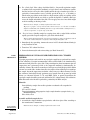
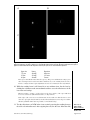
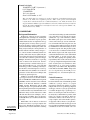
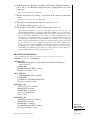
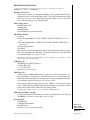
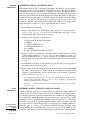
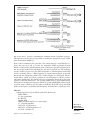
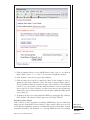
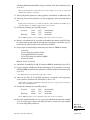
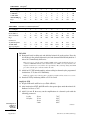
for RNA, DNA, or protein analysis (Fig.
25A.1.4). This targeting and capturing can be
repeated many times on the same tissue section
or cytologic sample. The temperature rise in the
tissue created by the laser is limited to 90°C
(Suarez-Quian et al., 1999) and is transient,
lasting only a few milliseconds. Experimental
results indicate that DNA, mRNA, and proteins
are not degraded by the LCM process
(Goldsworthy et al., 1999; Suarez-Quian et al.,
1999).
Critical Parameters
LCM can be performed on solid tissues that
have been either frozen or fixed under specified
conditions, cytologic smears, or cytospin
preparations derived from animals or patient
samples. The choice of specimen type depends
on the type of tissue or cytologic specimen that
is available, the physiologic or pathologic condition to be investigated, and the molecule to
be analyzed (i.e., DNA, RNA, or protein). Solid
tissues are typically sectioned for histologic
examination, whereas cells from blood or cytologic samples, such as fine-needle aspirates,
are prepared as direct smears or cytospins. Frozen tissues have the benefit of being processed
more rapidly for LCM than fixed tissue and are
considered to be the most reliable source for
25A.1.18
Supplement 55
Current Protocols in Molecular Biology
NIH Laser capture microdissection
cancerous cell
cell transferred to film
transport arm
plastic cap
glass slide
laser beam
tissue
section
cell(s) of interest
plastic cap
transfer film individual
on backing cell sample
transport
arm
joystick
transfer of
selected cell(s)
glass slide
Figure 25A.1.4 LCM Instrument. Schematic of the operation of the PixCell Laser Capture Microdissection Instrument,
indicating the location of the transfer arm, transfer film (“cap”), and the glass slide with the specimen to be microdissected.
Also shown is a cross-section of the tissue specimen with overlying cap demonstrating the effect of laser firing. Reprinted
with permission from Bonner et al. (1997).
molecular (i.e., DNA, RNA, and protein) recovery. Lengths of RNA and DNA of up to 800
base pairs have been recovered from sections
prepared from frozen tissue (http://
www.arctur.com; Dietmaier et al., 1999; Shibutani et al., 2000); however, histologic and cytologic detail are poor compared to fixed paraffin-embedded tissue and subtle diagnostic
features may be difficult to discern. The most
frequently utilized tissue fixative is neutral
buffered formalin (NBF; i.e., 10% buffered
formaldehyde) followed by paraffin embedding to allow histologic sectioning. This combination results in cross-linking and “breakage” of proteins, RNA, and DNA, which must
be considered when utilizing tissues prepared
in this manner.
Regardless of the preparation, cells or tissue
are usually stained in order to be visualized for
LCM, although LCM can be performed successfully without staining. Hematoxylin and
eosin (H&E) stain is the most commonly used
stain for examination of histologic sections,
and diagnostic histopathologic criteria are
based on its use in veterinary and human pathology practice; therefore, it is frequently used
for LCM even though hematoxylin may bind
to nucleic acids causing adverse effects during
PCR. Other stains such as methyl green and
nuclear fast red have been recommended as
alternatives, and literally hundreds of others
exist in clinical practice and for research applications (Ohyama et al., 2000); however, H&E
stained LCM samples have recently been
shown to amplify equally as well as samples
stained with methyl green, toluidine blue O, or
azure B (Ehrig et al., 2001). This is likely due
to the relatively small size of LCM samples,
Discovery of
Differentially
Expressed Genes
25A.1.19
Current Protocols in Molecular Biology
Supplement 55
Laser Capture
Microdissection
which thus contributes only a small amount of
hematoxylin to the PCR reaction mix. It is also
recommended that the duration of staining with
hematoxylin be minimized to decrease the concentration present. Eosin has been reported to
interfere with PCR analysis utilizing the
TaqMan instrument and can appear on electrophoretic gels when relatively large numbers of
cells are captured for protein analysis (Banks
et al., 1999; Ehrig et al., 2001). Consideration
should be given to minimizing or eliminating
its use when samples will be utilized for either
of these assays. Specimens can also be stained
immunohistochemically or with fluorescent labels prior to microdissection (Fend et al.,
1999b; Murakami et al., 2000).
There are two alternative methods for specimen staining. One is to place the staining solutions into either Coplin jars or staining dishes
and immerse the slides in the appropriate solutions. If this method is used, the stains should
be changed frequently to prevent contamination by tissue fragments from other tissue samples or microorganisms found in the environment, and to avoid excessive dilution of the
staining solutions. The second alternative, and
the one that the authors prefer, is to keep the
solutions in clean plastic squirt bottles and use
a slide staining rack. The slide to be stained can
then be placed on the staining rack and the
solutions can be applied gently to the slide to
cover the tissue or cells, allowed to remain the
appropriate time, and then drained from the
slide and replaced by the next solution. This
reduces any possible contamination, minimizes
dilution of solutions, and has the added advantage of using less reagents. For solutions requiring a duration of contact with the slide that is
longer than 1 min (i.e., xylene), we utilize small
Coplin jars. Thus, the best features of both
systems may be used efficiently.
For a successful LCM transfer, the polymer
film must be bonded to the targeted tissue so it
forms a stronger bond than that between the
tissue and the underlying glass slide; therefore,
proper sample preparation is critical. It is important that the sample be well dehydrated so
that the melted polymer can infiltrate intercellular spaces and create a tight bond. The final
dehydration and xylene steps have been found
to be absolutely crucial for successful LCM.
Any moisture present in the sample during
LCM will give less than optimal results. Ideally,
samples should be microdissected shortly after
dehydration; however, samples can be stored
with desiccant after staining and dehydrated for
later microdissection, although this is not rec-
ommended for recovery of RNA because of its
lability. Additionally, the humidity in the laboratory will also affect the results, and protocols
may need to be modified accordingly. Other
factors that will affect this bond are presented
below (see Troubleshooting).
Specimens, reagents, and materials for processing must be handled in a manner that will
allow optimal preservation of the molecule to
be analyzed; therefore, samples for RNA and
DNA should be handled to minimize contamination from other tissues. Samples for RNA
analysis should be processed rapidly, either as
fresh-frozen material or briefly fixed in 95%
ethanol. RNase-free reagents and materials
should be utilized whenever possible. Also, the
duration of the actual microdissection session
on each stained frozen section should be limited
to less than 30 min for optimal RNA preservation. Samples for protein analysis are also best
processed as for RNA analysis, but reagents
that include protease inhibitors can be used.
DNA is more stable, and fixed or frozen tissues
can be used, but samples should not be overfixed in formalin, as DNA yield increases with
prolonged fixation times (<6 hr is preferable
for small samples).
Troubleshooting
If LCM fails to capture the cells (i.e., they
are not released from the slide), the following
steps are recommended.
1. Refocus the beam (see Basic Protocol 6).
2. Make sure the sections are flat. Wrinkles
can be shaved off using sterile razor blades. Dip
the section in xylene after saving the wrinkles
to make sure that no contaminating debris remains on the section.
3. Change the cap. Not all caps perform
equally well and the age of the caps is important. It is best not to use expired caps and to buy
relatively small numbers of caps at a time so
that the stock is relatively new.
4. Ensure thorough dehydration of the
specimen. Place the slides in fresh xylene for 1
min or more and allow drying in a biologic
safety hood for 1 to 5 min. If LCM is still not
successful, pass the slides through 95% ethanol
twice for 30 sec, absolute ethanol twice for 30
sec, and xylene for 1 to 5 min.
5. Process a new section and make sure that
the frozen sections or cytologic specimens have
not been allowed to dry on the slide prior to
fixation. For formalin-fixed sections, do not
bake or at least decrease the baking time.
6. Try a different brand or type of glass
slide.
25A.1.20
Supplement 55
Current Protocols in Molecular Biology
7. If still not successful, call the technical
support at Acturus Engineering (650-9623020). The authors also find that talking with
other researchers working with LCM to be very
useful.
If LCM is successful, but the cap contains
contaminating debris, the following measures
are recommended.
1. Make sure the slide is free of debris. It
may be necessary to wash the slide in fresh
changes of xylene.
2. Use a CapSure Pad or Post-It Note to
remove any debris from the cap.
3. Use HS caps, which minimize contamination.
If the LCM was successful, but no RNA,
DNA, or protein was identified at analysis, try
the following.
1. Make sure optimum laboratory practices
and conditions that are free of nucleases or
proteinases have been observed.
2. Check the cap to see if the microdissected
tissue has dissolved in the lysis buffer in the
microcentrifuge tube.
3. Increase the number of microdissected
cells.
4. An overnight incubation at 37°C can be
used to lyse the cells from the cap when using
DNA lysis solutions, if required. For RNA and
proteins, inverting and gentle agitation should
be used to dislodge the cells from the cap.
Anticipated Results
Many molecular analyses have been successfully performed on cells procured by LCM.
These include genomic analyses such as loss of
heterozygosity analysis, restriction fragment
length polymorphism (RFLP) analysis, DNA
methylation analysis, fluorescence in situ hybridization, and comparative genomic hybridization (Finkelstein et al., 1999; Guan et al.,
1999; DiFrancesco et al., 2000; Jones et al.,
2000; Shen et al., 2000; Slebos et al., 2000).
Gene expression analysis has been accomplished from LCM samples utilizing reverse
transcription PCR, construction of cDNA libraries, and differential hybridization on highdensity-spotted nylon filters or glass microarrays (Peterson et al., 1998; Fend et al., 1999b;
Kuecker et al., 1999; Luo et al., 1999; Sgroi et
al., 1999; Garrett et al., 2000; Leethanakul et
al., 2000; Ohyama et al., 2000). Successful
proteomic analysis has been accomplished by
coupling LCM with immunoblotting (UNIT 10.8),
solid-phase sequential chemiluminescent immunometric assay, one-dimensional and twodimensional polyacrylamide gel electrophore-
sis (PAGE; UNITS 10.2-10.4), protein chip surface
enhanced laser desorption/ionization (SELDI)
mass spectrometry, as well as matrix-assisted
laser desorption/ionization time-of-flight
(MALDI-TOF) mass spectrometry (Wright et
al., 1999; Natkunam et al., 2000; Ohyama et
al., 2000; Ornstein et al., 2000a,b; Palmer-Toy
et al., 2000; Simone et al., 2000; also see UNIT
10.21). For all these assays, the expected results
will depend on the quality of preservation of
the analyte of interest within the sample and
upon procurement of at least the minimum
number of cells required for analysis.
The number of cells captured depends on
tissue thickness and type, the size of the cells,
and the size of the laser spot. The number of
cells procured can be estimated by counting the
number of cells per spot and multiplying by the
number of pulses of the laser. The transfer
efficiency of the capture should also be considered and can be assessed by viewing the captured tissue on the cap and estimating the percentage of spots that contain tissue.
The number of cells required depends on the
assay and whether formalin-fixed, alcoholfixed, or frozen samples are used. A single PCR
reaction (DNA analysis) can be successfully
performed with a single cell; however, results
are more reliable with at least 10 to 20 cells
from a 10-µm-thick, formalin-fixed, paraffinembedded section. Such small quantities of
cells may not account for the significant heterogeneity that exists even within populations
of the same cell type, which should be considered when determining the number of cells to
be used. For RNA analysis, fresh-frozen tissues
and cytologic specimens briefly fixed in alcohol are preferred. Only a small number of cells
(i.e., <50) may be required for transcripts of
high copy number per cell when utilizing RTPCR; however, the authors prefer using ≥1000
cells for RT-PCR. cDNA arrays require significantly more RNA, but how much will depend
on the type and size of array. It is estimated that
a typical mammalian cell contains ∼20 pg total
RNA/cell; therefore, to achieve 5 µg RNA, the
lower limit for some expression arrays, will
require the microdissection of 2.5 × 10¹¹ cells,
a daunting task. Thus, some authors have advocated amplification of RNA or resultant
cDNA prior to hybridization with these larger
arrays, even though this may introduce some
degree of amplification bias (Luo et al., 1999;
Ohyama et al., 2000). For protein analysis,
using 50,000 cells for two-dimensional PAGE
analysis has been a successful starting point.
For western blot analysis, the number of cells
Discovery of
Differentially
Expressed Genes
25A.1.21
Current Protocols in Molecular Biology
Supplement 55
required is at least 2000 to 3000 (http://www.
arctur.com). Some molecular assays may require modification in order to accommodate the
relatively small amount of cells obtained by
LCM.
Time Considerations
The time required for LCM is highly variable and depends on the method of tissue processing and staining, the number of cells to be
microdissected, and the location and number of
the desired cells in each section. H&E staining
(see Basic Protocol 5) requires only 10 to 15
min. Microdissecting ∼5000 cells, roughly
equal to 1000 shots using a 30-µm spot size,
will require 15 to 30 min, provided all the cells
required are present within a single tissue section or sample. If multiple sections or samples
are required to procure an adequate number of
cells, the time required for staining additional
sections should be added. This also assumes
that the samples are well prepared and microdissected efficiently, and that the cells of
interest are easy to identify and locate. Some
skill is also required in operating the joystick
in combination with laser firing and in being
able to identify the tissue and cell type of
interest.
The time required for lysis of the cells from
the cap depends on the buffer and the method
of sample preparation. We have found frozen
tissue will be completely removed from the cap
by Stat-60 after ∼5 min. Formalin-fixed paraffin-embedded tissue in buffers containing proteinase K requires significantly more time and
may require an overnight incubation at 37°C.
Literature Cited
Arnold, M.M., Srivastava, S., Fredenburgh, J.,
Stockard, C.R., Myers, R.B., and Grizzle, W.E.
1996. Effects of fixation and tissue processing
on immunohistochemical demonstration of specific antigens. Biotechnic. Histochem. 71:224230.
Banks, R.E., Dunn, M.J., Forbes, M.A., Stanley, A.,
Pappin, D., Naven, T., Gough, M., Harnden, P.,
and Selby, P.J. 1999. The potential use of laser
capture microdissection to selectively obtain distinct populations of cells for proteomic analysis—preliminary findings. Electrophoresis
20:689-700.
Bohm, M., Wieland, I., Schutze, K., and Rubben, H.
1997. Microbeam MOMeNT: Non-contact laser
microdissection of membrane-mounted native
tissue. Am. J. Pathol. 151:63-67.
Laser Capture
Microdissection
Bonner, R.F., Emmert-Buck, M., Cole, K., Pohida,
T., Chuaqui, R., Goldstein, S., and Liotta, L.A.
1997. Laser capture microdissection: Molecular
analysis of tissue. Science 278:1481-1483.
Bostwick, D.G., al Annouf, N., and Choi, C. 1994.
Establishment of the formalin-free surgical pathology laboratory. Utility of an alcohol-based
fixative. Arch. Pathol. Lab. Med. 118:298-302.
Coombs, N.J., Gough, A.C., and Primrose, J.N.
1999. Optimisation of DNA and RNA extraction
from archival formalin-fixed tissue. Nucl. Acids
Res. 27:e12.
Dietmaier, W., Hartmann, A., Wallinger, S., Heinmoller, E., Kerner, T., Endl, E., Jauch, K.W.,
Hofstadter, H., and Ruschoff, J. 1999. Multiple
mutation analyses in single tumor cells with
improved whole genome amplification. Am. J.
Pathol. 154:83-95.
DiFrancesco, L.M., Murthy, S.K., Luider, J., and
Demetrick, D.J. 2000. Laser capture microdissection-guided fluorescence in situ hybridization
and flow cytometric cell cycle analysis of purified nuclei from paraffin sections. Modern Pathology 13:705-711.
Ehrig, T., Abdulkadir, S.A,. Dintzis, S.M., Milbrandt, J., and Watson, M.A. 2001. Quantitive
amplification of genomic DNA from histological
tissue sections after staining with nuclear dyes
and laser capture microdissection. Journal of
Molecular Diagnostics 3:22-25.
Fend, F., Quintanilla-Martinez, L,. Kumar, S, Beaty,
M.W., Blum, L., Sorbara, L., Jaffe, E.S., and
Raffeld, M. 1999a. Composite low grade B-cell
lymphomas with two immunophenotypically
distinct cell populations are true biclonal lymphomas. A molecular analysis using laser capture microdissection. Am. J. Pathol. 154:18571866.
Fend, F., Emmert-Buck, M.R., Chuaqui, R., Cole,
K., Lee, J., Liotta, L.A., and Raffeld, M. 1999b.
Immuno-LCM: Laser capture microdissection of
immunostained frozen sections for mRNA
analysis. Am. J. Pathol. 154:61-66.
Finkelstein, S.D., Hasegawa, T., Colby, T., and
Yousem, S.A. 1999. 11q13 allelic imbalance discriminates pulmonary carcinoids from tumorlets. A microdissection-based genotyping approach useful in clinical practice. Am. J. Pathol.
155:633-640.
Garrett, S.H., Sens, M.A., Shukla, D., Flores, L.,
Somji, S., Todd, J.H., and Sens, D.A. 2000.
Metallothionein isoform 1 and 2 gene expression
in the human prostate: Downregulation of MT1X in advanced prostate cancer. Prostate 43:125135.
Glasow, A., Haidan, A., Hilbers, U, Breidert, M.,
Gillespie, J., Scherbaum, W.A., Chrousos, G.P.,
and Bornstein, S.R. 1998. Expression of Ob receptor in normal human adrenals: Differential
regulation of adrenocortical and adrenomedullary function by leptin. J. Clin. Endocrinol.
Metab. 83:4459-4466.
Goldsworthy, S.M., Stockton, P.S., Trempus, C.S.,
Foley, J.F., and Maronpot, R.R. 1999. Effects of
fixation on RNA extraction and amplification
from laser capture microdissected tissue. Molecular Carcinogenesis 25:86-91.
25A.1.22
Supplement 55
Current Protocols in Molecular Biology
Guan, R.J., Fu, Y., Holt, P.R., and Pardee, A.B. 1999.
Association of K-ras mutations with p16 methylation in human colon cancer. Gastroenterology
116:1063-1071.
Ikeda, K., Monden, T., Kanoh, T., Tsujie, M., Izawa,
H., Haba, A., Ohnishi, T., Sekimoto, M., Tomita,
N., Shiozaki, H., and Monden, M. 1998. Extraction and analysis of diagnostically useful proteins from formalin-fixed, paraffin-embedded
tissue sections. J. Histochem. Cytochem. 46:397403.
Jin, L., Thompson, C.A, Qian, X., Kuecker, S.J.,
Kulig, E., and Lloyd, R.V. 1999. Analysis of
anterior pituitary hormone mRNA expression in
immunophenotypically characterized single
cells after laser capture microdissection. Lab.
Invest. 79:511-512.
Jones, C., Foschini, M.P., Chaggar, R., Lu, Y.J.,
Wells, D., Shipley, J.M., Eusebi, V., and Lakhani,
S.R. 2000. Comparative genomic hybridization
analysis of myoepithelial carcinoma of the
breast. Lab. Invest. 80:831-836.
Kuecker, S.J., Jin, L., Kulig, E., Oudraogo, G.L.,
Roche, P.C., and Lloyd, R.V. 1999. Analysis of
PRL, PRL-R, TGFβ-R11 gene expression in
normal and neoplastic breast tissues after laser
capture microdissection. Appl. Immunohist.
Molec. Morp. 7:193-200.
Leethanakul, C., Patel, V., Gillespie, J., Pallente, M.,
Ensley, J.F,. Koontongkaew, S., Liotta, L.A.,
Emmert-Buck, M., and Gutkind, J.S. 2000. Distinct pattern of expression of differentiation and
growth-related genes in squamous cell carcinomas of the head and neck revealed by the use of
laser capture microdissection and cDNA arrays.
Oncogene 19:3220-3224.
Luo, L., Salunga, R.C., Guo, H., Bittner, A., Joy,
K.C., Galindo, J.E., Xiao, H., Rogers, K.E, Wan,
J.S., Jackson, M.R., and Erlander, M.G. 1999.
Gene expression profiles of laser-captured adjacent neuronal subtypes. Nature Medicine 5:117122 [published erratum appears in Nature Medicine 5:355].
Masuda, N., Ohnishi, T., Kawamoto, S., Monden,
M., and Okubo, K. 1999. Analysis of chemical
modification of RNA from formalin-fixed samples and optimization of molecular biology applications for such samples. Nucl. Acids Res.
27:4436-4443.
Ornstein, D.K., Englert, C., Gillespie, J.W.,
Paweletz, C.O., Linehan, W.M., Emmert-Buck,
M.R., and Petricoin, E.F. III 2000a. Characterization of intracellular prostate-specific antigen from laser capture microdissected benign
and malignant prostatic epithelium. Clin. Cancer
Res. 6:353-356.
Ornstein, D.K., Gillespie, J.W., Paweletz, C.P.,
Duray, P.H., Herring, J., Vocke, C.D., Topalian,
S.L., Bostwick, D.G., Linehan, W.M., Petricoin,
E.F. III, and Emmert-Buck, M.R. 2000b. Proteomic analysis of laser capture microdissected
human prostate cancer and in vitro prostate cell
lines. Electrophoresis 21:2235-2242.
Palmer-Toy, D.E., Sarracino, D.A., Sgroi, D., LeVangie, R., and Leopold, P.E. 2000. Direct acquisition of matrix-assisted laser desorption/ionization time-of-flight mass spectra from
laser capture microdissected tissues. Clin. Chem.
46:1513-1516.
Paweletz, C.P., Ornstein, D.K., Roth, M.J., Bichsel,
V.E., Gillespie, J.W., Calvert, V.S., Vocke, C.D.,
Hewitt, S.M., Duray, P.H., Herring, J., Wang,
Q.H., Hu, N., Linehan, W.M., Taylor, P.R.,
Liotta, L.A., Emmert-Buck, M.R., and Petricoin,
E.F. III. 2000. Loss of annexin 1 correlates with
early onset of tumorigenesis in esophageal and
prostate carcinoma. Cancer Res. 60:6293-6297.
Peterson, L.A., Brown, M.R., Carlisle, A.J., Kohn,
E.C., Liotta, L.A., Emmert-Buck, M.R., and
Krizman, D.B. 1998. An improved method for
construction of directionally cloned cDNA libraries from microdissected cells. Cancer Res.
58:5326-5328.
Sawyer, E.J., Hanby, A.M., Ellis, P., Lakhani, S.R.,
Ellis, I.O., Boyle, S., and Tomlinson, I.P. 2000.
Molecular analysis of phyllodes tumors reveals
distinct changes in the epithelial and stromal
components. Am. J. Pathol. 156:1093-1098.
Sgroi, D.C., Teng, S., Robinson, G., LeVangie, R.,
Hudson, Jr. J.R., and Elkahloun, A.G. 1999. In
vivo gene expression profile analysis of human
breast cancer progression. Cancer Res. 59:56565661.
Sheehan, D.C. and Hrapchak, B.B. (eds.) 1987a.
Specimen preparation for enzyme histochemistry In The Theory and Practice of Histotechnology. 2nd Edition, pp. 293-295. The C.V. Mosby
Company, St. Louis, MO.
Murakami, H., Liotta, L., and Star, R.A. 2000. IFLCM: Laser capture microdissection of immunofluorescently defined cells for mRNA
analysis rapid communication. Kidney Int.
58:1346-1353.
Sheehan, D.C. and Hrapchak, B.B. (eds.) 1987b.
Processing of tissue dehydrants, clearing agents,
and embedding media In The Theory and Practice of Histotechnology. 2nd Edition, pp. 59-78.
The C.V. Mosby Company, St. Louis, MO.
Natkunam, Y., Rouse, R.V., Zhu, S., Fisher, C., and
van De Rijn, M. 2000. Immunoblot analysis of
CD34 expression in histologically diverse neoplasms. Am. J. Pathol. 156:21-27.
Shen, C.Y., Yu, J.C., Lo, Y.L., Kuo, C.H., Yue, C.T.,
Jou, Y.S., Huang, C.S., Lung, J.C., and Wu, C.W.
2000. Genome-wide search for loss of heterozygosity using laser capture microdissected tissue
of breast carcinoma: An implication for mutator
phenotype and breast cancer pathogenesis. Cancer Res. 60:3884-3892.
Ohyama, H., Zhang, X., Kohno, Y., Alevizos, I,.
Posner, M., Wong, D.T., and Todd, R. 2000.
Laser capture microdissection-generated target
sample for high-density oligonucleotide array
hybridization. BioTechniques 29:530-536.
Shibutani, M., Uneyama, C., Miyazaki, K., Toyoda,
K., and Hirose, M. 2000. Methacarn fixation: A
novel tool for analysis of gene expressions in
Discovery of
Differentially
Expressed Genes
25A.1.23
Current Protocols in Molecular Biology
Supplement 55
paraffin-embedded tissue specimens. Lab. Invest. 80:199-208.
Simone, N.L., Remaley, A.T., Charboneau, L., Petricoin, E.F. III, Glickman, J.W., Emmert-Buck,
M.R., Fleisher, T.A., and Liotta, L.A. 2000. Sensitive immunoassay of tissue cell proteins procured by laser capture microdissection. Am. J.
Pathol. 156:445-452.
Sirivatanauksorn, Y., Drury, R., Crnogorac-Jurcevic,
T., Sirivatanauksorn, V., and Lemoine, N.R.
1999. Laser-assisted microdissection: Applications in molecular pathology. Journal of Pathology 189:150-154.
Slebos, R.J.C., Hoppin, J.A., Tolbert, P.E., Holly,
E.A., Brock, J.W., Zhang, R.H., Bracci, P.M.,
Foley, J., Stockton, P., McGregor, L.M., Flake,
G.P., and Taylor, J.A. 2000. K-ras and p53 in
pancreatic cancer: Association with medical history, histopathology, and environmental exposures in a population-based study. Cancer
Epidemiol., Biomark. Prev. 9:1223-1232.
Suarez-Quian, C.A., Goldstein, S.R., Pohida, T.,
Smith, P.D., Peterson, J.I., Wellner, E., Ghany,
M., and Bonner, R.F. 1999. Laser capture microdissection of single cells from complex tissues. Biotechniques 26:328-335.
Vardaxis, N.J., Hoogeveen, M.M., Boon, M.E., and
Hair, C.G. 1997. Sporicidal activity of chemical
and physical tissue fixation methods. J. Clin.
Pathol. 50:429-433.
Wright G.L. Jr., Cazares, L.H., Leung, S-,M.,
Nasim, S., Adam, B-.L., Yip, T-.T., Schellhammer, P.F., Gong, L., and Vlahou, A. 1999. Proteinchip surface enhanced laser desorption/ionization (SELDI) mass spectrometry: A novel protein biochip technology for detection of prostate
cancer biomarkers in complex protein mixtures.
Prostate Cancer and Prostatic Diseases 2:264276.
Key References
Sheehan and Hrapchak, 1987. See above.
This is a standard reference used by many histotechnologists for the basics of tissue processing, embedding, and sectioning.
Suarez-Quian et al., 1999. See above.
This references provides a good overview of the
mechanics and principles of LCM.
Internet Resources
http://dir.niehs.nih.gov/dirlep/lcm/guidelines.html
This website is maintained by the Laboratory of
Experimental Pathology of the National Institute of
Environmental Health Sciences and is another valuable source of protocols and general information for
LCM.
http://www.arctur.com
This is the website of Arcturus Engineering. It is a
very useful source of all LCM-related information
including protocols, references, and resources.
Many of the protocols that we use, including those
presented here, are modifications of protocols found
at this website.
http://www.bioprotocol.com
This website contains protocols for the performance
of LCM, the preparation of tissues for LCM and for
processing of microdissected tissue for DNA, RNA
and protein analysis.
Contributed by Andra R. Frost, Isam-Eldin
Eltoum, and Gene P. Siegal
University of Alabama at Birmingham
Birmingham, Alabama
Laser Capture
Microdissection
25A.1.24
Supplement 55
Current Protocols in Molecular Biology
Preparation of Single Cells from Solid
Tissues for Analysis by PCR
UNIT 25A.2
The ability to amplify a few copies of DNA or RNA to analyzable quantities makes it
technically possible to obtain detailed information regarding the DNA content and/or
transcriptional pattern of a single cell (Mullis and Falona, 1987). Although in many cases,
analysis at the level of the whole tissue can provide the required information, there are
circumstances that necessitate acquiring data on individual cells of a particular type. A
preparation of total DNA and RNA isolated from a tissue gives quantitative data but only
an average profile, masking differences among individual cells. In situ analysis provides
qualitative information on localization of abundant nucleic acids in specific cells, but is
generally not quantitative. Thus, it can be desirable to apply quantitative assays to
individual cells.
The acquisition of individual cells from blood and loosely associated tissues such as
spleen is straightforward, since these organs are essentially cell suspensions. Solid tissues,
however, are almost universally composed of tightly linked cells of multiple types,
organized in a highly structured and functionally interactive manner (Gilbert, 1994). It is
reasonable to expect that disruption of this environmental context rapidly alters the
physiology of the once-partnered cells. Even in the case of easily dissociated tissues, the
impact of manipulating the living tissue on the process under study must be considered.
In addition, some adult cell types, most notably neurons, can be recovered only at low
efficiency, with the majority bursting during the process (Pretlow and Pretlow, 1982).
This unit details a protocol for the separation of solid tissues into single-cell suspensions
for subsequent analysis of nucleic acids and protein. This protocol was developed using
mice, with the major focus being the analysis of the interaction of herpes simplex virus
(HSV) with the neurons of the trigeminal ganglia (Sawtell, 1997). The balance between
fixation and dissociation should be determined for the particular tissue of interest. It has
been determined, however, that the dissociation protocol is directly useful for several other
mouse tissues including liver, heart, skeletal muscle, lung, pancreas, brain, intestine, and
reproductive organs. Kidney yields a combination of single cells and multicellular tubular
structures. The adaptation of the method to other laboratory animals has not been fully
explored. Again, the appropriate balance between fixation and dissociation would need
to be determined for other species of interest. Using the approach of adjusting the volume
of the fixative perfused through the animal to achieve this balance, the author’s laboratory
has determined that the method is directly useful for guinea pigs.
Tissues are fixed in situ by perfusion (see Basic Protocol 1), terminating cell processes
and thus changes that would accompany dissociating the living tissue; their numbers can
then be quantitated (see Support Protocol). Once separated, individual cells or groups of
a particular cell type can then be analyzed using PCR strategies (see Basic Protocols 2
and 3; Fig. 25A.2.1). An alternative to fixing by perfusion (see Alternate Protocol 1) and
a modification of the standard Percoll gradient separation to prepare lacZ expressing cells
(see Alternate Protocol 2) are also provided. The method has broad potential and is
particularly potent when the cell type of interest represents a minor population relative to
other cells types in the tissue. The procedure can also be adapted to allow quantification
of the number of cells within a tissue containing specific nucleic acid sequences, for
example, a particular viral DNA or RNA sequence.
Discovery of
Differentially
Expressed Genes
Contributed by N.M. Sawtell
Current Protocols in Molecular Biology (2002) 25A.2.1-25A.2.15
Copyright © 2002 by John Wiley & Sons, Inc.
25A.2.1
Supplement 58
mouse
• fix
BE
DAB
terminate cell processes
• downstream analysis reflects
cell in context of tissue
cell types: A-E
tissue
• mince
• dissociate
separation strategies
C DE
• morphology (capture tweezers) A B
CD
• density (gradient centriguation)
A BE
• marker
• histochemical
• enrich (separate)
• protein
A
A A A
A
analyze frequency of:
• cell type
• mutation
• nucleic acid sequence
C D E
BBC D
CD
analyze: groups or individual cells
• PCR amplification strategies
• DNA
• mutation frequency
• viral (other foreign seqences)
• RNA
• specific or general transcription
(chip technology)
Figure 25A.2.1 Schematic representation of the preparation of single cells from solid tissue.
Tissue is represented by the box in the center, and letters A to E represent different cell types within
that tissue.
BASIC
PROTOCOL 1
PERFUSION FIXATION AND ENRICHMENT OF SINGLE CELLS
In this protocol, the animal (here, a mouse) is perfused with Streck tissue fixative (STF),
a noncrosslinking fixative. This fixative and the fixation conditions presented were
determined empirically so that intracellular nucleic acids and proteins are preserved
without interfering significantly with the ability of the dissociating enzymes to free the
cells from the extracellular matrix. The fixed tissues of interest are dissected out, finely
minced, and enzymatically separated using collagenase. The cell types of interest are then
enriched using a suitable strategy.
At this point, any of a number of methods can be used to harvest the desired cell
populations from the cell suspension. Percoll gradient separation is given here; however,
the end application will strongly influence the procedure selected.
Materials
Streck tissue fixative (STF; Streck Laboratories)
Animal (e.g., mouse)
Sodium pentobarbital
95% ethanol
0.25% (w/v) collagenase CLS I (Worthington) in Hank’s balanced salt solution
(HBSS; see recipe)
Triple 0.2-µm filtered nanopure (3×F) H2O
Percoll (Pharmacia): adjust to pH 6.0 with HCl
Preparation of
Single Cells from
Solid Tissues for
Analysis by PCR
Peristaltic pump (BRL CP-600 or equivalent) and appropriate tubing
15- and 50-ml conical tubes
27-G needle
80°C water bath
25A.2.2
Supplement 58
Current Protocols in Molecular Biology
Dissecting microscope (optional)
Clean dissection tools (e.g., forceps, scalpel blades, hemostat, 25-G needles)
Glass slides: bake overnight (3 hr minimum) at 250°C
200- and 1000-µl aerosol-resistant pipette tips
15-ml polystyrene conical tubes
9-in. Pasteur pipettes: bake overnight (3 hr minimum) at 250°C
Additional reagents and equipment for determining number of neurons recovered
(see Support Protocol), and analyzing DNA or RNA from single-cell
populations (see Basic Protocols 2 and 3)
NOTE: All protocols using live animals must first be reviewed and approved by an
Institutional Animal Care and Use Committee (IACUC) or must conform to governmental
regulations regarding the care and use of laboratory animals.
NOTE: Depending upon the final application of the cells, all materials must be DNaseand RNase-free, and free of contaminating nucleic acids which could interfere with the
interpretation of downstream PCR.
Perform perfusion fixation (as performed in mice)
1. Set up perfusion equipment by placing tubing from a peristaltic pump in the bottom
of a ∼50 ml conical tube containing 30- to 40-ml Streck tissue fixative (STF). Attach
a 27-G needle to the other end (this will be inserted into the left ventricle). Run fixative
through the line.
2. Place a 50-ml conical tube containing 50 ml STF in an 80°C water bath and equilibrate
to temperature.
Heat facilitates the inactivation of nucleases.
3. While the fixative is heating, anesthetize the animal by intraperitoneal injection of
80 to 100 mg/kg sodium pentobarbital. As soon as deep reflexes are fully deadened—
i.e., in mice, lack of corneal reflexes (i.e., no blinking response when touched with
the tip of a gloved finger) and response to pinching rear paw very firmly—place the
animal ventral surface up on absorbent paper and wet the chest and abdomen with
95% ethanol.
Isoflurane can be used as an alternative anesthetic.
4. Use forceps to lift the skin and, using a scalpel, make a T-shaped incision starting
over the abdomen with the vertical- and horizontal-cut centers at the base of the
sternum just below the diaphragm. Cut the diaphragm along the rib line and keep the
chest cavity open by clamping the base of sternum with a small hemostat, rotating it
upward toward the chest.
For additional information on animal handling, see Coligan et al. (2001), Chapter 1.
5. Insert the needle at the end of the pump tubing into the left ventricle and start the
pump, adjusting the flow rate to ∼6 ml/min. When the right atrium becomes dilated,
pierce with sharp pointed forceps to provide outflow. First pump 15 to 20 ml
room-temperature STF through the animal to remove blood from the vasculature,
followed by 40 to 50 ml heated (80°C) fixative. Stop the pump when fixative has been
depleted.
This procedure is not difficult but requires practice. The best indicator of a successful
perfusion is paling of the liver. If the liver does not begin to pale rapidly, try repositioning
the needle in the ventricle, adjusting its depth and angle.
Discovery of
Differentially
Expressed Genes
25A.2.3
Current Protocols in Molecular Biology
Supplement 58
Perfusion fixation is effective because the fixative is distributed to tissues and cells via the
macro- and microvasculature. Coagulation of the blood in the vessels could occur upon
contact with the heated fixative, thus it is important to first remove blood with room-temperature STF.
Dissociate tissue
6. Using a dissecting microscope (if possible), dissect the tissues of interest with “clean”
dissection tools and finely mince on a nuclease-free (i.e., baked) glass slide using
scalpel blades or needles (e.g., 25-G needles for ganglia).
The author uses disposable instruments (e.g., unused 25-G needles, unused scalpel blades)
that are discarded after use (i.e., a single dissection), which prevents the possibility of any
carryover; however, it should be adequate to clean instruments in detergent (e.g., liquinox),
rinse, and soak in 3% hydrogen peroxide for 2 hr, then rinse in 3×F H2O and bake overnight
(3 hr minimum) at 250°C. Any procedure for cleaning potentially contaminated instruments
should be confirmed to be effective.
Visualization of the mincing procedure under a dissecting microscope is helpful. Separate
instruments must be used for each tissue unit if cross contamination will present a problem
in the interpretation of downstream analyses.
7. Place minced tissue into 0.25% (w/v) collagenase CLS I in HBSS and incubate in a
1.5- or 2-ml microcentrifuge tube 5 to 10 min at 37°C.
The volume of collagenase used will depend upon the amount of tissue. Six fixed mouse
trigeminal ganglia (TG) are routinely digested in 1.5 ml collagenase.
The investigator must screen batches of collagenase and select a batch that is free of DNase
activity. If RNA will be analyzed, a batch free of RNase must be selected (see Critical
Parameters and Troubleshooting, Collagenase)
8. After collagenase treatment, facilitate dissociation by gentle trituration, first using
1000-µl, then 200-µl (as the tissue dissociates into smaller pieces) aerosol-resistant
pipet tips.
In the author’s studies, dissociation of TG is generally complete within 30 min.
Depending on the application, the requirement for complete dissociation may be less
critical. It is helpful to monitor progress of dissociation by viewing a drop of the suspension
under the microscope.
9. Pellet dissociated tissue by microcentrifuging 5 min at 5000 rpm, room temperature.
Resuspend gently in STF at room temperature. Heat resuspended cell suspension to
70°C for 10 min. Place on ice briefly, repellet, and resuspend in triple 0.2-µm filtered
nanopure (3×F) water.
At this point the integrity of the DNA, RNA, and/or protein (depending upon what will be
analyzed), should be tested. DNA can be isolated using standard proteinase K/SDS
digestion followed by phenol/chloroform extractions and ethanol precipitation (UNIT 2.1A).
RNA can be isolated from the cells using commercially available reagents such as Ultraspec
(Biotecx). When isolating RNA, cells should be homogenized using a tissue grinder to
ensure complete disruption of the cell membrane. Protein should be prepared from cells by
boiling in standard Laemmli cocktail (e.g., 0.125 M Tris⋅Cl/4% SDS/20% glycerol/10%
2-mercaptoethanol). Integrity of nucleic acid or protein is then determined by appropriate
gel electrophoresis (Chapter 10). If information about the integrity of a specific nucleic
acid or protein is desired, Southern (UNIT 2.9A), northern (UNIT 4.9), and/or immunoblotting
(UNIT 10.8) can then be performed, probing the membrane with the relevant labeled nucleic
acid probe or antibody. One should not necessarily expect that the integrity of these cells
will be as great as that from tissue culture cells or fresh tissue, but it can be more than
adequate to permit qualitative analysis by RT-PCR.
Preparation of
Single Cells from
Solid Tissues for
Analysis by PCR
Figure 25A.2.2A.1 to D.1 shows several tissues, including cerebral cortex, trigeminal
ganglia, liver, and diaphragm, after fixation and dissociation.
10. Determine the number of neurons recovered (see Support Protocol).
25A.2.4
Supplement 58
Current Protocols in Molecular Biology
Figure 25A.2.2 Photomicrograph showing tissues after dissociation and density gradient centrifugation. Following perfusion fixation, several tissue types were removed, finely minced, and dissociated as described in this protocol. The total dissociated cell suspensions obtained from cerebral
cortex (A.1), trigeminal ganglia (B.1), liver (C.1), and diaphragm (D.1) are shown. Following density
gradient centrifugation, enriched populations of neurons were obtained from cerebral cortex (A.2,
A.3) and trigeminal ganglia (B.2). Enriched populations of satellite and support cells isolated from
trigeminal ganglia are shown in B.3. An example of “marker” based separation is shown in panels
E.1 to E.3. A mouse infected with a virus containing a β-galactosidase expression cassette was
perfusion fixed and the trigeminal ganglia removed and stained histochemically for β-galactosidase
activity using Xgal. The dark spots in panel E.1 are blue neurons, a result of the action of
β-galactosidase on Xgal. The presence of this blue reaction product indicates that these neurons
contain virus actively transcribing the β-galactosidase gene. The ganglia were then dissociated into
single cell suspensions (E.2) and the blue neurons enriched by density gradient centrifugation (E.3).
These neurons can be analyzed individually or in groups using PCR strategies.
11. Harvest desired cell populations by Percoll gradient centrifugation (steps 12 to 16)
or by another suitable method.
The end application will strongly influence the procedure selected. The following steps
enrich for neurons, but the protocol can also be used to enrich for other cell types.
Enrich for neurons by Percoll gradient
12. Prepare a discontinuous Percoll gradient as follows:
a. Mix Percoll and 3×F H2O to make 40%, 50%, and 60% (v/v) Percoll solutions.
Keep on ice.
b. Place the dissociated cell mixture on the bottom of a 15-ml polystyrene (for greater
visibility) conical tube.
c. Using a baked 9-in. Pasteur pipette, layer 2.5 ml of 40% solution beneath the cell
suspension, then carefully dispense the 50% solution under the 40% layer. Finally,
carefully dispense the 60% solution beneath the 50% layer. Be sure to dispense
all solutions from the tip of the pipette in a slow continuous stream.
Discovery of
Differentially
Expressed Genes
25A.2.5
Current Protocols in Molecular Biology
Supplement 58
13. Centrifuge the gradient in a benchtop centrifuge 10 min at 1800 rpm (∼900 × g), 4°C.
The Percoll gradient resulting in the optimum separation of neurons from support cells was
determined empirically.
14. Remove tube from the centrifuge and place in a stable rack, taking care not to disturb
the gradient. Visually inspect the gradient. Carefully draw off the top myelin-containing layer to reduce contamination of cells banding lower on the gradient. A band
of cells should be apparent at the 50%:60% interface. This band will contain highly
enriched neurons.
15. Insert a baked 9-in. glass Pasteur pipette into the band of neurons and draw the banded
cells into the pipette. Place the Percoll/cell mixture into a 15-ml polystyrene conical
tube. Rinse by filling the tube with 3×F H2O and pelleting the cells by centrifuging
in a benchtop centrifuge 10 min at 1800 rpm (∼900 × g), 4°C.
A second gradient is not useful unless the first gradient has been overloaded.
16. Decant supernatant and resuspend the pellet in ∼12 ml 3×F H2O. Repeat two
additional times.
17. After the final rinse, decant the supernatant and resuspend the pellet in a small volume
(e.g., 300 to 500 µl) 3×F H2O. Transfer resuspended cells to a 1.5-ml centrifuge tube
and examine one drop using a microscope. Determine number of neurons (see
Support Protocol).
For examples of results, see Figure 25A.2.2, panels A.2 to C.2, A.3, and B.3.
Many factors will influence the separation of the cell suspension on the Percoll gradient.
Thus, adjusting the gradient to give the separation desired may be required. Monitoring
the distribution of cells throughout the gradient is helpful when beginning to determine
optimum separation conditions.
18. Analyze DNA or RNA from single cell populations (see Basic Protocols 2 and 3).
SUPPORT
PROTOCOL
DETERMINING NUMBER OF NEURONS RECOVERED
In the preceding method (see Basic Protocol 1), there are two steps (i.e., steps 10 and 17)
at which evaluating the yields of the cell type of interest should be performed. The
following procedure is presented for the evaluation of neurons but can be easily adapted
for any cell type that can be distinguished on the basis of morphology or specific marker
protein.
Materials
Cell pellet (see Basic Protocol 1)
Cresyl violet solution (see recipe)
95% and 100% ethanol
Xylene
Permount
Superfrost/Plus glass slides (Fisher) or equivalent with coverslips
Additional reagents and equipment for analyzing neuron-specific proteins (e.g.,
neurofilament 200 kDa peptide) by immunohistochemistry (Sawtell, 1997)
Preparation of
Single Cells from
Solid Tissues for
Analysis by PCR
1. Resuspend cell pellet in a known volume of 3×F H20. Mix tube well by flicking and
inverting several times to ensure uniform distribution of cells. Dot five 1-µl aliquots
of the cell suspension onto a Superfrost/Plus glass slide or equivalent. Keep cell
suspension thoroughly mixed during aliquoting. Dry slide thoroughly.
If more than one type of assessment is to be performed, multiple slides should be prepared.
25A.2.6
Supplement 58
Current Protocols in Molecular Biology
2. Stain the slide with cresyl violet solution by overlaying the staining solution onto the
slide for 5 min at room temperature, rinsing in deionized water, and dehydrating by
dipping once in 95% ethanol and then twice in 100% ethanol. Clear the dehydrated
slide in xylene and mount coverslip using Permount.
3. Identify neurons on the basis of morphology using a microscope. Count the number
of neurons in each 1-µl aliquot. Determine the average number of neurons per
microliter and calculate the total number of neurons by multiplying the average
number per microliter by the total number of microliters cell suspension.
4. Analyze an additional slide by immunohistochemistry for a neuron-specific protein,
such as neurofilament 200 kDa peptide (detailed in Sawtell, 1997).
The number of neurons determined by morphology should be similar to that determined
on the basis of neurofilament 200 kDa peptide staining.
NONPERFUSION FIXATION WITH STF SOLUTION
In some cases, perfusion fixation is not possible. The following procedure is an alternative
to perfusion fixation for subsequent analysis of DNA.
ALTERNATE
PROTOCOL 1
Additional Materials (also see Basic Protocol 1)
Harvested tissue, fresh
HBSS (see recipe)
1. Finely mince freshly harvested tissue in a drop of STF on a glass slide.
The tube sizes and volumes given are appropriate for 30 to 40 mg of tissue. If larger amounts
of tissue are used, tube sizes and volumes should be scaled up accordingly.
2. Transfer minced tissue to a 1.5 to 2-ml tube containing 1 ml STF and incubate for
the desired time at room temperature.
The optimum fixation time must be determined empirically. In a preliminary experiment,
divide minced tissue into several tubes and fix 5 to 15 min.
Fixation is carried out at room temperature so that subsequent dissociation is possible;
therefore, this method is not recommended for separation of cells to be used for downstream
analysis of RNA.
3. Following fixation, rinse minced tissue by microcentrifuging tissue 5 min at 5000
rpm, room temperature, then drawing off the supernatant and resuspending the pellet
in HBSS. Repeat this process four times.
4. Treat the fixed minced tissue (Basic Protocol 1, steps 7 to 9). Examine the dissociation
properties of the cells and the integrity of the nucleic acids and proteins. Select the
fixation time yielding good separation and integrity.
5. Proceed as described for perfusion fixation (see Basic Protocol 1, steps 10 to 18).
PREPARATION OF lacZ-EXPRESSING CELLS FROM SOLID TISSUES
In this example, a procedure used in the author’s laboratory, mice expressing an E. coli
β-galactosidase expression cassette are perfusion fixed using a modification of the
procedure described above (see Basic Protocol 1), to visualize lacZ-expressing cells.
Materials (also see Basic Protocol 1)
Glutaraldehyde
100 µg/ml Xgal in Xgal buffer (see recipe)
ALTERNATE
PROTOCOL 2
Discovery of
Differentially
Expressed Genes
25A.2.7
Current Protocols in Molecular Biology
Supplement 58
1. Perfusion-fix the animal (see Basic Protocol 1, steps 1 to 4), except add 0.2% (w/v)
glutaraldehyde to the STF and pump 20 ml of this solution through the animal at
room temperature. Proceed with 80°C STF-only perfusion as described (see Basic
Protocol 1, step 5).
This preserves β-galactosidase activity which does not remain active in STF alone. The
author has utilized mice infected with a viral mutant containing a β-galactosidase expression cassette; however, mice containing a β-galactosidase transgene or mice in which a
β-galactosidase cassette has been introduced using any gene transfer approach could also
be analyzed in this way.
2. Remove tissue of interest and incubate in 100 µg/ml Xgal in Xgal buffer at 37°C for
3 hr.
The time of incubation in the Xgal will depend on the strength of the promoter driving
expression. The minimum amount of time for development should be used.
3. Inspect tissue and confirm presence of “marked” cells, then mince and dissociate the
tissue (see Basic Protocol 1, steps 6 to 9).
4. Enrich cell population by Percoll gradient separation (see Basic Protocol 1, steps 10
to 17) or other suitable method.
Blue neurons are enriched in the bottom of the gradient, presumably because of increased
density from the precipitated X-gal reaction product. This is shown in Fig. 25A.2.1E.1 to 3.
BASIC
PROTOCOL 2
ANALYSIS OF SINGLE CELLS BY PCR
In the following section, a protocol for analyzing the dissociated enriched neurons by
PCR to detect the HSV thymidine kinase gene is presented; however, this protocol can
be applied to other cell types and nucleic acids as well. The goal in developing this assay
was to provide a method for the quantitative assessment of the number of neurons
containing the HSV genome. Because the frequency of the latent viral genome in the
author’s experimental system was relatively high (20% to 30% of the total neurons in the
ganglion), the analysis had to be performed on single neurons; however, depending on
the frequency of the nucleic acid of interest in the cell pool being analyzed, it could be
possible to perform the analysis on samples containing groups of known numbers of cells.
The primers and basic PCR conditions are essentially as reported by Katz and Coen (1990)
and detailed in UNIT 15.7. Steps are included here for (1) aliquoting cells, (2) confirming
the number of cells per tube being analyzed, and (3) eliminating any extracellular
contaminating DNA. This step is critical to ensure that the DNA being amplified is
actually intracellular. This is done by using DNase linked to beads. The bead cannot enter
the cell, and thus the DNase is able to digest DNA in the fluid surrounding the cell, but
does not destroy the DNA within the cell. In the next steps, which include a proteinase K
treatment (to increase the permeability of the cell) and the PCR reaction itself, a two-part
buffer system is utilized to minimize pipetting and insure maximum uniformity in the
setup of samples by eliminating the need to pipet very small volumes.
Preparation of
Single Cells from
Solid Tissues for
Analysis by PCR
Materials
Enriched cell sample (see Basic Protocol 1 or Alternate Protocols 1 or 2)
Triple 0.2-µm filtered nanopure (3×F) H2O
Ponceau S solution (see recipe)
Immobilized-DNase on PVP beads (Mobitec)
DNase reaction buffer (see recipe)
PCR/PK solution (see recipe)
25A.2.8
Supplement 58
Current Protocols in Molecular Biology
DNA standards—e.g., cloned segments of HSV genome containing the gene being
amplified (e.g., thymidine kinase)
PCR amplification solution (see recipe)
Taq DNA polymerase (Life Technologies)
200-µl PCR tubes
Dissecting microscope
PCR Gene Amp 2400 (Perkin Elmer Cetus)
Gene screen plus nylon membrane (NEN Life Science Products)
Storage phosphor screen (Molecular Dynamics)
Imagequant software
Additional reagents and equipment for quantitating standards (UNIT 15.7; Sawtell
and Thomson, 1992), PCR (UNIT 15.1), nondenaturing polyacrylamide gel
electrophoresis (UNITS 2.5 & 2.7), UV-crosslinking DNA to filters (UNIT 2.9),
hybridizing blots with oligonucleotides (UNITS 2.9A & 6.4), labeling
oligonucleotides (UNITS 4.6, 4.8 & 15.7), and phosphorimaging (APPENDIX 3A)
Select single neurons
1. Dilute a portion of the enriched neuron sample with 3×F H2O so that 1 µl contains
∼1 neuron. Add Ponceau S solution to a final volume of 1/200 and aliquot 1 µl
neuronal suspension into the bottom of a 200-µl PCR tubes.
This dye allows easy visualization of neurons in the bottom of the PCR tube when viewed
under a dissecting microscope, but does not interfere with subsequent analyses.
2. Examine each tube under a dissecting microscope and identify those containing a
single neuron for use in step 3.
The number of tubes will depend upon the anticipated frequency of the DNA sequence being
analyzed. In the authors studies, a typical analysis will include 200 single neuron samples.
Immobilized DNase treatment and PCR reaction
3. Resuspend immobilized-DNase on PVP beads in DNase reaction buffer so that 5 µl
contains ∼100 beads. Add a 5-µl aliquot to each PCR tube containing a single neuron.
Mix gently. Incubate samples several hours or overnight at 37°C.
The purpose of the DNase treatment is to make sure that the DNA being measured is the
DNA within the cell or cells in the PCR tube. While DNase treatment could be performed
on cells en masse, one could not be sure that some cells were not broken during purification
and aliquoting of cells.
Prior to use of the immobilized DNase, it is important to confirm that the DNase activity
in the preparation is associated with the bead, and that no free DNase activity can be
detected, as any free DNase could enter the cell and destroy the intracellular DNA. To test
this, the immobilized DNase in activation buffer is pelleted gently (as detailed by the
manufacturer) and an aliquot of the supernatant is drawn off and placed in a 1.5-ml
microcentrifuge tube. The supernatant is then spiked with intact plasmid DNA of known
size and incubated for ∼1 hr at 37°C. Agarose gel electrophoresis (UNIT 2.5A) is then used
to evaluate integrity of DNA incubated with and without supernatant. The supernatanttreated DNA should show no evidence of degradation.
When aliquoting cells at the single-cell level, many of the tubes contain no cells. Some of
these samples, as well as samples spiked with HSV DNA, are utilized as controls to test the
completeness of the DNase treatment (see Critical Parameters and Troubleshooting). The
ability of the immobilized DNase to eliminate potential contamination should be determined by spiking a sample with the DNA sequence being amplified. It is important to spike
the sample with an amount of DNA that would reflect anticipated levels of contamination.
With proper technique, these levels should be extremely low and not present in every cell
sample. The DNase step is an important safeguard, but not a solution for poor technique.
Discovery of
Differentially
Expressed Genes
25A.2.9
Current Protocols in Molecular Biology
Supplement 66
4. Place samples in a PCR Gene Amp 2400 or equivalent and heat to 94°C for 5 min to
inactivate DNase. Reduce temperature to 50°C, add 34 µl PCR/PK solution to each
sample, and incubate 3 hr.
5. Prepare standards and quantitate as described (UNIT 15.7; Sawtell and Thompson,
1992). Prepare standard dilutions representing 10,000, 1,000, 100, 10, and 0 HSV
viral genomes in 6 µl.
Standards are treated identically to the cell samples with the exception of DNase treatment.
To quantify other nucleic acids of interest, use appropriate standards and optimized PCR
assays (UNIT 15.1).
6. Incubate samples and standards 7 min at 94°C to inactivate proteinase K.
7. Incubate at 63°C while adding 10 µl PCR amplification solution and 1.25 U Taq DNA
polymerase per reaction (50 µl total).
8. Amplify using the following program parameters:
45 cycles:
Final step:
30 sec
30 sec
30 sec
7 min
94°C
55°C
72°C
72°C
(denaturation)
(annealing)
(extension)
(extension/hold).
PCR conditions should be optimized for the primer/target of interest as described in UNIT
15.1.
9. Electrophorese 5 µl each PCR product through a nondenaturing 12% polyacrylamide
gel (UNITS 2.5A & 2.7), transfer to a Gene screen plus nylon membrane (UNIT 2.9A), and
perform hybridization analysis (UNIT 2.9A & 6.4) using a 32P-end-labeled oligonucleotide
internal to the PCR primers (UNIT 15.7).
10. Expose blot to a storage phosphor screen (APPENDIX 3A) and analyze using Imagequant
software.
BASIC
PROTOCOL 3
Preparation of
Single Cells from
Solid Tissues for
Analysis by PCR
ANALYSIS OF ENRICHED CELL POPULATIONS BY RT-PCR
Presented in this section is a protocol that can be adapted to examine either specific or
general transcriptional patterns in groups of selected populations of cells harvested from
solid tissues. The cells in the tissue are first stabilized by fixation, avoiding the transcriptional changes that would occur with the manipulation and dissociation of living cells.
Using carefully screened reagents, it is possible to maintain the integrity of the RNA
within the cells during the dissociation process so that RT-PCR analysis is possible
(Sawtell, 1997). The goal of the author was to analyze the RNA contained within just a
few cells using RT-PCR. In PCR analysis (see Basic Protocol 2), the integration of the
pretreatment steps and the PCR reaction in a single assay tube was straightforward;
however, in the case of RT-PCR, establishing the compatibility of all of the enzymatic
steps required for the pretreatment, reverse transcription, and subsequent PCR without an
extraction step was more challenging. The assay developed is presented below. This
protocol has been successfully utilized to detect transcripts in samples of fewer than ten
neurons. This approach has proven to be especially useful to examine cell type specific
expression of transcripts within solid tissues. For example, the author used this approach
to demonstrate that the expression of a novel stress-induced spliced form of a key
transcription factor was restricted to the neurons in the trigeminal ganglion (unpub.
observ.).
Primer selection will depend on the transcript of interest. The MacVector PCR primer
selection program has proven to consistently yield primers that work well. If specific
25A.2.10
Supplement 66
Current Protocols in Molecular Biology
transcripts are being analyzed, primers that span splice sites is a distinct advantage. If a
nonspliced transcript is being amplified, it is imperative to include sufficient controls in
which the reverse transcriptase has been omitted to rule out the possibility that DNA rather
than RNA is being amplified. One limiting factor will be the length of product generated
by the reverse transcription reaction. The author has had success using this direct fixed
cell RT-PCR assay with primers to mouse genes that generate a 500-bp product.
Materials
Proteinase K solution (see recipe)
40 mM PMSF, fresh
RNase-free DNase I: 3 U RNase-free DNase I (Boehringer Mannheim)/25 mM
DTT/ 2.5 U placental RNase inhibitor
8 pmols/µl reverse transcriptase primer
Reverse-transcription reaction mix (see recipe)
200 U/µl SuperScript II reverse transcriptase (Life Technologies)
PCR amplification solution (see recipe)
1.25 U Taq DNA polymerase (Life Technologies)
PCR tubes
Additional reagents and equipment for obtaining dissociated perfusion-fixed cells
(see Basic Protocol 1) and PCR optimization (UNIT 15.1)
1. Obtain cells dissociated from perfusion fixed tissues as detailed above (see Basic
Protocol 1) using solutions tested to be free of RNase activity.
At this point, immobilized RNase could be utilized to remove any contaminating RNA from
the aliquoted cells, as detailed above (see Basic Protocol 2, step 3); however, the author
has tested extensively for specific RNAs in the supernatant of washed, dissociated cells and
has not detected extracellular RNA contamination. This could reflect the inability of the
reverse transcription reaction to detect one or just a few template molecules. In contrast,
HSV DNA could occasionally be detected in the supernatant; therefore, eliminating it was
imperative.
2. Aliquot cells to be analyzed in a 1-µl volume into PCR tubes. Add 4 µl proteinase K
solution and incubate 60 min at 50°C. After digestion, add 0.25 µl freshly prepared
40 mM PMSF.
Preliminary analysis demonstrated the need for protease digestion of cellular proteins in
isolated cells for complete DNase I digestion of genomic DNA; however, the high temperatures required for heat inactivation of this enzyme led to degradation of RNA, most likely
through metal ion-catalyzed hydrolysis. Thus, following digestion with proteinase K,
activity of this enzyme is selectively inhibited by adding freshly prepared PMSF.
3. Add 0.75 µl RNase-free DNase I. Incubate 45 min at 37°C.
4. Inactivate DNase by incubating 15 min at 70°C. After this time, add 0.25 µl of 8
pmol/µl (2 pmol total) reverse transcriptase primer and incubate an additional 10 min
at 70°C.
5. Reduce temperature to 50°C and add 3.5 µl reverse-transcription reaction mix,
followed by an additional 0.25 µl of 40 mM PMSF and 0.25 µl of 200 U/µl (50 U)
SuperScript II reverse transcriptase. Incubate 60 min at 50°C.
If the transcripts are to be detected are unspliced, samples are set up in multiples, half of
which receive no reverse transcriptase. In additional controls, RNase is included with the
DNase (step 3).
6. After 60 min, increase temperature to 70°C for 15 min. Add 1⁄5 to 1⁄2 of the cDNA
sample to 47 µl PCR reaction buffer and heat 5 min at 94°C.
Discovery of
Differentially
Expressed Genes
25A.2.11
Current Protocols in Molecular Biology
Supplement 58
7. Reduce the temperature to 5°C above the annealing temperature (UNIT 15.1) and add
1.25 U Taq DNA polymerase to each sample (50 µl total).
8. Analyze amplification products as described above (see Basic Protocol 2, steps 9 and
10)
The usefulness of the RT-PCR assay for quantification at the single-cell level has not been
fully explored. Using primers to specific HSV genes, the reverse transcription reaction
lacked the sensitivity required to detect the very low levels of these transcripts anticipated
during viral latency. This may be due, in part, to the very high GC content of the HSV
genome in general and the specific regions being reverse transcribed. Regardless, the assay
can detect specific transcripts in small numbers of cells.
REAGENTS AND SOLUTIONS
Use 3×F H2O in all recipes and protocol steps. For common stock solutions, see APPENDIX 2; for
suppliers, see APPENDIX 4.
Cresyl violet solution
Prepare the following in triple 0.2-µm filtered nanopure (3×F) H2O:
0.5% (w/v) cresyl violet
10% (v/v) glacial acetic acid
Store up to 12 months at room temperature
DNase reaction buffer
Prepare the following in triple 0.2-µm filtered nanopure (3×F) H2O:
20 mM Tris⋅Cl, pH 7.5 (APPENDIX 2)
5 mM MgCl2
5 mM CaCl2
Aliquot and store up to 12 months at −20°C
Hanks balanced salt solution (HBSS)
0.4 g/liter KCl
0.06 g/liter KH2PO4
8.00 g/liter NaCl
0.35 g/liter NaHCO3
0.048 g/liter Na2HPO4
1.00 g/liter D-glucose
Sterilize by passing through three 0.2-µm filters
Aliquot and store up to 12 months at −20°C
PCR amplification solution
Prepare the following in triple 0.2-µm filtered nanopure (3×F) H2O:
20 mM Tris⋅Cl, pH 8.4 (APPENDIX 2)
50 mM KCl
1.5 to 4.5 mM MgCl2
5% (w/v) gelatin
200 µM each dNTP
25 to 50 pmols of each primer (UNIT 15.7; Katz et al., 1990)
Store up to 1 month at −20°C
While the buffer can be stored with primers and dNTPs, it is better to add them just before
use. Buffer without primers or dNTPs can be stored up to 12 months at −20°C.
The concentration of MgCl2 will depend on specific primers utilized (UNIT 15.1) but will
commonly range between 1.5 to 4.5 mM.
Preparation of
Single Cells from
Solid Tissues for
Analysis by PCR
25A.2.12
Supplement 58
Current Protocols in Molecular Biology
PCR/PK solution
Prepare the following in triple 0.2-µm filtered nanopure (3×F) H2O:
20 mM Tris⋅Cl, pH 8.4 (APPENDIX 2)
50 mM KCl
1.4 to 4.5 mM MgCl2
Aliquot and store up to 12 months at −20°C
Just before use, add 50 µg/ml proteinase K
The concentration of MgCl2 will depend on specific primers utilized (UNIT 15.1) but will
commonly range between 1.5 to 4.5 mM.
Ponceau S solution
Prepare the following in triple 0.2-µm filtered nanopure (3×F) H2O:
0.5% (w/v) Ponceau S
1% (v/v) glacial acetic acid
Store in aliquots up to 12 months at room temperature.
Proteinase K solution
25 mM Tris⋅Cl, pH 8.4 (APPENDIX 2)
37 mM KCl
1.5 mM MgCl2
0.3 µg proteinase K
Make fresh
Reverse-transcription reaction mix
93 mM Tris⋅Cl, pH 8.3 (APPENDIX 2)
140 mM KCl
5.5 mM MgCl2
Store up to 12 months at −20°C
Just before use add DTT to 25 mM and dNTPs (UNIT 3.4) to 0.25 mM
Xgal buffer
Prepare the following in “clean” phosphate buffered saline, pH 7.4 (PBS;
APPENDIX 2):
5 mM K3Fe(CN)6 (potassium ferrocyanide)
5 mM K4Fe(CN)6⋅3H2O (potassium ferricyanide)
2 mM MgCl2
Aliquot and store up to 3 months at room temperature
COMMENTARY
Background Information
The concept of “cellular pathology” was put
forth nearly 150 years ago by Virchow (1863)
with the view that disturbances in structure and
function of individual cells form the basis of
disease. Current understanding of the interactive nature of the cells comprising an organism
have substantiated this view. It is now clear that
cells differentiate and function according to the
summation of the molecular cues arising from
many other cells in the organism (Gilbert,
1994). It follows that certain important aspects
of the molecular behavior of individual cellular
components can only be observed in the context
of the organism.
Reported here is a strategy, contextual expression analysis (CXA), that combines the
cell-specific information of in situ approaches
with the analytical and quantitative potential of
solution PCR (Sawtell, 1997). Cells are chemically stabilized in the context of the organism
and subsequently isolated. PCR can then be
utilized to gain insight into the molecular processes of a single cell among billions.
The enzymatic dissociation of living tissues
has been widely used and refined for many
specific tissue types (Pretlow and Pretlow,
1982). Inherent in this process are cellular molecular changes induced by disruption of context. In order to prevent these changes, tissues
Discovery of
Differentially
Expressed Genes
25A.2.13
Current Protocols in Molecular Biology
Supplement 58
are stabilized by chemical fixation prior to
dissociation. Yields of even fragile adult cell
types such as neurons are high. Distinct morphological features, such as brush borders of
the intestinal epithelial cells as well as nuclear
and cytoplasmic nucleic acid staining patterns
are comparable to those in sectioned tissues
(Sawtell, 1997). DNA and RNA isolated from
dissociated tissues are reasonably intact. By
immunohistochemical staining, the distribution of cytoskeletal proteins including actin and
neurofilament 200 kDa peptide are similar in
dissociated cells when compared to sectioned
tissue (Sawtell, 1997).
The impetus for development of this protocol arose out of the need in the author’s laboratory to identify the cell types and to quantify
the number of cells in a specific solid tissue that
harbored the latent HSV genome. It was also
important to determine the number of viral
genomes in each of those cells. The approach
has proven extremely useful for this purpose
(Sawtell, 1997; Thompson and Sawtell, 1997,
2000, 2001; Sawtell et al., 1998; Sawtell et al.,
2001); however, this method should be widely
useful for facilitating the analysis of rare cells
or cellular events occurring in a complex multicellular environment.
Critical Parameters and
Troubleshooting
In developing this procedure, several common fixation formulations were tested in combination with alternative digestive enzymes.
For the most part, tissues either remained a solid
mass or disintegrated into cellular debris; however, perfusion with STF followed by digestion
with collagenase (i.e., Worthington CLSI)
yielded single cell suspensions from peripheral
and central nervous tissue, lung, liver, intestine,
heart, pancreas, muscle, and reproductive tract.
Nonetheless, optimizing the balance between
fixation and dissociation for the specific tissue
of interest is advisable.
Preparation of
Single Cells from
Solid Tissues for
Analysis by PCR
Fixation
The volume of fixative perfused through the
animal is critical and should be measured. The
procedure can be modified for larger animals,
such as guinea pigs, by increasing the volume
of fixative utilized.
Several different types of fixatives were
tested, including various formaldehyde based
formulations. The fixative found to give the best
results was Streck tissue fixative (STF). This is
a noncrosslinking fixative containing diazolid-
inyl urea, 2-bromo-2-nitropropane-1,3-diol
(bronopol), zinc sulfate, and sodium citrate.
Why STF works in Basic Protocol 1 has not
been explored; however, it is likely that absence
of crosslinking in the fixed tissue is favorable
for the subsequent enzymatic dissociation
process.
Mincing
It is critically important to finely and uniformly mince the tissue. This allows greater and
more uniform access of dissociating enzymes
to the tissue.
Collagenase
The collagenase preparation used contains
several collagenases, as well as caseinase,
clostipain, and tryptic activities. This is a relatively crude preparation and there is lot-to-lot
variation in this product. The author’s laboratory has tested a number of purified enzymes
with varying levels of success; however, none
worked as well as the crude preparation.
Batches of collagenase must be screened not
only for optimum dissociation activity but also
for DNase and RNase activity, depending upon
final use of cells. This can be done easily by
spiking an aliquot of the enzyme (5× strength)
with DNA or RNA. The sample is then incubated at 37°C for 1 hr and examined by agarose
gel electrophoresis for integrity of the nucleic
acids. While many batches will be free of
DNase, RNase-free collagenase is less common.
Contamination
Careful planning to prevent contamination
control is necessary for the success of this
procedure. UNIT 15.7 discusses many of the relevant issues. It is critical that the results obtained
from the PCR be related to the contents of the
cell being analyzed and not contamination introduced at any point during the procedure.
With all aspects of this procedure, the final use
of the cells will determine the types of contamination that must be avoided. The most meticulous technique is required if downstream applications require intact RNA. The introduction of
RNases at any point must be avoided.
Controls
Observe the tissue and cells of interest frequently during the dissociation process. Such
observation will provide important information
regarding the response of the dissociating tissue
and cells to the process. Make estimates of the
25A.2.14
Supplement 58
Current Protocols in Molecular Biology
number of cells expected and determine if recoveries are reasonable. There should be minimal cell loss with this method.
Examine the integrity of the nucleic acids
and proteins by carrying out routine isolation
and analytical procedures on the tissue after
dissociation.
All standard PCR and RT-PCR controls
should be included. Additional controls will be
required, depending on the final application of
the cells.
Anticipated Results
Single cell suspensions of tissues will be
obtained. With proper attention to the quality
of reagents used, specifically the collagenase,
the nucleic acids within the cells will be intact.
Keep in mind that the results obtained from
downstream analyses will depend on the quality of the cells obtained from the dissociation
step.
Time Considerations
The time required will depend on the skill
level of the individual performing the task. For
the skilled practitioner, mouse perfusion will
require 10 to 15 min, dissection and mincing of
tissue 5 to 15 min (depending on how many
tissues are being dissected), tissue dissociation
30 to 45 min, rinsing and post-fixation 20 min,
neuron counts ∼1 hr (depending on how many
slides are examined), separation of Percoll gradient and rinsing 1 hr, aliquoting individual
cells one to several hours (depending on the
number of tubes), PCR (including all pretreatments) 1.5 to 2 days (this is not a continuous
effort), and gel electrophoresis, prehybridization, and hybridization 1 to 1.5 days (this also
is not a continuous effort).
Mullis, K.B. and Falona, F.A. 1987. Specific synthesis of DNA in vitro via a polymerase-catalyzed
chain reaction. Meth. Enzymol. 155:335-350.
Pretlow II, T.G. and Pretlow, T.P (eds.) 1982. Cell
Separation. Methods and Selected Applications.
Academic Press, New York.
Sawtell, N.M. 1997. Comprehensive quantification
of herpes simplex virus latency at the single cell
level. J Virol. 71:5423-5431.
Sawtell, N.M. and Thomson, R.L. 1992. Herpes
simplex virus type 1 latency-associated transcription unit promotes anatomical site-dependent establishment and reactivation from latency.
J. Virol 66:2157-2169.
Sawtell, N.M., Poon, D.K., Tansky, C.S., and
Thompson, R.L. 1998. The latent HSV-1
genome copy number in individual neurons is
virus strain specific and correlates with reactivation. J. Virol. 72:5343-5350.
Sawtell, N.M., Thompson, R.L., Stanberry, L.R. and
Bernstein, D.I. 2001. Early intervention with
high-dose acyclovir treatment during primary
herpes simplex virus infection reduces latency
and subsequent reactivation in the nervous system in vivo. J.I.D. 184:964-971.
Thompson, R.L. and Sawtell, N.M. 1997. The herpes simplex virus type 1 latency-associated transcript gene regulates the establishment of latency. J. Virol. 71:5432-5440.
Thompson, R.L. and Sawtell, N.M. 2000. Replication of herpes simplex virus type 1 within the
trigeminal ganglia is required for high frequency
but not high viral genome copy number latency.
J Virol. 74:965-974.
Thompson, R.L and Sawtell, N.M. 2001. Herpes
simplex type 1 latency-associated transcript gene
promotes neuronal survival. J Virol. 75:66606675.
Virchow, R. 1863. Cellular pathology: as based upon
physiological and pathological histology. 2nd
ed. translated by F. Chance, J.B. Lippincott,
Philadelphia.
Key References
Literature Cited
Sawtell, N.M. 1997. See above.
Coligan, J.E., Kruisbeek, A.M., Margulies, D.H.,
Shevach, E.M., and Strober, W. (eds.) 2001. Current Protocols in Immunology. John Wiley &
Sons, New York.
This manuscript describes the procedure as used to
quantify viral latency and includes several critical
validation experiments.
Gilbert, S. 1994. Developmental Biology 4th ed.
Sinauer Associates, Inc., Sunderland, Mass.
Katz, J.P., Bodin, E.T., and Coen, D.M.. 1990. Quantitative polymerase chain reaction analysis of
herpes simplex virus DNA in ganglia of mice
infected with replication-incompetent mutants.
J. Virol. 64:4288-4295.
Contributed by N.M. Sawtell
Children’s Hospital Medical Center
Cincinnati, Ohio
Discovery of
Differentially
Expressed Genes
25A.2.15
Current Protocols in Molecular Biology
Supplement 58
Laser Microdissection-Mediated Isolation
and In Vitro Transcriptional
Amplification of Plant RNA
UNIT 25A.3
Michael J. Scanlon,1 Kazuhiro Ohtsu,2 Marja C.P. Timmermans,3 and
Patrick S. Schnable2
1
Cornell University, Ithaca, New York
Iowa State University, Ames, Iowa
3
Cold Spring Harbor Laboratory, Cold Spring Harbor, New York
2
ABSTRACT
Protocols for laser microdissection and linear amplification of RNA from fixed, sectioned
plant tissues are described. When combined with quantitative RT-PCR, microarray analysis, or RNA-sequencing, these procedures enable quantitative analyses of transcript
accumulation from microscopic quantities of specific plant organs, tissues, or single
C 2009 by John Wiley & Sons, Inc.
cells. Curr. Protoc. Mol. Biol. 87:25A.3.1-25A.3.15. Keywords: laser microdissection r plants r RNA amplification r transcriptomics
INTRODUCTION
This unit describes a method for the isolation of RNA from plant structures using laser microdissection (LM). LM technology permits precise isolation of specific tissues, organs,
or cells from fixed and sectioned plant tissues adhered to microscope slides. In many cases,
the quantity of sample material isolated by LM is limiting. However, nanogram quantities
of RNA extracted from microdissected plant tissue—or any RNA sample—can be linearly
amplified using T7 RNA polymerase (Luo et al., 1999) to generate microgram quantities
of RNA. This microdissected amplified RNA (aRNA) is subsequently used as a template
for the preparation of cDNA, which can then be utilized in a variety of transcriptomic analyses including quantitative RT-PCR (qRT-PCR), microarrays hybridization, or massively
parallel sequencing (RNA-Seq). The power and allure of LM technology for plant biological research lies in the ability to sample discrete microdomains or cell types within plant
tissues, thereby eliminating the transcriptional background noise contributed by adjacent
or contaminating unrelated tissues. In this way, profiles of localized gene expression are
generated that are resolutely focused on the cells and tissues of interest (Fig. 25A.3.1).
The protocols described in this unit are adapted specifically for microdissection of plant
cells and tissues, whose properties (including cellulosic cell walls and large hydrolytic
vacuoles) present unique challenges to the implementation of LM technology. Accordingly, the LM protocol described here differs from those in UNITS 25A.1 & 25B.8, which are
optimized for animal cells and tissues. For additional reviews on the use of LM for transcriptional profiling in plants, see Kehr et al. (2003), Day et al. (2005), and Nelson et al.
(2006).
A variety of laser-assisted microdissection platforms are commercially available; users
are advised to evaluate several systems before deciding which platform is best suited
for their samples. The authors’ laboratories currently use the PALM (P.A.L.M. Microlaser Technologies, Carl Zeiss) laser microdissection and pressure catapulting system
(LMPC), in which a pulsed ultraviolet (UV-A) laser beam cuts cells from tissue sections and laser pressure is used to catapult these selected tissues into collection caps
Discovery of
Differentially
Expressed Genes
Current Protocols in Molecular Biology 25A.3.1-25A.3.15, July 2009
Published online July 2009 in Wiley Interscience (www.interscience.wiley.com).
DOI: 10.1002/0471142727.mb25a03s87
C 2009 John Wiley & Sons, Inc.
Copyright 25A.3.1
Supplement 87
1. dissect, fix, and embed plant tissues
dissected leaf
embedded leaf
2. prepare thin tissue sections on microtome;
mount sections on microscope slide
sectioned leaf tissue
3. laser-microdissect tissue microdomains
from mounted sections
4. extract nanogram quanities of RNA
from microdissected tissues
5. perform T7 RNA polymerase-based
amplication to generate microgram
quantities of amplified RNA
microdissected leaf tissue
6. prepare cDNA from amplified RNA
amplified leaf RNA
7. perform transcript analyses of choice
qRT-PCR
microarray
RNA-seq
Figure 25A.3.1 Flowchart of the use of laser microdissection for analysis of transcript accumulation within plant tissue microdomains. In this example, mesophyll cells are microdissected
(green arrows) from transverse sections (10-μm) of mature rosette leaves of Arabidopsis thaliana.
Images of Arabidopsis leaf sections were provided by K. Petsch, Cornell University; agarose gel
image of IVT-amplified RNA is kindly provided by X. Zhang, University of Georgia.
Laser
Microdissection
and Amplification
of Plant RNA
mounted above the samples. Thus, the PALM system enables the destruction of closely
surrounding, non-targeted tissues by laser ablation before isolation of the cells/tissues
of interest, thereby eliminating undesired contaminant transcripts from the sample
pool.
25A.3.2
Supplement 87
Current Protocols in Molecular Biology
LASER MICRODISSECTION OF PLANT RNA
The following protocol details procedures for LM and subsequent RNA isolation/amplification from acteone-fixed and paraffin-embedded shoot apical meristem
(SAM) tissue obtained from 14-day-old maize seedlings. Although procedures are focused on SAM tissue, this method has been utilized in LM analyses of a variety of plant
cell and tissue types with minor modifications in infiltration and embedding times, as
described below.
BASIC
PROTOCOL 1
Materials
Maize seedlings 14 days post-germination
Acetone (100%, Fisher Scientific), ice-cold and room temperature
Ice
Xylene (Fisher Scientific)
Diethylpyrocarbonate (DEPC; Sigma)
100% ethanol
Mineral oil (optional)
PicoPure RNA Isolation Kit (Arcturus)
Razor blade (single-edged)
Petri dishes (glass)
Scintillation vials (20 ml, Fisher Scientific)
Vacuum apparatus
Rotator (e.g., Ted Pella)
Paraplast chips (Paraplast +, 56◦ C, Oxford Labware)
Oven preset to 60◦ C
Gradient metal warming plate (a paraffin-embedding center can be used if one is
available)
Metal weighing dish
Tweezers or paintbrush (fine point)
Paraffin embedding rings (Simport)
Paraffin clear base molds (Surgipath)
Plastic bags
Rotary microtome
Probe-on-Plus slides (Fisher Scientific) or PEN Membrane Slides (P.A.L.M.
microbeam)
Slide-warming tray (Fisher Scientific)
Paper towels
Dissecting microscope
PALM MicroBeam System (Carl Zeiss)
PALM adhesive cap tubes (Carl Zeiss) or 0.5-ml centrifuge tubes with caps
NOTE: Work in a fume hood until samples are securely capped and placed at 4◦ C. Keep
fixative cold at all times to ensure slow penetration of fixative.
Fix samples
1. Using a fresh single-edged razor blade, separate the seedling shoot from the root
by slicing at the coleoptile node, which is the point of insertion of the first leaf-like
organ of the shoot. Retain the apical portion (i.e., the shoot) and place in a glass petri
dish containing ice-cold acetone. Immediately execute a second cut ∼1 cm above the
coleoptile node and retain the lower portion, which will isolate the base of the shoot
containing the SAM from the upper portion of the shoot containing expanded leaves.
IMPORTANT NOTE: High concentrations of acetone can cause dizziness, confusion,
unsteadiness, and unconsciousness if it comes into contact with the lungs, digestive tract,
or skin. Wear gloves and always work in a fume hood.
Discovery of
Differentially
Expressed Genes
25A.3.3
Current Protocols in Molecular Biology
Supplement 87
This step results in an ∼1-cm long segment of maize seedling shoot tissue that contains
a short segment of stem topped by the SAM, which is surrounded by basal portions of
approximately 14 leaves or whole leaf primordia.
2. Trim tissues while submersed in acetone fixative to a final size of ∼0.3 × 0.3 ×
0.2 cm. Place them in a scintillation vial with 15 ml of ice-cold 100% acetone and
keep on ice. Prepare eight to ten seedlings in this manner and place into the same
vial; the volume ratio of fixative to sample should not be less than 20:1. Work rapidly.
The total preparation time for a single vial of eight to ten seedlings should not exceed
10 min.
Trimming of seedlings in the manner described above will ensure that the SAM is retained
in sample blocks that are also small enough to permit two rows of samples to be mounted
on a single slide (see below). For larger tissue samples, be sure to trim samples to a size
small enough to be mounted on a 25 × 75–mm microscope slide.
3. Vacuum infiltrate the samples (on ice) by subjecting the vial to a vacuum of
400 mmHg for 10 to 15 min. Slowly equilibrate to atmospheric pressure to avoid
bumping or boiling the solution. Decant acetone and replace with fresh ice-cold
100% acetone. Re-cap the vial and allow samples to fix overnight at 4◦ C on a rotator.
Vacuum infiltration is required to remove air spaces trapped within samples that may
prevent penetration of fixative. If the samples sink readily, this step may not be necessary.
Be careful not to boil the solution during vacuum infiltration, as this may cause tissue
damage. As air is removed, the samples will rise to the surface; infiltrated samples will
rapidly sink to the bottom of the vial once the vacuum is released.
Xylene infiltrate samples
4. The next day, bring the samples to room temperature and replace the fixative with
fresh room-temperature 100% acetone. Rotate 1 hr at room temperature.
5. Replace the fixative with a mixture of acetone:xylene (1:1) and rotate 1.5 hr at room
temperature.
6. Perform three solution changes of pure xylene, incubating 1 hr at room temperature
after each change.
IMPORTANT NOTE: Xylene is irritating to the skin, eyes, and respiratory tract, ingestion
or inhalation can cause systemic toxicity. Always work in a fume hood.
Acetone is a polar yet versatile solvent that is miscible with H2 O, as well as most nonpolar
organic solvents. During the fixation step, all aqueous components of the tissue are
gradually replaced with the polar solvent acetone. During xylene infiltration, the acetone
is gradually replaced with the nonpolar solvent xylene in preparation for embedding with
the nonpolar Paraplast medium. If the sample is very dense or contains multiple tissue
layers, more gradual infiltration should be performed using 3:1, 1:1, and 1:3 mixtures of
acetone:xylene.
Perform paraffin infiltration and embedding of samples
7. Add a small amount (∼1/10 to 1/5 the volume of the vial) of Paraplast chips to each
vial and incubate overnight at room temperature on a rotator.
From this point on, care should be taken to avoid introduction of RNases during handling
of samples.
Laser
Microdissection
and Amplification
of Plant RNA
8. The next day, incubate a separate container of Paraplast chips at 60◦ C for several
hours or until completely melted. At the same time, place the vials containing the
plant tissue in an oven at 60◦ C to dissolve any remaining Paraplast chips. When
chips are dissolved, gently invert the vials to mix xylene and Paraplast.
The temperature of the molten Paraplast (60◦ C) is critical—overheating will shrink the
paraffin and cause tissue damage.
25A.3.4
Supplement 87
Current Protocols in Molecular Biology
9. Incubate the vials containing the plant tissue for an additional 1.5 hr at 60◦ C, add
more Paraplast chips (up to half the volume of the vial), and incubate for an additional
1.5 hr at 60◦ C.
10. Carefully decant half the volume of the xylene/Paraplast mixture and discard while
ensuring that the tissue samples remain in the vials. Replace the decanted solution
with 60◦ C molten 100% Paraplast from step 8. Mix by inversion, and incubate
overnight at 60◦ C. Be sure to maintain a container of 60◦ C molten, 100% Paraplast
for use in steps 11 to 14.
11. The next day, decant the contents of the vial into a waste receptacle, being careful
not to dispose of any tissue samples. Replace the volume with 60◦ C molten 100%
Paraplast, and incubate at 60◦ C. Renew with fresh molten Paraplast twice per day
(at the beginning and end of each workday).
12. Repeat Paraplast infiltration at 60◦ C (as in step 11) for 4 additional days. Incubate
overnight at 60◦ C after the last Paraplast change.
13. Prepare a gradient metal warming plate that is hot enough to melt Paraplast at one end
(but no greater than 60◦ C), and room temperature on the opposite end (a commercially
available paraffin-embedding station can be utilized for greater convenience).
14. Pour tissue and Paraplast from the vial into a metal weighing dish that has been
placed on the hot side of the warming plate. Using tweezers or a small paintbrush
that is dedicated for use with molten Paraplast, carefully transfer a single-shoot
tissue, along with some molten Paraplast, into the base mold. Orient the tissue in
the proper position for microtome sectioning, and place the paraffin-embedding ring
over the base mold. Fill the embedding ring/base mold assembly (block) with molten
paraffin. Cool the block to room temperature slowly (over at least 20 min), by sliding
gradually further and further down the warming plate toward the cool end. Store
solidified blocks in plastic bags at 4◦ C.
Overheated Paraplast will shrink and can cause tissue damage; do not exceed 60◦ C.
Denser materials will require longer Paraplast infiltration times. Incompletely infiltrated
tissues cannot be properly sectioned, and may tear or break free of Paraplast blocks.
Embedded tissue samples must not settle to the very bottom or edge of the base mold.
To avoid tissue breakage during sectioning, samples should be completely surrounded by
Paraplast at least 2-mm thick.
Perform microtome sectioning
15. Trim Paraplast blocks into a trapezoidal shape ensuring that the top and bottom edges
of the block are parallel to each other, and to the edge of the microtome knife blade.
Section the blocks on a rotary microtome (typically 10-μm sections are used).
The individual tissue sections will remain attached to both the preceding and the subsequent sections, to form a serial ribbon of tissue sections that can be handled using
fine-pointed paintbrushes.
Do not handle tissue ribbons with the fingers; the heat generated by the human hand
is sufficient to partially melt the paraffin sections, which will adhere to the fingers if
handled.
Microtome sectioning causes considerable tissue compression. Allow for ∼25% ribbon
expansion in all dimensions when cutting ribbons to place on slides, in order to prevent overcrowding of sections. For helpful hints on tissue sectioning techniques and
troubleshooting, consult “Plant Microtechnique and Microscopy” by S. Ruzin (1999).
16. Use a razor blade to trim ribbons containing sectioned samples of interest to fit onto
microscope slides. Using a fine-pointed paintbrush, carefully place tissue sections
Discovery of
Differentially
Expressed Genes
25A.3.5
Current Protocols in Molecular Biology
Supplement 87
onto slides floated with DEPC-treated water. Place slides with sections onto a slidewarming tray at 40◦ C for ∼5 min, or until the sections relax and decompress (not to
exceed 20 min).
Probe-on-Plus slides are coated with a charged tissue adhesive and are RNase-free, and
thus are convenient and suitable for most LM applications. However, the use of PEN
membrane-coated slides permits sample microdissection with a minimal amount of tissue
fragmentation.
17. Carefully remove water from underneath the relaxed section ribbons by tipping
the slide onto absorptive paper towels. Wick off residual water with tissue paper,
being careful not to disturb the ribbons. Quickly place the slide back onto the slidewarming tray and incubate overnight at 40◦ C to adhere tissue to slides. Be sure to
elevate one end of the slide during incubation, to allow for air circulation and prevent
the formation of air bubbles beneath the tissue.
Dried slides can be used right away, or stored in a vacuum desiccator at 4◦ C for at least
14 days until utilized for laser microdissection.
Perform laser microdissection-microcatapulting of plant cells
18. Bring sample slides to room temperature. Deparaffinize tissue by incubation in two
changes of xylene (10 min each), followed by one wash in 100% ethanol (2 min).
Air-dry the slide and place onto the microscope stage to mark tissue domains to be
collected. Keep remaining slides in 100% ethanol until needed.
19. Prior to sample microdissection, optimize the energy and focus of the laser for the
sections that include target cells. Test and optimize the PALM capturing settings for
each tissue type.
To prevent tissue damage, always utilize the minimal laser energy that is required to
cut and catapult the tissue from the slide. Cell wall thickness can vary greatly among
different cell types, and is a common barrier to successful laser microdissection of plant
cells. Laser settings MUST be optimized to each tissue type.
20. Mark areas of target cells using the PALM sample selection software (see Video 1
at http://www.currentprotocols.com).
21. Harvest targeted cells into the adhesive cap of the collection tubes via the “Close
and Cut plus AutoLPC” method according to the vendor’s manual. As an alternative
to adhesive caps, samples can be microcatapulted into the cap of a standard 0.5-ml
centrifuge tube containing a drop of mineral oil as a tissue adhesive. The mineral oil
will not inhibit RNA extraction, described below.
The focused laser first cuts the outline of the target cells to isolate the tissue of interest
from surrounding tissues. Subsequently, the defocused laser catapults the targeted cells
into the tube adhesive cap (see Video 1 at http://www.currentprotocols.com).
Be certain that tissues are laser microdissected at the same magnification as they are
marked with the sample selection software, or tissue targeting will be imprecise.
PALM adhesive caps are coated with an RNase-free tissue adhesive that prevents tissue
loss due to fallback from the cap. Be careful not to saturate the cap surface during
prolonged laser microdissections. Overfilled caps will no longer adhere to harvested
tissue, which may fall back to the slide surface (an unfortunate phenomenon sometimes
referred to as “snowing,” and which can be easily remedied by inserting a fresh adhesive
cap).
22. Collect a sufficient amount of tissue for downstream applications.
Laser
Microdissection
and Amplification
of Plant RNA
Tissue collected from six to ten maize SAMs typically yields between 5 and 10 ng of RNA,
utilizing RNA extraction kits.
25A.3.6
Supplement 87
Current Protocols in Molecular Biology
23. Perform RNA extraction from microdissected tissue using the PicoPure RNA
Extraction kit or equivalent kit, according to the manufacturer’s instructions.
RNA yields can be quantified using a small-volume spectrophotometer, such as a
NanoDrop.
IN VITRO TRANSCRIPTIONAL AMPLIFICATION OF RNA
The following section describes the in vitro transcription (IVT) amplification of RNA
from plant cells. It uses an oligo (dT)-T7 chimeric primer to preferentially select
polyadenylated RNA species and then convert the RNA into antisense RNA through two
rounds, each entailing sequential reverse transcription, conversion to double-stranded
DNA using E. coli DNA polymerase I, and transcription using T7 RNA polymerase. Use
RNase-free DEPC-treated water in all recipes and protocol steps.
BASIC
PROTOCOL 2
NOTE: All centrifugation steps are performed in a benchtop microcentrifuge at room
temperature.
Materials
T7-oligo(dT) primer (0.5 μg/μl):
(5 TCTAGTCGACGGCCAGTGAATTGTAATACGACTCACTATAGGGCG
TTTTTTTTTTTTTTTTTTTTT-3 )
RNA extracted from laser microdissection (LM) sample (see Basic Protocol 1)
Diethylpyrocarbonate (DEPC; Sigma)
dNTP mix (10 mM, Intermountain Scientific)
SuperScript II Reverse Transcriptase (200 U/μl, Invitrogen) containing:
5× first-strand buffer
0.1 M DTT
RNaseOUT Recombinant Ribonuclease Inhibitor (40 U/μl, Invitrogen)
T4 gene 32 protein (5 μg/μl, USB)
E. coli DNA polymerase I (10 U/μl, New England Biolabs) containing:
10× DNA polymerase I buffer
β-Nicotinamide adenine dinucleotide hydrate (β-NAD+ ; 260 μM, min. 98% from
yeast, Sigma)
Ribonuclease H (RNase H; 2 U/μl, Invitrogen)
E. coli DNA ligase (10 U/μl, New England Biolabs)
T4 DNA polymerase (3 U/μl, New England Biolabs)
Phenol (Saturated, Fisher Scientific):
pH 6.6, BP1750I-400 (for step 10)
pH 4.3, BP1751I-400 (for step 18)
Chloroform (∼0.75% ethanol as preservative, Technical grade, Fisher Scientific)
QIAquick PCR Purification Kit including:
Qiagen 250 columns
Buffer PB
Buffer PE
Bufffer EB
Sodium acetate (100 mM, pH 5.2, certified ACS, Fisher Scientific)
MEGAscript T7 Kit (Ambion) including:
rNTP solutions
10× reaction buffer
T7 RNA polymerase enzyme mix
RNase-free DNase I
Nuclease-free H2 O
RNeasy Mini Kit (50 columns; Qiagen) includes:
1.5- and 2.0-ml collection tubes
RNase-free reagents and buffers (including Buffer RLT and Buffer RPE)
Discovery of
Differentially
Expressed Genes
25A.3.7
Current Protocols in Molecular Biology
Supplement 87
Ethanol (Absolute, Aaper Alcohol)
Random hexamer primer (1 μg/μl, Roche Diagnostics)
Microcentrifuge tubes (nuclease-free)
Heating block or water bath preset to 16◦ C, 37◦ C, 42◦ C, 65◦ C, 70◦ C, 95◦ C
Concentrator/evaporator
Vortex
Perform first-round RNA amplification
1. For each reaction, mix the following components in a nuclease-free microcentrifuge
tube:
0.5 μg/μl T7-oligo(dT) primer
total RNA extracted from LM sample
H2 O (DEPC-treated)
1 μl
20 to 100 ng
to 10.5 μl.
2. Incubate the samples 10 min at 65◦ C and cool on ice for 5 to 10 min.
The primer anneals to poly(A)-containing RNA during this step, and thereby attaches a
copy of the T7 RNA polymerase promoter sequence to the cDNA molecules that will be
synthesized in the following steps
3. Collect the samples by “quick-spin” centrifugation 30 sec at 600 × g.
4. Add 8.5 μl of the following mixture to each tube:
10 mM dNTP mix
5× first-strand buffer
0.1 M DTT
40 U/μl RNAseOUT
5 μg/μl T4 gene 32 protein
1 μl
4 μl
2 μl
1 μl
0.5 μl.
NOTE: When preparing a cocktail master mixture to accommodate multiple samples,
excess reagents should be prepared to compensate for reagent loss during pipetting.
RNaseOUT is an inhibitor of RNaseA, RNaseB, and RNaseC type ribonucleases, and is
added to help prevent degradation of RNA samples during the ensuing reverse transcriptase reaction.
5. Mix gently and add 1 μl of Superscript II (200 U/μl) to each tube.
6. Incubate 1 hr at 42◦ C. If necessary, at this point the samples can be stored indefinitely
at –20◦ C.
Reverse-transcription of the RNA occurs during this step to form single-stranded DNA
that contains the T7 RNA polymerase promoter at 5 end.
7. Add 130 μl of the following mixture to each 20-μl reaction:
10× E. coli DNA polymerase I buffer
10 mM dNTP mix
260 μM β-NAD+
10 U/μl E. coli DNA polymerase I
2 U/μl RNase H
10 U/μl E. coli DNA ligase
H2 O
15 μl
3 μl
15 μl
4 μl
1 μl
1 μl
91 μl.
NOTE: Prepare excess reagent mixture to compensate for reagent loss during pipetting.
Laser
Microdissection
and Amplification
of Plant RNA
25A.3.8
Supplement 87
8. Mix gently and incubate 2 hr at 16◦ C.
During this step, DNA polymerase I synthesizes second-strand DNA molecules while DNA
ligase will ligate the new molecules into a single, uninterrupted DNA strand.
Current Protocols in Molecular Biology
9. Add 2 μl of T4 DNA polymerase (3 U/μl) and incubate 10 min at 16◦ C.
T4 DNA polymerase will fill in any remaining internal gaps in the second-strand DNA,
and will fill in any leftover 5 and 3 overhangs to yield blunt ends.
10. Extract the double-stranded DNA with an equal amount of 1:1 phenol (pH 6.6)/
chloroform (1:1).
11. Extract with an equal volume of chloroform and transfer the aqueous layer to a new
microcentrifuge tube.
12. Purify the DNA using a Qiagen QIAquick PCR Purification column as follows:
a.
b.
c.
d.
Add 35 μl of 100 mM sodium acetate (pH 5.2) to each tube.
Add 500 μl of Buffer PB to each tube and mix by inverting.
Proceed as per manufacturer’s instructions until elution.
Add 15 μl of H2 O to each column, allow the column to stand for 1 min, and
centrifuge 1 min at maximum speed. Repeat once.
13. Concentrate the sample to 8 μl in a concentrator/evaporator at 50◦ C.
14. Prepare the reagents from the MEGAscript T7 Kit.
a. Thaw the rNTP solutions, mix by vortexing, collect the sample by “quick-spin”
centrifugation 30 sec at 600 × g, and place on ice.
b. Thaw 10× reaction buffer, mix until the precipitate has dissolved, and keep at
room temperature (not on ice).
15. Assemble the 20-μl reaction in the following order:
cDNA (end-product from step 13)
rNTP mix (2 μl each of ATP, CTP, GTP, and UTP)
10× reaction buffer
T7 RNA polymerase enzyme mix
8 μl
8 μl
2 μl
2 μl.
NOTE: When preparing a cocktail mixture to accommodate multiple samples, excess
reagents should be prepared to compensate for reagent loss during pipetting.
16. Incubate the reaction mix 5 hr at 37◦ C.
During this step, T7 RNA polymerase will transcribe antisense RNA from the T7 RNA
polymerase promoter sequence that was incorporated into the cDNA prepared above.
This results in one round of RNA amplification.
17. Add 1 μl of RNase-free DNase I (2 U/μl) and incubate 15 min at 37◦ C.
This step removes the cDNA template from the reaction mixture, leaving amplified RNA
(aRNA) that is antisense in orientation.
18. Add 30 μl of nuclease-free H2 O to the sample and extract with an equal volume
(50 μl) of 1:1 phenol (pH 4.3)/chloroform.
19. Extract with an equal volume of chloroform and transfer the aqueous layer to a new
microcentrifuge tube.
During steps 18 and 19, the newly synthesized aRNA is purified by extraction with organic
solvents to denature and remove enzymes and other proteins.
20. Concentrate sample in RNeasy mini column:
a. Add 350 μl of Buffer RLT (with 3.5 μl of 2-mercaptoethanol) and mix thoroughly
by inverting.
Discovery of
Differentially
Expressed Genes
25A.3.9
Current Protocols in Molecular Biology
Supplement 87
b. Add 250 μl of absolute ethanol and mix thoroughly by pipetting. Do not centrifuge.
c. Apply the entire sample (700 μl) to an RNeasy minicolumn placed in a 2-ml
collection tube.
d. Centrifuge 15 sec at 8000 × g, and discard the flowthrough.
e. Transfer the RNeasy column to a new 2-ml collection tube.
f. Pipet 500 μl of Buffer RPE onto the RNeasy column.
g. Centrifuge 15 sec at 8000 × g, and discard the flowthrough.
h. Add another 500 μl of Buffer RPE to the RNeasy column and centrifuge 2 min at
8000 × g to dry the RNeasy silica-gel membrane. Discard the flowthrough.
i. To elute, transfer the RNeasy column to a new 1.5-ml collection tube and pipet
15 μl of H2 O onto the RNeasy column.
j. Centrifuge 1 min at 8000 × g.
k. Pipet another 15 μl of H2 O onto the RNeasy column, and centrifuge 1 min at
8000 × g.
21. Concentrate the amplified RNA (aRNA) sample to 11 μl in a concentrator/evaporator
at 50◦ C.
22. Use a 1-μl aliquot for RNA quantification.
A low-volume spectrophotometer such as a NanoDrop is utilized.
Second-round RNA amplification
23. Assemble the first-strand reaction by mixing 1 μl of random hexamer primer (1 μg/μl)
with 10 μl of aRNA and incubate 10 min at 70◦ C. Cool on ice for 5 min.
This results in annealing of the random primers to the aRNA.
24. Collect the sample by “quick-spin” centrifugation 30 sec at 600 × g, and equilibrate
the tube at room temperature for 10 min.
25. Add 8 μl of the following mixture to each tube:
10 mM dNTP mix
5× first-strand buffer
0.1 M DTT
40 U/μl RNaseOut
5 μg/μl T4 gene 32 protein
1 μl
4 μl
2 μl
0.5 μl
0.5 μl.
NOTE: When preparing a cocktail mixture to accommodate multiple samples, excess
reagents should be prepared to compensate for reagent loss during pipetting.
26. Mix gently, add 1 μl of Superscript II (200 U/μl), and incubate 1 hr at 37◦ C.
This step generates first-strand cDNA from the aRNA.
27. Add 1 μl of RNase H (2 U/μl), and incubate 30 min at 37◦ C.
This step removes the RNA strand from the RNA-DNA hybrids generated in the previous
step.
28. Heat for 2 min at 95◦ C. Cool sample on ice for 5 min.
Laser
Microdissection
and Amplification
of Plant RNA
29. Add 1 μl of 0.5 μg/μl T7-oligo(dT) primer and incubate 5 min at 70◦ C. Cool the
sample on ice for 5 min. Collect the sample by “quick-spin” centrifugation 30 sec at
600 × g.
This step anneals the primer to the cDNA.
30. Incubate 10 min at 42◦ C, and place sample on ice for 5 min.
25A.3.10
Supplement 87
Current Protocols in Molecular Biology
31. Add 128 μl of the following mixture to each tube:
10× E. coli DNA polymerase I buffer
10 mM dNTP mix
260 μM β-NAD+
10 U/μl E. coli DNA polymerase I
2 U/μl RNase H
H2 O
15 μl
3 μl
15 μl
4 μl
1 μl
90 μl.
NOTE: When preparing a cocktail mixture to accommodate multiple samples, excess
reagents should be prepared to compensate for reagent loss during pipetting.
32. Follow steps 8 to 20h of first-round RNA amplification.
33. To elute the aRNA, transfer the RNeasy column to a new 1.5-ml collection tube,
pipet 30 μl of H2 O onto the RNeasy column, and centrifuge 1 min at 8000 × g.
34. Pipet another 30 μl of H2 O onto the RNeasy column, and centrifuge 1 min at
8000 ×g.
35. Use a 1-μl aliquot for RNA quantification; a low-volume spectrophotometer such as
a NanoDrop can be used.
The purified, concentrated RNA may now be used in cDNA synthesis to generate templates
for qRT-PCR, microarray analyses, or RNA-seq.
COMMENTARY
Background Information
The use of LM technology was first described for high-resolution analyses of gene
expression in mammalian cells and tissues
(Becker et al., 1996; Emmert-Buck et al.,
1996; Luo et al., 1999), and has been especially
utilized in analyses of the molecular pathogenesis of human disease (reviewed in Espina
et al., 2007). Protocols utilizing LM to analyze gene expression in mammalian systems
are presented in UNIT 25A.1. Owing to the relatively small amount of tissue harvested during
a typical LM experiment, a key innovation in
the use of LM for global expression profiling was the development of reliable protocols
for the amplification of nucleic acids, including linear amplification of RNA using T7 RNA
polymerase (Van Gelder et al., 1990; Eberwine
et al., 1992). Indeed, the combined use of LM
and RNA amplification has enabled analyses
of gene expression from picogram quantities
of RNA extracted from a single animal cell
(Becker et al., 1996; Schütze and Lahr, 1998;
Kamme et al., 2004). Further, the use of LM for
proteomic analyses is hampered by the inability to amplify harvested proteins, such that its
use is restricted to analyses of very abundant
proteins extracted from a relatively large number of microdissected cells (Schad et al., 2005;
Dembinsky et al., 2007; reviewed in Mustafa
et al., 2008).
Initially, the biological and histological peculiarities of plant cells presented procedural
challenges to the use of LM in plants. For example, many plant cells are especially small
in comparison to animal cells, whereas other
plant cells contain extremely large vacuoles
harboring hydrolytic enzymes. Perhaps the
greatest obstacle in adapting LM technology
to plants is the presence of extremely rigid, interconnected, cellulosic cell walls that present
a formidable barrier to laser cutting and cell
harvesting. However, protocols are now developed for the fixation, infiltration, and embedding of a wide range of plant cell and tissue types amenable to laser microdissectionmediated transcriptional profiling, including
the vasculature, leaf epidermis, hypocotyl, embryo, root, shoot apical meristem, organ excision zone, and fibers (Asano et al., 2002; Kerk
et al., 2003; Nakazono et al., 2003; Casson
et al., 2005; Klink et al., 2005; Schad et al.,
2005; Woll et al., 2005; Jiang et al., 2006;
Dembinsky et al., 2007; Ohtsu et al., 2007;
Spencer et al., 2007; Wu et al., 2007; Yu et al.,
2007; Zhang et al., 2007; Cai et al., 2008).
Critical Parameters and
Troubleshooting
Tissue fixation
The fixative must penetrate plant tissues and arrest biological activities, while
Discovery of
Differentially
Expressed Genes
25A.3.11
Current Protocols in Molecular Biology
Supplement 87
preserving the cellular macromolecules
(lipids, proteins, nucleic acids, carbohydrates)
in a state that best approximates that found
in living tissues and enabling their efficient
extraction. Surveys of several chemical fixatives have concluded that reagents that coagulate or precipitate cellular molecules are
superior to non-coagulative or cross-linking
fixatives for use in LM-mediated RNA analyses (Nakazono et al., 2003; reviewed in Kehr
et al., 2003; Day et al., 2005; Nelson et al.,
2006). Thus, although non-coagulative fixatives such as formaldehyde and glutaraldehyde
yield superior tissue histology, these are generally avoided for LM studies owing to the
greatly reduced yields of RNA extracted from
cross-linked tissues. In addition to the acetone fixative described in this unit, a number of different coagulating fixatives have
been used for LM analyses of plants including ethanol, ethanol/acetic acid, and chloroform/acetic acid.
It is of critical importance that dissection
times be minimized to 5 min or less per sample to avoid eliciting transcriptional responses
to plant wounding. If longer dissection times
are mandated, dissections should be performed
while the plant tissues are immersed in fixative. In addition, fixation should be performed
at cold temperatures to allow for the gradual
penetration of plant tissues; rapid infiltration
of chemical fixatives may shock plant tissues,
introducing structural and anatomical artifacts
due to cellular disruption.
Laser
Microdissection
and Amplification
of Plant RNA
Infiltration and embedding media
As described above for chemical fixation,
infiltration of plant tissues must also be carried
out gradually; sudden and drastic changes in
chemical environments may generate extreme
tissue anomalies (reviewed in Ruzin, 1999).
Although this unit describes paraffin embedding, a number of plant LM studies have utilized fresh-frozen, cryo-embedded, and cryosectioned plant tissues (Asano et al., 2002;
Nakazono et al., 2003; Casson et al., 2005;
Schad et al., 2005). Several studies have reported improved yields of RNA extracted from
cryo-sectioned tissues compared to paraffinembedded samples (Goldsworthy et al., 1999;
Gillespie et al., 2002); however, fast-freezing
can cause vacuolar ruptures and wholesale
anatomical disruptions that may prohibit the
accurate microdissection of fine-scale plant
tissue domains. Thus, despite the slight reduction in RNA yield, many researchers opt for
the superior histological resolution obtained
in paraffin-sectioned samples.
RNA extraction:Tissue-specific results
A number of commercially available RNA
extraction kits are suitable for the isolation
of minute concentrations of total RNA from
microdissected plant cells, and are not individually evaluated here. However, RNA yields
from LM-derived samples may vary considerably depending upon the specific plant tissue
analyzed. When planning LM experiments, researchers must carefully consider the targeted
tissue and empirically determine the appropriate number of cells to be microdissected.
A single plant cell may contain <10 pg or
as much as 100 pg of RNA, depending upon
the tissue type (Zimmerman and Goldberg,
1977; Dixon et al., 2000). As a rule, fully
differentiated plant cells may be quite large
and extremely vacuolated, and contain far less
RNA/μm2 than the smaller, densely cytoplasmic cells found in undifferentiated and actively
dividing tissues (reviewed in Nelson et al.,
2006; authors’ personal observations).
RNA amplification procedures
Typically, LM procedures are performed
on <1000 plant cells, and yield between 5
and 100 ng of total RNA (reviewed in Day
et al., 2005). Although these RNA yields are
often sufficient to perform a few qRT-PCR
reactions, most transcriptomics applications
incorporate an RNA amplification procedure
to generate several micrograms of amplified
RNA (aRNA). In addition to the “in-house”
RNA amplification protocol for T7 RNA polymerase based in vitro transcription (IVT) described in this unit, a variety of RNA amplification kits are commercially available and are
not critically evaluated here. Similar to the IVT
protocol described in this unit, many commercially available kits generate aRNA that is in
antisense orientation, whereas other protocols
produce sense-oriented aRNA. Before choosing a particular RNA amplification method, researchers planning to perform LM-microarray
analyses should be particularly attentive to the
strand orientation of the microarray probe elements to ensure that the aRNA is compatible
with the array platform of choice.
Although capable of >104 -fold amplification, IVT also introduces some degree of
bias that may be exacerbated following multiple rounds of RNA amplification. Amplified
RNA prepared in this manner is 3 truncated
and may contain some degree of non-linear
amplification; some transcripts may amplify
more efficiently than others, such that the relative transcript abundances may not be exactly
equivalent to the starting mRNA. Notably,
25A.3.12
Supplement 87
Current Protocols in Molecular Biology
these IVT-introduced biases tend to be systematic and reproducible such that direct comparisons of any two samples subjected to equivalent RNA amplification protocols are usually
compensated for inherent biases (Nakazono
et al., 2003; Schneider et al., 2004; Wilson
et al., 2004; Day et al., 2007). Kerk et al.
(2003) analyzed the linearity of IVT amplification using Arabidopsis RNA and reported
correlation coefficients of 0.92 (unamplified
RNA/amplified RNA) after a single round
of RNA amplification versus 0.87 after two
sequential amplifications, results that are in
agreement with those reported by IVT kit manufacturers. Based on these data and similar results from separate studies (Luzzi et al., 2003),
more than two rounds of IVT RNA amplification is usually discouraged. Although typical PCR can result in considerable differences in representation of different transcripts,
as an alternative to IVT, PCR employing 12
cycles or fewer has also been employed to
amplify nanogram quantities of LM-harvested
RNA with less transcript truncation than IVT
protocols and good correlation with quantitative analyses of unamplified RNA samples
(Wilhelm et al., 2006; Day et al., 2007).
Anticipated Results
In their comparisons of RNA yield following LM of 1000 vascular or epidermal cells
from maize seedlings, Nakazono et al. (2003)
harvested 35 to 43 ng of total RNA corresponding to an average yield of 2 to 3 pg of RNA
per individual cell. Following two rounds of
amplification by IVT, these researchers generated from 24 μg to over 46 μg of aRNA, which
translates to amplification rates of over 62,000fold to more than 100,000-fold. Similar procedures performed on replicate samples of ten
maize seedling SAMs, which contain significantly smaller cells than vascular or epidermal
tissues, yielded average harvests of >10 μg of
aRNA per mm2 of microdissected SAM tissue (Zhang et al., 2007). Lastly, LM of ∼700
parenchyma, collenchyma, or epidermis from
cryosections of tomato fruit pericarp yielded
from 5 ng to 50 ng of total RNA that, after two
rounds of amplification, produced between 75
and 100 μg of aRNA (A. Arroyo and J. Rose,
personal communication of unpublished data).
Laser microdissected plant RNAs amplified by IVT typically range from 0.2 kb to
>2 kb (see Fig. 23A.5.1; Ohtsu et al., 2007)
and are free of genomic contamination. Thus,
the majority of aRNAs prepared following LM
exhibit at least some degree of transcript truncation, the majority of which appears to be
a by-product of the IVT amplification procedure rather than RNA shearing during laserharvesting of plant tissue (authors’ unpublished results).
Time Considerations
A single experienced individual can handdissect and fix at least twenty maize seedling
shoots per hour. Following overnight fixation, sample infiltration and embedding takes 5
days. These steps may be shortened to as little
as 3 days for less dense tissues such as Arabidopsis seedlings, whereas 8 to 10 days may
be required to infiltrate and embed more compact tissues such as 20 day-after-pollination
maize kernels. Once embedded in Paraplast
and kept at 4◦ C, samples may be stored indefinitely. After experience is gained in microtome sectioning of maize shoot apices, four
to five samples per hour can be readily processed. However, following microtome sectioning and fixation to slides, samples should
be placed under vacuum desiccation at 4◦ C
and used for LM as quickly as possible. The
authors have not attempted to perform LM of
RNA on slides that were prepared more than 14
days in advance. Several mm2 of SAM tissue
can be laser-microdissected in a single day,
although the time required for LM can vary
tremendously depending upon the abundance
of targeted tissues the effort required to locate
the specific cells/tissues of interest. Optimization of LM settings, which must be performed
for every tissue type, typically requires <10
min. Finally, whereas the kit-based protocols
for RNA extraction of LM tissues can be completed in <1 hr, IVT-based RNA amplification
requires an investment of two full days.
Literature Cited
Asano, T., Masumura, T., Kusano, H., Kikuchi,
S., Kurita, A., Shimada, H., and Kadowaki, K.
2002. Construction of a specialized cDNA library from plant cells isolated by laser capture
microdissection: toward comprehensive analysis of the genes expressed in the rice phloem.
Plant J. 32:401-408.
Becker, I., Becker, K.F., Röhrl, M.H., Minkus, G.,
Schütze, K., and Höfler, H. 1996. Single-cell
mutation analysis of tumors from stained histologic slides. Lab Invest. 75:801-807.
Cai, S. and Lashbrook, C.C. 2008. Stamen abscission zone transcriptome profiling reveals new
candidates for abscission control: Enhanced retention of floral organs in transgenic plants
overexpressing Arabidopsis ZINC FINGER
PROTEIN2. Plant Physiol. 146:1305-1321.
Casson, S., Spencer, M., Walker, K., and Lindsey,
K. 2005. Laser capture microdissection for the
Discovery of
Differentially
Expressed Genes
25A.3.13
Current Protocols in Molecular Biology
Supplement 87
analysis of gene expression during embryogenesis of Arabidopsis. Plant J. 42:111-123.
Day, R.C., Grossniklaus, U., and Macknight, R.C.
2005. Be more specific! Laser-assisted microdissection of plant cells. Trends Plant Sci.
10:397-406.
Day, R.C., McNoe, L., and Macknight, R.C. 2007.
Evaluation of global RNA amplification and its
use for high-throughput transcript analysis of
laser-microdissected endosperm. Int. J. Plant
Genomics 61028.
Dembinsky, D., Woll, K., Saleem, M., Liu, Y., Fu,
Y., Borsuk, L.A., Lamkemeyer, T., Fladerer, C.,
Madlung, J., Barbazuk, B., Nordheim, A.,
Nettleton,
D.,
Schnable,
P.S.,
and
Hochholdinger, F. 2007. Transcriptomic
and proteomic analyses of pericycle cells
of the maize primary root. Plant Physiol.
145:575-588.
Dixon, A.K., Richardson, P.J., Pinnock, R.D., and
Lee, K. 2000. Gene-expression analysis at the
single-cell level. Trends Pharmacol. Sci. 21:6570.
Eberwine, J., Yeh, H., Miyashiro, K., Cao, Y., Nair,
S., Finnell, R., Zettel, M., and Coleman, P. 1992.
Analysis of gene expression in single live neurons. Proc. Natl. Acad. Sci. U.S.A. 89:30103014.
Emmert-Buck, M.R., Bonner, R.F., Smith, P.D.,
Chuaqui, R.F., Zhuang, Z., Goldstein, S.R.,
Weiss, R.A., and Liotta, L.A. 1996. Laser
capture microdissection. Science 274:9981001.
Espina, V., Heiby, M., Pierobon, M., and Liotta,
L.A. 2007. Laser capture microdissection technology. Expert Rev. Mol. Diagn. 7:647-657.
Gillespie, J.W., Best, C.J., Bichsel, V.E., Cole,
K.A., Greenhut, S.F., Hewitt, S.M., Ahram,
M., Gathright, Y.B., Merino, M.J., Strausberg,
R.L., Epstein, J.I., Hamilton, S.R., Gannot,
G., Baibakova, G.V., Calvert, V.S., Flaig,
M.J., Chuaqui, R.F., Herring, J.C., Pfeifer, J.,
Petricoin, E.F., Linehan, W.M., Duray, P.H.,
Bova, G.S., and Emmert-Buck, M.R. 2002.
Evaluation of non-formalin tissue fixation for
molecular profiling studies. Am. J. Pathol.
160:449-457.
Goldsworthy, S.M., Stockton, P.S., Trempus, C.S.,
Foley, J.F., and Maronpot, R.R. 1999. Effects
of fixation on RNA extraction and amplification
from laser capture microdissected tissue. Mol.
Carcinog. 25:86-91.
Jiang, K., Zhang, S., Lee, S., Tsai, G., Kim, K.,
Huang, H., Chilcott, C., Zhu, T., and Feldman,
L.J. 2006. Transcription profile analyses identify
genes and pathways central to root cap functions
in maize. Plant Mol. Biol. 60:343-363.
Laser
Microdissection
and Amplification
of Plant RNA
Kamme, F., Zhu, J., Luo, L., Yu, J., Tran, D.T.,
Meurers, B., Bittner, A., Westlund, K., Carlton,
S., and Wan, J. 2004. Single-cell laser-capture
microdissection and RNA amplification. Methods Mol. Med. 99:215-223.
Kehr, J. 2003. Single cell technology. Curr. Opin.
Plant Biol. 6:617-621.
Kerk, N.M., Ceserani, T., Tausta, S.L., Sussex, I.M.,
and Nelson, T.M. 2003. Laser capture microdissection of cells from plant tissues. Plant Physiol.
132:27-35.
Klink, V.P., Alkharouf, N., MacDonald, M., and
Matthews, B. 2005. Laser capture microdissection (LCM) and expression analyses of Glycine
max (soybean) syncytium containing root regions formed by the plant pathogen Heterodera
glycines (soybean cyst nematode). Plant Mol.
Biol. 59:965-979.
Luo, L., Salunga, R.C., Guo, H., Bittner, A., Joy,
K.C., Galindo, J.E., Xiao, H., Rogers, K.E.,
Wan, J.S., Jackson, M.R., and Erlander, M.G.
1999. Gene expression profiles of laser-captured
adjacent neuronal subtypes. Nat. Med. 5:117122.
Luzzi, V., Mahadevappa, M., Raja, R., Warrington, J.A., and Watson, M.A. 2003. Accurate
and reproducible gene expression profiles from
laser capture microdissection, transcript amplification, and high-density oligonucleotide microarray analysis. J. Mol. Diagn. 5:9-14.
Mustafa, D., Kros, J.M., and Luider, T. 2008.
Combining laser capture microdissection and
proteomics techniques. Methods Mol. Biol.
428:159-178.
Nakazono, M., Qiu, F., Borsuk, L.A., and
Schnable, P.S. 2003. Laser-capture microdissection, a tool for the global analysis of gene
expression in specific plant cell types: Identification of genes expressed differentially in epidermal cells or vascular tissues of maize. Plant
Cell. 15:583-596.
Nelson, T., Tausta, S.L., Gandotra, N., and Liu,
T. 2006. Laser microdissection of plant tissue:
What you see is what you get. Annu. Rev. Plant
Biol. 57:181-201.
Ohtsu, K., Takahashi, H., Schnable, P.S., and
Nakazono, M. 2007. Cell type-specific gene expression profiling in plants by using a combination of laser microdissection and highthroughput technologies. Plant Cell Physiol.
48:3-7.
Ruzin, S.E. 1999. Plant Microtechnique and Microscopy. Oxford University Press, New York.
Schad, M., Mungur, R., Fiehn, O., and Kehr, J.
2005. Metabolic profiling of laser microdissected vascular bundles of Arabidopsis thaliana.
Plant Methods 18:2.
Schneider, J., Buness, A., Huber, W., Volz, J.,
Kioschis, P., Hafner, M., Poustka, A., and
Sültmann, H. 2004. Systematic analysis of T7
RNA polymerase–based in vitro linear RNA amplification for use in microarray experiments.
BMC Genomics 5:29.
Schütze, K. and Lahr, G. 1998. Identification of
expressed genes by laser-mediated manipulation
of single cells. Nat. Biotechnol. 16:737-742.
Spencer, M.W., Casson, S.A., and Lindsey, K. 2007.
Transcriptional profiling of the Arabidopsis embryo. Plant Physiol. 143:924-940.
Van Gelder, R.N., von Zastrow, M.E., Yool, A.,
Dement, W.C., Barchas, J.D., and Eberwine,
25A.3.14
Supplement 87
Current Protocols in Molecular Biology
J.H. 1990. Amplified RNA synthesized from
limited quantities of heterogeneous cDNA.
Proc. Natl. Acad. Sci. U.S.A. 87:1663-1667.
Wilhelm, J., Muyal, J.P., Best, J., Kwapiszewska,
G., Stein, M.M., Seeger, W., Bohle, R.M., and
Fink, L. 2006. Systematic comparison of the T7IVT and SMART-based RNA preamplification
techniques for DNA microarray experiments.
Clin. Chem. 2:1161-1167.
Wilson, C.L., Pepper, S.D., Hey, Y., and Miller, C.J.
2004. Amplification protocols introduce systematic but reproducible errors into gene expression studies. Biotechniques 36:498-506.
rapidly expanding fibre initial cells on the surface of cotton ovules. Planta. 22:1475-1490.
Yu, Y., Lashbrook, C.C., and Hannapel, D.J. 2007.
Tissue integrity and RNA quality of laser microdissected phloem of potato. Planta 226:797803.
Zhang, X., Madi, S., Borsuk, L., Nettleton, D.,
Elshire, R.J., Buckner, B., Janick-Buckner, D.,
Beck, J., Timmermans, M., Schnable, P.S., and
Scanlon, M.J. 2007. Laser microdissection of
narrow sheath mutant maize uncovers novel
gene expression in the shoot apical meristem.
PLoS Genet. 3:e101.
Woll, K., Borsuk, L.A., Stransky, H., Nettleton, D.,
Schnable, P.S., and Hochholdinger, F. 2005. Isolation, characterization, and pericycle-specific
transcriptome analyses of the novel maize lateral and seminal root initiation mutant rum1.
Plant Physiol. 139:1255-1267.
Zimmerman, J.L. and Goldberg, R.B. 1977. DNA
sequence organization in the genome of Nicotiana tabacum. Chromosoma 59:227-252.
Wu, Y., Llewellyn, D.J., White, R., Ruggiero, K.,
Al-Ghazi, Y., and Dennis, E.S. 2007. Laser
capture microdissection and cDNA microarrays
used to generate gene expression profiles of the
http://www.palm-microlaser.com/dasat/
index.php?cid=100113&conid=0&sid=dasat
Offers product information for PALM MicroLaser
Systems at Carl Zeiss.
Internet Resources
Discovery of
Differentially
Expressed Genes
25A.3.15
Current Protocols in Molecular Biology
Supplement 87
MOLECULAR METHODS FOR DISCOVERY
OF DIFFERENTIALLY EXPRESSED GENES
SECTION B
Production of a Subtracted cDNA Library
UNIT 25B.1
PRODUCTION OF A SUBTRACTED LIBRARY
For some experiments, a complete cDNA library (UNIT 5.8A) is unnecessary and instead, a
subtracted cDNA library is useful. A subtracted cDNA library contains cDNA clones
corresponding to mRNAs present in one cell or tissue type and not present in a second
type. This cDNA library is used to isolate a set of cDNA clones corresponding to a class
of mRNAs, or to aid in the isolation of a cDNA clone corresponding to a particular mRNA
where the screening procedure for the cDNA clone is laborious because a specific DNA
or antibody probe is unavailable. A technique known as differential screening is an
alternative to creating subtracted libraries (see Commentary).
BASIC
PROTOCOL
In this protocol, the tissue, library, RNA, or cDNA designated with a [+] contains the
target or desired sequence(s), and that which is to be subtracted from the [+] is termed
[−]. Since relatively few recombinants are obtained after subtraction, this protocol is for
a cDNA library constructed in the λgt10 vector or its equivalent, which allows a high
cloning efficiency and permits elimination of nonrecombinants; however, the protocol
can be used to produce subtracted cDNA libraries in any vector system.
[+] cDNA with EcoRI ends and [−] cDNA with blunt ends are prepared. The [−] cDNA
is digested with RsaI and AluI to give small blunt-ended fragments. The [+] cDNA inserts
are mixed with a 50-fold excess of fragmented [−] cDNA inserts, the DNAs in the mixture
are heated to melt the double-stranded DNA, and the single-stranded insert DNA is
allowed to hybridize. After hybridization, annealed cDNA inserts are ligated to λgt10
arms, packaged, and transfected.
The only [+] cDNA likely to regenerate double-stranded fragments with an EcoRI site at
each end are those sequences for which no complementary fragments were present in the
[−] cDNA. The subsequent cloning step allows the selection and amplification of these
fragments.
Materials
[+] and [−] cDNA libraries (ATCC or Stratagene)
TE buffer (APPENDIX 2)
EcoRI and 10× EcoRI buffer (UNIT 3.1)
0.5 M EDTA, pH 8.0 (APPENDIX 2)
10% sucrose solution (UNIT 5.3)
1.5% and 2% agarose gels (UNIT 2.5A)
TBE buffer (APPENDIX 2)
95% and 70% ethanol
S1 nuclease (Sigma; UNIT 3.12) and 10× S1 nuclease buffer (UNIT 3.4)
25:24:1 phenol/chloroform/isoamyl alcohol (UNIT 2.1A)
3 M sodium acetate, pH 5.2 (APPENDIX 2)
AluI and 10× AluI buffer (UNIT 3.1)
RsaI (UNIT 3.1)
Deionized formamide (Fluka, IBI, or American Bioanalytical)
20× SSC (APPENDIX 2)
1 M NaPO4, pH 7.0 (see recipe)
Contributed by Lloyd B. Klickstein
Current Protocols in Molecular Biology (2001) 25B.1.1-25B.1.8
Copyright © 2001 by John Wiley & Sons, Inc.
Discovery of
Differentially
Expressed Genes
25B.1.1
Supplement 55
10% sodium dodecyl sulfate (SDS)
10 mg/ml yeast tRNA
24:1 chloroform/isoamyl alcohol
Phosphatased λgt10 arms (Stratagene)
10× T4 DNA ligase buffer (UNIT 3.4)
T4 DNA ligase (measured in cohesive-end units; New England Biolabs; UNIT 3.14)
E. coli C600hflA (Table 1.4.5)
λ phage packaging extracts (Stratagene)
Suspension medium (SM; UNIT 1.11)
SW-28 rotor and 38-ml centrifuge tubes (Beckman) or equivalent
0.4-ml microcentrifuge tube
Additional reagents and equipment for construction of recombinant DNA libraries
(UNITS 5.5 & 5.6), large-scale DNA preps from plasmids (UNIT 1.7) or phage (UNIT
1.13), sucrose gradients (UNIT 5.3), agarose gel electrophoresis (UNIT 2.5A),
production and growth/maintenance of λ phage libraries (UNITS 5.8, 25B.2, and
1.9-1.13), plating and titering libraries (UNITS 6.1 & 6.2), hybridization (UNIT 6.3), and
radiolabeling probes (UNIT 3.4)
Prepare the insert DNA
1. Prepare or obtain cDNA libraries from the [+] and [−] cells or tissue sources.
A major advantage of this protocol is that a subtracted library may be prepared from
existing libraries, which is highly recommended. Complementary DNA libraries from many
species and tissue sources are widely available and considerable time may be saved by
obtaining preexisting [+] and [−] libraries to be used in this protocol.
Alternatively, prepare ≥1 ìg [+] cDNA with EcoRI ends and 10 ìg [−] cDNA with blunt
ends (stop the [−] cDNA synthesis before adding linkers) from poly(A)+ [+] and poly(A)+
[−] RNA, respectively (UNITS 5.5 & 5.6). If this is done, proceed to step 13.
The protocol assumes that the [+] and [−] libraries are bacteriophage λ libraries. If the
vector for either is a plasmid, only 100 ìg of each is needed (scale down steps 2 and 3 by
1⁄ ) and the inserts should be purified by agarose gel electrophoresis rather than by sucrose
10
gradient centrifugation.
2. Perform large-scale (2 to 3 liters) DNA preps of both the [+] and [−] libraries to obtain
>1 mg DNA from each library. Resuspend the DNA at 1 mg/ml in TE buffer.
Digest the DNA
3. Digest 1 mg of each library DNA in a 1.5-ml microcentrifuge tube as follow (final
volume 1.167 ml):
1 ml library DNA (1 mg)
0.117 ml of 10× EcoRI buffer
0.05 ml EcoRI (1000 U).
Mix by shaking and incubate 5 hr at 37°C. Stop the reaction by adding 40 µl of 0.5
M EDTA, pH 8.0, and incubate 10 min at 65°C. During the digestion, prepare four
10% to 40% sucrose gradients in 38-ml SW-28 tubes (UNIT 5.3). Label two tubes [+]
and two tubes [−].
Production of a
Subtracted
cDNA Library
Internal EcoRI sites present in the cDNA inserts will be cut. If this occurs, the partial-length
cDNA clone obtained through this procedure can be used to generate a probe with which
to screen the initial [+] library for a full-length clone. The advent of newer vectors (e.g.,
λZAP; see Fig. 1.10.8) with cloning sites for enzymes such as NotI will nearly eliminate
this difficulty.
25B.1.2
Supplement 55
Current Protocols in Molecular Biology
Run the sucrose gradients
4. Mix each digest with an equal volume of 10% sucrose solution and carefully layer
the digested [+] library DNA onto the two 10% to 40% sucrose gradients labeled [+].
Split the sample between the two tubes evenly. Similarly, load the [−] DNA onto the
two gradients labeled [−]. Centrifuge the gradients overnight (18 to 24 hr) at 122,000
× g (26,000 rpm in an SW-28 rotor), 20°C.
The insert fragments will remain near the top of the gradient while the phage arms will
migrate half the length of the tube.
5. Harvest the gradients by gently removing 0.2-ml fractions from the top of the tube
with a pipettor. Place each fraction into a separate, labeled microcentrifuge tube at
4°C.
Twenty fractions per gradient are sufficient, as the insert DNA is small and barely enters
the gradient under these conditions. Save the remainder of the gradient until the fractions
containing the inserts have been identified, just in case!
Recover the DNA
6. Identify the tubes containing the insert DNA by analyzing 20 µl of every other fraction
on a 1.5% agarose gel made in TBE buffer.
7. Precipitate the insert DNA: add 0.3 ml TE buffer and 1.0 ml of 95% ethanol to each
tube, mix, and place at −20°C for 2 hr or on dry ice for 15 min.
Because the sucrose gradient buffer contains 1 M NaCl, there is sufficient NaCl in the
fractions for precipitation of the DNA. The sucrose in the gradient fractions must be diluted
in order to successfully precipitate the DNA. A 2- to 3-fold dilution of these low-density
fractions is adequate. A greater dilution of the higher density fractions is necessary in order
to obtain high recoveries of DNA following ethanol precipitation.
8. Thaw and collect the DNA by microcentrifugation at high speed for 15 min. Aspirate
the supernatant and save until DNA recovery has been checked. Add 0.5 ml of 70%
ethanol to each tube. Recentrifuge, aspirate the ethanol supernatants, and dry the
pellets.
9. Resuspend and pool the fractions containing insert DNA from the [+] library in TE
such that the final concentration is 0.2 mg/ml. Store the DNA at −20°C.
10. Resuspend and pool the insert DNA from the [−] library in 100 µl TE buffer and place
on ice. Save an aliquot of 400 ng of each [+] and [−] cDNA separately, to be used in
evaluating the final library produced.
Expect recoveries of >10 to 15 ìg of insert DNA from 1 mg of total library DNA. The aliquots
of [+] and [−] DNA, alternatively, may be radiolabeled and used as probes for differential
screening of the [+] library (see Commentary).
Remove EcoRI ends from [−] DNA
11. Remove the EcoRI ends from the [−] DNA by mixing in the following order (final
volume 112 µl):
100 µl [−] insert DNA (10 to 15 µg)
11 µl 10× S1 nuclease buffer
1 µl 1:500 S1 nuclease (2 U).
Mix by vortexing, briefly microcentrifuge, and incubate 30 min at 37°C.
Discovery of
Differentially
Expressed Genes
25B.1.3
Current Protocols in Molecular Biology
Supplement 55
12. Stop the reaction by adding:
5 µl 0.5 M EDTA, pH 8.0
200 µl TE buffer
300 µl phenol/chloroform/isoamyl alcohol.
Vortex. Microcentrifuge 1 min to separate the phases and transfer the upper, aqueous
phase to a new tube. Add 30 µl of 3 M sodium acetate, pH 5.2, and 700 µl ethanol.
Freeze, then collect the DNA by centrifugation as in steps 7 and 8. Resuspend the
washed and dried pellet in 100 µl TE buffer.
Digest the [−] DNA with AluI and RsaI
13. Digest the S1 nuclease–treated [−] insert DNA to small fragments with AluI and RsaI
by adding in the following order (final volume 121 µl):
100 µl [−] insert DNA (10 to 15 µg)
12 µl 10× AluI buffer
5 µl AluI (50 U)
4 µl RsaI (60 U).
Mix by vortexing, briefly microcentrifuge, and incubate 3 hr at 37°C. Add 5 µl of 0.5
M EDTA, pH 8.0, and incubate 10 min at 65°C to stop the reaction. Remove and save
5 µl of the digest for evaluation by electrophoresis.
14. Add 200 µl TE buffer and 300 µl phenol/chloroform/isoamyl alcohol; extract and
ethanol precipitate the DNA as in step 12. Resuspend the washed and dried pellet in
TE buffer at 1.0 µg/µl.
15. Check the 5-µl aliquot from step 13 by running a 2% agarose minigel (in TBE buffer)
and ethidium bromide–staining. The [−] DNA fragments should be between 50 and
200 bp in length.
Hybridize the DNA
16. Hybridize the [+] insert DNA with the [−] DNA fragments. Add in the following order
to a 0.4-ml microcentrifuge tube (final volume 51 µl):
25 µl deionized formamide (50% vol/vol final)
10 µl [−] DNA fragments (10 µg)
1 µl [+] insert DNA (0.2 µg)
12.5 µl 20× SSC (5× final)
0.5 µl 1 M NaPO4, pH 7.0 (10 mM final)
0.5 µl 0.1 M EDTA, pH 8.0 (1 mM final)
0.5 µl 10% SDS (0.1% final)
1.0 µl 10 mg/ml yeast tRNA (0.2 mg/ml final).
Mix by vortexing, briefly microcentrifuge, and place tube in a bath of boiling water
for 5 min. Briefly microcentrifuge again and incubate 18 to 24 hr at 37°C.
The boiling step melts the DNA strands. During the hybridization step, only [+] sequences
not present in the [−] DNA will find their complementary strands and regenerate clonable,
double-stranded fragments with EcoRI ends. A [+] sequence also present in the [−] DNA
will hybridize with at least one of the AluI/RsaI [−] fragments, forming a partially
single-stranded, partially double-stranded molecule without clonable ends.
Production of a
Subtracted
cDNA Library
17. Add 200 µl TE buffer and transfer the mixture to a 1.5-ml microcentrifuge tube. Wash
the hybridization tube with 250 µl TE buffer and add it to the hybridization mix (the
volume is now 500 µl). Add 500 µl phenol/chloroform/isoamyl alcohol, vortex, and
microcentrifuge 1 min to separate the phases.
25B.1.4
Supplement 55
Current Protocols in Molecular Biology
18. Transfer the upper, aqueous phase to a new tube. Reextract this phase with 500 µl
chloroform/isoamyl alcohol as in step 17. Recover the aqueous phase and add 50 µl
of 3 M sodium acetate, pH 5.2, and 1 ml ethanol. Precipitate as in steps 7 and 8.
Resuspend the washed and dried pellet in 12 µl TE buffer.
Chloroform/isoamyl alcohol extraction ensures removal of SDS and formamide.
Ligate the DNA
19. Ligate the insert DNA to λgt10 (not λgt11) phage arms by adding in the following
order (final volume 25 µl):
12 µl insert DNA
10 µl λgt10 phosphatased phage arms (10 µg)
2.5 µl 10× ligase buffer
0.5 µl T4 DNA ligase (200 U).
Mix by gently pipetting up and down and incubate overnight at 12° to 15°C.
Package and plate the library
20. Start a fresh overnight culture of E. coli C600hflA and the next morning, package the
ligation from step 19 with 8 to 10 commercial λ phage packaging extracts according
to manufacturer’s instructions.
The vector λgt10 is used here because it permits selection of recombinants when grown on
the appropriate host. Ten micrograms of bacteriophage λ vector is roughly an equimolar
amount of EcoRI ends with respect to the input [+] DNA, the ends of which must be
considered even though only a small fraction of the [+] insert DNA is clonable after the
melting and hybridization steps. The recommended 10 ìg of vector and no less than 8 to
10 packaging extracts will ensure a library of good complexity.
21. Add suspension medium (SM) to the packaging mixtures and pool them in a 5-ml
polypropylene tube to a final volume of 2 ml. Add two drops of chloroform, shake
by hand for 3 sec, and allow the chloroform to settle.
22. Plate 0.2 ml packaged phage with 3 ml fresh C600hflA plating bacteria on each of
ten 150-mm plates as described in the library amplification protocol (UNIT 25B.2);
however, allow the plates to incubate overnight at 37°C.
23. The following morning, count the number of plaques on a representative plate and
multiply by 10 to determine the total number of recombinants in the library.
Typically, 300 to 15,000 phage per library are obtained.
24. Elute the plates with SM as in
screening.
UNIT 25B.2
or directly select individual plaques for
Evaluate the library
25. Evaluate a newly prepared subtracted library as described in UNIT 5.8A (first support
protocol).
The best approach is to amplify the library and differentially screen duplicate nitrocellulose
filters from a single 150-mm plate of 20,000 to 40,000 recombinants. Hybridize one lift
with a total [+] cDNA probe and the other with a total [−] cDNA probe. The total [+] and
[−] cDNA probes are prepared by radiolabeling some of the [+] and [−] cDNA saved from
step 10. Most clones should hybridize with the [+] probe and few with the [−] probe.
Evaluation by screening the library with a probe for proteins such as actin or tubulin would
not be appropriate, since the expected result is no hybridization (or only a few), which may
occur for a variety of reasons.
Discovery of
Differentially
Expressed Genes
25B.1.5
Current Protocols in Molecular Biology
Supplement 58
REAGENTS AND SOLUTIONS
Use deionized, distilled water in all recipes and protocol steps. For common stock solutions, see
APPENDIX 2; for suppliers, see APPENDIX 4.
1 M NaPO4, pH 7.0
A: 1 M Na2HPO4
B: 1 M NaH2PO4
Add B to A until pH = 7.0
COMMENTARY
Background Information
Production of a
Subtracted
cDNA Library
The practical consequence of creating a subtraction library is considerable enrichment of
the target cDNA clones. For example, a subtracted cDNA library was used to isolate T cell
antigen receptor cDNAs. By hybridizing T cell
cDNA to B cell mRNA, and selecting the single-stranded cDNA molecules by hydroxylapatite column chromatography, the T cell antigen
receptor cDNAs were significantly enriched.
The cDNA was then hybridized back with the
T cell mRNA from which it was derived and
the double-stranded RNA-DNA hybrids were
selected, carried through second-strand cDNA
synthesis, and the resulting cDNA was cloned
(Hedrick et al., 1984). Thus, a large percentage
of the clones in the subtracted library were T
cell–specific. All clones in the subtracted library would have been present in a library
constructed from the T cell line without the
subtraction step; the objective was to obtain a
library so enriched that clones derived from it
could be screened by random selection.
Two major disadvantages to the approach
outlined above are that poly(A)+ RNA from
both [+] and [−] source is required and the
hybridizations, hydroxylapatite columns, and
library production with a very small amount of
cDNA are technically difficult. A conceptually
different approach, termed deletion enrichment, has been undertaken in the construction
of a genomic library enriched for Y chromosome–specific sequences (Lamar and Palmer,
1984). In this case, [+] DNA (male) and an
excess of [−] DNA (female) fragments were
mixed, denatured, hybridized, and [+] DNA
that did not hybridize to [−] was selected by a
cloning step. Production and selection of a
library were accomplished simultaneously.
The subtracted cDNA library protocol described here is an adaptation of the deletion
enrichment method to cDNA libraries and is
recommended over the other because (1) it is
conceptually and practically simple, involving
only standard laboratory techniques; (2) it does
not involve the handling of RNA, which can be
problematic; (3) it may be performed with DNA
prepared from already existing libraries, eliminating the potential time and expense involved
in the preparation of fresh tissue or cells; and
(4) with slight modifications, either cDNA or
genomic subtracted libraries may be prepared.
A disadvantage of this approach is that if no
[+] or [−] cDNA libraries are available, they
must first be made or cDNA must be synthesized, requiring an extra few days to a week. A
second disadvantage of this or any other subtraction protocol is that clones containing reiterated sequences—e.g., an Alu repeat in the 3′
untranslated region—would be eliminated
from the library on that basis. Thus, the representation of a clone containing a reiterated
sequence would be lower than expected, with
only partial-length cDNAs present after subtraction.
A good alternative to creating a subtracted
library is differential screening of a library
known to contain the target clone(s). In one
well-characterized experiment, duplicate lifts
from a lymphoid tissue cDNA library were
screened with total B cell cDNA and total T cell
cDNA probes. B cell–specific clones were
identified as plaques that hybridized with a B
cell cDNA probe and not with a T cell probe
(Tedder et al., 1988). A potential drawback to
the differential screening approach is that rare
sequences will have very low specific probe
concentrations in the mixture and thus might
not hybridize to the DNA from a target plaque
in a reasonable period of time (e.g., overnight).
Critical Parameters
Because the EcoRI ends of [+] insert cDNA
must remain intact through the sucrose gradient
and hybridization steps, the nuclease inhibitor
and bacteriostatic agent EDTA is present in
both steps. In contrast, S1 nuclease digestion
destroys the EcoRI ends of [−] cDNA, ensuring
that all clones in the final library are derived
from [+] cDNA. Restriction digestion of [−]
DNA with AluI and RsaI increases the molar
ratio of [−] to [+] DNA while not increasing the
25B.1.6
Supplement 58
Current Protocols in Molecular Biology
mass of [−] cDNA, which can inhibit subsequent steps. The boiling step prior to hybridization is essential to melt the cDNA to its
single-stranded form. The hybridization conditions favor the annealing of fragments >50 bp
and a relatively long hybridization is required
to permit reannealing of rare [+] cDNA. Hybridization buffer must be diluted at least 10fold in order to successfully phenol extract,
chloroform extract, and ethanol precipitate the
DNA. A full 10 µg of phage vector arms must
be added in the ligation reaction. This represents only an equimolar amount of EcoRI ends
with respect to the number of ends from the [+]
cDNA, and is by no means an excess.
A major advantage of this protocol is that it
may be performed with reagents, enzymes, and
supplies routinely available in a typical molecular biology laboratory. Sucrose for gradients should be molecular biology grade
(DNase-free). λgt10 phosphatased arms and
packaging extracts should be obtained commercially unless large volume use is anticipated, in which case “homemade” arms and
extracts would be more economical.
Troubleshooting
The initial EcoRI digestion, the sucrose gradients, and the AluI and RsaI digestion of [−]
DNA are monitored by minigel electrophoresis. If difficulties such as incomplete digestion
or poor separation occur here, see the commentaries of UNITS 3.1 & 5.3. Poor recovery of DNA is
usually not a problem, since at least 10 µg of
DNA is present at each precipitation. Once
beyond these steps, there is no method for
evaluation short of determining the titer and
composition of the subtracted library. Possible
adverse outcomes include too few clones, too
many clones, or no enrichment for [+] clones
(see Anticipated Results).
When too few clones are obtained, check the
λgt10 phage arms, packaging extracts, and host
bacteria by cloning a test insert. If >1 × 10⁷
PFU/µg test insert are obtained, the problem
may be that the EcoRI ends of the [+] cDNA
have been destroyed or there is an inhibitor of
one of the later steps present in the DNA.
Evaluate these possibilities by cloning [+] DNA
after the sucrose step and measuring the efficiency, and by cloning a test insert with and
without post-hybridization DNA added to the
test insert ligation.
If too many clones are obtained, the problem
is usually contamination of one or more reagents with phage, non–E. coli C600hflA bacterial host, or failure to denature the [+] or [−]
DNA prior to hybridization. Too many clones
may also be obtained if the S1 nuclease digestion of [−] DNA did not work, which can be
evaluated by cloning some of the [−] DNA
directly. Alternatively, check the S1 nuclease
step by digesting some M13 DNA under the
same conditions and monitoring the reaction by
agarose gel electrophoresis.
If the subtraction did not work, duplicate
filters screened with [+] and [−] total cDNA
probes as described in step 20 will have roughly
equal numbers of positive clones. The most
likely explanation is that the S1 nuclease digestion was incomplete. Check the S1 step by
cloning 100 ng of the [−] DNA; <103 PFU/µg
insert is expected.
Anticipated Results
The number of clones obtained depends on
the similarity of sources of [+] and [−] cDNA.
For a subtracted cDNA library prepared from
B cell [+] and T cell [−] cDNA, 5500 recombinants were obtained, 15% of which were immunoglobulin clones. Because of the high level
of similarity between B cells and T cells, this
result probably represents a minimum number
to be expected. Investigators using this protocol
have reported 300 to 15,000 phage per library.
Twenty to fifty percent of the clones in a wellconstructed library will be [+]-specific; most of
the remainder will be abundant cDNAs present
in both [+] and [−] cDNA. Five to ten percent
of clones not [+]-specific may have inserts that
are not released by EcoRI and probably represent aberrant ligation of [−] fragments into the
vector.
Time Considerations
Once [+] and [−] total library DNA is obtained, perform the EcoRI digestion during the
day and run the sucrose gradient overnight. On
the second day harvest the gradients, perform
the S1 digestion of the [−] cDNA, and store the
precipitated DNA overnight. On the third day,
digest the [−] DNA with AluI and RsaI and set
up the hybridization overnight. The fourth day,
ligate the cDNA to the λgt10 vector overnight
and start an overnight culture of host cells.
Package and plate over the following night. The
protocol may be interrupted at any ethanol
precipitation overnight or over the weekend.
Literature Cited
Hedrick, S.M., Cohen, D.I., Nielsen, E.A., and
Davis, M.M. 1984. Isolation of cDNA clones
encoding T cell–specific membrane-associated
proteins. Nature (Lond.) 308:149-153.
Discovery of
Differentially
Expressed Genes
25B.1.7
Current Protocols in Molecular Biology
Supplement 55
Lamar, E.E. and Palmer, E. 1984. Y-encoded, species-specific DNA in mice: Evidence that the Y
chromosome exists in two polymorphic forms in
inbred strains. Cell 37:171-177.
Tedder, T.F., Strueli, M., Schlossman, S.F., and
Saito, H. 1988. Isolation and structure of a cDNA
encoding the B1 (CD20) cell-surface antigen of
human B lymphocytes. Proc. Natl. Acad. Sci.
U.S.A. 85:208-212.
Contributed by Lloyd B. Klickstein
Brigham and Women’s Hospital
Boston, Massachusetts
Production of a
Subtracted
cDNA Library
25B.1.8
Supplement 55
Current Protocols in Molecular Biology
PCR-Based Subtractive cDNA Cloning
UNIT 25B.2
Subtractive cloning is a powerful technique that allows isolation and cloning of mRNAs
differentially expressed in two cell populations. In the generalized subtraction scheme
illustrated in Figure 25B.2.1, the cell types to be compared are the [+] or tracer cells and
the [−] or driver cells, where mRNAs expressed in the tracer and not the driver are isolated.
Briefly, tracer nucleic acid (cDNA or mRNA) from one cell population is allowed to
hybridize with an excess of complementary driver nucleic acid from a second cell
population to ensure that a high percentage of the tracer forms hybrids. Hybrids that form
include sequences common to both cell populations. Hybrids between the tracer and
driver, and all driver sequences, are removed in the subtraction step. The unhybridized
fraction is enriched for sequences that are preferentially expressed in the tracer cell
population.
The method described here (see Basic Protocol) uses double-stranded cDNA (ds cDNA)
as both tracer and driver and is modified from protocols devised by Sive and St. John
(1988) and Wang and Brown (1991; see Background Information and Fig. 25B.2.2).
Reciprocal subtractions are performed between two cell populations, A and B: that is, genes
preferentially expressed in A more than in B are isolated, as are genes expressed
tissues
(tracer)
(driver)
mRNA
mRNA or cDNA
cDNA
hybridize
remove hybrids and driver
subtracted cDNA enriched with
sequences differentially expressed in tracer (+)
Figure 25B.2.1 Generalized subtraction scheme. Tracer cDNA from the + cell population is
hybridized to >10-fold excess driver mRNA or cDNA from the − cell population. The resulting hybrids
and excess driver are removed to enrich for cell type–specific sequences in the tracer. The
subtraction may be repeated for further enrichment.
Contributed by Mukesh Patel and Hazel Sive
Current Protocols in Molecular Biology (2001) 25B.2.1-25B.2.20
Copyright © 2001 by John Wiley & Sons, Inc.
Discovery of
Differentially
Expressed Genes
25B.2.1
Supplement 55
tissue A
tissue B
AAA
mRNA
AAA
ds cDNA
digest with
restriction
endonucleases
ligate adaptor
a1/a2
b1/b2
PCR0
A0
PCR T/D
32P-A
0
32P-A
0
B0
Bio-A0
Bio-B0
32P-B
0
– Bio-B0
32P-B
0
– Bio-A0
mix (1:20)
denature
reanneal
add streptavidin
and phenol extract
PCR T/D A1
B1
perform further
subtractions
(see Fig. 5.9.3)
An
Bn
clone subtracted cDNAs
Figure 25B.2.2 Basic steps in PCR-based cDNA subtraction cloning. mRNAs purified from
tissues A and B are used to synthesize double-stranded cDNA by standard methods. The resulting
cDNAs are then digested with restriction endonucleases that have 4-bp recognition sequences.
Two different sets of adapters (a1/a2 and b1/b2) are ligated to the two sets of digested cDNA. The
cDNAs are amplified with the appropriate primers (a1 or b1) to yield A0 and B0. Two sets of
subtractions are performed (A0 − B0 and B0 − A0). In each case the tracer is labeled with small
amounts of [α32P]dCTP, and the driver is labeled with bio-11-dUTP during PCR synthesis. Tracer
and driver cDNAs are mixed at a ratio of 1:20, denatured, and allowed to reanneal. Driver/driver
and tracer/driver hybrids are removed by treatment with streptavidin and extraction with phenol.
This results in an enrichment of sequences found at greater abundance in tracer versus driver to
yield A1 and B1. Further subtractions are performed after another round of amplification using the
appropriate cDNAs (see Fig. 5.9.3). When the subtractions are completed, the cDNAs are cloned
into an appropriate vector for analysis.
PCR-Based
Subtractive
cDNA Cloning
25B.2.2
Supplement 55
Current Protocols in Molecular Biology
preferentially in B more than in A. The method uses the polymerase chain reaction (PCR)
to amplify cDNAs after each subtraction to prepare tracer and driver for the next
subtraction. This makes it possible to begin with very small quantities of cells and, by
performing repeated subtractions, achieve maximal enrichment of differentially expressed genes in both cell populations. The progress of subtraction is monitored by slot
blot hybridization (see Support Protocol). Differentially expressed cDNA sequences are
used to construct a subtracted cDNA library.
STRATEGIC CONSIDERATIONS
For this method ds cDNA, full-length (if possible) and prepared from cell types A and B
using oligo(dT) as first-strand primer, is the starting material. The ds cDNA is digested
by restriction endonucleases to obtain short cDNA fragments. This prevents preferential
PCR amplification of naturally small cDNAs. Next, each of the two cDNA samples is
ligated to different adapters and amplified by PCR to obtain a large amount of material.
In the first (and subsequent) PCR amplification step, both tracer and driver cDNAs are
made for each cell type to allow subtractions in both directions. The first subtractions are
A0 tracer − B0 driver and B0 tracer − A0 driver. Tracer cDNA is made partially radioactive
so the success of subtractions can be monitored. Driver cDNA is biotinylated during PCR
by incorporating bio-11-dUTP to provide a basis for separation of hybrids and driver.
Tracer and driver are mixed, denatured, and allowed to reanneal at a driver cDNA/tracer
cDNA ratio of 20:1 and a driver concentration of ≥2 mg/ml (or for a driver with fragment
sizes of 200 bp, 15 µmol/liter). In order to achieve this concentration, hybridizations are
performed in small volumes (5 to 10 µl). Subtractions are performed in driver excess to
ensure that the reannealing rate is a function of the driver concentration only and to drive
hybridization of tracer as close to completion as possible. Subtractions are performed
either for a short period of time to remove sequences that are common to both A and B
and abundant in both, or for much longer to remove rarer sequences that are common to
both A and B (see Critical Parameters).
After annealing, tracer/driver and driver/driver hybrids are efficiently removed by addition of streptavidin (a protein that specifically and tightly binds biotin) and extraction
with phenol. Biotinylated nucleic acid that has bound streptavidin is taken into the organic
phase or remains at the interface (Sive and St. John, 1988). Unhybridized tracer or tracer
hybrids are not removed by the streptavidin/phenol treatment because they are not
biotinylated and so remain in the aqueous phase. This constitutes subtraction and
enrichment for differentially expressed genes. cDNAs remaining after the first set of
subtractions are termed A1 and B1; these are used for the next round of subtraction.
The subtraction sequence is shown in Figure 25B.2.3. The number of subtractions
necessary depends primarily on the complexity of the cDNAs, where complexity refers
to the total number of different cDNAs, or fragments of cDNA, from each cell type
(Davidson, 1986). The complexity should not be confused with the number of differentially expressed cDNAs, which is only a subset of the total cDNA populations. The greater
the complexity of the starting mRNA pool (or, in general, the greater the number of cell
types contributing to the starting mRNA), the more subtractions will be required. Ideally,
subtraction should be repeated until no more cDNA is removed after hybridization and/or
until the subtracted cDNAs (An and Bn) do not cross-hybridize. In practice, with the
scheme described here, this is usually between five and twenty subtractions.
Discovery of
Differentially
Expressed Genes
25B.2.3
Current Protocols in Molecular Biology
Supplement 55
Subtraction series A
day 1
day 2
day 5
A0
–B0
B0
–A0
A1
–B1
B1
–A1
A2
B2
–B0
day 6
A3
–B3
day 9
A4
–B0
day 10
Subtraction series B
A5
–Bn
–A0
short hybridization to remove
abundant common sequences
long hybridization to remove rare
and abundant common sequences
short hybridization to remove
abundant common sequences
B3
–A3
long hybridization to remove rare
and abundant common sequences
B4
–A0
short hybridization to remove
abundant common sequences
B5
–An
An
Bn
A-specific genes
B-specific genes
Figure 25B.2.3 Sequence of subtractions. The order of subtractions performed is outlined here
for the first five subtractions. The approximate timescale and the hybridization length for each
subtraction is indicated along with the primary purpose for each subtraction. Subtractions alternate
between a short (2-hr) subtraction with A0 or B0 as driver and a long subtraction (30- to 40-hr) with
An or Bn as driver. A0 and B0 are not normalized, that is, they contain an excess of abundant mRNAs
or cDNAs and are therefore used to ensure that abundant common sequences are removed.
Conversely, A1 − An and B1 − Bn are enriched for rarer sequences and therefore remove rare
common sequences more efficiently than does A0 or B0. The progress of the subtractions is
monitored by slot blot hybridization after every three to four subtractions. When the degree of
enrichment is satisfactory (>20-fold differential; that is, when An hybridizes to itself better than to Bn
>20-fold), then the subtracted cDNAs (An and Bn) are cloned into appropriate vectors for clonal
analysis.
BASIC
PROTOCOL
CONSTRUCTION OF SUBTRACTED cDNA LIBRARIES
This protocol describes preparation of libraries of subtracted cDNA clones that represent
differentially expressed genes prepared from two cell populations. Each cDNA is ligated
to a specific adapter and then the two sets of cDNAs are amplified by PCR to provide
large amounts of starting material. Part of the starting material is radiolabeled to provide
tracer cDNA to monitor subtraction efficiency; part is biotinylated to provide driver cDNA
to facilitate removal of hybrids after annealing. Tracer cDNA from cell population A is
hybridized to driver cDNA from population B and vice versa. Tracer/driver and
driver/driver hybrids are removed by exposure to streptavidin and phenol extraction,
leaving subtracted tracer cDNAs enriched for differentially expressed genes for each
population. The sequences are enriched further by repeated rounds of amplification and
hybridization. The progress of subtraction is monitored by slot blot hybridization (see
Support Protocol). Finally, the subtracted cDNAs are ligated into vectors and used to
create libraries that can be screened for individual differentially expressed genes.
PCR-Based
Subtractive
cDNA Cloning
25B.2.4
Supplement 55
Current Protocols in Molecular Biology
Materials
Double-stranded cDNA (ds cDNA) for cell types A and B (UNIT 5.5)
AluI and 10× AluI buffer (see recipe)
RsaI
10, 15, and 75 mM ATP
10 U/µl T4 polynucleotide kinase and 10× T4 polynucleotide kinase buffer
(see recipe)
Oligonucleotide primers
3 µg/µl a1: 5′-TAG TCC GAA TTC AAG CAA GAG CAC A-3′
2.5 µg/µl a2: 5′-CTC TTG CTT GAA TTC GGA CTA-3′
3 µg/µl b1: 5′-ATG CTG GAT ATC TTG GTA CTC TTC A-3′
2.5 µg/µl b2: 5′-GAG TAC CAA GAT ATC CAG CAT-3′
10 U/µl T4 DNA ligase and 10× T4 DNA ligase buffer (see recipe)
40% (w/v) polyethylene glycol 8000 (PEG 8000)
25:24 (v/v) phenol/chloroform (made with buffered phenol; UNIT 2.1)
Chloroform
5 U/µl Taq DNA polymerase and 10× Taq DNA polymerase buffer (see recipe)
25 mM MgCl2
10 mM 4dNTP mix (UNIT 3.4)
Mineral oil, PCR-grade, sterile
800 Ci/mmol [α32P]dCTP (10 Ci/µl)
Driver dNTP mix (see recipe)
Ethanol
1 and 5 M NaCl
HEPES buffer (see recipe)
2× hybridization buffer for subtractions (see recipe)
Streptavidin solution (see recipe)
EcoRI and 10× EcoRI buffer (see recipe) or EcoRV and 10× EcoRV buffer (see
recipe)
pBluescript vector cut with EcoRI
pBluescript vector cut with EcoRV
Tranformation-competent bacterial strain (UNIT 1.8)
Radiolabeled subtraction probes (see Support Protocol)
0.5-ml PCR tubes
Sephacryl S-300 spin columns (Pharmacia Biotech)
Beckman Accuspin FR centrifuge with swinging-bucket rotor or equivalent
Thermal cycler
Anion-exchange PCR spin columns (Qiagen)
1.5-ml microcentrifuge tubes, silanized (APPENDIX 3B)
Hand-held Geiger counter
Heating block
Additional reagents and equipment for restriction endonuclease digestion (UNIT
3.1), agarose gel electrophoresis (UNIT 2.5A), chromatography to remove
oligonucleotide fragments (UNIT 2.6), phenol/chloroform extraction and ethanol
precipitation (UNIT 2.1A), anion-exchange (Qiagen) column purification of
oligonucleotides (UNIT 2.1B), spectrophotometric quantitation of nucleic acids
(APPENDIX 3D), hybridization of slot blots (UNIT 2.9B & 2.10; also see Support
Protocol), bacterial transformation (UNIT 1.8), plating libraries (UNIT 6.1),
preparing replica filters (UNIT 6.2), hybridizing replica filters (UNIT 6.3), preparing
minipreps of plasmid DNA (UNIT 1.6), and sequencing plasmid DNA (UNIT 7.4A &
7.4B)
Discovery of
Differentially
Expressed Genes
25B.2.5
Current Protocols in Molecular Biology
Supplement 55
Digest ds cDNA with restriction endonucleases
Double-stranded cDNA (ds cDNA) is digested with frequent-cutting restriction endonucleases into 200- to 600-bp fragments so PCR will not be biased towards smaller
fragments.
1. For each set of ds cDNA (A and B) set up two digestions (AluI and AluI + RsaI) as
follows:
30 ng ds cDNA
3 µl 10× AluI buffer
10 U AluI or 10 U AluI + 10 U RsaI
H2O to 30.0 µl.
Incubate overnight at 37°C to ensure complete digestion.
Any other frequent-cutting restriction endonucleases may be used, but enzymes that
generate blunt ends are preferable. If an enzyme does not generate blunt-ended DNA
fragments, an additional filling-in or chewing-back step is required.
This protocol starts with double-stranded cDNA, full length if possible and primed with
oligo(dT), from each cell type being compared (see UNIT 5.5). Commercially available
cDNA-synthesis kits from several companies (e.g., Pharmacia Biotech or Life Technologies) work well, even with ≤100 ng poly(A)+ RNA. Silanized tubes and glycogen are used
during ethanol precipitation to avoid loss of cDNA. Sephacryl S-400 columns (Pharmacia
Biotech) can be used to purify the synthesized cDNA, which must be cuttable and clean
enough for adapter ligation. Between 10 and 100 ng cDNA is a suitable quantity for this
digestion.
2. Heat inactivate restriction endonucleases by incubating the reactions ≥10 min at
65°C.
Some restriction endonucleases are not susceptible to heat inactivation; phenol/chloroform
extraction (UNIT 2.1A) is required to remove them.
Prepare adapters
The adapters are made by annealing kinased oligonucleotide primers a1 or b1 to unphosphorylated primers a2 or b2, respectively.
3. Kinase oligonucleotides a1 and b1 using the following reaction (25 µl per reaction):
18.0 µl H2O
2.5 µl 10 mM ATP
2.5 µl 10× T4 polynucleotide kinase buffer
1.5 µl 3 µg/µl oligonucleotide a1 or oligonucleotide b1
0.5 µl 10 U/µl T4 polynucleotide kinase.
Incubate 60 min at 37°C.
It is important that the ligated adapters do not contain or regenerate the restriction
endonuclease recognition site in case the enzymes are not totally inactivated (see Critical
Parameters).
4. Heat inactivate the kinase by incubating 20 min at 65°C.
5. Add 1.5 µl of 2.5 µg/µl oligonucleotide a2 or 2.5 µg/µl oligonucleotide b2 to form
a1/a2 or b1/b2 adapters. Mix and microcentrifuge briefly at maximum speed. Incubate 10 min at 45°C.
The adapters can be stored at −20°C at this stage.
PCR-Based
Subtractive
cDNA Cloning
Ligate adapters to cDNA
Adapters are ligated onto the cDNAs and excess adapters are removed.
25B.2.6
Supplement 55
Current Protocols in Molecular Biology
6. Set up ligation reactions in 0.5-ml PCR tubes for each set of cDNAs using the
appropriate adapter (130 µl per reaction):
63 µl H2O
13 µl 10× T4 DNA ligase buffer
30 µl 40% PEG 8000
1 µl 15 mM ATP
10 µl AluI-digested cDNA
10 µl AluI/RsaI-digested cDNA
2 µl a1/a2 adapter or 2 µl b1/b2 adapter
1 µl 10 U/µl T4 DNA ligase.
Mix and incubate 2 hr at 16°C.
7. Incubate reactions >10 min on ice.
8. Prepare Sephacryl S-300 spin columns according to manufacturer’s instructions.
9. Add 1 µl of 75 mM ATP and 1 µl T4 polynucleotide kinase to each ligation reaction.
Incubate 30 min at 37°C.
10. Extract the ligation reaction with 1 vol of 25:24 phenol/chloroform, then with 1 vol
chloroform.
11. Centrifuge the reaction mixture through a prepared Sephacryl S-300 spin column—
i.e., 2 min at 400 × g in a Beckman Accuspin FR with a swinging-bucket rotor, room
temperature—to remove unligated adapters.
Approximately 130 ìl ligated cDNA will come through the column.
Ligated cDNAs may also be separated from unligated adapters by agarose gel electrophoresis (UNIT 2.5A) followed by electroelution (UNIT 2.6).
Amplify ligated cDNA
Ligated cDNA is amplified by PCR to obtain large amounts of cDNA (A0, B0).
12. Set up a PCR mixture for each of the two sets of cDNAs (50 µl per reaction):
35 µl H2O
5 µl 10× Taq DNA polymerase buffer
3 µl 25 mM MgCl2
1 µl 10 mM 4dNTP mix
0.5 µl 2.5 µg/µl oligonucleotide a2 or oligonucleotide b2
5 µl 0.2 ng/µl ligated A cDNA or B cDNA
0.5 µl 5 U/µl Taq DNA polymerase.
Add a few drops of sterile PCR-grade mineral oil to cover the reaction.
13. Amplify the cDNA using the following PCR program:
30 cycles:
1 min
1 min
2 min
25 sec
94°C (denaturation)
50°C (annealing)
72°C (extension)
72°C (autoextension)
If available, use the autoextension function of the thermal cycler (e.g., Perkin-Elmer 480).
Alternatively, for thermal cyclers without autoextension, increase the extension time from
2 to 4 min.
This amplification should yield ∼10 ìg A0 and B0 cDNAs.
The reaction product can be stored overnight at 4°C or longer at −80°C.
Discovery of
Differentially
Expressed Genes
25B.2.7
Current Protocols in Molecular Biology
Supplement 55
14. Analyze 5 to 10 µl of the amplified cDNAs by agarose gel electrophoresis (UNIT 2.5A)
to determine the size ranges of amplified cDNAs.
The size of amplified cDNAs should be between 150 bp and 1.5 kb with most ∼250 bp.
Prepare labeled tracer and driver DNAs
Radioactive tracer DNA is required for monitoring subtraction efficiency; biotinylated
driver DNA is required for removing hybrids by streptavidin binding and phenol extraction.
15. For both sets of amplified cDNAs, set up the following tracer synthesis PCR (100 µl
per reaction):
77 µl H2O
10 µl 10× Taq DNA polymerase buffer
6 µl 25 mM MgCl2
2 µl 10 mM 4dNTP mix
1 µl diluted [32P]dCTP
1 µl 2.5 µg/µl oligonucleotide a2 or b2
2 µl A0 or B0 cDNA (∼0.4 µg)
1 µl 5 U/µl Taq DNA polymerase.
Add a few drops of sterile PCR-grade mineral oil to cover the reaction.
The amount of cDNA used for these initial A0 and B0 tracer synthesis reactions is 400 ng;
this may be decreased but use ≥40 ng for the first amplification. In subsequent amplifications, use 5 to 10 ng An or Bn cDNA.
These reactions yield 32P-labeled tracer cDNA ([32P]A0 and [32P]B0 in the first round and
[32P]An and [32P]Bn in subsequent rounds; see Fig. 25B.2.2).
16. For both sets of amplified cDNAs, set up three or four driver synthesis PCRs (100 µl
per reaction):
73.3 µl H2O
10 µl 10× Taq DNA polymerase buffer
6 µl 25 mM MgCl2
6.7 µl driver dNTP mix
1 µl 2.5 µg/µl oligonucleotide a2 or b2
2 µl A0 or B0 cDNA (1 to 5 ng)
1 µl 5 U/µl Taq DNA polymerase.
Add a few drops of sterile PCR-grade mineral oil to cover the reaction.
The driver dNTP mix contains 0.5 mM bio-11-dUTP and 1.0 mM dTTP. In the authors’
hands this ratio of bio-11-dUTP/dTTP gives the highest overall subtraction efficiency and
still allows efficient base pairing.
These reactions yield biotinylated driver cDNA (Bio-A0 and Bio-B0 in the first round and
Bio-An and Bio-Bn in subsequent rounds; see Fig. 25B.2.2).
17. Use the PCR amplification program described in step 13 for tracer and driver
synthesis.
18. Purify amplified cDNAs away from unincorporated nucleotides, primer, and salts
using a commercial anion-exchange PCR spin column (Qiagen) as directed by the
manufacturer (UNIT 2.1B).
PCR-Based
Subtractive
cDNA Cloning
An alternate way to purify the PCR products is by agarose gel purification (UNIT 2.5A), but
care must be taken to avoid contamination with other DNAs.
25B.2.8
Supplement 55
Current Protocols in Molecular Biology
19. Determine the yields by spectrophotometric quantitation of nucleic acids (APPENDIX 3D).
Typical amplifications yield 12 to 16 ìg 32P-labeled cDNA per 100-ìl tracer reaction and
7 to 10 ìg biotinylated cDNA per 100-ìl driver reaction.
The quality and size range of the purified cDNA should be checked using agarose gel
electrophoresis (UNIT 2.5A) after every third PCR amplification before proceeding to the
next subtraction step. The size range should not change significantly.
Anneal tracer and driver
This is a hybridization between 32P-labeled tracer and biotinylated driver cDNAs.
20. Set up two hybridization reactions ([32P]An − Bio-Bn and [32P]Bn − Bio-An). Ethanol
precipitate 1 µg radiolabeled tracer and 20 µg biotinylated driver DNAs in a 1.5-ml
silanized microcentrifuge tube without freezing. Air dry the pellet and when just dry,
resuspend in 5 µl HEPES buffer by gentle pipetting. Monitor resuspension of the
pellet with a hand-held Geiger counter.
A small radioactive pellet should be clearly visible. By not freezing during ethanol
precipitation, the possibility of a large salt pellet is avoided.
Resuspension of the pellet sometimes requires a little patience; warming the tube to 60°C
usually helps. Also check that none of the counts (i.e., cDNA) are stuck to the pipet tip, as
this can greatly reduce the subtraction efficiency. The use of silanized pipet tips may help
reduce sticking.
The pellet should not be resuspended in a larger volume because this will lower the
concentration of driver, and hence the reannealing rate.
21. Transfer resuspended DNA to a 0.5-ml PCR tube. Add 5 µl of 68°C 2× hybridization
buffer for subtractions. Mix by gentle pipetting and add a few drops of sterile
PCR-grade mineral oil to cover the DNA solution. Microcentrifuge briefly at maximum speed.
If a pellet is visible, the DNA has come out of solution.
22. Incubate the two tubes 10 min at 95°C and cool slowly over 1 hr to 68°C. Continue
incubation 2 hr at 68°C (short hybridization).
Either a thermal cycler or a heat block may be used for this step.
Subsequent hybridizations alternate between long (30- to 40-hr) hybridizations during
which both rare and abundant common sequences form hybrids, and short (2-hr) hybridizations during which only abundant common sequences form hybrids.
Remove biotinylated annealed and single-stranded DNA
Tracer/driver and driver/driver hybrids and biotinylated single-stranded driver cDNA are
removed by addition of streptavidin and extraction with phenol/chloroform.
23. Mix 7 µl of 1 M NaCl with 140 µl HEPES buffer and warm to 68°C. Add to the
hybridization reaction to dilute the reaction. Mix and microcentrifuge briefly at
maximum speed. Cool to room temperature.
24. Remove 5 µl from each tube and save (total pre-phenol extraction counts).
25. Add 15 µl streptavidin to each tube. Vortex and incubate 5 min at room temperature.
26. Extract each tube with an equal volume 25:24 phenol/chloroform. Retain the aqueous
phases and transfer to new tubes.
Discovery of
Differentially
Expressed Genes
25B.2.9
Current Protocols in Molecular Biology
Supplement 55
27. Add 10 µl streptavidin to each tube containing aqueous phase. Mix and incubate 5
min at room temperature.
28. Extract twice with phenol/chloroform and twice with chloroform. Measure the
volume of the aqueous layer for each tube.
The volume for each reaction should be ∼150 ìl.
The aqueous phase contains An and Bn cDNA.
29. Remove 5 µl of the aqueous layer from each tube (total post-phenol extraction
counts).
Use either scintillation or Cerenkov counts of the pre- and post-phenol extraction samples
to determine efficiency of subtraction. The percent tracer cDNA removed is calculated by
the following equation:
% tracer removed = 100 − (total post-phenol counts × 100/total pre-phenol counts)
The subtracted material can be stored at −20°C.
Perform further subtractions
Further rounds of subtraction are performed using subtracted cDNAs from the previous
round as template for PCR synthesis of tracer and driver cDNAs. Additional rounds of
subtraction, with alternating short and long hybridization steps, continue enriching for
the differentially expressed genes.
30. Repeat the subtractions (steps 15 to 29) using An or Bn tracer cDNA and the
appropriate driver cDNA as determined by the subtraction strategy (see Fig. 25B.2.3).
Use A0 or B0 drivers for short (2-hr) hybridizations and An or Bn drivers for long (30to 40-hr) hybridizations. Monitor the progress of subtraction by slot blot hybridization (see Support Protocol).
Between five and twenty rounds of subtraction are usually sufficient to isolate cDNAs for
differentially expressed genes.
Clone subtracted cDNAs
Subtracted cDNAs are ligated into a vector and cloned to permit screening of individual
clones.
31. Amplify 5 µl of the subtracted cDNAs (An and Bn) using the program described in
step 13. Purify PCR products with a commercial anion-exchange PCR spin column
(e.g., Qiagen; UNIT 2.1B).
32. Digest the cDNAs with the appropriate restriction endonucleases that cut within the
adapters (e.g., EcoRI and EcoRV for the adapters used here).
Taq DNA polymerase may survive phenol/chloroform extraction, so it may help to purify
the cDNAs by treating the amplified reaction with proteinase K, extracting with phenol/chloroform, and precipitating with ethanol before digestion.
Digestion may be omitted if blunt-ended ligations are to be performed. PCR amplification
often results in the addition of an extra adenosine at the 3′ end; this should be removed by
Klenow treatment (UNIT 3.16) if blunt-ended ligations are to be performed. Alternatively,
the subtracted cDNAs may be cloned into a T-vector (UNIT 15.4).
33. Purify digested cDNAs by phenol/chloroform extraction and ethanol precipitation.
34. Ligate the DNA into an appropriate vector (UNIT 3.16; e.g., pBluescript digested with
EcoRI or EcoRV).
PCR-Based
Subtractive
cDNA Cloning
Any convenient vector may be used (see Critical Parameters and Troubleshooting). Using
a vector with blue-white selection is useful because it allows immediate assessment of the
proportion of the library that contains inserts.
25B.2.10
Supplement 55
Current Protocols in Molecular Biology
35. Transform the vector into a transformation-competent bacterial strain (UNIT 1.8).
If the subtractions were done to (or nearly to) completion and most of the colonies contain
inserts, then it should be possible to pick colonies at random and check for differential
expression. Alternatively, use the following steps to assess the quality of the library.
Assess subtracted libraries
Replica filters of the library are probed to assess for percent differentially expressed clones
and to provide an indication of the success of the subtractions.
36. Plate out the subtracted library (UNIT 6.1).
It is worth titrating the library first (UNIT 1.3) to obtain individual colonies. It is also
important to determine the percentage of colonies that have inserts and the sizes of the
inserts (UNIT 5.8). The insert size should be ∼250 bp. If the insert size is >500 bp, consider
the possibility that the inserts may be double inserts.
37. Prepare four replica lifts from each primary filter (UNIT 6.2).
38. Denature, neutralize, and cross-link the lifts according to the manufacturer’s instructions (also see UNIT 6.2).
39. Use subtracted probes (see Support Protocol, step 5) to hybridize the replica filters.
Comparison of filters probed with An versus Bn identifies those clones that are probably
differentially expressed in the starting A0 and B0 cDNAs and also indicates what proportion
of the library contains differentially expressed genes. Further rounds of subtraction may
be desirable if only a small number of the clones seem to be differentially expressed. The
filter probed with a common abundant gene should give very few or no positive signals if
the subtractions were done to completion. Finally, probing with a known differentially
expressed gene(s) gives another indication of how well the subtractions have worked. If
the library evaluation suggests that no further subtractions are needed, analyze individual
clones in the library.
Sort through the library
The number of differentially represented clones from the subtracted library is assessed
by sequencing and/or gridding.
40. Pick 50 to 100 differentially expressed clones from the library either randomly (if
the library assessment indicates most of the clones are differentially expressed) or
based on a differential hybridization screen using An and Bn as probes. Prepare a
miniprep of plasmid DNA (UNIT 1.6).
41. Sequence the inserts in each of the plasmid DNAs (UNIT 7.4A & 7.4B) and group together
clones containing the same sequences.
DNA sequence analysis software such as that from DNAStar is helpful.
If most of the clones analyzed initially are the same, they should be subtracted out to reveal
rarer transcripts. This is done by pooling the identified clones and using them to make
driver that is then used for subtraction with An or Bn tracer. Alternatively, the library can
be plated out and the lifts probed with mixed probe from the sequenced clones (≤20
sequences/mixed probe). Clones that do not hybridize have not yet been sequenced and
should be analyzed. If all the clones seem to be differentially expressed but a few are
particularly prevalent, then another way to reveal rare transcripts is to normalize An and
Bn (or self-subtract them—i.e., An − An and Bn − Bn) for a short period of time. These
procedures greatly reduce the work involved in sorting through the library.
Discovery of
Differentially
Expressed Genes
25B.2.11
Current Protocols in Molecular Biology
Supplement 55
42. Determine whether the clones are truly differentially expressed in the starting tissues
by RNA expression analysis—e.g., northern blot hybridization (UNIT 4.9), RNase
protection assay (UNIT 4.7), quantitative RT-PCR (UNIT 15.5), or in situ hybridization
(UNITS 14.3 & 14.7).
SUPPORT
PROTOCOL
SLOT BLOT HYBRIDIZATION TO MONITOR SUBTRACTION
After every three to four subtractions, the progress of enrichment for differentially
expressed genes is monitored by slot blot hybridization (also see UNITS 2.9B & 2.10).
Additional Materials (also see Basic Protocol)
cDNA from each subtraction (see Basic Protocol, step 28)
3 M NaOH
2 M ammonium acetate, pH 7.0
Probe dNTP mix (see recipe)
Sephadex G50/80 spin column (Pharmacia Biotech) in sterile 1-ml syringe
Additional reagents and equipment for slot blotting (UNIT 2.9B) and hybridization
(UNIT 2.10)
1. Denature 1200 ng cDNA from each subtraction (An − Bn and Bn − An) by adding 0.1
vol of 3 M NaOH to cDNA and heating 30 to 60 min at 65°C.
2. Neutralize the DNA by adding 1 vol of 2 M ammonium acetate, pH 7.0.
3. Spot duplicate 100-ng aliquots of denatured and neutralized cDNA from each
subtraction onto each of six or more slot blots (UNIT 2.9B).
4. Use cDNA from An, Bn, A0, B0, a gene expressed at high levels in both A and B, and
one or more genes expressed differentially by A or B (or a gene used to spike the
reaction) to prepare radiolabeled subtraction probes. Prepare a PCR mixture for each
probe (50 µl per reaction):
17.5 µl H2O
5 µl 10× Taq DNA polymerase buffer
3 µl 25 mM MgCl2
2 µl probe dNTP mix
20 µl [α-32P]dCTP
1 µl 2.5 µg/µl primer a2, primer b2, primer specific for gene expressed in
both A and B, or primer specific for gene expressed differentially in A or
B
0.5 µl 4 ng/µl subtracted An or Bn cDNA or appropriate gene template DNA
1 µl 5 U/µl Taq DNA polymerase.
Add a few drops of sterile PCR-grade mineral oil to cover the reaction.
5. Amplify and label the probe using the following PCR program:
30 cycles
1 min
1 min
2 min
94°C (denaturation)
50°C (annealing
72°C (extension)
This reaction yields a double-stranded probe; the probes should be denatured before
hybridization.
PCR-Based
Subtractive
cDNA Cloning
25B.2.12
Supplement 55
Current Protocols in Molecular Biology
6. Purify the probe by centrifuging it through a 1-ml Sephadex G50/80 spin column, 2
min at 170 × g, in a Beckman Accuspin FR with a swinging-bucket rotor, room
temperature.
Expect ∼50 ìl eluate after centrifugation.
7. Measure incorporation by counting a 1-µl fraction of the eluate in a scintillation
counter.
Routinely, incorporation is ∼106 cpm/ìl eluate.
8. Hybridize each slot blot with one of the above probes (UNIT 2.10).
9. Wash the blots to high stringency (UNIT 2.10).
10. Expose filters to X-ray film or a phosphoimaging plate (APPENDIX 3A).
The An and Bn hybridizations are the most important because they reveal the degree to
which An and Bn cDNAs still cross-hybridize with Bn and An cDNAs, respectively. In general,
further subtractions are desired if the differential is <20-fold (that is, An hybridizes <20-fold
better to itself than to Bn and vice versa). Probing the subtracted cDNAs with a highly
expressed gene or with a differentially expressed gene gives another indication of how well
the subtractions are advancing. Common abundant genes should become less abundant
with increasing rounds of subtraction, and the known differentially expressed gene should
become enriched in one series of cDNAs and depleted in the other. The A0 and B0 probes
usually represent the common abundant genes and therefore behave accordingly; that is,
they hybridize more strongly to cDNA from earlier rounds of subtraction and less so to later
rounds. When the evaluation suggests that no more subtractions are required, then the An
and Bn cDNAs should be cloned into an appropriate vector.
REAGENTS AND SOLUTIONS
Use deionized, distilled water in all recipes and protocol steps. For common stock solutions, see
APPENDIX 2; for suppliers, see APPENDIX 4.
AluI buffer, 10×
100 mM Bis-Tris propane (1,3-bis[tris(hydroxymethyl)methylamino]propane)⋅Cl, pH 7.0
100 mM MgCl2
10 mM dithiothreitol (DTT; APPENDIX 2)
Store up to 6 months at −20°C
Driver dNTP mix
1.5 mM each dATP, dCTP, and dGTP
1.0 mM dTTP
0.5 mM bio-11-dUTP (Enzo Diagnostics)
Store up to 3 month at −20°C
EcoRI buffer, 10×
1 M Tris⋅Cl, pH 7.5 (APPENDIX 2)
500 mM NaCl (APPENDIX 2)
100 mM MgCl2 (APPENDIX 2)
0.25% (v/v) Triton X-100
Store at −20°C
EcoRV buffer, 10×
100 mM Tris⋅Cl, pH 7.9 (APPENDIX 2)
500 mM NaCl (APPENDIX 2)
100 mM MgCl2 (APPENDIX 2)
10 mM dithiothreitol (DTT; APPENDIX 2)
Store up to 6 months at −20°C
Discovery of
Differentially
Expressed Genes
25B.2.13
Current Protocols in Molecular Biology
Supplement 55
HEPES buffer
100 mM HEPES (N-2-hydroxyethylpiperazine-N-2-ethanesulfonic acid), pH 7.3
1 mM EDTA (APPENDIX 2)
Store at −20°C
Hybridization buffer for subtractions, 2×
50 mM HEPES, pH 7.3
10 mM EDTA (APPENDIX 2)
0.2% (w/v) SDS
1.5 M NaCl (APPENDIX 2)
Store up to 3 months at −20°C
To avoid cloudiness, add NaCl last and warm to 68°C
Probe dNTP mix
0.5 mM each dATP, dGTP, and dTTP
0.1 mM dCTP
Store up to 3 months at −20°C
Streptavidin solution
2 µg/µl streptavidin
0.15 M NaCl (APPENDIX 2)
HEPES buffer (see recipe)
Store up to 6 months at −20°C
T4 DNA ligase buffer, 10×
500 mM Tris⋅Cl, pH 7.8 (APPENDIX 2)
100 mM MgCl2 (APPENDIX 2)
100 mM dithiothreitol (DTT; APPENDIX 2)
10 mM ATP
250 µg/ml BSA
Store up to 6 months at −20°C
T4 polynucleotide kinase buffer, 10×
700 mM Tris⋅Cl, pH 7.6 (APPENDIX 2)
100 mM MgCl2 (APPENDIX 2)
50 mM dithiothreitol (DTT; APPENDIX 2)
Store up to 6 months at −20°C
Taq DNA polymerase buffer, 10×
100 mM Tris⋅Cl, pH 9.0 (APPENDIX 2)
500 mM KCl (APPENDIX 2)
1% (v/v) Triton X-1000
Store at −20°C
COMMENTARY
Background Information
PCR-Based
Subtractive
cDNA Cloning
Early subtractive cloning involved one or
two rounds of hybridization using cDNA as
tracer and mRNA as driver. cDNA/mRNA hybrids were removed by binding to hydroxylapatite columns maintained at 68°C. This
scheme has two major limitations that prevented subtractive cloning from becoming a
routine and frequently used technique. The
first was that hydroxylapatite columns are
cumbersome, making it difficult to separate
single-stranded sequences from the hybrids.
This problem has been largely overcome
through the use of biotinylated driver sequences
in combination with streptavidin treatment and
phenol extractions (Sive and St. John, 1988;
Sive et al., 1989), or streptavidin-conjugated
magnetic beads (Uhlen, 1989; Straus and
Ausubel, 1990).
A second problem with the original technique was the rapid decrease in the amount of
cDNA present, making it very difficult to per-
25B.2.14
Supplement 55
Current Protocols in Molecular Biology
form multiple rounds of subtraction or to clone
the minute amounts of cDNA left after subtraction. Several different approaches have been
used to tackle this second problem. One solution has been to construct directional phagemid
libraries that can be converted into a singlestranded library; after the subtractions are performed, the remaining single-stranded plasmids are transformed into bacteria for amplification (Duguid et al., 1988; Rubenstein et al.,
1990). The subtracted library can be used in
further rounds of subtractions; however, the
method is laborious and care must be taken to
avoid contamination with the double-stranded
(ds) forms of the phagemid. Contaminating ds
phagemid DNA will not be subtracted away and
will transform bacteria much more efficiently
than single-stranded DNAs do, thus reducing
the overall subtraction effect. Other methods
have used cDNA attached to oligo(dT)-Latex in
combination with the polymerase chain reaction (PCR). This allows the driver to be reused
(Hara et al., 1993).
An alternative solution described in this protocol regenerates the cDNAs by PCR (Duguid
and Dinauer, 1989; Wang and Brown, 1991). A
problem with PCR is that it amplifies smaller
fragments better than larger fragments and
therefore selects for smaller mRNAs. Wang and
Brown (1991) overcame this difficulty by cutting the original cDNAs to smaller sizes before
PCR. This approach allows multiple rounds of
subtractions and has allowed isolation of many
genes that are differentially expressed in metamorphosis-stage Xenopus embryos after thyroid hormone treatment (Buckbinder and
Brown, 1992). With the modified protocol detailed here, the authors have isolated many
genes that delineate the early events of neural
induction and anteroposterior patterning in
Xenopus (Patel et al., unpub. observ.). The
method described here is very sensitive and can
isolate genes that are as little as 2- to 3-fold
differentially expressed.
In the scheme described here, two cDNA
populations are cross-subtracted—that is, A
tracer is subtracted with B driver and B tracer
with A driver. This allows isolation of genes
expressed preferentially in A and genes expressed preferentially in B. Cross-subtraction
has two other effects. The first is to increase the
concentration of rare sequences relative to the
concentration of abundant common sequences
in the driver, because the latter rapidly hybridize (at low C0t) and are removed by subtraction.
This is termed normalization, as it normalizes
or equalizes the concentrations of what were
initially rare and abundant common cDNAs. In
practice, it is not possible to reach a truly
equalized representation of sequences, but the
starting concentrations of different cDNAs can
vary 10,000-fold, and after normalization this
can be reduced to ∼10-fold (Patanjali et al.,
1991; Soares et al., 1994). Normalizing the
driver makes it much more efficient at removing rare common sequences than an unnormalized driver. Normalizing the driver is essential
when starting with tissues that have high
mRNA complexity. It is, of course, also important that some of the subtractions be performed
with a driver that still contains high levels of
abundant common sequences (that is, the starting cDNA population, A0 or B0); otherwise
these abundant sequences will never be removed.
Normalization could also be achieved by
subtracting the driver against itself (self-subtraction). The reason cross-subtractions are
used instead is that they provide a second benefit. One of the problems with any efficient
subtraction scheme is that it may remove sequences expressed only a few-fold higher in
one cell population than the other, and therefore
allow isolation of only those sequences that are
not expressed at all in the driver. Sequences
expressed with ≤10-fold differential may be of
great interest and can be isolated by cross-subtractions. Suppose that sequence G is present
at a ratio of 1:5 in A0/B0, the starting cDNAs.
If B0 is subtracted with A0, and vice versa, G
will be removed somewhat from the resulting
B1; however, after the reciprocal A0 − B0 subtraction, relatively more G will be removed
from the resulting A1 than it was from B1
because the driver (B0) had a higher concentration of G than A0 did. Thus, the ratio of G in
A1/B1 will decrease, perhaps to 1:10. This enhanced relative difference in the level of G
between A1 and B1 will be enhanced even more
in subsequent cross-subtractions, to ultimately
allow isolation of G as a differentially expressed clone. One problem here is that crosssubtracting can result in false positives (genes
that are differentially represented in the final
An and Bn cDNA populations, but not in the
starting A0 and B0 cDNAs). This is a particular
problem if the efficiences of the two subtraction
series (A − B versus B − A) are different, but it
can easily be checked after subtraction by asking whether a clone is differentially represented
in the A0 and B0 starting cDNAs.
This protocol includes two modifications to
the Wang and Brown (1991) method that the
authors feel improve it. First, bio-11-dUTP is
Discovery of
Differentially
Expressed Genes
25B.2.15
Current Protocols in Molecular Biology
Supplement 64
incorporated into the driver as a means of biotinylating (Patel and Sive, unpub. observ.) in
place of the photobiotinylation originally described (Sive and St. John, 1988) for two reasons. Incorporation of biotin during PCR amplification is extremely simple and does not
require additional photobiotinylation steps.
Substituting 30% of the dTTP with bio-11dUTP in the amplification of driver nucleic acid
gives maximal subtraction efficiency. With
lower substitution, subtraction efficiency decreases, presumably because the density of biotin is not great enough; with greater substitution, subtraction efficiency also decreases, presumably because the biotin intereferes with
base-pairing (Patel and Sive, unpub. observ.).
Photobiotinylated nucleic acid is rather insoluble in aqueous solutions due to a long hydrocarbon linker arm; photobiotinylated driver
sometimes precipitates out of the hybridization
mix. Nucleic acids with biotinylated nucleotides incorporated during PCR seem as soluble
as unmodified nucleic acids and precipitation
in the hybridization mix does not occur, at least
in in the authors’ hands. Another method for
incorporating biotinylated nucleotides is to use
biotinylated primers for PCR (Rosenberg et al.,
1994). Second, this protocol uses different
adapters on the driver and tracer cDNAs. The
original protocol (Wang and Brown, 1991) used
the same adapters for both tracer and driver to
ensure that all sequences in tracer and driver
amplified to the same extent; however, this also
Table 25B.2.1
meant an increased risk of driver carry-over into
the next round of subtraction; such carried-over
driver would be amplified along with the subtracted cDNA and would decrease subtraction
efficiency. Using the different primers given
here, the authors have observed essentially
equivalent PCR efficiency for the two cDNA
pools.
Several other methods have been used to
isolate genes that are differentially expressed
between two or more cell populations (see
Table 25B.2.1)—random sampling (in which
clones are randomly selected from a cDNA
library), differential hybridization (in which
probes made from the mRNAs of the two tissues being compared are used to screen a cDNA
library, and clones that hybridize to one probe
but not to the other are isolated), and differential
display (UNIT 25B.3; in which partially random
primers are used to amplify a subset of mRNAs
expressed in a given cell type; these are then
separated on an acrylamide gel and the bands
between different samples compared). Of all
the procedures, subtractive cloning is probably
the most sensitive, and it is the method of choice
to isolate as complete a set of differentially
expressed genes as possible. The other methods
allow isolation of a small number of differentially expressed genes and may be sufficient to
obtain useful markers. Random sampling of a
cDNA library is useful only if the two tissues
to be compared contain a widely different spectrum of mRNAs.
A Comparison of Differential Screening Methods
Method
Advantages
Disadvantages
Subtractive cloning
Targets rare mRNAs (<0.001%)
Targets complete set of
differentially expressed RNAs
Requires little starting material
Nonisogenic tissues can be
compared
Can generally only compare two
tissues at one time
Procedure can be long
Differential display
Requires little starting material
Can compare more than two
tissues or treatments at one time
Procedure is relatively short
Targets only a subset of the
differentially expressed genes
Generally targets medium-abundant
mRNAs
Can yield many false positives
Differential
hybridization
Procedure is relatively easy
Targets relatively abundant mRNAs
(∼0.1%)
Random sampling
Simple procedure; only cDNA
libraries are required
Only useful for comparing very
different tissues
PCR-Based
Subtractive
cDNA Cloning
25B.2.16
Supplement 64
Current Protocols in Molecular Biology
Critical Parameters and
Troubleshooting
Some of the more common problems that
arise with this procedure and their solutions are
listed in Table 25B.2.2.
RNA preparation
It is essential to start with a clean preparation
of RNA that is free of any salts or other substances that may inhibit reverse transcription.
The RNA should not be contaminated with
Table 25B.2.2
even trace amounts of genomic DNA. In fact,
all RNA preparations should be treated with
RNase-free DNase, then checked for contaminating genomic DNA by PCR using primers for
specific genes. Contaminating DNA alters the
representation of the various mRNAs during
the subtractions to create false positives.
Purity of oligonucleotides
The quality of the primers is crucial to the
success of the procedure. It is worth purifying
Troubleshooting Guide for Subtractive cDNA Cloning
Problem
Probable cause(s)
Remedy
No amplified cDNAs
visible on agarose gel
Failure of adapters to ligate to
cDNA due to:
Kinasing of wrong primer
Inactive ligation buffers
and/or enzymes
Inhibitors in cDNA
Kinase correct primer
Test and replace as necessary
Failure of PCR amplification
due to inactive amplification
buffer and/or enzymes
Median size range of
amplified cDNAs >500
bp in A0 and/or B0
Incomplete digestion of cDNA
before amplification due to:
Inhibitors in ds cDNA
Inactive restriction buffers or
enzyme
Repurify cDNA by
phenol/chloroform extraction
and ethanol precipitation using
glycogen as carrier
Test and replace as necessary
Purify ds cDNA by
phenol/chloroform extraction
and ethanol precipitation using
glycogen as carrier
Test and replace as necessary
Low subtraction
efficiency
Loss of DNA during ethanol
precipitation or resuspension
Incomplete resuspension of
DNA before hybridization
Repeat with careful monitoring
using hand-held Geiger counter
Avoid complete drying of DNA
pellet before resuspension
Warm sample to 60°C to aid
resuspension
No or few colonies after
cloning into vector
Incomplete digestion of DNA
Repurify DNA; treat with
proteinase K, phenol/chloroform
extract, ethanol precipitate, and
wash with 70% ethanol
Test and replace as necessary
Repurify DNA; test and replace
enzymes or buffers
Test and replace competent cells
Restart with fresh RNA and treat
it with DNase before reverse
transcription
Inactive enzymes or buffers
Poor ligation efficiency
No or few differentially
expressed genes
Low transformation efficiency
Contamination of RNA or
cDNA with (genomic) DNA
before ligation of adaptors
Discovery of
Differentially
Expressed Genes
25B.2.17
Current Protocols in Molecular Biology
Supplement 55
the primers to ensure they are full length and
free of any salts or other inhibitors. The synthesized primers can be gel purified, although the
authors prefer to use Nensorb Prep columns
(Du Pont NEN). To use these columns, the
5′-trityl group on the primer must not be removed (see UNIT 2.11 for more information about
the synthesis of oligonucleotides).
Primer design
The two different adapters used during this
protocol are created by annealing a 21-mer and
a 25-mer oligonucleotide. The sequences of
four primers that these authors have used successfully are listed in the Basic Protocol. These
primers contain sites for EcoRI or EcoRV; however, different restriction endonuclease sites or
other special features for particular vectors may
be desirable, so this section outlines some considerations in primer design.
First, restriction endonucleases generally
require at least four bases next to their recognition sequences to work efficiently. Second,
primers should contain minimal secondary
structure to maximize annealing to the target
sequence. Third, there should be no similarity
between the primers that make up one set of
adapters and those that make up the second set.
This is extremely important for the success of
the subtractions, and it is essential to check for
any cross-annealing by testing whether a
primer from one set of adapters can amplify
cDNA (or a test DNA fragment) ligated to the
other adapter. Fourth, in order to perform the
PCR amplifications for the two sets of cDNAs
(A and B) at the same time, it is important that
the primers have similar melting temperatures
(Tm). Fifth, the Tm should not be so high that it
approaches the hybridization temperature of
68°C, so the GC content should be kept <50%,
and the primers should not be excessively long
(>50 bases). Standard oligonucleotide software
(e.g., Oligo, Primerselect) is helpful for designing primers. Primer sequences should also be
checked against a database such as GenBank
for any similarities to sequences in known
genes.
PCR-Based
Subtractive
cDNA Cloning
Restriction digestion of cDNAs
It is very important that the cDNAs of both
the tracer and driver sides be cut to completion
before adapter ligation. If, for example, A
cDNA has not digested as well as B cDNA,
PCR may be biased for smaller fragments in A
but not B, resulting in false positives at the end
of the procedure. The A0 and B0 populations
should be checked on a gel to ensure that the
size ranges of amplified cDNAs are the same.
Monitoring subtractions
It is necessary to monitor efficiency of the
subtractions to determine when to stop subtracting. In many cases a problem can be easily
resolved on the spot rather than being discovered at the end of the subtractions so that it is
necessary to start all over again. Subtraction
efficiency can be monitored in the following
ways. First, the cumulative percentage removal
of tracer counts after the phenol extractions at
each subtraction should be determined to provide an immediate and fairly accurate way of
determining whether a particular subtraction
has been successful and whether the subtraction
should be repeated. Second, the degree to
which An and Bn cross hybridize can be monitored by slot blotting cDNAs from each step
of subtraction and probing the blots with the
last set of subtracted cDNAs (An and Bn).
Subtractions are generally stopped when a
probe made from An hybridizes to the An
cDNA pool ∼20-fold better than it does to the
Bn pool, and vice versa. Third, the removal or
enrichment of a known differentially expressed gene in A0 through An can be monitored by slot blot hybridization. If no such gene
is available, then the original tracer may be
spiked with some DNA such as β-galactosidase, which can be removed at the end. Fourth,
if the subtractions are working, common abundant sequences should be progressively removed with each subtraction.
Anticipated Results
The end result of the procedure is the isolation of fragments of differentially expressed
genes. The actual number of such genes obtained depends on the tissues being compared.
Hence, if the two starting tissues are of very
similar complexity, only a few genes may be
obtained. On the other hand, if the tissues being
compared contain a mixture of cell types and
are very different, it is easily possible to obtain
hundreds of differentially expressed genes.
Abundant transcripts will be represented more
frequently than rare transcripts. Additionally,
each original transcript may be represented by
multiple clones because the original cDNA was
digested into fragments before subtraction. In
theory, because the restriction endonucleases
(AluI and RsaI) have 4-bp recognition sequences, digestion should produce approximately four 250-bp fragments per kilobase
25B.2.18
Supplement 55
Current Protocols in Molecular Biology
original mRNA. In practice, digestion yields
one to two fragments per gene. If the subtractions have been performed exhaustively, then
theoretically every clone in the subtracted library should be differentially expressed. Furthermore, it should be possible to isolate genes
that are 2- to 3-fold differentially expressed
between two given tissues and whose abundance is as little as 5 copies mRNA/cell; however, the isolation of rare differentially expressed genes is dependent on the complexity
of the starting tissues.
Time Considerations
A time schedule for this procedure is presented in Table 25B.2.3. This schedule is approximate and assumes that the procedure starts
with double-stranded cDNA (see Fig. 25B.2.3).
Table 25B.2.3
Literature Cited
Buckbinder, L. and Brown, D.D. 1992. Thyroid
hormone–induced gene expression changes in
the developing frog limb. J. Biol. Chem.
267:25786-25791.
Davidson, E.H. 1986. Complexity of maternal RNA.
In Gene Activity in Early Development, 3rd ed.,
pp. 50-55. Academic Press, San Diego.
Duguid, J.R., Rohwer, R.G., and Seed, B. 1988.
Isolation of cDNAs of scrapie-modulated RNAs
by subtractive hybridization of a cDNA library.
Proc. Natl. Acad. Sci. U.S.A. 85:5738-5742.
Duguid, J.R. and Dinauer, M.C. 1989. Library subtraction of in vitro cDNA libraries to identify
differentially expressed genes in scrapie infection. Nucl. Acids Res. 18:2789-2792.
Hara, E., Yamaguchi, T., Tahara, H., Tsuyama, N.,
Tsurui, H., Ide, T., and Oda, K. 1993. DNA-DNA
subtractive cDNA cloning using oligo dT-Latex
and PCR: Identification of cellular genes which
Time Requirements for Preparation of Subtracted cDNA
Day
Procedure
Time required
1
Restriction endonuclease digestion
Overnight (0.5 hr to set up)
2
cDNA preparation
Adapter preparation
Adapter ligation
Amplification of ligated cDNA and checking
by gel electrophoresis
Tracer and driver synthesis
First (short) subtraction
Tracer and driver purification and quantitation
Tracer and driver annealing
Removal of annealed and ssDNA
Tracer and driver synthesis
3
Second (long) subtraction
Tracer and driver purification and quantitation
Tracer and driver annealing
Removal of annealed and ssDNA
Tracer and driver synthesis
7 to 30 Further subtractions
Alternating short and long hybridizations
Slot blot hybridization to check the progress
of subtraction
31 to 34 Cloning of subtracted cDNAs
Amplification of subtracted cDNAs
Restriction endonuclease digestion
Vector ligation
Bacterial transformation and growth
1.5 hr
3.5 hr
5 hr
Overnight (0.5 hr to set up)
1 hr
2 hr (short)
3 hr
Overnight (0.5 hr to set up)
4 to 6
35 to 38 Assessment of subtracted cDNA library
Growth of library
Preparation of lifts
Hybridization with subtracted probes
1 hr
40 hr (long)
3 hr
Overnight (0.5 hr to set up)
Variablea
6 hr to 44 hr
24 hr
8 hr
Overnight (0.5 hr to set up)
Overnight (0.5 hr to set up)
Overnight (0.5 hr to set up)
Overnight (0.5 hr to set up)
8 hr
24 hr
aThe schedule for days 7 to 30 depends on the duration of the hybridization steps and the amount of progress
with each subtraction.
Discovery of
Differentially
Expressed Genes
25B.2.19
Current Protocols in Molecular Biology
Supplement 55
are overexpressed in senescent human diploid
fibroblasts. Anal. Biochem. 214:58-64.
anteroposterior axis in Xenopus laevis. Cell
58:171-180.
Patanjali, S.R., Parimoo, S., and Weissman, S.M.
1991. Construction of a uniform abundance
(normalized) cDNA library. Proc. Natl. Acad.
Sci. U.S.A. 88:1943-1947.
Soares, M.B., Bonaldo, M.F., Jelene, P., Su, L.,
Lawton, L., and Efstratiadis, A. 1994. Construction and characterization of a normalized cDNA
library. Proc. Natl. Acad. Sci. U.S.A. 91:92289232.
Rosenberg, M., Przylbylska, M., and Straus, D.
1994. RFLP subtraction: A method for making
libraries of polymorphic markers. Proc. Natl.
Acad. Sci. U.S.A. 91:6113-6117.
Rubenstein, J.L.R., Brice, A.E.J., Ciaranello, R.D.,
Denney, D., Porteus, M.H., and Usdin, T.B.
1990. Subtractive hybridization system using
single-stranded phagemids with directional inserts. Nucl. Acids Res. 18:4833-4842.
Sive, H.L. and St. John, T. 1988. A simple subtractive hybridization technique employing photoactivatable biotin and phenol extraction. Nucl. Acids Res. 16:10937.
Sive, H.L., Hattori, K., and Weintraub, H. 1989.
Progressive determination during formation of
Straus, D. and Ausubel, F.M. 1990. Genome subtraction for cloning DNA corresponding to deletion mutants. Proc. Natl. Acad. Sci. U.S.A.
87:1889-1893.
Uhlen, M. 1989. Magnetic separation of DNA. Nature 340:733-734.
Wang, Z. and Brown, D.D. 1991. A gene expression
screen. Proc. Natl. Acad. Sci. U.S.A. 88:1150511509.
Contributed by Mukesh Patel and Hazel Sive
Whitehead Institute for Biomedical Research
Cambridge, Massachusetts
PCR-Based
Subtractive
cDNA Cloning
25B.2.20
Supplement 55
Current Protocols in Molecular Biology
Differential Display of mRNA by PCR
This unit describes differential display to identify mRNA species for differentially
expressed genes. DNA sequences corresponding to these mRNAs can be recovered,
cloned, sequenced, and used for hybridization or library screening probes. This approach
combines both the power of polymerase chain reaction (PCR) amplification and the high
resolution of denaturing polyacrylamide gel electrophoresis for separation of amplified
cDNA products. The basic principle is to reverse transcribe and systematically amplify
the 3′ termini of mRNAs with a set of anchored oligo(dT) primers and an arbitrary
decamer. Figure 25B.3.1 illustrates the general strategy of differential display. Specifically, an RNA sample is reverse transcribed with each of the four sets of degenerate
anchored oligo(dT) primers (T12MN), where M can be G, A, or C and N is G, A, T, and
C. Each primer set is dictated by the 3′ base (N), with degeneracy in the penultimate (M)
position. For example, the primer set where N = G consists of:
UNIT 25B.3
BASIC
PROTOCOL
5′-TTTTTTTTTTTTGG-3′
5′-TTTTTTTTTTTTAG-3′
5′-TTTTTTTTTTTTCG-3′
The resulting cDNA population is PCR-amplified using the degenerate primer set, an
arbitrary decamer, and radioactive nucleotide. The radioactively labeled PCR products
that represent a subpopulation of mRNAs defined by the given primer set are separated
on a denaturing polyacrylamide gel. By changing primer combinations, most of the RNA
species in a cell may be represented. Side-by-side comparison of RNA samples from
different cells allows the identification and cloning of differentially expressed genes.
Materials
Total cellular human RNA (UNIT 4.2) or poly(A)+ RNA (UNIT 4.5)
1 U/µl human placental RNase inhibitor
10 U/µl DNase I (RNase-free)
0.1 M Tris⋅Cl, pH 8.3 (APPENDIX 2)
0.5 M KCl
15 mM MgCl2
3:1 (v/v) phenol/chloroform
3 M sodium acetate, pH 5.2 (APPENDIX 2)
100%, 70%, and 85% ethanol
Diethylpyrocarbonate (DEPC)–treated H2O (UNIT 4.1)
10 µM each degenerate anchored oligo(dT) primer set 5′-T12MN-3′ (e.g.,
GenHunter): T12MG, T12MA, T12MT, and T12MC (M represents G, A, or C)
5× MoMuLV reverse transcriptase buffer (UNIT 15.6)
0.1 M dithiothreitol (DTT; APPENDIX 2)
250 µM and 25 µM 4dNTP mixes (UNIT 3.4)
200 U/µl Moloney murine leukemia virus (MoMuLV) reverse transcriptase
10× PCR amplification buffer (make as in UNIT 15.1, with 15 mM MgCl2, but use
only 0.1 mg/ml gelatin; store at −20°C)
10 µCi/µl [α-33P]dATP (>2000 Ci/mmol)
2 µM arbitrary decamer (see Critical Parameters; e.g., GenHunter or Operon
Technologies)
5 U/µl Taq DNA polymerase
Mineral oil
Formamide loading buffer (see recipe)
10 mg/ml glycogen (DNA-free)
Contributed by Peng Liang and Arthur B. Pardee
Current Protocols in Molecular Biology (2001) 25B.3.1-25B.3.10
Copyright © 2001 by John Wiley & Sons, Inc.
Discovery of
Differentially
Expressed Genes
25B.3.1
Supplement 56
5′
N′M′ AAAAAAAAAAAAAAA n
DNA-free total cellular RNA or poly(A+ ) RNA
reverse transcribe (steps 7-12 )
5′
N′M′ AAAAAAAAAAAAAAA n
N M TTTTTTTTTTTT
degenerate anchored oligo(dT) primer
perform PCR (steps 13-15)
FIRST ROUND
arbitrary decamer
NNNNNNNNNN
N M TTTTTTTTTTTT
REMAINING ROUNDS
NNNNNNNNNN
N M TTTTTTTTTTTT
perform denaturing PAGE (step 16 )
cell type A
cell type B
extract band of interest ( steps 17-24)
reamplify (step 25 )
purify by agarose gel electrophoresis
and extraction (UNITS 2.5 & 2.6)
probe for northern
blot hybrid ization
(UNIT 4.9)
probe for cDNA
library screening
(UNIT 6.3)
sample for subcloning
and sequencing
(UNITS 15.4 & 7.4)
Figure 25B.3.1 Schematic representation of differential display. Diagram of gel represents results
with a single primer set for two cell types, A and B. Dashed line, RNA; solid line, DNA; T12MN,
degenerate oligo(dT) primer; M indicates A, C, or G (degenerate); N can be A, C, G or T.
65°, 95°, 80°, and 100°C water baths
Thermal cycler
Whatman 3MM filter paper
Differential
Display of
mRNA by PCR
Additional reagents and equipment for preparing total (UNIT 4.2) or poly(A)+
(UNIT 4.5) RNA, quantitating RNA (APPENDIX 3D), PCR (UNIT 15.1), agaroseformaldehyde gel electrophoresis (UNIT 4.9), denaturing PAGE (UNIT 7.6),
autoradiography (APPENDIX 3A), agarose gel electrophoresis (UNIT 2.5A), purifying
DNA from agarose gels (UNIT 2.6), analysis of RNA by northern blot analysis
(UNIT 4.9), screening libraries using oligonucleotide probes (UNIT 6.3), cloning
PCR products (UNIT 15.4), and dideoxy DNA sequencing (UNIT 7.4)
25B.3.2
Supplement 56
Current Protocols in Molecular Biology
CAUTION: This procedure should be performed only by personnel trained in the proper
use of 33P isotope and in NRC licensed sites. Standard precautions to prevent excessive
exposure and radioactive contamination of personnel and equipment should be followed
at all times.
NOTE: Experiments involving RNA require careful technique to prevent RNA degradation (UNIT 4.1).
Remove chromosomal DNA contamination from RNA
1. Digest DNA from total cellular RNA or poly(A)+ RNA by mixing:
50 µg RNA
10 µl 1 U/µl human placental RNase inhibitor
1 µl 10 U/µl RNase-free DNase I
5 µl 0.1 M Tris⋅Cl, pH 8.3
5 µl 0.5 M KCl
5 µl 15 mM MgCl2
H2O to 50 µl.
Incubate 30 min at 37°C.
When performing differential display, it is essential that the RNA sample be free from any
genomic DNA contamination. RNA preparations isolated by various methods are often
found to be contaminated with trace amounts of chromosomal DNA that results in reverse
transcription–independent DNA amplification. Amounts from 15 to 100 ìg of total RNA
can be cleaned with this procedure.
2. Add 50 µl phenol/chloroform (3:1), vortex, and microcentrifuge 2 min at maximum
speed to separate phases.
This step serves to inactivate DNase I before cDNA synthesis during reverse transcription,
so vigorous mixing is important to allow complete extraction of DNase I.
3. Transfer upper phase to a clean microcentrifuge tube and add 5 µl of 3 M sodium
acetate and 200 µl of 100% ethanol. Incubate 30 min at −70°C to precipitate RNA.
4. Microcentrifuge 10 min at high speed. Remove supernatant and wash pellet (precipitated RNA) once with 500 µl of 70% ethanol.
5. Dissolve RNA pellet in 20 µl DEPC-treated water and quantitate the RNA concentration accurately by measuring the A260 with a spectrophotometer (APPENDIX 3D).
DNA-free RNA should be stored at a concentration >1 ìg/ìl. It should not be diluted to the
working concentration until immediately before reverse transcription. Diluted RNA should
not be reused for differential display as diluted RNA is very unstable during storage and
repeated freezing and thawing.
6. Check the integrity of the RNA to be used for differential display by performing
agarose/formaldehyde gel electrophoresis (UNIT 4.9) on 3 µg of cleaned RNA. Store
DNA-free RNA at −80°C until used for differential display.
For undegraded total RNA, the 28S and 18S ribosomal RNAs should be clearly visible by
ethidium bromide staining.
Reverse transcribe RNA
7. For each RNA sample, label four microcentrifuge tubes G, A, T, and C—one tube for
each degenerate anchored oligo(dT) primer set.
8. Dilute 1 µg DNA-free RNA (step 5) to 0.1 µg/µl in DEPC-treated water and place
on ice.
Discovery of
Differentially
Expressed Genes
25B.3.3
Current Protocols in Molecular Biology
Supplement 56
9. Set up reverse transcription of DNA-free total RNA or poly(A)+ RNA with each of
four different degenerate anchored oligo-dT primer sets (5′-T12MN-3′: T12MG,
T12MA, T12MT, and T12MC, where M is G, A or C) as follows:
4 µl 5× MoMuLV reverse transcriptase buffer (1× final)
2 µl 0.1 M DTT (10 mM final)
1.6 µl 250 µM 4dNTP mix (20 µM final)
0.2 µg total RNA or 0.1 µg poly(A)+ RNA
2 µl of one 10 µM degenerate anchored oligo(dT) primer set (T12MN;
1 µM final)
Adjust volume to 19 µl with DEPC-treated H2O.
There will be four reactions for each RNA sample, each made with one degenerate primer
set.
10. Incubate tube 5 min at 65°C to denature the mRNA secondary structure and incubate
10 min at 37°C to allow primer annealing.
11. Add 1 µl of 200 U/µl MoMuLV reverse transcriptase to each tube, mix well, and
incubate 50 min at 37°C.
12. Incubate 5 min at 95°C to inactivate the reverse transcriptase and microcentrifuge
briefly at high speed to collect condensation. Place tube on ice for immediate PCR
amplification or store at −20°C for later use (stable at least 6 months).
Perform PCR amplification
13. Prepare a 20-µl reaction mix for each primer set as follows:
10 µl H2O
2 µl 10× amplification buffer (1× final)
1.6 µl 25 µM 4dNTP mix (2 µM final)
0.2 µl [α-33P]dATP
2 µl 2 µM arbitrary decamer (0.2 µM final)
2 µl 10 µM degenerate anchored oligo(dT) primer set (T12MN; 1 µM final)
2 µl cDNA (step 12)
0.2 µl 5 U/µl Taq DNA polymerase.
To avoid pipetting errors, prepare enough PCR reaction mix without the arbitrary decamer
for 5 to 10 reactions and aliquot 18 ìl to each tube. Then add the arbitrary decamer.
Otherwise it is difficult to pipet accurately 0.2 ìl of Taq DNA polymerase.
14. Pipet up and down to mix well and overlay with 25 µl mineral oil.
15. Carry out PCR in a thermal cycler using the following amplification cycles:
40 cycles:
1 cycle:
Final step:
30 sec
2 min
30 sec
5 min
indefinitely
94°C (denaturation)
40°C (annealing)
72°C (extension)
72°C (extension)
4°C (hold).
The 2-min incubation at 40°C is to allow sufficient time for the short primers to anneal and
start extension. The short extension period at 72°C is intended to amplify only short
(<600-bp) DNA products to be separated on a denaturing polyacrylamide gel.
PCR products may be stored at 4°C until used.
Differential
Display of
mRNA by PCR
16. Mix 3.5 µl PCR product with 2 µl formamide loading buffer and incubate 2 min at
80°C. Load sample onto a 6% denaturing polyacrylamide gel (UNIT 7.6). Run the gel
∼3 hr at 60 W until xylene cyanol runs to within 10 cm of the bottom.
25B.3.4
Supplement 56
Current Protocols in Molecular Biology
Flush out the urea from the gel wells with a syringe and needle just before loading samples
to obtain high-resolution differential-display cDNA patterns.
Recover differentially displayed amplified DNAs
17. Carefully remove one of the glass gel plates. Place a piece of Whatman 3MM filter
paper over the gel without trapping air bubbles between filter paper and gel. Dry the
gel ∼1 hr at room temperature without fixing it in methanol/acetic acid.
Fixing the gel with methanol/acetic acid will make it difficult to reamplify recovered DNA
because DNA is labile at acidic pH, especially at the high temperature at which the gel is
normally dried.
The dried gel should be handled with gloves to prevent DNA contamination. Always store
the dried gel between two sheets of clean Whatman 3MM filter paper.
18. Use either radioactive ink or needle punches to mark X-ray film and dried gel to orient
them. Expose the film 24 to 48 hr at room temperature (APPENDIX 3A).
19. Develop the film, align film with gel, and indicate DNA bands of interest (those
differentially displayed in different lanes) either by marking beneath the film with a
clean pencil or by cutting through the film.
Typical results of differential display are shown in Figure 25B.3.2.
20. Cut out gel slice and attached Whatman 3MM filter paper with a razor blade and
place in a microcentrifuge tube. Add 100 µl H2O and incubate 10 min at room
temperature.
If more than one band is differentially expressed, extract and reamplify each one separately.
21. Cap tube tightly and boil 15 min.
Place a lid-lock on the tube to prevent it from opening while boiling.
22. Microcentrifuge 2 min at high speed to pellet gel slice and paper debris. Decant
supernatant into clean tube.
23. Add 10 µl of 3 M sodium acetate (to give 0.3 M final) and 5 µl of 10 mg/ml glycogen
(as a carrier) to supernatant. Add 400 µl of 100% ethanol and incubate 30 min at
−70°C. Microcentrifuge 10 min at high speed, 4°C.
Glycogen is soluble at ethanol concentrations <85%.
24. Rinse pellet with 500 µl of 85% ethanol, air-dry, and dissolve the DNA in 10 µl H2O.
Reamplify DNA
25. Reamplify 4 µl of the eluted DNA in a 40-µl reaction volume using the same
degenerate anchored oligo(dT) primer set and PCR conditions as in steps 13 through
15, except add 3.2 µl of 250 µM 4dNTP mix (20 µM final) instead of 1.6 µl of 25
µM 4dNTP mix and omit isotope. Save the remaining recovered DNA at −20°C for
future reamplification (stable indefinitely).
26. Electrophorese 30 µl of each PCR sample on a 1.5% agarose gel and stain with 0.5
µg/ml ethidium bromide (UNIT 2.5A). Store the remaining PCR samples at −20°C
(stable for years).
Most amplified DNAs should be visible after the first reamplification. Fragment molecular
weights should be checked after reamplification to ensure that they are consistent with those
on the denaturing polyacrylamide gel. If a DNA is not visible after the first reamplification,
4 ìl of 1/100 dilution (in water) of the first reamplification sample may be used for a second
40-cycle amplification.
Discovery of
Differentially
Expressed Genes
25B.3.5
Current Protocols in Molecular Biology
Supplement 56
27. Extract the desired reamplified DNA band from the agarose gel (UNIT 2.6) and use it
as a probe for northern blot analysis (UNIT 6.3) and cDNA library screening (UNIT 6.3).
Store extracted DNA at −20°C (stable for years) if it is not to be used immediately.
28. Characterize remaining PCR sample (from step 26) by subcloning (UNIT 15.4) and
sequencing (UNIT 7.4).
A
RTR T
RTAA32 RTAA32
B
clone J
36B4
Differential
Display of
mRNA by PCR
Figure 25B.3.2 Reproducibility and multiple display of mRNAs from normal versus ras/p53
mutant transformed cells. (A) RNA samples from normal rat embryo fibroblasts REF (R) and its
ras/p53 doubly transformed derivative T101-4 cells (T) were reverse transcribed and amplified in
duplicate with T12MA and OPA17 primers (left four lanes). In a separate experiment, RNA samples
from REF (R), T101-4 (T), and another ras/p53 temperature-sensitive mutant transformed cell line
A1-5 grown at nonpermissive temperature (A) and shifted to permissive temperature for 24 hr (A32)
were reverse transcribed and amplified in duplicate with T12MA and OPA17 primers (right eight
lanes). An arrowhead indicates a reproducible difference between normal and transformed cells.
(B) Northern blot analysis of this reamplified cDNA probe (named as clone J). 20 mg of total RNA
from REF, T101-4, and A1-5 cells were analyzed. 36B4 was used as a probe for RNA loading control.
25B.3.6
Supplement 56
Current Protocols in Molecular Biology
REAGENTS AND SOLUTIONS
Use deionized, distilled water in all recipes and protocol steps. For common stock solutions, see
APPENDIX 2; for suppliers, see APPENDIX 4.
Formamide loading buffer
95% (v/v) formamide
0.09% (w/v) bromphenol blue
0.09% (w/v) xylene cyanol FF
Store at 4°C
COMMENTARY
Background Information
Current methods to distinguish mRNAs in
comparative studies rely largely on differential
or subtractive hybridization techniques (Hedrick et al., 1984; Lee et al., 1991). Several
important genes implicated in tumorigenesis
have been isolated using these methods (Steeg
et al., 1988). Although subtraction is quite sensitive and can detect fairly rare mRNAs (see
UNIT 25B.1), the method recovers genes incompletely and selects for genes in only one direction at a time during a two-way comparison
between a pair of cells. The process is also
laborious and time-consuming.
The differential display technique was developed with the goal of identifying differentially expressed genes, detecting individual
mRNA species that are changed in different sets
of mammalian cells, then recovering and cloning the cDNA (Liang and Pardee, 1993; Liang
et al., 1993). This method utilizes polymerase
chain reaction (PCR) amplification and denaturing polyacrylamide gel electrophoresis, two
of the most commonly used molecular biological methods, and provides a sensitive, straightforward, and flexible approach to detect genes
that are differentially expressed at the mRNA
level.
In differential display, each RNA sample is
first reverse transcribed with a degenerate anchored oligo(dT) primer set that anneals at the
start of the poly(A) tails of mRNAs. Each
degenerate anchored oligo(dT) primer set (e.g.,
T12MA) will, in theory, reverse transcribe onefourth of the total mRNA population. In combination with a decamer oligonucleotide of
arbitrary sequence, which in theory can hybridize to any mRNA, cDNA fragments representing the 3′ termini of mRNAs defined by
both primers are amplified. Thus, this procedure allows amplification of an mRNA subpopulation without knowledge of sequence information. If any given arbitrary decamer does
not actually sample all mRNAs, different de-
camers can be used to permit sampling of differential mRNA populations.
Differential display can be used for many
purposes. One is to provide a picture of mRNA
composition of cells by displaying subsets of
mRNAs as short DNA bands. This mRNA
fingerprinting is useful in the same way as are
two-dimensional protein gels, for example, for
observing alterations in gene expression. Secondly, these DNAs can be quickly reamplified,
cloned, sequenced, and compared with sequences in data banks. Finally, reamplified
cDNAs can be used as probes for northern or
Southern blot hybridization and to isolate genes
from genomic or cDNA libraries for further
molecular characterization.
Investigations of expression genetics
(Sager, 1997) has gained in preeminence. The
differential display procedure is being successfully employed by many research groups to
identify numerous expressed genes. Related
publications have increased exponentially, and
currently there are ∼2000. For a cross section
of results see Liang et al. (1994). Thus, differential display is a viable method for the identification of novel gene targets.
Critical Parameters and
Troubleshooting
The most important, powerful application of
differential display is to identify and clone
differentially expressed genes in various biological systems. Because the method is based
on reverse transcription–PCR (RT-PCR; UNIT
15.5), critical parameters relevant to that procedure generally apply for this protocol.
Utilization of this technique has encountered the problem of isolation of “false-positive” transcripts—i.e., PCR products that appear to be differentially expressed but which
cannot be verified when subsequent northern
analysis is performed using the same RNA
source. PCR is highly sensitive to minor variations in experimental procedures and is noto-
Discovery of
Differentially
Expressed Genes
25B.3.7
Current Protocols in Molecular Biology
Supplement 56
Differential
Display of
mRNA by PCR
riously difficult to make quantitative. In the
authors’ experience, success with differential
display is dependent to a large degree on experimental design, great care in achieving consistency, the use of core reagent mixes, and
duplicate assays, among other things.
Many modifications of the original protocol
have been described, the implementation of
which have resulted in enhanced fidelity and
overall utility of this evolving technique.
Isolation of RNAs that are undegraded and
that are free of contaminating DNA is necessary
to select optimally for expressed genes (see
Quality of RNA, below). A considerable number of articles propose modifications in choice
of primers for both reverse transcriptase and
PCR steps. Single base oligo(dT)-anchored
primers reduce the number of reactions and
redundancy (Liang et al., 1994). A recent study
proposes primer sequences based on frequencies of gene sequences (Pesole et al., 1998).
Longer arbitrary primers seem to enhance the
reproducibility of the differential display patterns (Liang et al., 1994; Zhao et al., 1995).
Labelling the PCR products with [35S]- or
[33P]deoxynucleotides has safety advantages
over [32P] (Trentmann, 1995). Bands may be
visualized nonradioactively with silver staining
or fluorescence. Improved methods for cloning
differential display products have also been
proposed (Comes et al., 1997; Wybranietz and
Laurer, 1998).
One band on a sequencing gel often contains
more than one cDNA, and the contaminating
band can generate a false northern signal if its
mRNA is very plentiful. For avoiding false
positives, cloning strategies (Zhao et al., 1996),
restriction cutting (Prasher and Weissman,
1996), nested PCR reamplification (Zhang et
al., 1996; Martin et al., 1998), and single-strand
conformation polymorphism gels (Miele et al.,
1998) can help to avoid this problem.
Direct sequencing of differentially expressed cDNAs has been reported (Wang and
Feurstein, 1995). Dot blot grids are being developed to evaluate the differential display
products (Martin et al., 1998).
Recently, other methods have been developed for studying expression genetics. These
include representational difference analysis
(Lisitsyn, 1995), serial analysis of gene expression (SAGE; Zhang et al., 1997), and dot blot
analysis (Wodicka, 1997), by which differential
mRNA expression is examined with high
throughput mass cDNA library screening on
dot blots placed on chips, together with powerful computational analysis of sequences. This
technique will in time provide massive amounts
of information, although it is relatively laborious and requires special facilities.
Quality of RNA
The quality of RNA is determined by two
criteria. First is the integrity of the RNA; second
is the degree of chromosomal DNA contamination. The integrity of total RNA can be easily
verified by agarose/formaldehyde gel electrophoresis, whereas the integrity of poly(A)+
RNA must be checked by northern blot hybridization using a cDNA probe for an mRNA with
known molecular weight. Contamination by
chromosomal DNA can be checked by performing differential display omitting the reverse transcription step. Under the PCR conditions used for differential display (i.e., low
dNTP concentrations), RNA amplification is
dependent on reverse transcription. Because
total RNA isolated with various methods is
generally found to be contaminated with DNA,
it is recommended that, as a good practice, RNA
samples be treated with DNase I before being
used for differential display.
Design of arbitrary decamers
Generally any arbitrary decamer can be used
as long it does not contain palindromic sequences and has a G+C content of 50% to 70%.
The original decamer chosen for this application was from the mouse thymidine kinase gene
(Liang and Pardee, 1993), but it has been used
successfully to detect multiple mRNAs in cells
of various species. Because the arbitrary decamers have been shown to contain up to 4-bp
mismatches with the original cDNA templates
and these mismatches are often clustered at the
5′ end of the primers (Liang et al., 1993), the
arbitrary decamers can be designed in such a
way that the 3′ sequences are maximally randomized while the 5′ bases (up to four bases)
are fixed. The G+C content of the arbitrary
decamers can be increased or decreased to reflect the G+C content of the genome of the
organism from which the mRNA is isolated.
False-positive difference
The intrinsic problem encountered with differential display, as with any method based on
PCR, is that it is highly sensitive to minor
variations. True differences in expression must
be differentiated from the “noise” that is the
major source of false-positive differences. If a
pair of RNA samples is to be compared, the
displayed (DNA) pattern differences must be
reproducible. An advantage of differential dis-
25B.3.8
Supplement 56
Current Protocols in Molecular Biology
play is the ability to simultaneously compare
more than two relevant RNA samples (e.g.,
from different cell types or stages of development); multiple display thus has a built-in internal control for distinguishing “noise” from
true differences. This also facilitates isolation
of genes that really give useful results for the
system under study.
Size of DNA probe
Short DNA probes (<150 bp) have been
found to be hard to label and often fail to
produce any signals in northern blot hybridizations. Therefore, it is advised that only DNA
bands >150 bp be further characterized by
northern blot analysis and that smaller bands
be ignored.
Anticipated Results
This method should produce reproducible
amplified DNA patterns. The reproducible
DNA bands representing differentially expressed genes should be readily reamplifiable
and usable as probes for northern blot analysis
or cDNA library screening.
Time Considerations
The whole procedure from RNA to DNA
samples ready to use as probes can be performed within three days. Treating RNA with
DNase I and checking its integrity by gel electrophoresis takes ∼2 hr. Reverse transcription
takes ≤2 hr. Setting up 40 PCR samples requires
1 to 2 hr. PCR amplification requires ∼4 hr but
can be performed overnight. Preparing, running, and drying the denaturing polyacrylamide gel takes 1 day. Autoradiography can be
as brief as overnight. Recovery, reamplification
of DNA, and extraction of reamplified DNA
from an agarose gel can easily fit into the third
day. Northern blot analysis requires an additional 2 days.
Literature Cited
Comes, A., Humbert, J., and Laurent, F. 1997. Rapid
cloning of PCR-derived RAPD probes. BioTechniques 23:210-212.
Hedrick, S.M., Cohen, D.I., Nielsen, E.A., and
Davis, M.M. 1984. Isolation of cDNA clones
encoding T cell specific membrane associated
proteins. Nature 308:149-153.
Lee, S.W., Tomasetto, C., and Sager, R. 1991. Positive selection of candidate tumor-suppressor
genes by subtractive hybridization. Proc. Natl.
Acad. Sci. U.S.A. 88:2825-2829.
Liang, P. and Pardee, A.B. 1993. Distribution and
cloning of eukaryotic mRNAs by means of dif-
ferential display: Refinements and optimization.
Nucl. Acids Res. 21:3269-3275.
Liang, P., Averboukh, L., and Pardee, A.B. 1993.
Distribution and cloning of eukaryotic mRNAs
by means of differential display: Refinements
and optimization. Nucl. Acids Res. 21:32693275.
Liang, P., Zhu,W., Zhang, X., Gui, Z., O’Connell,
R.P., Averboukh, L., Want, F., and Pardee, A.B.
1994. Differential display using one-base anchored oligo-dT primers. Nucleic Acids Res.
22:5763-5764.
Lisitsyn, N.A. 1995. Representational difference
analysis: Finding the difference between
genomes. Trends Genet. 11:303-307.
Martin, K.J., Kwan, C.-P., O’Hare, M.J., Pardee,
A.B., and Sager, R. 1998. Identification and verification of differential display cDNAs using
gene-specific primers and hybridization arrays.
BioTechniques 24:1018-1026.
Miele, G., MacRae, L., McBride, D., Manson, J.,
and Clinton, M. 1998. Elimination of flase positives generated through PCR reamplification of
differential display cDNA. BioTechniques
25:138-144.
Pesole, G., Liuni, S., Grillo, G., Belichared, P., Trenkle, T., Walse, J., and McClelland, M. 1998.
GeneUp: A program to select short PCR primer
pairs that occur in multiple members of sequence
lists. BioTechniques 25:112-123.
Prasher, Y. and Weissman, S.M. 1996. Analysis of
differential gene expression by display of 3′ end
restriction fragments of cDNAs. Proc. Natl.
Acad. Sci. U.S.A. 93:659-663.
Sager, R. 1997. Expression genetics: Shifting the
focus from DNA to RNA. Proc. Natl. Acad. Sci.
U.S.A. 94:952-955.
Steeg, P.S., Bevilacqua, G., Kopper, L., Thorgeirson,
U.P., Talmadge, J.E., Liotta L.A., and Sobel,
M.E. 1988. Evidence for a novel gene associated
with low tumor metastatic potential. J. Natl.
Cancer Inst. 80:200-204.
Trentmann, S.M., van der Dnapp, E., and Kende, H.
1995. Alternatives to 35S as a label for the differential display of eukaryotic messenger RNA,
Science 267:1186-1187.
Wang, W. and Feurstein, G.Z. 1995. Direct sequencing of DNA isolated from mRNA differential
display. BioTechniques 18:448-453.
Wodicka, L., Dong, H., Mittmann, M., Ho, M-H.,
and Lockhart, D.J. 1997. Genome-wide expression monitoring in Saccharomyces cerevisiae.
Nature Biotechnology 15:1359-1367.
Wybranietz, W. and Lauer, U. 1998. Distincet combination of purification methods dramatically
improves cohesive-end subcloning of PCR products. BioTechniques 24:578-580.
Zhang, H., Zhang, R., and Liang, P. 1996. Differential screening of gene expression difference enriched by differential display. Nucleic Acids Res.
24:2454-2455.
Discovery of
Differentially
Expressed Genes
25B.3.9
Current Protocols in Molecular Biology
Supplement 56
Zhang, L., Zhou, V.E., Velculescu, S.E., Kern, R.H.,
Hruban, S.R., Hamilton, B., Volgelstein, B., and
Kinzler, K.W. 1997. Gene expression profiles in
normal and cancer cells. Science 276:12681272.
Zhao, S., Ooi, S.L., and Pardee, A.B. 1995. New
primer strategy improves precision of differential display. BioTechniques 18:842-850.
Zhao, S., Ooi, S.L., and Pardee, A.B. 1996. Three
methods for the identification of true positive
cloned cDNA fragments in differential display.
BioTechniques 20:400-402
Key Reference
Liang et al., 1993. See above.
Uses the protocol outlined here and presents examples of data generated.
Contributed by Peng Liang
Vanderbilt-Ingram Cancer Center
Nashville, Tennessee
Arthur B. Pardee
Dana Farber Cancer Institute
Boston, Massachusetts
Differential
Display of
mRNA by PCR
25B.3.10
Supplement 56
Current Protocols in Molecular Biology
Restriction-Mediated Differential Display
(RMDD)
UNIT 25B.4
Restriction-mediated differential display (RMDD) can be applied to identify differentially expressed (i.e., up- or down-regulated) genes in many eukaryotic cells or tissues by
comparison of band patterns obtained from two or more different RNA preparations. As
opposed to early differential display or other RNA-fingerprinting protocols based on
arbitrarily primed PCR, RMDD provides very robust and reproducible results which are
largely independent of the exact amount of input material or of the exact cycling
conditions, respectively. Two different PCR strategies for fragment amplification, depending on the complexity of the material under investigation as well as the appropriate
choice of the restriction enzyme or enzymes used, are discussed (see Strategic Planning).
The first protocol describes oligo(dT)-primed conversion of total RNA into doublestranded cDNA, which is cleaved with a frequently cutting restriction enzyme, ligated to
linker molecules (thus creating the “RMDD library”), and amplified with labeled selective
3′-elongated oligonucleotide primers to generate subpools of amplified fragments which
represent the 3′-ends of the cDNA molecules (see Basic Protocol and Fig. 25.B4.1). A
protocol outlining two-phase PCR is given as an alternative to the amplification steps
used in the Basic Protocol (see Alternate Protocol). This protocol is usually chosen if the
RNA samples to be analyzed are particularly complex. The final protocol describes
nonradioactive fragment analysis through the use of biotinylated primers and direct-blotting electrophoresis (see Support Protocol).
AAAAAAAAAAAA
TTTTT
mRNA
ds cDNA synthesis
AAAAA
TTTTT
cDNA
1. digest with frequent cutter
2. linker ligation
Bio
AAAAA
TTTTT
1. PCR 3′-fragments with 3′extended biotinylated primers
2. direct blotting electrophoresis
A
B
1. reamplification
2. sequencing
Figure 25B.4.1 Schematic of RMDD.
Discovery of
Differentially
Expressed Genes
Contributed by Achim Fischer
25B.4.1
Current Protocols in Molecular Biology (2001) 25B.4.1-25B.4.17
Copyright © 2001 by John Wiley & Sons, Inc.
Supplement 56
NOTE: 5′-labeled primers are indicated by an asterisk (*). The label can be a radioactive
isotope (e.g., 33P) or a nonradioactive label such as biotin or digoxigenin. In the latter
case, labels should be attached via a sufficiently long spacer to the oligonucleotide (e.g.,
tetraethylene glycol from Eurogentec) to ensure maximum detection sensitivity.
NOTE: The technology described in this unit is protected by certain patent rights (US
5,876,932; EP 0 743 367; JP 96/308598). Commercial application of RMDD (including
in-house research projects of any company) thus requires a license. No license is required
for academic use.
STRATEGIC PLANNING
The “RMDD library” contains a mixture of restriction fragments of all cDNA molecules
obtained from the respective biological sample. It has been estimated that a single cell
type contains ~10,000 different mRNA molecules, resulting in 10,000 different cDNA
species. For successful gel display of the fragments derived from the 3′ ends of these
cDNA molecules, a strategy must be provided to subdivide this rather complex fragment
mixture into a number of subpools, each containing a sufficiently low number (i.e., ≤50
to 100) of different fragment species. This can be easily achieved by fragment amplification employing oligonucleotide primers each carrying one additional “selective” base at
the 3′-end. Theoretically, such a selective base allows primer extension by a polymerase
only if it perfectly matches the corresponding base on the other strand. Combining
selective primers directed against the ligated linker and against the sequence introduced
by the cDNA primer thus allows subdivision of fragments into nonoverlapping subpools.
The RMDD protocol (see Basic Protocol and Alternate Protocol) involves two subsequent
rounds of amplification, the first employing selective primers extended by one base each
and the second employing primers extended by one more base, providing a total number
of 12 × 16 = 192 reactions to be performed for complete coverage of all generated 3′-end
fragments. Two rounds are chosen, since the discrimination of a polymerase against
extension of primers distinguished by a mismatch at the second last position is much less
pronounced than the discrimination against extension of terminal mismatches, prohibiting
use of primers carrying two selective bases at their 3′-end in a single round of PCR.
However, in practice, a certain extent of “bleedthrough” can still be observed (i.e.,
amplification of fragments with a given selective primer, which theoretically should not
take place due to a 3′-terminal mismatch of the annealed primer).
If mRNA complexity is not too high (e.g., material obtained from cell cultures or “simple”
tissues of low complexity), this “bleedthrough” usually does not cause any problems;
nevertheless, when working with highly complex samples (e.g., RNA isolated from
mammalian brain), bleedthrough may render band patterns too crowded for reliable
isolation of particular bands of interest. To reduce bleedthrough, both first and second
amplification reactions can be performed in a “two-phase” manner (see the Alternate
Protocol). The first phase, performed at extremely low concentrations of dNTPs (i.e., 2
µM each), involves 10 (first amplification) or 15 (second amplification) cycles and defines
which products will be amplified to a detectable level. This phase exploits the fact that
mismatch extension can be significantly reduced at low dNTP levels. For the second
phase, dNTP concentrations are raised to “normal” levels (i.e., 200 µM each), which, after
an additional 10 cycles, allows for accumulation of the desired amount of product.
RestrictionMediated
Differential
Display (RMDD)
The choice of the restriction enzyme used for RMDD depends on the particular organism
to be analyzed, since average fragment size may vary due to differences in codon usage
and G/C content. To obtain cDNA 3′-fragments in a size range optimal for gel display
(i.e., most of the fragments having a size between 100 and 700 bp), an appropriate enzyme
25B.4.2
Supplement 56
Current Protocols in Molecular Biology
has to be employed—e.g., MboI, as described in this protocol (see Basic Protocol)—
which has proven satisfactory with RNA isolated from man, rat, mouse, corn, and
Arabidopsis. Should another enzyme be chosen, linker and linker primer sequences will
have to be modified accordingly, and the same holds true if, for the sake of more complete
coverage of the transcriptome, experiments are repeated with a second enzyme. Computer
analysis has demonstrated that in man and rodents roughly 80% to 85% of all transcripts
contain a recognition site for MboI (unpub. observ.); therefore, 15% to 20% of transcripts
would be inaccessible to analysis using this particular enzyme. Accordingly, if nearly
complete coverage of transcripts is desired, a second-pass RMDD analysis might be
performed with a second frequently cutting enzyme. Performing RMDD with a second
enzyme, assuming both enzymes recognize 80% of cDNAs each, would provide a total
coverage of 96% of all transcripts.
RMDD LIBRARY PREPARATION AND TWO-ROUND AMPLIFICATION
This protocol describes conversion of total RNA to labeled PCR products, which are ready
to be displayed by gel electrophoresis.
Materials
50 µg total RNA (UNITS 4.1 & 4.2)
RNase-free water
10 µM cDNA primer CP29V: 5′-ACC TAC GTG CAG ATT TTT TTT TTT TTT
TX1-3′ (X1 = A, C, or G; equimolar amounts of all three species; see UNIT 2.11 for
oligonucleotide synthesis)
100 mM RNase-free DTT (Life Technologies)
5× SuperScript buffer (Life Technologies)
10 mM RNase-free and standard dNTPs
40 U/µl RNase inhibitor (e.g., RNasin)
200 U/µl SuperScript II reverse transcriptase (Life Technologies)
5× second-strand buffer II (UNIT 5.5)
1.5 U/µl RNase H
10 U/µl E. coli DNA polymerase I
Phenol equilibrated with TE buffer, pH 8.0 (UNIT 2.1A)
Chloroform
20 mg/ml glycogen
28% PEG 8000/3.6 mM MgCl2 (see recipe)
70% and 100% ethanol
10× universal buffer (Stratagene)
4 U/µl MboI restriction endonuclease (Stratagene)
3 M sodium acetate, pH 5.2 (APPENDIX 2)
10 mM ATP
0.5 µg/µl MboI-linker ML2025 (see recipe)
T4 DNA ligase and 10× buffer (Roche)
1× and 0.25× TE buffer, pH 8.0 (APPENDIX 2)
4 µM primer CP28X1: 5′-ACC TAC GTG CAG ATT TTT TTT TTT TTT TX1-3′
(X1 = A, C, or G; see UNIT 2.11 for oligonucleotide synthesis)
4 µM primer ML19Y1: 5′-TGC TAA GTC TCG CGA GAT CY1-3′ (Y1 = A, C, G,
or T; see UNIT 2.11 for oligonucleotide synthesis)
10× PCR buffer (see recipe)
20 mM MgCl2 (APPENDIX 2)
RediLoad (Research Genetics)
5 U/µl Taq DNA polymerase
100-bp DNA size ladder (e.g., Life Technologies)
BASIC
PROTOCOL
Discovery of
Differentially
Expressed Genes
25B.4.3
Current Protocols in Molecular Biology
Supplement 64
1.5% agarose gel (UNIT 2.5A)
4 µM primer CP28X1X2: 5′-ACC TAC GTG CAG ATT TTT TTT TTT TTT T
X1X2-3′ (X2 = A, C, G, or T; see UNIT 2.11 for oligonucleotide synthesis)
4 µM labeled primer *ML18Y1Y2: 5′-*GCT AAG TCT CGC GAG ATC Y1Y2-3′
(Y2 = A, C, G, or T; see UNIT 2.11 for oligonucleotide synthesis)
Formamide buffer: 5 mM EDTA/0.1% bromophenol blue in 99% deionized
formamide
22°, 37°, 42°, 65° and 75°C water bath, heat blocks, or equivalent
Thermal cycler with heated lid
96-well PCR plates (e.g., MJ Research)
Additional reagents and equipment for ethanol precipitation and
phenol/chloroform extraction of DNA (UNIT 2.1A), and pouring and running (UNIT
2.5A) agarose and 6% polyacrylamide gels (UNIT 7.6)
Synthesize first-strand cDNA
1. Ethanol precipitate 50 µg total RNA (UNIT 2.1A) and dissolve in 15.5 µl RNase-free
water. Add 1.5 µl of 10 µM cDNA primer CP29V, denature 5 min at 65°C (e.g., in a
heat block), and cool down on ice.
It is not necessary to isolate poly(A+) RNA. Band patterns obtained with mRNA are
virtually identical to those obtained with total RNA. On the other hand, mRNA isolation is
a potential source of variation and should therefore be avoided.
DEPC treatment will not usually be required for RNase-free water.
2. Assemble components for first-strand synthesis on ice (29.1 µl total):
17.0 µl freshly denatured RNA with cDNA primer
3.0 µl 100 mM RNase-free DTT
6.0 µl 5× SuperScript buffer
1.5 µl 10 mM RNase-free dNTPs
0.6 µl 40 U/µl RNase inhibitor (e.g., RNasin)
1.0 µl 200 U/µl SuperScript II reverse transcriptase.
Mix well and incubate 1 hr at 42°C. Stop reaction by placing on ice.
Incubation is best done in a water bath or thermal cycler. Hot air ovens do not guarantee
sufficiently quick heating of samples.
To check for possible RNA degradation in the course of first-strand synthesis due to RNase
contamination, 0.5 to 1 ìl of the first-strand synthesis reaction can be analyzed on a 1%
standard agarose gel (UNIT 2.5A; no special RNA gel is required), watching for undegraded
ribosomal RNA bands.
Synthesize second-strand cDNA
3. Assemble on ice the following components (207.2 µl total) for second-strand synthesis:
48 µl 5× second-strand buffer II
3.6 µl 10 mM dNTPs
148.4 µl H2O
1.2 µl 1.5 U/µl RNase H
6.0 µl 10 U/µl E. coli DNA polymerase I.
RestrictionMediated
Differential
Display (RMDD)
4. Combine first-strand and second-strand synthesis reactions. Mix and incubate for 2
hr at 22°C. After completion of second-strand synthesis, inactivate DNA polymerase
by heating for 20 min to 75°C.
25B.4.4
Supplement 64
Current Protocols in Molecular Biology
Purify cDNA
5. Extract with 100 µl phenol equilibrated with TE buffer, pH 8.0. Extract again with
100 µl chloroform.
UNIT 2.1A describes the
procedures for phenol-chloroform extraction of DNA.
CAUTION: Phenol and chloroform are severe health hazards. See UNIT 2.1A for precautions.
6. For size-selective PEG precipitation, carefully mix:
200 µl phenol/chloroform–extracted ds cDNA
1.0 µl 20 mg/ml glycogen
200 µl 28% PEG 8000/3.6 mM MgCl2.
Let the reaction (401 µl total) stand at room temperature for 5 min, then microcentrifuge for 15 min at maximum speed, 10°C. Wash pellet carefully with 70% ethanol.
This precipitation step removes unincorporated cDNA primer as well as small (i.e., below
∼100 nt) nucleic acid molecules. Since size-selective PEG precipitations are susceptible to
minor concentration changes, it is imperative to adhere to the following guidelines:
1. Make sure to pipet exactly 200 ìl ds cDNA. Vapor pressure of chloroform dissolved in
the aqueous phase tends to displace liquid from the pipet tip, making accurate pipetting
difficult. One way to overcome this problem is to repeatedly (5 to 10 times) withdraw and
expel again ∼50 to 100 ìl of the chloroform-saturated aqueous phase before pipetting the
required 200 ìl, thus allowing the pipet to saturate with chloroform vapor.
2. The 28% PEG/3.6 mM MgCl2 solution is rather viscous. Pipet slowly and carefully,
again being sure to accurately transfer the required volume.
3. Mix carefully by first repeatedly inverting the tube, then vigorously vortexing. Due to
viscosity, complete and homogeneous mixing takes a while.
During addition of PEG solution, a white glycogen precipitate usually forms. This becomes
invisible again in the course of mixing.
When washing the pellet with ethanol, detachment from the tube wall does no harm since
the pellet is too large to be easily lost.
Perform restriction digest
7. Dissolve the pellet on ice in the following solution (96 µl total):
15.0 µl 10× universal buffer
81.0 µl H2O.
Instead of the Universal buffer supplied by Stratagene, any buffer supplied with the
restriction enzyme can be used. In this case, adhere to the manufacturer’s recommendations
concerning dilution of buffer stock.
8. Add 4.0 µl of 4 U/µl MboI and incubate 1 hr at 37°C. Inactivate the enzyme by heating
20 min at 65°C.
The choice of restriction enzyme is discussed elsewhere in this unit (see Strategic Planning).
9. Extract with 50 µl phenol buffered with TE buffer, pH 8.0, then with 50 µl chloroform.
Add 1 µl glycogen and 10 µl 3 M sodium acetate, pH 5.2, followed by 2.5 vol 100%
ethanol. Microcentrifuge 20 min at maximum speed and wash pellet with 70%
ethanol. Air dry pellet briefly (5 to 10 min). Do not apply heat and/or vacuum, since
overdrying DNA pellets might make resuspending them difficult.
Discovery of
Differentially
Expressed Genes
25B.4.5
Current Protocols in Molecular Biology
Supplement 56
Perform linker ligation
10. Dissolve pellet in ligation mix (20 µl total), consisting of the following components:
1.2 µl 10× ligation buffer
2.0 µl 10 mM ATP
8.0 µl 0.5 µg/µl MboI-linker ML2025
7.8 µl H2O
1.0 µl 1 U/µl T4 DNA ligase.
Ligate overnight at 16°C or over the weekend at 4°C.
11. Add 90 µl water, mix, and extract with 50 µl phenol buffered with TE buffer, pH 8.0,
then with 50 µl chloroform. For removal of unligated linkers, assemble a second PEG
precipitation reaction (201 µl total):
100 µl phenol-extracted ligation products
1.0 µl glycogen
100 µl 28% PEG/3.6 mM MgCl2.
Let stand at room temperature 5 min, then microcentrifuge 15 min at maximum speed,
10°C. Wash pellet carefully with 70% ethanol and resuspend in 40 µl TE buffer, pH
8.0.
For precautions, see step 6.
Perform first-round amplification of 3′-cDNA fragments
12. Set up first-round amplification reactions by combining 1 µl of each of the three 4
µM CP28X1 (X1 = A, C, or G) primers with 1 µl of each of the four 4 µM ML19Y1
(Y1 = A, C, G, or T) primers in separate tubes on ice (12 reactions total). Assemble
a master mix with all remaining components (recipe is for 1 reaction):
2.0 µl template (PEG-precipitated ligation products)
2.0 µl 10× PCR buffer
1.5 µl 20 mM MgCl2
0.4 µl 10 mM dNTPs
2.0 µl RediLoad
9.9 µl H2O
0.2 µl 5 U/µl Taq DNA polymerase.
Assemble reactions and place the tubes in the wells of a thermocycler preheated to
90°C.
13. Apply the following cycling program:
Initial step:
25 cycles:
Final step:
1 min
20 sec
30 sec
4 min
indefinitely
94°C (denaturation)
94°C (denaturation)
65°C (primer annealing)
72°C (primer extension)
10°C (hold/extension).
14. Load 10 µl of each reaction onto a 1.5% agarose gel and check for successful
amplification by agarose gel electrophoresis (UNIT 2.5A). Include a 100-bp ladder as a
size marker.
RestrictionMediated
Differential
Display (RMDD)
PCR conditions are adjusted in such a way that the amount of primers limits the amount
of product. The long extension time ensures that differently sized products are simultaneously amplified essentially without a bias against the longer ones. Agarose gel electrophoresis should yield smears between ∼100 bp and ∼700 bp with very few (if any) discrete
bands being visible. Most importantly, reactions obtained with the same primer combina-
25B.4.6
Supplement 56
Current Protocols in Molecular Biology
tion, but from different RNA samples to be compared, should look essentially indistinguishable. If appearance and/or amount of material should visibly differ, probably one of the
enzymatic steps prior to amplification was performed at too low an efficiency (see
Troubleshooting and Table 25.B4.1).
15. Dilute reactions 1:100 with 0.25× TE buffer, pH 8.0.
Diluted reactions can be indefinitely stored at −20°C.
Perform second-round amplification of 3′-cDNA fragments
16. Set up second-round amplification mix by combining in 96-well plates each of the
12 CP28X1X2 primers with each of the 16*ML18Y1Y2 primers (192 different reactions per sample; 20 µl each):
2.0 µl template (diluted first-round PCR)
2.0 µl 10 × PCR buffer
1.5 µl 20 mM MgCl2
0.4 µl 10 mM standard dNTPs
2.0 µl 4 µM primer CP28X1X2 (X2 = A, C, G, or T)
2.0 µl 4 µM labeled primer *ML18Y1Y2 (Y2 = A, C, G, or T)
2.0 µl RediLoad
7.9 µl H2O
0.2 µl 5 U/µl Taq DNA polymerase.
Make sure that for every reaction, X1 and Y1 of the second-round amplification are identical
to X1 and Y1 of the first-round amplification. PCR can be conveniently performed in two
96-well plates per RNA sample.
It is highly preferable to use a thermocycler equipped with a hot top, obviating the need to
cover reactions with oil.
Use of labeled primers instead of incorporating labeled nucleotides has the advantage that
(1) only one of two complementary strands is visualized, thus limiting complexity of band
patterns (usually, two complementary strands of equal length show slightly different
mobility in polyacrylamide gels), and (2) label intensity does not increase with fragment
length. In addition, if biotin is used as a label, incorporation of an undefined number of
biotin molecules (it is not possible to replace all nucleotides of a given type by enzymatic
incorporation of the biotinylated analog) into the amplified strands leads to pronounced
smearing of the obtained bands due to the incremental mobility shift caused by each of the
biotin groups in a DNA molecule.
17. Apply the cycle program of step 13, but for only 20 cycles. Check for successful
amplification by agarose gel electrophoresis (also see step 13).
Reactions obtained with the same primer combination but from different RNA samples
should again look essentially indistinguishable, whereas reactions obtained with different
primer combinations usually look distinct. Other than with first-round PCR products,
usually a small number of discrete bands (e.g., 1 to 5) can be observed.
18. Transfer 5 µl of each reaction into a fresh microtiter plate containing 5 µl formamide
buffer per well and mix. Denature 2 min at 75°C.
Nonradioactively labeled PCR products in formamide buffer can be stored for several
months at −20°C. When radioactive labeling is chosen, storage time is limited by decay of
the incorporated isotope.
Label nucleotides
19a. For radioactive labeling: Load 1 to 2 µl sample into the slots of a denaturing 6%
polyacrylamide gel and run as described in UNIT 25B.3, starting at Basic Protocol, step
16, of that unit.
Discovery of
Differentially
Expressed Genes
25B.4.7
Current Protocols in Molecular Biology
Supplement 56
19b. For nonradioactive labeling and use of direct blotting electrophoresis: See Support
Protocol, below.
ALTERNATE
PROTOCOL
AMPLIFICATION BY TWO-PHASE PCR
Alternatively, the amplification steps (see Basic Protocol, steps 12 to 17) can be replaced
by a two-phase PCR (see Strategic Planning). This procedure decreases the
“bleedthrough” sometimes observed between different PCRs obtained from the same
sample by “illegitimate priming” (i.e., priming with a mismatch at the primer’s 3′-ultimate
base). The approach is to perform the first 10 to 15 cycles of each PCR at an extremely
low nucleotide concentration (2 µM each), which increases the bias of Taq polymerase
against mismatch extension. After these initial cycles are finished and the product
composition in each reaction has been defined, reactions are supplemented with nucleotides to a final concentration of 200 µM each, thus allowing sufficient amounts of
amplification products to be generated. The drawback is the increase in hands-on time
required for pipetting.
Additional Materials (also see Basic Protocol)
0.1 mM dNTPs (freshly diluted from 10 mM dNTPs)
Perform first-round low-concentration amplification
1. Synthesize ds cDNA (see Basic Protocol, steps 1 to 11).
2. Set up first-round 2-µM amplification reactions (12 different reactions per sample,
20 µl each):
2.0 µl template (PEG-precipitated ligation products; see Basic Protocol,
step 11)
2.0 µl 10× PCR buffer
1.5 µl 20 mM MgCl2
0.4 µl 0.1 mM dNTPs (freshly diluted from 10 mM dNTPs)
2.0 µl 4 µM primer CP28X1 (X1 = A, C, or G)
2.0 µl 4 µM primer ML19Y1 (Y1 = A, C, G, or T)
9.9 µl H2O
5 U/µl 0.2 µl Taq DNA polymerase.
Again, all PCR mixtures should be prepared as master mixes.
3. Carry through the same program as described (see Basic Protocol, step 13), except
for 15 rather than 25 cycles.
Perform first-round normal-concentration amplification
4. Transfer reaction tubes to ice. To each tube add 20 µl of 200 µM amplification mix,
prepared as follows:
2.0 µl 10 × PCR buffer
1.5 µl 20 mM MgCl2
0.8 µl 10 mM dNTPs
4.0 µl RediLoad
11.5 µl H2O
0.2 µl 5 U/µl Taq DNA polymerase.
RestrictionMediated
Differential
Display (RMDD)
5. Repeat the program cycle as described (see Basic Protocol, step 13), performing the
remaining cycles (i.e., 16 to 25).
25B.4.8
Supplement 56
Current Protocols in Molecular Biology
6. Check products by agarose gel electrophoresis (see Basic Protocol, step 14 and UNIT
2.5A).
7. Dilute reactions 1:100 with 0.25× TE buffer.
Perform second-round low-concentration amplification
8. Using 96-well microtiter plates, set up second-round 2 µM amplification reactions
(192 different reactions per sample; 20 µl each):
2.0 µl template (diluted first-round PCR)
2.0 µl 10× PCR buffer
1.5 µl 20 mM MgCl2
0.4 µl 0.1 mM dNTPs
4.0 µl 4 µM primer CP28X1X2 (X2 = A, C, G, or T)
4.0 µl 4 µM labeled primer *ML18Y1Y2 (Y2 = A, C, G, or T)
5.9 µl H2O
5 U/µl 0.2 µl Taq DNA polymerase.
9. Transfer plates to the preheated wells of a thermal cycler and cycle as described above
(see Basic Protocol, step 13), except for only 10 rather than 25 cycles.
Perform second-round normal-concentration amplification
10. Cool reaction tubes on ice and add 20 µl of 200 µM amplification mix (step 4) to
each tube.
11. Repeat the program (see Basic Protocol, step 13), this time using 20 cycles (i.e., add
10 more cycles).
12. Check products by agarose gel electrophoresis (see Basic Protocol, step 14 and UNIT
2.5A).
Agarose gel electrophoresis can be skipped if radioactive label is used. In the latter case,
adhere to the usual precautions for working with radioisotopes (APPENDIX 1F) and handle
samples at a dedicated workspace only.
DIRECT BLOTTING ELECTROPHORESIS
The authors have found direct blotting electrophoresis (DBE) to be an extremely helpful
technique to get high-quality display results from amplified RMDD products and to
simplify physical access to bands of interest. In contrast with standard fragment analysis
(see Chapter 2) based on radioactive labeling, it is not necessary, for the sake of optimal
resolution of different size ranges, to perform “short” and “long” runs of each sample. In
DBE, all fragments, including the largest ones, pass the whole length of the gel before
being transferred to the blotting membrane, providing unsurpassed resolution of bands in
the size range relevant for RMDD. Working with nonradioactive materials provides
considerable convenience, and stained bands can be directly cut out of the blotting
membrane for recovery and analysis.
Additional Materials (also see Basic Protocol)
TBE electrophoresis buffer (APPENDIX 2) standard and degassed (i.e., stirred under
vacuum 20 min)
Maleic buffer, pH 7.5 (see recipe)
1.5% blocking reagent (see recipe)
Streptavidin-alkaline phosphatase conjugate (Roche Molecular Biochemicals)
Reaction buffer, pH 9.5 (see recipe)
NBT/BCIP in 67% (v/v) DMSO (Roche Molecular Biochemicals)
SUPPORT
PROTOCOL
Discovery of
Differentially
Expressed Genes
25B.4.9
Current Protocols in Molecular Biology
Supplement 56
Primers (see UNIT 2.11 for oligonucleotide synthesis):
CP28: 5′-ACC TAC GTG CAG ATT TTT TTT TTT TTT T-3′
ML18: 5′-GCT AAG TCT CGC GAG ATC-3′
GATC 1500 Direct Blotting Electrophoresis System (GATC Biotech AG)
Direct blotting membrane (GATC Biotech AG)
10-ml syringe and 25-G needle
32-well sharkstooth comb
GELoader tips (Eppendorf) with capillary-like part cut away
Stratalinker (Stratagene)
Developing drum (e.g., GATC tube; GATC Biotech AG)
Adhesive tape
Rolling incubator accepting 18 × 35–cm tubes and capable of revolving at ∼20 rpm
2-mm-thick polyethylene wrap (e.g., Neolab, Heidelburg, FRG) or material from a
thick hybridization bag
T-A cloning system (e.g., Invitrogen; optional)
Additional reagents and materials for casting denaturing polyacrylamide gels (UNIT
2.12), agarose gel electrophoresis (UNIT 2.5A), and molecular cloning of PCR
products (UNIT 15.7).
NOTE: For details concerning use of the GATC 1500 Direct Blotting Electrophoresis
apparatus, consult the manufacturer’s instructions.
Prepare the gel
1. Cast a denaturing 4.5% polyacrylamide gel (UNIT 2.12). Attach a 40- to 45-cm long
piece of blotting membrane to the conveyor belt of the direct blotting electrophoresis
system. Mount the gel on the apparatus and fill with the appropriate amount of TBE
electrophoresis buffer, using degassed buffer in the lower chamber. Move the leading
edge of the membrane 1 cm past the lower edge of the gel. Connect apparatus to a
high-voltage power supply.
When choosing the direct blotting technique, all fragments, including the largest ones, pass
through the whole length of the gel. Thus, a lower acrylamide concentration (i.e., 4.5%
instead of 6%) is used as compared to the concentration used for standard sequencing gels.
2. Prerun (i.e., with no sample) the gel for 30 min with the power supply set to 2000 V
and 30 W as limiting parameters.
Electrophorese samples and transfer to the membrane
3. Rinse gel slot with TBE buffer using a 10-ml syringe and 25-G needle, and insert a
32-well sharkstooth comb. Using GELoader tips with the capillary-like part cut away,
load 1 to 1.5 µl denatured reaction (see Basic Protocol, step 18) per well, being sure
to load the whole gel within ∼10 min.
Although 48-well combs are available as well, no satisfactory results could be obtained
with them in the authors’ laboratory.
Do not use the first and the last slot of a gel, since the corresponding lanes easily run off
the membrane due to imprecise membrane alignment prior to the run.
4. Start electrophoresis with the same parameters used for prerunning. After 45 to 50
min, start the conveyor belt with an initial speed of 16 cm/hr, linearly decreasing to
10 cm/hr.
RestrictionMediated
Differential
Display (RMDD)
The continuous decrease in conveyor belt speed (i.e., in the blotting membrane feed rate)
compensates for the nonlinear mobility of differently sized DNA molecules. The chosen
parameters yield an approximate equidistant spacing of bands of different size (e.g., the
25B.4.10
Supplement 56
Current Protocols in Molecular Biology
distance between a 100- and a 150-bp band is roughly the same as the distance between a
400- and a 450-bp band).
At the end of the run, the conveyor belt and membrane are wound up to the back roller. The
membrane can be left wound up for drying overnight. Alternatively, it can be removed and
hung up in a dust-free space.
If a size marker is desired, biotinylated Sequamark 10-bp ladder (Research Genetics) turns
out to be optimal. This marker provides an accurate and easily identifiable standard for
DNA fragments up to 500 bp; however, 5- to 10-fold concentration of the marker by
precipitation is necessary to obtain sufficient sensitivity.
5. Air-dry the membrane overnight and fix by gentle UV irradiation in a Stratalinker
with a UV dosage of ∼10,000 µJ/cm2 (i.e., ∼1⁄10 the “auto-cross-link” dosage).
For later recovery of bands of interest, it is important not to overfix membranes.
Rinse membrane and block nonspecific binding
6. Insert membrane into a suitable developing drum (e.g., GATC tube), fix with some
adhesive tape, and rinse with 100 ml water while rotating 5 min on a suitable rolling
incubator.
Any roller that accepts a tube 18 cm in diameter × 35 cm long and is able to revolve at ∼20
rpm will do.
7. Replace water with 150 ml maleic buffer, pH 7.5, and equilibrate membrane by
rotating another 5 min. Pour buffer into a beaker and store for later use.
8. Incubate 40 to 50 min in a rolling incubator with 80 ml of 1.5% blocking reagent.
Label bands with streptavidin-alkaline phosphatase
9. Discard buffer and add 20 ml of 1.5% blocking reagent and 2 to 4 µl streptavidin–alkaline phosphatase conjugate. Incubate membrane 30 min in a rolling incubator.
10. Pour off buffer completely and wash 5 min, using the 150 ml maleic buffer set aside
in step 7. Replace with 150 ml fresh maleic buffer and wash 10 min. Replace with
another 150 ml maleic buffer and wash 15 min.
11. Replace with 150 ml reaction buffer, pH 9.5, and equilibrate membrane 5 min.
Develop color
12. For color development, pour off buffer and add 20 ml reaction buffer containing 400
µl NBT/BCIP stock solution. Develop under slow rotation for 2 to 3 hr.
CAUTION: NBT is a suspected carcinogen. Moreover, the DMSO in the concentrated stock
solution might mediate penetrance of dissolved substances through the skin, and is itself
hazardous. Wear gloves, replace contaminated gloves immediately, and carefully avoid any
skin contact. Dispose of according to institutional regulations (also see APPENDIX 1H).
13. Pour off developing solution and perform three 10-min rinses with 150 ml water each.
14. Put the wet membrane between two sheets of 2-mm-thick polyethylene wrap or
material from a thick hybridization bag. Inspect wet membranes visually for bands
appearing significantly stronger or weaker in one lane as compared to adjacent
corresponding lanes.
Polyethylene wrap is also called “tubular film” and must be thick, as thinner material
makes handling of the wrapped membranes much more difficult and might not be a
sufficient barrier against water vapor, allowing the membranes to dry. The material from
a hybridization bag should also work, provided it is thick enough.
Discovery of
Differentially
Expressed Genes
25B.4.11
Current Protocols in Molecular Biology
Supplement 56
It is important that, after color development, membrane pieces carrying DNA to be
reamplified never dry, as otherwise reamplification by PCR may become impossible.
For documentation, scanning of the wrapped wet membranes has proved to yield the most
satisfactory results.
Isolate and reamplify sample band
15. Cut out “differential” bands with a scalpel and transfer to microcentrifuge tubes each
containing 20 µl TE buffer, pH 8.0. Make sure that membrane pieces do not become
dry during this procedure. Using the scalpel tip, immediately submerge bands in the
buffer. Rinse scalpel carefully before excising the next band.
If excision is not intended to occur immediately, wet membranes can be stored 1 to 2 days
at 4°C; however, during prolonged storage, wet membranes tend to become blotched. It is
therefore advisable to dry membranes after at most one week. To avoid fading after drying,
membranes should be kept dark (indefinitely) at room temperature.
16. For band reamplification, transfer half of the respective piece of membrane into a
PCR tube containing 30 µl of the following mixture:
4.0 µl buffer from the tube in which the band was stored
3.0 µl 10× PCR buffer
2.25 µl 20 mM MgCl2
0.6 µl 10 mM dNTPs
13.85 µl H2O
3.0 µl 4 µM CP28
3.0 µl 4 µM ML18
0.3 µl 5 U/µl Taq DNA polymerase.
17. Amplify under the following conditions:
Initial step:
20 or 25 cycles:
Final step:
1 min
20 sec
20 sec
2 min
indefinitely
94°C (denaturation)
94°C (denaturation)
65°C (annealing)
72°C (extension)
10°C (hold).
Amplification takes place for 20 cycles (strong bands) or 25 cycles (weak bands), respectively.
Do not use biotinylated primers for band reamplification. 5′-modification of oligonucleotide primers will interfere with cloning.
18. Check products by agarose gel electrophoresis (UNIT 2.5A).
Clone products
19. Clone reamplification products as described in
commercially available T-A cloning systems.
UNIT 15.7
or by using one of the
In the authors’ laboratory, 4 to 5 clones per band are usually sequenced. Depending on
band intensity, all clones may be identical, or there may be more than one sort of insert.
In the latter case, choose the most frequently occurring insert for further processing.
RestrictionMediated
Differential
Display (RMDD)
25B.4.12
Supplement 56
Current Protocols in Molecular Biology
REAGENTS AND SOLUTIONS
Use deionized, distilled water in all recipes and protocol steps. For common stock solutions, see
APPENDIX 2; for suppliers, see APPENDIX 4.
Blocking reagent, 1.5%
Prepare stock solution by suspending blocking reagent (Roche Molecular Biochemicals) to 10% (w/v) in maleic buffer, pH 7.5 (see recipe) and autoclaving. Store
frozen up to 1 year at −20°C. Immediately before use, dilute 1.5 parts (v/v) of the
10% stock with 8.5 parts (v/v) of maleic buffer.
Maleic buffer, pH 7.5
100 mM maleic acid
150 mM NaCl
200 mM NaOH
Store indefinitely at room temperature
MboI-linker ML2025
Combine:
150 µl 100 pmol/µl ML20: 5′-TCA CAT GCT AAG TCT CGC GA-3′ (see UNIT
2.11)
150 µl 100 pmol/µl LM25: 5′-GAT CTC GCG AGA CTT AGC ATG TGA C-3′
(see UNIT 2.11)
55 µl 10× ligation buffer
195 µl H2O.
Mix and place in a 90°C heating block. Shut off the heating block and let cool down
slowly to room temperature. The linker (∼0.5 µg/µl) is now ready for use and should
be stored frozen up to 1 to 2 years at −20°C.
Alternatively, a thermocycler programmed to a low cooling rate (e.g., 0.02°C/sec) can be
used as opposed to a heating block.
PCR buffer, 10×
670 mM Tris⋅Cl, pH 8.8 (APPENDIX 2)
170 mM (NH4)2SO4
1% (v/v) Tween 20
Store up to 2 years at −20°C
PEG 8000, 50%
Add exactly 10 g of PEG 8000 (Promega) to 10 g water in a 50-ml conical tube (e.g.,
Becton Dickinson). Close the tube and attach to the rotor of a hybridization oven
with the heat turned off. Rotate at room temperature 12 hr to overnight until all flakes
are completely dissolved. Store up to 1 to 2 years at −20°C.
After thawing, shake vigorously until no more “schlieren” can be observed. Wait
∼10 to 15 min until all air bubbles introduced by shaking have come to the surface
before slowly and carefully withdrawing the desired volume.
It is important to adhere to the exact 1:1 weight ratio of PEG and water.
PEG 8000, 28%/MgCl2, 3.6 mM
Carefully mix 5.6 ml 50% PEG 8000 (see recipe) with 3.68 ml water and 720 µl of
50 mM MgCl2 (APPENDIX 2). Store up to 2 years at −20°C.
Reaction buffer
100 mM NaCl
5 mM Tris hydrochloride
90 mM Tris base
Store up to 1 year at room temperature
Discovery of
Differentially
Expressed Genes
25B.4.13
Current Protocols in Molecular Biology
Supplement 56
COMMENTARY
Background Information
RestrictionMediated
Differential
Display (RMDD)
Identification of differentially expressed
genes is currently one of the most promising
approaches toward understanding fundamental
life processes. However, due to the high complexity of mRNA composition in a living cell,
as well as the broad range of relative frequencies of particular transcripts and the fact that
subtle changes in the expression level of a gene
can have profound biological effects, performing a sensitive, reliable, and relatively complete
comparative expression analysis has remained
a nontrivial task up to the present.
Probably the first methods for isolation of
differentially expressed genes that found widespread acceptance were the fingerprinting techniques of differential display (e.g., Liang and
Pardee, 1992; see also UNIT 25.B3) and RNA
arbitrarily primed PCR (Welsh et al., 1992).
These methods relied on the generation of arbitrarily primed amplification products, each
representing a particular transcript, which were
radiolabeled and separated by polyacrylamide
gel electrophoresis. Resulting band patterns
originating from different samples were then
compared. An indisputable strength of display
technology, as opposed to subtractive hybridization experiments (UNIT 25.B2), is the option to
directly compare any desired number of different samples with each other. Moreover, no prior
knowledge about the RNA to be analyzed is
required, rendering these methods suitable for
analysis of RNA from any source. Nevertheless, in some hands, the application of these
protocols was not always satisfactory (Debouck, 1995), due to insufficient reproducibility (Malhotra et al., 1998), a high rate of isolating false positive clones (Poirier et al., 1997),
a biased representation favoring abundant transcripts (Ledakis et al., 1998), and contamination of workspaces through closed tube walls
by volatile sulfur compounds (Trentmann,
1995). The use of longer primers (i.e., 20-mers;
Zhao et al., 1995) improved reproducibility, but
not other problems.
To address these issues, arbitrarily primed
PCR was replaced by amplification of linker
ligated restriction fragments (Fischer, 1995;
Fischer et al., 1995; Prashar and Weissman,
1996). With this approach, it is possible to
generate and display exactly one fragment per
cDNA, thereby clearly increasing the sensitivity of the analysis. Spiking experiments demonstrated that, following the RMDD protocol
as described above, an mRNA species at a
relative concentration of 1:100,000 will usually
be identifiable by a specific band. This holds
true for the radioactive as well as for the nonradioactive version of the protocol—i.e., the
authors could not detect any differences in the
sensitivity of RMDD regardless of whether
biotin or 33P was used for labeling, which is due
to the fact that sensitivity is not limited by the
amount of amplification product used for display, but by a slight background smear which
cannot be avoided when separating complex
mixtures of PCR products by gel electrophoresis.
It is important to note that, due to the use of
nonphosphorylated linkers, only one of the two
linker strands is covalently attached to the
cDNA restriction fragments upon ligation. The
opposite linker strand is melted off during the
initial denaturation step and can no longer serve
as a primer binding site. Thus, amplification
can take place only when extension of a nonlinker primer (i.e., the “downstream” primer
which is essentially identical to the cDNA
primer) has taken place, incorporating the reverse complement of the covalently attached
linker strand. As a consequence, only cDNA
3′-ends are amplified to a detectable level,
whereas “internal” cDNA fragments flanked by
linkers at both ends remain unamplified.
Another problem that had to be solved was
band identification. “Classic” protocols rely on
cutting out invisible radioactive bands from
dried gels after superimposing the gel and its
corresponding autoradiogram (Liang and
Pardee, 1992). In addition to the uncertainty of
cutting invisible bands, which may easily lead
to missing the desired band, tiny splinters of the
radioactive gel, which becomes quite brittle
after drying, might be inhaled. On the other
hand, nonradioactive in-gel detection of DNA
by silver staining turned out to lack sufficient
sensitivity, and also significantly reduced the
dynamic range of display patterns (A. Fischer,
unpub. observ.). Attempts to bypass the physical fragment isolation step by defining fragment signatures and performing database
searches after fluorescent gel display on an
automatic DNA sequencer (A. Fischer, unpub.
observ.; Shimkets et al., 1999; Sutcliffe et al.,
2000) are hampered by the unpredictable influence of base composition on the electrophoretic
mobility of a DNA strand, which introduces
considerable inaccuracies when fragment sizes
are to be determined, and are unsuitable for
organisms less well characterized molecularly
25B.4.14
Supplement 56
Current Protocols in Molecular Biology
Table 25B.4.1
Troubleshooting Guide for RMDD
Problem
Possible cause
Solution
Low amount of first-round PCR
product
RNase contamination
Take care to use only RNase-free solutions.
Make sure RNA is not contaminated by
remaining traces of RNase.
Check integrity of ribosomal bands after
cDNA first-strand synthesis.
RNA preparation contaminated
by inhibitors of cDNA synthesis
Use only RNA that is as pure as possible.
Usually, standard purification protocols (e.g.,
the “classic” guanidinium method, UNIT 4.2, or
more modern, commercially available RNA
purification columns), if not overloaded, yield
RNA of sufficient purity.
Should problems persist, in very tenacious
cases purification of RNA by CsCl density
gradient centrifugation (UNIT 4.2) might be
considered.
Be sure to exactly balance the amounts of
DNA solution and of PEG solution.
Incomplete PEG precipitation
Inefficient ligation
Check activity of ligase or use a fresh batch.
Make sure linkers fit to the fragment ends
generated by the employed restriction enzyme.
Agarose gel appearance of
first-round PCR products
obtained with identical primer
combinations between samples
Very low amounts of template
DNA lead to stochastical effects
in early PCR cycles (“Monte
Carlo effect”; Karrer et al., 1995)
See “low amount of PCR product”
Fuzzy bands on DBE membrane
Glass plates accumulated too
much silane
Edges of glass plates not exactly
parallel
Biotin label of blotted DNA not
sufficiently accessible
Immerse glass plates for 1 hr in 0.5 M NaOH
Low signal intensity after color
development
Insufficient amounts of
second-round PCR primers
White vertical stripes interrupt
band pattern on membrane
Air bubbles accumulated at the
lower edge of the gel
Band reamplification fails
UV fixation too strong
False positive clones (no
regulation detectable)
Make sure plates are carefully aligned
immediately after pouring gel
Use biotinylated PCR primers distinguished
by a TEG spacer
Check primer concentration.
Since primers are used at limiting
concentration, inaccuracies upon
determination of concentration may hamper
generation of sufficient PCR product.
Degas running buffer for lower chamber by
stirring 20 min under vacuum.
Insert glass plates slightly inclined.
Apply ∼1⁄10 the UV dose usually chosen for
fixing DNA blots (recommended dose is
10,000 µJ/cm2)
Membrane has become dry before Keep wet membrane between two sheets of
reamplification
thick polyethylene wrap until bands are cut
out.
After cutting out bands, immediately
submerge in buffer.
Sequence more than one clone per band.
Reamplification product
If several inserts are identified, choose the
contained more than one DNA
most frequently occurring one.
species
25B.4.15
Current Protocols in Molecular Biology
Supplement 56
than man or mouse. Attempts to use such an
approach for analysis of rat RNA resulted in an
unacceptably low hit rate (i.e., <10%) of correctly identified fragments (A. Fischer, unpub.
observ.). Thus, although the RMDD technique
could be very well performed using 32P or 33P
as a label, the authors developed a protocol
using nonradioactive detection of biotinylated
amplification products. These are transferred to
a membrane by use of direct blotting electrophoresis (DBE; Beck and Pohl, 1984); visible
bands are rendered directly accessible by simply cutting them out of the stained membrane,
eliminating one of the most common sources
of false positives. Besides providing convenient access to “differential” bands, DBE proved
superior in terms of resolution power, yielding
nearly equally spaced bands in the range between 100 and 1000 base pairs.
After generating a library of cDNA-derived
restriction fragments ligated to linkers, sufficient resolution and sensitivity of detection for
the thousands of 3′-cDNA fragments generated
has to be achieved. Towards this end, RMDD
primers elongated at their 3′-ends are used for
amplification, each only allowing the amplification of a defined subset of fragments. Using
extensions of two nucleotides on each side, 16
linker primers and 12 reverse primers (the first
extension nucleotide by definition cannot be a
T) are synthesized. Thus, during the subsequent
PCR step, the original set of fragments is divided into 16 × 12 = 192 subsets, which fits
exactly in two 96-well PCR plates and renders
the method suitable for automation. Each of
these subsets then contains an estimated 50 to
100 fragments, which can be easily resolved by
denaturing polyacrylamide electrophoresis.
Critical Parameters
RestrictionMediated
Differential
Display (RMDD)
During efforts to identify critical steps contributing to the robustness of the RMDD protocol, the amount of amplifiable material left
after enzymatic processing of input RNA was
identified as a major factor causing instability
of band patterns, probably due to random fluctuations during early PCR cycles (Karrer et al.,
1995). The authors’ RMDD protocol was therefore optimized to minimize losses during sample preparation. Toward this end, an important
step was replacing spin-column chromatography for removal of unincorporated linker molecules with size-selective polyethylene glycol
precipitation, allowing almost 100% recovery
of the desired DNA species and reduction of
the protocol to as few steps as possible. In its
current version, RMDD yields highly reproducible band patterns, independent of moderate
variations of the amount of input material, in
the range of at least down to 10 µg total RNA;
however, it is essential that the analyzed RNA
be of high purity. Otherwise, due to inhibition
of enzymatic steps, the amount of linker-ligated
template fragments effectively entering amplification might become too low to guarantee
stable PCR results.
One should also be aware that RMDD analysis only covers those transcripts that carry a
recognition site for the restriction enzyme used
in an “amplifiable” distance from the poly(A)
tail. For a more detailed discussion of this issue,
see Strategic Planning.
Troubleshooting
For solutions to problems that may arise
during these protocols, see Table 25.B4.1.
Anticipated Results
After corresponding PCRs (distinguished
by identical primer extensions) from different
RNA samples are run side by side on the gel,
resulting band patterns are visually compared.
A typical RMDD pattern shows, in each lane,
bands of different sizes and intensities, each
representing one particular cDNA. Patterns obtained from similar samples should very closely
resemble each other, with only very few (if any)
differences. Within these patterns, band intensities correlate with the original relative frequencies of the template cDNAs. This is due to
the fact that in complex PCR reactions (i.e.,
with more than one amplification product) entry into plateau phase of amplification freezes
the different amounts of synthesized products
(McClelland and Welsh, 1994); therefore, if a
particular cDNA is present at different amounts
in the two samples, the resulting bands will
show different intensities on the RMDD membrane. Differences in expression levels at least
down to 2-fold will be detectable. In one instance, a band that was shown by quantitative
PCR to represent a gene down-regulated 1.4fold was isolated in the authors’ laboratory. This
is especially significant as the “gold standard”
in transcription profiling is usually set at 2-fold
up- or down-regulation; therefore, the fact that
RMDD allows isolation of transcripts regulated
to a lower degree, which still can be of the
highest biological relevance (e.g., gradients in
developmental biology), clearly contributes to
its usefulness.
25B.4.16
Supplement 56
Current Protocols in Molecular Biology
Time Considerations
When starting with up to six samples of
precipitated RNA, the protocol, including second-round amplification with a subset of all
primer combinations, can be performed within
two days, including an overnight ligation step.
The remaining set of second-round amplifications can be done at a rate of four to six 96-well
plates per day and person. Alternatively, employment of a robotic pipetting station might
be considered. Choosing the DBE variant, two
membranes per day per DBE machine can be
prepared, each providing space for 30 reactions. It should be noted that buffer capacity
allows for using each DBE gel twice, provided
that the second run starts immediately after the
first run without idle electrophoresis in between. One person can then operate three to
four machines per day and produce 6 to 8
membranes. In such a medium-scale setup, gels
are prepared in the evening, and, with edges
carefully wrapped in plastic wrap with some
wetted pieces of paper towel enclosed, allowed
to polymerize overnight. In the morning, gels
are mounted and electrophoresis is started.
During electrophoresis, the membranes of the
day before are developed, the glass plates of the
previous runs cleaned, and the gels for the next
day are prepared.
Literature Cited
Beck, S. and Pohl, F.M. 1984. DNA sequencing with
direct blotting electrophoresis. EMBO J. 3:29052909.
Debouck, C. 1995. Differential display or differential dismay? Curr. Opin. Biotechnol. 6:597-599.
Fischer, A. 1995. Verfahren zur Genexpressionsanalyse. German patent application DE 195 18
505.6 [other members of the same patent family
are given in the introduction].
Fischer, A., Saedler, H., and Theissen, G. 1995.
Restriction fragment length polymorphism-coupled domain-directed differential display: A
highly efficient technique for expression analysis of multigene families. Proc. Natl. Acad. Sci.
U.S.A. 92:5331-5335.
Karrer, E.E., Lincoln, J.E., Hogenhout, S., Bennett,
A.B., Bostock, R.M., Martineau, B., Lucas, W.J.,
Gilchrist, D.G., and Alexander, D. 1995. In situ
isolation of mRNA from individual plant cells:
Creation of cell-specific cDNA libraries. Proc.
Natl. Acad. Sci. U.S.A. 92:3814-3818.
Ledakis, P., Tanimura, H., and Fojo, T. 1998. Limitations of differential display. Biochem. Biophys.
Res. Commun. 251:653-656.
Liang, P. and Pardee, A.B. 1992. Differential display
of eucaryotic messenger RNA by means of the
polymerase chain reaction. Science 257:967971.
Malhotra, K., Foltz, L., Mahoney, W.C., and
Schueler, P.A. 1998. Interaction and effect of
annealing temperature on primers used in differential display RT-PCR. Nucl. Acids Res. 26:854856.
McClelland, M. and Welsh, J. 1994. RNA fingerprinting by arbitrarily primed PCR. PCR Methods Appl. 4:S66-S81.
Poirier, G.M., Pyati, J., Wan, J.S., and Erlander,
M.G. 1997. Screening differentially expressed
cDNA clones obtained by differential display
using amplified RNA. Nucl. Acids Res. 25:913914.
Prashar, Y. and Weissman, S.M. 1996. Analysis of
differential gene expression by display of 3′ end
restriction fragments of cDNAs. Proc. Natl.
Acad. Sci. U.S.A. 93:659-663.
Shimkets, R.A., Lowe, D.G., Tai, J.T., Sehl, P., Jin,
H., Yang, R., Predki, P.F., Rothberg, B.E., Murtha, M.T., Roth, M.E., Shenoy, S.G., Windemuth,
A., Simpson, J.W., Simons, J.F., Daley, M.P.,
Gold, S.A., McKenna, M.P., Hillan, K., Went,
G.T., and Rothberg, J.M. 1999. Gene expression
analysis by transcript profiling coupled to a gene
database query. Nature Biotechnol. 17:798-803.
Sutcliffe, J.G, Foye, P.E., Erlander, M.G., Hilbush,
B.S., Bodzin, L.J., Durham, J.T., and Hassle,
K.W. 2000. TOGA: An automated parsing technology for analyzing expression of nearly all
genes. Proc. Natl. Acad. Sci. U.S.A. 97:19761981.
Trentmann, S.M. 1995. Alternatives to 35S as a label
for the differential display of eucaryotic messenger RNA. Science 267:1186.
Welsh, J., Chada, K., Dalal, S.S., Cheng, R., Ralph,
D., and McClelland, M. 1992. Arbitrarily primed
PCR fingerprinting of RNA. Nucl. Acids Res.
20:4965-4970.
Zhao, S., Ooi, S.L., and Pardee, A.B. 1995. New
primer strategy improves precision of differential display. Biotechniques 18:842-846, 848,
850.
Contributed by Achim Fischer
F. Hoffmann-La Roche AG
Basel, Switzerland
Discovery of
Differentially
Expressed Genes
25B.4.17
Current Protocols in Molecular Biology
Supplement 56
AFLP-Based Transcript Profiling
UNIT 25B.5
In recent years, several techniques have been developed to analyze the transcriptome—
i.e., the entirety of transcripts present in a cell, tissue, or organ. These procedures include
methods based on hybridization to microarrays of known expressed sequence tag (EST)sequences (Schena et al., 1995; De Risi et al., 1997), sequence-based approaches like
SAGE (Velculescu et al., 1995; UNIT 25B.6) and random EST sequencing (Adams et al.,
1991), and protocols based on display of cDNA fragment patterns on high-resolution gels
(Liang and Pardee, 1992; UNITS 25B.3 & 25B.4). In the last category is transcript profiling
based on amplified fragment length polymorphism (AFLP)-fingerprinting of doublestranded cDNA (Zabeau and Vos, 1993; Vos et al., 1995; Bachem et al., 1996). The
protocol, illustrated in Figures 25B.5.1 and 25B.5.2, includes the following steps: (1) the
isolation of poly(A)+ RNA from total RNA (UNIT 4.2), (2) the synthesis of a double-stranded
(ds) cDNA library, (3) the preparation of template fragments by digestion of the cDNA
library with a combination of two restriction enzymes and the ligation of adapters to the
fragment ends, (4) the selective amplification of specific subsets of fragments, and (5)
the electrophoretic analysis of these amplification products on standard denaturing
polyacrylamide gels. The protocol given in this unit describes all steps in the procedure,
except the isolation of total RNA; however, any of the presently used methods is
acceptable (e.g., UNIT 4.2). The restriction enzyme combination (EC) used in this protocol
is TaqI-MseI. This EC will target the majority of the mRNAs, and both MseI and TaqI are
reliable and inexpensive. Other combinations of two 4-base cutters may also work well
5′
AAA..AAA 3′
ds cDNA 6′
3′
AAA..AAA 3′
TTT..TTT 5′
mRNA
BASIC
PROTOCOL
Taql
Taql
Taql
digest
Msel
digest
adapter
ligation
Taql
Taql Taql Msel Msel
Taql
amplification
Msel
Msel Msel
Taql
Taql Taql
Taql Taql
X
Msel
Msel
Msel Msel Msel
Msel
X
X
Figure 25B.5.1 Principle of the AFLP-based transcript profiling technique. The poly(A)+ RNA is
indicated at the top with the poly(A) tail at the 3′ end. The ds cDNA is shown as a double line;
restriction enzyme sites with 5′ overhangs are indicated. The ds TaqI and MseI adapters are depicted
as small black and gray boxes respectively, attached to the protruding ends of the restriction
fragments. At the bottom the “X’s” illustrate the poor amplification of the MseI-MseI fragments.
Contributed by Pieter Vos and Patrick Stanssens
Current Protocols in Molecular Biology (2002) 25B.5.1-25B.5.16
Copyright © 2002 by John Wiley & Sons, Inc.
Discovery of
Differentially
Expressed Genes
25B.5.1
Supplement 57
Msel
+0
+1
Taq l
A
G
C
T
+0 +1 +2 AA AC AG AT CA CC CG CT GA GC GG GT TA TC TG TT
AA
AC
A
AG
AT
1/16
A/C
1/64
ATCT
1/256
CA
C
CC
CG
CT
GA
G
GC
GG
GT
TA
T
TC
TG
TT
Figure 25B.5.2 Illustration of the selective amplification principle. The smallest squares indicate subsets
of the transcript fragment population amplified with four selective nucleotides, two for TaqI and two for
MseI, and exemplified by the black square amplified with TaqI-AT and MseI-CT. The 16 larger squares,
composed of 16 of the smallest squares, indicate the transcript fragment subsets amplified using two
selective nucleotides, exemplified by the dark gray square of TaqI-A and MseI-C. The total transcript
fragment population is depicted by the full square, composed of 256 of the smallest squares.
but require the use of adaptors and primers that match the recognition sequences of the
corresponding enzymes (see Reagents and Solutions). Restriction enzymes that cut less
frequently in the cDNA are not advised since these enzymes target only a small subset of
the mRNAs.
To generate specific subsets of fragments, three PCR steps are used, which minimizes
mismatch amplification. When all combinations of PCR primers are used at each step, as
prescribed in the protocol, this generates an expression profile consisting of 256 “fingerprints” (Fig. 25B.5.2). (One can modify the protocol to use only certain primer combinations, but this will yield fewer fingerprints and less information.) The first PCR step entails
no selective nucleotides on each primer (i.e., nonselective preamplification +0/+0). The
second step entails one selective nucleotide at each primer (selective preamplification
+1/+1; 16 combinations). The third step entails two selective nucleotides at each primer
(selective amplification +2/+2; 256 combinations).
NOTE: All solutions and materials coming into contact with RNA must be RNase free,
and proper techniques should be used accordingly (see APPENDIX 2).
AFLP-Based
Transcript
Profiling
NOTE: AFLP is a registered trademark of Keygene N.V. and is protected by patents and
patent applications of Keygene N.V.
25B.5.2
Supplement 57
Current Protocols in Molecular Biology
Materials
Total RNA (UNIT 4.2 or equivalent)
5′-biotinylated oligo-dT25 (5-biotin-dT25)
1× and 2× binding buffer (see recipe)
H2O: Milli-Q purified (i.e., water deionized by passage through a five-stage
Milli-Q Plus system; Millipore) or double-distilled
Streptavidin-coated magnetic beads (Dynal)
Wash buffer (see recipe)
2 mM EDTA, pH 7.5
5× first-strand buffer (see recipe)
5× second-strand buffer (see recipe)
0.1 M DTT (APPENDIX 2)
5 and 10 mM (each) mixture of all 4 dNTPs (Pharmacia or UNIT 3.4)
SuperScript II (Life Technologies)
E. coli DNA ligase (Life Technologies)
E. coli DNA polymerase I (Pharmacia Biotech)
RNase H (Pharmacia Biotech)
2× and 1× STEX (see recipe)
10 mM Tris⋅Cl, pH 8.0/0.1 mM EDTA (APPENDIX 2)
TaqI restriction endonuclease (New England Biolabs; UNIT 3.1)
5× RL buffer (see recipe)
MseI restriction endonuclease (New England Biolabs; UNIT 3.1)
50 pmol/µl TaqI adapter top and bottom strands (see recipe for oligonucleotides
and double-stranded adapters)
50 pmol/µl MseI adapter top and bottom strands (see recipe for oligonucleotides
and double-stranded adapters)
10 mM ATP (Pharmacia)
T4 DNA ligase (Pharmacia)
8 pmol/µl AFLP + 0 (nonselective) primers (see recipe for oligonucleotides and
double-stranded adapters): TaqI + 0 and MseI + 0 primers
10× PCR buffer (see recipe)
AmpliTaq DNA polymerase (Perkin-Elmer; UNIT 3.5)
10 µCi/µl (~2000 Ci/mmol) [33P-γ]ATP (Amersham)
10× T4 polynucleotide kinase buffer (see recipe)
T4 polynucleotide kinase (Pharmacia; UNIT 3.4)
8 pmol/µl AFLP +1 and + 2 (selective) primers (see recipe for oligonucleotides
and double-stranded adapters): TaqI + 1 and + 2 and MseI + 1 and + 2 primers
AmpliTaq-Gold polymerase (Perkin-Elmer)
Loading dye (see recipe)
Repel silane (Pharmacia)
Bind silane solution, fresh: Combine 30 µl bind silane (Pharmacia Biotech) and 30
µl glacial acetic acid in 10 ml ethanol
4.5% denaturing polyacrylamide gels (see recipe)
1× TBE (see recipe)
Molecular weight standard (e.g., SequaMark 10-base ladder; Research Genetics;
optional)
10% acetic acid
Microcentrifuge tubes, RNase free
Magnetic plate chamber (MPC; Dynal)
PE-9600 thermal cycler (Perkin Elmer) and PCR microtiter plate
Discovery of
Differentially
Expressed Genes
25B.5.3
Current Protocols in Molecular Biology
Supplement 57
Sequencing gel system (e.g., BioRad 38 × 50 × 0.04–cm SequiGen sequencing gel
system)
PhosphorImager (Fujix BAS 2000, Molecular Dynamics STORM 824)
Additional reagents and equipment for agarose gel electrophoresis (UNIT 2.5A),
analysis by denaturing polyacrylamide gel electrophoresis (UNIT 2.12), and
detection of DNA by autoradiography or phosphor imaging (APPENDIX 3A)
NOTE: Suppliers and brands are generally not very critical, however in case of problems
it is advised to use the suggested suppliers for at least the reverse transcriptase (SuperScript II) and Taq polymerases (AmpliTaq and AmpliTaq-Gold).
NOTE: When preparing AFLP amplifications, it is advisable to work with mixes of
reagents as much as possible. Working with mixes facilitates assembly and is also
important for the reliability and reproducibility of the reactions. In practice, the assembly
of the mixes depends on the experiment—i.e., which components remain constant in a
series of reactions: the template-DNA or the primer combinations (e.g., one sample with
many primer combinations, many samples with one primer combination).
Isolate poly(A)+ RNA
1. Combine 200 µg total RNA, 600 ng 5′-biotinylated oligo-dT25 (5-biotin-dT25), and
300 µl 2× binding buffer in an RNase-free microcentrifuge tube. Adjust the volume
to 600 µl with water. Incubate 5 min at 70°C, followed by 15 to 20 min at room
temperature.
Sufficient poly(A)+ RNA to perform the subsequent steps (i.e., cDNA synthesis and template
preparation in duplicate) is yielded from 200 ìg total RNA.
2. Wash 150 µl streptavidin-coated magnetic beads with 0.5 ml of 1× binding buffer
(see step 4 below for technique or use microcentrifuge). Resuspend the beads in 50
µl of the same buffer.
Mix the magnetic beads solution well before use to obtain a homogeneous suspension. Do
not let the magnetic beads dry for a long period of time, as drying may lower their capacity
(see Dynal, 1995).
3. Add these prewashed beads to the RNA-containing mixture (step 1) and incubate 30
min at room temperature with gentle agitation.
4. Place the microcentrifuge tube in the magnetic plate chamber (MPC) for ∼30 sec and
then remove as much of the supernatant as possible without disturbing the beads.
Remove the tube from the MPC, add 0.5 ml wash buffer, and mix thoroughly. Repeat
two more times, removing the supernatant after the final wash.
Do not allow the beads to dry out.
5. Elute poly(A)+ RNA by resuspending the beads in 20 µl of 2 mM EDTA and
incubating 5 min at 70°C. Collect the beads with the MPC as in step 4 and transfer
the supernatant to a new RNase-free microcentrifuge tube as quickly as possible
without transferring any beads. Repeat once to obtain ∼40 µl of poly(A)+ RNA
solution.
For long-term storage, add 0.1 vol 2 M sodium acetate, pH 5.5 and mix. Add 3 vol 100%
ethanol and store indefinitely at −20°C (UNIT 2.1A). To recover, microcentrifuge 5 min at
maximum speed, remove supernatant, dry in a rotary evaporator, and resuspend in the
original volume of double-distilled water or buffer.
AFLP-Based
Transcript
Profiling
6. Check the yield (on average ∼2 µg) and quality of the isolated poly(A)+ RNA by
performing agarose gel electrophoresis alongside molecular weight markers (UNIT
25B.5.4
Supplement 57
Current Protocols in Molecular Biology
using 5 µl of the poly(A)+ RNA solution, which should appear as a faint smear
from ∼10 kb down (i.e., lower molecular weight) with trace rRNA bands.
2.5A)
It is not necessary to eliminate the rRNA contamination by extracting the mRNA from the
eluate a second time.
Synthesize the ds cDNA
7. For first-strand cDNA synthesis, combine the following:
10 µl poly(A)+ RNA (∼0.5 µg)
0.5 µl 700 ng/µl 5-biotin-dT25 (reverse transcription primer)
2 µl H2O
4 µl of 5× first-strand buffer
2 µl 0.1 M DTT
1 µl 10 mM dNTPs
0.5 µl of 200 U/µl SuperScript II (add last).
Incubate 2 hr at 42°C.
8. For second-strand synthesis, combine the following:
20 µl first-strand cDNA synthesis mixture (from step 7)
16 µl 5× second-strand buffer
1.5 µl 10 mM dNTPs
3 µl 0.1 M DTT
7.5 U E. coli DNA ligase
25 U E. coli DNA polymerase I
0.8 U RNase H
H2O to 80 µl.
Incubate 1 hr at 12°C followed by 1 hr at 22°C.
The quality and yield of the resulting ds cDNA can be checked by agarose gel electrophoresis (UNIT 2.5A).
9. Wash 25 µl streptavidin-coated beads with 100 µl of 2× STEX (see step 4 for
technique). Resuspend in 80 µl of 2× STEX.
10. Add the bead suspension to the cDNA mixture and incubate 30 min at room
temperature with gentle agitation.
Purification of a large number of samples using beads can be performed in 96-well format.
Incubation at room temperature is done in 96-well plates with caps. Subsequently, samples
are transferred to fresh microtiter plates.
11. Collect beads with the MPC (step 4), wash once with 100 µl of 1× STEX, and transfer
to a fresh microcentrifuge tube. Wash twice more with 1× STEX and resuspend final
bead pellet in 50 µl H2O or 10 mM Tris⋅Cl, pH 8.0/0.1 mM EDTA.
Generally, 250 to 500 ng ds cDNA will be obtained from the 500 ng of input (singlestranded) poly(A)+ RNA.
10 mM Tris⋅Cl, pH 8.0/0.1 mM EDTA is also known as T10E0.1 buffer and has a lower EDTA
concentration than the TE buffer described in APPENDIX 2 of this manual.
The ds cDNA is attached to the beads and is taken into subsequent steps while attached to
the beads.
Discovery of
Differentially
Expressed Genes
25B.5.5
Current Protocols in Molecular Biology
Supplement 57
Prepare the AFLP cDNA template fragments using TaqI and MseI
12. Mix the following:
20 µl cDNA preparation (generally 100 to 200 ng cDNA)
10 U TaqI restriction endonuclease
8 µl 5× RL buffer
Adjust volume to 40 µl with H2O.
Incubate 1 hr at 65°C.
13. Add the following:
10 U MseI restriction endonuclease enzyme
2 µl 5× RL buffer
Adjust the volume to 50 µl with H2O.
Incubate 1 hr at 37°C.
14. Prepare the TaqI adapter by combining 8.5 µg (1500 pmol) top and 8 µg (1500 pmol)
bottom strands. Adjust volume to 30 µl with water.
This results in a solution of 50 pmol/ìl of double-stranded TaqI-adapter.
15. Prepare the MseI adapter by combining 8.0 µg (1500 pmol) of the top strand and 8.0
µg (1500 pmol) of the bottom strand. Adjust volume to 30 µl with water.
This results in a solution of 50 pmol/ìl of ds MseI adapter.
The TaqI and MseI adapters both have double-stranded parts of 14 base pairs; it appears
unnecessary to perform a specific denaturation-renaturation procedure to anneal the two
strands of the adapters. Note that the base-pair adjacent to the restriction site overhang is
such that the recognition site is not restored upon ligation (see Background Information).
Absence of 5′-phosphates prevents self-ligation of adapters.
16. To the cDNA fragments digested with TaqI and MseI (steps 12 and 13), add 1 µl of
each adapter (50 pmol each; steps 14 and 15), 1 µl of 10 mM ATP, 2 µl of 5× RL-buffer,
1 U of T4 DNA ligase, and 10 µl water. Incubate 2 hr at 37°C.
The cDNA is incubated for 2 hr with restriction enzymes (steps 12 and 13) followed by an
additional incubation of 2 hr in the presence of DNA ligase. It is not advisable to perform
the restriction digestion and ligation simultaneously. This may affect the efficiency of the
DNA restriction. Longer incubation times are also not recommended, because this may
affect the quality of the transcript fingerprints. After digestion and ligation of adapters, the
cDNA is stored at −20°C or immediately used for the subsequent steps.
Perform nonselective preamplification of the template fragments
17. Dilute a small aliquot (2 to 5 µl) of the template mixture (step 16) 10-fold with Tris⋅Cl,
pH 8.0/0.1 mM EDTA. Prepare the following preamplification reactions:
5.0 µl 1:10 diluted template mixture
1.5 µl 8 pmol/µl each AFLP + 0 (nonselective) primer
2.0 µl 5 mM dNTPs (0.2 mM final concentration of each dNTP)
5 µl 10× PCR buffer
1 U AmpliTaq DNA polymerase
Adjust volume to 50 µl with H2O.
18. Amplify using the following temperature cycle profile on a PE-9600 thermal cycler:
20 cycles:
AFLP-Based
Transcript
Profiling
30 sec
60 sec
60 sec
94°C
56°C
72°C
(denaturation)
(annealing)
(extension).
25B.5.6
Supplement 57
Current Protocols in Molecular Biology
The purpose of the nonselective preamplification reaction is to generate more starting
material for the subsequent selective AFLP reactions. This is one of the advantages of the
AFLP technique. Once the template-DNA is made, new starting material for selective
amplifications can always be made by nonselective amplification of the template DNA, and
hence, new RNA isolation will never have to be done again.
Note that the adapter strands are not phosphorylated and that, therefore, the strand which
represents the primer-target is not ligated to the template DNA. Thus, a “hot-start” should
never be performed (UNIT 15.1); however, during the initial heating step, Taq polymerase
should elongate the staggered ends of the template replacing the adapter strands.
19. Check the preamplification by running 10 µl of the reaction mixture on an agarose
gel alongside molecular weight markers (UNIT 2.5A), which should give a visible smear
of products in the size range of 50 to 500 base pairs.
Perform selective preamplification reactions using TaqI+1 and Mse+1 primers
20. Dilute 2 µl nonselective preamplified cDNA fragments (i.e., +0/+0) 1:500 in Tris⋅Cl,
pH 8.0/0.1 mM EDTA.
21. Prepare selective preamplification (+1/+1) reactions in a microtiter plate for a
PE-9600 thermocycler in the following way:
a. Dispense 5 µl of 1:500 nonselective preamplification cDNA fragments into each
well of the first two columns (1 and 2) of the microtiter plate.
b. Dispense 1.5 µl of 8 pmol/µl TaqI+A primer into each of wells A1 to D1, 1.5 µl
of 8 pmol/µl TaqI+C primer into each of wells E1 to H1, 1.5 µl of 8 pmol/µl
TaqI+G primer into each of wells A2 to D2, and 1.5 µl of 8 pmol/µl TaqI+T primer
into each of wells E2 to H2.
c. Dispense 1.5 µl of 8 pmol/µl MseI+A primer into each of wells A1, A2, E1, and
E2; 1.5 µl of 8 pmol/µl MseI+C primer into each of wells B1, B2, F1, and F2; 1.65
µl of 8 pmol/µl MseI+G primer into wells C1, C2, G1, and G2; and 1.4 µl of 8
pmol/µl MseI+T primer into each of wells D1, D2, H1, and H2.
d. Prepare dNTP/polymerase mix by combining 32 µl 5 mM dNTPs, 80 µl of 10×
PCR buffer, 16 U AmpliTaq-Gold polymerase, and adjust the volume to 672 µl
with water.
e. Dispense 42 µl dNTP/polymerase mix into each well of the first two columns.
The procedure above can be adjusted when more samples are processed at the same time
(i.e., 3 samples occupy 48 wells of the microtiter plate and three times more TaqI+1 primers,
MseI+1 primers, and dNTP/polymerase mix will be needed).
An individual reaction can be prepared by combining 5 ìl of 1:500 nonselective preamplification product, 1.5 ìl of 8 pmol/ìl TaqI+1 primer (12 pmol), 1.5 ìl of 8 pmol/ìl MseI+1
primer (12 pmol), 2 ìl of 5 mM dNTP, 5 ìl 10× PCR buffer, and 1 U AmpliTaq-Gold
polymerase. The volume is adjusted to 50 ìl with water.
22. Perform AFLP amplification with the following “touch-down” temperature cycle
program:
13 cycles:
23 cycles:
30 sec
30 sec
60 sec
30 sec
30 sec
60 sec
94°C
65°−0.7°C/cycle
72°C
94°C
56°C
72°C
(denaturation)
(annealing)
(extension)
(denaturation)
(annealing)
(extension).
The initial annealing step is performed at 65°C, decreasing by 0.7°C each cycle.
Discovery of
Differentially
Expressed Genes
25B.5.7
Current Protocols in Molecular Biology
Supplement 57
A stepwise amplification procedure is used to minimize mismatch amplification. A single
additional selective nucleotide (one on each primer) is added per selective AFLP amplification. The most useful expression profiles consist of the 256 fingerprints obtained with all
combinations of the TaqI+2 and MseI+2 primers. This implicates a series of 3 consecutive
PCRs, the first with no selective nucleotides (nonselective preamplification +0/+0), the
second with one selective nucleotide at both the TaqI and MseI primer (selective preamplification +1/+1), and the third with two selective nucleotides at each primer (final
selective amplification +2/+2).
Similar to the nonselective preamplification, it is advisable to check 10 ìl of the reaction
mixtures on an agarose gel.
Label selective TaqI + 2 primers
23. Prepare the following phosphorylation reaction mixture:
2.0 µl 10 µCi/µl (∼2000 Ci/mmol) [33P-γ]ATP
1.0 µl 10× T4 polynucleotide kinase buffer
4 U T4 polynucleotide kinase
Adjust volume to 8 µl with water.
24. To phosphorylate 16 pmol selective TaqI+2 primer (the amount required for 20 AFLP
reactions; i.e., the amount required to perform all 16 +2/+2 reactions for a given
TaqI+2 primer in the complete set of 256 primer combinations), combine 2.0 µl of 8
pmol/µl selective primer (+2) and 8.0 µl phosphorylation reaction mix (step 23),
yielding labeled primer at a concentration of 12.6 pmol/µl and a final volume of 10.0
µl. Incubate 60 min at 37°C, followed by 10 min at 70°C to inactivate the kinase.
33
P-labeled primers are preferred because they give a better resolution of the PCR products
on polyacrylamide gels. Also, the reaction products are less prone to degradation due to
autoradiolysis.
Only the TaqI primers should be labeled. Labeling both the TaqI and MseI primers causes
each of the two strands of the AFLP fragments to be visualized on the gels, often causing
“doublets” when these two strands migrate differently on the gel.
Perform selective AFLP amplification using labeled TaqI + 2 and MseI + 2 primers
25. Dilute 2 µl of each selective preamplification product (+1/+1; step 22) 500-fold with
Tris⋅Cl, pH 8.0/0.1 M EDTA. Prepare selective amplification (+2/+2) reactions in a
microtiter plate for a PE-9600 thermocycler in the following way:
AFLP-Based
Transcript
Profiling
a. Dispense 2 µl of 1:500 preamplification mixture TaqI+A/MseI+C in the first two
columns of the microtiter plate.
b. Dispense 0.5 µl labeled TaqI+AA primer into each of wells A1 to D1; 0.5 µl labeled
TaqI+AC primer into each of wells E1 to H1; 0.5 µl labeled TaqI+AG primer into
each of wells A2 to D2, and 0.5 µl labeled TaqI+AT primer into each of wells E2
to H2.
c. Dispense 0.6 µl unlabeled MseI+CA primer into each of wells A1, A2, E1, and
E2; 0.6 µl unlabeled MseI+CC primer into each of wells B1, B2, F1, and F2; 0.6
µl unlabeled MseI+CA primer into each of wells A1, A2, E1, and E2; 0.6 µl
unlabeled MseI+CG primer into each of wells C1, C2, G1, and G2; and 0.6 µl
unlabeled MseI+CT primer into each of wells D1, D2, H1, and H2.
d. Prepare dNTP/polymerase mixture by combining 12.8 µl of 5 mM dNTPs, 32 µl
of 10× PCR buffer, 6.4 U AmpliTaq-Gold polymerase, and adjusting the volume
to 270.4 µl.
e. Dispense 16.9 µl dNTP/polymerase mixture in the first two columns of the
microtiter plate.
25B.5.8
Supplement 57
Current Protocols in Molecular Biology
An individual reaction can be prepared by combining 2 ìl of 1:500 selective preamplification reaction product, 0.5 ìl of 1.6 pmol/ìl (5 ng) labeled selective TaqI+2 primer, 0.6 ìl
of 8 pmol/ìl (30 ng) unlabeled selective MseI+2 primer, 0.8 ìl of 5 mM dNTPs, 2.0 ìl of
10× PCR buffer, and 0.4 U AmpliTaq-Gold polymerase. The volume is adjusted to 20 ìl
with water.
26. Amplify the material using the “touch-down” PCR program specified in step 22.
Generally, a number of AFLP reactions will be performed in parallel and the indicated
quantities of the reaction mixes should be adjusted accordingly.
Analyze amplification products by standard PAGE
27. Mix the AFLP reactions with an equal volume (20 µl) of loading dye. Denature the
AFLP reaction products by heating at 90°C for 3 min and then quickly cooling on
ice.
CAUTION: Formamide is harmful—perform this step under a fume hood.
28. Treat the back plate of the sequencing gel system with 2 ml repel silane, and the front
plate with 10 ml bind silane solution. Prepare 4.5% denaturing polyacrylamide gels
(∼100 ml).
The authors use the BioRad SequiGen sequencing gel system (38 × 50 × 0.04–cm), for
which the parameters given in this protocol are optimized; however, other sequencing gel
systems should also work well.
29. Using 1× TBE as the running buffer, prerun gels 0.5 hr just before loading the samples
under appropriate conditions to heat the gel to ∼55°C (e.g., 110-W limit for the
BioRad system). Use a gel thermometer to monitor temperature.
Maintaining this temperature throughout the electrophoresis is crucial for good quality
fingerprints.
30. Load either 3 µl (for 48-lane gels) or 1.5 µl (for 96-lane gels) of sample into each
well and analyze at ∼55°C. Include a molecular weight standard (e.g., SequaMark
10-base ladder) if desired.
31. After electrophoresis, disassemble the gel cassette. Fix the gel, which will stick to
the front glass plate because of the silane treatments, by soaking in 10% acetic acid
for 30 min. Rinse thoroughly with water and dry 10 to 20 hr at room temperature in
a fume hood, or for a shorter time period at an elevated temperature (e.g., using an
incubator).
CAUTION: Radioactive materials require special handling. See APPENDIX 1F and the
institutional Radiation Safety Office for guidelines concerning proper handling and
disposal.
Gel is dry when it is no longer “sticky.”
32. Visualize gel-fractionated cDNA AFLP fragments by autoradiography or using a
phosphorimager (APPENDIX 3A).
Exposure times are reduced at least 2.5-fold using phosphorimaging technology.
Discovery of
Differentially
Expressed Genes
25B.5.9
Current Protocols in Molecular Biology
Supplement 57
REAGENTS AND SOLUTIONS
Use Milli-Q purified or double-distilled water in all recipes and protocol steps. For common stock
solutions, see APPENDIX 2; for suppliers, see APPENDIX 4.
Binding buffer, 2×, 1×
20 mM Tris⋅Cl, pH 7.5 (APPENDIX 2)
150 mM LiCl
1 mM EDTA (APPENDIX 2)
Store up to 6 months at room temperature
Dilute to 1× with Milli-Q-purified or double-distilled H2O
Denaturing polyacrylamide gel, 4.5%
Prepare 4.5% (v/v) Sequagel ready-for-use gel mix (19:1 acrylamide/methylene
bisacryl; National Diagnostics) in 7.5 M urea (Life Technologies)/0.5× TBE (see
recipe) at a total volume of ∼100 ml. Add 500 µl of 10% ammonium persulfate
(APS), freshly made just before use, and 100 µl of TEMED (N,N,N’,N’-tetramethylethylenediamine) immediately before casting the gel. Cast the gel according
to the instructions of the gel system manufacturer, using either two 24-well (for
48-lane gels) or 48-well (for 96-lane gels) sharkstooth combs to create the gel slots.
These gels are essentially normal sequencing gels (Vos and Kuiper, 1998; UNIT 7.6), with the
exception that a lower percentage of polyacrylamide is used. Ready made solutions should
also work well.
First-strand buffer, 5×
250 mM Tris⋅Cl pH 8.3 (APPENDIX 2)
15 mM MgCl2
375 mM KCl
Store up to 6 months at −20°C
Oligonucleotides and double-stranded adapters
Adapters:
TaqI adapter top strand: 5′-CTCGTAGACTGCGTACA-3′
TaqI adapter bottom strand: 3′-CATCTGACGCATGTGC-5′
MseI adapter top strand: 5′-GACGATGAGTCCTGAG-3′
MseI adapter bottom strand: 3′-GCTACTCAGGACTCAT-5′
Nonselective primers (AFLP + 0):
TaqI + 0 primer: 5′-CTCGTAGACTGCGTACACGA-3′
MseI + 0 primer: 5′-GACGATGAGTCCTGAGTAA-3′
Selective primers (AFLP +1 and +2):
TaqI + 1 primer: 5′-GTAGACTGCGTACACGAN-3′
TaqI + 2 primer: 5′-GTAGACTGCGTACACGANN-3′
MseI + 1 primer: 5′-GATGAGTCCTGAGTAAN-3′
MseI + 2 primer: 5′-GATGAGTCCTGAGTAANN-3′
N is any nucleotide; therefore, there are a total of 1 “+ 0,” 4 “+ 1,” and 16 “+2" primers
for each restriction endonuclease.
AFLP-Based
Transcript
Profiling
Loading dye
98% formamide, deionized and filtered (Merck)
10 mM EDTA, pH 8.0 (APPENDIX 2)
5 mM spermidine⋅3HCl (Sigma)
Trace amounts (i.e., ∼0.5 mg/ml) of bromphenol blue and xylene cyanol
Store in small (500 µl) aliquots up to 6 months at −20°C.
25B.5.10
Supplement 57
Current Protocols in Molecular Biology
PCR buffer, 10×
100 mM Tris⋅Cl, pH 8.3 (APPENDIX 2)
15 mM MgCl2
500 mM KCl
Store up to 6 months at room temperature
RL buffer, 5×
50 mM Tris acetate, pH 7.5
50 mM magnesium acetate
250 mM potassium acetate
25 mM DTT
Store in small aliquots (up to 500 µl) and store up to 6 months at −20°C
Second-strand buffer, 5×
100 mM Tris⋅Cl, pH 7.0 (APPENDIX 2)
20 mM MgCl2
450 mM KCl
750 µM NAD+
50 mM (NH4)2SO4
Store in small aliquots up to 6 months at −20°C
STEX, 2×, 1×
20 mM Tris⋅Cl, pH 8.0 (APPENDIX 2)
2000 mM NaCl (APPENDIX 2)
2 mM EDTA (APPENDIX 2)
0.2 % (v/v) Triton X-100
Store up to 6 months at room temperature
Dilute to 1× with Milli-Q-purified or double-distilled H2O
T4 polynucleotide kinase buffer, 10×
250 mM Tris⋅Cl, pH 7.5 (APPENDIX 2)
100 mM MgCl2
50 mM DTT
Make small aliquots and store up to 6 months at −20°C
TBE, 1×
Prepare a 10× stock:
1 M Tris base
1 M boric acid
20 mM EDTA, pH 8.3
Store up to 6 months at room temperature
Dilute to 1× with water
Wash buffer
10 mM Tris⋅Cl, pH 7.5 (APPENDIX 2)
150 mM LiCl
1 mM EDTA
Store up to 6 months at room temperature
Discovery of
Differentially
Expressed Genes
25B.5.11
Current Protocols in Molecular Biology
Supplement 57
COMMENTARY
Background Information
AFLP-Based
Transcript
Profiling
At present, a variety of technologies are
available for high-throughput analysis of
mRNA populations in cells, tissues, and organs.
These can be divided into three major classes:
(1) methods based on hybridization of labeled
cDNA to transcript sequences on microarrays
(Schena et al., 1995; De Risi et al., 1997), (2)
methods based on high-throughput sequencing
of small identifier (“signature”) sequences corresponding to specific transcripts (UNIT 25B.6;
Velculescu et al., 1995; Brenner et al., 2000),
and (3) methods based on display of cDNA
fragment patterns on high-resolution gels such
as AFLP (UNITS 25B.3 & 25B.4; Liang and Pardee,
1992; the current unit).
Hybridization to microarrays of known
transcript sequences is an attractive method for
high-throughput transcript analysis (Schena et
al., 1995; De Risi et al., 1997). The amount of
data that can be obtained with this technology
cannot be matched easily by any other presently known transcript analysis method. The
fast growing number of gene and whole
genome sequences creates a valuable resource
for probe design for microarrays. One of the
most attractive applications of the technology
to date is the comparative analysis of gene
expression between two samples for which the
cDNA is differentially labeled (Welsh et al.,
2001). Cross hybridization may pose a problem using microarrays, primarily because gene
families are quite predominant in higher organisms; however, the use of multiple oligonucleotide probes of individual genes alleviates
this problem, enabling the design of highly
discriminative oligonucleotide sets (Wodicka
et al., 1997).
A second category of transcript analysis
technologies is represented by the SAGE technology (Serial Analysis of Gene Expression)
first described by Velculescu et al. (1995; UNIT
25B.6) and the Massive Parallel Signature Sequencing (MPSS) technology first described by
Brenner et al. (2000). These technologies generate small identifier or signature sequences
specific for each transcript in a particular cell
or tissue type, and are very well suited for
transcript discovery in known genomic sequences. Gene prediction from genomic sequences is still far from perfect today, and the
whole genome sequences of complex organisms suggest that the transcript repertoire may
be quite complicated. The MPSS technology is
commercialized by Lynx Therapeutics. SAGE
technology is described elsewhere in this book
(UNIT 25B.6).
Differential display (DD) technology as first
described by Liang and Pardee (1992; UNIT 25B.3)
uses one random primer and an anchored oligod(T) primer for amplification of cDNA fragments, which are displayed on denaturing
polyacrylamide gels (i.e., sequencing gels).
The major difference between DD and the
AFLP cDNA technology described in this unit
is that AFLP cDNA profiling allows a systematic display of cDNA fragments, with each
primer combination displaying a different subset of the cDNAs (Durrant et al., 2000; Van der
Biezen et al., 2000; Breyne and Zabeau, 2001;
Din et al., 2001; Qin et al., 2001). This, and the
smaller fragments generated by AFLP, generally yield sharper and more discrete banding
patterns. Another alternative to DD is restriction enzyme analysis of differentially expressed sequences. This technology makes use
of restriction enzyme cleavage sites in the
cDNA and yields sharp, discrete bands like
AFLP (UNIT 25B.4; Fischer et al., 1995; Prashar
and Weismann, 1996).
The AFLP technique allows the selective
amplification of subsets of genomic restriction
fragments or cDNAs, which can subsequently
be displayed on DNA sequencing gels. One of
the characteristics of the AFLP technique is that
the reaction proceeds until the primer is depleted from the reaction mixture (Vos et al.,
1995). This is different from a standard PCR,
where the amplification process is inhibited in
the final stage of the reaction due to competition
between fragment-to-fragment, reannealing,
and primer-to-template annealing. This difference is probably caused by the fact that the
concentration of individual AFLP fragments is
much lower compared to standard PCR due to
many fragments competing for the same primer
set. This characteristic of the AFLP technique
is of great importance for the quantitative amplification and display of transcript fragments.
Another important characteristic of the
AFLP technique is the preferential amplification of TaqI-MseI fragments compared to the
TaqI-TaqI fragments and MseI-MseI fragments
that will also result from template preparation.
It is the authors’ belief that the TaqI-TaqI fragments and MseI-MseI fragments amplify less
efficiently because they contain inverted repeats at the fragment ends after adapter ligation.
As a result, intramolecular self ligation of TaqITaqI fragments and MseI-MseI fragments will
25B.5.12
Supplement 57
Current Protocols in Molecular Biology
Adapter (top strand) and primer sequences for MseI:
Adapter End
MseI
After adapter ligation
5′-GACGATGAGTCCTGAG-TAA-Internal sequence-TaqI adapter-3′
Mse I-primer+0
5′-GACGATGAGTCCTGAG-TAA-3′
Mse I-primer+1 (+1 = T) 5′-GACGATGAGTCCTGAG-TAA-T-3′
Mse I-primer+2 (+2 = C) 5'-GACGATGAGTCCTGAG-TAA-TC -3′
Adapter (top strand) and primer sequences for TaqI:
Adapter End
TaqI
After adapter ligation
5′-CTCGTAGACTGCGTACA-CGA-Internal sequence-MseI adapter-3′
TaqI primer +0
5′-CTCGTAGACTGCGTACA-CGA-3′
TaqI primer +1 (+1 = A) 5′ -CTCGTAGACTGCGTACA-CGA-A-3′
TaqI primer +2 (+2 = G) 5′ -CTCGTAGACTGCGTACA-CGA-AG -3′
Figure 25B.5.3 Schematic of primer design.
compete with primer annealing during AFLP
amplification. This hypothesis is supported by
the observation that amplification of MseIMseI fragments is efficient when two different
MseI adapters are used for template preparation
and two corresponding MseI primers are used
for amplification (P. Vos, unpub. observ.).
In the protocol outlined in this chapter, double-stranded cDNA is restriction digested with
TaqI and MseI, and adapters for these two
restriction endonucleases are ligated to the resulting restriction fragments. Adapters create a
target site for the AFLP primers in the subsequent amplification reactions. The adapter
ligation is performed in a way that the original
TaqI and MseI sites are not restored. After
adapter ligation the TaqI-MseI restriction fragments have from 5′ to 3′ a universal sequence
at the TaqI end (TaqI adapter + remnant of TaqI
site), the original sequence between the TaqI
and MseI recognition sequence, and a second
(different from TaqI) universal sequence at the
MseI end (MseI adapter + remnant of MseI site;
Figure 25B.5.3). The primer design matches
the newly created fragment ends. The use of the
restriction endonuclease combination TaqIMseI and primers containing four selective nucleotides (two selective bases for TaqI and two
selective bases for MseI) divides the mixture of
transcript fragments into 256 different fragment subsets. Each fragment subset will be
amplified by a specific combination of TaqI and
MseI primers (i.e., a primer combination), and
will display a small amount (i.e., ∼1/256) of the
transcript fragments in a specific sample. From
various experiments it is known that an AFLP
fragment will be detected if at least 1/1000 part
of the AFLP primer is incorporated in the AFLP
fragment (P. Vos unpub. observ.; P. Stanssens
unpub. observ.); therefore, the detection sensitivity of the protocol described in this unit will
generally be quite high. However, it should be
noted that the detection sensitivity may vary
from one primer combination to another as a
result of the specific subset of transcript fragments that will be amplified within each primer
combination.
In conclusion, the use of cDNA AFLP is an
attractive technology for gene expression
analysis and transcript discovery, particularly
in organisms for which little or no sequence
information is available. The technology is
complementary to microarray based transcript
imaging techniques that rely on prior characterization of the gene sequences.
Critical Parameters and
Troubleshooting
AFLP analysis of genomic DNA is a very
robust technology that has been used by numerous laboratories around the world for the past
five years. Very few technical problems are
generally encountered (Vos et al., 1995; Vos and
Kuiper, 1998); however, the quality of the
poly(A)+ RNA and resulting ds cDNA is critical
to its success. The authors advise that the protocols for poly(A)+ RNA isolation from total
RNA and the synthesis of ds cDNA be strictly
followed.
Despite the robustness of AFLP, there are
several theoretical and technical reasons why
specific transcripts might not be displayed.
These include (1) low transcript abundance, (2)
the absence of relevant restriction enzyme sites
in the transcript, and (3) features of the transcript that prevent efficient reverse transcrip-
Discovery of
Differentially
Expressed Genes
25B.5.13
Current Protocols in Molecular Biology
Supplement 57
+1/+2
A1A2A3B1B2B3
+2/+2
+A
AB
+C
AB
+G
AB
+T
AB
Figure 25B.5.4 cDNA fingerprint of Aspergillus niger that displays a very typical result for AFLP
technology. Samples A1 to A3 represent three different samples which have been taken independently through the procedure of RNA isolation, cDNA synthesis, template preparation, and
cDNA-AFLP reactions (notice the reproducibility). The same is true of samples B1 to B3; however,
these samples were induced differently than the “A” sample sets and therefore a number of
differentially expressed cDNAs are detected between the two samples. Fingerprints on the right
represent +2/+2 fingerprints, and on the left corresponding +1/+2 fingerprints. The figure clearly
shows that the cDNA fragments in the +2/+2 fingerprints are a subset of the cDNA fragments in
the +1/+2 fingerprint.
tion (e.g., secondary structure). In the authors’
experience the major cause for this is deviation
from the protocol as outlined above. Annotations to the steps highlight important considerations.
The quality of the sequence gels can simply
be verified by adding a “sequence ladder” to
the gel. Gels that work well for sequencing will
be good for AFLP profiling as well.
AFLP-Based
Transcript
Profiling
Anticipated Results
All experiments carried out according to the
protocol outlined above will give satisfactory
results. Typical transcript profiles show 50 to
100 cDNA AFLP fragments per lane (i.e., sample). The profiles should change completely
when a different primer combination is used,
with virtually none of the fragments being the
same. Transcript profiles from the same individual will vary according to the tissue that is
inspected and the conditions that are used (e.g.,
developmental stages, environmental factors,
pathogenic infections). Figure 25B.5.4 displays an example of a typical experiment with
the transcript profiles of various organisms.
25B.5.14
Supplement 57
Current Protocols in Molecular Biology
Table 25B.5.1
Typical AFLP Experiment Time Course
Day 1
Poly(A)+ RNA isolation and synthesis of ds cDNA
Day 2
AFLP cDNA template preparation and nonselective
preamplification reactions
Selective amplification, gel electrophoresis and
overnight exposure of the gels to X-ray films or
phosphoimaging screens
Analysis of results
Day 3
Day 4
Time Considerations
Starting from total RNA, the following time
considerations are expected for up to 96 samples:
1. Isolating poly(A)+ RNA: 1 to 2 hr depending on the number of samples.
2. Synthesizing ds cDNA from the
poly(A)+ RNA: 5 to 6 hr.
3. Preparing the AFLP cDNA templates
from the ds cDNA: 5 to 6 hr.
4. Nonselective preamplification: 3 to 4 hr
(up to 96 samples).
5. Selective amplification: 3 to 4 hr (up to
96 samples).
6. Gel electrophoresis (up to 4 × 96 samples), 6 to 8 hr.
The procedure may be interrupted after each
of above steps. A typical experiment time
course starting from poly(A)+ RNA is given in
Table 25B.5.1.
Literature Cited
Adams, M.D., Kelley, J.M., Gocayne, J.D., Dubnick, M., Polymeropoulos, M.H., Xiao, H., Merril, C.R., Wu, A., Olde, B., Moreno, R.F., Kervalage, A.R., McCombie, W.R., and Venter, J.G.
1991. Complementary DNA sequencing: Expressed sequence tags and the human genome
project. Science 252:1651-1655.
Bachem, C.W.B., Van der Hoeven, R.S., De Bruijn,
S.M., Vreugdenhil, D., Zabeau, M., and Visser,
R.G.F. 1996. Visualization of differential gene
expression using a novel method of RNA fingerprinting based on AFLP: Analysis of gene expression during potato tuber development. Plant
J. 9:745-753.
Brenner, S., Johnson, M., Bridgham, J., Golda, G.,
Lloyd, D.H., Johnson, D., Luo, S., McCurdy, S.,
Foy, M., Ewan, M., Roth, R., George, D., Eletr,
S., Albrecht, G., Vermanas, E., Williams, S.R.R.,
Moon, K., Burcham, T., Pallas, M., DuBridge,
R.B., Kirchner, J., Fearson, K., Mao, J., and
Corcoran, K. 2000. Gene expression analysis by
massively parallel signature sequencing on microbead arrays. Nat. Biotechn. 18:630-634.
Breyne, P. and Zabeau, M. 2001. Genome-wide
expression analysis of plant cell cycle modulated
genes. Curr. Opin. Plant Biol. 4:136-142.
De Risi, J.L., Iyer, V.R., and Brown, P.O. 1997.
Exploring the metabolic and genetic control of
gene expression on a genome scale. Science
278:1359-1367.
Din, R.F., Nesert, E.W., and Comai, L. 2001. Plant
gene expression response to Agrobacterium tumefaciens. Proc. Natl. Acad. Sci. U.S.A.
98:10954-10959.
Durrant, W.E., Rowland, O., Piedras, P., HammondKosack, K.E., and Jones, J.D. 2000. cDNAAFLP reveals a striking overlap in race-specific
resistance and wound response gene expression
profiles. Plant Cell 12:963-977.
Dynal. 1995. Biomagnetic techniques in molecular
biology. Technical Handbook, Second Edition.
Dynal A.S, Oslo, Norway.
Fischer, A., Saedler, H., and Theissen, G. 1995.
Restriction fragment length polymorphism-coupled domain-directed differential display: A
highly efficient technique for expression analysis of multigene families. Proc. Natl. Acad. Sci.
U.S.A. 92:5331-5335.
Liang, P. and Pardee, A.B. 1992. Differential display
of eukaryotic messenger RNA by means of the
polymerase chain reaction. Science 257:967971.
Prashar, Y. and Weismann, S.M. 1996. Analysis of
differential gene expression by display of 3′ end
restriction fragments of cDNAs. Proc. Natl.
Acad. Sci. 93: 659-663.
Qin, L., Prins, P., Jones, J.T., Popeijus, J., Smant, G.,
Bakker, J., and Helder, J. 2001. GenEst, a powerful bidirectional link between cDNA sequence
data and gene expression profiles generated by
cDNA-AFLP. Nucl. Acids. Res. 29: 1616-1622.
Schena, M., Shalon, D., Davis, R.W., and Brown,
P.O. 1995. Quantitative monitoring of gene expression patterns with a complementary DNA
microarray. Science 270:467-470.
Van der Biezen, E.A., Juwana, H., Parker, J.E., and
Jones, J.D. 2000. cDNA-AFLP reveals a striking
overlap in race-specific resistance and wound
response gene expression profiles. Plant Cell.
12:963-977.
Discovery of
Differentially
Expressed Genes
25B.5.15
Current Protocols in Molecular Biology
Supplement 57
Velculescu, V., Zhang, L., Vogelstein, B., and Kinzler, K.W. 1995. Serial analysis of gene expression. Science 270:484-487.
Vos, P., Hogers, R., Bleeker, M., Reijans, M., van de
Lee, T., Hornes, M., Frijters, A., Pot, J., Peleman,
J., Kuiper, M., and Zabeau, M. 1995. AFLP: A
new technique for DNA fingerprinting. Nucleic
Acids Res. 23:4407-4414.
Vos, P. and Kuiper, M. 1998. AFLP analysis. In DNA
Markers: Protocols, Applications and Overviews
(G. Caetano-Anolles and P.M. Gresshoff, eds.)
pp. 115-131. John Wiley and Sons, New York.
Welsh, J.B., Zarrinkar, P.P., Supinosos, L.M., Kern,
S.G., Behling, C.A., Monk, B.J., Lockhart, D.J.,
Burger, S.A., and Hampton, G.M. 2001. Analysis of gene expression profiles in normal and
neoplastic ovarian tissue samples identifies can-
didate molecular markers of epithelial ovarian
cancer. Proc. Natl. Acad. Sci. 98:1176-1181.
Wodicka, L., Dong, H., Millmann, M., Ho, M.H.,
and Lockhart, D.J. 1997. Genome-wide expression monitoring in Saccharomyces cerevisiae.
Nature Genet. 15:1359-1367.
Zabeau, M. and Vos, P. 1993. Selective restriction
fragment amplification: A general method for
DNA fingerprinting. European Patent EP
0534858-B1.
Contributed by Pieter Vos and Patrick
Stanssens
Keygene N.V.
The Netherlands
AFLP-Based
Transcript
Profiling
25B.5.16
Supplement 57
Current Protocols in Molecular Biology
Serial Analysis of Gene Expression
(SAGE): Experimental Method and Data
Analysis
UNIT 25B.6
Seth Blackshaw,1 Brad St. Croix,2 Kornelia Polyak,3 Jae Bum Kim,4 and
Li Cai5
1
Johns Hopkins University School of Medicine, Baltimore, Maryland
National Cancer Institute, Frederick, Maryland
3
Dana-Farber Cancer Institute, Boston, Massachusetts
4
Brigham and Women’s Hospital, Boston, Massachusetts
5
Rutgers University, Piscataway, New Jersey
2
ABSTRACT
Serial analysis of gene expression (SAGE) involves the generation of short fragments
of DNA, or tags, from a defined point in the sequence of all cDNAs in the sample
analyzed. This short tag, because of its presence in a defined point in the sequence, is
typically sufficient to uniquely identify every transcript in the sample. SAGE allows one
to generate a comprehensive profile of gene expression in any sample desired from as
little as 100,000 cells or 1 µg of total RNA. SAGE generates absolute, rather than relative,
measurements of RNA abundance levels, and this fact allows an investigator to readily
and reliably compare data to those produced by other laboratories, making the SAGE
data set increasingly useful as more data is generated and shared. Software tools have
also been specifically adapted for SAGE tags to allow cluster analysis of both public
C 2007 by John
and user-generated data. Curr. Protoc. Mol. Biol. 80:25B.6.1-25B.6.39. Wiley & Sons, Inc.
Keywords: Genomics r mRNA r expression profiling r DNA sequencing
INTRODUCTION
This unit provides a protocol for performing serial analysis of gene expression (SAGE).
SAGE involves the generation of short fragments of DNA, or tags, from a defined point
in the sequence of all cDNAs in the sample analyzed. This short tag, because of its
presence in a defined point in the sequence, is typically sufficient to uniquely identify
every transcript in the sample. SAGE allows one to generate a comprehensive profile of
gene expression in any sample desired from as few as 100,000 cells or as little as 1 µg
total RNA. SAGE also allows an investigator to readily and reliably compare data to
those produced by other laboratories, making the SAGE data set increasingly useful as
more data are generated and shared.
Serial analysis of gene expression (SAGE), as described in the main method (see Basic
Protocol 1), involves the generation of an oligonucleotide library, with each 14-bp SAGE
tag representative of a discrete cDNA. Sometimes, the gene that the SAGE tag represents
cannot be readily identified. Thus, a second method (see Basic Protocol 2) describes
reverse cloning the 3 end of the cognate cDNA for an unknown SAGE tag. Three
additional protocols for verifying cDNA by PCR (see Support Protocol 1), optimizing
ditag PCR (see Support Protocol 2), and annealing linkers (see Support Protocol 3),
are also given. Finally, protocols for use of publicly available cluster analysis software
designed for analysis of SAGE data are described in Basic Protocol 3.
Discovery of
Differentially
Expressed Genes
Current Protocols in Molecular Biology 25B.6.1-25B.6.39, October 2007
Published online October 2007 in Wiley Interscience (www.interscience.wiley.com).
DOI: 10.1002/0471142727.mb25b06s80
C 2007 John Wiley & Sons, Inc.
Copyright 25B.6.1
Supplement 80
BASIC
PROTOCOL 1
MicroSAGE
SAGE library construction involves anchoring mRNA molecules via their poly(A) tails
to magnetic beads. cDNA synthesis is then conducted, and the cDNAs are cleaved with
NlaIII to completion. (MicroSAGE, which is described here, differs from conventional
SAGE in that this anchoring at the 3 end takes place prior to cDNA synthesis rather than
after cDNA synthesis.) This results in the loss of all cDNA sequence 5 to the cleavage
site, and ensures that only the 3 -most NlaIII site is exposed at the 3 end of the cDNA.
The cDNA sample is then divided into two equal pools and two sets of linkers (which
contain a BsmFI site, PCR primer sites, and modified 3 bases to prevent ligation to each
other) are then added by ligation. BsmFI is a type IIS restriction enzyme, with a cut site
15 bp 3 of the recognition site. The resulting cDNAs are then digested with BsmFI, which
results in the release of the linker, the NlaIII site, and 10 to 11 bp 3 of the NlaIII site.
The resulting “tags” are then blunt-ended with the Klenow fragment of DNA polymerase
I, and the two separate pools of tags are ligated together via blunt-end ligation to form
“ditags.” These are then amplified via the PCR primer sites incorporated into the linkers
and then recleaved with NlaIII. These cleaved ditags are purified and ligated together
to form concatemers of tags, which are then subcloned into plasmid vectors to create a
SAGE library. Individual clones are then sequenced, and analyzed via SAGE analysis
software. SAGE software identifies and discards any sets of duplicate ditags (i.e., a given
combination of any two individual tags) to control for PCR amplification bias. It can also
be used to prepare a tag report, listing all tags and their abundance in a given library, or
a tag comparison file, listing the tag abundances in a number of different libraries.
An overview of the microSAGE protocol is shown in Figure 25B.6.1.
Figure 25B.6.1
The steps of a SAGE experiment.
Serial Analysis of
Gene Expression
(SAGE)
25B.6.2
Supplement 80
Current Protocols in Molecular Biology
Materials
Dynabeads mRNA DIRECT kit (Dynal Biotech):
Dynabeads oligo(dT)25
Lysis/binding buffer
Washing buffer A: add 1 µl 20 mg/ml molecular-biology-grade glycogen (Roche
Diagnostics) per milliliter
Washing buffer B
Cells or tissue of interest
SuperScript Choice System cDNA synthesis kit (Invitrogen):
5× first-strand buffer
DEPC-treated (UNIT 4.1) double-distilled water (DEPC ddH2 O)
1× first-strand buffer: dilute from 5× stock in DEPC ddH2 O
0.1 M DTT
10 mM dNTP
200 U/µl SuperScript II reverse transcriptase
5× second-strand buffer
10 U/µl E. coli DNA ligase
10 U/µl E. coli DNA polymerase I
2 U/µl E. coli RNase H
1× and 5× T4 DNA ligase buffer
1 U/µl T4 DNA ligase
0.5 M EDTA, pH 8.0 (APPENDIX 2)
1× BW buffer (see recipe)/2× BSA (New England Biolabs)/0.1% (w/v) SDS
1× BW buffer/2× BSA
1× NEBuffer 4 (New England Biolabs)/2× BSA
LoTE buffer (see recipe)
100× BSA (New England Biolabs)
10 U/µl NlaIII and 10× NEBuffer 4 (New England Biolabs): store at −80◦ C
1× BW buffer/2× BSA/1% (v/v) Tween 20
Annealed linkers (see Support Protocol 3)
5 U/µl (high-concentration) T4 DNA ligase (Invitrogen)
2 U/µl BsmFI (New England Biolabs)
PC8 (see recipe)
SeeDNA (Amersham Pharmacia Biotech)
3:1 solution of 20 mg/ml glycogen/SeeDNA (optional)
3 M sodium acetate (APPENDIX 2)
70% and 100% ethanol
Klenow fragment of DNA polymerase I and 10× buffer (Amersham Pharmacia
Biotech) or Roche Buffer H
3 mM Tris·Cl, pH 7.5 (APPENDIX 2)
10× SAGE PCR amplification buffer (see recipe)
DMSO (Sigma)
PCR primers (see recipe):
350 ng/µl primers 1 and 2
350 ng/µl M13 forward and reverse primers
5 U/µl Platinum Taq DNA polymerase (Invitrogen)
20 mg/ml glycogen (Roche Diagnostics)
7.5 M ammonium acetate (Sigma)
Dry ice/methanol bath
5× loading buffer: 50 mM EDTA/50 mM Tris·Cl, pH 8.0 (APPENDIX 2)/50% (v/v)
glycerol
20% (w/v) polyacrylamide/TBE minigels (Novex)
20-bp DNA ladder (GenSura)
10,000× SYBR Green I (Roche Diagnostics)
Discovery of
Differentially
Expressed Genes
25B.6.3
Current Protocols in Molecular Biology
Supplement 80
1× TBE (APPENDIX 2)
1-kb DNA ladder
pZErO-1 plasmid (Invitrogen)
SphI and NEBuffer 2 (New England Biolabs)
TE buffer, pH 8.0 (APPENDIX 2)
SOC medium (UNIT 1.8)
0.01 ng/µl pUC19 control DNA
DH10B Electromax competent cells, −70◦ C (Invitrogen)
LB medium (UNIT 1.1; optional)
LB plates with 100 µg/ml ampicillin (UNIT 1.1)
10-cm zeocin-containing low-salt LB plate (see recipe)
10:1 U/µl Taq/Pfu polymerase (Stratagene)
Exonuclease I (USB)
Shrimp alkaline phosphatase (USB)
50 mM Tris·Cl, pH 8.0 (APPENDIX 2)
0.5-, 1.5-, 2.0-ml RNase-free No-stick siliconized microcentrifuge tubes (Ambion)
Magnetic rack for 1.5-ml microcentrifuge tubes (Dynal Biotech)
Tissue homogenizer (e.g., Polytron PT1200, Brinkmann Instruments)
23-G needles and 1-ml syringes
200-µl aerosol-barrier pipet tips
16◦ and 65◦ C water baths, heat blocks, or equivalent
96-well PCR plates
50-ml conical tubes
Tabletop centrifuge with swinging-bucket rotor
Gel-loading tips
UV box and SYBR green or UV filter
0.5-ml microcentrifuge tubes with ∼0.5-mm holes in the bottom: pierce from the
inside out with a 21-G needle
Spin-X centrifuge-tube filters (Costar)
Long-wavelength UV source
0.1-mm disposable microelectroporation cuvettes (Bio-Rad)
Gene Pulser electroporator (Bio-Rad) or equivalent
15-ml culture tubes
Additional reagents and equipment for determining integrity of cDNA by PCR (see
Support Protocol 1), optimizing ditag PCR conditions (see Support Protocol 2),
agarose gel electrophoresis (UNIT 2.5A), ethanol precipitation (UNIT 2.1A),
polyacrylamide gel electrophoresis (UNIT 2.7) and direct sequencing of PCR
products (UNIT 15.2)
NOTE: Prepare Dynabeads, washing solutions, and 5× first-strand mix before thawing
and collecting cells.
Prepare mRNA and synthesize cDNA
1. Thoroughly resuspend Dynabeads oligo (dT)25 , transfer 100 µl to a 1.5-ml RNasefree siliconized No-stick microcentrifuge tube, and place on a magnetic rack. After
∼30 sec remove supernatant.
This volume of beads is much more than needed, but permits easy handling.
When removing the supernatant, always place the pipet tip at the opposite side of the
tube, push the pipet tip to the bottom, and pipet very slowly, so as not to disturb the
beads.
Serial Analysis of
Gene Expression
(SAGE)
25B.6.4
Supplement 80
Current Protocols in Molecular Biology
2. Resuspend beads in 500 µl lysis/binding buffer by “flicking” the tube or by gently
vortexing. Leave beads in buffer until ready to add them to the cell lysate (step 4).
In this and all subsequent washing steps, add solution to the tube while keeping it on the
magnetic rack in order to minimize “drying out” of the beads. Next, close the cap, remove
the tube from the magnet, and resuspend the beads. Place back on the magnetic rack for
∼30 sec to collect beads at the bottom before removing wash.
3. Lyse 100,000 to 1,000,000 cells (or 2 to 10 mg tissue) in 1 ml lysis/binding buffer in
a 2-ml microcentrifuge tube with a tissue homogenizer for 1 min.
Before using the homogenizer, clean it thoroughly, rinse with 100% ethanol, and pulse in
1 liter DEPC ddH2 O.
If necessary, remove any cellular debris that remains following homogenization by microcentrifuging 1 min at maximum speed.
4. Immediately shear genomic DNA by pressing lysed cells through a 23-G needle
attached to a 1-ml syringe into the tube containing prewashed Dynabeads (step 2),
from which the buffer has been removed. Incubate 3 to 5 min at room temperature
with constant agitation by hand.
Alternatively, total RNA previously isolated and stored at −80◦ C may be used. Total RNA
(1 to 10 µg in 500 µl of lysis/binding buffer) may be added and incubated 3 to 5 min,
room temperature, with constant agitation by hand. It is best to run some of the RNA on
a denaturing gel to check for degradation. Visualization of sharp 28S and 18S ribosomal
bands should be seen.
5. Place the tube on a magnetic rack for 2 min, then remove the supernatant.
This supernatant can be used for a genomic DNA prep if desired.
6. Wash beads by pipetting up and down several times with a 200-µl aerosol-barrier
pipet tip in the following sequence:
Twice with 1 ml washing buffer A
Once with 1 ml washing buffer B
Four times with 1× first-strand buffer.
Pipetting the beads is more efficient than flicking the tubes.
7. Resuspend beads in the following first-strand synthesis mix:
54 µl DEPC ddH2 O
18 µl 5× first-strand buffer
9 µl 0.1 M DTT
4.5 µl 10 mM dNTP.
Heat tube 2 min at 37◦ C, then add 3 µl of 200 U/µl SuperScript II reverse transcriptase. Incubate 1 hr at 37◦ C, mixing beads every 10 min by hand. Terminate reaction
by placing tube on ice.
8. Add the following components of the second-strand synthesis to the first-strand
reaction, on ice, in the order shown:
227 µl ddH2 O, prechilled
150 µl 5× second-strand buffer
15 µl 10 mM dNTP
3 µl 10 U/µl E. coli DNA ligase
12 µl 10 U/µl E. coli DNA polymerase I
3 µl 2 U/µl E. coli RNase H.
Incubate 2 hr at 16◦ C, mixing beads every 10 min by hand.
Discovery of
Differentially
Expressed Genes
25B.6.5
Current Protocols in Molecular Biology
Supplement 80
9. After incubation, place tubes on ice and terminate reaction by adding 100 µl of
0.5 M EDTA, pH 8.0.
10. Wash beads one time with 0.5 ml of 1× BW buffer/2× BSA/0.1% (w/v) SDS.
The BSA appears to reduce the stickiness of the beads and improves the efficiency of the
washes and the quality of the library. Extra washes with SDS can cause beads to clump
severely.
11. Wash beads three times, each in 500 µl of 1× BW buffer/2× BSA. Resuspend beads
in 500 µl of 1× BW buffer/2× BSA and heat 20 min at 75◦ C.
This heating step is crucial as it inactivates the nuclease activity of PolI.
12. Wash three times in 500 µl of 1× BW buffer/2× BSA. Wash twice with 200 µl of
1× NEBuffer 4/2× BSA, transferring to new tubes after the first wash in NEBuffer
4/BSA and saving 5 µl of the last bead suspension.
13. Using the saved 5-µl aliquot, check the integrity of the cDNA by PCR (see Support
Protocol 1), using primers for genes known to be in the cDNA used for library
construction.
Cleave cDNA with anchoring enzyme (NlaIII) and ligate linkers to cDNA
14. Resuspend beads in following mix:
171 µl LoTE buffer
4 µl 100× BSA
20 µl 10× NEBuffer 4
5 µl 10 U/µl NlaIII.
Incubate 1 hr at 37◦ C.
15. After incubation, place on a magnetic rack ∼30 sec, then wash beads with the
following solutions by pipetting up and down several times with a 200-µl aerosolbarrier pipet tip:
Twice with 500 µl 1× BW/2× BSA/1% Tween 20
Four times with 500 µl 1× BW/2× BSA
Twice with 1× T4 DNA ligase buffer.
After final resuspension in ligase buffer, transfer 100 µl of each sample into two new
1.5-ml siliconized microcentrifuge tubes.
16. Remove last wash and resuspend beads with the following:
5 µl LoTE buffer (both tubes)
2 µl 5× T4 DNA ligase buffer (both tubes)
3 µl 2 ng/µl annealed linkers 1A and 1B (only in tube 1)
3 µl 2 ng/µl annealed linkers 2A and 2B (only in tube 2).
17. Heat tubes 2 min at 50◦ C then let sit for 5 to 15 min at room temperature. Add 1 µl of
5 U/µl (high-concentration) T4 DNA ligase to each tube and incubate 2 hr at 16◦ C.
Mix beads intermittently.
Serial Analysis of
Gene Expression
(SAGE)
Release cDNA-tags using tagging enzyme BsmFI
18. After ligation, place on a magnetic rack ∼30 sec, then wash each sample two times
with 500 µl of 1× BW/2× BSA/0.1% SDS each, pooling tube 1 and tube 2 together
after first wash in order to minimize loss in subsequent steps.
25B.6.6
Supplement 80
Current Protocols in Molecular Biology
19. Wash four times with 500 µl of 1× BW/2× BSA each and twice with 200 µl of 1×
NEBuffer 4/2× BSA (transfer to new tubes after first wash in NEBuffer 4/BSA).
20. Preheat the following mix 2 min at 65◦ C:
170 µl LoTE buffer
20 µl 10× NEBuffer 4
4 µl 100× BSA
2 µl 2 U/µl BsmFI.
Resuspend beads in the mixture and incubate 1 hr at 65◦ C, mixing intermittently.
21. After incubation, microcentrifuge 2 min at maximum speed, then transfer supernatant
to a new 1.5-ml microcentrifuge tube. Wash beads once with 40 µl LoTE buffer, then
resuspend to a final volume of 240 µl with LoTE buffer.
IMPORTANT NOTE: From this point on, do not use siliconized tubes.
22. Extract with 240 µl PC8 and ethanol precipitate with SeeDNA using the following
procedure:
a. Add 4 µl SeeDNA. Alternatively, use 4 µl of a 3:1 solution of 20 mg/ml glycogen/SeeDNA mix.
b. Add 0.1 vol of 3 M sodium acetate (24 µl) and mix briefly.
c. Add 2 vol of 100% ethanol (480 µl) and vortex briefly.
d. Incubate 2 min at room temperature.
e. Microcentrifuge 5 min at maximum speed.
f. Wash two times with 70% ethanol and microcentrifuge again after last wash.
Carefully remove residual liquid with a pipet tip and resuspend pellet in 10 µl
LoTE buffer.
SeeDNA is a brightly colored carrier molecule that allows easy visualization and maximal
recovery of alcohol-precipitated DNA or RNA. The glycogen/SeeDNA mixture may be used
to reduce cost.
One may pause the protocol here and store the pellet overnight at −20◦ C.
Perform blunt-end digestion on released tags
23. Add the following mix to tags:
30.5 µl ddH2 O
5 µl 10× Klenow buffer (or Roche Buffer H)
2.5 µl 10 mM dNTPs
1 µl 100× BSA
1 µl Klenow fragment of DNA polymerase I.
Incubate 30 min at 37◦ C then add 190 µl LoTE buffer (240 µl final volume).
24. Extract with an equal volume of PC8 (240 µl). Transfer 200 µl into a ligase “+”
tube and the remaining 40 µl into a ligase “−” tube.
25. Ethanol precipitate with 2 µl SeeDNA, 0.1 vol of 3 M sodium acetate, and 2 vol
of 100% ethanol. Wash two times with 70% ethanol and centrifuge again after last
wash. Carefully remove residual liquid with a pipet tip and air-dry 5 to 10 min.
Resuspend pellet in 2 µl LoTE buffer.
Do not overdry because DNA will be lost.
Discovery of
Differentially
Expressed Genes
25B.6.7
Current Protocols in Molecular Biology
Supplement 80
Ligate tags to form ditags
26. Prepare 2× ligase “+” mix as follows:
2.5 µl 3 mM Tris·Cl, pH 7.5
3.0 µl 5× T4 DNA ligase buffer
2.0 µl 5 U/µl (high-concentration) T4 DNA ligase.
Prepare a 2× ligase “−” mix with 4.5 µl of 3 mM Tris·Cl, pH 7.5 and 3.0 µl of
5× T4 DNA ligase buffer. Add 2 µl of appropriate mix to +/− ligase samples and
incubate in a thermal cycler overnight (8 to 12 hr) at 16◦ C.
The sample may dry out in a water bath (in 4◦ C cold room), thus incubation in a PCR
machine/thermal cycler is preferable.
27. After ligation, add 98 µl LoTE buffer, optimize PCR conditions (see Support Protocol 2), and proceed to large-scale PCR amplification.
Samples may be stored >1 year at −20◦ C.
Perform large-scale PCR amplification of ditags
28. Prepare a reaction master mix for large-scale PCR (two to three 96-well PCR plates
containing 50 µl reaction per well) using the following recipe for one reaction as a
guide:
5 µl 10× SAGE PCR amplification buffer
3 µl DMSO
4.0 to 10 µl 10 mM dNTPs
1 µl 350 ng/µl PCR primer 1
1 µl 350 ng/µl PCR primer 2
Adjust volume to 49 µl with ddH2 O
0.7 µl 5 U/µl Platinum Taq DNA polymerase.
Aliquot 49 µl of reaction mix to each well, then add 1 µl template at appropriate
dilution (see Support Protocol 2).
The authors usually use a 300-reaction PCR premix that is dispensed into 96-well plates
at 50-µl per well.
The volume of dNTPs to use is determined through optimization (see Support Protocol 2).
Platinum Taq DNA polymerase is used because it allows for a room-temperature hot start
reaction (the Taq DNA polymerase is complexed with an anti-Taq antibody that denatures
when heated to 94◦ C).
29. Carry out the amplifications in a thermal cycler with the following parameters:
1 cycle:
26 to 32 cycles:
1 cycle:
2 min
30 sec
1 min
1 min
5 min
94◦ C
94◦ C
55◦ C
70◦ C
70◦ C
(denaturation)
(denaturation)
(annealing)
(extension)
(final product extension).
The number of cycles to use is determined through optimization (see Support Protocol 2).
The ligase “−” sample should be amplified for 35 cycles.
If a thermal cycler with heated lid is not available, oil can be used to prevent evaporation
(see UNIT 15.1).
Serial Analysis of
Gene Expression
(SAGE)
Do not substitute conventional hot-start PCR for use of Platinum Taq DNA polymerase.
The authors have found that yields are much lower if this is done. There is no need to
refrigerate the PCR mix while setting up the reactions.
25B.6.8
Supplement 80
Current Protocols in Molecular Biology
Isolate ditags
30. Pool PCR reactions into a 50-ml conical tube, adjusting volume to 11.5 ml with
LoTE buffer, then extract with an equal volume of PC8.
31. Precipitate with ethanol as follows:
11.5 ml samples
10 µl SeeDNA
100 µl 20 mg/ml glycogen
5.1 ml 7.5 M ammonium acetate
38.3 ml 100% ethanol.
Place in a dry ice/methanol bath for 15 min. Thaw 2 min at room temperature to
fully melt the solution.
32. Vortex briefly and centrifuge 30 min in a tabletop centrifuge with swinging-bucket
rotor at ∼3000 × g (4000 rpm), room temperature.
33. Wash with 5 ml of 70% ethanol, vortex, and centrifuge an additional 5 min at
∼3000 × g, room temperature.
34. Resuspend pellet in 216 µl LoTE buffer and add 54 µl of 5× loading buffer (270 µl
total).
35. Using gel-loading pipet tips, load 10 µl sample into each of 27 lanes on each of three
prepoured 20% polyacrylamide/TBE minigels. Include 10 µl of a 20-bp ladder on
each gel as a marker.
It is critical not to overload the gel wells, as this can lead to linker contamination and
poor separation of products.
36. Electrophorese 90 min at 160 V.
The optimal distance for electrophoresis is ∼1 cm above the bottom of the gel. The idea
is to obtain maximum separation of the 102- (ditags) and 80-bp bands (linker-linker
dimers) without allowing product to get too close to the edge of the gel. Depending on the
apparatus and batch of TBE buffer, varying the electrophoresis time might be necessary.
37. Stain 15 min in a foil-wrapped container on a platform shaker using 2 to 5 µl of
10,000× SYBR Green I in 50 ml of 1× TBE buffer. Visualize on a UV box using a
SYBR green or UV filter.
Alternatively, use long-wavelength UV. Amplified ditags should run at 102 bp while a
background band (linker-linker dimers) runs at ∼80 bp.
38. Cut out only amplified ditags from the gel, and place three cut-out bands in 0.5-ml
microcentrifuge tubes (nine tubes total) which have an ∼0.5-mm diameter hole in
the bottom.
39. Place the 0.5-ml microcentrifuge tubes in 2.0-ml siliconized microcentrifuge tubes
and microcentrifuge 4 min at maximum speed.
This serves to break up the acrylamide gel into small fragments at the bottom of the 2.0-ml
microcentrifuge tube.
40. Discard 0.5-ml microcentrifuge tubes. Add 250 µl LoTE buffer and 50 µl of 7.5 M
ammonium acetate to each 2.0-ml microcentrifuge tube.
At this point, the 2.0-ml microcentrifuge tubes can remain overnight at 4◦ C.
41. Vortex each tube, and incubate 15 min at 65◦ C. Add 5 µl LoTE buffer to the
membrane of each of 18 Spin-X centrifuge-tube filters.
Discovery of
Differentially
Expressed Genes
25B.6.9
Current Protocols in Molecular Biology
Supplement 80
42. Transfer contents of each tube to two Spin-X centrifuge tube filters (i.e., nine tubes
transferred to 18 Spin-X centrifuge tube filters). Microcentrifuge each SpinX filter
for 5 min at maximum speed. Consolidate sets of two eluates (300 µl total) and
transfer to 1.5-ml microcentrifuge tubes.
Sometimes purified 102-bp bands do not recut well with NlaIII, which seems to be related
to imperfect purification from the gel. If this is a problem, run 300 µl eluate through a
Qiaquick gel extraction protocol (Qiagen). Bring the volume of the extract back up to
300 µl to proceed.
43. Ethanol precipitate eluates by adding the following:
300 µl sample
0.5 µl SeeDNA
1.5 µl glycogen
133 µl 7.5 M ammonium acetate
1000 µl 100% ethanol.
Vortex and place in a dry ice/methanol bath for 15 min. Warm 2 min at room
temperature until solution has melted, then microcentrifuge 15 min at 4◦ C.
44. Microcentrifuge 15 min at maximum speed. Wash two times with 75% ethanol. Resuspend each DNA tube in 10 µl LoTE buffer. Pool samples into one microcentrifuge
tube (90 µl total).
The total amount of DNA at this stage should be 10 to 20 µg.
45. Digest PCR products with NlaIII by adding the following:
90 µl PCR products in LoTE buffer
226 µl LoTE buffer
40 µl 10× NEBuffer 4
4 µl 100× BSA
40 µl 10 U/µl NlaIII.
Incubate 1 hr at 37◦ C.
Purify the ditags
46. Extract with an equal volume of PC8. Pool aqueous phases and transfer into 1.5-ml
microcentrifuge tubes. Ethanol precipitate in dry ice as follows:
200 µl sample
66 µl 7.5 M ammonium acetate
3 µl SeeDNA
825 µl 100% ethanol.
Vortex and place in dry ice/methanol bath for 15 min.
47. Warm 2 min at room temperature until solution has melted, then microcentrifuge
15 min at 4◦ C.
48. Wash once with cold 75% ethanol, removing ethanol traces with a gel-loading pipet
tip. Resuspend pellet in 40 µl LoTE buffer. On ice, add 10 µl of 5× loading buffer
(50 µl total).
49. Load this sample into four lanes of a 20% polyacrylamide/TBE gel, load the 20-bp
ladder into a separate lane, and run ∼2.5 hr at 160 V. Stain as described in step 37.
Optimal electrophoresis time may vary somewhat. Be careful not to run the gel too long.
Serial Analysis of
Gene Expression
(SAGE)
50. Cut out the 24- to 26-bp band from four lanes under long-wavelength UV illumination, and place two cut-out bands in each of two 0.5-ml microcentrifuge tubes which
have an ∼0.5-mm diameter hole in the bottom.
25B.6.10
Supplement 80
Current Protocols in Molecular Biology
51. Microcentrifuge as described in step 39.
52. Discard the 0.5-ml microcentrifuge tubes. Add 250 µl LoTE buffer and 50 µl of
7.5 M ammonium acetate to each of the 2.0-ml microcentrifuge tubes. Vortex the
tubes, and incubate 1 hr at 37◦ C.
IMPORTANT NOTE: Do not incubate at 65◦ C. This will cause the 26-bp ditags to
denature. Longer incubations (even overnight) can be performed, but do not appear to
result in significantly higher yields.
53. Use four Spin-X centrifuge-tube filters to isolate eluate as described in step 42.
Ethanol precipitate in three tubes (200 µl each) with the following:
200 µl sample
66 µl 7.5 M ammonium acetate
2 µl SeeDNA
3 µl glycogen
825 µl 100% ethanol.
Incubate 10 min in a dry ice/methanol bath, then microcentrifuge 15 min at 4◦ C.
54. Wash two times with cold 75% ethanol each. Resuspend each DNA sample on ice
in 2.5 µl cold LoTE buffer and pool (7.5 µl total).
It is critical to keep the purified ditags on ice until the ligation buffer is added. Ditags
with a high A and T content can denature at room temperature, even in LoTE buffer.
Ligate ditags to form concatemers
55. Mix the following:
7 µl pooled purified ditags
2 µl 5× T4 DNA ligase buffer
1 µl 5 U/µl (high-concentration) T4 DNA ligase.
Incubate 1 to 3 hr at 16◦ C.
Do not ligate overnight, as this will result in long concatemers that are difficult to clone.
The authors usually ligate for 2 hr with good results.
The length of ligation time depends on the quantity and purity of the ditags. Typically,
several hundred nanograms of ditags are isolated and produce large concatemers when
the ligation reaction is performed for 1 to 3 hr at 16◦ C (lower quantities or less-pure
ditags will require longer ligations).
56. After completing ligation, add 2.5 µl of 5× loading buffer to the ligation reaction.
Heat samples 5 min at 65◦ C and immediately place on ice.
The heating step melts annealed sticky ends and is critical for obtaining a good yield of
clonable concatemers.
57. Separate concatemers on a 10% to 12% polyacrylamide/TBE gel (UNIT 2.7). Load 1-kb
DNA marker in first lane, leave one empty lane, and then load the entire concatenated
sample into the third well. Run samples 45 min at 200 V.
58. Stain and visualize as described in step 37. Isolate regions of interest.
Concatemers will form a smear on the gel with a range from ∼100 bp to several kilobases.
The authors usually isolate regions 600 to 1200 bp and 1200 to 2500 bp. These size ranges
clone efficiently and yield ample sequencing information.
59. Place each gel piece into 0.5-ml microcentrifuge tubes which have an ∼0.5-mmdiameter hole in the bottom.
60. Microcentrifuge as described in step 39.
Discovery of
Differentially
Expressed Genes
25B.6.11
Current Protocols in Molecular Biology
Supplement 80
61. Discard the 0.5-ml microcentrifuge tubes. Add 300 µl LoTE buffer to the gel pieces
in the 2.0-ml microcentrifuge tubes. Vortex each tube, and incubate 15 min at 65◦ C.
If desired, this incubation can be extended to overnight, but yields are not significantly
increased.
Note that ammonium acetate is not required for high-molecular-weight molecules.
62. Add 5 µl LoTE to the membrane of each of four Spin-X microcentrifuge-tube filters.
Transfer contents of each tube to two Spin-X microcentrifuge-tube filters (four total).
Microcentrifuge each Spin-X tube 5 min at maximum speed.
63. Pool eluates from two Spin-X centrifuge tube filters into one 1.5-ml microcentrifuge
tube and ethanol precipitate by adding the following:
300 µl eluate
2 µl SeeDNA
133 µl 7.5 M ammonium acetate
1000 µl 100% ethanol.
Glycogen can be substituted for SeeDNA, but the authors obtained better results when
only SeeDNA was used.
64. Microcentrifuge 15 min at maximum speed. Wash two times with 70% ethanol and
air dry 5 min. Resuspend purified concatemer DNA in 6 µl LoTE buffer.
Ligate the concatemers into vector
65. Digest 1 µg pZErO-1 plasmid with SphI in a total volume of 10 µl by adding the
following:
1 µl pZErO-1 plasmid
7 µl ddH2 O
1 µl 10× NEBuffer 2
1 µl 10 U/µl SphI.
Incubate 15 to 30 min at 37◦ C, then heat inactivate 10 min at 65◦ C. Do not digest
>30 min.
Concatemers can be cloned and sequenced in a vector of choice. The authors currently
clone concatemers into a SphI-cleaved pZErO-1.
66. Check for complete digestion on an agarose gel (UNIT 2.5A). Dilute the cut vector with
90 µl TE buffer, pH 8.0, then extract with equal volume of PC8. Ethanol precipitate
(UNIT 2.1A), wash two times with 70% ethanol, and resuspend in 40 µl water or TE
buffer (∼25 ng/µl of vector).
The authors recommend using the linearized DNA immediately, but it may be stored for up
to 2 weeks at −20◦ C with decreased ligation efficiency. Ligation efficiency varies beyond
2-week storage. A 2-to-5 fold increase in background is observed upon prolonged storage,
due to self-ligation—i.e., no insert.
67. Mix the following ligation reaction and set up a duplicate reaction without concatamer as a control:
6 µl purified concatemer (step 64; none in control)
1.5 µl dH2 O (7.5 µl in control)
1 µl 25 ng/µl pZErO plasmid cut with SphI
1 µl 10× T4 DNA ligase buffer
1.0 µl 1 U/µl T4 DNA ligase.
Serial Analysis of
Gene Expression
(SAGE)
25B.6.12
Supplement 80
Current Protocols in Molecular Biology
Incubate 2 hr at 16◦ C.
Consider using 3 µl concatemers and save the rest for backup.
The manufacturer of pZErO plasmid warns that there is increased background at incubations >1 hr, which may result in breakthrough by spontaneous mutations in the ccdB
death gene.
68. Bring sample volume to 200 µl with LoTE buffer. Extract with an equal volume
PC8, then ethanol precipitate by mixing the following:
200 µl sample
133 µl 7.5 M ammonium acetate
2 µl SeeDNA
777 µl 100% ethanol.
69. Wash four times with 70% ethanol. Microcentrifuge briefly at maximum speed,
remove 70% ethanol, and air dry 5 min. Resuspend in 10 µl LoTE buffer.
Excess salt can cause arcing during electroporation and kill the cells.
Transfect DNA by electroporation
70. Place an appropriate number of 0.1-mm microelectroporation cuvettes and 1.5-ml
microcentrifuge tubes on ice.
71. Place 1 ml SOC medium in an appropriate number of 15-ml culture tubes at room
temperature.
72. Add 1 µl DNA from step 69 to 1.5-ml microcentrifuge tubes on ice. To determine
transformation efficiency, add 1 µl of 0.01 ng/µl pUC19 control DNA to a tube
labelled “control.”
Use 1 µl of the DNA for this transfection. The remainder of the sample is stored at −20◦ C.
73. Remove DH10B Electromax competent cells from −70◦ C and thaw on wet ice.
When cells are thawed, mix cells by tapping gently.
74. Add 40 µl competent cells to each chilled 1.5-ml microcentrifuge tube containing
DNA. Refreeze any unused cells in a dry ice/methanol bath for 5 min before returning
to −70◦ C.
75. Pipet 40 µl of the cell/DNA mixture into a prechilled disposable microelectroporation cuvette (step 70). Perform electroporation with the Bio-Rad Gene Pulser
electroporator at 100 /25 µF/1.8 kV.
76. Transfer electroporated cells into a 15-ml culture tube and immediately add 1.0 ml
SOC medium at room temperature. Shake 15 min at 225 rpm, 37◦ C.
The incubation time is short because, in theory, the postelectroporation incubation period
is required for expression of the antibiotic resistance gene, hence increasing transformation efficiency. However, given that the doubling time of the bacteria is ∼20 min, it is
possible that the transformed bacteria may double during the incubation period, potentially skewing the library’s representation of tags. With 15 min incubation prior to
plating, the authors found the transformation efficiency to be 1.0 × 10¹⁰ cfu/µg pUC19,
respectable when compared with the 1-hr incubation recommended by the manufacturer
that resulted in 1.5 × 10¹⁰ cfu/µg pUC19.
77. Spread 100 µl of a 1:100 dilution of control cells (pUC19) in SOC or LB medium
on LB plates containing 100 µg/ml ampicillin.
Discovery of
Differentially
Expressed Genes
25B.6.13
Current Protocols in Molecular Biology
Supplement 80
78. Plate 1/10 transfected bacteria onto each of ten 10-cm zeocin-containing low-salt
LB plates. Incubate and analyze 12 to 16 hr later.
Insert-containing clones should have hundreds to thousands of colonies while no-insert
control plates should have zero to tens of colonies.
Save all ten plates for each concatemer ligation reaction since, if insert size appears
appropriate, these may be used for sequencing described below.
Check insert size by PCR
79. Prepare a reaction master mix using the following recipe for one reaction as a guide:
2.5 µl 10× SAGE PCR amplification buffer
1.25 µl DMSO
1.25 µl 10 mM dNTP
0.5 µl 350 ng/µl M13 forward PCR primer
0.5 µl 350 ng/µl M13 reverse PCR primer
18.5 µl ddH2 O
0.5 µl 10:1 U/µl Taq/Pfu DNA polymerase.
Pipet 25 µl master mix to wells of 96-well PCR plates.
Any thermostable polymerase can be used (with the appropriate buffer), but the Taq/Pfu
mixture works well.
80. For each reaction, use a sterile toothpick or pipet tip to gently touch colony and then
dip tip with a twirl into PCR mix.
81. Carry out the amplifications in a thermal cycler with the following parameters:
1 cycle:
25 cycles:
1 cycle:
2 min
30 sec
1 min
2 min
5 min
95◦ C
95◦ C
56◦ C
72◦ C
70◦ C
(denaturation)
(denaturation)
(annealing)
(extension)
(final product extension).
For Taq DNA polymerase-based PCR amplifications, an extension time of 0.5 to
1.0 min/kb of template amplified is sufficient, but in contrast, Pfu-based PCR amplifications require a minimum extension time of 1 to 2 min/kb of amplified template to
achieve similar target synthesis.
82. Analyze on a 1.5% agarose gel at ∼150 V (UNIT 2.5A).
For large-scale screening, use multichannel pipettors with an Owl Centipede 50-well
horizontal electrophoresis system. The tips of the multichannel pipettors fit into every
second well of the 50-slot comb used on the Owl Centipede rigs. Consequently, to maintain
a sequential loading order for each 96-well plate, the authors prepare a separate 96-well
loading plate with sample loading dye.
The authors typically get 85% to 95% of clones with inserts, of which >95% are >400 bp
long. Libraries of this quality can be sequenced directly without gel screening and sorting.
Purify template and sequence amplification product
83. Use 2 µl PCR product (the exact amount will depend on the sequencing protocol
and should be optimized) for clean-up using the following:
0.1 µl exonuclease I
0.1 µl shrimp alkaline phosphatase
1.8 µl 50 mM Tris·Cl, pH 8.0.
Serial Analysis of
Gene Expression
(SAGE)
Add 2 µl clean-up mix to 2 µl DNA.
The exonuclease I degrades unincorporated primers while the alkaline phosphatase degrades unincorporated free nucleotides.
25B.6.14
Supplement 80
Current Protocols in Molecular Biology
84. Perform reactions in 96-well plates on a thermal cycler, incubating 15 min at 37◦ C,
then 15 min at 80◦ C. Add ddH2 O to 15 µl. Sequence PCR products directly (UNIT 15.2).
Use as little as 2 µl of diluted product for the sequencing reaction—optimize according
to protocol. The authors run reactions on an ABI 3700 96 capillary machine, though any
sequencing system may be used.
85. Download SAGE analysis software from SAGEnet (see Internet Resources) and
follow easy-to-use instructions.
VERIFYING cDNA PRODUCTION BY PCR ANALYSIS
The PCR primers used to test efficiency of the reverse-transcription will depend on
the species and tissue type from which the library is constructed. Working in mouse,
the authors typically test a ubiquitously expressed mRNA (RPS17) and a more tissuerestricted mRNA. Design primers to be 18 to 22 bp in length and have a Tm of 55◦ to
60◦ C. Tm for the two primers should not differ by more than 1◦ to 2◦ C. The PCR product
should be 300 to 700 bp in length, with a 5 end not more than 1 kb from the 3 end of
the mRNA. The following describes the authors’ method; however, conditions will have
to be optimized for each primer set (see UNIT 15.1).
SUPPORT
PROTOCOL 1
Materials (also see Basic Protocol 1)
350 ng/µl 5 and 3 primers (e.g., Integrated DNA Technology)
Bead suspension (see Basic Protocol 1, step 13)
Additional reagents and equipment for agarose gel electrophoresis (UNIT 2.5A)
1. Prepare the following PCR mixture:
5 µl 10× SAGE PCR buffer
3 µl DMSO
4 µl 10 mM dNTP mix
0.5 µl 350 ng/µl 5 primer
0.5 µl 350 ng/µl 3 primer
31.3 µl ddH2 O
0.7 µl 5 U/µl Taq DNA polymerase
5 µl bead suspension.
It is possible to test smaller aliquots of bead suspension depending on the abundance of
the template.
2. Perform PCR using the following program:
Initial step:
30 cycles:
Final step:
2 min
30 sec
1 min
1 min
5 min
95◦ C
95◦ C
53◦ –58◦ C
72◦ C
70◦ C
(denaturation)
(denaturation)
(annealing)
(extension)
(final extension).
Annealing temperature should be 2◦ to 3◦ C lower than the lowest predicted Tm for the
primers.
3. Analyze 5 µl of each PCR product on a 1.5% agarose gel in TAE buffer and visualize
bands by ethidium bromide staining (UNIT 2.5A).
Discovery of
Differentially
Expressed Genes
25B.6.15
Current Protocols in Molecular Biology
Supplement 80
SUPPORT
PROTOCOL 2
OPTIMIZING DITAG PCR AMPLIFICATION
The following protocol gives a method for optimizing ditag PCR by varying template
concentration, nucleotide concentration, and number of cycles. The optimal template
concentration to use is the one which gives a high yield of the 102-bp band with the least
concentration of template. A clear plateau in yield should be seen with high concentrations
of template. The optimal concentration of nucleotide is simply that which gives the highest
yield of the 102-bp band. If none of the PCR reactions give high yields of the 102-bp
band, repeat the protocol, but run one tube for 30 cycles and one for 32 cycles. The
authors have found that the optimal concentration of nucleotide can vary from batch to
batch and supplier to supplier, so repeated optimization may be required.
See Basic Protocol 1 for materials.
1. Prepare serial dilutions of LoTE diluted ditag reaction (see Basic Protocol 1,
step 27) at 1:3, 1:9, 1:27, 1:81, and 1:243 in LoTE buffer using 10 µl reaction
and 20 µl LoTE buffer (30 µl total) at each step.
2. Prepare the following PCR reaction mixture:
5 µl 10× SAGE PCR amplification buffer
3 µl DMSO
1 µl 350 ng/µl PCR primer 1
1 µl 350 ng/µl PCR primer 2
28.3 µl ddH2 O
0.7 µl 5 U/µl Platinum Taq DNA polymerase.
3. Prepare six tubes each containing 1 µl of either stock (see Basic Protocol 1, step 27)
or diluted ditag reaction (1:3, 1:9, 1:27, 1:81, or 1:243). In duplicate, add 4, 7, or
10 µl of 10 mM dNTP mix (i.e., prepare two tubes of each dilution and nucleotide
concentration pair). Add sufficient double-distilled water to bring the total volume
to 11 µl.
4. Perform PCR as described (see Basic Protocol 1, step 29), using 26 cycles for one of
the duplicate tubes and 28 for the other.
5. Remove 10 µl from each reaction and run on a prepoured 20% polyacrylamide/TBE
gel, using a 20-bp ladder as a marker (10 µl of 1:5 dilution of the marker stock
solution; see Basic Protocol 1, steps 35 and 36). Stain gel and visualize as described
(see Basic Protocol 1, step 37).
The amplified ditags should be 102 bp in size. A background band of equal or lower
intensity (due to linker-linker dimers) occurs at ∼80 bp. All other background bands
should be of substantially lower intensity.
The ligase “−” samples should not contain any amplified product of the size of the ditags,
even at 35 cycles.
BASIC
PROTOCOL 2
Serial Analysis of
Gene Expression
(SAGE)
25B.6.16
Supplement 80
REVERSE CLONING UNKNOWN SAGE TAGS (rSAGE)
SAGE is a technique that allows a generally unbiased evaluation of cellular mRNAs on a
genome-wide scale, thus providing a generally more quantitative analysis than subtractive cloning or microarray approaches. Furthermore, the sequencing of 14-bp SAGE tags
has a significantly higher throughput than conventional expressed sequence tag (EST)
approaches; however, the cDNA that a SAGE tag represents may not be readily identifiable due to the lack of an appropriate anchored cDNA sequence or multiple potential
tag to gene matches. This protocol describes an approach, reverse-SAGE (rSAGE), by
which the native 3 sequence can be cloned from cDNA utilizing a variation of the
original SAGE protocol and PCR primers based upon sequences in the SAGE tag. The
advantage of this protocol is that the unknown gene is cloned using 3 cDNA fragments
Current Protocols in Molecular Biology
Figure 25B.6.2
Steps of an rSAGE experiment.
that are the most 3 sequences containing the anchoring enzyme recognition sequence.
This approach provides increased specificity of cloning the appropriate cognate cDNA
from an anonymous SAGE tag.
Figure 25B.6.2 summarizes this procedure. The starting material is total RNA that expresses the target gene and, as a result, the anonymous SAGE tag. Double-stranded
cDNA is synthesized by mRNA priming with a biotinylated poly(dT) oligonucleotide
that also encodes an M13 forward priming site and an AscI restriction site. The anchoring
enzyme, NlaIII, is used to cleave the cDNA and produce 3 cDNA fragments with NlaIII
cohesive overhangs. These 3 cDNA fragments are captured onto magnetic streptavidin
Dynabeads and subsequently purified. The NlaIII overhangs are then ligated with annealed linkers, 2A/2B, that encode a priming site for PCR primer 2, which is used for
subsequent amplification. The cDNA is then released from the Dynabeads by digestion
with AscI restriction endonuclease. The resulting cDNA library is then amplified using
PCR primer 2 and M13 forward primer (M13F). A specific rSAGE PCR product is then
generated using a SAGE tag–specific primer with M13F. The SAGE tag–specific PCR
product is then agarose gel purified and subsequently TA cloned into a sequencing vector.
Materials
SuperScript Choice System cDNA synthesis kit (Invitrogen):
DEPC ddH2 O
5× first-strand buffer
0.1 M DTT
10 mM dNTP
200 U/µl SuperScript II reverse transcriptase
5× second-strand buffer
10 U/µl E. coli DNA ligase
10 U/µl E. coli DNA polymerase I
2 U/µl E. coli RNase H
Current Protocols in Molecular Biology
Discovery of
Differentially
Expressed Genes
25B.6.17
Supplement 80
5 U/µl T4 DNA polymerase
1× and 5× T4 DNA ligase buffer
1 µg/µl gel-purified BRS1 primer (see recipe)
0.5 M EDTA, pH 7.5 (APPENDIX 2)
PC8 (see recipe)
SeeDNA (Amersham Pharmacia Biotech)
7.5 M ammonium acetate (Sigma)
70% and 100% ethanol
LoTE buffer (see recipe)
100× BSA (New England Biolabs)
10 U/µl NlaIII and 10× NEBuffer 4 (New England Biolabs)
Streptavidin Dynabeads (Dynal)
1× BW buffer (see recipe)
Annealed linkers (see Support Protocol 1)
5 U/µl (high-concentration) T4 DNA ligase (Invitrogen)
1× BW buffer/1× BSA
1× NEBuffer 4/1× BSA
100× BSA
10 U/µl AscI (New England Biolabs)
10× SAGE PCR buffer (see recipe)
DMSO
PCR primers (see recipe):
350 ng/µl M13 forward primer
350 ng/µl primer 2
5 U/µl Platinum Taq DNA polymerase (Invitrogen)
4% to 20% TBE acrylamide gel (Novex)
1-kb ladder
1× SYBR green I (Roche Diagnostics) in TBE buffer (APPENDIX 2)
5 M betaine: prepare monohydrate salt (Sigma) in PCR-grade ddH2 O
SAGE tag–specific primer (see recipe)
Qiaquick gel-extraction kit (Qiagen):
Qiaquick columns
EB Buffer
TOPO TA Cloning Kit with pCR2.1 vector (Invitrogen) or TOPO TA Cloning Kit
for Sequencing with pCR4-TOPO vector (Invitrogen)
16◦ , 50◦ , and 70◦ C water baths, heat blocks, or equivalent
1.5-ml No-stick siliconized microcentrifuge tubes (Ambion)
Magnetic rack for 1.5-ml microcentrifuge tubes(Dynal)
1.5-ml nonsiliconized nuclease-free microcentrifuge tubes
Additional reagents and equipment for preparing total RNA (UNIT 4.2), agarose gel
electrophoresis (UNIT 2.5A), and sequencing (UNIT 7.4A)
Synthesize cDNA
1. Prepare total RNA in DEPC ddH2 O using standard methods (e.g., UNIT 4.2).
Trizol (Sigma) is the preferred method in the authors’ laboratory. The same RNA with
which the original SAGE library was generated would be ideal (see Basic Protocol 1,
steps 3 and 4).
Serial Analysis of
Gene Expression
(SAGE)
It is advisable to also generate a control rSAGE library that will not express the genes of
interest. As PCR cloning from the rSAGE library might generate more than one clonable
band, PCR of a control rSAGE library would allow the researcher to discriminate and
identify the likely rSAGE product representing the gene of interest.
2. Add 2 µl of 1 µg/µl gel-purified BRS1 primer to a nonsiliconized 1.5-ml microcentrifuge tube. Add 6 µl total RNA (5 to 10 µg total) and mix.
25B.6.18
Supplement 80
Current Protocols in Molecular Biology
3. Heat mixture to 70◦ C for 10 min and quick chill on ice. Microcentrifuge briefly at
room temperature. Prepare first-strand-synthesis mix as shown below:
8 µl BRS1 primer/RNA
4 µl 5× first-strand buffer
2 µl of 0.1 M DTT
1 µl of 10 mM dNTP.
4. Mix gently by vortexing and microcentrifuge briefly at room temperature. Incubate
2 min at 37◦ C, then add 5 µl of 200 U/µl SuperScript II reverse transcriptase and
mix well. Incubate an additional 1 hr at 37◦ C.
5. After incubation, place tube on ice to terminate the reaction. Add the components
of the second-strand-synthesis mixture to the first-strand reaction on ice in the order
shown:
93 µl DEPC ddH2 O, 4◦ C
30 µl 5× second-strand buffer
3 µl 10 mM dNTP
1 µl 10 U/µl E. coli DNA ligase
4 µl 10 U/µl E. coli DNA polymerase I
1 µl 2 U/µl E. coli RNase H.
Vortex gently to mix.
6. Incubate 2 hr at 16◦ C. Intermittently mix by gentle flicking. Add 2 µl 5 U/µl T4 DNA
polymerase and incubate 5 min at 16◦ C. Place tubes on ice and terminate reaction
by adding 10 µl of 0.5 M EDTA, pH 7.5.
T4 DNA polymerase is used in the reverse-SAGE protocol to fill in 5 overhangs generated
after second-strand synthesis.
7. Add 150 µl PC8 and vortex thoroughly. Microcentrifuge 5 min at maximum speed,
room temperature. Remove and save aqueous layer (∼150 µl).
Unlike microSAGE, the reverse-SAGE protocol synthesizes DNA onto unbound biotinylated oligonucleotides, making purification (i.e., phenol-chloroform extraction followed
by ethanol precipitation) easier. As a result, the heat denaturation and multiple wash
steps in the SAGE protocol are unnecessary.
8. Ethanol precipitate aqueous layer in a fresh standard 1.5-ml microcentrifuge tube by
adding the following reagents:
2 µl SeeDNA
70 µl 7.5 M ammonium acetate
500 µl 100% ethanol.
Vortex thoroughly, then microcentrifuge 20 min at maximum speed, 4◦ C. Wash pellet
in 70% ethanol.
9. Resuspend in 20 µl LoTE buffer.
Samples may be stored at 4◦ C up to a week or frozen at −20◦ C for months. However, it
is best to leave at 4◦ C overnight and resume the protocol the following day.
Cleave cDNA with anchoring enzyme (NlaIII) and ligate linkers
10. Cleave cDNA with the anchoring enzyme (NlaIII) using the following mixture:
20 µl cDNA (step 9)
148 µl H2 O
2 µl 100× BSA
20 µl 10× NEBuffer 4
10 µl 10 U/µl NlaIII.
Current Protocols in Molecular Biology
Discovery of
Differentially
Expressed Genes
25B.6.19
Supplement 80
Mix and incubate 1 hr at 37◦ C.
It is best to proceed with prewashing the streptavidin-Dynabeads (step 11) during this
incubation such that the beads will be ready for use in the subsequent steps.
11. Thoroughly resuspend Streptavidin Dynabeads, exercising care to avoid excessive
vortexing as streptavidin may be sheared off the magnetic beads. Transfer 200 µl
beads to a No-stick siliconized 1.5-ml microcentrifuge tube and place in a magnetic
rack. After ∼1 min remove supernatant. Wash beads twice in 200 µl of 1× BW then
let stand in 200 µl of 1× BW until ready for use (up to several hours).
All manipulations with Dynabeads are done using siliconized microcentrifuge tubes to
avoid loss of yield due to products sticking to tube walls. All other manipulations, especially ethanol precipitations, should be done in standard microcentrifuge tubes.
Dynabead washes are executed in the same fashion as done in the primary method (see
Basic Protocol 1, step 2). Briefly, the beads are placed in the magnet 1 to 2 min. While
the siliconized tube is still in the magnet, the buffer is gently pipetted off. The tube is
then taken off the magnet and fresh buffer/wash is added to the tube and the beads are
resuspended by agitation by hand or gentle vortexing. It is critical that the Dynabeads
are not allowed to dry between the wash steps.
12. Ethanol precipitate cDNA from step 10 as described in step 8. Resuspend cDNA
pellet in 200 µl of 1× BW.
13. Remove 1× BW from Dynabeads (step 11) and replace with 200 µl cDNA in
BW. Mix gently by pipetting the mixture up and down. Incubate 15 min at room
temperature with intermittent agitation by hand. Wash three times with 200 µl of 1×
BW. Add 200 µl of 1× T4 DNA ligase buffer.
14. Prepare the following mix:
2 µl 200 ng/µl linkers 2A and 2B (annealed)
28 µl LoTE
8 µl 5× T4 DNA ligase buffer.
Remove 1× ligase buffer from the Dynabeads by pipetting and add the above mixture.
15. Mix bead slurry bound with cDNA gently, but well. Heat the tube 2 min at 50◦ C then
incubate 15 min at room temperature.
16. Add 2 µl of 5 U/µl (high-concentration) T4 DNA ligase and incubate 2 hr at 16◦ C.
Mix beads intermittently during ligation.
It is best to use annealed linkers 2A/2B that are <1 month old.
Release cDNA with AscI
17. After ligation, wash beads four times with 1× BW/1× BSA. Wash in 1× NEBuffer
4/1× BSA and proceed immediately to the next step.
18. Resuspend the beads by adding the following components:
85 µl LoTE buffer
10 µl 10× NEBuffer 4
2 µl 100× BSA
2 µl 10 U/µl AscI.
Mix contents gently, but well using a pipet.
Serial Analysis of
Gene Expression
(SAGE)
25B.6.20
Supplement 80
Current Protocols in Molecular Biology
19. Incubate 1 hr at 37◦ C, agitating intermittently by hand every 15 min.
20. After digestion, collect supernatant carefully with a magnet. Place supernatant into a
fresh nonsiliconized microcentrifuge tube. Add 50 µl LoTE to sample. Extract with
PC8 as described in step 7.
21. High-concentration ethanol precipitate by combining the following:
150 µl sample
2 µl SeeDNA
70 µl 7.5 M ammonium acetate
500 µl 100% ethanol.
Microcentrifuge 20 min at full speed, room temperature. Wash with 70% ethanol
and resuspend in 25 µl LoTE.
This is the concentrated rSAGE product, which may be stored indefinitely at −20◦ C. Avoid
repeated freeze-thaw.
Amplify rSAGE-library dilutions by PCR
22. Make several dilutions of rSAGE product in LoTE.
Usually 1 µl of 1:25, 1:50, and 1:100 dilutions are recommended for PCR. Due to
frequent variations in yield, this can vary widely. These dilutions are good starting point,
however.
23. Prepare the following PCR reaction:
1 µl rSAGE dilution
5 µl 10× SAGE PCR buffer
3 µl DMSO
3 µl 10 mM dNTPs
1 µl 350 µg/µl M13 forward primer
1 µl 350 µg/µl primer 2
36 µl ddH2 O
1 µl 5 U/µl Platinum Taq DNA polymerase.
Repeat for all dilutions.
24. Use the following PCR cycling conditions:
Initial step:
25 cycles:
1 cycle:
Final step:
2 min
45 sec
1 min
1 min
5 min
indefinite
94◦ C
94◦ C
57◦ C
70◦ C
70◦ C
4◦ C
(denaturation)
(denaturation)
(annealing)
(extension)
(fill-in)
(hold).
25. Analyze 10 µl of each PCR product on a 4% to 20% Novex TBE acrylamide gel
along with 1-kb ladder. Stain with 1× SYBR Green I in TBE buffer for 30 min and
visualize under UV light.
A smear predominantly in the 200 to 500 bp range should be observed. Choose the
highest rSAGE dilution that gives reliable results. The authors usually use the amplified
1:50 dilution of the rSAGE product. Amplified rSAGE libraries may be stored at −20◦ C
for months.
Discovery of
Differentially
Expressed Genes
25B.6.21
Current Protocols in Molecular Biology
Supplement 80
PCR amplify using SAGE tag–specific primer and M13F primer
26. Prepare the following PCR mixture per reaction:
1 µl amplified rSAGE library (step 24)
5 µl 10× SAGE PCR buffer
2.5 µl DMSO
3 µl 10 mM dNTPs
10 µl 5 M betaine
1 µl 350 µg/µl M13 forward primer
1 µl 350 µg/µl SAGE tag–specific primer
25.5 µl H2 O
1 µl 5 U/µl Platinum Taq.
See Critical Parameters and Troubleshooting for a discussion of SAGE tag–specific
primers.
27. Amplify under the following PCR cycling conditions:
Initial step:
1 cycle:
15 cycles:
30 cycles:
1 cycle:
Final step:
2 min
30 sec
1 min
1 min
30 sec
1 min
1 min
30 sec
1 min
1 min
5 min
indefinite
93◦ C
93◦ C
60◦ C
70◦ C
93◦ C
60◦ − 1◦ C/cycle
70◦ C
93◦ C
44◦ C
70◦ C
70◦ C
4◦ C
(denaturation)
(begin touchdown)
(touchdown cycles)
(amplification cycles)
(fill-in)
(hold).
These PCR cycling conditions are only guidelines that happen to work well for most SAGE
tag–specific primers. A prolonged touchdown is pivotal for the specificity of priming.
Optimal annealing temperatures may vary depending upon the nucleotide makeup of
the SAGE tag–specific primer. Therefore, the touchdown annealing temperature should
begin at least 10◦ C above the predicted oligonucleotide melting point (Tm ). Over the
15 touchdown cycles, the annealing temperature should, by −1◦ C increments, settle
upon the predicted SAGE-tag-specific primer’s annealing temperature, where the rest of
the 30 amplification cycles will proceed. It is not advisable to go below an annealing
temperature of 40◦ C, regardless of how low the oligonucleotide Tm might be. Despite the
apparent numerous amplification cycles used in this prolonged touchdown approach, the
Taq polymerase remains very much active, mostly attributable to the protective effects
of high-concentration betaine. See Critical Parameters and Troubleshooting for further
discussion.
28. Visualize 5 µl of the PCR products on a 1.5% TBE agarose gel (UNIT 2.5A).
The expected amplicons are usually between 100 to 400 bp, sometimes larger or smaller.
Sometimes multiple bands may be amplified. If a control rSAGE amplified library was
constructed, the band that is more intense in the experimental rSAGE library should be
selected for further characterization. Often, multiple closely sized bands are amplification
products of the same cDNA, attributable to variable oligo-dT priming along the poly(A)
tract during reverse transcription.
Serial Analysis of
Gene Expression
(SAGE)
29. Load 25 µl of PCR products into a 1.5% TBE agarose gel and electrophorese until individual bands can be resolved. Carefully excise the amplicon in the smallest agarose
piece possible without sacrificing yield and place into a preweighed microcentrifuge
tube.
25B.6.22
Supplement 80
Current Protocols in Molecular Biology
30. Purify PCR product using the Qiaquick gel-extraction kit according to manufacturer’s
instructions. Elute Qiaquick columns with 30 µl EB Buffer. Proceed immediately
to cloning using 4 µl eluant and the TOPO TA Cloning Kit or Cloning Kit for
Sequencing per manufacturer’s instructions.
If the only goal for the rSAGE procedure is to sequence the cDNA fragment, then
the standard TA cloning vector pCR2.1 (Invitrogen) should suffice. However, if there
are future plans for in vitro transcription of the cloned cDNAs, then it is advisable to
use the TA cloning vector pCR4-TOPO (Invitrogen), which has both T7 and T3 RNA
polymerase recognition sequences flanking the multiple cloning site.
IMPORTANT NOTE: After TOPO TA cloning, do not use the M13 forward primer for
subsequent colony PCR or cycle sequencing, as the M13 forward site will be embedded
in the cloned cDNA. The M13 forward primer will not discriminate between M13 forward
sites in the cDNA clone and the vector.
31. Sequence TA cloning products using conventional methods (e.g., UNIT 7.4A).
PHOSPHORYLATING AND ANNEALING LINKERS
It is critical that the linkers be both annealed into double-stranded products and efficiently
phosphorylated prior to ligation onto NlaIII-digested cDNAs during SAGE-library construction. Even if linkers are ordered prephosphorylated, it is critical to test the efficiency
of linker phosphorylation by self-ligation prior to SAGE library construction so as not to
lose precious time and material. The following protocol details linker phosphorylation,
annealing, and self ligation.
SUPPORT
PROTOCOL 3
Additional Materials (also see Basic Protocol 1)
Linkers 1A, 1B, 2A, and 2B (see recipe)
10× kinase buffer (New England Biolabs)
10 mM ATP
10 U/µl T4 polynucleotide kinase (New England Biolabs)
Phosphorylate linkers
1. If linkers 1B and 2B are not already phosphorylated on their 5 ends, prepare the
following mixture:
9 µl 350 ng/µl linker 1B or 2B
6 µl LoTE buffer
2 µl 10× kinase buffer
2 µl 10 mM ATP
1 µl 10 U/µl T4 polynucleotide kinase.
Incubate 30 min at 37◦ C, then heat inactivate 15 min at 65◦ C.
Anneal linkers
2. Add 9 µl of 350 ng/µl linker 1A to 20 µl phosphorylated linker 1B.
3. Add 9 µl of 350 ng/µl linker 2A to 20 µl phosphorylated linker 2B.
4. Perform the following incubations on each linker pair:
2 min at 95◦ C
10 min at 65◦ C
10 min at 37◦ C
20 min at room temperature.
5. Dilute to 2 ng/µl with LoTE prior to use in SAGE-library construction.
Discovery of
Differentially
Expressed Genes
25B.6.23
Current Protocols in Molecular Biology
Supplement 80
Perform and check ligation
6. Prepare the following ligation reaction:
0.5 µl annealed undiluted 350 ng/ml linker 1A + phosphorylated linker 1B
(step 4)
0.5 µl annealed undiluted 350 ng/ml linker 2A + phosphorylated linker 2B
(step 4)
7 µl H2 O
1 µl 10× T4 DNA ligase buffer
1 µl 5 U/µl (high-concentration) T4 DNA ligase buffer.
Incubate 4 hr at 16◦ C.
All linkers, whether ordered prephosphorylated or phosphorylated in-house, should be
checked for self-ligation.
7. Analyze product on a prepoured 20% polyacrylamide/TBE gel. Visualize as described (see Basic Protocol 1, step 37).
Phosphorylated linkers should allow linker-linker dimers (80 to 100 bp) to form after
ligation, while nonphosphorylated linkers will prevent self-ligation. Only linker pairs
that self-ligate >70% should be used in further steps.
BASIC
PROTOCOL 3
USING THE SAGE DATA ANALYSIS APPLICATION
The SAGE Data Analysis Application is a statistical computational program implementing a Poisson-based algorithm for analysis of SAGE data (Cai et al., 2004). The
application allows users to compare two or multiple SAGE libraries, and to perform cluster analysis. The purpose of cluster analysis is to group tags (i.e., genes) with significant
changes in expression levels that behave similarly under different conditions. It has been
applied in a number of genomics studies in mouse retinal development (Blackshaw et al.,
2004), fetal gut development (Lepourcelet et al., 2005), and diseases, such as cancer
(Allinen et al., 2004; Lepourcelet et al., 2005).
There are two user platforms for the SAGE Data Analysis Application: one is an online
Web-based application and the other is a Microsoft Windows desktop-based application
(stand-alone version; can be downloaded from http://genome.dfci.harvard.edu/sager/).
Both platforms perform the same set of analyses, the difference being that the Webbased application does not require users to download and install the application onto a
local computer. All data analyses are performed interactively. The potential drawback
of the Web-based application is that users need to submit their SAGE data onto the
online application Web server, which may risk the exposure of data to the public. If data
security is a concern, the authors recommend that users use the Windows desktop-based
application. The instructions in this protocol describe use of the online version.
Materials
Hardware
Computer with Internet access
Software
An up-to-date Internet browser, such as Internet Explorer
(http://www.microsoft.com/ie); Netscape (http://browser.netscape.com); Firefox
(http://www.mozilla.org/firefox); or Safari (http://www.apple.com/safari).
Serial Analysis of
Gene Expression
(SAGE)
25B.6.24
Supplement 80
Current Protocols in Molecular Biology
Files
Raw SAGE data should be in tab-delimited text format with tags in rows and
SAGE libraries in columns. For security purposes, the header line identifying the
data in each column has been removed (see Fig. 25B.6.3). The SAGE Data
Analysis Application requires that the data file be sorted by the tag sequence
column (see the first column in Fig. 25B.6.3). In a Unix system this can be done
with the “sort” command, and in Microsoft Windows system this can be done by
choosing from the menu “Records” −> “Sort” in Microsoft Access or “Data”
−> “Sort” in Excel. After sorting, export or save data as a tab-delimited text
file. If the Cluster Analysis module is used, the columns that contain tag counts
for all libraries in the data file must be next to each other, i.e., if the libraries start
from the second column and there are 5 libraries, the 2nd through 6th columns
should be the columns for tag counts from each individual SAGE library (see
Fig. 25B.6.3).
NOTE: The data file can have as many extra columns as desired. As long as the correct
column numbers are specified for the tag counts and first library the program should
work.
Figure 25B.6.3 Screen shot of a sample SAGE data file. SAGE data file needs to be in tabdelimited format. All columns of SAGE libraries (tag counts) need to be arranged next to each
other. Column 1 is SAGE tag, columns 2 to 6 are tag counts for five different SAGE libraries. For
online version, the column headers are removed to keep data unidentifiable by other users.
Discovery of
Differentially
Expressed Genes
25B.6.25
Current Protocols in Molecular Biology
Supplement 80
Uploading a data file
1. Navigate to the home page for the SAGE Data Analysis Application (shown in
Fig. 25B.6.4) at http://genome.dfci.harvard.edu/sager/. Upload a tab-delimited data
file by clicking “Browse” under “Step 1.” Navigate to the data file, select it and then
click “Send” (Fig. 25B.6.4).
A new screen appears showing your data alongside some other previously uploaded data
sets.
2. Select the data file of interest under “Step 2” on the screen.
The choice of data file is confirmed and two calculation options are given (Fig. 25B.6.5)
for significance analysis (Step 3a) and for cluster analysis (Step 3b).
Performing significance analysis
Significance analysis allows users to compare two or more different libraries and calculate
P values. The description of the algorithm used for Poisson-based significance analysis
is in the Appendix at the end of this unit.
Serial Analysis of
Gene Expression
(SAGE)
Figure 25B.6.4
Application.
Screen shot of the main page of the online version of the SAGE Data Analysis
25B.6.26
Supplement 80
Current Protocols in Molecular Biology
Figure 25B.6.5
Screen shot for SAGE data significance analysis.
3. Click the numbered boxes to select SAGE libraries under “Step 3a.” As shown in
Figure 25B.6.5, boxes “1”, “3”, and “5” are selected for significance analysis.
4. Click “Submit.” A new screen appears (Fig. 25B.6.6).
5. Click the link to the result file (“sample.txt.1370.txt” in this example) to view or
download results with calculated P values. The result is shown in Figure 25B.6.7.
The last column contains the calculated P values. The result file is a tab-delimited
text file. Users can open the result file in Microsoft Excel or Access. Result data
can be sorted by P value to allow the selection of tags that are most significantly
differentially expressed. The smaller the P value, the more significantly differentially
expressed the tag.
6. To annotate the data, select an organism for SAGE tag gene mapping (Fig. 25B.6.6).
Click “Submit.” The annotated results appears on screen (Fig. 25B.6.8).
Performing cluster analysis
Cluster analysis is more appropriate for multiple SAGE library data sets rather than
simple pair-wise comparisons between libraries. Cluster analysis allows users to select
several different algorithms (distances), including Poisson-based (PoissonC), Pearson
correlation (PearsonC), and Euclidean, etc., to group SAGE data into a user-defined
Discovery of
Differentially
Expressed Genes
25B.6.27
Current Protocols in Molecular Biology
Supplement 80
Figure 25B.6.6
Serial Analysis of
Gene Expression
(SAGE)
Selection of libraries 1, 3, and 5 for significance analysis.
Figure 25B.6.7 Results from the significance analysis. Column 1 is the SAGE tag, columns 2 to
6 are five different SAGE libraries, column 7 is calculated P value.
25B.6.28
Supplement 80
Current Protocols in Molecular Biology
Figure 25B.6.8 Annotated results after tag matching with SAGEmap. Column 1 is the SAGE tag, columns 2 to 6 are five
different SAGE libraries, column 7 is calculated P value, column 8 is organism (Hs = homo sapiens), column 9 is unigene
ID, column 10 is gene symbol and gene description.
number of clusters (k). We have found that Poisson-based clustering is generally most
robust algorithm for analyzing SAGE data (Cai et al., 2004). The number of clusters cannot be more than the number of tags (genes) contained in the data file. It is recommended
that users test a range of values for k. A more detailed discussion of how to set the value
for k is found in (Hartigan, 1975).
To start cluster analysis, users begin with “Step 3b” as shown in Figure 25B.6.5.
7. Select the clustering algorithm from the pull-down menu, as indicated by the arrow
in Figure 25B.6.5.
8. Enter the desired value in the “Specify Number of Clusters” box.
9. Click “Submit.”
The run time is usually <1 min, but will vary depending on how large the dataset is. For
example, for a large dataset containing >4000 unique tags, the run time could be as long
as half of an hour. When clustering is finished a new screen appears, similar to that shown
in Figure 25B.6.6.
10. Select an organism for annotation, then click “Submit.” A screen with graphs appears.
To view members of a cluster, click on the individual graphs. A new window appears
with all members in the clicked cluster (Fig. 25B.6.9).
11. To save graphs, right click on individual graphs. Select “Save Image As . . .” from
the menu. The user then selects a directory where the graph is to be saved.
Discovery of
Differentially
Expressed Genes
25B.6.29
Current Protocols in Molecular Biology
Supplement 80
Figure 25B.6.9
Screen shot shows cluster #2 and all of its members after clicking on the graph of cluster #2.
Prioritizing data for further analysis
Once particular clusters of interest have been identified, genes can be prioritized for
further study based on a variety of criteria. Genes that match specific SAGE tags can be
rapidly functionally annotated with Gene Ontology criteria using Web-based programs
such as EASE (Hosack et al., 2003), and genes that match a particular function of interest
can then be selected. Genes can also be prioritized based on abundance levels or by
relative tissue-specificity. It can be very useful to include additional SAGE libraries from
public repositories in the analysis to help generate more robust clusters. Some sources of
this data include the SAGEmap (http://www.ncbi.nlm.nih.gov/SAGE/) and SAGE Genie
(http://cgap.nci.nih.gov/SAGE) sites found at NCBI and at http://www.mouseatlas.org.
Suggestions for improved results
Given the fact that observed SAGE tag levels are actually found in a Poisson distribution
about their actual abundance level (Audic and Claverie, 1997), an abundance threshold
can be usefully applied to the data prior to submission for cluster analysis. The exact
value to use should be determined empirically, and largely depends on how many false
positives one is willing to tolerate in each cluster. Tag counts ≥5 in at least one of the
SAGE libraries is a good value to start with. Significance analysis indicates that when
comparing 2 or more libraries, with tag count 5 in one library versus tag count 0 or 1 in
the other library, p ≤ 0.05. This means SAGE tags that are included in clustering analysis
are significantly differentially expressed tags.
Serial Analysis of
Gene Expression
(SAGE)
25B.6.30
Supplement 80
Current Protocols in Molecular Biology
Using the stand-alone version of the software
To perform the analysis of SAGE data on a desktop computer, obtain a copy of
the application from the SAGE Data Analysis Application Web site (http://genome.
dfci.harvard.edu/sager/) and store it onto the desktop computer, and double click the
downloaded file to start installation. Follow instructions to finish the installation process.
There will be an application icon called “SAGE Data Analysis” on the desktop. Double
click the icon to start the program. The instructions and tutorial of the stand-alone version are included in the software download package. The program is free for public use.
This program is distributed in the hope that it will be useful for research purpose, but
WITHOUT ANY WARRANTY.
REAGENTS AND SOLUTIONS
Use double-distilled water in all recipes and protocol steps. For common stock solutions, see
APPENDIX 2; for suppliers, see APPENDIX 4.
BRS1 primer
5 -Biotin-CCGGGCGCGCCGTAAAACGACGGCCAG(T)19 -3
Order HPLC purified from a trusted supplier. The authors recommend using Integrated
DNA Technologies (IDT).
BW buffer, 1×
For 2 stock:
10 mM Tris·Cl, pH 7.5 (APPENDIX 2)
1 mM EDTA
2.0 M NaCl
Store up to 1 year at room temperature
Dilute to 1× with H2 O just before use
Linkers
Linker 1A: 5 TTTGGATTTGCTGGTGCAGTACAACTAGGCTTAATAGGGACATG 3
Linker 1B: 5 TCCCTATTAAGCCTAGTTGTACTGCACCAGCAAATCC[amino
mod C7] 3
Linker 2A: 5 TTTCTGCTCGAATTCAAGCTTCTAACGATGTACGGGGACATG 3
Linker 2B: 5 TCCCCGTACATCGTTAGAAGCTTGAATTCGAGCAG[amino
mod C7] 3
The authors recommend using Integrated DNA Technologies for ordering oligonucleotides.
LoTE buffer
3 mM Tris·Cl, pH 7.5 (APPENDIX 2)
0.2 mM EDTA, pH 7.5 (APPENDIX 2)
Store up to 1 year at room temperature
PC8
480 ml phenol, warmed to 65◦ C
320 ml 0.5 M Tris·Cl, pH 8.0 (APPENDIX 2)
640 ml chloroform
Add in sequence and place at 4◦ C. After 2 to 3 hr, shake again. After an additional 2
to 3 hr, aspirate aqueous layer. Store up to 1 year in aliquots at −20◦ C or 6 months
at 4◦ C.
Commercially available 1:1 (v/v) phenol/chloroform mix can also be substituted, as long
as the pH is preset to 8.0.
Current Protocols in Molecular Biology
Discovery of
Differentially
Expressed Genes
25B.6.31
Supplement 80
PCR primers
Primer 1:
Primer 2:
M13 forward:
M13 reverse:
5 GGATTTGCTGGTGCAGTACA 3
5 CTGCTCGAATTCAAGCTTCT 3
5 GTAAAACGACGGCCAGT 3
5 GGAAACAGCTATGACCATG 3
The authors recommend using Integrated DNA Technologies for ordering oligonucleotides.
SAGE PCR buffer, 10×
166 mM ammonium sulfate
670 mM Tris·Cl, pH 8.8 (APPENDIX 2)
67 mM MgCl2
100 mM 2-mercaptoethanol
Dispense into aliquots and store up to 1 year at −20◦ C
SAGE tag–specific primer
5 -GACATGXXXXXXXXXX-(10-bp SAGE tag)-3
If the SAGE-tag-specific primer has a calculated annealing temperature below 40◦ C,
incorporate additional bases further 5 on linker 2A (see recipe for linkers) to increase the
oligonucleotide melting temperature. The full linker 2A-SAGE tag sequence is as follows:
5 -TTTCTGCTCGAATTCAAGCTTCTAACGATGTACGGGGACATGXXXXXX
XXXX-(10-bp SAGE tag)-3
The SAGE 2000 software has the ability to extract an additional base for an 11-base tag.
This may be helpful, as any additional sequence-specific bases may yield a more specific
product.
Zeocin-containing low-salt LB plates
For 1 liter:
10 g tryptone
5 g yeast extract
5 g NaCl
Adjust the pH to 7.5 and add 15 g bactoagar. Autoclave solution and allow to cool
before adding zeocin to 100 mg/ml.
COMMENTARY
Background Information
Serial Analysis of
Gene Expression
(SAGE)
Serial analysis of gene expression (SAGE)
was first developed in 1995 (Velculescu et al.,
1995), and has since been used to generate a
large variety of data from normal and cancerous human tissue (Zhang et al., 1997; Boon,
et al. 2002), yeast (Velculescu et al., 1997),
C. elegans (Halaschek-Wiener et al., 2005),
D. melanogaster (Gorski et al., 2003), mouse
(Virlon et al., 1999; Blackshaw et al., 2004), rat
(Klimaschewski et al., 2000), and even (with
modifications) human oocytes (Neilson et al.,
2000).
SAGE is a powerful method for providing
genome-wide gene-expression data. In much
the same fashion as EST libraries, SAGE utilizes cDNA “tags” which are sequenced and
quantified. The 14-bp SAGE tags differ from
ESTs essentially by size, allowing subsequent
concatenation and high-throughput sequencing in much greater volumes. The location of
the anchoring enzyme site is essentially sufficient to uniquely identify the cognate cDNA
or gene. The original protocol required relatively large amounts of starting material (2 to
5 µg of polyA mRNA) and was technically
quite challenging, frequently giving variable
results even in experienced hands. Major improvements were made to the protocol by a
number of groups (Datson et al., 1999; Virlon
et al., 1999; St. Croix et al., 2000), which collectively gave rise to a version of the protocol
known as microSAGE (see Basic Protocol 1),
owing to the fact that over 1000-fold less
starting material could be readily used for library construction. The critical modifications
25B.6.32
Supplement 80
Current Protocols in Molecular Biology
appear to have been anchoring the mRNA
to magnetic beads prior to cDNA synthesis
(rather than after cDNA sythesis via incorporation of a biotinylated oligo(dT) primer
as in the original protocol) and optimization
of the quantities of reagents used, in particular, the quantities of linkers. Additional improvements, such as heating the ditag concatemers prior to gel purification (Angelastro
et al., 1999), have resulted in SAGE libraries
with substantially higher insert frequency and
larger insert size than in the original protocol. These technical improvements, coupled
with the drop in the cost of DNA sequencing,
have combined to allow the generation of over
3.5 million human SAGE tags alone, many
of which are publicly available for analysis
(http://www.ncbi.nlm.nih.gov/SAGE).
SAGE analysis has a number of unique advantages over hybridization-based measures
of global gene expression, such as microarray analysis (Chapter 22), or approaches such
as subtractive hybridization (UNITS 25B.1 &
25B.2) and differential display methodologies
(UNITS 25B.3-25B.5). Since very few mRNAs
lack NlaIII sites, SAGE generates a tag for virtually every cellular mRNA, providing a level
of coverage unequaled by any microarray yet
available for humans or mice. For these same
reasons, SAGE can also serve as a tool for gene
discovery and transcript annotation even in
species with fully sequenced genomes. The
sensitivity of SAGE is limited only by the
number of tags that one has the desire or
resource to sequence and, with larger numbers of tags sequenced, it becomes possible to determine relatively small (<2-fold)
changes in gene expression between samples. Since individual SAGE tag levels are
expressed as a percentage of total tags, it is
straightforward to compare tag levels among
libraries generated by other labs. As more
SAGE libraries are generated and made public, these data sets can be used to generate a
large-scale atlas of gene expression that is of
great use to the whole scientific community.
Such a resource is already available for human normal and malignant tissues at NCBI
(http://www.ncbi.nlm.nih.gov/SAGE), and libraries from other species are available from
various sources (see Internet Resources for a
partial list).
SAGE data have been poorly exploited by
clustering analysis owing to the lack of appropriate statistical methods that consider their
specific properties. In the analysis methods
proposed in Basic Protocol 3, SAGE data were
modeled by Poisson statistics, and the Poisson-
based distances were implemented into the Kmeans procedure in clustering SAGE data. It
has been demonstrated that the Poisson-based
distances have advantages over the Pearson
correlation and Euclidean distance in clustering SAGE data (Cai, et al., 2004). These
commonly used distance measurements, e.g.,
Pearson correlation and Euclidean, in microarray data analysis were shown not to be suitable for SAGE data analysis. The poor performance of Pearson correlation and Euclidean
distance in SAGE data analysis may be due
to the fact that the Pearson correlation distance only uses the shape of the curves, but
neglects the magnitude of changes, while the
Euclidean distance takes the difference between data points directly and may be overly
sensitive to the magnitude of changes.
The main drawbacks of SAGE analysis
are the time and expense required to generate sufficient numbers of tags to examine
expression of low and moderate-abundance
mRNAs. The price of sequencing has dropped
considerably in the past few years, but real
costs still remain around $0.25/tag. For researchers simply hoping to identify a handful of differentially expressed genes in their
sample of interest, subtractive hybridization
(UNIT 25B.1), differential display methodologies (UNITS 25B.3-25B.5), or even the use of
commercially available microarray technology may prove more cost-effective. An additional drawback of SAGE is the requirement
that a large body of cDNA/EST sequence must
be available from the organism being studied in order to match SAGE tags to the specific mRNAs. This effectively limits the use
of SAGE to model organisms. Another drawback of the method is the occasional failure of
a SAGE tag to match a predicted gene or to
be long enough to easily isolate a full-length
cDNA clone. While this happens at relatively
low frequency for high abundance transcripts
in model organisms, it can limit the interpretation of the data in some cases.
As a result, several approaches, most of
which are variations of conventional RT-PCR,
have been developed to identify these unknown or anonymous SAGE tags. There has
been marked improvements in strategies used
to identify unknown SAGE tags by reversecloning cDNA fragments, collectively called
reverse SAGE (rSAGE; see Basic Protocol 2).
First, the cloning process is similar to the original SAGE protocol; therefore, only cDNA
pieces which are 3 to the most 3 anchoring
enzyme site are used as templates for subsequent PCR amplification and subcloning
Discovery of
Differentially
Expressed Genes
25B.6.33
Current Protocols in Molecular Biology
Supplement 80
(Polyak et al., 1997; also see Internet Resources, SAGEnet). Second, the use of betaine
allows for a prolonged PCR touchdown that
results in more specific priming.
Critical Parameters and
Troubleshooting
MicroSAGE
The two key determinants of a successful
SAGE library are quantity and purity of ditags.
To ensure obtaining many ditags, carefully optimize the starting reaction and scale up the
number of PCR reactions as desired. For certain low-yield preparations, the authors have
gone as high as 700 PCR reactions of 50 µl
to generate the starting material. For purity,
ensure that the 102-bp and the 80-bp bands
are well separated, and be very careful not to
extract any of the 80-bp band. Run the gel
as long as possible and do not overload the
wells (no more than 10 µl per well, despite the
large number of gels this will require). Do the
same for the 26-bp cut ditag band (avoiding the
40-bp linker band).
One other problem that has been encountered occasionally is contamination of
reagents following construction of libraries,
which will result in 102-bp bands in the noligase control in the initial optimization PCR
reactions. To avoid this, be very careful to
avoid splashes and not reuse tips during the
scale-up or initial purification of the 102-bp
band. Make separate aliquots of LoTE buffer,
PC8, ammonium acetate, and ethanol for each
library during these steps to reduce the likelihood of contamination. Use aerosol-barrier
tips wherever possible.
A final common cause of experimental failure is low-quality reagents. Wherever possible,
order supplies from the sources specified in the
protocol. The authors have most frequently observed problems with the NlaIII enzyme and
the linkers. Always store NlaIII in aliquots at
−80◦ C, do not reuse aliquots, and try to have
the enzyme shipped on dry ice if possible. The
authors order linkers prekinased, but always
check via self-ligation to ensure that a sufficiently large fraction of the linkers is properly
phosphorylated.
Serial Analysis of
Gene Expression
(SAGE)
rSAGE
For the rSAGE procedure, much depends
on the quality of RNA used in the sample. It
would be best to use the same batch of RNA
that was originally used to construct the SAGE
library. As most interesting SAGE tags are
those that are expressed in abundance in one
RNA sample and not in another, it is advis-
able to make a reverse-SAGE library of such
a control tissue. It is not uncommon to generate multiple PCR bands from a tag-specific
rSAGE amplification. Identifying a PCR product that is specific to the experimental rSAGE
library and not present (or less apparent) in the
control would help in the cloning and identification process.
The most technically challenging aspect of
reverse-cloning SAGE tags is the PCR of a
specific cDNA with the tag-specific primer.
The rSAGE-amplified library used as a template for this PCR reaction consists solely of
3 -cDNA ends which have the linker2-SAGE
tag on the 5 end and a oligo dT-M13 forward
sequence on the 3 end. The PCR of a specific
product is difficult when the reverse primer
(M13 Forward) anneals to all templates, and
the forward primer (SAGE-tag specific) shares
the same sequences on the 5 end. Specificity is
conferred only by the last 10 bases on the forward primer, representing the unique 10-base
SAGE tag. One may also choose to incorporate
an additional SAGE-tag base, information that
the SAGE 2000 software can extract from the
raw data. The SAGE tag–specific PCR is executed with a prolonged touchdown using an
automatic hot-start Taq polymerase (i.e., Platinum Taq; Invitrogen). As a 15-cycle touchdown requires 46 denaturing cycles, betaine
is used as a Taq polymerase protectant. The
authors strongly advise against switching to
a proofreading DNA polymerase, such as Pfu
or Vent, in the PCR reactions. Proofreading
enzymes have significant 3 -5 exonuclease activity which may digest the 3 end of the SAGE
tag–specific primer. Even one-base differences
may reduce the specificity of the PCR product.
Designing of SAGE tag–specific primers
is a matter of much debate. Only the 3 -most
ten bases of the oligonucleotide contains tagspecific sequences, and the rest of the primer at
the 5 end consists of linker sequences which
are shared by all the cDNAs in the amplified
rSAGE library. As a result, the authors empirically use CACATG-XXXXXXXXXX as a
guideline for primer design where the Xs refer
to the specific sequence in the SAGE tag of interest. Only six bases are nonspecific, and the
relatively low annealing temperatures allow
for an extended touchdown starting at a temperature that is well above the oligonucleotide
melting point. However, if the rSAGE-specific
primer has an annealing temperature which is
too low, there is a risk of the primers melting
off the template before the extension cycle.
Therefore, if the calculated Tm of the SAGE tag
specific primer is below 40◦ C, it is advisable
25B.6.34
Supplement 80
Current Protocols in Molecular Biology
Table 25B.6.1 Troubleshooting for SAGE Reactions
Problem
Possible Cause
Solution
Dynabeads inactive
Store Dynabeads at 4◦ C
only; do not freeze
Reverse transcriptase
inactive
Replace reverse transcriptase
RNA degraded prior to
homogenization
Minimize delay between
tissue harvesting and
homogenization
Cells insufficiently lysed
Homogenize tissue
thoroughly. Use
homogenization by Polytron
only.
Failure to completely
remove E. coli DNA
polymerase I following
second strand cDNA
synthesis
Do not omit or shorten SDS
washes or 75◦ C heat
inactivation step
MicroSAGE
No PCR product with control
primers following cDNA
synthesis
Ditag PCR product is slightly
shorter (running at ∼90 bp) and
will not redigest with NlaIII
PCR product in no-ligase control Contamination of reagent
at 100 bp
by ditags from a previously
constructed SAGE library
Use separate aliquots of
LoTE buffer, ammonium
acetate, and PC8 for each
large-scale ditag purification.
Use aerosol pipet tips.
Ditag yield low (100-bp band
<80-bp band)
Ratio of linkers to cDNA
too high
Reduce amount of linkers in
ligation
cDNA synthesis inefficient
See advice in steps 1-11
PCR conditions not
optimized
Titrate dNTP concentration
and number of amplification
cycles
Quantity of starting material Increase amount of starting
too low
material
Ditags do not cut with NlaIII
following purification
NlaIII inactive
Store enzyme in aliquots at
−80◦ C. Do not reuse thawed
aliquots.
Ditags insufficiently pure
Run Qiaquick gel extraction
on eluate (see step 44)
Ditag concatemers not generated Insufficient quantity of
efficiently
purified ditags used in
ligation
Ditag concatemers most
concentrated at high molecular
weight (3kb) and do not clone
efficiently
Increase quantity of cDNA
used for large-scale ditag
prep and/or increase number
of cycles of amplification
Ditags used in ligation are
insufficiently pure
Run preparative gel longer to
more efficiently separate
100- and 80-bp bands
Concatemer ligation not
heated properly
Heat at 65◦ C and chill on ice
immediately
continued
Discovery of
Differentially
Expressed Genes
25B.6.35
Current Protocols in Molecular Biology
Supplement 80
Table 25B.6.1 Troubleshooting for SAGE Reactions, continued
Problem
Possible Cause
Solution
Concatemers have a high (5%)
frequency of duplicate ditags
Too many cycles of PCR
used to reamplify ditags
Reduce number of cycles
used. Increase amount of
starting material when
making cDNA
Degraded RNA
Use fersh RNA
Error in generation of
rSAGE amplified library
Reconstruct rSAGE library
Poor tag specific primer
design
Redesign primer (see Critical
Parameters and
Troubleshooting)
Low abundance transcript
Increase the number of
amplification cycles
rSAGE procedure
No SAGE tag-specific PCR
product
Multiple SAGE tag–specific PCR Multiple splice variants or
products
multiple gene identities for
a given SAGE tag
Clone all PCR amplicons
Construct a control rSAGE
library and select amplicons
not present in control library
Nonspecific priming
Poor sequence quality
Use of M13 forward primer Use another universal primer
for cycle sequencing
on the pCR vector for
sequencing—e.g., M13
reverse, T3, T7
to incorporate more of the linker sequence to
raise the melting temperature of the oligo.
In the rare case that the SAGE tag in question lies immediately 5 to the polyA tail,
reverse-SAGE may yield no additional information, and the PCR product may be too small
to adequately visualize on a 1.5% agarose gel.
Additional troubleshooting guidelines are
presented in Table 25B.6.1.
Anticipated Results
Serial Analysis of
Gene Expression
(SAGE)
Start the PCR touchdown
cycles at a higher
temperature
If Basic Protocol 1 is followed closely, libraries containing >85% inserts with an average size of 30 to 50 tags (450 to 750 bp) should
be routinely generated. This should enable one
to obtain a SAGE data set of 50,000 tags after
∼2000 individual sequencing reactions.
If the above guidelines for rSAGE (see
Basic Protocol 2) are followed, one should
be able to clone the cDNA, usually 75 to
400 bp, from which a given SAGE tag is
generated. This cDNA fragment would stretch
from the 3 -most anchoring-enzyme site
to the poly(A) tail. The additional sequence
data can be used to BLAST genome databases
(UNIT 19.3) or be used to generate primers for
5 RACE (UNIT 15.6). The cloned fragment
may also be used for northern analyses
(UNIT 4.9) or in situ hybridizations (UNIT 14.3).
Time Considerations
MicroSAGE
The time typically taken for RNA preparation through BsmFI digestion is 10 to 14 hr.
Blunt-ending and ditag-ditag ligation take 2 to
3 hr. Ditag amplification and PCR optimization take 2 to 3 hr and large-scale ditag amplification and purification take 6 to 8 hr/day
for 2 days. Ditag digestion and purification
take 6 to 8 hr. Concatemer formation, purification, and subcloning take 6 to 8 hr. Template
cleanup and transformation take 4 to 6 hr. PCR
of library clones and gel analysis take 4 to 5 hr.
If a high-quality SAGE library is produced,
it will require ∼2000 sequencing reactions to
obtain 50,000 tags. This will take anywhere
25B.6.36
Supplement 80
Current Protocols in Molecular Biology
from an additional 1 week to 3 months,
depending on the resources and sequencing
capacity.
rSAGE
Generating purified double-stranded cDNA
typically takes 4.5 hr. Cleaving the cDNA with
the anchoring enzyme (NlaIII), magnetic bead
purification, ligating linkers to cDNA, and release of 3 cDNA fragments from magnetic
beads with AscI typically takes 6 to 8 hr. PCR
generation of amplified rSAGE libraries takes
2.5 to 3.5 hr. SAGE tag-specific PCR takes 3.5
to 4.5 hr. TOPO-TA cloning and subsequent
sequencing is user-dependent.
Acknowledgement
The authors are grateful to the collaborators
who kindly provided the data, and to the many
users who provided valuable feedback, suggestions, and help. The authors wish to thank
Feng X. Zhao and members of Research Computing at Dana-Farber Cancer Institute.
Literature Cited
Allinen, M., Beroukhim, R., Cai, L., Brennan, C.,
Lahti-Domenici, J., Huang, H., Porter, D., Hu,
M., Chin, L., Richardson, A., Schnitt, S., Sellers,
W.R., and Polyak, K. 2004. Molecular characterization of the tumor microenvironment in breast
cancer. Cancer Cell 6:17-32.
Angelastro, J.M., Kenzelmann, M., and
Muhlemann, K. 1999. Substantially enhanced cloning efficiency of SAGE (serial
analysis of gene expression) by adding a
heating step to the original protocol. Nucl.
Acids Res. 27:917-918.
Audic, S. and Claverie, J. M. 1997. The significance
of digital gene expression profiles. Genome Res.
7:986-995.
Blackshaw, S., Harpavat, S., Trimarchi, J., Cai,
L., Huang, H., Kuo, W.P., Weber, G., Lee, K.,
Fraioli, R.E., Cho, S.H., Yung, R., Asch, E.,
Wong, W.H., and Cepko, C.L. 2004. Genomic
analysis of mouse retinal development. PLoS
Biol. 2:E247.
Boon, K., Osorio, E.C., Greenhut, S.F., Schaefer,
C.F., Shoemaker, J., Polyak, K., Morin, P.J.,
Beutow, K.H., Strausberg, R.L., De Souza, S.J.,
Riggins, G.J. 2002. An anatomy of normal and
malignant gene expression. Proc. Natl. Acad.
Sci. U.S.A. 99:11287-11292.
Cai, L., Huang, H., Blackshaw, S., Liu, J.S., Cepko,
C., and Wong, W.H. 2004. Clustering analysis of
SAGE data using a Poisson approach. Genome
Biol. 5(7) R51.
Datson, N.A., van der Perk-de Jong, J., van den
Berg, M.P., de Kloet, E.R., and Vreugdenhil,
E. 1999. MicroSAGE: A modified procedure
for serial analysis of gene expression in limited
amounts of tissue. Nucl. Acids Res. 27:13001307.
Gorski, S.M., Chittaranjan, S., Pleasance, E.D.,
Freedman, J.D., Anderson, C.L., Varhol, R.J.,
Coughlin, S.M., Zuyderduyn, S.D., Jones, S.J.,
and Marra, M.A. 2003. A SAGE approach to
discovery of genes involved in autophagic cell
death. Curr. Biol. 13:358-363.
Halascheck-Wiener, J., Khattra, J.S., McKay, S.,
Pouzyrev, A., Stott, J.M., Yang, G.S., Holt, R.A.,
Jones, S.J., Marra, M.A., Brooks-Wilson, A.R.,
and Riddle, D.L. 2005. Analysis of long-lived
C. elegans daf-2 mutants using serial analysis of
gene expression. Genome Res. 15:603-615.
Hartigan, J. 1975. Clustering Algorithms. John
Wiley & Sons, New York.
Hosack, D.A., Dennis, G., Jr., Sherman, B.T., Lane,
H.C., and Lempicki, R.A. 2003. Identifying biological themes within lists of genes with EASE.
Genome Biol. 4:R70.
Klimaschewski, L., Tang, S., Vitolo, O.V.,
Weissman, T.A., Donlin, L.T., Shelanski, M.L.,
and Greene, L.A. 2000. Identification of diverse nerve growth factor-regulated genes by
serial analysis of gene expression (SAGE) profiling. Proc. Natl. Acad. Sci. U.S.A. 97:1042410429.
Lepourcelet, M., Tou, L., Cai, L., Sawada, J., Lazar,
A.J., Glickman, J.N., Williamson, J.A., Everett,
A.D., Redston, M., Fox, E.A., Nakatani, Y., and
Shivdasani, R.A. 2005. Insights into developmental mechanisms and cancers in the mammalian intestine derived from serial analysis of
gene expression and study of the hepatomaderived growth factor (HDGF). Development
132:415-427.
Neilson, L., Andalibi, A., Kang, D., Coutifaris, C.,
Strauss, J.F. 3rd, Stanton, J.A., and Green, D.P.
2000. Molecular phenotype of the human oocyte
by PCR-SAGE. Genomics 63:13-24.
Polyak, K., Xia, Y., Zweier, J.L., Kinzler, K., and
Vogelstein, B. 1997. A model for p53 induced
apoptosis. Nature 389:300-305.
St. Croix, B., Rago, C., Velculescu, V., Traverso,
G., Romans, K.E., Montgomery, E., Lal, A.,
Riggins, G.J., Lengauer, C., Vogelstein, B.,
and Kinzler, K.W. 2000. Genes expressed in
human tumor endothelium. Science 289:11971202.
Velculescu, V.E., Zhang, L., Vogelstein, B., and
Kinzler, K.W. 1995. Serial analysis of gene expression. Science 270:484-487.
Velculescu, V.E., Zhang, L., Zhou, W., Vogelstein,
J., Basrai, M.A., Bassett, D.E., Hieter, P.,
Vogelstein, B., and Kinzler, K.W. 1997. Characterization of the yeast transcriptome. Cell
88:243-251.
Virlon, B., Cheval, L., Buhler, J.M., Billon, E.,
Doucet, A., and Elalouf, J.M. 1999. Serial microanalysis of renal transcriptomes. Proc. Natl.
Acad. Sci. U.S.A. 96:15286-15291.
Zhang, L., Zhou, W., Velculescu, V.E., Kern,
S.E., Hruban, R.H., Hamilton, S.R., Vogelstein,
B., and Kinzler, K.W. 1997. Gene expression
profiles in normal and cancer cells. Science
276:1268-1272.
Discovery of
Differentially
Expressed Genes
25B.6.37
Current Protocols in Molecular Biology
Supplement 80
Internet Resources
http://www.sagenet.org
SAGEnet. Contains instructions for obtaining
SAGE analysis software, downloadable SAGE libraries from human, mouse and yeast, and a comprehensive bibliography of SAGE papers.
http://www.ncbi.nlm.nih.gov/SAGE
Serial analysis of gene expression at NCBI.
http://www.ncbi.nlm.nih.gov/CGAP
Cancer Genome Anatomy project. Contains full
downloadable predicted tag data for human, mouse,
rat, zebrafish, and cow. Also contains a large number of downloadable human SAGE libraries (containing >3.5 million total tags), as well as tools for
submitting SAGE data for public access and tools
for searching tag abundance levels in the publicly
available human SAGE data.
http://www.umich.edu/∼ehm/eSAGE
eSAGE at University of Michigan. Helpful software
for SAGE data analysis.
http://www.invitrogen.com
iSAGE at Invitrogen. Integrated kit and software
package for conducting microSAGE. The protocol
used is very similar to the one described here.
http://arep.med.harvard.edu/labgc/adnan/projects/
Utilities/mergesagetags.html
Merge SAGE tags at Harvard Medical School.
Helpful tool for merging SAGE data files and downloaded predicted tag identify files (from NCBI).
APPENDIX: ALGORITHM FOR POISSON-BASED SIGNIFICANCE
ANALYSIS
In a SAGE experiment, a set of transcripts from a cell or tissue is sampled for tag
extraction. Considering the numerous types of transcripts present in a cell or tissue and
the small probability of sampling a particular type of transcript, the authors assume that
the number of sampled transcripts of each type is approximately Poisson distributed.
Statistically, when this actual sampling process is random enough, Poisson would be the
most practical and reasonable assumption compared to other probability models. This
assumption leads to the following probability models used for significance analysis and
clustering analysis of SAGE data.
Based on Poisson assumption, the authors developed a significance analysis algorithm
(“SA algorithm") to detect differentially expressed tags in SAGE data. The input to the
SA algorithm is a tab-delimited file containing multiple sage libraries. The SA algorithm
can simultaneously compare two or more SAGE libraries. The output of SA algorithm is
a set of P values of tests for the significance of the difference in gene expression. Genes
with significantly small P values are identified as differentially expressed across different
libraries. The P values are calculated in the following way:
Letting X i j be the number of copies of tag i in library j, three sums are defined:
Under the null hypothesis that there is no expression difference across libraries, Mi M j /M
copies are then expected to be observed for tag i in library j. Further, considering that the
tags are extracted from a random sample of transcripts in cell, it is reasonable to assume
X i j is Poisson distributed with means λi j = Mi M j /M.
The χ 2 statistic is used to test the deviation of observed counts from expected counts:
Serial Analysis of
Gene Expression
(SAGE)
where k is the number of libraries compared.
25B.6.38
Supplement 80
Current Protocols in Molecular Biology
When k is large or λij is not small (<5), TSi is approximately χ 2 distributed with degree of
freedom of k−1 (χ 2 k−1 ), the SA algorithm calculates the P values using the approximated
χ 2 k−1 . However, when k and λij are small, there is a large departure of TSi from χ 2 k−1 , the
SA algorithm calculates exact P value of observed TSi based on the Poisson distribution
of Xij .
Discovery of
Differentially
Expressed Genes
25B.6.39
Current Protocols in Molecular Biology
Supplement 80
Representational Difference Analysis
UNIT 25B.7
This unit provides a protocol for performing representational difference analysis (RDA);
a technique that couples subtractive hybridization to PCR-mediated kinetic enrichment for
the detection of differences between two complex genomes. RDA requires the generation
of representations from two pools of nearly identical DNA varying only in polymorphisms,
deletions/amplifications, rearrangements, or exogenous pathogens. A representation or
subset of the genome is used rather than the entire genome, since the full complexity of
genomic DNA is unfavorable for hybridization to proceed to completion. In its original
formulation by Lisitsyn and colleagues (1993), 2% to 15% of the genome is included in
the representation, the percentage being dependent on the frequency of restriction endonuclease sites and the efficiency of PCR amplification of these restriction-generated fragments. While RDA was first developed for genomic DNA, subsequent modifications have
been devised to look for differences in transcript expression.
RDA starts with the digestion of two comparison samples of DNA (see Basic Protocol 1)
or cDNA (see Basic Protocol 2) with a frequently cutting restriction enzyme. Some
consideration should be given to which of the two genomes is designated tester and which
is designated driver. In principle, the tester should contain DNA restriction fragments not
found in the driver. Specific linkers are ligated to DNA restriction fragments from each
pool and amplicons are generated by PCR. Linkers are then removed from both samples
and a new linker is added only to size-selected tester amplicons. These tester amplicons
are mixed and melted with a large excess of driver amplicons lacking linkers. Hybridization between complementary single strands is allowed to proceed, resulting in the
generation of three species of double-stranded DNA fragments: (1) both strands derived
from driver DNA (lacking linkers on either strand), (2) hybrids with one strand from driver
(no linker) and one from tester (with linker), and (3) both strands from tester DNA (linkers
on both strands). Excess driver will soak up DNA fragments common to both samples
(i.e., tester:driver), and only the DNA fragments unique to the tester (i.e., the tester:tester
population) will be exponentially amplified and kinetically enriched when linker-specific
primers are used. Iterative rounds of subtractive/kinetic enrichment against driver amplicons is performed until distinct difference products can be cloned.
GENOMIC REPRESENTATIONAL DIFFERENCE ANALYSIS
This protocol describes RDA for genomic DNA derived from tissues or cells. Modifications for performing cDNA RDA are discussed below (see Basic Protocol 2).
Materials
Tester and driver DNA samples
Phenol (Amresco; UNIT 2.1A)
Phenol:chloroform:isoamyl alcohol (Amresco; UNIT 2.1A)
20 µg/µl glycogen
TE buffer, pH 8.0 (APPENDIX 2)
Primers/oligomers, HPLC purified (Table 25B.7.1)
400 U/µl T4 DNA ligase and 10× buffer (New England BioLabs; UNIT 3.14)
5× RDA PCR buffer (see recipe)
dNTP chase solution: 4 mM (each) dGTP, dATP, dTTP, dCTP; store at −20°C
5 U/µl Taq DNA polymerase (Invitrogen; UNIT 3.5)
Mineral oil
Isopropanol
10 M ammonium acetate (APPENDIX 2)
Contributed by Yuan Chang
Current Protocols in Molecular Biology (2002) 25B.7.1-25B.7.12
Copyright © 2002 by John Wiley & Sons, Inc.
BASIC
PROTOCOL 1
Discovery of
Differentially
Expressed Genes
25B.7.1
Supplement 60
Table 25B.7.1
Primer Type
Representation
24-mers
12-mers
Odd cycle
24-mers
12-mers
Even cycle
24-mers
12-mers
Prototypic Primers Used in RDA
Namea
Sequenceb
RBgl24
RBam24
RHind24
RXxx24
RBgl12
RBam12
RHind12
RXxx24
5′-AGCACTCTCCAGCCTCTCACCGCA-3′
5′-AGCACTCTCCAGCCTCTCACCGAG-3′
5′-AGCACTCTCCAGCCTCTCACCGCA-3′
5′-AGCACTCTCCAGCCTCTCACCGxx-3′
5′-GATCTGCGGTGA-3′
5′-GATCCTCGGTGA-3′
5′-AGCTTGCGGTGA-3′
5′-xxxxxx CGGTGA-3′
OBgl24
OBam24
OHind24
OXxx24
OBgl12
OBam12
OHind12
OXxx24
5′-ACCGACGTCGACTATCCATGAACA-3′
5′-ACCGACGTCGACTATCCATGAACG-3′
5′-ACCGACGTCGACTATCCATGAACA-3′
5′-ACCGACGTCGACTATCCATGAACx-3′
5′-GATCTGTTCATG-3′
5′-GATCCGTTCATG-3′
5′-AGCTTGTTCATG-3′
5′-xxxxx GTTCATG-3′
EBgl24
EBam24
EHind24
EXxx24
EBgl12
EBam12
EHind12
EXxx12
5′-AGGCAACTGTGCTATCCGAGGGAA-3′
5′-AGGCAACTGTGCTATCCGAGGGAG-3′
5′-AGGCAGCTGTGGTATCGAGGGAGA-3′
5′-AGGCAACTGTGCTATCCGAGGGAx-3′
5′-GATCTTCCCTCG-3′
5′-GATCCTCCCTCG-3′
5′-AGCTTCTCCCTC-3′
5′-xxxxx TCCCTCG-3′
aR primers are used only in making representations of the tester and driver DNAs. The O and E primers are
used in odd and even iterations of the subtractive/enrichment process. These were previously designated J and
N in the original protocol (Lisitsyn et al., 1993).
bUnderscores indicate restriction sites that are variable, but limited to those comprising restriction sites (i.e.,
can be changed to accommodate other enzymes). Nucleotides shown in bold outline invariant core sequences
of the primers. Nucleotides which are neither bold nor underscored are completely variable.
100% ethanol, ice cold
70% ethanol, room temperature
3 M sodium acetate, pH 5.2 (APPENDIX 2)
EE × 3 hybridization buffer (see recipe)
5 M NaCl
5 µg/µl glycogen in TE buffer (see APPENDIX 2 for TE buffer)
10 U/µl mung bean nuclease and 10× buffer (New England BioLabs; UNIT 3.12)
50 mM Tris⋅Cl, pH 8.9 (APPENDIX 2)
Thermal Cycler (Perkin-Elmer Model 480 preferred)
24-mm GF/C glass microfibre filters (Whatman)
Dialysis tubing, 6,000 to 8,000 MWCO (Spectra/Pore)
Flat blunt forceps
18-G needle
Representational
Difference
Analysis
25B.7.2
Supplement 60
Current Protocols in Molecular Biology
Additional reagents and equipment for restriction digestion (UNIT 3.1), agarose gel
electrophoresis (UNIT 2.5A), ethanol and isopropanol precipitation (UNIT 2.1A), and
quantifying DNA by absorbance spectroscopy (APPENDIX 3D), gel isolation (UNIT
2.6), and sequencing (UNIT 7.1).
NOTE: Use de-ionized, distilled water in all recipes and protocol steps, and ensure that
the water is RNase/DNase free. Since minute amounts of contaminating DNA may be
detected by RDA, use barrier pipet tips throughout the protocol.
Prepare amplicons and representation: Enzyme restriction of tester and driver DNA
1. Using 10 U enzyme per microgram DNA and a total volume of 200 µl (each),
separately digest 5 µg tester and driver DNA samples with the restriction enzyme
chosen for representation (UNIT 3.1). Analyze 40 µl (1 µg) of each reaction by
electrophoresis on a 1% agarose gel (UNIT 2.5A) to confirm complete digestion. Bring
volume of remaining digest to 400 µl each with water.
This step provides three to four times the DNA needed for the preparation of amplicons;
therefore, if the amount of starting DNA is a limiting factor, as little as 1 to 2 ìg DNA can
be used.
BglII, BamHI, and HindIII are the enzymes which were used in the original RDA publication by Lisitsyn and colleagues (1993). Oligomer/primers compatible with each of these
enzymes are listed in Table 25B.7.1. These enzymes with corresponding oligomers have
been extensively and successfully used in RDA applications; however, other enzymes may
be used by adapting the restriction sites adjacent to the core sequences. In particular,
four-base cutters may be more appropriate for less complex genomes.
2. Extract digested tester and driver with 1 vol phenol (400 µl each) followed by 1 vol
phenol:chloroform:isoamyl alcohol (400 µl each). Ethanol precipitate DNA (UNIT
2.1A), adding 20 µg glycogen and microcentrifuging at 4°C to increase recovery. Dry
pellets and resuspend at 0.1 µg/µl in TE buffer, pH 8.0, instead of water in the final
step. Confirm DNA concentration by comparison to dilution of known standards by
agarose gel electrophoresis (UNIT 2.5A).
3. Resuspend HPLC-purified primers/oligomers in water at 62 pmol/µl, an OD260 of 6
or 12 AU/ml for 12- and 24-mers, respectively (APPENDIX 3D).
HPLC purification of oligomers is critical for minimizing false positive RDA bands
(O’Neill and Sinclair, 1997).
Ligate adapters onto driver and tester DNA
4. Mix the following in thermal cycler tubes colored differently for tester and driver
DNA:
2 µl water
3 µl 10× ligase buffer
7.5 µl 12-mer (R primer)
7.5 µl 24-mer (R primer)
10.0 µl (1 µg) driver or tester DNA digest
30 µl total volume.
The use of tubes of different colors throughout the protocol helps distinguish between driver
and tester samples to avoid confusion and cross-contamination of DNA.
5. Place tubes in a thermal cycler at 55°C. Program the thermal cycler to decrease the
temperature to 4°C over 1 hr.
Slow annealing allows the 12- and 24-mers to form a temporary bridging complex with
cohesive ends complementary to the restriction sites on the ends of the digested DNAs.
The Perkin-Elmer Model 480 is preferred because of its larger tube capacity, but any
96-well thermal cycler may also be used.
Discovery of
Differentially
Expressed Genes
25B.7.3
Current Protocols in Molecular Biology
Supplement 60
6. Add 1 µl of 400 U/µl T4 DNA ligase, mix by gentle pipetting, and incubate 12 to 16
hr at 14°C.
This step results in ligation of the 24-mers onto the 5′ ends of the DNAs. The temperature
used is below the Tm of the four base duplexes formed by the overhanging ends.
7. Transfer ligation product to 1.5-ml microcentrifuge tubes matching the colors used
above (step 4). Dilute adapter-ligated tester and driver DNA to 1 ng/µl by adding 970
µl TE buffer.
PCR-amplify driver and tester amplicons
8. Prepare two tubes of PCR mix for preparation of tester amplicon and twelve tubes
for driver amplicon, each containing:
240 µl water
80 µl 5× RDA PCR buffer
32 µl dNTP Chase solution
8 µl 24-mer oligonucleotide (R primer)
360 µl total volume.
9. Add 40 µl diluted adapter-ligated tester or driver DNA (40 ng) to corresponding PCR
tubes (two for tester and twelve for driver) and place tubes in a thermal cycler 1 to 2
min at 72°C.
10. Fill-in 3′-recessed ends of the ligated adapters by adding 3 µl of 5 U/µl (15 U) Taq
DNA polymerase to each tube, mix by pipetting, and overlay with 110 µl mineral oil.
Incubate 5 min at 72°C.
If using a 96-well PCR machine, double the number of tubes and halve the amount of PCR
mixture for each tube such that four tubes of tester and twenty-four tubes of driver amplicon
are made. With the 96-well PCR machine, no mineral oil is required. Do not let the tubes
cool below 72°C in steps 9 or 10.
11. Perform the following two-step PCR program:
20 cycles:
Final step:
1 min
3 min
10 min
95°C
72°C
72°C
(denaturation)
(extension)
(extension).
Quantitate amplicons and remove linkers
12. Pipet off as much mineral oil as possible. Combine the contents of both tester PCR
tubes into a single 1.5-ml microcentrifuge tube. Combine driver tubes pairwise into
single microcentrifuge tubes (i.e., six driver tubes total).
For the 96-well PCR format, combine the contents of four PCR tubes into a single 1.5-ml
microcentrifuge tube.
13. Extract each tube with 1 vol phenol followed by 1 vol phenol:chloroform:isoamyl
alcohol, isopropanol precipitate with 20 µg glycogen, and dry the pellets (UNIT 2.1A).
14. Resuspend driver and tester amplicons in TE buffer at a concentration between 0.2
to 0.4 µg/µl (expecting ∼15 µg of DNA from each 0.5-ml PCR tube). Pool driver
DNA into a single tube. Confirm concentrations of driver and tester DNA by agarose
gel electrophoresis (UNIT 2.5A) against DNA standards.
Representational
Difference
Analysis
Enough of the driver amplicon needs to be prepared to provide sufficient amounts of DNA
such that all rounds of hybridization use aliquots that are identical and derived from the
same source. Calculate the total amount of driver DNA needed for the experiment (∼40
ìg/round) and if necessary, scale up driver amplicon production or perform additional
driver amplicon amplifications and pool.
25B.7.4
Supplement 60
Current Protocols in Molecular Biology
15. Digest 150 µg driver DNA and 15 µg tester DNA with initially chosen restriction
endonuclease (step 1) in volumes of 400 µl to remove the adapters.
16. Repeat step 2 and resuspend in 125 µl TE buffer.
Expect the concentration of tester to be ∼0.1 ìg/µl and that of driver to be ∼1 ìg/ìl.
17. Dilute 2 µl resuspended driver amplicon digest with 18 µl water to an expected
concentration of 0.1 µg/µl. Load 0.2, 0.4, and 0.6 µg driver and tester amplicon digests
and compare with DNA standards by 2% agarose gel electrophoresis (UNIT 2.5A). Using
electrophoresis results as a guide, perform final dilution with TE buffer such that the
driver amplicon digest concentration is 0.5 µg/µl and the tester amplicon digest
concentration is 50 ng/µl.
Change adapters on tester amplicon
18. Load 5 µg (100 µl) tester amplicon DNA digest on a 1% agarose gel (UNIT 2.5A).
Electrophorese at appropriate voltage until DNA in the range from 150 to 1500 bp
can be resolved.
19. With a clean razor blade, cut two full thickness slits in the running lanes, one at 150
and another at 1500 bp.
20. Soak small pieces of 24-mm GF/C glass microfibre filter and 6,000- to 8,000-MWCO
dialysis tubing in water. Make a two-layer barrier of filter and dialysis tubing and cut
into rectangles slightly higher and wider than the agarose lane. Using a blunt flat
forceps, insert the filter/dialysis tubing barrier into each of the slits with the filters
facing the loading wells.
Be sure that the entire running lane is blocked by both the filter as well as the dialysis
tubing.
21. Resume electrophoresis until DNA between 150 and 1500 bp has migrated onto the
filter/dialysis tubing. Stop the electrophoresis and carefully remove the DNA embedded filter/dialysis tubing from the 150-bp slit.
DNA larger than 1500 bp should be blocked from migrating past the filter/dialysis
membrane in the 1500-bp slit.
In the author’s hands, this method gives better recovery than gel isolation and elution.
22. Cut the lid off a 0.5-ml PCR tube and puncture a hole in the bottom with an 18-G
needle so that DNA can elute. Make a collecting apparatus comprised of the PCR
tube placed inside a 1.5-ml microcentrifuge tube.
23. Place the filter/dialysis membrane into the PCR tube of the collecting apparatus.
Microcentrifuge the collecting apparatus 5 min at 8,000 rpm, room temperature.
24. Discard the PCR tube and filter/dialysis tubing. Bring up volume of collected liquid
to 400 µl with water and extract with 1 vol phenol followed by 1 vol phenol:chloroform:isoamyl alcohol. Ethanol precipitate DNA with 20 µg glycogen and dry the
pellet as described (step 2).
25. Dissolve the DNA pellet in 30 µl TE buffer, check DNA concentration by agarose
gel electrophoresis against DNA standards (UNIT 2.5A), and adjust the concentration
to 0.1 µg/µl.
26. Ligate 1 µg purified tester amplicon DNA digest to primer set O, as described in steps
4 to 6 above.
The R set of primers used to make the driver amplicons is never used in subsequent
subtractive/kinetic enrichment rounds to prevent driver amplification as a result of uncleaved primers.
Discovery of
Differentially
Expressed Genes
25B.7.5
Current Protocols in Molecular Biology
Supplement 60
27. Dilute the pellet to a concentration of 10 ng/µl by adding 70 µl TE buffer
If using HindIII, dilute the pellet to 25 ng/ìl by adding 10 ìl TE buffer.
Perform subtractive/kinetic enrichment
28. In a microcentrifuge tube, combine driver and tester by mixing 80 µl driver amplicon
DNA digest (0.5 µg/µl) and 40 µl diluted tester amplicon ligate (0.4 µg for representations made with most six cutters or 1 µg for HindIII representation).
The first hybridization is done at a tester:driver ratio of ∼1:100.
29. Extract once with 120 µl phenol:chloroform:isoamyl alcohol.
30. Ethanol precipitate DNA with ammonium acetate as follows:
a.
b.
c.
d.
e.
f.
g.
h.
Add 30 µl of 10 M ammonium acetate and mix by pipetting.
Add 300 µl (2 vol) ice-cold 100% ethanol.
Add 1 µl (20 µg) glycogen and mix by inverting.
Chill 10 min at −70°C.
Microcentrifuge 20 min at 13,000 rpm, room temperature.
Carefully remove the supernatant.
Wash the pellet with 1 ml room-temperature 70% ethanol.
Dry pellet.
31. Add 4 µl EE × 3 hybridization buffer to the pellet. Resuspend by pipetting, incubate
5 min at 37°C, vortex 2 min, and then microcentrifuge at maximum speed to collect
the sample at the bottom.
32. Transfer resuspended DNA to a PCR tube. In another PCR tube, add 1 µl of 5 M
NaCl. Place both tubes in a thermal cycler preheated to 95°C and incubate 1 min.
Centrifuge the tubes briefly to collect the contents at the bottom and immediately
transfer the denatured DNA to the tube containing NaCl. Mix well by pipetting and
overlay with 35 µl mineral oil.
33. Incubate the tube containing DNA and NaCl in the thermal cycler for an additional
4 min at 95°C to ensure that all DNA species are denatured.
34. Set the thermal cycler to hold >20 hr at 67°C. Incubate at least 18, but not more than
48 hr, to allow the DNAs to hybridize to complementary strands.
As a result of the vast excess of driver, the majority of fragments common to both the driver
and tester populations will rapidly form driver:driver or tester:driver complexes. The
fragments unique (or at a relatively higher quantity) in the tester will require a significantly
longer period of time to completely hybridize and form tester:tester complexes.
Perform selective amplification
35. Remove as much of the mineral oil as possible without losing the hybridizing mixture.
Dilute the DNA stepwise to a concentration of 0.1 µg/µl by first adding 8 µl of 5
µg/µl glycogen in TE buffer and mixing by pipetting, then adding 23 µl TE buffer
and again mixing by pipetting, and finally adding 364 µl TE buffer and vortexing.
36. To fill-in the adapter ends, make two tubes of PCR mix (not containing 24-mer):
Representational
Difference
Analysis
235 µl water
80 µl 5× RDA PCR buffer
32 µl dNTP chase solution
347 µl total volume.
25B.7.6
Supplement 60
Current Protocols in Molecular Biology
Add 40 µl diluted hybridized DNA (4 µg) to each tube. Place tubes in thermal cycler
set at 72°C.
This reforms priming sites at both ends of tester:tester complexes necessary for exponential
amplification of difference products.
37. Add 3 µl Taq DNA polymerase, mix by pipetting, and incubate an additional 5 min.
38. Add 10 µl 24-mer primer (O primer set), mix by pipetting, and overlay with mineral
oil.
If using a 96-well thermal cycler, double the number of tubes and halve the PCR recipe in
each tube. In this case, addition of mineral oil is not necessary.
39. Perform the following two-step PCR program:
10 cycles:
Final step:
1 min
3 min
10 min
95°C
72°C
72°C
(denaturation)
(extension)
(extension).
For the OBgl 24 primer, a lower annealing temperature of 70°C is required.
40. Remove as much mineral oil as possible and combine the contents of the PCR tubes
in a microcentrifuge tube. Extract and isopropanol precipitate as described (step 13),
but dissolve the pellet in 40 µl water and do not pool DNA.
41. Digest single-stranded templates with mung bean nuclease (MBN) by mixing:
14 µl water
4 µl 10× mung bean nuclease buffer
20 µl amplified difference product
2 µl 10 U/µl mung bean nuclease (MBN)
40 µl total volume.
Incubate at 30°C for 30 min.
42. Add 160 µl of 50 mM Tris⋅Cl, pH 8.9. Inactivate MBN by incubating 5 min at 98°C.
43. Prepare two tubes of PCR mix (360 µl) containing the O 24-mer primer as in step 8.
Add 40 µl MBN-treated difference product in each tube and place in a thermal cycler
set at 72°C.
For OBgl 24-mer use an annealing temperature of 70°C.
44. Add 3 µl of 5 U/µl (15 U) Taq DNA polymerase to each tube, mix by pipetting,
overlay with 110 µl mineral oil, and incubate 5 min at 72°C.
Again, double the number of PCR tubes and halve the given recipe placed in each tube if
using a 96-well PCR machine.
45. Perform the following two-step PCR program:
20 cycles:
Final step:
1 min
3 min
10 min
95°C
72°C
72°C
(denaturation)
(extension)
(extension).
For the OBgl 24 primer, a lower annealing temperature of 70°C is required.
46. Run 10 µl amplified product on a 2% agarose gel with DNA concentration standards
(UNIT 2.5A). If necessary to improve the yield, perform 1 to 3 more cycles after addition
of 3 µl fresh Taq DNA polymerase.
Discovery of
Differentially
Expressed Genes
25B.7.7
Current Protocols in Molecular Biology
Supplement 60
The quantity of DNA should be between 0.1 to 0.3 ìg.
In subsequent iterations of this step, discrete products should be observed. Alternatively,
the results of the agarose gel may suggest strategies for interventional troubleshooting (see
Commentary). For example, a high background may indicate either primer hydrolysis or
the need for increasing the stringency of the preceding hybridization step (i.e., decreasing
tester relative to driver).
Change adapter on the difference product
47. Combine the contents of the two PCR tubes in one microcentrifuge tube (four tubes
for the 96-well format). Extract and isopropanol precipitate as described in step 13.
48. Dissolve the pellet in 80 µl TE buffer. Determine DNA concentration by 2% agarose
gel electrophoresis (UNIT 2.5A), and adjust to 0.1 µg/µl.
49. Digest 5 µg difference product (50 µl) with 10 U/µg chosen restriction enzyme (step
1) in a total volume of 200 µl. Bring volume of digested product up to 400 µl with
water.
50. Extract and ethanol precipitate as described (step 2).
51. Resuspend DNA pellet at 0.1 µg/µl in TE buffer. Take 10 µl (1 µg) DNA solution and
directly ligate to primer set E in a volume of 30 µl as described in steps 4 to 6.
Changing primer sets between each round of RDA ensures that selective subtractive/kinetic
enrichment of unique tester DNA restriction fragments will occur from newly ligated primer
and not from uncleaved primer carried over from the previous rounds.
52. Dilute the ligated difference product to 1.25 ng/µl with TE buffer.
For HindIII representation, dilute to 2.5 ng/ìl with TE buffer.
Always ligate 1 ìg tester, then serially dilute the ligation product to a concentration such
that 40 ìl will give the appropriate amount of tester for the selected tester:driver hybridization ratio.
Perform subsequent subtractive/kinetic enrichment steps
53. For a second subtractive/kinetic enrichment, mix 40 µl (50 ng) adapter-ligated
difference product (100 ng for HindIII representation) and 80 µl (40 µg) of driver
amplicon DNA digest. Proceed through subtractive/kinetic enrichment exactly as
outlined in steps 28 to 51 except substitute E for O primers/oligomers and dilute the
ligated difference product to 2.5 pg/µl (10 pg/µl for HindIII representation).
The second hybridization is done at a tester:driver ratio of 1:800 (1:400 for HindIII
representations).
54. For a third subtractive/kinetic enrichment, mix 40 µl (100 pg) difference product from
the second subtractive/kinetic enrichment (400 pg for HindIII representation) and 80
µl (40 µg) driver amplicon DNA digest. Proceed exactly as outlined in steps 28 to 51
using O primers/oligomers.
The third hybridization is done at a tester:driver ratio of 1:400,000 (1:200,000 for HindIII
representations).
55. For HindIII: Use 5 pg difference product from the third subtractive/kinetic enrichment (tester:driver ratio of 1:8,000,000). Again, proceed through steps 27 to 51 of
the protocol, except substitute E for O primers/oligomers, and use 27 cycles in the
final PCR of the selective amplification (step 44).
For HindIII representation sometimes this fourth subtractive/kinetic enrichment is needed.
Representational
Difference
Analysis
56. Clone products following gel isolation (UNIT 2.6) or use shotgun cloning and subsequent sequencing (UNIT 7.1).
25B.7.8
Supplement 60
Current Protocols in Molecular Biology
cDNA REPRESENTATIONAL DIFFERENCE ANALYSIS
cDNA RDA works under the same principles as RDA of genomic DNA, and requires only
minor modification from the procedure described above (see Basic Protocol 1). Two
RDAs may be performed at the same time with the testers and drivers reversed in order
to detect both induced as well as suppressed transcripts. There are two other modifications
to Basic Protocol 1. The first is the substitution of DpnII or its isoschizomer Sau3AI, as
the restriction endonuclease. DpnII is a four-base recognition enzyme that is compatible
with the BglII and BamHI primers listed in Table 25B.7.1. The second is the use of
different ratios of tester to driver in the sequential hybridizations. For cDNA RDA, the
ratios of 1:10, 1:100, 1:500, and 1:25000 may be used (see Table 25B.7.2 for ranges of
tester:driver ratios; Pastorian et al., 2000).
BASIC
PROTOCOL 2
Table 25B.7.2 Tester:Driver Hybridization
Stringencies for cDNA RDA
Subtractive/kinetic
enrichment
Range of tester:driver
ratios
Round 1
Round 2
Round 3
Round 4
1:10–1:50
1:100–1:500
1:1000–1:5,000
1:10,000–1:50,000
REAGENTS AND SOLUTIONS
Use deionized, distilled water in all recipes and protocol steps. For common stock solutions, see
APPENDIX 2; for suppliers, see APPENDIX 4.
EE × 3 hybridization buffer
30 mM 4-(2-hydroxethyl)-1-piperazinepropanesulfonic acid (EPPS), pH 8.0 at
20°C
3 mM EDTA
Store up to 6 months at room temperature.
RDA PCR buffer, 5×
335 mM Tris⋅Cl, pH 8.8 at 25°C (APPENDIX 2)
20 mM MgCl2
80 mM (NH4)2SO4
50 mM 2-mercaptoethanol
0.5 mg/ml BSA
Store up to 6 months at −20°C.
COMMENTARY
Background Information
Representational difference analysis (RDA)
was first described in 1993 and has been used
to detect polymorphisms between individuals,
positional synteny between species, and genetic lesions in neoplasms (Lisitsyn et al., 1993;
Lisitsyn and Wigler, 1995; Lowrey et al., 2000).
In addition to finding genomic alterations,
RDA has been successfully used to identify
exogenous sequences from DNA-based infectious agents (Chang et al., 1994). While RDA
was original applied to genomic DNA, the
versatility of the technique allowed minor
modifications in the protocol for the examination of differences in gene expression (Hubank
and Schatz, 1994; Bakin and Curran, 1999;
Reick et al., 2001; Shields et al., 2001) as well
as the identification of new RNA viruses
(Nishizawa et al., 1997; Birkenmeyer et al.,
1998).
RDA has advantages and limitations when
compared to other techniques used to detect
Discovery of
Differentially
Expressed Genes
25B.7.9
Current Protocols in Molecular Biology
Supplement 60
differences in genomic content. The first generation technique of subtractive hybridization
requires large amounts of starting DNA and is
inefficient, usually allowing only a 1:100-fold
enrichment of target sequences. This is due to
the complexity of eukaryotic genomes in which
hybridization of complementary sequences
cannot go to completion. Therefore, only very
long or abundant sequences can be isolated.
RDA circumvents this problem by the incorporation of a simplification step in which only a
representation of the genome is used in the
analysis. The simplification process is based on
restriction endonuclease digestion of the
genome and is accomplished by selective amplification of digested DNA fragments with
lengths amenable to PCR followed by physical
size selection. This simplification is key to
successful RDA, but its disadvantage is that not
all of the potential differences between two
genomes will be found.
Many techniques are available for scanning
differential gene expression, whether to ascertain changes that occur in development and
differentiation, or that are associated with disease phenotypes. These include differential display, (UNIT 25B.3) cDNA array, serial analysis of
gene expression (SAGE; UNIT 25B.6), and rapid
analysis of gene expression (RAGE). In a novel
combination of two techniques, RDA is performed first to generate products used as hybridization probes which are then applied to
cDNA microarrays (Geng et al., 1998). Consideration must be given to the strengths and
weakness of each tool in individual applications. The main advantages of using RDA are
that the analysis is not limited to known sequences, it is efficient, and it is affordable for
even small laboratories.
Critical Parameters and
Troubleshooting
Representational
Difference
Analysis
General considerations
DNA RDA is dependent on the generation
of different DNA restriction fragments between
driver and tester after restriction endonuclease
digestion. Furthermore, the extra DNA fragment(s) must be found in the tester and not the
driver, and must be within the size range for
standard PCR amplification. Therefore, if the
targeted genetic change does not result in a
unique DNA fragment after digestion, then the
change cannot be detected. In the case of DNA
RDA, it is critical that the two samples to be
compared are extracted from tissues or cells of
nearly identical genetic background. To look
for polymorphism, tissues from closely related
individuals of the same gender may be used. To
look for genetic changes associated with a neoplastic phenotype, tumor and normal tissue
from the same individual is appropriately
matched, unless the genetic change is germline.
Although translocations may be identified
whether the neoplastic tissue is used as the
driver or tester, deletions require the neoplastic
DNA to be used as driver. When the nature of
the genetic change is not known, it is reasonable
to perform two RDA with the samples switched
from their designation as driver or tester.
Several issues arise when hunting for a microbial agent. The agent’s genome must be
large enough to offer a DNA fragment which
when digested is big enough to PCR, and the
genome must go through a DNA stage in its life
cycle. RNA viruses must be pursued using
cDNA RDA. Optimally, samples are acquired
in a sterile manner and are free from contaminating organisms. In particular, epithelial or
mucosal surfaces should be dissected off prior
to DNA extraction. Diseases primarily involving such tissues are difficult to analyze by RDA
unless existing microbial flora is matched.
Lastly, the infected tissue should always be
used as the tester, keeping in mind that the
infection may be disseminated. In a related
cautionary, when working with cell lines, ensure that no mycoplasma infection is present in
cultures and that transformed cell lines are not
generated by viral infections (i.e., herpesviruses, papillomaviruses, or adenoviruses).
The use of PCR in RDA necessitates implementation of procedures that guard against
DNA contamination. If RDA is performed repetitively, all work areas and surfaces should
be monitored regularly for occult adapter-ligated products. This can be done with swipe
tests followed by PCR with the O and E 24mers. PCR preparation, amplification, and
analysis should be isolated from each other if
possible, dedicated micropipettors should be
used, and reagents should aliquoted and
changed frequently.
Amplicon preparation
In both DNA and cDNA RDA, the quality
of the starting material is important. Tissues or
cells used to generate tester and driver DNA
should be subjected to the same harvesting,
storage, and DNA extraction conditions. Use
methods for DNA preparation which give relatively pure DNA to ensure complete digestion.
25B.7.10
Supplement 60
Current Protocols in Molecular Biology
The amount, the completion of digestion, as
well as the integrity of DNA should be assessed
by agarose gel electrophoresis to confirm that
smears of tester and driver DNA in the initial
steps prior to hybridization are comparable in
both intensity and size distribution. Agarose gel
electrophoresis is the preferred method for
evaluating products in the protocol, since this
method allows not only concentration determination, but also visualization of DNA integrity.
When preparing cDNA, any standard protocol
or kit may be used; however, be aware that some
reverse transcriptases may contain minute
amounts of contaminating vector which can
give false positive results. To ensure the highest
quality full-length cDNA, poly(A) RNA should
be immediately subjected to reverse transcription and second-strand cDNA synthesis with
no intermediate storage or precipitations.
If the amount of amplicon generated is
suboptimal, several more cycles of PCR may
be performed with the addition of new Taq
DNA polymerase; however, PCR-introduced
distortions of representations can be expected
to be more pronounced at higher cycle numbers.
Subtractive/kinetic enrichment
In every round of subtractive hybridization,
the amount of driver DNA remains constant.
The amounts of tester (the product from the
previous round) will diminish round by round
to ultimately yield only the difference product
or the differentially expressed targets. For DNA
RDA, increasing stringency occurs with successive tester:driver ratios of 1:100, 1:800,
1:400,000, and 1:8,000,000. The tester:driver
hybridization ratios may be modified, particularly when performing cDNA RDA to detect
rare transcripts or smaller fold differences in
expression between tester and driver. If no DNA
products appear as bands by agarose gel electrophoresis in the later rounds of RDA, it may
help to start either the particular hybridization
round or the entire RDA again with a less stringent tester:driver hybridization ratio (relatively
more tester DNA). If too much background
smearing occurs in later rounds of RDA and
primer problems have been ruled out (see below), then a more stringent tester:driver hybridization ratio in the preceding round may help.
No difference products
RDA requires the generation of restriction
fragments between 200 to 1000 bp to ensure
optimal PCR amplification. Because of this
simplification step, a particular restriction strat-
egy may fail to find sought after differences.
Therefore, if no difference products are isolated
after iterative rounds of kinetic/subtractive enrichment, alternate restriction endonucleases
may be tried. The placement in the tester sample
of an internal control with known restriction
characteristics at the beginning of an RDA
experiment can be used; however, to prevent
preferential amplification of the internal control, the internal standard should be spiked at
sufficiently low concentrations (<1:100,000 on
a weight basis).
Too many difference products or high
background
HPLC purification of oligomers is critical
for minimizing false positive RDA bands
(O’Neill and Sinclair, 1997). Additionally, repeated thawing and freezing of primers in aqueous solution results in increased primer hydrolysis and contributes to mispriming during
PCR amplification. This may result in increased false positives, increased rounds required to isolate true difference products, and
excessive background smearing. Primers can
be stored in lyophilized aliquots to circumvent
this problem.
Anticipated Results
The RDA protocol selectively enriches for
unique DNA sequences in the tester DNA sample. Upon completion of RDA, enriched populations of DNA can be visualized on agarose
gel electrophoresis as a few or several distinct
bands that range usually from between 150 to
800 bp. Although a significant background
smear with only poorly identifiable bands may
be seen at the end of the first round of kinetic/subtractive enrichment, successive
rounds of enrichment should result in sharper
bands with clean backgrounds. Even if discrete
bands appear in the first or second rounds of
RDA, three or more rounds are typically required to minimize background amplimers or
stochastically amplified false positives.
Authentic bands can then be cloned by a variety
of different approaches. Sequence analysis of
clones should reveal authentic endonuclease
restriction sites at the termini of the inserts. It
is not unusual to identify more than one discrete
DNA fragment from each band; however, the
majority of the clones should contain a single
true positive difference product.
Time Considerations
Preparation of amplicons and representations requires 4 days. Each round of DNA
Discovery of
Differentially
Expressed Genes
25B.7.11
Current Protocols in Molecular Biology
Supplement 60
kinetic/subtractive enrichment also requires 4
days. If three rounds are performed, an RDA
experiment exclusive of DNA and cDNA
preparation or subsequent cloning can be completed in 16 days. Four rounds require 20 days.
With some consideration for life’s distractions,
an RDA experiment can be performed in 4
weeks.
Acknowledgments
The contributor would like to thank Nikolai
A. Lisitsyn, Michael Wigler, and Craig V. Byus
for providing detailed laboratory protocols for
RDA, Roy Bohenzky and Patrick S. Moore for
helpful discussion, and Patrick S. Moore for
review of the protocol.
Literature Cited
Bakin, A.V., and Curran, T. 1999. Role of DNA
5-methylcytosine transferase in cell transformation by fos. Science 283:387-390.
Birkenmeyer, L.G., Desai, S.M., Muerhoff, A.S.,
Leary, T.P., Simons, J.N., Montes, C.C., and
Mushahwar, I.K. 1998. Isolation of a GB virusrelated genome from a chimpanzee. J. Med. Virol. 56:44-51.
Chang, Y., Cesarman, E., Pessin, M.S., Lee, F.,
Culpepper, J., Knowles, D.M., and Moore, P.S.
1994. Identification of herpesvirus-like DNA sequences in AIDS-associated Kaposi’s sarcoma.
Science 266:1865-1869.
Geng, M., Wallrapp, C., Muller-Pillasch, F., Frohme, M., Hoheisel, J.D., and Gress, T.M. 1998.
Isolation of differentially expressed genes by
combining representational difference analysis
(RDA) and cDNA library arrays. Biotechniques
25:434-438.
Hubank, M. and Schatz, D.G. 1994. Identifying
differences in mRNA expression by representational difference analysis of cDNA. Nucleic
Acids Res. 22:5640-5648.
Lisitsyn, N. and Wigler, M. 1995. Representational
difference analysis in detection of genetic lesions
in cancer. Methods Enzymol. 254:291-304.
Lisitsyn, N., Lisitsyn, N., and Wigler, M. 1993.
Cloning the differences between two complex
genomes. Science 259:946-951.
Lowrey, P.L., Shimomura, K., Antoch, M.P.,
Yamazaki, S., Zemenides, P.D., Ralph, M.R.,
Menaker, M., and Takahashi, J.S. 2000. Positional syntenic cloning and functional characterization of the mammalian circadian mutation
tau. Science 288:483-492.
Nishizawa, T., Okamoto, H., Konishi, K., Yoshizawa, H., Miyakawa, Y., and Mayumi, M. 1997.
A novel DNA virus (TTV) associated with elevated transaminase levels in posttransfusion
hepatitis of unknown etiology. Biochem. Biophys. Res. Commun. 241:92-97.
O’Neill, M.J. and Sinclair, A.H. 1997. Isolation of
rare transcripts by representational difference
analysis. Nucleic Acids Res. 25:2681-2682.
Pastorian, K., Hawel, L. 3rd, and Byus, C.V. 2000.
Optimization of cDNA representational difference analysis for the identification of differentially expressed mRNAs. Anal. Biochem.
283:89-98.
Reick, M., Garcia, J.A., Dudley, C., and McKnight,
S.L. 2001. NPAS2: An analog of clock operative
in the mammalian forebrain. Science 293:506509.
Shields, J.M., Der, C.J., and Powers, S. 2001. Identification of Ras-regulated genes by representational difference analysis. Methods Enzymol. 332:221-232.
Contributed by Yuan Chang
Hillman Cancer Center
University of Pittsburgh
Pittsburgh, Pennsylvania
Representational
Difference
Analysis
25B.7.12
Supplement 60
Current Protocols in Molecular Biology
Gene Expression Analysis of a Single or Few
Cells
UNIT 25B.8
The need to analyze rare or even single cells is based on the dynamic nature of tissue
differentiation and regeneration, the initiation and propagation of disease processes in
multicellular organisms, and the functional diversity of individual cells. Gene transcription is the most important regulatory mechanism by which a phenotype and functional
state of a cell is determined. Therefore, qualitative and quantitative assessment of mRNA
abundance is not only a first step into the nature of biological processes but is easier to
investigate in a comprehensive way than protein expression when small cell numbers are
used.
In this unit, a protocol that allows a semi-quantitative analysis of gene expression of a
single cell and a quantitative representation of expressed genes from >10 to 30 cells is
described. This unit concentrates on the amplification procedure (see Basic Protocol 1)
and less on the cDNA array hybridization. However, a basic protocol (see Basic Protocol
2) for array hybridization on nylon filters is provided because such filters are available in
every laboratory without the need of additional expensive equipment. As tissue samples
contain many different cell types in variable amounts, their analysis often requires
microdissection of the tissue to isolate the specific cell types. Therefore, additional
information on how to isolate mRNA from very small tissue samples such as biopsies and
laser-microdissected material from cryosections (see Alternate Protocols 1 and 2) is given.
Finally, a simple procedure to prepare the data for statistical analysis is also provided (see
Basic Protocol 3).
STRATEGIC PLANNING
This unit deals with the handling of minute amounts of mRNA. Therefore, two “natural
foes,” contamination and RNA degrading enzymes (RNases; see UNIT 4.1 for additional
details), will be encountered. Contamination can be reduced by working under a laminarflow clean bench that has never been exposed to PCR-amplified DNA or cloned DNA,
and that is preferably located in a room apart from laboratories where DNA is handled.
It is recommended to always use filter tips for solutions and to take care not to contaminate
pipets or other devices with DNA from other rooms. Unfortunately, contamination might
still occur since many enzymes (in particular, reverse transcriptase) contain traces of
bacterial DNA/RNA that will be co-amplified with the desired single-cell mRNA. For
many assays, this bacterial DNA will not interfere, but may be a potential source of
trouble. Degradation of RNA by RNases can be avoided by the use of powder-free gloves
(changing them frequently) and being cautious when preparing buffers. RNase inhibitors
are not added because they are frequently derived from human placenta and might
therefore be contaminated with human nucleic acids. Working quickly and placing probes
on ice is also recommended.
GLOBAL AMPLIFICATION OF SINGLE-CELL cDNA
This PCR-based protocol has been developed for maximal sensitivity of transcript
detection. This raises the concern of exponential-error transmission, which will be
discussed in detail along with the means that have been undertaken to reduce this error.
However, one has to be aware that by using this method an exact quantification of the
transcripts from a single cell is not possible; rather, semi-quantitative results are
obtained.
Contributed by Christoph A. Klein, Dietlind Zohlnhöfer, Karina Petat-Dutter, and Nicole Wendler
Current Protocols in Molecular Biology (2003) 25B.8.1-25B.8.18
Copyright © 2003 by John Wiley & Sons, Inc.
BASIC
PROTOCOL 1
Discovery of
Differentially
Expressed Genes
25B.8.1
Supplement 61
To achieve maximal sensitivity, conditions were sought to avoid unnecessary loss of
mRNA during the precipitation steps. Enzymatic activity of the reverse transcriptase or
Taq polymerase should not be compromised by using less than an optimal supply of
substrates or by inadequate buffers.
The basic goal of this protocol is to introduce two binding sites for PCR primers into
cDNAs representing transcripts, allowing amplification of each transcript uniformly (Fig.
25B.8.1). The first primer-binding site is contained within a flanking region that lies at
the 5′-end of a random cDNA synthesis primer or an oligo dT primer. The second is
introduced through a tailing step using terminal deoxynucleotide transferase (TdT).
Therefore, three enzymatic steps are required—cDNA synthesis, tailing, and PCR. The
use of a random primer has two advantages. First, it enables amplification of 5′ regions
that might be of interest (e.g., when mutations are studied), and second, it leads to
production of cDNAs of lengths that are optimal for PCR amplification. However, for
cDNA synthesis with a random primer, it is important to remove most of the rRNA and
tRNA, which comprise >95% of total cellular RNA. Therefore, mRNA is purified using
1. mRNA isolation
(AAAAAAAAAAAAAAAAAAAAAAAAAAAAA)n
TTTTTTTTTTTTTTTTTTTTTTTTT
5′
2. primer-hybridization
(AAAAAAAAAAAAAAAAAAAAAAAAAAAAA)n
(TTTTTTT) 2TVN
TTTTTTTTTTTTTTTTTTTTTTTTT
5′- (CCC) 5
CFl5cT
NNNNNNNN
5′- (CCC) 5
5′
CFl5c8
3. cDNA-synthesis
(AAAAAAAAAAAAAAAAAAAAAAAAAAAAA)n
(TTTTTTT) 2TVN
TTTTTTTTTTTTTTTTTTTTTTTTT
5′
5′- (CCC) 5
4. RNA removal + G-tailing
(TTTTTTT)2TVN
GGGGGGGG(G)n
5′- (CCC) 5
5. CP2-PCR
5′ CCCCCCCCCCCCCCC
5′
CP2
(TTTTTTT) 2TVN
5′
CCCCCCCCCCCCCCC
GGGGGGGG(G)n
CP2
5′
CCCCCCCCCCCCCCC
CCCCCCCCCCCCCCC
Figure 25B.8.1 Global amplification of mRNA from a few or single cells. mRNA is captured by paramagnetic
beads (1), and primed using random and oligo dT primers containing a poly C flanking region (2). cDNA synthesis
starts from both primers (3; CFL5c8 is omitted in 3 and 4). After RNA removal, a poly G tail is added by TdT.
Using the poly C containing CP2 primer, all sequences can be amplified (5).
25B.8.2
Supplement 61
Current Protocols in Molecular Biology
paramagnetic oligo-dT beads. While the mRNA is bound to the beads, reaction buffers
can easily be changed without loss of mRNA or cDNA. This allows using optimal (i.e.,
high) concentrations of cDNA primers and nucleotides during cDNA synthesis without
interference with the subsequent tailing reaction. To avoid loss of transcripts, do not
contaminate the reaction with RNases because the mRNA holds the newly synthesized
cDNA to the bead. After cDNA synthesis and before starting the tailing reaction, the
unbound cDNA synthesis primers and unincorporated dNTPs have to be washed out.
Tailing is performed in a KH2PO4 buffer that, unlike the provided potassium-cacodylate
buffers, does not inhibit the subsequent PCR reaction, which is set up in the same reaction
tube without discarding the tailing buffer.
Random primers were originally used because they reduced the length of an amplicon
and allowed amplification of 5′-sequences. These random primers, combined with oligodT primers, slightly improve the results when single cells are used (CFL5 primer mix).
However, when higher cell numbers (>100) are used, it appears that random primers alone
work at least as well as the combination. For single cells, a random octamer increases the
average fragment length, compared to a random hexamer, by ∼100 to 200 bp. Due to the
increasing number of commercially available oligo arrays that are restricted to the 3′-end,
it might be advantageous to use oligo dT primers alone. The authors’ first experiments
indicate that the CFl5CT(24) primer should be used in this instance.
Materials
Oligo dT kit (Dynal) including:
Dynabeads Oligo (dT)25
Washing buffer containing LiDS
Lysis buffer
Phosphate-buffered saline (PBS; APPENDIX 2)
5× RT buffer (Life Technologies)
0.1 M DTT (Life Technologies)
10% (v/v) Igepal
cDNA synthesis primers:
For mRNA amplification for ≥100 cells:
CFL5C6: 5′-(CCC)5 GTC TAG ANN NNN N-3′ (200 µM)
For single cells and 5′ and 3′ coverage:
CFl5C8: 5′-(CCC)5 GTC TAG ANN NNN NNN-3′ (200 µM)
CFl5CT: 5′-(CCC)5 GTC TAG ATT TTT TTT TTT TTT TVN-3′ (100 µM)
CFL5 primer mix: 1 vol CFl5c8 (200 µM) + 1 vol CFl5cT (100 µM)
For the use of 3′-restricted oligo arrays:
CFl5CT(24): 5′-(CCC)5 GTC TAG ATT (T)22VN-3′
10 mM and 200 µM dNTPs
Reverse transcriptase (Superscript II; Life Technologies)
Igepal wash buffer (see recipe)
Tween 20 wash buffer (see recipe)
40 mM MgCl2
2 mM dGTP
200 mM KH2PO4
Tailing wash buffer (see recipe)
Mineral oil
Terminal deoxynucleotide transferase (TdT; Amersham Pharmacia Biotech)
Expand Long Template (ELT) PCR system (Roche Diagnostics) including:
10× ELT buffer 1 (17.5 mM MgCl2)
3.5 U/µl DNA polymerase mix
Discovery of
Differentially
Expressed Genes
25B.8.3
Current Protocols in Molecular Biology
Supplement 70
20% (v/v) formamide
PCR primer, CP2: 5′- TCA-GAA-TTC-ATG-CCC-CCC-CCC-CCC-CCC-3′ (24
µM)
1× PCR buffer (Sigma)
Primers for β-actin: 5′- CTA CGT CGC CCT GGA CTT CGA GC-3′ and 5′-GAT
GGA GCC GCC GAT CCA CAC GG-3′
Primers for EF-1α: 5′- GCA GTG CAC ACA CAG AGG TGT A-3′ and 5′- CTA
CCG CTA GGA GGC TGA GCA A-3′
0.75 U Taq DNA polymerase (Sigma)
Magnet separation apparatus for 0.2-ml tubes (Dynal)
0.2-ml PCR tubes
15- to 50-ml tubes
Roller-bottle apparatus or other rotisserie-type rotator
Thermal cycler
Hybridization oven or other rotator with temperature control
Additional reagents and equipment for agarose gel electrophoresis (UNIT 2.5A)
Lyse cells and isolate mRNA
1. Wash beads two times in an equal volume of washing buffer containing LiDS using
the magnet.
Dynal beads are supplied as a solution and have to be washed using the magnet prior to
use. Resuspend beads in adequate volume of lysis buffer to which the cells or tissue biopsies
are added.
The beads must completely adhere to the side of the tube at the site of the magnet before
the supernatant is removed to avoid loss of beads. This wash procedure can take several
minutes. Do not forget to prepare beads for the negative control.
2. Resuspend beads in an equal volume of lysis buffer. The amounts of lysis buffer and
beads depend on the cell number. Table 25B.8.1 suggests the volumes of lysis buffer
and beads to use for specific numbers of cells.
3. Pick cells in 1× PBS (APPENDIX 2) in the smallest possible volume. Pick single cells
in a 1- to 2-µl volume and add to the beads in lysis buffer in a 0.2-ml PCR tube.
Individual cells can be isolated from suspensions using a 2-ìl automatic pipettor and an
inverted microscope.
Cell numbers >3000 in one reaction tube should be avoided because the released genomic
DNA will clump the beads and prevent successful isolation of mRNA. When more cells are used,
either use up to 500 ìl of lysis buffer with 50 ìl of beads, use aliquots, or isolate total RNA first
by classical protocols (e.g., UNIT 4.1) and add the RNA (1 to 10 ìg total RNA) to the beads.
4. Place the 0.2-ml PCR tubes in a 15- to 50-ml tube and rotate the lysate for 30 min at
4° to 20°C (room temperature) in a roller-bottle apparatus.
Rotation ensures that the beads remain suspended.
If desired, freeze the sample after this step at −80°C. The authors have stored samples for
up to 12 months without any negative effect. On continuation, resuspend the beads after
thawing and rotate for 5 min.
Table 25B.8.1 Volumes of Beads and Lysis Buffer
for Given Numbers of Cells
Gene Expression
Analysis of
A Single or
Few Cells
No. of cells
Oligo dT beads
Lysis buffer
1–10
11–50
51–300
>300–3000
10 µl
30 µl
50 µl
50 µl
10 µl
30 µl
50 µl
50–200 µl
25B.8.4
Supplement 70
Current Protocols in Molecular Biology
Table 25B.8.2
cDNA Synthesis Mixes
No. of samples
1
2
3
4
5
6
7
8
9
10
cDNA synthesis mix Ia
5× first strand buffer
0.1 M DTT
10% Igepal
H2O
cDNA synthesis primers
2
1
0.5
0.5
6
4
2
1
1
12
6
3
1.5
1.5
18
8
4
2
2
24
10
5
2.5
2.5
30
12
6
3
3
36
14
7
3.5
3.5
42
16
8
4
4
48
18
9
4.5
4.5
54
20
10
5
5
60
cDNA synthesis mix IIa
5× first strand buffer
0.1 M DTT
10 mM dNTP
H2O
Reverse transcriptase
2
1
1
5
1
4
2
2
10
2
6
3
3
15
3
8
4
4
20
4
10
5
5
25
5
12
6
6
30
6
14
7
7
35
7
16
8
8
40
8
18
9
9
45
9
20
10
10
50
10
aAll solution volumes are indicated in microliters.
Synthesize cDNA
5. Prepare cDNA synthesis mix I and II (see Table 25B.8.2) on ice while the beads are
rotating. Add the reverse transcriptase to mix II just before use.
Never use a reverse transcriptase with RNase H activity.
6. Add an equal volume of Igepal wash buffer to the cell lysate containing the mRNA
bound to the beads and place tube in the magnet. Remove supernatant after the beads
have completely adhered to the tube at the site of the magnet. Resuspend beads
carefully in 20 µl Tween 20 wash buffer. Transfer to a fresh 0.2-ml tube, place in the
magnet, and remove the supernatant after complete adhesion of beads to the magnet.
The multiple washing steps as well as the change of the reaction tube serve to remove the
LiDS-containing buffer, since even small traces of LiDS can inhibit reverse transcription.
It is very important to allow complete adhesion of the magnetic beads to the tube wall at
the site of the magnet to avoid loss of cDNA. Note that collection of the supernatant and
storage at −20°C may be desired because it contains the genomic DNA that can be used
for additional analyses at a later time.
7. Resuspend beads in cDNA synthesis mix I and allow primers to anneal for 2 min on
the bench at room temperature, then add mix II (remember to add the RT in mix II).
Immediately start cDNA synthesis by placing the tubes in a hybridization oven for
45 to 60 min at 44°C with rotation.
It is important to rotate so that the beads remain suspended.
The authors tape the 0.2-ml sample tubes to pre-heated hybridization bottles.
8. Prepare tailing mix (see Table 25B.8.3).
9. Place tubes in the magnet and remove supernatant. Wash beads one time in 20 µl
tailing wash buffer. Pre-heat thermal cycler to 94°C.
After cDNA synthesis and before starting the tailing reaction, the unbound cDNA synthesis
primers and unincorporated dNTPs have to be washed off. Therefore, meticulously remove
all of the cDNA synthesis solutions by carefully pipetting, because dNTPs and primers will
interfere with the tailing reaction.
Discovery of
Differentially
Expressed Genes
25B.8.5
Current Protocols in Molecular Biology
Supplement 63
Tailing Mixa
Table 25B.8.3
No. of samples
40 mM MgCl2
1 mM DTT
2 mM dGTP
200 mM KH2PO4
H2O
1
2
3
4
5
6
7
8
9
10
1
1
1
0.5
6.5
2
2
2
1
13
3
3
3
1.5
19.5
4
4
4
2
26
5
5
5
2.5
32.5
6
6
6
3
39
7
7
7
3.5
45.5
8
8
8
4
52
9
9
9
4.5
58.5
10
10
10
5
65
aAll solution volumes are indicated in microliters.
Table 25B.8.4
PCR Mixes for Global Amplificationa
No. of samples
1
2
3
4
5
6
7
8
9
10
PCR-mix I
Roche buffer 1
20% formamide
H2O
4
7.5
24
8
15
48
12
22.5
72
16
30
96
20
37.5
120
24
45
144
28
52.5
168
32
60
192
36
67.5
216
40
75
240
PCR-mix II
24 µM CP2 primer
10 mM dNTP
Taq long template
2.5
1.75
1.5
5
3.5
3
7.5
5.25
4.5
10
7
6
12.5
8.75
7.5
15
10.5
9
17.5
12.25
10.5
20
14
12
22.5
15.75
13.5
25
17.5
15
aAll solution volumes are indicated in microliters.
Tail cDNA
10. Resuspend beads in tailing mix and add 40 µl mineral oil on the surface. Place the
0.2-ml tubes in the preheated thermal cycler and denature RNA-DNA hybrids for 5
min at 94°C. Immediately chill on ice.
This step serves to generate single-stranded cDNA, which is tailed with high efficiency in
contrast to RNA-DNA hybrids. (After denaturation, the cDNA is no longer bound to the
magnetic beads but is now found in the supernatant.) The following tailing and PCR
procedure will take place with the beads in the tube.
11. Add 10 to 15 U TdT, mix thoroughly, and start tailing in a thermal cycler programmed
for 60 min at 37°C, then 22°C indefinitely.
Tailing is complete after 1 hr, but can be extended overnight at 22°C, whenever necessary.
12. Inactivate TdT by incubating cDNA at 70°C for 5 min.
Amplify by PCR
13. Prepare PCR mix I and II on ice (see Table 25B.8.4).
14. After inactivation of TdT, add PCR mix I to the aqueous phase under the mineral oil.
Incubate for 30 sec at 78°C.
15. Add 5.5 µl mix II, then carry out the amplifications in a thermal cycler with the
following parameters:
1 cycle:
19 cycles:
Gene Expression
Analysis of
A Single or
Few Cells
30 sec
15 sec
30 sec
2 min
78°C
94°C
65°C
68°C
continued
25B.8.6
Supplement 63
Current Protocols in Molecular Biology
20 cycles:
1 cycle:
15 sec
30 sec
2.5 min + 10 sec/cycle
7 min
indefinitely
94°C
65°C
68°C
68°C
4°C.
The separation of mix I and II serves for the hot-start procedure. Add the largest solution
volume first, which consists of buffer and water. After 78°C has been reached, add the
primers, nucleotides, and enzymes. Taq long template is one of several available mixtures
of a highly processive DNA polymerase (Taq-polymerase) and a proof-reading enzyme with
3′-5′ exonuclease activity (Pwo-polymerase). The exonuclease activity would degrade the
single-stranded CP2 primer in absence of dNTP, which consequently has to be included in
mix II. The reason for the hot start is to avoid unspecific priming and extension of the CP2
primers (that bound to the single-stranded cDNA at low temperatures) until 94°C is
reached. The longer extension time in cycles 20 to 39 is due to the increased amount of
product.
16. Store sample at −20°C.
Evaluate global amplification and validate genes
17. Check 3 to 5 µl of the primary PCR on a 1.5 % agarose gel for the presence of a smear
in the range of 300 to 2000 bp.
18. Test amplification success by performing gene-specific PCR on at least two housekeeping genes.
For human cells, use the primers for β-actin and EF-1α (see Materials) in the conditions
outlined below (see step 19). For other species, choose/design primers specific to housekeeping genes of those species.
To test amplification success, perform gene-specific PCRs for selected genes. Each genespecific PCR should be individually optimized. For most transcripts, best results will be
obtained after dilution of the primary amplifications in water (1:10). As the length of the
amplified cDNA is usually <1000 bp, choosing primers that amplify sequences of 150 to
200 bp is recommended, as this size range produces the best results.
19. Make up a PCR reaction containing 2.5 ng of each cDNA in a 25-µl reaction
containing 1× PCR buffer (Sigma), 200 µM dNTPs, 0.4 µM of each primer (β-actin
or EF-1α), and 0.75 U Taq polymerase. Carry out the amplifications in a thermal
cycler with the following parameters:
1 cycle:
14 cycles:
15-45 cycles:
1 cycle:
2 min
30 sec
2 min
40 sec
30 sec
20 sec
40 sec
30 sec
30 sec
40 sec
30 sec
2 min
indefinitely
94°C
58°C
72°C
94°C
58°C
72°C
94°C
58°C
72°C
94°C
58°C
72°C
4°C.
The number of cycles in the main part of the amplification can be 15 to 45, depending on
the transcript abundance.
20. Run PCR products on a 2% agarose gel containing 0.5 µg/ml ethidium bromide.
Discovery of
Differentially
Expressed Genes
25B.8.7
Current Protocols in Molecular Biology
Supplement 61
ALTERNATE
PROTOCOL 1
EXTRACTION OF mRNA FROM SMALL TISSUE BIOPSIES
This protocol is used to isolate and amplify mRNA from small biopsies that are obtained
during diagnostic clinical procedures and do not undergo laser microdissection (UNIT
25A.1). The fresh biopsy is immediately snap-frozen in liquid nitrogen and stored in liquid
nitrogen or at −80°C until lysis and mRNA preparation is performed.
Additional Materials (also see Basic Protocol 1)
Biopsy sample
Liquid nitrogen
Dry ice
Mortar and pestle
1. Use only a small piece of the biopsy sample with a size of 1 to 1.5 mm in diameter.
2. Using a mortar and pestle, crush the frozen tissue sample in liquid nitrogen.
Prior to using the mortar and pestle, destroy all nucleic acids by UV irradiation. Expose
the internal surface of the mortar to UV light in a transilluminator or hold it close to a UV
light source (254-nm wavelength) for 10 to 15 min. For the pestle, in order to expose the
whole surface, it will be necessary to turn it, as only DNA lying in the direct path of the
light will be destroyed by the UV irradiation (also see APPENDIX 3F for sterile technique).
Thawing of the sample must be avoided under all circumstances! Therefore, place the
mortar on dry ice and frequently pour liquid nitrogen over the sample.
3. Add the powdered sample directly to 50 µl of prepared Dynal beads (see Basic
Protocol 1, steps 1 and 2) and rotate lysate as in Basic Protocol 1, step 4.
4. Proceed with global amplification in Basic Protocol 1, steps 5 through 20.
ALTERNATE
PROTOCOL 2
EXTRACTION OF mRNA FROM MICRODISSECTED SAMPLES
Laser microdissection is the cleanest way to isolate selected morphologically defined cell
groups from tissue sections. However, it is also possible to scratch the tissue area with a
glass needle of which the tip is then broken into the lysis buffer. The authors use the PALM
Laser-MicroBeam System (PALM) that first cuts the selected area by a laser beam and
then catapults it into the lid of the reaction tube (see Fig. 25B.8.2). Other laser microdissection systems (see UNIT 25A.1) should work equally as well, as long as the isolation does
not change the composition of the lysis buffer. The combination with Basic Protocol 1
(Global Amplification) and Basic Protocol 2 (Non-Radioactive Gene Expression Analysis
on Nylon Arrays) enables quick analysis of global gene expression from 30 to 200 cells
from 5-µm sections.
Materials (also see Basic Protocol 1)
Resectioned tissue snap-frozen in liquid nitrogen and stored at −80°C (see
Alternate Protocol 1)
OCT embedding compound (Tissue-Tek, Miles; also see UNIT 25A.1)
Mayer’s hematoxylin solution (Sigma)
70%, 95%, and 100% ethanol
Lysis buffer from Oligo dT kit (see Basic Protocol 1)
Cryostat
Slides for the PALM Laser-MicroBeam System (PALM)
PALM Laser-MicroBeam System (PALM)
Gene Expression
Analysis of
A Single or
Few Cells
25B.8.8
Supplement 61
Current Protocols in Molecular Biology
DNA and RNA
isolation
lysis buffer
lid of PCR tube
microdissected
area
laser
cryosection
membrane
slide
Figure 25B.8.2 Isolation of small tissue samples by laser microdissection and catapulting using
the PALM system.
1. Embed the tumor sample in OCT embedding medium (UNIT 25A.1) and cut the sample
to 5-µm thick slices on slides for the PALM Laser-MicroBeam System using a
cryostat.
2. Place the slides in Mayer’s hematoxylin solution for 45 sec, in water for 5 min, and
in distilled water for 1 min.
3. Dehydrate sections in 70%, 95%, and 100% ethanol for 60 sec in each concentration.
4. Dry stained tissue sections overnight at room temperature.
The slides are ready for the Laser-MicroBeam System.
For the PALM Laser-MicroBeam System, the sections have to be completely dried,
otherwise the heat generated by the laser beam will be transmitted, boil the tissue, and
destroy the mRNA. If using a different microdissection system, individually establish the
conditions and parameters.
5. To catch the catapulted tissue area in the lid of a PCR reaction tube, pipet 5 µl lysis
buffer on the inner wall of the lid.
6. Centrifuge the lysed tissue (mRNA and DNA) at maximum speed and proceed with
mRNA isolation and global amplification (see Basic Protocol 1).
NON-RADIOACTIVE GENE EXPRESSION ANALYSIS ON NYLON ARRAYS
This protocol allows one to assay the expression of many genes whose mRNAs are
represented in the amplification in Basic Protocol 1 without expensive equipment. It also
assesses the complexity of sequences within the amplification, which can be helpful
before proceeding to more detailed analyses. Test filters may be self-prepared by spotting
5 to 50 ng of each cDNA sequence (each should have a length of 300 to 700 bp) in 1 to
2 µl of 0.1 M NaOH on a positively charged nylon membrane. There are also several
commercially available products. See Chapter 22 for methods to prepare and assay arrays
on glass slides.
BASIC
PROTOCOL 2
Discovery of
Differentially
Expressed Genes
25B.8.9
Current Protocols in Molecular Biology
Supplement 70
Materials
Expand Long Template (ELT) PCR system (Roche Diagnostics) including:
10× ELT buffer 1 (17.5 mM MgCl2)
3.5 U/µl DNA polymerase mix
1/7 dNTP mix (see recipe)
20% formamide
CP2 primer: 5′- TCA-GAA-TTC-ATG-CCC-CCC-CCC-CCC-CCC-3′ (24 µM)
Digoxigenin-11-dUTP (Dig-UTP), alkali labile (Roche Diagnostics)
Sample
DIG Easy Hyb solution (Roche Diagnostics)
E.coli DNA
DNase I
Labeled probe
Herring sperm DNA (Invitrogen)
20× SSC
10% SDS
Development buffer 1 (see recipe)
Development buffer 2 (see recipe)
DIG Luminescent Detection Kit (Roche Diagnostics) containing:
Blocking reagent
750 U/ml anti-digoxigenin-AP (Fab fragment) antibody
11.6 mg/ml CSPD
Tween 20 (Sigma)
Development buffer 3 (see recipe)
Thermal cycler
Nylon membrane containing an array of cDNAs (either self-prepared or
commercially available)
Hybridization tubes
Hybridization oven or other rotator with temperature control
1.5-ml microcentrifuge tubes
Acetate sheets
Whatman 3MM filter paper
Biomax ML film (Kodak)
Label amplifications with Dig-UTP
1. Prepare PCR master mix as in Table 25B.8.5. Pipet 49-µl aliquots in sterile PCR
tubes, add 1 µl from the sample (i.e., from the PCR product obtained in Basic Protocol
1, step 15) and program the thermal cycler with the following parameters:
1 cycle:
2 min
94°C
4 min
68°C
10 cycles:
15 sec
94°C
4 min
68°C
2 cycles:
15 sec
94°C
4 min + 10 sec/cycle
68°C
1 cycle:
7 min
68°C
2. Determine the concentration of the amplified DNA (see UNIT 2.6, Support Protocol).
Gene Expression
Analysis of
A Single or
Few Cells
3. Prehybridize nylon array by placing the nylon membrane containing the cDNA array
in a small hybridization tube, add 6 ml DIG Easy Hyb solution supplemented with
100 µg/ml E. coli DNA that has been digested with DNase I to a size of 100 to 1000
bp, and prehybridize for at least 6 hr at 45°C.
25B.8.10
Supplement 70
Current Protocols in Molecular Biology
Table 25B.8.5
PCR Master Mix for Non-Radioactive Gene Expression Analysisa
No. of samples
10× ELT buffer 1
dNTP mix
20% formamide
24 µM CP2 primer
Dig-UTP
H2O
3.5 U/µl DNA polymerase mix
1
2
3
4
5
6
7
8
9
10
5
1.75
7.5
5
2.5
28
0.5
10
3.5
15
10
5
56
1
15
5.25
22.5
15
7.5
84
1.5
20
7
30
20
10
112
2
25
8.75
37.5
25
12.5
140
2.5
30
10.5
45
30
15
168
3
35
12.25
52.5
35
17.5
196
3.5
40
14
60
40
20
224
4
45
15.75
67.5
45
22.5
252
4.5
50
17.5
75
50
25
280
50
aAll solution volumes are indicated in microliters.
Be aware that several commercial membranes are heavily contaminated with bacterial
and/or plasmid DNA. The additional DNA in the hybridization solution serves not only to
block all non-specific binding of labeled probe but also any amplified bacterial/plasmid
DNA contaminating the enzyme preparations used to generate probes. All enzyme preparations contain traces of bacterial RNA/DNA that will be amplified by the highly sensitive
amplification protocol and sometimes hybridize to bacterial/plasmid DNA on the filters.
Therefore, even with the additional DNA, some poor arrays might not be usable. Always
test the quality of the arrays by labeling and hybridizing a probe that has been amplified
by the protocol in the absence of cellular RNA (negative control), in which contaminating
DNA from the enzymes can be expected to be present as in the cell samples.
Note that although some favor the opposite nomenclature for array hybridizations, the
authors use the term “probe” to refer to the labeled DNA in solution.
Add probe to membrane
4. Mix in a 1.5-ml microcentrifuge tube, 1 ml DIG Easy Hyb solution, 6 µg of the labeled
probe from step 1, and 100 µg of herring sperm DNA. Denature 5 min at 94°C and
immediately add to the prehybridization solution in the hybridization tube. Incubate
with slow rotation at least 36 hr at 45°C.
It is important that the nylon membrane be completely covered with the hybridization
solution before rotating. Otherwise, high non-specific backgrounds will result due to the
drying of the membrane during hybridization. Therefore, adjust the amount of hybridization
solution to add to the prehybridization accordingly.
Additionally, do not pour the concentrated probe directly onto the filter. This will result in
high background.
Wash the membrane
5. Remove the hybridization solution and wash the membrane in the bottle and in the
hybridization oven at 68°C using the following regimen:
1 min in 2× SSC + 0.1% SDS
1 min in 1× SSC + 0.1% SDS
15 min in 0.5× SSC + 0.1% SDS
30 min in 0.1× SSC + 0.1% SDS (two times)
Warm all solutions to 68°C prior to use in a water bath.
The hybridization mix can be stored at −20°C and re-used for additional filters. Before
re-using the hybridization mix, denature the solution for 10 min at 80°C.
6. Wash the membrane in development buffer 1 for a few seconds at room temperature,
then block in 25 ml development buffer 2 for 30 min with gentle agitation.
Discovery of
Differentially
Expressed Genes
25B.8.11
Current Protocols in Molecular Biology
Supplement 61
7. Dilute 2.5 µl anti-digoxigenin-AP (Fab fragment) antibody directly into the 25 ml
development buffer 2 and incubate for an additional 30 min at room temperature.
8. Pour off development buffer 2 and wash two times, 15 min each, in development
buffer 1 containing 0.3% Tween 20 at room temperature.
This step will remove the unbound antibody.
Detect binding with chemiluminescent substrate
9. Prepare 50 ml of development buffer 3 and prepare 1 ml of chemiluminescent
substrate by mixing 10 µl CSPD with 990 µl development buffer 3. Equilibrate the
membrane for a few seconds in the remaining development buffer 3.
10. Place the membrane between two acetate sheets. Lift the top sheet of plastic and add
1 ml of the chemiluminescent substrate (from step 9), scattering the drops over the
surface of the membrane. Carefully lower the top sheet of plastic without producing
any bubbles.
11. Incubate on the bench 5 min at room temperature. Remove the membrane from the
plastic sheets and place on a sheet of Whatman 3MM paper for a few seconds to
remove excessive chemiluminescent substrate, then put the membrane back between
two clean, dry acetate sheets.
It is important to remove any excess moisture from the membrane. This avoids the
development of background during film exposures up to 60 min. However, the membrane
should not completely dry out because this would exclude any further use.
12. Incubate 15 min at 37°C and place the membrane on film to be exposed.
The 37°C-incubation allows the alkaline phosphatase reaction to reach a steady state
quickly. The authors recommend 15 min for the first exposure, then adjust the time
according to the signal strength.
BASIC
PROTOCOL 3
DATA ANALYSIS OF HYBRIDIZED cDNA ARRAYS
There are several ways to analyze and normalize the data obtained by gene-expression
profiling with cDNA arrays. This protocol describes a method to measure differences of
signal intensities of differentially expressed genes and to normalize the signal intensities
to several housekeeping genes. See UNIT 22.3 for other information regarding data analysis.
Materials
Photographic step tablet (Kodak)
Transparency scanner that can be calibrated (e.g., SNAPSCAN, Agfa)
Labscan software or equivalent (Scanwise v. 1.2.1, Agfa)
Array Vision software or equivalent (Clontech)
Excel software or equivalent (Microsoft)
SPSS software or equivalent (SPSS)
Perform intensity calibration of the scanner
1. Define the known density values from the photographic step tablet.
Gene Expression
Analysis of
A Single or
Few Cells
To analyze the signal intensity on the X-ray film, it is important to measure its optical
density. Signal intensity is usually measured in units, which do not necessarily represent
the same “real-world” values in different images. It is important to calibrate a scanner
before measuring the optical density of the signals. Therefore, by indicating raw intensity
values in an image and defining their corresponding optical density, the system can be
provided with the information it needs to convert its measurements to real-world quantities.
25B.8.12
Supplement 61
Current Protocols in Molecular Biology
2. Scan the photographic step tablet in the grayscale mode values that have been entered.
The Kodak No. 2 Photographic Step Tablet Standard values are provided as optical density
values, starting at 0.05 and proceeding at 0.15-OD increments to 3.05 OD units. At least
four calibration points are necessary to compute a calibration curve.
3. Compute a calibration curve.
At least three different curve models are available. The linear option calculates the curve
with the formula: y = ax + b; the quadratic option with the formula: y = ax2 + b; and the
log linear option with the formula: y = a log ((255 − x)/255) + b. The authors recommend
the log linear option.
Scan the developed films
4. Scan the grayscale of the developed films in the transmission mode with a resolution
of at least 600 dpi.
5. Save files as MD GEL (*.gel), MCID (*.im), BRS (*.img), TIFF (*.tif), TIFF5 (*.tif),
Fujix Bas Series (*.inf), Bio-Rad PA (*.img), Packard (*.tif), or MD Dataset (*.ds).
Other data formats cannot be imported by the array vision software.
Analyze with software
6. Define a template according to the grid of the cDNA arrays that were used.
7. Import the scanned films as a data file into arrays vision.
8. Align the grid to the corresponding spots on the cDNA array.
9. Normalize the signals to the housekeeping genes present on the cDNA array.
The average of the signals of the housekeeping genes is set to a value of one and the
background to a value of zero.
10. Sample the template.
11. Export the gained data to MS Excel and/or SPSS for further statistical analysis.
REAGENTS AND SOLUTIONS
Use deionized, distilled water in all recipes and protocol steps. For common stock solutions, see
APPENDIX 2; for suppliers, see APPENDIX 4.
Development buffer 1
100 mM maleic acid
150 mM NaCl, pH 7.5
Autoclave and store up to 6 months at room temperature
Development buffer 2
100 mM maleic acid
150 mM NaCl, pH 7.5
1% blocking reagent (DIG Luminescent Detection Kit, Roche Diagnostics)
Store up to 12 months at −20°C
Development buffer 3
100 mM Tris⋅Cl, pH 9.5 (APPENDIX 2)
100 mM NaCl
Prepare fresh just prior to use.
Discovery of
Differentially
Expressed Genes
25B.8.13
Current Protocols in Molecular Biology
Supplement 70
dNTP mix, 1/7
10 mM dCTP
10 mM dGTP
10 mM dATP
8.4 mM dTTP
Store up to 12 months at −20°C
Igepal wash buffer
50 mM Tris⋅Cl, pH 8 (APPENDIX 2)
75 mM KCl
10 mM DTT
0.25% (v/v) Igepal CA-630 (Sigma)
Store up to 12 months at −20°C
Tailing wash buffer
50 mM potassium phosphate, pH 7 (APPENDIX 2)
1 mM DTT
0.25% (v/v) Igepal CA-630 (Sigma)
Store up to 12 months at −20°C
Tween 20 wash buffer
50 mM Tris⋅Cl, pH 8 (APPENDIX 2)
75 mM KCl
10 mM DTT
0.5% (v/v) Tween 20
Store up to 12 months at −20°C
COMMENTARY
Background Information
Gene Expression
Analysis of
A Single or
Few Cells
Overview of amplification methods for
small amounts of mRNA
With the completion of the human genome
project and the introduction of technologies
such as DNA microarrays and laser microdissection, many fields in biology and medicine
await the application of comprehensive gene
expression analyses of specific cell types isolated from defined tissues. The first protocols
for the amplification of single cell mRNA were
introduced in the late 1980s and early 1990s
(Belyavsky et al., 1989; Brady and Iscove,
1993) and their development as well as their
technical differences and application have been
recently reviewed (Brady, 2000). All protocols
are based on either of two principal approaches—linear amplification by T7 RNA polymerase or PCR amplification. Both procedures have advantages and disadvantages, and
the one used depends on the experimental situation.
As a general rule, PCR-based methods are
easier to handle and less time consuming, although there are concerns about the quantitative reliability of measurements obtained after
exponential amplification (Brail et al., 1999).
The linear amplification achieved by T7 RNA
polymerase, also referred to as the Eberwine
protocol (Eberwine et al., 1992; Kacharmina et
al., 1999), has the advantage that a failure to
amplify a given transcript will not be exponentially transmitted. On the other hand, there are
several publications using PCR-based protocols showing that the relative abundance of
transcripts is preserved even after 50 cycles. T7
RNA polymerase–based methods have been
applied to cDNA and oligonucleotide arrays,
but so far, the least number of cells that could
be used successfully was ∼1000 (Luo et al.,
1999).
The methods provided in this unit are PCR
approaches, and therefore are inherently prone
to exponentially propagate initial amplification
errors. The authors’ primary intention was to
obtain a qualitative representation of a singlecell transcriptome rather than preserving the
numerical ratios of transcript abundance (Klein
et al., 2002). Having established the method for
single cells, the authors saw that quantitative
differential analysis of gene expression with
higher cell numbers (100 to 1000 cells) works
quite well (Zohlnhofer et al., 2001a,b). This
25B.8.14
Supplement 70
Current Protocols in Molecular Biology
seems to result from the fact that all experimental steps were optimized individually and in
combination, that the number of steps was kept
to a minimum, which led to high-complexity
transcriptomes when the amplicons derived
from single cells were hybridized onto cDNA
arrays. Three points seemed to be particularly
important. First, random primers reduce the
length of primary transcript and enable subsequent amplification within the optimal range
for PCR. Second, a poly-G tail provides a much
better primer binding site than a poly A or poly
T tail. Third, a poly-C containing PCR primer
(binding to the poly G tail) should not be combined with any other primer sequence. Therefore, the flanking region of the cDNA synthesis
primer has to be a poly-C track and a single
PCR primer is used. A high annealing temperature and the addition of 3% formamide provide
highly specific and optimal conditions for such
sequences.
Reproducibility on a single-cell level is very
difficult to assess, as two individual cells cannot
be assumed to be identical and in the same
functional stage. To exclude intercellular variation, the cDNA of an individual cell was divided prior to amplification, and then the variation of the resulting expression patterns (which
was presumably introduced by the different
methodological steps) was tested. Although random priming during cDNA synthesis, labeling,
and hybridization add to the total variation,
overall congruence of the two halves from one
cell after global PCR was remarkably high for
strong and intermediate signals. The weaker the
signal, the more likely it was lost in one of the
two halves (Klein et al., 2002). Therefore, when
single cells are analyzed, the lack of a signal is
more difficult to interpret and the authors recommend using independent methods such as
real-time PCR or antibody staining.
Oligo arrays have become increasingly available from commercial suppliers (Affymetrix,
Clontech, Qiagen, MWG-Biotech). Most of the
sequences on these arrays are selected from the
3′ end of a transcript. In those cases where the
5′−3′ ratio is included into the bioinformatic
evaluation (Affymetrix), one should not include
the random primers, as the ratio will be shifted
to the 5′ end. Here, initial results indicate that
the CFl5CT(24) alone results in more quantitative results (if using the Affymetrix system, do
not forget to include the T7 promoter into the
oligo in the order: 5′-poly-C-flank, T7 promoter,
dT(24)-3′). In addition, if enough cells are available that allow division of the sample, it is
advisable to determine the number of cycles
needed to reach the plateau of the PCR reaction.
Quantification is more precise during the linear
phase of PCR, i.e., just before the plateau is
reached. This can be done by setting up and
running the PCR with half of the cDNA, and
then running a gel of 3-µl aliquots that are taken
during the PCR at various cycle numbers between 20 and 40 cycles (e.g., cycle 20, 24, 28,
etc.). Then, the PCR may be set up with the other
half of the cDNA, programming the thermal
cycler for the ideal number of cycles.
Critical Parameters
For best results, adhere to the following rules.
High-quality enzymes are critical for amplification success. In particular, terminal deoxynucleotide transferase (TdT) and RNaseH–
deficient reverse transcriptase (RT) need to be
selected carefully. TdT is delivered either in
cacodylate-containing or KH2PO4-containing
storage buffers. Avoid cacodylate-containing
buffers unless they can be highly diluted. Reverse transcriptase is sometimes contaminated
with bacterial DNA. Therefore, check different
batches of a manufacturer.
Always work under sterile conditions with
filter tips and avoid RNase contamination. It is
also of great importance to protect the reactions
from any nucleic acid contamination because
DNA/RNA molecules present in the tube will
be amplified as well (reverse transcriptase also
uses DNA as a template).
Always work on ice.
During all wash steps using the magnet,
check that no beads are aspirated with the
supernatant.
Do not allow the beads to dry out. This
preserves the binding of the mRNA to the beads.
Working with more than eight samples at
once is not recommended, since it increases the
duration of the procedure and consequently
favors RNA degradation.
Clumped beads typically result from
genomic DNA. Refer to Table 25B.8.1 to adjust
the bead volume to the cell number.
Perform the hot-start procedure quickly,
since keeping a single-stranded cDNA at 78°C
for extended times can destroy the template.
Troubleshooting
Global amplification
There is no way to check the individual steps
prior to PCR amplification. Before hybridizing
a sample to an array, test amplification success
Discovery of
Differentially
Expressed Genes
25B.8.15
Current Protocols in Molecular Biology
Supplement 61
Table 25B.8.6
General Troubleshooting Guide
Cause/problem
Possible solution
Negative PCRs or no primary product
Inactive reagents
Because all steps are critical, be sure that all reagents have been properly stored and
handled. Primers should be dispensed into aliquots prior to use in order to prevent
repeated freeze/thaw cycles; do not store diluted dNTP or dGTP too long; check
expiration dates of enzymes; check tailing buffer and TdT storage buffer for absence of
cacodylate; formamide must be deionized. High-quality enzymes and primers are most
essential.
Gene-specific PCR
Most gene-specific PCRs will work with the primary PCR products as template, but be
prepared to re-test the annealing temperature for the CP2-amplified cDNA. Sometimes,
gene-specific PCR works better on 1:10 to 1:1000 diluted template than on undiluted
amplicons.
No or weak signals on cDNA arrays
Degraded Dig-UTP
Digoxigenin is alkali-labile. Therefore, check pH of all solutions after hybridization.
Film exposure
Be sure to expose the hybridized/exposed side of the filter. Re-expose cDNA array,
prolong exposure time, correct orientation of coated film.
Hybridization temperature
Control the hybridization temperature. Some hybridization buffers work at 68°C, others
at 45°C, depending on the content of DNA-denaturing substances.
Denaturation of DNA
Both probe and target have to be single stranded. Check denaturation and the protocol
for array preparation.
Suspiciously identical results with different probes on cDNA arrays
Co-amplification, labeling,
and hybridization of
bacterial/plasmid DNA
with cellular cDNA
Control the quality of the array by hybridizing labeled E. coli and plasmid DNA to the
array; use arrays of which the cDNAs have been amplified by insert-specific PCR or
oligonucleotide arrays
Check for possible sources of contamination in the sample; test different batches of
reverse transcriptase
If contamination is unavoidable, label the negative control and add increasing amounts
of blocking DNA (i.e., E. coli or DNA of the most frequently used plasmids used to
generate the array) until the filters are clean
High background of cDNA arrays
Probe concentration
Check concentration of added probe. Concentrations >1.5 µg/ml can result in high
background
Addition of probe
Never add undiluted probe to the array. Direct contact with the nylon membrane will
result in dark areas/spots. Dilute the labeled probe in ∼1 ml hybridization buffer and be
careful not to pour it directly onto the filter.
Restringency washes
Unbound or unspecifically bound probe must be entirely washed out. Check SSC
concentrations and washing temperatures.
Alkaline phosphatase
Alkaline phosphatase is expressed by bacteria. Check/autoclave buffers used for
developing the filters.
Filters
Nylon membranes can be stripped and re-hybridized up to six to eight times. Repeated
use, however, will increase background every time.
Spin down antibody solution prior to use and use the supernatant only
Precipitated Fab fragments,
degraded
anti-digoxigenin-alkaline
phosphatase
25B.8.16
Supplement 61
Current Protocols in Molecular Biology
by gene-specific PCRs for housekeeping genes
and one less abundant, but more or less consistently expressed, gene of the investigated cells.
In addition, it is advisable to run a gel with 5
µl of the primary PCR. It should show a smear
ranging from 200 to 2000 bp without bands. A
sample without the addition of cellular mRNA
should also be checked since contamination can
be detected this way. If a smear (originating
from DNA contamination in the enzyme preparations) is at all present, in the negative control,
it should be smaller (100 to 300 bp) and less
intense. Note that individual bands sometimes
result from concatamerization of the primers
and do not necessarily indicate contamination.
Gene expression analysis on nylon arrays
Roche Diagnostics provides an excellent
manual with the digoxigenin hybridization kit.
All relevant information for non-radioactive
array analysis can be found there.
A general troubleshooting guide is presented in Table 25B.8.6.
Anticipated Results
After PCR amplification, the DNA content
of the sample should be measured by following
the Support Protocol in UNIT 2.6 or by optical
density, an ethidium bromide plate compared
with a standard, or alternative methods like
Nucleic dotMetric (Genotech). The anticipated
amount of cDNA is between 100 and 300 ng/µl.
Before hybridization, amplification success
is tested by checking the primary product and
by gene-specific PCR as described. Running a
gel with the primary PCR product, a smear
ranging from 100 to 2000 bp without bands
should be observed. Using single cells sometimes results in a smaller range. A sample without cellular mRNA should be included throughout the whole experiment as a negative control.
From this sample, there should be no apparent
smear; however, sometimes smears can be observed when the reagents, especially enzyme
preparations, contain nucleic acids. Controlling the primary amplification by gene-specific
PCRs for two housekeeping genes and one
constantly but less abundantly expressed gene
is recommended. The negative control must be
negative for all gene-specific PCRs. Gene-expression analysis on nylon arrays should result
in films with low background and ∼20% to 40%
positive hybridization signals for >10 to 20
cells. Positive signals from single cells should
range from 5% to 25% of spotted cDNAs,
depending on activation stage. The housekeep-
ing genes spotted on each filter should yield
strong positive signals. The negative-control
spots show no signal unless sample and array
are contaminated with bacterial/plasmid-derived DNA.
Time Considerations
Global amplification of cellular cDNA
The time needed depends on the incubation/reaction times and the number of samples
(washing >7 samples using the magnet is time
consuming). It takes ∼45 to 60 min for cell lysis,
mRNA capture to the beads, and washing steps.
At this point, the mRNA on the beads can be
frozen and stored at −80°C. The subsequent
cDNA synthesis, tailing reaction, and PCR amplification must be performed without interruption. cDNA synthesis including the wash steps
will take ∼1.5 hr and the tailing reaction will
take an additional 1.5 hr. The PCR will take 3
to 4 hr and can be run overnight.
Non-radioactive gene expression analysis
on nylon arrays
It takes ∼30 min to set up the labeling PCR
and the PCR itself will take ∼1.5 hr. Pre-hybridization of samples requires at least 6 hr
when cDNA arrays are used. Hybridize the
labeled probe over 2 nights when few cells were
used; cDNA from higher cell numbers might
be hybridized for 1 night. Non-radioactive development of filters will require ∼3 hr. The
exposure time of the film has to be individually
evaluated, but usually two films developed at
15 and 60 min are sufficient.
Data analysis of hybridized cDNA arrays
Scanning of the films will take ∼10 min per
film and data analysis by array vision will take
30 to 60 min per film.
Literature Cited
Belyavsky, A., Vinogradova, T., and Rajewsky, K.
1989. PCR-based cDNA library construction:
General cDNA libraries at the level of a few cells.
Nucleic Acids Res. 17:2919-2932.
Brady, G. 2000. Expression profiling of single mammalian cells–small is beautiful. Yeast 17:211217.
Brady, G. and Iscove, N.N. 1993. Construction of
cDNA libraries from single cells. Methods Enzymol. 225:611-623.
Brail, L.H., Jang, A., Billia, F., Iscove, N.N., Klamut, H.J., and Hill, R.P. 1999. Gene expression
in individual cells: Analysis using global single
cell reverse transcription polymerase chain reaction (GSC RT-PCR). Mutat.-Res. 406:45-54.
Discovery of
Differentially
Expressed Genes
25B.8.17
Current Protocols in Molecular Biology
Supplement 61
Eberwine, J., Yeh, H., Miyashiro, K., Cao, Y., Nair,
S., Finnell, R., Zettel, M., and Coleman, P. 1992.
Analysis of gene expression in single live neurons. Proc. Natl. Acad. Sci. U.S.A. 89:30103014.
Kacharmina, J.E., Crino, P.B., and Eberwine, J.
1999. Preparation of cDNA from single cells and
subcellular regions. Methods Enzymol. 303:318.
Klein, C.A., Seidl, S., Petat-Dutter, K., Offner, S.,
Geigl, J.B., Schmidt-Kittler, O., Wendler, N.,
Passlick, B., Huber, R.M., Schlimok, G.,
Baeuerle, P.A., and Riethmuller, G. 2002. Combined transcriptome and genome analysis of single micrometastatic cells. Nat. Biotechnol.
20:387-392.
Luo, L., Salunga, R.C., Guo, H., Bittner, A., Joy,
K.C., Galindo, J.E., Xiao, H., Rogers, K.E., Wan,
J.S., Jackson, M.R., and Erlander, M.G. 1999.
Gene expression profiles of laser-captured adjacent neuronal subtypes. Nat. Med. 5:117-122.
C.A., and Baeuerle, P.A. 2001a. Transcriptome
analysis reveals a role of interferon-gamma in
human neointima formation. Mol. Cell. 7:10591069.
Zohlnhofer, D., Klein, C.A., Richter, T., Brandl, R.,
Murr, A., Nuhrenberg, T., Schomig, A.,
Baeuerle, P.A., and Neumann, F.J. 2001b. Gene
expression profiling of human stent-induced
neointima by cDNA array analysis of microscopic specimens retrieved by helix cutter
atherectomy: Detection of FK506-binding protein 12 upregulation. Circulation 103:13961402.
Contributed by Christoph A. Klein, Dietlind
Zohlnhöfer, Karina Petat-Dutter, and
Nicole Wendler
Ludwig-Maximilians-University of Munich
Munich, Germany
Zohlnhofer, D., Richter, T., Neumann, F., Nuhrenberg, T., Wessely, R., Brandl, R., Murr, A., Klein,
Gene Expression
Analysis of
A Single or
Few Cells
25B.8.18
Supplement 61
Current Protocols in Molecular Biology
CHAPTER 25
Discovery and Analysis of Differentially
Expressed Genes in Single Cells and Cell
Populations
INTRODUCTION
or decades, molecular biologists have been discovering and analyzing genes that are
differentially expressed. Initially, discovery and analysis were achieved one gene at a
time. This was followed by cDNA cloning methods to identify genes that were expressed
in a given tissue. However, this left the investigator with a large number of genes to screen
for differential expression. A major advance was the development of subtractive cloning
in the 1980s, which greatly enriched for genes that were expressed in one cell or tissue
type rather than another. Since the advent of PCR using thermostable DNA polymerases
in the late 1980s, older methods have been refined and many new techniques have been
developed that make discovery of differentially expressed genes much more facile and
permit the analysis of differential gene expression at the single cell level.
F
This chapter consists of protocols—some of them older, some of them newer—for two
kinds of methods. The first of these are amplification-based methods for analysis of
individual cells and are contained within Section 25A. UNITS 25A.1 & 25A.3 describe the use
of laser-capture microdissection (LCM) of histological specimens so that one can analyze
nucleic acids, in individual cells, using PCR or other methods. The LCM protocols in
UNIT 25A.1 are optimized for analysis of animal cells and tissues, while those in UNIT 25A.3
are optimized for plant cells and tissues. Additionally, UNIT 25A.3 describes a protocol
for in vitro transcriptional amplification of RNA, which is a frequently used alternative
to PCR that entails linear rather than exponential amplification, and thus has certain
advantages (and disadvantages) relative to PCR. UNIT 25A.2 describes methods for fixation
of tissues and subsequent dissociation of the fixed tissue into single cells whose nucleic
acids can be analyzed by PCR-based or other methods.
Section 25B contains molecular methods for discovery of differentially expressed genes.
UNIT 25B.1 (formerly UNIT 5.8B) describes production of a subtracted cDNA library while
UNIT 25B.2 (formerly UNIT 5.9) describes the refinement of PCR-based subtractive cDNA
cloning with a support protocol for slot blot hybridization to monitor sublibraries. Subtracted cDNA libraries provide a method where cDNAs are synthesized from mRNA
from the desired tissue or cell type and then sequences that are also expressed in a control
tissue or cell type are removed by hybridization and selection.
describes a powerful application of PCR to gene discovery, differential display. This technique allows the identification and subsequent isolation of differentially
expressed genes that requires no knowledge of sequences, but rather PCR amplification
using arbitrary oligonucleotides and high-resolution polyacrylamide gel electrophoresis.
UNITS 25B.4 & 25B.5 describe variations on differential display, restriction-mediated differential display (RMDD), and amplified fragment length polymorphism (AFLP) based
transcript profiling, which make use offrequently cutting restriction enzyme sites in
cDNAs and may offer advantages to the practitioner.
UNIT 25B.3
Discovery of
Differentially
Expressed Genes
Current Protocols in Molecular Biology 25.0.1-25.0.2, July 2009
Published online July 2009 in Wiley Interscience (www.interscience.wiley.com).
DOI: 10.1002/0471142727.mb2500s87
C 2009 John Wiley & Sons, Inc.
Copyright 25.0.1
Supplement 87
UNITS 25B.6 & 25B.7 contain different PCR-based approaches for determining what genes
are expressed in a given cell or tissue type. UNIT 25B.6 describes serial analysis of gene
expression (SAGE). This technique generates concatemers of short cDNA sequence
tags that have been ligated together. These concatemers can be cloned, sequenced, and
analyzed with the aid of specialized software to identify differentially expressed genes
and to compare their expression with those present in other SAGE libraries. The unit
also contains a protocol for cloning cDNA starting with a given sequence tag. UNIT 25B.7
describes representational difference analysis (RDA). RDA combines PCR-mediated
kinetic enrichment with subtractive hybridization to generate 0.2 to 2 kbp sequences that
are distinct to genomic DNA or mRNA in one cell type versus another. These can then
be cloned and sequenced or otherwise analyzed.
describes a protocol in which both PCR and reverse transcription have been
optimized to permit the detection and semi-quantitative analysis of transcripts from
single cells, small tissue biopsies, and microdissected samples. These protocols extend
and complement those provided in UNITS 25A.1, 25A.2, & 25A.3.
UNIT 25B.8
Donald M. Coen
Contributing Editor (Chapter 25)
Harvard Medical School
Introduction
25.0.2
Supplement 87
Current Protocols in Molecular Biology