1
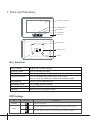
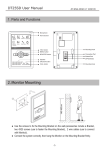
1. Parts and Functions
Digital TFT LCD Screen
Talk/MON Button
Menu Button
Unlock Button
Microphone
Mounting Hook
123
L2
ON
DIPS
L1
Connection Port
Speaker
Key functions
LCD screen
Unlock button
Menu button
Talk/Mon button
Microphone
Mounting hook
Connection port
Speaker
Display the visitors' image
Press to release the door
Press to open the menu shortcuts
Press to communicate hands free with visitor
Press to view the outdoor condition in standby mode
Receive voice from the user
Use to hang up the monitor
Bus terminal
Send out vioce from the visitor
DIP Settings
Bit
DIP1&2
DIP3
Bit State
1 2 3
Reserved. left to default.
ON
1 2 3
Set to OFF. When the monitor is in the middle of the line in daisy chain connection.
1 2 3
Set to ON. When the montior is at the end of the line or connected to a DBC4S.
ON
ON
-1-
Description