1
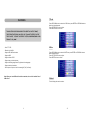
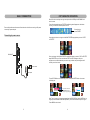
3. Slideshow Interval
TABLE OF CONTENTS
This item ca n adju st the interv al time between the playi ng pic tures. You ca n sele ct the
interv al tim e from 3/5/7/ 10/15 /20/30 secon ds,1/1 0/30 m inute s, 1/2/ 4/8/12 hours ,1 day.
4.Startup Mode
T his ite m can selec t the s tartup mode. Which you s elect m ode will dis play on the s creen
a fter yo u turn on the unit. You ca n sele ct from slide show, Main menu, Calen dar.
I MP O RTAN T IN ST RU CT I O N .. .. .. .. . . . . . .. . . .. .. .. .. .. .. . . . . . .. . . .. .. .. .. .. .. .. . .. . . .. .. 1
FEATURE S .. .. .. .. .. .. . .. .. .. .. .. . .. .. .. .. .. .. . .. .. .. .. .. . .. .. .. .. .. . . . .. .. .. .. .. . . . .. .. .. .. .. . . . .. 2
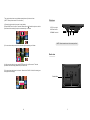
5.Reset
T his ite m is th e factory de fault s etup. I f you s elect this ite m, the n pres s ENT ER bu tton to
c onfirm , the s creen will dis play a s follo w:
MAIN UNIT.... .. ..... .. ..... .. ... .. .. ... .. ... .. .. ..... .. ..... .. ..... ....... ..... .. ..... .. ..... .. ..... .. 4-5
BASI C CONNE CTIO N . .. .. .. .. . . . . . .. .. .. .. .. . . . .. .. .. .. .. . . . .. .. .. .. .. .. . .. .. .. .. .. .. . .. .. .. 6
I talian
Ra n do m
BA SI C OP ERATION . .. .. .. . .. .. .. .. .. .. .. . .. .. .. .. .. .. .. . .. .. .. .. .. .. .. . .. . . .. .. .. .. . . . .. . . .. 7
3sec
S l id es h ow
F act ory Reset
Yes
PHOTO PLAYBACK .. .. .. ... .. .. .. . .. .. .. .. . .. .. .. .. . .... .. .. ... .. .. .. ... .. .. .. . .. .. .. .. . .... 8-10
No
16
06
50
59
14
2 0 08
COPY&DELETE OPERATI ON..... ....... ... .. ..... ..... ....... ..... ....... ... .. ... ....... ..... .11-12
V0.01 Ma y 2 1 200 8
I NI T I A L S ET U P. .. .. .. .. .. .. . . . . . . . . . .. .. .. .. .. .. .. .. . . . . . . . .. .. .. .. .. .. .. . . . . . . . .. .. .. 13 - 15
“Yes” is go to the fa ctory reset.
“No” is canc el.
Press ENTER butt on to c onfirm .
SPECI FICATION.... .. ..... .. ..... .. ..... .. ... .. ... .. .. ..... .. ..... .. ..... .. ..... .. ... .. .. ... .. ... .. .. .16
TROUBLES HOOTING ... .. . .... .. . .... .. ... .. .. ... .. .. .. ... .. .. ... .. .. ..... .. ..... .. . .... .. ..... .. .16
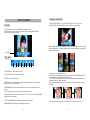
6.Update
This item is for SO FTWA RE up dated. If you select this it em, th en pre ss RIG HT bu tton to
confir m, the scree n will d isplay as fol low:
ACCESSORIES . .. ... .. .. . .... .. ..... .. ... .. .. .. ... .. .. . .... .. ..... .. ... .. .. ..... .. .. . .. .. .. ..... .. .16
It alia n
Ra ndo m
3 sec
S lid es how
Software Update
Yes
No
16
06
50
59
14
2 008
V 0.01 Ma y 21 2 008
“Yes” is go t o the factory reset.
“No” i s canc el.
Press ENTER but ton to confirm .
14
3