1
BASIC CONNECTION
COPY&DELETE OPERATION
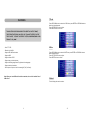
With this fu nction mode you ca n cop y some pictu res fro m USB key t o an SD/MM C card
and v ice ve rsa.
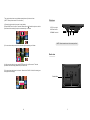
From slide show mode depres s “EN TER”, the fol lowing bar w ill app ears o n the b ottom
scre en, go to the last ic on and depre ss “ENTER”
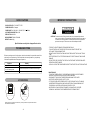
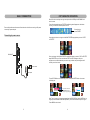
Ensu re all t he cab les ar e disco nnect ed fro m the m ain u nit bef ore co nnecti ng to A C pow er
sourc e by A C power ada ptor.
Sel ect thi s icon
pre ss “EN TER”
Connecting to power source
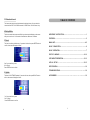
Use n aviga tion bu tton to navig ate to the MI NIATURIZED imag es/ph otos yo u wan t “COP Y”
or “DELETE ”.
M AIN UNIT
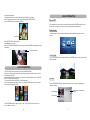
Once you h ave go t to the MINI ATURI ZED im ages /photo s that you want to COPY or DEL ETE
depre ss EN TER for up to 5 sec onds the bars COP Y and DEL w ill app ear. Use you r
navig ator cursor t o decide whe ther y ou want to co py or delete , the p ink bac kgrou nd wil l
indica te you r actio n cho sen.
To power outlet
AC a daptor
Copy
Del
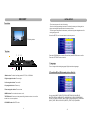
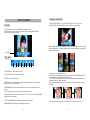
-Pres s UP/D OWN cursor to sel ect Co py or DEL ,th en press EN TER b utton ,the sc reen
will di splay a s:
Co py To N OR
Co py To U SB
De le te Cur r ent V iew?
If you haven’t insert the
USB/CARD,the bar will
display the gray background
OK
Ca n cel
Note: The un it supports t o copy the pi ctures from t he US B/CAR D into the un it(NO R flash ),or
copy t he pic tures b etwee n USB /CARD(SD/MMC). You ca n sele ct whe re the pictur e copy to.
-Press MENU butto n to back.
6
11