1
MAIN UNIT
INITIAL SETUP
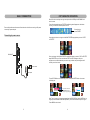
Front view
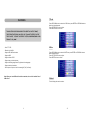
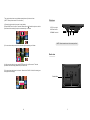
-There is a se tup menu fo r the in itial setting.
-Once the ini tial pro gramming is enter ed it is retain ed in memory unti l chang ed, the
player can al ways b e operated u nder the same con ditions.
-The settings will be retai ned in the me mory until th e sett ings are changed e ven after
setting the pl ayer to off.
-Sel ect the SET UP ico n in th e ma in men u to e nter s etup m enu.
I tal ian
TFT display window
Rand om
3 sec
S lide sho w
Top view
16
50
59
06
14
20 08
V 0.01 May 21 2 008
5
7
3
1
S TAND BY E NTER ME NU
-Pres s the U P/DO WN bu tton to selec t diffe rent ite m ,pre ss ENTER b utton to con firm.
-Pres s the L EFT/R IGHT button to sw itch.
1.Language
MODE
Th is unit suppo rt the followi ng lan guage s: Eng lish an d othe r lang uages .
8
6
4
2
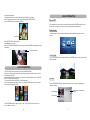
2.Transition Effect (Slide mode picture effects):
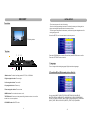
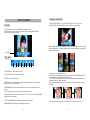
1 .Mode butto n- To switch the d isplay mode AUTO, FULL , ORIG INAL.
Ital i an
2 .Righ t navi gation butto n -To m ove r ight.
Rand om
3 se c
S li de sho w
3 .Left naviga tion b utton -To m ove lef t.
4 .Up n avigat ion bu tton - To mo ve up.
5 .Dow n navi gation butto n -To move d own
16
50
59
06
14
2008
V 0. 01 May 21 2 008
6 .MEN U butt on- To enter the ma in me nu, or exit.
7 .ENTE R button -To ente r a too l bar, p ress le ft/righ t butto n to select, or to co nfirm
a selec tion, o r to m ove up /down .
You can se lect N ONE, ZIGZAG TOP, ZIGZ AG BO TTOM , BOX , BLIN DS(L R),
SHUTTER , SPIRAL, BARDO OR (TD) , BARDOO R (LR), CRO SS, C ROSS COM B,
STR IPE(T D), MA SK, D ISSOLVE, BAR ,PU SH(L R), DIAGONAL(LB 2RT), DIAGO NAL
(RB 2LT), FADE, BRICK , CHE CHER (CEN TER), STRE TCH(T D),RA NDOM .
8 .STAN DBY button -ON/O FF bu tton
4
13