1
AIP-0800-801-EUM
Contents
1.Introduction....................................................... 4
2.Using Arrive InfoPoint™ .................................... 4
2.1 Using InfoPoint Web Server........................ 4
2.1.1 Managing Reservations..................... 7
2.1.2 Managing Resources....................... 14
2.1.2.1 Managing Locations............... 15
2.1.2.2 Managing Building.................. 17
2.1.2.3 Managing Floor...................... 20
2.1.2.4 Managing a Venue.................. 22
2.1.2.5 Managing Device.................... 25
2.1.2.6 Managing Group..................... 28
2.1.2.7 Managing Users..................... 31
2.1.2.8 Managing Announcement....... 34
Arrive InfoPoint
User Manual
™
2.1.2.9 Managing Signage.................. 37
2.1.2.10 Managing Theme.................. 40
2.1.2.11 Managing Survey.................. 43
2.1.2.12 Using Status Monitor............ 45
2.1.2.13 Using Bulk Upload................ 46
2.1.2.14 Managing Catering............... 48
2.1.2.15 App Push.............................. 55
2.1.3 View Report..................................... 56
2.1.4 Miscellaneous................................. 58
2.2 Using the Device...................................... 62
2.2.1 Booking a Room............................. 62
2.2.2 Managing Meetings......................... 65
2.2.2.1 Modifying a meeting............... 66
2.2.3 Viewing the Calendar information.... 67
2.2.4 Adding a Note................................. 68
2.2.5 Retrieving Venue Information........... 70
2.2.5.1 Changing Venue Settings........ 71
2.2.6 Survey............................................. 72
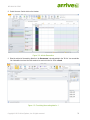
2.3 Using Calendar Systems ......................... 73
Copyright © 2013 Arrive Systems, Inc. All rights reserved.
2